

Note: This article contains affiliate links. If you click on these links and make a purchase, I may earn a small commission at no extra cost to you. This helps support my research and content. Read my full affiliate disclosure here.
If you drive a Ford Ranger Wildtrak, a dedicated dash cam can protect you from insurance disputes, document off-road trips, and record unexpected incidents on busy roads. Choosing the right dash cam matters because windshield mounting, video quality, and power options affect what you actually capture while driving and parked.This guide covers our seven shortlisted dash cams suited to the Wildtrak, emphasizing real-world recording performance, mounting stability, and ease of use. Below we summarize the evaluation criteria and practical tradeoffs to help you pick the camera that matches how you use your truck.
Looking for other parts? See all Ford Ranger parts & accessories.
Top Picks at a Glance
| Best Overall Dash Cam The all-around best choice balancing features, reliability, and price | REDTIGER F17 3-Channel 4K Dash Cam with STARVIS 2 and Built-In GPS |  |
| Best Budget Dash Cam A low-cost option that still records reliably and clearly | POYBPCY CT369 4K Front Dash Cam with 5GHz Wi‑Fi and CPL Filter |  |
| Best Compact Dash Cam A small, unobtrusive unit for minimal windshield intrusion | Garmin Dash Cam 67W — Compact 1440p Dash Camera with 180° Field of View |  |
| Best Dual-Lens Dash Cam Front-and-rear or interior coverage for comprehensive recording | REDTIGER F7NP 4K Front + 1080P Rear Dual-Lens Dash Cam |  |
| Best 4K Dash Cam Highest-resolution recording for clear detail and license plate capture | KBSYNT 4K OEM-Style Dash Cam for Ford Ranger (Front) |  |
| Best Hardwired Dash Cam Designed for permanent install with parking mode and constant power | GATGIT Front 4K OEM-Style Dash Cam for Ford Ranger (2024–2026) |  |
| Best Wi‑Fi Dash Cam Built-in wireless for easy footage transfer and app control | REDTIGER F7N TOUCH 4K Dual Front and Rear Dash Cam with Wi‑Fi and GPS |  |
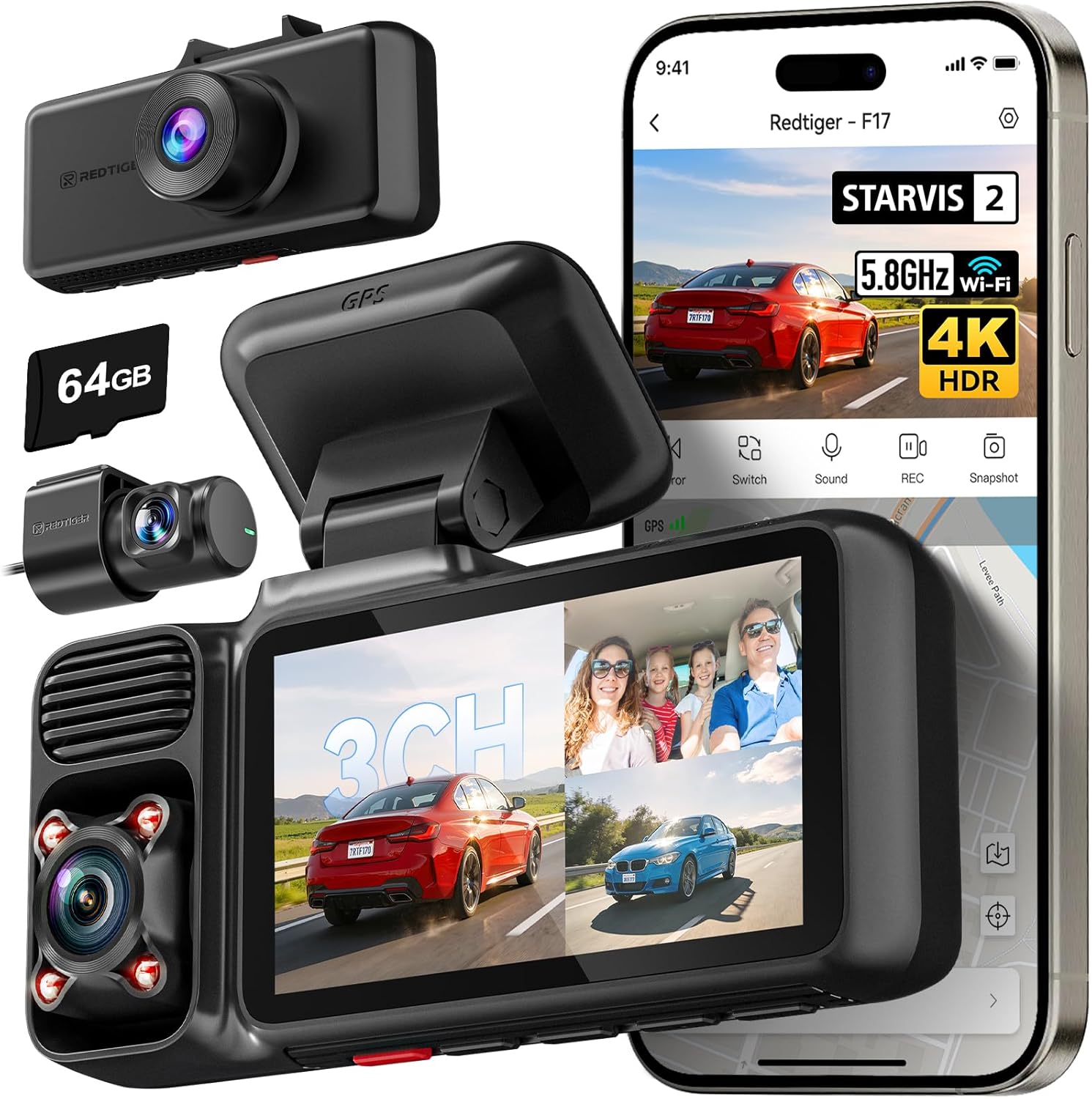
1. REDTIGER F17 3-Channel 4K Dash Cam with STARVIS 2 and Built-In GPS
Best Overall Dash Cam
| Video Capture Resolution | 2160p |
|---|---|
| Included Memory Card Size | 64 GB |
| Field Of View | 150 Degrees |
| Screen Size | 3 Inches |
| Connectivity Technology | Wi-Fi |
The REDTIGER F17 is a three-channel dash camera setup that records a 4K front view using a STARVIS 2 IMX675 sensor plus 1080p inside and rear feeds to give full-coverage footage useful for everyday driving and incident capture. It mounts to the windshield, connects to the REDTIGER app over 5GHz or 2.4GHz Wi-Fi for quick file transfer and live replay, and logs GPS data so you can pair video with location and speed. Practical features include WDR/HDR for better dynamic range in bright or low-light scenes, loop recording with SD storage, G-sensor-triggered event locking, and a supercapacitor for reliable operation in hot or cold conditions. The unit supports dual recording modes so you can disable the cabin camera to prioritize full 4K front footage when needed. Installation is straightforward for a truck like the Ford Ranger Wildtrak, and parking monitor modes protect the vehicle while parked when hardwired. Expect a complete, feature-rich package, though managing three-channel footage requires a bit more storage and occasional app navigation to find clips.
Best for: Someone who wants a single, dependable system that records front, cabin, and rear views with strong night performance and GPS logging for everyday driving and incident evidence on their Ranger Wildtrak.
Less Ideal for: Drivers who only need a simple single-channel front unit or who prefer a hidden, factory-integrated solution should consider more basic or OEM-style alternatives.
- True 4K front recording with STARVIS 2 sensor for improved low-light clarity
- Three-channel coverage (front, cabin, rear) for comprehensive incident capture
- Built-in GPS and 5GHz Wi-Fi for fast file transfer and location-stamped evidence
- Supercapacitor design for reliable operation in extreme temperatures
- Parking monitor with G-sensor and time-lapse options for post-park protection
- Three-channel recording consumes more storage and can complicate file management
Verdict: The best all-around dash cam that balances video quality, ease of installation, dependable recording, and useful features for everyday driving and incident capture.
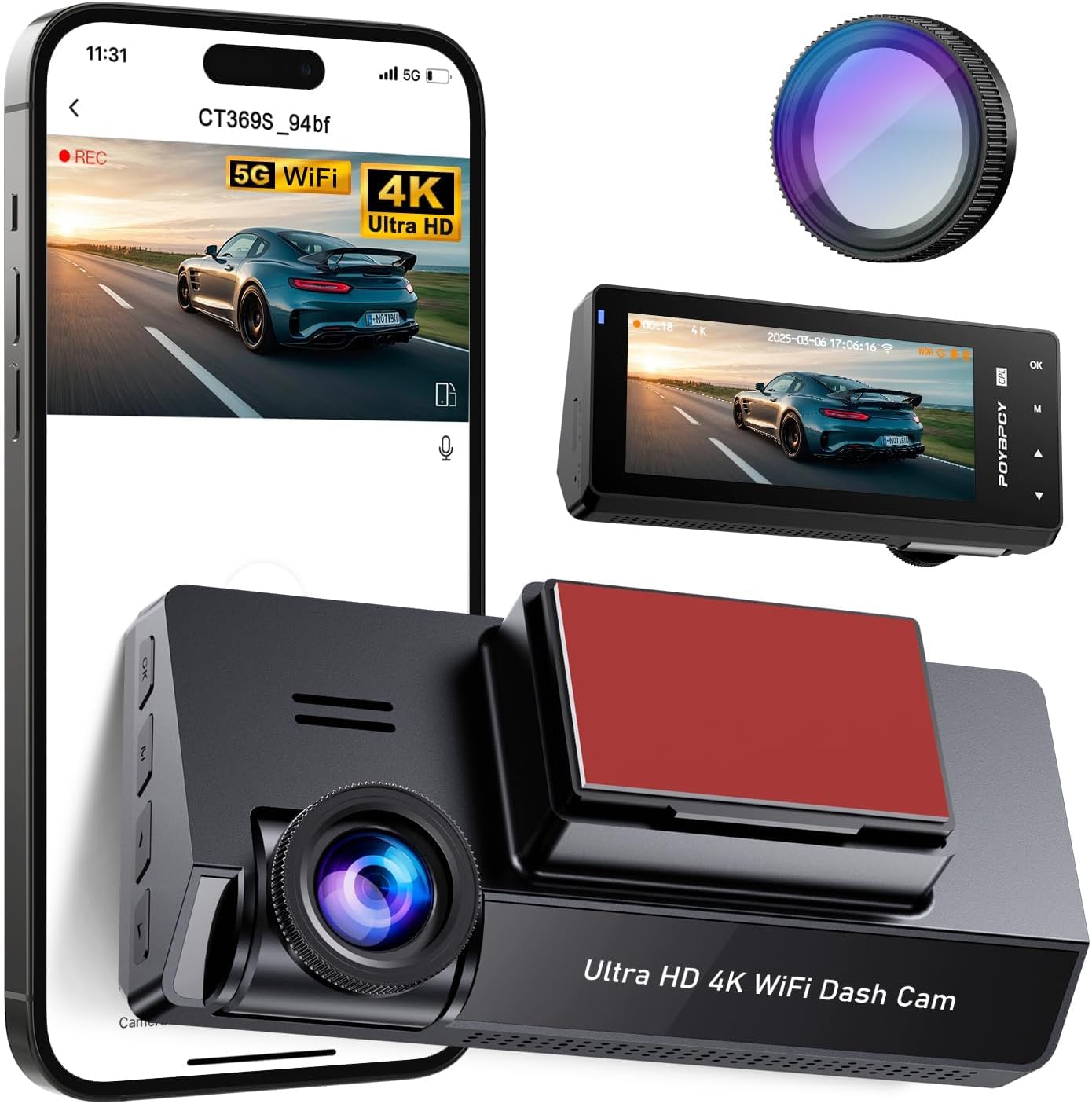
2. POYBPCY CT369 4K Front Dash Cam with 5GHz Wi‑Fi and CPL Filter
Best Budget Dash Cam
| Video Capture Resolution | 2160p |
|---|---|
| Connectivity Technology | Wi‑Fi (5GHz) |
| Field Of View | 170 degrees |
| Included Memory Card Size | 64 GB |
| Screen Size | 3.69 inches |
This POYBPCY CT369 is a budget-focused front dash cam that captures UHD 2160p footage with a wide 170 degree field of view and a 3.69 inch IPS screen for on-device review. It is typically mounted on the dashboard or windshield using a magnetic mount and is controlled by a smartphone app over 5GHz Wi‑Fi for faster transfers than 2.4GHz models. The included CPL filter cuts windshield glare and the unit advertises enhanced night vision, continuous loop recording, and a G‑sensor that locks files after impacts. It also supports parking mode for around‑the‑clock monitoring when hardwired. Practical benefits include clear daytime detail from 4K capture, quick app access to recordings, and a bundled 64GB SD card that gets you started right away. Limitations to expect at this price are a 30 fps frame rate that may affect fluidity in fast scenes and reliance on an external hardwire kit for true 24/7 parking surveillance. Installation and app performance can vary by vehicle and smartphone, so plan some setup time for a clean install in a Ranger Wildtrak cabin.
Best for: Drivers who want reliable, high-resolution front footage and easy smartphone access without paying for advanced extras, especially those fitting the camera discreetly in a Ranger Wildtrak cabin.
Less Ideal for: Users who need multi-camera fleets, high frame-rate evidence capture, or built-in long-term parking power without additional accessories.
- True 4K (2160p) front recording for high daytime detail
- 5GHz Wi‑Fi and companion app for faster file transfer and easy viewing
- CPL filter reduces windshield glare for clearer images
- Includes 64GB SD card and magnetic mount for quick setup
- 170 degree wide angle covers a broad area in front of the vehicle
- 30 FPS recording may show less smooth motion during high-speed incidents
- Parking mode requires a separate hardwire kit for continuous power
Verdict: The best budget dash cam for drivers who want dependable recording and essential features at a low price without unnecessary extras.
3. Garmin Dash Cam 67W — Compact 1440p Dash Camera with 180° Field of View
Best Compact Dash Cam

| Video Capture Resolution | 1440p |
|---|---|
| Field Of View | 180 degrees |
| Frame Rate | 60 FPS |
| Included Memory Card Size | 16 GB |
| Mounting Type | Dashboard Mount |
The Garmin Dash Cam 67W is a pocket-sized windshield camera designed to stay discreet while capturing high-resolution forward-facing footage. It records 1440p video at up to 60 fps with a 180-degree field of view, so it covers a wide area including cross traffic without sticking out from the windshield. The unit mounts with a low-profile magnetic puck and runs from vehicle power, and voice control lets you save clips, snap stills, or toggle audio without touching the device. Saved incidents include GPS, time, and date and can upload automatically to Garmin Vault over Wi-Fi for easy viewing and sharing. Parking Guard and Live View give remote monitoring when the camera has constant power and network access. Practical limitations are that advanced alerts and some region-specific features depend on app connectivity and that continuous remote access requires a powered, connected setup; the small size also means the screen is minimal for on-device playback. For a compact, low-visibility dash cam that still delivers clear day and night footage, this is a well-rounded option.
Best for: Buyers who want a low-visibility dash cam that preserves cabin sightlines while still capturing wide, high-quality forward footage and convenient wireless access via a smartphone app.
Less Ideal for: Drivers who need multi-camera setups or built-in large displays for on-device review should consider alternatives tailored to those needs.
- Truly compact low-profile form factor that stays unobtrusive on the windshield
- 1440p recording with Garmin Clarity HDR and a 180-degree lens for wide, detailed coverage
- Voice control for hands-free clip saves and camera commands
- Automatic incident tagging with GPS time and date plus Wi-Fi upload to secure cloud storage
- Parking Guard and Live View for remote monitoring when the unit has constant power and app connectivity
- Remote features and parking monitoring require app connectivity and constant power to function fully
Verdict: The best compact dash cam for buyers who prioritize a low-profile, space-saving design that stays out of sight while still capturing clear footage.
4. REDTIGER F7NP 4K Front + 1080P Rear Dual-Lens Dash Cam
Best Dual-Lens Dash Cam

| Front resolution | 4K |
|---|---|
| Rear resolution | 1080P |
| Front field of view | 170° |
| WiFi | 5.8GHz 20MB/s |
| Power storage | Supercapacitor |
The REDTIGER F7NP is a two-channel dash cam designed to capture simultaneous front and rear footage for clear incident documentation. It records front video in 4K and rear in 1080p using STARVIS 2 imaging and a wide-angle front lens, which improves low-light detail and balances highlights and shadows for daytime and nighttime driving. The unit supports loop recording with automatic locking via the G-sensor, and two parking modes (time-lapse and event-triggered) for unattended protection when hardwired. Built-in 5.8GHz WiFi and the Redtiger Cam app let you preview, download, and view GPS-tagged routes and speeds quickly, with advertised download speeds up to 20 MB/s. A supercapacitor replaces an internal battery for better heat tolerance, and a microSD card is included so you can start recording immediately. Expect straightforward installation tailored to a pickup like the Ford Ranger Wildtrak, but note the rear camera is 1080p rather than 4K and a hardwire kit is required for full 24/7 parking recording.
Best for: Drivers who want a single unit that records synchronized front and rear video for clear evidence and easy smartphone access, especially those who value low-light performance and app-based management.
Less Ideal for: Buyers seeking the highest-resolution rear footage or a simpler plug-and-play camera without hardwiring needs should consider other options.
- True dual-channel setup with 4K front and 1080p rear for simultaneous front and rear coverage
- STARVIS 2 sensor and WDR/HDR deliver improved night and high-contrast performance
- Built-in 5.8GHz WiFi and app let you preview, download, and review GPS-tagged footage quickly
- Supercapacitor design improves heat resistance and longevity compared with internal batteries
- Includes a microSD card out of the box and supports loop recording with G-sensor clip locking
- Full 24/7 parking surveillance requires an additional hardwire kit for constant power
Verdict: The best dual-lens dash cam for users who want simultaneous front and rear (or interior) coverage to capture incidents from multiple angles in one unit.
5. KBSYNT 4K OEM-Style Dash Cam for Ford Ranger (Front)
Best 4K Dash Cam

| Compatible with Vehicle Type | Ford Ranger 2024, 2025 |
|---|---|
| Video Capture Resolution | 2160p |
| Field Of View | 170 degrees |
| Control Method | App |
| Frame Rate | 30 |
This KBSYNT dash cam is designed to blend into the Ford Ranger headliner area and deliver high-detail 2160p video at 30 fps for clear evidence capture. It mounts behind the rearview mirror in an OEM-style housing so there are no visible wires and installation is plug-and-play using the vehicle fuse box; the package includes a 64GB card for immediate use. The camera uses a large f/1.6 aperture and HDR processing to improve low-light performance and a 170 degree field of view to cover the road ahead. Built-in features like loop recording, a G-sensor that locks collision footage, parking monitoring (requires an optional harness for 24h monitoring), and a local WiFi + app let you review and download clips quickly on your phone. Trade-offs include single-channel front-only recording—there is no integrated rear camera option—and 30 fps limits fast-motion smoothing compared with some higher-frame models. For drivers who prioritize plate-level detail and a factory look, this is a practical, vehicle-specific 4K choice.
Best for: Drivers who need the highest image clarity for reading plates and documenting incidents and want a discreet, factory-style install tailored to Ford Ranger models.
Less Ideal for: Anyone who wants a dual-channel front-and-rear system or who needs higher frame rates for very fast action should consider other options.
- True 4K (2160p) front recording for readable plate and sign capture
- OEM-style hidden housing provides a clean, factory-integrated appearance
- Large f/1.6 aperture plus HDR improves night and high-contrast footage
- Included 64GB microSD card and plug-and-play fuse connection make installation fast
- App and built-in WiFi allow quick local viewing and downloading of clips
- Front-only design with no integrated rear camera option
Verdict: The best 4K dash cam for drivers who need maximum image detail for reading plates and capturing fine evidence in varied lighting conditions.
6. GATGIT Front 4K OEM-Style Dash Cam for Ford Ranger (2024–2026)
Best Hardwired Dash Cam

| Compatible with Vehicle Type | Ford Ranger 2024 2025 2026 XL XLT Lariat Raptor |
|---|---|
| Video Capture Resolution | 2160p |
| Connectivity Technology | Wi-Fi (built-in 5.8GHz) |
| Field Of View | 155 degrees |
| Other Special Features of the Product | GPS (non-built-in), G-Sensor, HDR, Loop Recording, Parking Monitor |
This GATGIT front dash cam is built to integrate into Ranger cabins with an OEM look and a plug-and-play installation that avoids aftermarket wiring. It records 4K UHD (2160p) video with HDR and an f/1.6 aperture for clearer detail day and night, and the 155 degree field of view captures wide scenes including license plates at distance. The unit uses a supercapacitor for improved heat tolerance and longevity, and built-in 5.8GHz Wi-Fi plus a smartphone app let you preview and download clips quickly while GPS logging stores route and speed data when enabled. Loop recording and an automatic G-sensor protect incident clips from overwriting, and two parking modes provide time-lapse monitoring or event-triggered recording when paired with the optional hardwire kit. The main limitation for hardwired parking use is that the 24/7 surveillance function requires a separate hardwire accessory, so fully ignition-controlled, always-on parking surveillance needs that additional part and professional-style wiring for permanent powered operation.
Best for: Owners who want a factory-integrated dash cam for a clean, permanent-looking install in a Ranger and who prioritize high-resolution recording, reliable thermal performance, and app-based clip management.
Less Ideal for: Buyers who need built-in always-on parking recording straight out of the box without adding a hardwire kit or professional installation support.
- OEM-style design that installs cleanly without visible suction cups or adhesives
- 4K 2160p recording with HDR and f/1.6 aperture for clear daytime and low-light footage
- Built-in 5.8GHz Wi-Fi and mobile app for fast clip preview and downloads
- Supercapacitor power module for better heat resistance and longer service life
- G-sensor and loop recording that lock incident files automatically
- 24/7 parking surveillance requires purchasing and installing a separate hardwire kit
Verdict: The best hardwired dash cam for owners who want a professional-style permanent installation, dependable parking surveillance, and seamless ignition-controlled recording.
7. REDTIGER F7N TOUCH 4K Dual Front and Rear Dash Cam with Wi‑Fi and GPS
Best Wi‑Fi Dash Cam

| Front resolution | 4K UHD |
|---|---|
| Rear resolution | 1080P FHD |
| Connectivity | 5.8GHz Wi‑Fi |
| Included storage | 128GB memory card |
| Features | Built-in GPS, G-sensor, Loop recording, Parking monitor |
The REDTIGER F7N TOUCH is a dual-channel dash cam that records the front in 4K with a STARVIS 2 sensor and the rear in 1080p, and is aimed at drivers who want easy on-phone access to footage. It mounts to the windshield, connects to your phone over 5.8GHz Wi‑Fi and the REDTIGER Cam app, and supports fast downloads so you can view and share clips without removing the included 128GB card. The responsive 3.18" touchscreen and voice control let you lock clips, enable Wi‑Fi, or take snapshots with minimal distraction. Built-in GPS embeds speed and route data in recordings while WDR/HDR and STARVIS 2 improve low-light performance. Loop recording, a G-sensor that auto-locks incident files, and parking monitoring modes (requires hardwire kit for constant power) cover typical day and night use. The package includes a long rear camera cable and power lead, but full 24-hour surveillance needs the optional hardwire kit and installation considerations for a clean hide of wiring.
Best for: Drivers who prioritize fast, convenient smartphone access to recordings and on-the-fly control so they can review and share incident footage without swapping cards.
Less Ideal for: Buyers who need continuous out-of-the-box parking surveillance without additional wiring or those who prefer a permanently hardwired, discreet factory-style installation included with the unit.
- Fast 5.8GHz Wi‑Fi and app support for quick on-phone viewing and 20 MB/s downloads
- 4K front STARVIS 2 sensor plus 1080p rear for high-resolution daytime and improved low-light capture
- Touchscreen and voice control let you operate features hands-free and lock emergency clips quickly
- Includes 128GB memory card, long rear camera cable, and GPS for speed and route data
- True 24-hour parking monitoring requires a separate hardwire kit and constant power
- Suction-cup mount may need repositioning to avoid windshield glare or obstructed view
Verdict: The best Wi‑Fi dash cam for people who value convenient on-phone access to footage, settings, and quick file transfers without removing the memory card.
Choosing the Right Ford Ranger Wildtrak Dash Cam: Key Factors to Consider
Video Resolution and Frame Rate
Higher resolution and sufficient frame rate directly affect how much detail is captured in footage. For the Ford Ranger Wildtrak, clear license plate legibility at highway speeds and readable traffic signs in low light are common priorities. A 1080p resolution at a stable 30fps is a practical baseline, while higher frame rates or resolutions improve motion clarity but increase storage needs.
Consider how often you plan to review clips and whether you will rely on mobile apps to view footage. Higher-resolution files take longer to transfer and require larger memory cards. Balancing resolution with reliable frame rates ensures you capture usable evidence without constant card management.
Low-Light and Night Performance
Wildtrak owners often drive early mornings, late evenings, or on unlit rural roads where sensor sensitivity and lens aperture matter. Low-light performance determines whether headlights, street signs, and faces remain distinguishable after dark. Look for features such as larger image sensors, wider apertures, or night-optimized image processing.
Some cameras apply aggressive noise reduction that smooths detail; others prioritize sharpness at the expense of noise. For typical Wildtrak use, aim for a camera that retains readable contrast in headlight glare and reduces bloom from oncoming traffic while protecting vital scene details.
Mounting System and Field of View
A stable mount prevents vibration and drift on rough roads and during off-road use. The Wildtrak's windshield slope and accessory trims can affect adhesive placement and camera angle. Choose a mounting system that offers adjustability and secure adhesion or a dependable suction mechanism when appropriate.
Field of view determines how much of the road and adjacent lanes are captured. Wider angles include more context but can introduce fisheye distortion that reduces plate legibility at the edges. For a pickup like the Ranger Wildtrak, a balanced FOV that covers both lanes and some cabin area is often most useful.
Power Options and Parking Modes
Dash cams can draw constant power for parking surveillance or rely on vehicle ignition power to operate only while driving. For parked-event recording on a Wildtrak, hardwiring to a fused source with a voltage cutoff preserves the battery while enabling impact-triggered recording. Alternatively, a camera with a dedicated parking mode using a low-drain standby or capacitor can capture short events without complex wiring.
Understand the tradeoffs: hardwiring offers continuous protection but requires installation, while plug-and-play 12V adapters are simple but may not provide true parking monitoring. Choose based on how often you need parked surveillance and your comfort with installation.
Storage, Loop Recording, and Data Management
Loop recording ensures continuous capture by overwriting older files, but file size and card speed determine how much footage you can retain. For the Ranger Wildtrak, frequent long drives or road trips will fill storage faster, so prioritize cameras that support large-capacity microSD cards and efficient file management.
Also consider how easy it is to protect and extract incident files. Automatic event-locking on impact, manual lock buttons, and app-based downloads make preserving evidence straightforward. Verify the camera supports reliable loop recording and file integrity to avoid corrupted clips when power is interrupted.
Connectivity and Ease of Use
WiFi pairing, smartphone apps, and clear on-device menus change how quickly you can review and manage footage. A well-designed app simplifies firmware updates, settings adjustments, and clip downloads, which is handy when you are on the road with a Wildtrak. However, overly complex interfaces can be frustrating during an incident.
Consider whether you want real-time viewing, quick downloads, or basic plug-and-play operation. Connectivity should enhance daily usability without creating additional failure points.
Installation Tips for the Ranger Wildtrak Windshield
Place the camera behind the rearview mirror where it does not obstruct the driver's line of sight and aligns with the Wildtrak's windshield slope. Clean the mounting area thoroughly, use the supplied adhesive pad for firm adhesion, and allow proper curing time before driving off.
Route cables along the headliner and A-pillar trim to keep them hidden and prevent interference with airbags. If you plan to hardwire for parking mode, use a fused connection to the vehicle fuse box and consider a professional install if you are not comfortable with automotive electrical work.
- Test camera angle before final adhesion to ensure horizon leveling and correct framing.
- Leave a small service loop in the cable to prevent tension on the connector.
- Verify the camera clears the rearview mirror and cabin accessories when mounted.
Choosing Between Single-Lens and Dual-Lens Setups
Single-lens dash cams focus on forward-facing events and are simpler to install. They are often compact and cost-effective while providing clear highway and collision footage. For owners who rarely need cabin or rear coverage, a high-quality front-only camera is sufficient.
Dual-lens setups add rear or interior coverage, which is useful for hit-and-run incidents or recording trailers and cargo behind the truck. Keep in mind that two channels increase storage use and may require additional routing for the rear camera cable or a dedicated rear-facing mount on the tailgate glass.
- Dual-lens is useful if you frequently reverse in busy areas or want evidence of rear impacts.
- Front-only cameras are lighter on storage and simpler to configure.
Memory Cards and File Integrity
Use manufacturer-recommended microSD cards with high endurance ratings to reduce the risk of corrupted footage. Cards designed for continuous writing withstand loop recording workloads better than standard consumer cards. For long trips, choose larger capacity cards to retain more historical footage between overwrites.
Periodically format the card in-camera to maintain file system health and perform occasional checks for bad sectors. When preserving an incident file, remove the card or copy the clip to avoid automatic overwriting while you sort the evidence.
- Select cards labeled for dash cams or surveillance use.
- Keep at least one spare formatted card in the glovebox for long journeys.
Maintaining Clear Footage in Harsh Conditions
Truck cabins and windshields can accumulate dust, mud, and condensation that degrade video quality. Clean the windshield regularly on both sides and ensure the camera lens is free of smudges. Parking under cover when possible reduces sun exposure and temperature extremes that can affect camera electronics.
If you frequently drive off-road, inspect the mount and cable routing after heavy vibration events. Tighten adjustable mounts and check that seals and adhesive pads remain secure to avoid sudden drops or reorientation that would spoil footage.
- Wipe lens with a microfiber cloth and avoid abrasive cleaners.
- Verify camera firmware updates for image processing improvements.
Legal and Privacy Considerations
Laws about recording vary by region. For the Ford Ranger Wildtrak owner, be aware of local regulations governing audio recording, windshield obstruction, and use of footage as evidence. Mute or disable cabin audio if required by local privacy rules.
Respect passenger privacy when sharing footage publicly and redact or blur faces if necessary. Keep copies of important clips in secure storage to preserve chain of custody for insurance or legal purposes.
- Check local rules on dash cam placement and audio recording.
- Store incident footage in multiple locations for redundancy.
Still looking for the perfect fit?
Select your Ford Ranger configuration to see the most relevant Dash Cams recommendations
How We Chose the Best Ford Ranger Wildtrak Dash Cam
We prioritized dash cams that balance dependable video capture, robust mounting for a truck-sized windshield, and practical features that Wildtrak owners value. Our selection filters focused on video resolution and low-light performance to ensure usable evidence in day and night incidents. We also weighed mounting options and bracket stability since the Wildtrak's windshield angle and cabin vibrations demand secure attachment. Power and installation choices were considered, with preference for units offering hardwire or reliable 12V adapters and clear cable routing for a clean install.Additional criteria included recording modes such as loop recording and motion/impact-triggered events, battery or capacitor design for parked-event durability, and straightforward menu and app access for retrieving footage. We excluded specialty models that require professional installation, cameras without recorded evidence retention features, and units lacking basic crash detection. The resulting list focuses on balanced, user-friendly dash cams that match day-to-day driving and occasional off-road use in the Ranger Wildtrak.
Our full evaluation process is outlined in our review methodology.
FAQ
Will a dash cam void any warranty on my Ford Ranger Wildtrak?
Installing a dash cam usually does not void vehicle warranties if it is attached using adhesive and does not alter vehicle systems. Hardwiring may require care to avoid affecting electrical systems. If concerned, consult a dealer or professional installer about wiring best practices.
What microSD card size should I use for long road trips?
For long drives, choose a large-capacity, high-endurance microSD card such as 64GB or 128GB depending on your resolution and whether you use dual channels. Larger cards retain more footage between overwrites and reduce the need to offload files frequently.
Can a dash cam record while my Wildtrak is parked?
Many dash cams offer parking modes that record on motion or impact when hardwired or using a low-power standby. True 24/7 parking surveillance typically requires a hardwire kit with voltage cutoff to protect the battery, or a camera with a dedicated parking-capable power source.
How do I angle the camera to avoid glare from the hood or sun?
Mount the camera just below the rearview mirror and adjust the tilt so the horizon sits slightly below center. Use the camera's exposure and WDR settings if available to reduce glare. Ensure the lens is clear of stickers or tints that can create reflections.
Is WiFi connectivity necessary for a dash cam in a Wildtrak?
WiFi is convenient for quickly downloading clips and adjusting settings from a phone, but it is not strictly necessary for reliable recording. If you prefer quick access to footage without removing the card, a WiFi-enabled camera simplifies file transfer.
How often should I update dash cam firmware?
Check for firmware updates periodically, especially if you notice bugs or compatibility issues. Updating can improve stability, video processing, and feature support, but follow the manufacturer's instructions to avoid interrupting critical recordings.
Final Verdict
Focus on video quality, mounting security, and power strategy when choosing a dash cam for your Ford Ranger Wildtrak. Decide whether you need front-only coverage or dual channels for rear monitoring, and balance resolution with storage and transfer convenience.Prioritize a stable mount, reliable loop recording, and a parking solution that matches how you use the truck. With those tradeoffs clear, you can pick the dash cam that provides the evidence and peace of mind you need on daily drives and long road trips.
Explore More:
- Check out all Ford Ranger parts & accessories
- Explore Electronics
- Browse all Accessories
