

Note: This article contains affiliate links. If you click on these links and make a purchase, I may earn a small commission at no extra cost to you. This helps support my research and content. Read my full affiliate disclosure here.
If you own a 2006-2011 Honda Civic, upgrading the factory radio is one of the most impactful changes you can make to daily driving. A modern car stereo adds clearer sound, smartphone connectivity, and easier control of music and navigation, but choices vary widely in fit, features, and installation complexity.This guide covers the top shortlisted car stereos that suit the Civic dash from 2006 through 2011. We focus on head units and systems that balance audio performance, physical fitment for the FA and FG era Civic, and practical installation considerations. Below you will find our top picks plus notes on the features and tradeoffs that matter when upgrading your Civic car stereo system.
Looking for other parts? See all Honda Civic parts & accessories.
Top Picks at a Glance
| Best Overall Car Stereo The top all-around head unit balancing features, sound, and usability | podofo 10.1" Android Car Stereo with Wireless CarPlay/Android Auto for Honda Civic 2006–2011 |  |
| Best Budget Car Stereo A low-cost head unit that covers core audio and connectivity needs | podofo 10.1" Android Car Stereo for Honda Civic 2006–2011 |  |
| Best Premium Car Stereo Higher-end unit focused on superior sound, build, and advanced features | MAHVEC 10.1" Android 15 Car Stereo for Honda Civic (2006–2011) — 6GB/128GB, Wireless CarPlay/Android Auto |  |
| Best Single-DIN Car Stereo A one-DIN head unit that fits narrow dash openings and swaps easily | BOSS Audio Systems BCPA9 Single DIN Car Stereo with 9" Touchscreen, Apple CarPlay & Android Auto |  |
| Best Double-DIN Car Stereo A full-size double-DIN head unit with large screens and extra features | BOSS Audio Systems BV9358B Double-DIN Car Stereo with 6.2" Touchscreen and CarPlay/Android Auto |  |
| Best Bluetooth Car Stereo Focused on wireless phone pairing, hands-free calling, and streaming audio | podofo Android Car Stereo with 10.1" IPS Touchscreen for Honda Civic 2006–2011 |  |
| Best Compact Car Stereo A small, low-profile unit for tight dash spaces and minimalist setups | Roinvou 9" Android 15 Car Stereo for Honda Civic 2006-2011 with Wireless CarPlay & Android Auto |  |
1. podofo 10.1" Android Car Stereo with Wireless CarPlay/Android Auto for Honda Civic 2006–2011
Best Overall Car Stereo

| Screen Size | 10.1 Inches |
|---|---|
| Resolution | 1080p |
| Operating System | Android |
| Memory Storage Capacity | 64 GB |
| Additional Features | Bluetooth, GPS, Touchscreen, Wireless Carplay Android Auto |
This podofo double-din replaces the factory radio in 2006–2011 Honda Civics with a 10.1-inch capacitive touchscreen Android unit that bundles wireless CarPlay and Android Auto, built-in GPS, Bluetooth, DSP audio tuning and a rearview camera. Typical use is daily driving navigation, hands-free calling, streaming music and reversing with camera guidance. The included 64 GB storage and Android OS let you install apps like Google Maps and Spotify while split-screen support keeps navigation and media visible at once. Built-in DSP and multiple EQ presets let you tune sound without extra hardware, and the package includes an external mic, GPS antenna and RCA outputs for a simple DIY install. Limitations to expect are occasional wireless CarPlay/phone connection quirks reported by users, a learning curve for some deeper settings such as the equalizer, and camera cable length that may require splicing or rerouting during install. For most Civic owners this unit modernizes an older dash affordably but may need small wiring or configuration work to run perfectly.
Best for: Buyers who want a balanced, feature-rich upgrade that brings modern navigation, streaming and a large touchscreen to an older Civic with a straightforward DIY installation mindset.
Less Ideal for: Drivers who prioritize flawless, plug-and-play wireless phone switching or who want a no-configuration, purely factory-matching radio experience should consider higher-end, brand-name alternatives or professional installation.
- Wireless CarPlay and Android Auto for phone integration without constant cables
- 10.1-inch 1080p capacitive touchscreen with split-screen multitasking
- Includes backup camera, external mic and GPS antenna for a complete kit
- 64 GB internal storage and Android OS allow app installs and offline navigation
- Built-in DSP and adjustable EQ for noticeable audio tuning without extra gear
- Some users report intermittent wireless connectivity and phone switching issues during calls
Verdict: The best all-around car stereo for most buyers, offering a balanced mix of audio quality, connectivity, and ease of installation for typical DIY installs.
2. podofo 10.1" Android Car Stereo for Honda Civic 2006–2011
Best Budget Car Stereo

| Operating System | Android 13 |
|---|---|
| Screen Resolution | 1024 x 600 |
| Memory Storage Capacity | 32 GB |
| Bluetooth version | 4.0 |
| Screen Size | 10.1 Inches |
This podofo 10.1-inch Android car stereo swaps into a Honda Civic 2006–2011 dash and provides a modern touchscreen, built-in GPS navigation, Bluetooth hands‑free and music, Wi‑Fi internet access, and mirror‑link for Android and iOS devices. It ships as a kit with wiring harness, GPS antenna, mounting bracket, dual USB adapters and an HD backup camera for reverse assist. The Android 13 system and 32 GB storage let you run navigation apps and media without needing a phone constantly connected, while steering wheel control support keeps common functions within reach. Installation is aimed at DIYers and is mostly plug‑and‑play for Civic dash wiring, though some buyers reported missing paperwork or camera issues so expect to verify included parts before starting. Performance is basic rather than premium: the 1 GB RAM platform handles navigation and media but will not be as snappy as higher‑end units, and Bluetooth is version 4.0. For cost‑conscious upgrades this unit modernizes the car with useful features at a budget price, but power draw and occasional fitment or accessory inconsistencies are aspects to watch during installation.
Best for: Buyers who want a low-cost way to modernize a 2006–2011 Honda Civic with touchscreen navigation and basic smartphone integration while prioritizing straightforward features and an included installation kit.
Less Ideal for: Drivers who expect high‑performance multimedia, fast responsiveness, or the latest Bluetooth codecs should consider higher‑spec head units with more memory and newer wireless standards.
- Designed specifically for Honda Civic 2006–2011 dash for easier fitment and wiring
- Large 10.1-inch capacitive touchscreen that adds modern navigation and media playback
- Includes GPS antenna, wiring harness, dual USB and an HD backup camera in the kit
- Built‑in Android 13 with 32 GB storage for offline maps and local media
- Supports steering wheel controls and mirror‑link for phone projection
- Modest 1 GB RAM platform can feel slow with multiple apps or heavy navigation
- Bluetooth 4.0 is functional but lacks newer wireless audio improvements
- Some units may arrive without clear instructions or missing camera/accessories
Verdict: The best budget car stereo for cost-conscious buyers who need reliable basic audio, simple controls, and straightforward installation without extra bells and whistles.
3. MAHVEC 10.1" Android 15 Car Stereo for Honda Civic (2006–2011) — 6GB/128GB, Wireless CarPlay/Android Auto
Best Premium Car Stereo

| Screen Size | 10.1 Inches |
|---|---|
| Operating System | Android 15 |
| Memory Storage Capacity | 128 GB |
| Additional Features | Android Auto, Apple CarPlay, Built-In Bluetooth, DSP, GPS Navigation |
| Connectivity Technology | Bluetooth 5.0 |
This MAHVEC 10.1-inch Android 15 head unit replaces the factory radio in compatible Honda Civic center consoles and brings a modern infotainment experience. It runs on an 8-core chipset with 6 GB RAM and 128 GB storage so apps, navigation, and media load quickly and run smoothly. The touchscreen supports split-screen, customizable home pages and wireless or wired CarPlay and Android Auto for hands-free navigation, calls, and streaming. Built-in DSP with a 46-band EQ and RCA outputs lets you tune sound precisely or add aftermarket amplifiers and rear headrest displays. The unit includes GPS, 5 GHz WiFi, Bluetooth 5.0, and a waterproof AHD backup camera with wide-angle night vision for safer reversing. Practical limits to note are that this is a vehicle-specific replacement so fit and connector compatibility must be verified before purchase, and advanced audio tuning may require time to dial in for different speaker setups. Installation for nontechnical buyers may need professional help to retain steering wheel controls and factory functions.
Best for: Buyers who prioritize a refined in-car media experience and long-term audio performance for a 2006–2011 Honda Civic and are willing to invest in a high-spec replacement head unit.
Less Ideal for: Drivers who need a simple plug-and-play radio without any possibility of wiring or dash modification or those unwilling to pay for a premium, vehicle-specific upgrade.
- Large 10.1-inch capacitive touchscreen with split-screen and customizable home pages for easy multitasking
- Powerful hardware (8-core, 6GB RAM, 128GB storage) for responsive app use and media playback
- Wireless and wired CarPlay plus wireless Android Auto for seamless smartphone integration
- Built-in DSP with 46-band EQ and RCA outputs for detailed sound tuning or external amp connection
- Includes GPS, 5GHz WiFi, Bluetooth 5.0 and a weatherproof 1280×720 backup camera with night vision
- Designed specifically for certain Honda Civic center consoles so it is not universally plug-and-play across other dashboards
Verdict: The best premium car stereo for buyers willing to pay more for top-tier audio performance, refined user interfaces, and durable construction for long-term satisfaction.
4. BOSS Audio Systems BCPA9 Single DIN Car Stereo with 9" Touchscreen, Apple CarPlay & Android Auto
Best Single-DIN Car Stereo

| Inputs | USB, AV, front & rear camera |
|---|---|
| Smartphone | Apple CarPlay and Android Auto |
| Outputs | Front, rear & subwoofer pre-amp |
| Form factor | Single DIN with 9" swivel display |
The BOSS BCPA9 turns a tight single-DIN opening into a modern infotainment center by mounting a 9-inch touchscreen on a single-DIN chassis. It provides wired and wireless Apple CarPlay and Android Auto for navigation, calls and streaming, Bluetooth hands-free calling, and front/rear/sub preamp outputs for adding amplifiers. Inputs include USB, AV and two camera feeds so you can add a backup camera, and the removable swivel display helps get the screen angle right in cramped dashboards. Real-world benefits include much better smartphone integration than a factory radio, touch controls for maps and media, and the option to add external amps or a camera without hunting for power. Reported downsides are occasional software glitches like random source switching or reconnect delays and a slightly lagging CarPlay refresh rate compared with premium units. Installation usually requires harness adapters and may need extra rear support because the floating display adds leverage to the single-DIN sleeve. For a compact, feature-packed single-DIN replacement that modernizes older Civics, it delivers strong value with a few usability quirks to be aware of.
Best for: Buyers who need a compact single-DIN replacement that brings modern smartphone integration and camera support to older cars without reworking the dash, prioritizing features and screen size over premium polish.
Less Ideal for: Drivers who want flawless, lag-free CarPlay and the smoothest possible software experience should consider higher-end head units instead.
- Single-DIN chassis with 9-inch swivel touchscreen fits tight dash openings while offering a large display
- Certified Apple CarPlay and Android Auto for navigation, calls and app access
- Multiple inputs including USB, AV and dual camera inputs plus front/rear/sub pre-amp outputs
- Removable screen and physical volume knob improve usability and security
- Some users report intermittent software glitches such as random source switching and reconnect delays
- CarPlay can feel slightly laggy compared with higher-end head units
Verdict: The best single-DIN car stereo for shoppers who need a compact, straightforward replacement that fits smaller dash openings while retaining essential features.
5. BOSS Audio Systems BV9358B Double-DIN Car Stereo with 6.2" Touchscreen and CarPlay/Android Auto
Best Double-DIN Car Stereo

| Display resolution | 800 x 480 |
|---|---|
| Screen size | 6.2 inches |
| Outputs | Front, rear & subwoofer pre-amp |
| Connectivity | Apple CarPlay, Android Auto, Bluetooth, USB, SD, AUX |
| Output power | 320 Watts |
The BOSS BV9358B is a double-DIN touchscreen stereo aimed at drivers who want a modern infotainment center with broad media support. It provides Apple CarPlay and Android Auto for phone-based navigation and voice control, Bluetooth for hands-free calling and music streaming, and USB/SD/AUX inputs plus an external microphone for clearer calls. The 6.2-inch capacitive display is responsive and presents apps, maps, and basic video playback clearly while the unit offers front/rear/sub preamp outputs for adding an aftermarket amplifier or speakers. Installation in a 2006–2011 Honda Civic requires a double-DIN dash kit and likely a steering wheel control interface if you want to retain factory buttons. Notable compromises are its modest 800×480 resolution compared with higher-end stereos and limited onboard navigation since mapping runs through your phone. The BV9358B is a good value if you want a large, showroom-style touchscreen and smartphone integration without stepping up to a premium branded head unit, but expect to spend on a proper install and any adapters for a clean factory-like fit.</review
Best for: Buyers who want a prominent touchscreen and modern smartphone integration to update their Civic dash appearance and add phone-based navigation and multimedia features.
Less Ideal for: Drivers who need built-in offline navigation or want the highest-resolution display and premium audio processing without installing additional components.
- Integrated Apple CarPlay and Android Auto for phone navigation and media control
- Multiple inputs including USB, SD, AUX and RCA preouts for expanded audio system upgrades
- Bluetooth with external microphone for hands-free calling and music streaming
- 6.2-inch capacitive touchscreen provides a modern, showroom-style dash appearance
- Screen resolution is 800×480 which is lower than higher-end double-DIN units
- No built-in turn-by-turn maps; navigation depends on a connected smartphone
Verdict: The best double-DIN car stereo for buyers who want a large touchscreen, integrated navigation or multimedia features, and a showroom-style dash presence.
6. podofo Android Car Stereo with 10.1" IPS Touchscreen for Honda Civic 2006–2011
Best Bluetooth Car Stereo
| Compatible with Vehicle Type | Honda Civic (2006-2011) |
|---|---|
| Screen Size | 10.1 Inches |
| Resolution | 1920 x 1080 |
| Operating System | Android |
| Memory Storage Capacity | 64 GB |
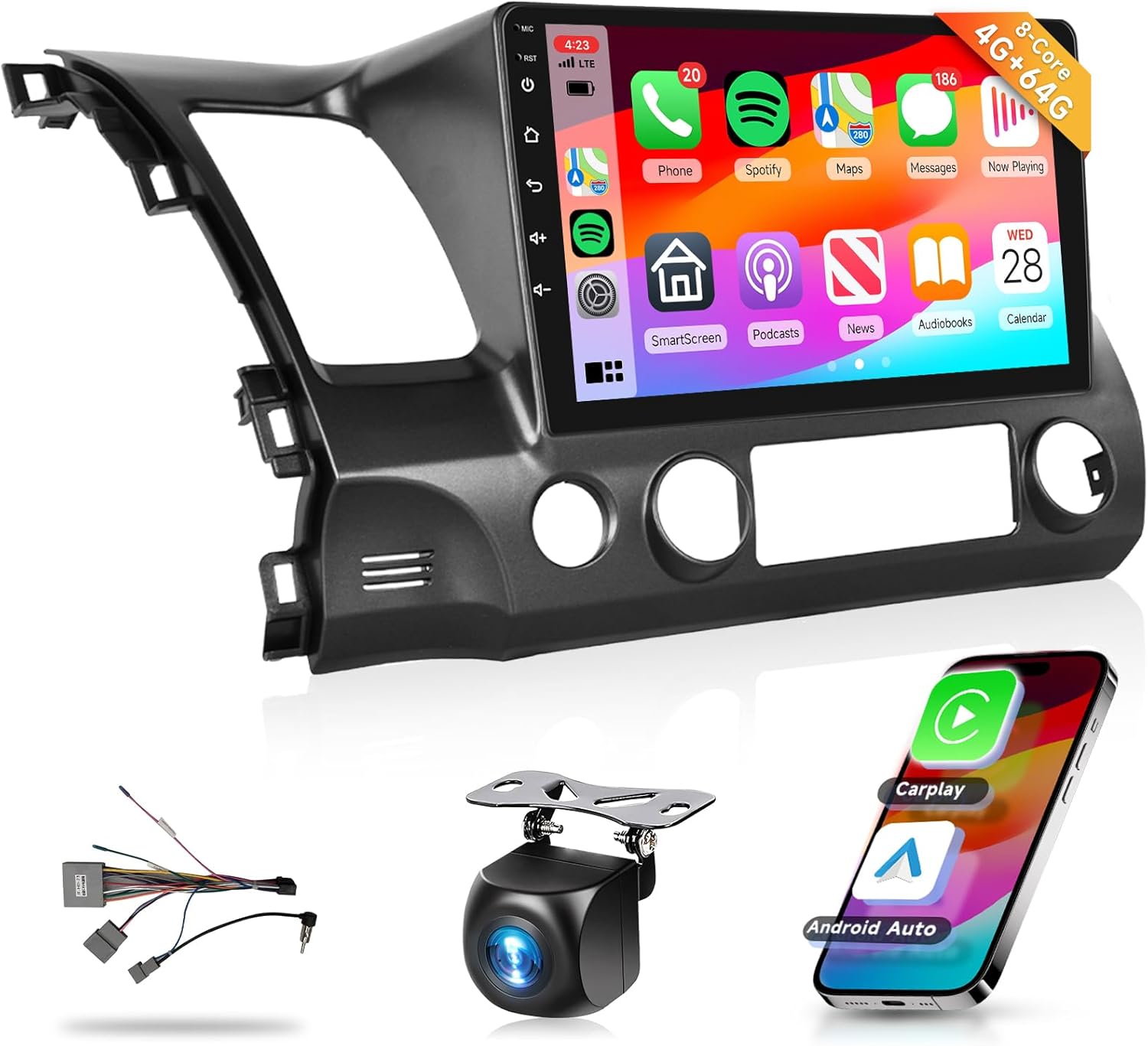
This podofo head unit replaces the factory radio in 2006–2011 Honda Civics with a 10.1-inch 1280×720 IPS touchscreen running Android and offering both wired and wireless CarPlay and Android Auto. In daily use it behaves like a large tablet mounted in the dash: you get app access, navigation via GPS or online maps over Wi-Fi/5G, and media playback from multiple formats. Bluetooth 5.0 handles phone pairing and audio streaming and the built-in mic and external mic option let you take hands-free calls. Audio is enhanced with a DSP 32-band EQ for tuning to your speakers. Installation is described as straightforward for this Civic fit, and the unit includes backup camera wiring and a vehicle-specific trim frame. Limitations worth noting are mixed user reports about occasional Bluetooth or CarPlay disconnects, intermittent USB port failures, and some units showing stability issues that require rebooting; sound interactions with factory amps have also been reported. If you prioritize modern smartphone integration and a large, responsive screen for navigation and media, this unit delivers a big upgrade over the stock radio, but expect basic troubleshooting or occasional firmware attention to keep connectivity rock-solid.
Best for: Drivers who want reliable in-car phone integration, stable hands-free calling and flexible audio streaming with a large touchscreen and app access in a 2006–2011 Civic.
Less Ideal for: Buyers who need guaranteed plug-and-play perfection without any troubleshooting or who prefer a direct factory-quality audio integration without potential amp interference should look elsewhere.
- Large 10.1-inch 1280×720 IPS capacitive touchscreen for clear navigation and app use
- Supports wired and wireless CarPlay and Android Auto for seamless smartphone integration
- Bluetooth 5.0 with external mic option for hands-free calling and audio streaming
- Built-in GPS, Wi-Fi/5G support and 64 GB storage let you run navigation apps and install apps from the Play Store
- DSP 32-band EQ provides flexible sound tuning for aftermarket speaker setups
- Some users report occasional Bluetooth or CarPlay dropouts and intermittent USB port failures
- A few reports of system instability requiring reboots or firmware attention
Verdict: The best Bluetooth car stereo for drivers who prioritize seamless phone pairing, reliable hands-free calling, and stable audio streaming while on the road.
7. Roinvou 9" Android 15 Car Stereo for Honda Civic 2006-2011 with Wireless CarPlay & Android Auto
Best Compact Car Stereo

| Operating System | Android |
|---|---|
| Memory Storage Capacity | 64 GB |
| Screen Size | 9 Inches |
| Connectivity Technology | Bluetooth, USB, Wi-Fi |
| Additional Features | CarPlay, Android Auto, DSP, GPS Navigation |
This Roinvou 9-inch Android head unit is built to replace the factory radio in a 2006–2011 Honda Civic while keeping a relatively low-profile fit in the dash. It runs Android 15 on a responsive processor with 64 GB storage so you can install navigation and media apps, connect to 5G Wi-Fi, and stream audio over Bluetooth. Wireless and wired CarPlay and Android Auto are supported for hands-free calling, maps, and media control, and mirror-link lets you mirror phone content. The unit includes GPS, FM/RDS radio, steering wheel control support, a DSP and adjustable EQ for tuning sound, and inputs for a backup camera and external microphone. Installation-friendly wiring harnesses and CAN settings are provided, though buyers should verify dimensions and connector fitment for their Civic trim. The user interface offers multiple themes and split-screen capability, but advanced users may need to adjust CAN settings during setup. For installers focused on saving dash space while adding modern connectivity and sound tuning, this unit delivers a strong feature set with practical on-road benefits.
Best for: Installers and owners who need a space-conscious replacement head unit for a 2006–2011 Civic that modernizes connectivity and lets you tune audio without a bulky double-DIN overhaul.
Less Ideal for: Drivers who want a plug-and-play OEM-identical fit with zero configuration or those who prefer a minimalist single-function radio with no smart features.
- Wireless and wired CarPlay and Android Auto for seamless phone integration
- Built-in GPS and 5G Wi-Fi for online navigation and app downloads
- DSP and EQ settings allow practical sound tuning for improved audio
- Includes camera input, external microphone, and steering wheel control support
- 64 GB onboard storage and Android 15 give room for apps and media
- May require checking dash dimensions and CAN wiring adjustments for proper fit and steering wheel functions
- User interface and advanced settings can need setup time for optimal integration
Verdict: The best compact car stereo for installers needing a low-profile or space-saving head unit that still delivers solid sound and essential connectivity.
Choosing the Right 2006-2011 Honda Civic Car Stereo: Key Factors to Consider
Dash Fit and Mounting
Correct dash fit is the first practical concern when replacing the factory radio in a 2006-2011 Honda Civic. The Civic's FA and FG era dash has specific trim and mounting points; choosing a head unit that matches the opening size or that works with an appropriate installation kit reduces gaps, rattles, and the need for permanent modifications.
A proper fit also affects how HVAC controls and trim pieces sit around the new unit. Poorly fitting units can obstruct controls or require additional bezel adapters. When planning an upgrade, confirm whether a single DIN insert or a double DIN cavity is present and whether any optional pocket or trim plate is needed to achieve a factory-like appearance.
Audio Performance and Tuning
Audio quality determines whether the upgrade is noticeable beyond connectivity features. Look for head units with low noise preouts, flexible equalization, and adjustable crossovers if you intend to add amplifiers or a subwoofer. Built-in high-pass/low-pass options and parametric or graphic EQs help tailor the system to the Civic's cabin acoustics.
Consider the number and strength of preamp outputs for driving external amplifiers. A head unit with robust line outputs and signal trimming options reduces reliance on noisy speaker-level taps and improves overall system dynamics.
Connectivity and Smartphone Integration
Modern connectivity is often the main reason owners replace the stock radio. Native Apple CarPlay or Android Auto offers navigation, voice control, and app access through the head unit interface. Bluetooth should support stable audio streaming and hands-free calling with good call quality and microphone flexibility.
If you use offline audio files, ensure the unit supports common codecs and provides convenient USB or auxiliary inputs. For owners who want wireless mirroring or streaming, check whether the head unit supports wireless CarPlay or wireless phone profiles and how reliable those implementations are for everyday use.
Controls, Usability, and Safety
Ease of use while driving is a safety issue. Units with large, intuitive touchscreens, tactile volume controls, and quick-access buttons let you operate the stereo with minimal distraction. Voice control compatibility through CarPlay or Android Auto can further reduce eyes-off-road time.
Steering wheel control retention is important for many Civic owners. Verify whether the head unit supports factory steering wheel buttons via an adapter and whether any additional programming is required. Also consider screen glare, day/night modes, and default brightness settings for safe daytime and nighttime driving.
Installation Complexity and Vehicle Integration
Installation difficulty affects cost, time, and the likelihood of a DIY install. Units that work with plug-and-play wiring harnesses, antenna adapters, and dash trim kits simplify the process. Check whether additional parts are required to retain features like factory chimes, balance/fade adjustment, and rear camera inputs.
Power draw, fuse location, and wiring access in the Civic should be considered before purchase. Some head units require tapping speaker-level outputs or adding line output converters, which adds steps. Owners should plan for cable routing for microphones, backup cameras, and external amplifiers to avoid interference and maintain a tidy install.
Expandability and Future Upgrades
Think about how the head unit will fit into any larger audio plan. If you expect to add an amp, subwoofer, backup camera, or multiple input sources, choose a unit with sufficient preamp outputs, camera inputs, and accessory triggers. A head unit with multiple USB ports and auxiliary inputs lets you connect media players and maintain charging for phones in the dash area.
Also consider software update paths and whether the unit supports firmware updates to add features over time. Hardware expansion options make it easier to stage upgrades without replacing the head unit again.
Single DIN Versus Double DIN Considerations
The 2006-2011 Civic dash can accept either a single DIN head unit with an added pocket or a full double DIN touchscreen, depending on trim and kit availability. Single DIN units are smaller and often retain more of the original dash openings, while double DIN units provide larger displays for navigation and smartphone integration.
If you prefer a clean, factory look with a touchscreen interface, a double DIN installation provides a more integrated experience. Single DIN units with a motorized display or a compact control face are a good choice when retaining certain dash features or when you want to preserve storage space.
- Single DIN: simpler installation, smaller footprint, can add pocket storage
- Double DIN: larger touchscreen, native navigation and CarPlay/Android Auto options
- Consider trim kit options to avoid gaps or protruding bezels
Retaining Steering Wheel Controls and Factory Features
Many Civic owners want to keep their steering wheel audio controls after upgrading the head unit. This is usually achievable with an appropriate interface module that translates factory button signals into the aftermarket head unit's protocol. Confirm compatibility for your specific 2006-2011 Civic wiring harness.
Beyond steering wheel controls, features like factory backup sensors, chimes, and climate control illumination may require adapter modules or minor wiring to function as before. Planning for these integrations ahead of purchase avoids surprises during installation.
- Verify availability of a steering wheel control adapter for FA and FG era Civics
- Check whether the head unit supports retaining factory audio chimes and illumination
- Plan for any additional modules if you want to retain OEM convenience features
Backup Camera and Parking Integration
Adding a backup camera is a common complement to a new head unit. Most modern double DIN and many single DIN units support a camera input and automated reverse-triggering, which switches the display when you shift into reverse. Consider camera mounting options that preserve the trunk and bumper aesthetics on the Civic.
Wiring a backup camera requires routing a video cable from the rear of the vehicle to the dash and connecting a reverse-trigger wire. If you plan to add parking sensors as well, ensure the head unit or an auxiliary module can display camera feed and integrate sensor alerts if desired.
- Look for a dedicated camera input and reverse trigger
- Plan cable routing to avoid interference and water intrusion
- Consider a camera with wide-angle view and parking guidelines for easier alignment
Power and Grounding Best Practices
Reliable power and grounding are essential for clean audio and system stability. Use proper gauge power and ground wires when connecting amplifiers and ensure the head unit is tied to a solid chassis ground point in the Civic. Poor grounding can introduce noise and affect Bluetooth reception and touchscreen responsiveness.
If adding amplifiers, fuse the power run near the battery and use a quality distribution block. Keep signal cables away from power and speaker wiring to minimize noise pickup in the audio system.
- Use recommended wire gauges for power and speaker connections
- Fuse power runs close to the battery for safety
- Route signal cables separately from high-current wiring to reduce noise
Choosing Between Touchscreen and Physical Controls
Touchscreen stereos offer large displays and easier access to smartphone apps, but physical buttons and knobs provide quicker, tactile control while driving. Consider which control style matches your driving habits and how often you need to adjust settings without looking.
Some head units combine both approaches, with a touchscreen complemented by a quick-access volume knob and programmable buttons. For the Civic, prioritize controls that are within comfortable reach and do not obstruct HVAC or steering wheel access.
- Touchscreen: better for maps and media browsing
- Physical controls: faster adjustments with less distraction
- Look for hybrid designs that offer both touchscreen and tactile controls
Audio Source Flexibility and Media Inputs
Think about how you listen to music daily. Units with multiple USB ports, Bluetooth audio, auxiliary inputs, and support for high-resolution files give the most flexibility. If you keep large media libraries on USB drives, confirm that the head unit can read common file systems and formats.
If smartphone integration is a priority, ensure the head unit supports the phone platforms you use, whether through wired CarPlay/Android Auto, wireless options, or robust Bluetooth profiles. Also consider adding an SD card slot or rear USB for passenger access to media.
- Multiple USB inputs for charging and media playback
- Compatibility with common audio formats and large file support
- Options for adding external sources like satellite tuners or streaming dongles
Still looking for the perfect fit?
Select your Honda Civic configuration to see the most relevant Car Stereos recommendations
How We Chose the Best 2006-2011 Honda Civic Car Stereo
We evaluated options based on several concrete, car-specific criteria aimed at Honda Civic owners. First, dash fit and mounting compatibility: units had to fit the 2006-2011 Civic dash openings with common installation kits and allow preservation of HVAC controls and bezel alignment. Second, audio performance: rated sources were assessed for signal-to-noise, preamp outputs for adding an amp, EQ flexibility, and support for common file formats. Third, connectivity and user interface: we prioritized Bluetooth hands-free and streaming stability, smartphone integration such as Apple CarPlay or Android Auto, and responsive touchscreen or physical control ergonomics suitable for in-dash reach.Fourth, installation complexity: we considered harness adapters, antenna integrations, and whether steering wheel control retention is feasible without major modification. Fifth, expandability: support for external amps, subwoofers, backup cameras, and microphone options mattered for owners planning further upgrades. We excluded units that require extensive dash cutting or permanent modification to the dash structure, head units lacking basic safety features like easy mute or quick-access volume, and any options clearly incompatible with the 2006-2011 Civic electrical interface. The resulting list focuses on products that deliver reliable sound and features while remaining practical for typical Civic owners to install and use.
Our full evaluation process is outlined in our review methodology.
FAQ
Will a double DIN head unit fit my 2006-2011 Honda Civic dash?
Many 2006-2011 Civic trims can accept a double DIN head unit with the correct trim kit and mounting kit. Fit depends on the original dash configuration and the chosen bezel; some installs require a replacement trim plate to ensure a factory-like appearance.
Can I keep my steering wheel audio controls after upgrading the stereo?
In most cases you can retain steering wheel controls by using an interface module designed for the Civic's wiring. The module translates factory button signals to the aftermarket head unit, though some programming may be required.
Do I need a new antenna adapter for an aftermarket head unit?
Often an antenna adapter is needed to match the Civic antenna lead to the aftermarket radio connector. Check compatibility before installation to avoid poor reception or unexpected wiring changes.
Is it difficult to add a backup camera to a new head unit?
Adding a backup camera requires routing a video cable to the dash and wiring a reverse trigger. It is a moderate DIY task for those comfortable with basic vehicle wiring, and most modern head units include a dedicated camera input to simplify integration.
Should I choose a unit with built-in amplification or add an external amp?
Built-in amplification is sufficient for modest upgrades and saves space, while an external amplifier provides more headroom and cleaner power for larger speakers or subwoofers. The choice depends on your desired sound level and future expandability plans.
Will Apple CarPlay or Android Auto work with my phone wirelessly?
Wireless CarPlay or Android Auto support depends on both the head unit and your phone. Some head units offer wireless implementations, but wired connections are generally more reliable and may be required for certain phone models.
Final Verdict
For 2006-2011 Honda Civic owners, the most important priorities are ensuring proper dash fit, reliable connectivity, and achievable installation. Balance audio performance with the level of integration you want, whether that means a compact single DIN install or a full double DIN touchscreen with CarPlay or Android Auto.Decide first whether you value a larger display and smartphone integration or simpler installation and tactile controls. Prioritize units that offer solid preamp outputs and stable connectivity if you plan to expand the system. With those tradeoffs in mind, you can choose a car stereo that delivers better sound and modern features while fitting neatly into your Civic.
Explore More:
- Check out all Honda Civic parts & accessories
- Explore Electronics
- Browse all Accessories
