

Note: This article contains affiliate links. If you click on these links and make a purchase, I may earn a small commission at no extra cost to you. This helps support my research and content. Read my full affiliate disclosure here.
If you drive a 2001-2005 Honda Civic (ES, EM, and EP) you know the factory radio can feel dated compared with today's options. Choosing the right car stereo matters because the dash space, wiring harness, and speaker load on these Civics influence fitment, sound quality, and feature compatibility. This guide covers six shortlisted car stereos that suit the 2001-2005 Civic's dash and electrical setup, focusing on installation ease, audio performance, and modern connectivity like Bluetooth and smartphone integration.Below you'll find products selected for common Civic owner needs, followed by practical buying factors and answers to frequent installation and compatibility questions. Use the evaluation notes to match a unit to your priorities before you shop replacements or upgrades.
Looking for other parts? See all Honda Civic parts & accessories.
Top Picks at a Glance
| Best Overall Car Stereo The strongest all-around choice balancing features, sound, and usability | electrosmart 9" Android 15 Car Radio for Honda Civic 2001–2005 with Wireless CarPlay & Android Auto |  |
| Best Budget Car Stereo A low-cost unit that covers core audio and basic features | Upriding 9" QLED Android 15 Car Stereo for Honda Civic 2001–2005 (4GB/64GB) |  |
| Best Premium Car Stereo Higher-end model with superior audio, features, and build quality | ASURE 9" Android 15 Car Stereo for Honda Civic 2001–2005 |  |
| Best Double-DIN Car Stereo Full-size head unit with large display and expanded features | podofo 9" Android Car Stereo for Honda Civic 2001–2005 with Wireless CarPlay/Android Auto |  |
| Best Bluetooth Car Stereo Modern wireless connectivity for hands-free calling and streaming | AINAVI 9" Linux Touchscreen Car Radio for Honda Civic 2001–2005 with Wireless CarPlay/Android Auto |  |
| Best Compact Car Stereo Smaller footprint and simplified controls for tight installations | Jensen JCR311 Single-DIN Car Stereo with Bluetooth and CD Player |  |
1. electrosmart 9" Android 15 Car Radio for Honda Civic 2001–2005 with Wireless CarPlay & Android Auto
Best Overall Car Stereo

| Operating system | Android 15 |
|---|---|
| Memory | 4 GB RAM + 128 GB ROM |
| Screen | 9-inch capacitive touch, 1280×720 |
| Wireless | Wireless CarPlay, Android Auto, Wi‑Fi, Bluetooth 5.2 |
| Camera input | Rear camera input, 170° waterproof camera included |
This electrosmart head unit replaces the factory radio in 2001–2005 Honda Civics with a 9-inch capacitive touchscreen running Android 15 and 4 GB RAM plus 128 GB storage. It is intended for drivers who want modern smartphone integration: wireless CarPlay and Android Auto work for voice navigation, calls, and music, and Bluetooth 5.2 provides stable hands-free calling and audio streaming. The unit includes built-in GPS, WiFi for app downloads and online maps, and a waterproof wide-angle backup camera that switches on automatically when reversing. Install is typically a DIY job with the provided cables and GPS antenna, and reviewers report straightforward wiring and fast boot. The UI has plenty of features including HiFi audio and subwoofer output, but the settings menu can take some time to learn and some functions may require tuning after install. This is a full-feature upgrade for daily driving, though it is focused on adding modern connectivity rather than matching premium factory infotainment polish.
Best for: Buyers who want a modern, smartphone-first upgrade for a 2001–2005 Civic that balances sound and connectivity without requiring professional installation.
Less Ideal for: Drivers seeking a factory-level OEM interface or the absolute highest-end audio tuning should consider higher-tier units or professional installation and tuning.
- Designed specifically to fit 2001–2005 Honda Civic dash for simpler installation
- Wireless CarPlay and Android Auto plus Bluetooth 5.2 for reliable phone integration
- Built-in GPS and WiFi let you use offline or online maps and download apps
- Includes waterproof 170° backup camera that auto-switches on reverse
- 4 GB RAM and 128 GB storage give smooth performance and room for apps/media
- Settings and menus are not as intuitive as factory systems and require time to customize
- Included GPS antenna or camera may need repositioning or swapping depending on vehicle wiring
Verdict: The best all-around car stereo that balances sound quality, connectivity, user interface, and reliability for most DIY installers and everyday listening.
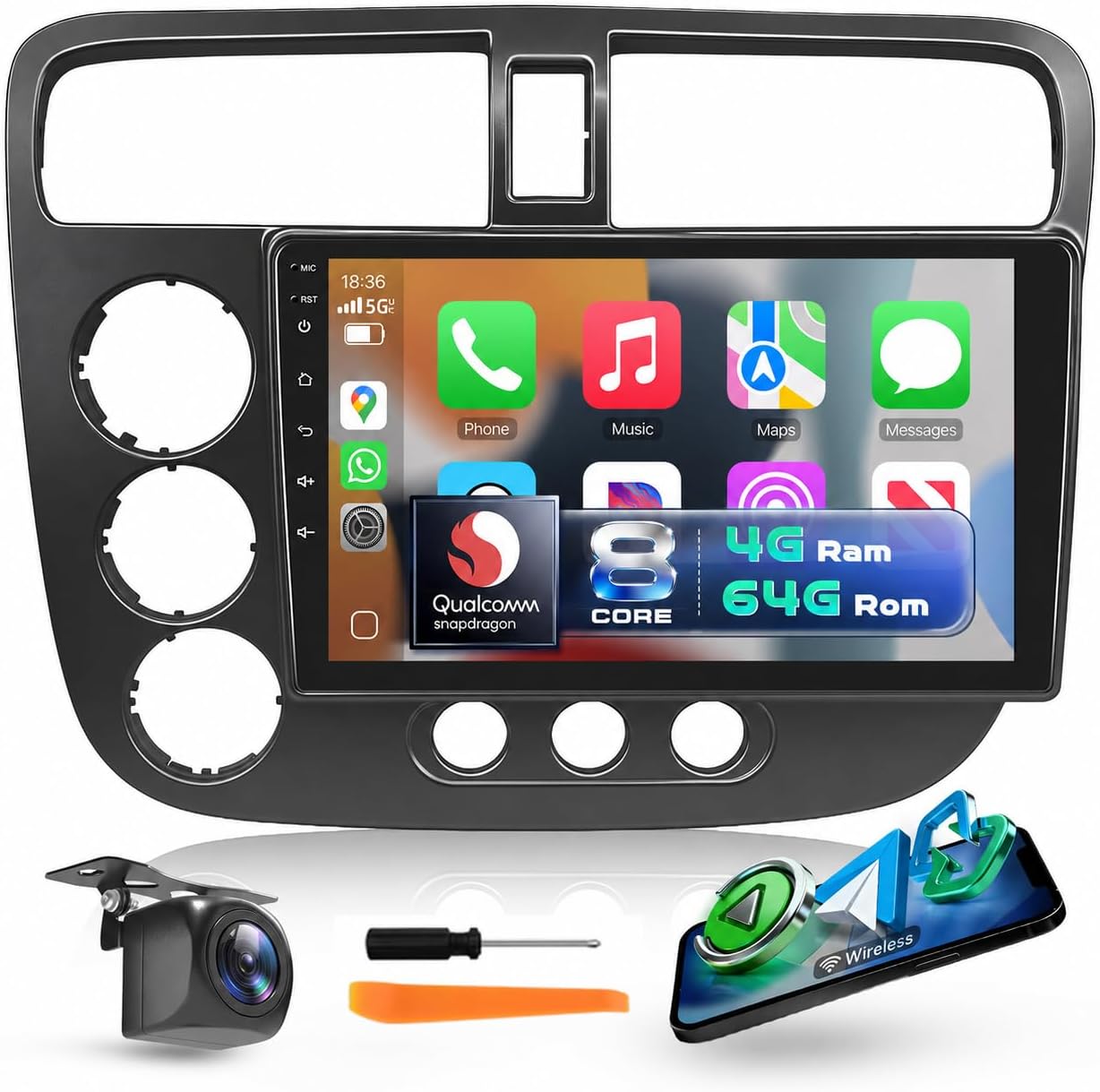
2. Upriding 9" QLED Android 15 Car Stereo for Honda Civic 2001–2005 (4GB/64GB)
Best Budget Car Stereo
| Screen Size | 9 Inches |
|---|---|
| Operating System | Android 15 |
| Memory Storage Capacity | 64 GB |
| Additional Features | Wireless CarPlay, Android Auto, DSP |
| Connectivity Technology | Bluetooth, USB, Wi-Fi |
This Upriding 9-inch unit replaces the factory head unit on Honda Civics from 2001 to 2005 and focuses on giving modern features at a budget-friendly level. It installs using a vehicle-specific wiring harness and supports steering wheel controls, so most owners can swap it in without major dash modifications. The Android 15 system with a Qualcomm 8-core processor and 4GB/64GB memory keeps maps, media apps, and wireless CarPlay/Android Auto responsive for everyday use. The QLED 1280×720 touchscreen is bright and touch-responsive, and built-in DSP plus Bluetooth 5.1 provide clearer sound and stable phone connections. Practical extras include dual USB, GPS antenna, and a backup camera input with a camera included for safer parking. Limitations to expect are that advanced audiophile features and factory integration nuances may be less refined than higher-end units, and achieving a perfect dash fit or steering wheel mapping might need minor adjustments during installation. For a Civic owner wanting modern connectivity without spending much, this covers the essentials well.
Best for: Buyers who want a low-cost way to add modern touchscreen navigation, smartphone integration, and a backup camera to a 2001–2005 Honda Civic without complex installation.
Less Ideal for: Those seeking premium audio tuning, factory-perfect fitment, or advanced vehicle integration features should consider higher-end, vehicle-matched head units.
- Vehicle-specific plug-and-play wiring harness simplifies installation for 2001–2005 Honda Civics
- Wireless CarPlay and Android Auto for hands-free navigation and media
- Android 15 with 4GB RAM and 64GB storage for smooth app use and onboard media
- Includes backup camera, GPS antenna, external mic, and accessories for a complete install
- Fit and steering wheel control mapping may require small adjustments to match every Civic trim
Verdict: The best budget car stereo for buyers who prioritize low price while still getting dependable sound, basic connectivity, and straightforward installation.
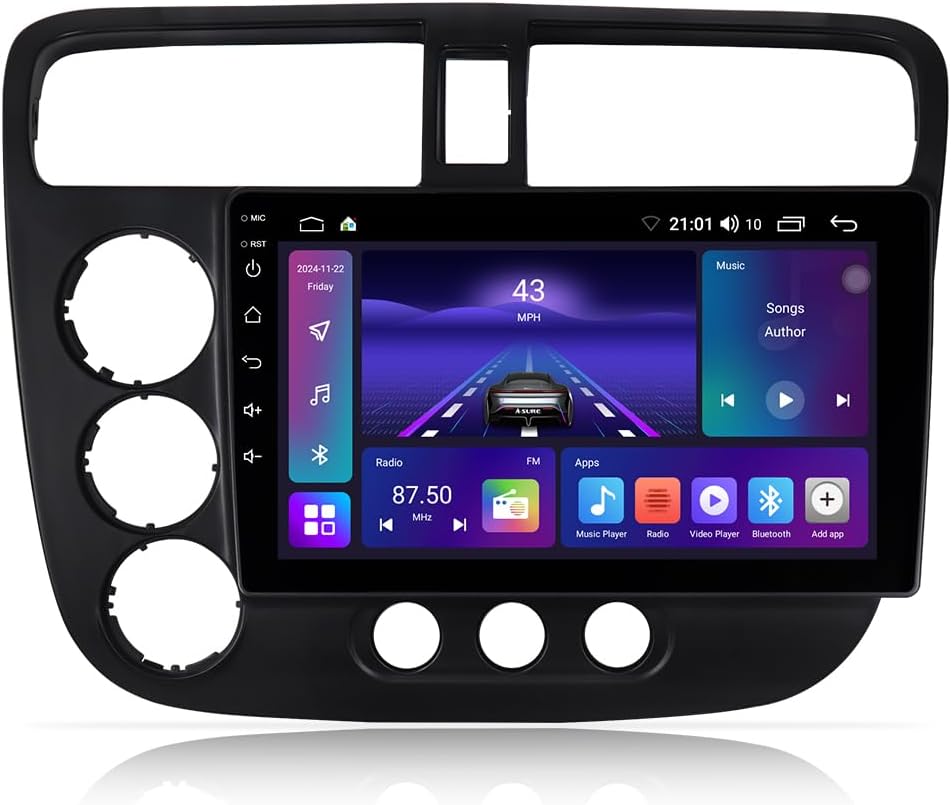
3. ASURE 9" Android 15 Car Stereo for Honda Civic 2001–2005
Best Premium Car Stereo
| Screen resolution | 1280 x 800 |
|---|---|
| Operating system | Android 15 |
| Memory | 4 GB RAM |
| Storage | 64 GB ROM |
| Connectivity | Wireless CarPlay, Android Auto, Bluetooth 5.0, Wi‑Fi |
This ASURE 9-inch Android 15 head unit is a full-feature infotainment upgrade tailored to 2001–2005 Honda Civics. It installs using the included vehicle-specific harness and bezel so the large IPS touchscreen sits cleanly in the dash while retaining steering wheel control support. Under the hood an octa-core processor with 4GB RAM and 64GB storage runs apps, maps and media smoothly and the unit supports both wireless and wired CarPlay and Android Auto for hands-free navigation and media. Audio is enhanced by a built-in DSP and Bluetooth 5.0 for clearer calls and streaming, and dual USB ports let passengers charge and connect devices. Dual-band Wi-Fi and built-in GPS let you run online and offline mapping apps. Expect a modern, tablet-like interface and a big visual upgrade, though a few users report occasional UI lag and some steering-wheel control installs may need minor wiring adjustments. The unit is best where you want modern smartphone integration, better sound control and a factory-looking fit in an older Civic.
Best for: Buyers who want a premium, feature-rich upgrade for an aging Civic and value superior smartphone integration, advanced audio processing, and a factory-style installation.
Less Ideal for: Drivers who need a barebones replacement or are unwilling to perform a dash install or minor wiring for steering wheel control integration.
- Designed specifically to fit Honda Civic 2001–2005 with vehicle-specific harness and bezel for a factory look
- Android 15 with octa-core CPU and 4GB RAM delivers multi-app capability and responsive media playback
- Wireless and wired CarPlay and Android Auto for hands-free navigation and phone integration
- Built-in DSP plus Bluetooth 5.0 improves sound customization and streaming stability
- Dual-band Wi‑Fi, built-in GPS and 64GB storage support online/offline navigation and app installs
- Some users report occasional UI lag under heavy multitasking
Verdict: The best premium car stereo for buyers willing to pay more for top-tier sound, advanced processing, richer feature sets, and durable components.
4. podofo 9" Android Car Stereo for Honda Civic 2001–2005 with Wireless CarPlay/Android Auto
Best Double-DIN Car Stereo

| Screen Size | 9 Inches |
|---|---|
| Resolution | 1280×720 IPS |
| Operating System | Android |
| Memory Storage Capacity | 64 GB |
| Connectivity Technology | Bluetooth, USB, Wi‑Fi |
This podofo double-DIN unit replaces the factory radio in Honda Civic 2001–2005 to deliver a large 9-inch 1280×720 IPS touchscreen driven by an Android system and an octa-core processor with 4G RAM and 64 GB storage. It is typically used as a full dash upgrade for navigation, streaming, hands‑free calling and media playback; features include wireless and wired CarPlay/Android Auto, Bluetooth 5.0, built-in GPS, Wi‑Fi/5G connectivity and a DSP with 36‑band EQ for detailed sound tuning. Practical benefits include fast app loading, the ability to run split‑screen apps and a modern interface with multiple UI themes that modernize an older Civic. The package includes an AHD 1080P backup camera and external mic for clearer hands‑free calls. Trade-offs to note are documented fitment and bezel alignment issues on some dashboards, occasional overheating reports during long drives, and a backup camera whose image quality some users found inferior to the radio display. Installation often benefits from professional fitting or some trim modification for a clean factory look.
Best for: Installers and DIYers who want to replace the stock radio with a large touchscreen head unit that brings modern navigation, smartphone integration and advanced audio tuning to a 2001–2005 Civic.
Less Ideal for: Buyers seeking a plug‑and‑play, factory‑perfect bezel fit without any trimming or dash modification or those who prioritize a bulletproof long‑term thermal reliability without occasional reports of overheating.
- Large 9-inch 1280×720 IPS touchscreen for clearer, more modern display
- Android OS with octa‑core processor and 64 GB storage for apps and smooth multitasking
- Wireless and wired CarPlay/Android Auto plus Bluetooth 5.0 for convenient phone integration
- Built‑in GPS, Wi‑Fi/5G support and split‑screen functionality for navigation and media at once
- Built‑in DSP and 36‑band EQ for detailed audio tuning without extra hardware
- Some users report fitment or bezel gaps that require trimming or professional installation
- Several reviews mention overheating after extended use that can affect audio stability
- Included backup camera image quality is inconsistent compared with the head unit display
Verdict: The best double-DIN car stereo for installers who want a large touchscreen, integrated navigation or multimedia capabilities, and a more feature-rich dash experience.
5. AINAVI 9" Linux Touchscreen Car Radio for Honda Civic 2001–2005 with Wireless CarPlay/Android Auto
Best Bluetooth Car Stereo

| Compatible Vehicle | Honda Civic 2001-2005 |
|---|---|
| Screen Size | 9 Inches |
| Operating System | Linux |
| Connectivity | Wireless CarPlay, Wireless Android Auto, Bluetooth, USB |
| Display Type | QLED |
This AINAVI 9-inch touchscreen is a focused upgrade that brings modern phone connectivity and hands-free features to a 2001–2005 Honda Civic. It installs as a plug-and-play dashboard unit designed to fit the Civic dash and keeps factory steering wheel controls functional. The Linux OS boots quickly and aims for snappy everyday operation while serving as a platform for wireless CarPlay and Android Auto so phones pair automatically and stream music without a cable. Bluetooth 5.0 handles calls and audio streaming, and the included 1080p waterproof backup camera switches on when you shift into reverse. The bright anti-glare QLED screen makes maps and camera images easy to read in daylight. Expect fewer app customization options compared with full Android units, and some users report the occasional slight delay in Bluetooth reconnection and limited install guidance in the box. For drivers who want reliable wireless phone mirroring, clearer reverse visibility, and a factory-style fit, this unit modernizes the Civic affordably.
Best for: Drivers who want dependable wireless phone pairing and easy hands-free control in a 2001–2005 Civic and prefer a clean dash-fit upgrade that restores modern navigation and audio streaming.
Less Ideal for: Buyers seeking extensive on-unit app stores, heavy UI customization, or step-by-step installation guides may prefer a full Android unit or professional installation services instead.
- Designed for 2001–2005 Civic dash with plug-and-play wiring for a clean fit
- Wireless CarPlay and Android Auto for cable-free phone mirroring
- Bluetooth 5.0 for stable hands-free calls and wireless audio streaming
- Bright anti-glare QLED touchscreen improves map and camera visibility
- Includes 1080p IP68 backup camera that auto-activates in reverse
- Linux-based system has fewer native apps and customization than Android equivalents
Verdict: The best Bluetooth car stereo for drivers who prioritize seamless phone pairing, reliable wireless audio streaming, and convenient hands-free controls during drives.
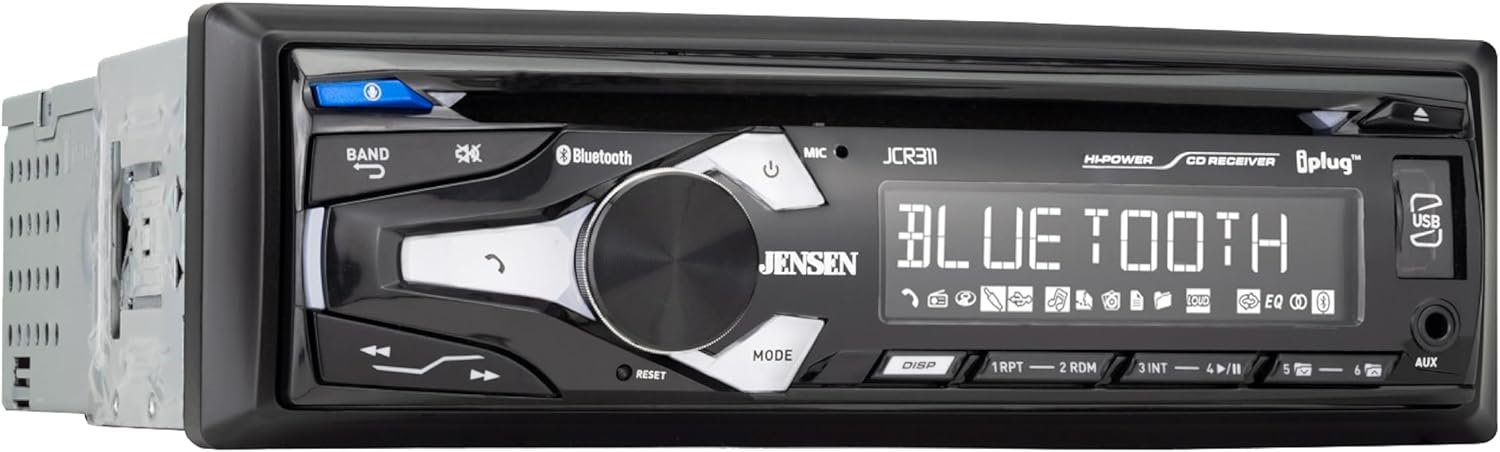
6. Jensen JCR311 Single-DIN Car Stereo with Bluetooth and CD Player
Best Compact Car Stereo
| Form factor | Single DIN |
|---|---|
| Wireless communication technologies | Bluetooth |
| Playback options | CD, USB, MP3, Aux, AM/FM |
| Preamp outputs | Two pair RCA (Front/Rear) |
The Jensen JCR311 is a compact single-DIN head unit aimed at buyers who want basic features and an easy install. It provides CD playback, a front USB port that charges devices and plays MP3s, Bluetooth for music streaming and hands-free calls, plus an auxiliary input and AM/FM tuner with 30 presets. The small 10-character white-on-black LCD and straightforward controls keep operation simple while the unit offers two pair RCA preamp outputs for adding an amplifier later. For DIY installers working on a 2001–2005 Honda Civic, the single-DIN size and included wiring harness and radio cage make mounting and wiring straightforward and quick, preserving dash space. Sound is clean for everyday listening and the microphone performs well for calls. Limitations are its basic display and feature set compared with modern touchscreen receivers and occasional reviewer reports of inconsistent Bluetooth or display longevity, so expect a no-frills, budget-focused experience rather than high-end audio refinement.
Best for: DIY installers who prioritize a small, easy-to-install head unit that keeps the Civic dash uncluttered while providing reliable Bluetooth calling and basic playback options.
Less Ideal for: Drivers who want touchscreen navigation, Apple CarPlay/Android Auto, or audiophiles seeking high-resolution audio and advanced tuning features.
- Single-DIN compact size preserves dash space and simplifies installation
- Built-in Bluetooth for hands-free calling and wireless music streaming
- Multiple playback options: CD, USB, aux and AM/FM with presets
- Includes wiring harness, radio cage and RCA preouts for future amp upgrades
- Basic 10-character LCD limits on-screen information compared with modern displays
- Not feature-rich compared with touchscreen units and some users report occasional connection or display issues
Verdict: The best compact car stereo for DIY installers looking for a small, unobtrusive unit that simplifies installation and preserves dash space without sacrificing core performance.
Choosing the Right 2001-2005 Honda Civic Car Stereo: Key Factors to Consider
Dash Size and Mounting Type
Confirm whether your Civic has the factory single-din opening or a pocket that supports a double-din conversion. The 2001-2005 Civic (ES, EM, and EP) commonly accepts both single din car stereo and double din head unit installations with the right trim kit. Knowing the mounting type determines whether you need a single-din spacer, a dash conversion kit, or a full bezel adapter.
Incorrect assumptions about dash size lead to extra labor, poor fit, or an unstable unit. If you plan to add a touchscreen car stereo, measure available depth behind the dash; some double-din units with large screens or mechanical controls require more clearance and may conflict with HVAC controls or airbags.
Wiring Harness and Vehicle Integration
A vehicle-specific wiring harness adapter eliminates cutting the factory harness and preserves features like retained accessory power and speaker polarity. For the 2001-2005 Civic, pick a head unit that has compatible harness adapters or documented compatibility notes for Civic ES, EM, and EP wiring. Adapters that integrate steering-wheel controls are especially useful if you want to keep OEM button functions.
Failing to match harness and ignition wire behavior can cause the unit not to power on correctly, drain the battery when off, or lose memory settings. Check whether the head unit supports a switched ignition lead and a constant memory lead, and whether CAN-bus or other vehicle networks require additional adapters for retained functions.
Power and Speaker Compatibility
Factory speaker impedance and amplifier setups affect the type of head unit you need. Many 2001-2005 Civics use full-range door speakers and sometimes a trunk or dash sub. Choose a head unit with enough preamp outputs and gain control to drive external amplifiers if you plan an expanded system.
Head units with high preamp voltage and adjustable crossover settings make adding external amplification easier and yield cleaner sound. If you stick with factory speakers, prioritize models with built-in equalization, time alignment, or basic DSP to compensate for door-mounted speaker placement and cabin acoustics.
Connectivity and Smartphone Integration
Decide whether you need Apple CarPlay head unit or Android Auto car stereo functionality, or if Bluetooth-only streaming is sufficient. For many Civic owners, Bluetooth car stereo features like hands-free calling and audio streaming are minimum requirements. If you rely on navigation or apps, a CarPlay/Android Auto-capable head unit provides safer, integrated access to maps and voice control.
Consider whether the unit offers both wired and wireless smartphone connections, multiple USB ports for charging and media, and compatibility with common audio codecs. Some touchscreen car stereos include onboard navigation or offline map support; others depend entirely on a connected phone.
User Interface and Controls
The usability of menus, touch response, and physical control layout matters during daily driving. Single-din car stereo units often pair a small display with physical buttons and a rotary knob, which many drivers prefer for tactile feedback. Double-din head units with larger screens deliver more visual feedback but should have responsive touch performance and clear menu structure.
If you rely on steering-wheel control retention, verify the head unit's mapping options for shortcut keys and whether the display allows quick-access buttons for common functions like source, phone, and volume. Poor interface design leads to distraction and frustration during use.
Expandability and Future Upgrades
Think about whether you will add amplifiers, subwoofers, or camera inputs later. Head units with multiple preamp outputs, camera inputs, and flexible signal routing let you grow the system without swapping the head unit. For 2001-2005 Civic owners, a unit with at least two RCA preamp outputs and a dedicated subwoofer output is often enough for a modest upgrade.
Also consider the availability of software updates or modular accessories. Units that support firmware updates or have modular input options make it easier to adapt as phone platforms and audio codecs evolve.
Single-Din Vs Double-Din: Which Works Best in a Civic ES, EM, and EP
The 2001-2005 Civic's dash can accommodate either a compact single-din unit or a full double-din touchscreen with the correct trim kit. Single-din car stereo installations preserve more of the factory look and are usually simpler to wire, while double-din head units provide larger displays and more advanced touchscreen features.
- Single-din pros: simpler installation, retains more factory trim, better for basic Bluetooth upgrades
- Double-din pros: larger touchscreen, easier smartphone integration, more room for advanced interfaces
- Installation note: double-din installations may require a bezel adapter and attention to depth clearance behind the dash
Retaining Steering-Wheel Controls and OEM Features
Many Civic owners want to keep steering-wheel audio controls. Look for head units with steering control input compatibility or confirm that a third-party interface is available for the 2001-2005 Civic ES, EM, and EP. These adapters translate OEM button signals to the aftermarket unit and preserve cruise and accessory functions where applicable.
- Verify adapter compatibility with the ES, EM, and EP dash harness
- Confirm which OEM features will be retained after installation
- Expect minor programming or button mapping during installation
Audio Tuning Without Changing Speakers
If you prefer to keep the stock speakers, choose a head unit with a capable equalizer or basic DSP. These tools let you tailor frequency response and apply crossovers to improve clarity and bass response without replacing speakers. Small changes in gain staging and crossover settings can significantly improve perceived sound quality in the Civic's compact cabin.
- Look for a multi-band EQ and adjustable high-pass/low-pass filters
- Use preamp outputs to add an external amp later if needed
- Test settings at highway and city speeds to optimize for cabin noise
Backup Camera and Reverse Integration Options
Upgrading to a double-din touchscreen often enables adding a backup camera. For the Civic ES, EM, and EP, confirm the head unit accepts a standard RCA camera input and that you can route a camera signal to the dash without obstructing existing HVAC or wiring harnesses. Some head units automatically trigger the display when the reverse signal is detected, which simplifies wiring.
- Ensure a camera input is present and triggers on reverse gear
- Plan cable routing from the trunk or rear bumper to the dash
- Consider camera mounting points that do not interfere with trunk weather seals
Maintaining Factory Antenna and Radio Reception
Aftermarket car radios vary in antenna adapter requirements. The 2001-2005 Honda Civic uses a standard antenna connector, but some head units need an adapter to maintain reception quality. Check whether the unit supports the Civic's antenna impedance and whether an inline amplifier or adapter is necessary for consistent AM/FM performance.
- Confirm antenna connector type and whether an adapter is required
- Test reception after installation and adjust antenna grounding if necessary
- Avoid long adapter chains that introduce signal loss
Still looking for the perfect fit?
Select your Honda Civic configuration to see the most relevant Car Stereos recommendations
How We Chose the Best 2001-2005 Honda Civic Car Stereo
We prioritized units that combine reliable physical fitment and the connectivity features Civic owners most often seek. Criteria weighed included dash and wiring compatibility with 2001-2005 Civic (ES, EM, and EP) dashboards, electrical load and speaker impedance handling, and the availability of mounting kits or wiring harness adapters that simplify installation.We also evaluated audio performance based on signal-to-noise expectations for this vehicle's factory speaker environment, the presence of preamp outputs for amp expansion, and equalization or DSP features that improve sound without changing speakers. Modern connectivity mattered: Bluetooth hands-free and streaming, USB or auxiliary inputs, and support for Apple CarPlay or Android Auto where possible.Durability, user interface clarity, and documented owner reports about installation challenges specific to this Civic generation informed the shortlist. Units lacking basic harness support for the 2001-2005 Civic, or those with persistent reported CAN-bus or accessory-power issues, were excluded. We excluded products that require extensive custom dash work beyond standard double- or single-din conversions.
Our full evaluation process is outlined in our review methodology.
FAQ
Will a modern double-din head unit fit without cutting the dash?
Often yes with a Civic ES, EM, and EP double-din bezel kit. Many owners install a double-din unit using a purpose-made trim kit that fills gaps and secures the unit without cutting factory sheet metal. Measure depth and check compatibility with HVAC and airbag placement before proceeding.
Can I retain steering-wheel controls after installing an aftermarket stereo?
Usually. A steering control interface designed for the 2001-2005 Civic will translate OEM button commands to the aftermarket head unit. Confirm compatibility with the specific head unit and be prepared to map functions during installation.
Do I need a special wiring harness to avoid cutting factory wires?
Yes, a vehicle-specific wiring harness adapter is recommended. It preserves factory wiring, maintains ignition and memory power connections, and speeds installation. Avoid direct splicing unless you plan to restore factory wiring later.
Will Apple CarPlay or Android Auto work wirelessly in an older Civic?
It depends on the head unit. Some modern units support wireless CarPlay or Android Auto, while others require a wired USB connection. Confirm wireless support in the unit's specifications and ensure you have a compatible phone and USB cable if needed.
Can I improve bass without replacing the factory speakers?
Yes. A head unit with a subwoofer output and adjustable low-pass filters paired with a small powered sub or amplifier can significantly improve bass without changing door speakers. Proper gain setting and enclosure choice are important to avoid distortion.
How much dashboard depth do touchscreen head units usually need?
Depth varies by model but many double-din touchscreen units need extra clearance for the display, control board, and rear connectors. Measure the space behind your dash and account for harness adapters and possible HVAC interference before purchasing.
Final Verdict
For 2001-2005 Civic owners, prioritize fitment and integration first, then features. Ensure the chosen stereo matches dash dimensions and wiring harness options for the Civic ES, EM, and EP, and verify steering control and antenna adapter availability. Choose a unit with the connectivity level you use most often, whether that is Bluetooth streaming or full Apple CarPlay and Android Auto support.Balance sound improvements against installation complexity. If you want a low-effort upgrade, a single-din Bluetooth unit with a quality preamp and EQ delivers noticeable gains. If you want modern smartphone integration and a camera, plan for a double-din touchscreen and the necessary trim and wiring adapters.
Explore More:
- Check out all Honda Civic parts & accessories
- Explore Electronics
- Browse all Accessories
