

Note: This article contains affiliate links. If you click on these links and make a purchase, I may earn a small commission at no extra cost to you. This helps support my research and content. Read my full affiliate disclosure here.
Upgrading the factory unit in a 1996-2000 Honda Civic can transform daily driving with clearer sound, modern media playback, and better connectivity. Whether you want a minimal single DIN replacement that preserves the dash look or a double DIN touchscreen that adds navigation and smartphone integration, the right car stereo balances fit, features, and sound for EJ, EK, and EM, or EM chassis Civics.This guide covers a short list of top car stereos suited to this Civic generation, explains the key criteria we used to evaluate them, and helps you decide which head unit best matches your installation goals and listening preferences.
Looking for other parts? See all Honda Civic parts & accessories.
Top Picks at a Glance
| Best Overall Car Stereo Top pick balancing features, fitment, performance, and reliability | WOWiViD 9" Android Car Radio for Honda Civic 1996–2001 with Wireless CarPlay & Android Auto |  |
| Best Budget Car Stereo Affordable, reliable options with basic Bluetooth and AM/FM functionality | BOSS Audio Systems 611UAB Single-DIN Car Stereo with Bluetooth and USB |  |
| Best High‑RAM Performance Car Stereo Units with 4GB+ RAM or higher for snappy multitasking and apps | Hikity Android 15 9" Car Stereo for Honda Civic (1996–2001) — 6GB RAM, 128GB Storage |  |
| Best In‑Cell / IPS Display Car Stereo Head units with Incell or IPS screens for brighter, clearer visuals | Hikity 9" Android Car Stereo with InCell Touchscreen and Backup Camera for Honda Civic 1996–2001 (4+128GB) |  |
| Best Audiophile / DSP Car Stereo Models with DSP, multi-band EQ and dedicated audio tuning features | Hodozzy 9" Android 15 Car Stereo with Wireless CarPlay/Android Auto for Honda Civic 1996–2001 |  |
| Best Plug‑and‑Play Direct‑fit Car Stereo Direct-replacement units with harnesses, CANbus and dash kits included | Fuluku 9" Android 15 Car Stereo for Honda Civic 1996–2001 (4GB/64GB) |  |
| Best Single‑DIN / Compact Car Stereo Smaller single‑DIN or flip-out head units for tight installs or conservatism | Pioneer MVH-S230BT 1‑Din Digital Media Receiver with Bluetooth and USB |  |
1. WOWiViD 9" Android Car Radio for Honda Civic 1996–2001 with Wireless CarPlay & Android Auto
Best Overall Car Stereo

| Screen Size | 9 Inches |
|---|---|
| Memory Storage Capacity | 64 GB |
| Connectivity Technology | Bluetooth, USB, Wi-Fi |
| Touch Screen Type | Capacitive |
| Supported Satellite Navigation System | GPS |
This WOWiViD unit replaces the factory head unit in 1996–2001 Honda Civics with a 9-inch capacitive touchscreen running Android 13 and 4GB+64GB memory for smooth multitasking. It installs into the dashboard using the vehicle-specific housing and includes the harnesses, GPS antenna, and backup camera to simplify fitment. In daily use it brings wireless and wired CarPlay/Android Auto, Wi-Fi for app downloads, Bluetooth 5.2 for stable streaming and calls, FM radio, and a customizable DSP EQ for improved sound. Steering wheel control support and a built-in mic let you control playback and calls without taking hands off the wheel. Practical benefits include modern navigation, hands-free phone access, and expandable storage for maps and media. Expect some learning curve with the Android interface and third-party app behavior, and installation may require minor trimming or adapter cables in nonstandard consoles. For drivers who want a full modern infotainment experience while preserving factory mounting, this is a balanced upgrade that covers connectivity, sound tuning, and backup camera safety.
Best for: Buyers who want a complete, modern infotainment upgrade that integrates smartphone features, navigation, and a backup camera while keeping a clean dashboard installation.
Less Ideal for: Anyone looking for a no-change, factory-identical interface or a basic single-function replacement without smartphone features should consider simpler units instead.
- Vehicle-specific fitment and included installation cables simplify replacement of the stock radio
- Android 13 with 4GB RAM and 64GB storage provides responsive performance and app flexibility
- Wireless and wired CarPlay/Android Auto plus Wi-Fi and Bluetooth 5.2 deliver modern smartphone integration
- Includes backup camera and GPS antenna for navigation and reversing safety
- Customizable DSP/EQ and stereo output let you tune audio to taste
- May require minor trim, adapter cables, or professional tuning during installation in some dashboards
Verdict: Choose this slot if you want the most well-rounded car stereo option that combines responsive hardware, modern connectivity, and reliable fit/installation for a smooth upgrade.
2. BOSS Audio Systems 611UAB Single-DIN Car Stereo with Bluetooth and USB
Best Budget Car Stereo

| Connectivity Technology | Auxiliary, Bluetooth, USB |
|---|---|
| Radio Bands Supported | AM/FM |
| Audio Output Mode | Stereo |
| Power Source | Car battery |
The BOSS 611UAB is a straightforward single-DIN replacement head unit aimed at restoring modern connectivity in older cars. It pairs with phones for Bluetooth streaming and hands-free calling using the built-in microphone, and also supports USB playback and charging plus an aux input for wired devices. The AM/FM tuner and simple front and rear preamp outputs make it suitable for upgrading a basic speaker setup or adding an inexpensive amplifier. Controls are basic and easy to learn, and the unit delivers a usable 50 watts x 4 max output that sounds better with decent speakers or an added amp. Expect no CD player or advanced audio tuning features beyond basic bass and treble, and some users report occasional reliability and button-durability concerns. Installation is typical for a single-DIN replacement but professional help is recommended if you need steering-wheel control integration or custom dash fittings. For a 1996-2000 Civic this unit returns core modern features without extra cost, though long-term durability and premium finish are not its strong points.
Best for: Buyers who need an inexpensive, no-frills replacement stereo to add Bluetooth and USB to an older car and prioritize basic functionality over premium features or cosmetics.
Less Ideal for: Drivers who want advanced sound tuning, removable faceplate security, or long-term durability should consider higher-end units with stronger materials and more features.
- Bluetooth streaming and hands-free calling with built-in microphone
- USB port for playback and phone charging plus auxiliary input for legacy devices
- Front and rear preamp outputs for adding an amplifier or upgrading speakers
- Simple, familiar single-DIN form factor that fits older dashboards
- Limited onboard audio tuning and no CD/DVD playback
- Build materials and buttons are basic and have reported durability issues
Verdict: Pick this when you need a no-frills, low-cost car stereo that restores modern connectivity (Bluetooth/USB/FM) without breaking the bank.
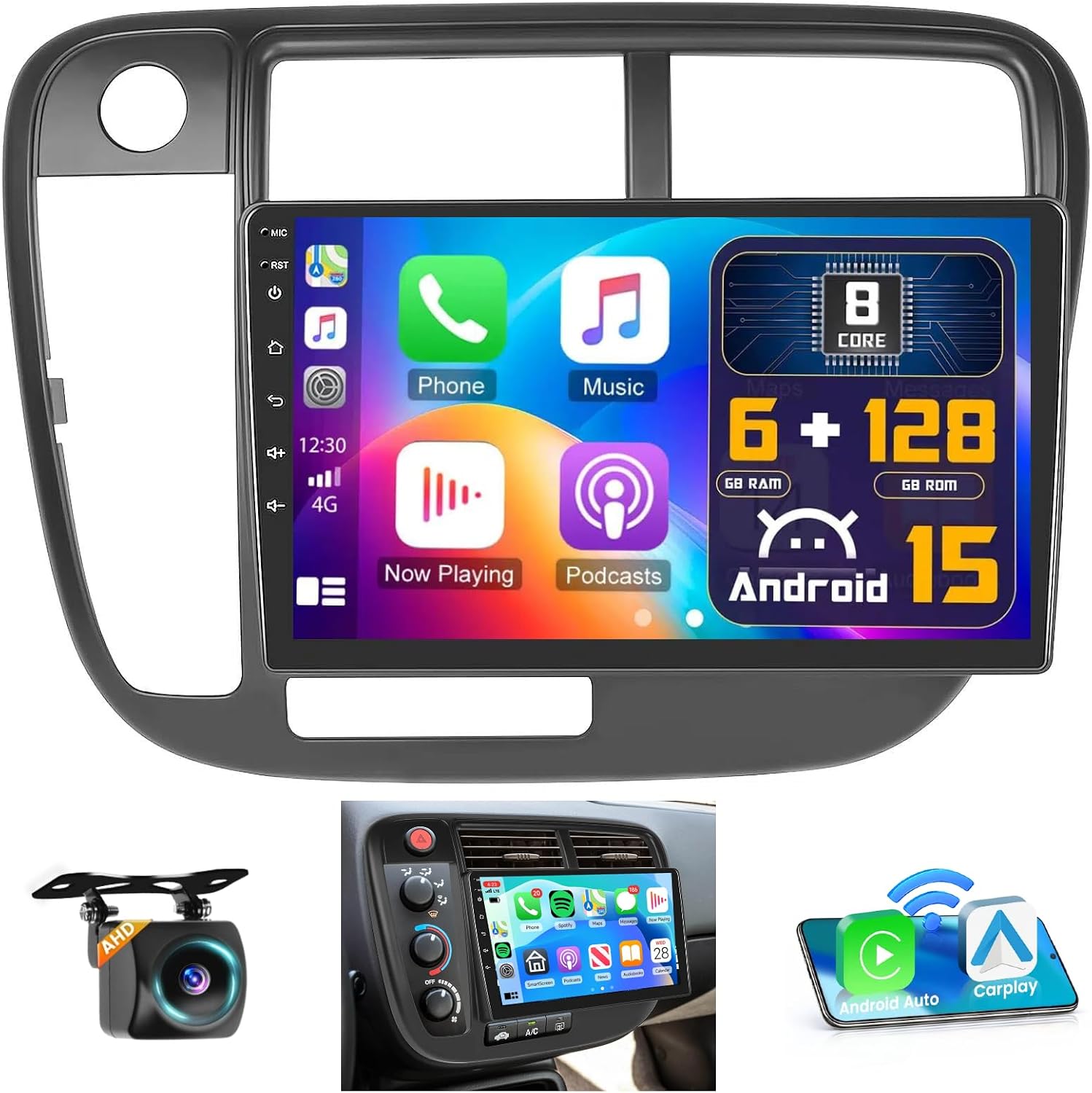
3. Hikity Android 15 9" Car Stereo for Honda Civic (1996–2001) — 6GB RAM, 128GB Storage
Best High‑RAM Performance Car Stereo
| Compatible vehicle | Honda Civic 1996-2001 |
|---|---|
| Screen size | 9 Inches |
| Display resolution | 1280×720 IPS |
| Memory | 6 GB RAM + 128 GB ROM |
| Connectivity | Wireless/Wired CarPlay, Android Auto, Bluetooth 5.0, Wi‑Fi |
This Hikity Android 15 unit replaces the factory head unit in 1996–2001 Honda Civics with a modern 9-inch IPS touchscreen and an 8-core Android processor intended for heavy in-car multitasking. With 6GB of RAM and 128GB of storage the system handles GPS navigation, streaming apps, and split-screen use with noticeably fewer slowdowns than lower-RAM units. It supports wireless and wired CarPlay and Android Auto, Bluetooth 5.0, Wi-Fi, and mirror-link so you can run maps, music, and messaging hands-free; steering-wheel control support and an external microphone help integration with the car. The built-in DSP and 32-band EQ give useful audio tuning and the package includes an AHD night-vision backup camera and all necessary cables. Expect a more app-capable, responsive interface compared with basic replacements, but be prepared for an involved install and some adaptation to the aftermarket dash fit and Android quirks; some phones may need a wired connection for CarPlay/Android Auto in certain cases. The unit is best when you prioritize smooth multitasking and added connectivity over a factory-matched appearance.
Best for: Buyers who regularly run navigation, streaming, and multiple apps at once and want a responsive, app-friendly head unit that keeps lag to a minimum.
Less Ideal for: Drivers who need a perfect factory-matched look or a simple plug-and-play radio with minimal installation work should consider other options.
- High-performance hardware with 6GB RAM and 128GB storage for smooth navigation and multitasking
- Supports wireless and wired Apple CarPlay and Android Auto for flexible phone integration
- Includes AHD night-vision backup camera and all necessary installation cables
- Built-in DSP and 32-band EQ for meaningful sound tuning and subwoofer output
- Wi‑Fi, Bluetooth 5.0, and split-screen support for streaming and simultaneous apps
- Aftermarket fitment may require modification or professional installation and some dash trim adjustments
- Some smartphone models may experience intermittent wireless CarPlay/Android Auto connections
Verdict: Select this slot if you run navigation, streaming apps, and multitask often — higher RAM models minimize lag and keep the interface responsive.
4. Hikity 9" Android Car Stereo with InCell Touchscreen and Backup Camera for Honda Civic 1996–2001 (4+128GB)
Best In‑Cell / IPS Display Car Stereo

| Compatible Vehicle | Honda Civic 1996–2001 |
|---|---|
| Screen Size | 9 Inches |
| Memory | 4 GB RAM, 128 GB ROM |
| Display Type | Incell capacitive |
| Connectivity | Wireless CarPlay, Android Auto, Bluetooth, Wi‑Fi |
This Hikity unit replaces the factory head unit in 1996–2001 Honda Civics with a bright 9-inch InCell capacitive touchscreen and a full Android platform. It is typically used as a daily-driver infotainment upgrade to add wireless CarPlay/Android Auto, navigation, streaming over Wi‑Fi, and hands‑free calling while keeping steering wheel controls functional. Notable features include a 128 GB internal storage and 4 GB RAM for responsive app use, dual USB ports, FM/RDS radio, built-in GPS, and a waterproof AHD rear camera in the box. The InCell panel improves daylight visibility and touch responsiveness versus older screens, and split-screen support helps run maps and media side by side. Expect a fuller feature set than a basic single-DIN swap, but installation may require dash trimming or adapter parts and some wiring time to retain factory features. Also the display resolution is 1280×720 rather than a higher-resolution modern tablet panel, so fine text is clear but not ultra-high definition.
Best for: Buyers who prioritize a high-quality touchscreen experience and modern smartphone integration in a period-correct upgrade for a 1996–2001 Honda Civic, and who are comfortable with a modest installation effort.
Less Ideal for: Drivers who want a plug-and-play swap with zero dashboard modification or those who need the absolute highest display resolution available in newer head units.
- InCell capacitive touchscreen for brighter daytime visibility and faster touch response
- Built-in Android with 4 GB RAM and 128 GB storage for smooth multitasking and app installs
- Wireless CarPlay and Android Auto plus MirrorLink for easy phone integration
- Includes GPS antenna and waterproof AHD rear camera for navigation and reversing visibility
- Dual USB ports and Bluetooth for media playback and hands-free calling
- May require custom dash kit, wiring harness, or trimming for a clean fit in older Civic dashboards
Verdict: Use this label for car stereos with higher-quality touch panels (In‑Cell or IPS) when screen clarity, sunlight visibility, and fast touch response matter most.
5. Hodozzy 9" Android 15 Car Stereo with Wireless CarPlay/Android Auto for Honda Civic 1996–2001
Best Audiophile / DSP Car Stereo

| Screen Size | 9 Inches |
|---|---|
| Memory Storage Capacity | 128 GB |
| Touch Screen Type | In-cell |
| Additional Features | Android Auto, Apple Carplay, Bluetooth, Touchscreen |
| Supported Satellite Navigation System | GPS |
This Hodozzy 9-inch double-din replaces the factory radio in Honda Civic 1996–2001 with a modern Android 15 head unit focused on connectivity and sound tuning. It provides wireless and wired CarPlay and Android Auto, GPS navigation with offline maps, Wi-Fi hotspot support, Bluetooth hands-free and media streaming, and mirror-link functionality. For audio, the unit includes a 36-band DSP equalizer, dedicated bass control, and a 4x45W amplifier output that lets you tune sound in-car and drive external amplifiers or a subwoofer. The 4GB RAM and 128GB storage make multitasking and map storage responsive, while dual USB ports and reversing camera input cover common installs. Practical limits include the need to wire steering wheel control manually without CANbus and potential installation complexity for cars needing additional adapters or dash trim. The interface offers many customization options, but buyers expecting turnkey OEM-like steering integration or factory amplifier passthrough may need extra parts or wiring work.
Best for: Buyers who prioritize in-car sound tuning and want the ability to add amplifiers or a sub while keeping modern smartphone integration and navigation in a Civic 1996–2001.
Less Ideal for: Drivers seeking a plug-and-play swap with full factory amp and steering-wheel integration without extra modules or wiring should consider a specialist installer or a different aftermarket option.
- 36-band DSP and dedicated bass control for fine-grained tuning
- Wireless and wired CarPlay/Android Auto plus Bluetooth for hands-free use
- 4x45W amplifier output and RCA camera input support adding external amps and a backup camera
- 4GB RAM and 128GB storage for fast startup, multitasking, and offline maps
- Steering wheel control requires manual button learning and no CANbus adapter is included
Verdict: Choose this when audio quality is a priority — units in this slot include DSP, extensive EQ controls, and outputs for amplifiers or subwoofers.
6. Fuluku 9" Android 15 Car Stereo for Honda Civic 1996–2001 (4GB/64GB)
Best Plug‑and‑Play Direct‑fit Car Stereo

| System | Android 15 |
|---|---|
| Memory | 4GB RAM + 64GB ROM |
| Display Size | 9 Inches |
| Power Output | 4×45W |
| Radio | FM / RDS |
This Fuluku 9-inch Android head unit is designed to directly replace the factory radio in 1996–2001 Honda Civics and modernizes the dash with a large in-cell touchscreen and Android 15 under the hood. Typical use is daily navigation, streaming, hands-free calling, and reversing with the included camera input. Notable features include 4 GB RAM and 64 GB storage for smooth multitasking, wireless CarPlay and Android Auto, built-in GPS, FM/RDS radio, EQ tuning, and support for steering wheel controls. The unit advertises plug-and-play wiring for this Civic generation, so installation is simpler than universal stereos and keeps factory functions like steering buttons and reverse trigger working. Practical benefits are a clear, responsive screen, reliable phone integration, and improved audio tuning over the stock head unit. Limitations are expected for budget head units: some setup and attention to wiring are required during install, and advanced users may find the interface less polished than premium OEM-grade systems. Overall it is a high-value direct-fit upgrade to bring modern connectivity to an older Civic.
Best for: Buyers who prioritize an easy, vehicle-specific install to modernize a mid‑1990s Civic with a large touchscreen, reliable phone integration, and preserved steering wheel functions.
Less Ideal for: Drivers seeking a premium, factory-level infotainment experience or enthusiasts who want the most polished interface and advanced audio hardware should consider higher-end alternatives.
- Vehicle-specific plug-and-play harness and trim for easier installation in 1996–2001 Honda Civics
- Wireless Apple CarPlay and Android Auto for phone mirroring without cables
- 9-inch in-cell touchscreen with 1280×720 resolution for better visibility and touch response
- 4GB RAM and 64GB storage give smooth navigation, multitasking, and media playback
- Backup camera input and steering wheel control support preserve key factory functions
- Setup can require patience and careful connection; not completely foolproof for first-time installers
- Interface and system polish are typical of budget Android head units and may lack some refinements of factory infotainment
Verdict: Pick this slot if you want an easy install: these stereos include the wiring harness, Canbus support or trim kit to preserve factory functions and simplify fitting.
7. Pioneer MVH-S230BT 1‑Din Digital Media Receiver with Bluetooth and USB
Best Single‑DIN / Compact Car Stereo

| Connectivity Technology | Bluetooth, USB |
|---|---|
| Audio Output Mode | Stereo |
| Output Power | 50 Watts |
| Connector Type | RCA, USB Type A |
| Supported Internet Services | Pandora, Spotify |
The Pioneer MVH-S230BT is a shallow single‑DIN, mechless media receiver aimed at drivers who need modern connectivity in tight dash spaces. It provides built‑in Bluetooth for hands‑free calls and wireless streaming, a front USB port for music playback and charging, and RCA outputs for adding an amplifier or subwoofer. The unit uses Pioneer’s Advanced Sound Retriever to improve compressed audio and delivers up to 50 watts per channel to factory or modest aftermarket speakers. Installation is easier than deeper head units thanks to its shallow chassis, so it fits older compact cars with limited clearance. The interface is simple with touch controls and smartphone compatibility through Pioneer’s app, but the feature set is basic compared with double‑DIN multimedia units: there is no touchscreen, no Apple CarPlay or Android Auto, and some users report intermittent Bluetooth pairing issues with newer phones. For a budget single‑DIN swap that prioritizes space and core audio functions, this is a practical choice; buyers who want navigation, a display, or seamless smartphone mirroring should look elsewhere.
Best for: Anyone who needs a compact, space‑friendly single‑DIN replacement that restores basic modern connectivity and improved sound without a large display or complex features.
Less Ideal for: Drivers who want a touchscreen, wireless CarPlay/Android Auto, or advanced infotainment features should choose a double‑DIN multimedia receiver instead.
- Shallow single‑DIN chassis fits vehicles with limited dash depth
- Built‑in Bluetooth for hands‑free calling and wireless music streaming
- Front USB input supports playback and device charging
- 50 W x 4 output delivers strong power for factory or entry‑level aftermarket speakers
- RCA output lets you add an amplifier or subwoofer easily
- No touchscreen or smartphone mirroring like CarPlay or Android Auto
- Some reports of inconsistent Bluetooth pairing with certain phones
Verdict: Use this label when you need a compact single‑DIN or flip‑out car stereo that fits limited dash space while still offering Bluetooth and basic modern features.
Choosing the Right 1996-2000 Honda Civic Car Stereo: Key Factors to Consider
Fit and Dash Compatibility
Physical fit determines whether a stereo installs cleanly in the Civic dash without major modification. The 1996-2000 Civic dash accepts either single DIN units with pocket kits or double DIN units where trim conversion is possible. Confirming bezel, mounting depth, and pocket requirements avoids surprises at install time.
Fit also affects appearance. A close-fitting head unit preserves factory aesthetics and reduces vibration or gaps that can rattle. Consider whether you want to retain factory climate controls placement and whether you prefer a fill pocket below a single DIN unit or a full touchscreen occupying the double DIN opening.
Wiring and Harnesses
Wiring compatibility controls how much labor or adapter hardware you need. The Civic from 1996-2000 uses specific wiring colors and connectors that can be matched with vehicle-specific harness adapters. Using a dedicated harness maintains retainment of features like factory speaker wiring, power, and illumination without cutting factory wires.
Also check whether an antenna adapter or steering wheel control interface is required. Steering wheel control retainers allow you to keep factory button functions and are especially valuable if you want integrated volume and track switching without aftermarket buttons.
Audio Quality and Preamp Features
Head unit audio characteristics influence the system's overall sound before amplifiers and speakers are changed. Look for higher preamp (RCA) output voltages, adjustable EQ, time alignment, and crossover settings if you plan to add amplifiers or upgraded speakers in the future. These features let you shape the system and provide cleaner signal to downstream components.
If you are keeping factory or budget speakers, improved source clarity, noise reduction, and better built-in equalization can yield the most noticeable listening improvement without additional gear.
Connectivity and Media Playback
Modern connectivity options determine how you interact with media and phones. Bluetooth is essential for hands-free calls and basic audio streaming. USB inputs allow music from flash drives and often provide better audio decoding. For advanced smartphone features, check for Apple CarPlay and Android Auto compatibility or support via compatible adapters.
Decide how important touchscreen controls, navigation, and voice assistant access are for your driving routine. Simpler units offer reliable Bluetooth and AM/FM, while touchscreen head units expand functions but may require more dash modification.
Controls and User Interface
Control layout affects usability while driving. Physical knobs and tactile buttons provide quick adjustments without looking away from the road, which some Civic owners prefer. Touchscreen interfaces can centralize functions but may require menu navigation for volume or source changes.
Consider whether you want to retain steering wheel control functionality and how easily the unit integrates with existing factory ergonomics. Interface responsiveness and clarity at a glance are important for safe, pleasant use.
Installation Complexity and Future Upgrades
The difficulty of installation influences total cost and time. A straightforward plug-and-play swap with a harness adapter and mounting kit can be completed quickly. More complex installations that require trimming, custom brackets, or dash modification increase labor and the potential for fitment issues.
Also think about future upgrades. A head unit with preamp outputs and expandable features will make adding amplifiers, subwoofers, or upgraded speakers easier down the line without replacing the source unit again.
Single DIN Vs Double DIN for EJ, EK, and EM Civics
The 1996-2000 Civic dash commonly accepts single DIN head units with a pocket insert to fill extra space. Single DIN replacements are compact, preserve more of the original dash look, and often retain simpler installation steps. They are a good choice if you value a clean OEM-like appearance and want easier DIY installation.
- Single DIN: smaller footprint, easier installation, often cheaper to replace.
- Double DIN: offers larger touchscreens, improved media and navigation options, but may require trim kits or dash modification.
Retaining Steering Wheel Controls and Factory Features
Many owners want to keep factory steering wheel controls and other conveniences when upgrading the stereo. There are readily available steering wheel control adapters designed for these Honda Civic years that translate factory button signals into commands the new head unit understands. Choosing a unit that supports these adapters avoids losing convenient controls and maintains a factory-like experience.
- Verify adapter compatibility with the chosen head unit.
- Confirm whether the adapter preserves multifunction features like mode and track change.
Smartphone Integration Options
If you want Apple CarPlay or Android Auto, check whether the head unit supports these natively or via an optional module. For owners focused on phone navigation, messaging, and music apps, a CarPlay/Android Auto-capable double DIN or compatible single DIN with screen option delivers the best experience.If smartphone mirroring is less important, reliable Bluetooth and USB playback still provide a significant convenience upgrade over the factory radio.
- Native CarPlay/Android Auto vs aftermarket adapters.
- Touchscreen responsiveness and visibility under sunlight.
Power and Speaker Output Considerations
Understand the head unit's built-in amplifier capabilities if you plan to keep stock speakers. Higher RMS output ratings and cleaner amplification reduce distortion at higher listening volumes. For substantial speaker upgrades or adding a subwoofer, prioritize a head unit with preamp RCA outputs to feed an external amplifier.
- Check number of preamp outputs and their voltage.
- Match head unit gain structure to planned amplifier and speaker setup.
Practical Installation Tips for Civic Owners
Plan the installation before purchasing by measuring mounting depth and checking dash clearance, especially behind the radio cavity. Gather needed items such as a vehicle-specific wiring harness, mounting kit or pocket, antenna adapter if required, and a steering wheel control interface if you want to retain those buttons.Test all functions on the bench when possible, label wires during removal, and keep fasteners and trim pieces organized for a clean reinstall. If you are uncomfortable with trimming or custom wiring, consider professional installation to ensure proper fit and prevent damage to dash components.
- Measure depth and dash clearance before choosing a unit.
- Use a vehicle-specific wiring harness to avoid cutting factory wires.
Still looking for the perfect fit?
Select your Honda Civic configuration to see the most relevant Car Stereos recommendations
How We Chose the Best 1996-2000 Honda Civic Car Stereo
We focused on options that fit the unique interior and wiring of 1996-2000 Honda Civic chassis codes EJ, EK, and EM while delivering improvements in audio, connectivity, and long-term reliability. Selection prioritized units with documented dash compatibility or clear installation pathways for Civic owners, a range of form factors including single DIN and double DIN head units, and modern connectivity such as Bluetooth, USB audio, and optional smartphone integration adapters.Evaluation criteria included physical fit and mounting options, wiring harness and vehicle-specific adapter availability, audio output quality and preamp features, ease of installation for DIYers and installers, and firmware/feature support for phone integration. We excluded units lacking documented compatibility with these Civic interiors or those that require extensive dashboard modification without clear benefit. The final list emphasizes practical, vehicle-specific choices that balance sound performance, features, and straightforward installation.
Our full evaluation process is outlined in our review methodology.
FAQ
Will a double DIN unit fit the 1996-2000 Civic dash without modification?
A double DIN can fit but may require a trim kit or some modification depending on the specific dash trim. Many owners install a conversion kit to achieve a clean fit; measure and plan ahead to avoid surprises.
Can I keep the factory steering wheel audio controls with a new stereo?
Often yes. Steering wheel control adapters exist that translate factory button signals to aftermarket head units. Confirm adapter compatibility with both the Civic wiring and the chosen head unit before buying.
Do I need a special wiring harness to install an aftermarket stereo?
A vehicle-specific wiring harness adapter is highly recommended. It preserves factory wiring, reduces installation time, and helps maintain features like ignition-switched power and illumination without cutting factory wires.
Is Bluetooth sufficient for modern phone use, or should I get CarPlay/Android Auto?
Bluetooth covers hands-free calling and basic audio streaming, but CarPlay or Android Auto provides a more integrated experience for navigation, messaging, and app control. Decide based on how often you rely on phone navigation and app access while driving.
Will replacing the head unit improve overall sound without new speakers?
Yes. A cleaner source with better signal processing and higher-quality preamp outputs often yields noticeable improvements even with factory speakers. However, for dramatic sound upgrades, complementary speaker or amplifier upgrades are recommended.
How difficult is the install for a DIYer with basic tools?
Difficulty varies. Single DIN swaps with a harness and pocket are usually straightforward for someone with basic tools. Double DIN or custom installations may require more advanced trimming, wiring, or bracket fabrication and could be better handled by a professional.
Final Verdict
When upgrading a 1996-2000 Honda Civic, prioritize correct fit and wiring compatibility first, then evaluate connectivity and audio features based on how you use the car. Single DIN units keep installation simple and preserve dash appearance, while double DIN touchscreen units add modern convenience if you are willing to accommodate the extra fitment work.Balance immediate listening improvements against future upgrade plans by choosing a head unit with solid preamp outputs and flexible connectivity. That approach keeps your options open and helps ensure the selected stereo meets both daily usability and long-term audio goals for your Civic.
Explore More:
- Check out all Honda Civic parts & accessories
- Explore Electronics
- Browse all Accessories
