

Note: This article contains affiliate links. If you click on these links and make a purchase, I may earn a small commission at no extra cost to you. This helps support my research and content. Read my full affiliate disclosure here.
If you drive a Ford Maverick, a dedicated dash cam can provide continuous evidence, safer driving behavior, and peace of mind on daily commutes or long trips. The right dash cam balances clear daytime and nighttime video, simple mounting that fits the Maverick's windshield and interior, and straightforward power and wiring options.This guide shortlists the top dash cams suited for the Maverick across several use cases, from compact units that stay out of sight to front-and-rear setups for full coverage. Below we explain the features we evaluated so you can pick the best dash cam for your driving needs and installation preferences.
Looking for other parts? See all Ford Maverick parts & accessories.
Top Picks at a Glance
| Best Overall Dash Cam The best all-around dash cam balancing features, quality, and value | mangoal Front 4K & Rear 1080P Dash Cam — Custom Fit for Ford Maverick (2022–2024) |  |
| Best Budget Dash Cam A low-cost option that still records reliably and clearly | GMAIPOP F19 4K Front Dash Cam with Wi‑Fi and 64GB Card |  |
| Best Premium Dash Cam A higher-end unit with top build quality and advanced features | ROVE R2-4K Dual Dash Cam with Front 4K and Rear 1080P, STARVIS 2 Sensor |  |
| Best 4K Dash Cam Ultra-high-resolution recording for maximum detail and clarity | VIOFO A229 Pro 4K+2K Dual STARVIS 2 Dash Cam (2-Channel) |  |
| Best Compact Dash Cam A small, low-profile camera that minimizes windshield obstruction | Garmin Dash Cam Mini 3 — Ultracompact 1080p Dash Camera with 140° FOV and Polarizer |  |
| Best Dual-Lens Dash Cam Front-and-rear or front-and-cabin coverage for broader protection | REDTIGER F7NP 4K Front + 1080P Rear Dual-Lens Dash Cam |  |
| Best Parking-Mode Dash Cam Reliable parked-vehicle monitoring with motion or impact detection | IIWEY N6 PRO 4-Channel 4K Dash Cam with STARVIS 2 |  |
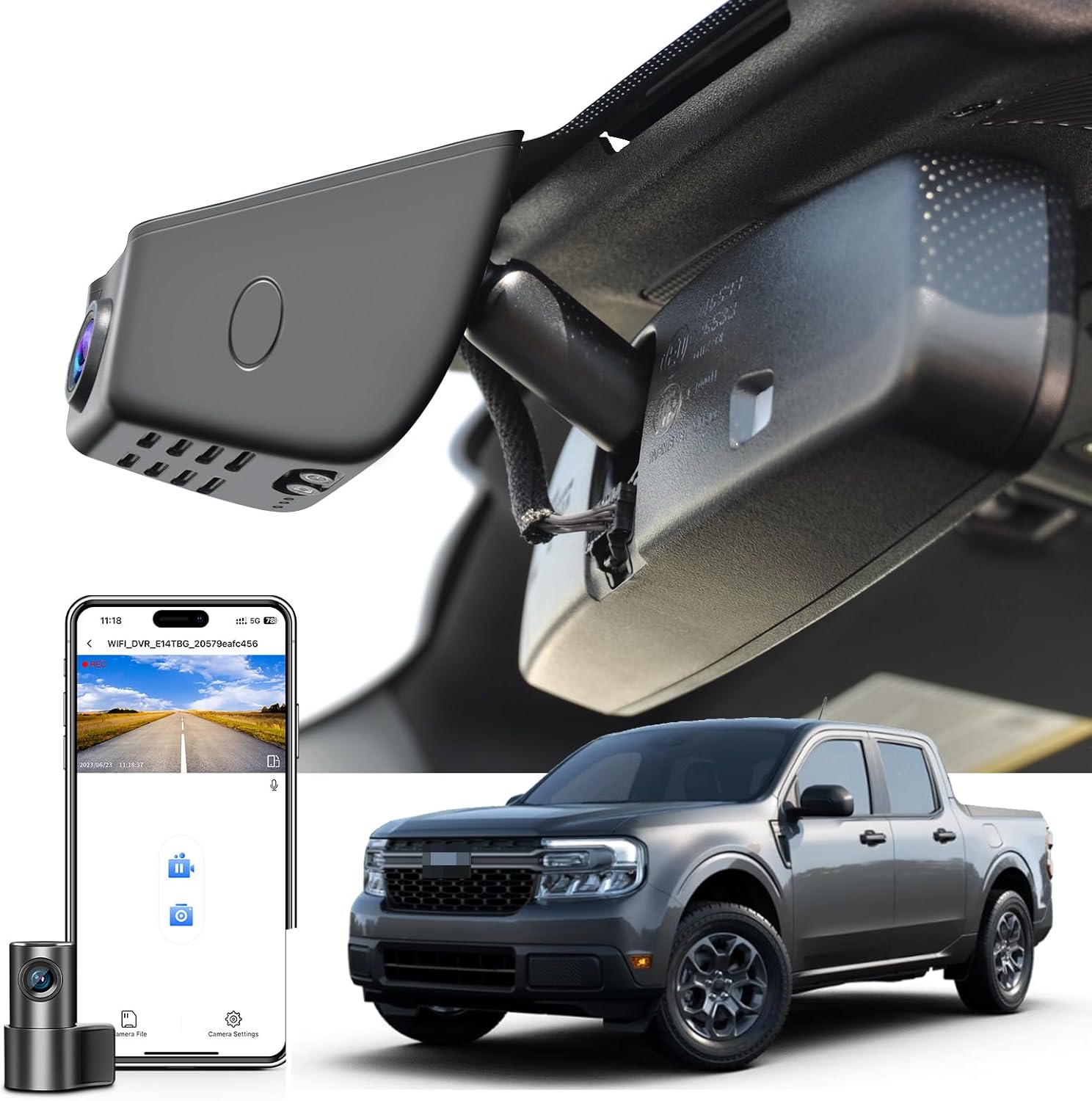
1. mangoal Front 4K & Rear 1080P Dash Cam — Custom Fit for Ford Maverick (2022–2024)
Best Overall Dash Cam
| Compatible with Vehicle Type | Ford 1st Gen Maverick 2022-2024 |
|---|---|
| Video Capture Resolution | Front 4K and Rear 1080P |
| Connectivity Technology | Wi-Fi |
| Included Memory Card Size | 128 GB |
| Control Method | App |
This mangoal dash cam is a vehicle-specific dual-channel system designed to sit behind the Maverick's rearview mirror for a factory-integrated look. It records the front in 4K and the rear in 1080p, uses a STARVIS IMX335 sensor for improved low-light clarity, and captures wide-angle views to preserve license plate and sign details. The unit includes built-in Wi‑Fi and a free app for on-phone preview and file downloads, plus GPS logging, loop recording, a G-sensor that locks incident clips, and optional parking monitoring when hardwired. Installation is straightforward for DIYers because the custom mount and supplied plug-and-play adapter minimize exposed wiring, though parking mode may require a fuse-box accessory to avoid battery issues. App preview is compressed for smooth performance so original-quality playback requires downloading the AHD file. Packaged extras include a 128 GB microSD card and a GPS module so the camera is ready to use out of the box. For most Maverick drivers this delivers high-quality daytime and improved night captures in a neat, factory-style package, with the main limitation being app preview compression and the need for the correct power adapter for dependable parking surveillance.
Best for: Drivers who want a near-factory dash cam for a Ford Maverick that balances top-tier front video, simple DIY installation, and helpful safety features without visual clutter.
Less Ideal for: Users who need remote cloud streaming or truly remote live viewing capabilities, or those who prefer a universal dash cam that fits many vehicle types rather than a model-specific unit.
- Custom-fit design tucks unit behind the mirror for an OEM look and clean wiring
- Front 4K and rear 1080p recording with STARVIS sensor for better low-light detail
- Built-in Wi‑Fi, free app, and GPS make reviewing and geotagging clips convenient
- Includes 128GB microSD card, GPS module, and plug-in power adapter for out-of-box use
- G-sensor and loop recording automatically protect incident footage
- App preview is compressed so original-quality video must be downloaded for best detail
Verdict: The best all-around dash cam that balances video quality, reliability, ease of installation, and useful features for most drivers and DIY mechanics.
2. GMAIPOP F19 4K Front Dash Cam with Wi‑Fi and 64GB Card
Best Budget Dash Cam

| Video Capture Resolution | 4K |
|---|---|
| Field Of View | 170 degrees |
| Connectivity Technology | Wi‑Fi (5GHz via app) |
| Included Memory Card Size | 64 GB |
| Frame Rate | 30 fps |
The GMAIPOP F19 is a compact, budget-oriented 4K front dash cam designed for straightforward daily use in a Ford Maverick. It records 4K/30fps with a 170 degree field of view, so it captures clear license-plate level detail and wide coverage of the road ahead. Setup is simple: adhesive windshield mount, plug into the vehicle power port, and configure settings in the free Framefox app over faster 5GHz Wi‑Fi for quick clip review and downloads. The unit includes loop recording, an adjustable G-sensor to auto-lock incident clips, HDR night enhancements, and a preinstalled 64GB high-endurance microSD card so you can start recording without buying extras. Parking mode and time-lapse features are available when the cam is hardwired, which adds protection when the vehicle is unattended but requires an extra hardwire kit. The 1.47 inch IPS screen and detachable mini design keep the camera low profile behind the mirror, but the small display limits on-device playback and advanced menu navigation. For a Maverick owner wanting dependable, no-frills video evidence and easy DIY install, this covers the essentials at a low cost.
Best for: Budget-minded Maverick owners who want clear, reliable front-facing video and a simple DIY install without extra purchases or technical setup.
Less Ideal for: Drivers who need integrated rear or interior recording, extensive on-device controls, or a full hardwired multi-camera system should consider higher-end options.
- True 4K recording at 30 fps for detailed daytime and night captures
- 5GHz Wi‑Fi and app control for fast clip review and downloads without a PC
- Includes a preinstalled 64GB high‑endurance microSD card so it is ready to use
- Adjustable G‑sensor and loop recording automatically protect incident footage
- Compact, low‑profile design that mounts discreetly behind the mirror
- Parking mode requires a separately sold hardwire kit to function when ignition is off
- Small 1.47 inch screen limits on‑camera review and menu control
Verdict: The best low-cost dash cam for buyers who need dependable recording and basic features without spending much, ideal for budget-conscious DIY installers.
3. ROVE R2-4K Dual Dash Cam with Front 4K and Rear 1080P, STARVIS 2 Sensor
Best Premium Dash Cam

| Front resolution | 3840×2160@30fps |
|---|---|
| Rear resolution | 1920×1080@30fps |
| Sensor | Sony STARVIS 2 (IMX675) for front |
| Storage support | Includes 128GB microSD; supports up to 1TB |
| Connectivity | Dual-band Wi‑Fi (5GHz/2.4GHz) with app |
The ROVE R2-4K Dual is a feature-rich premium dash cam intended to capture high-resolution evidence for daily driving and parking surveillance. The front unit records 3840×2160@30fps using a Sony STARVIS 2 sensor and an f/1.5 aperture for strong low-light detail, while the rear camera records 1080p@30fps with a 140° field of view. You get built-in GPS for speed and location stamps, a 3" IPS screen for on-camera review, and 5GHz Wi-Fi with app control to download clips quickly. The kit includes a 128GB microSD and long rear-extension cabling, plus a supercapacitor for improved temperature resilience. Parking mode options include timelapse, motion detect, and collision-triggered clips when hardwired. For installation on a Ford Maverick the compact front unit and included mounting hardware make on-windshield placement straightforward and the long rear cable reaches most small pickup beds and cabs. Be aware that full 24/7 parked surveillance requires buying a hardwire kit separately and some advanced settings are easiest to manage via the app rather than on-screen menus.
Best for: Buyers who prioritize top-tier video quality and a broad feature set for continuous in-vehicle recording and parking monitoring on their Maverick, and who want fast app access to footage.
Less Ideal for: Drivers who only need a simple, no-frills recorder or who do not plan to hardwire the unit for parking mode should consider more basic single-channel options.
- True 4K front recording with Sony STARVIS 2 sensor for superior daytime and night detail
- 5GHz Wi-Fi and app support enable fast downloads up to 20 MB/s and remote settings management
- Built-in GPS records speed and route stamps for reliable evidence
- Includes 128GB microSD card and long rear cam extension cable for complete dual-channel setup
- Supercapacitor design improves reliability in extreme heat or cold compared with battery units
- Hardwire kit for continuous parking surveillance is sold separately
Verdict: The best premium dash cam for users who want superior video resolution, robust build, long feature lists, and top-tier performance regardless of price.
4. VIOFO A229 Pro 4K+2K Dual STARVIS 2 Dash Cam (2-Channel)
Best 4K Dash Cam

| Video Capture Resolution | 1440p, 2160p |
|---|---|
| Field Of View | 140 Degrees |
| Connectivity Technology | Type‑C |
| Flash Memory Supported Size Maximum | 512 GB |
| Frame Rate | 30 |
The VIOFO A229 Pro records a 4K front view and 2K rear view simultaneously using dual Sony STARVIS 2 sensors and HDR to capture crisp details day or night. It mounts to the windshield and is controlled via the VIOFO app over fast 5GHz Wi‑Fi or with 12 hands‑free voice commands for safe operation while driving. Practical features include a quad‑mode GPS logger for precise speed and location stamping, loop recording with automatic event locking, a CPL filter to cut windshield glare, and a built‑in supercapacitor for reliable power in hot or cold climates. For parked protection it offers buffered parking mode that saves 15 seconds before and 30 seconds after a triggered event and three recording modes to manage storage. The A229 Pro is feature rich for evidence-grade video, but it does not include an SD card or the hardwire kit needed for continuous monitoring out of the box, so plan for those purchases if you want full 24/7 operation.
Best for: Drivers who need the clearest possible video evidence for incidents and license plate capture and who will prioritize image quality and reliable recording over buying a minimal setup.
Less Ideal for: Buyers wanting a plug‑and‑play package with every accessory included or those who prefer a single‑channel budget unit focused only on basic recording.
- True 4K front and 2K rear recording with Sony STARVIS 2 sensors for strong low‑light detail
- Dual HDR processing for balanced highlights and shadows at night
- Fast 5GHz Wi‑Fi and app control for quick previews and file transfers
- Buffered 24H parking mode with event pre‑buffer and automatic emergency lock
- Included CPL and long 6m rear cable make installation and glare reduction easier
- No microSD card included so you must buy a high‑endurance card separately
- Hardwire kit for full parking power management is sold separately
Verdict: The best 4K dash cam for drivers who prioritize the highest video detail for capturing license plates, incidents, and fine visual evidence.
5. Garmin Dash Cam Mini 3 — Ultracompact 1080p Dash Camera with 140° FOV and Polarizer
Best Compact Dash Cam

| Video Capture Resolution | 1080p |
|---|---|
| Field Of View | 140 Degrees |
| Frame Rate | 24 FPS |
| Connectivity Technology | Bluetooth, USB, Wi‑Fi |
| Memory Slots Available | 1 |
The Garmin Dash Cam Mini 3 is a near-key-sized windshield camera built for discreet, everyday recording on your Ford Maverick. It mounts low and unobtrusively and automatically captures 1080p video at 24 fps with a 140-degree field of view to record incidents and surrounding traffic. The Clarity polarizer and HDR optics reduce glare and help preserve license-plate and detail legibility in bright or low light. Setup and file transfer use Wi‑Fi and the Garmin Drive app, and voice commands let you save clips or toggle audio without touching the device. Optional cloud features such as Vault, parking guard notifications, and live view require a paid subscription plus constant power and Wi‑Fi. Because the unit is so small it relies on a dedicated power cable for continuous features and has a single memory slot, so intensive multi-cam setups or heavy local storage needs may require extra accessories. For Maverick drivers wanting an unobtrusive, easy-to-install camera that still records clear evidence-quality video, this is a practical compact choice.
Best for: Ford Maverick owners who prioritize a discreet, space-saving camera that is easy to mount and operate with minimal visual impact on the interior.
Less Ideal for: Drivers who need long-term local storage, multi-camera recording without extra gear, or full-featured cloud services without subscribing to additional services should consider larger or more feature-rich alternatives.
- Exceptionally small, low-profile housing that blends into the windshield
- 1080p recording with 140° field of view for wide coverage of the road
- Built-in Clarity polarizer and HDR optics to reduce windshield glare and improve detail
- Voice control for hands-free saving and recording commands
- Wi‑Fi and Garmin Drive app support for easy clip transfer and cloud features
- Advanced remote features like live view and parking notifications require a paid Vault subscription plus constant power and Wi‑Fi
Verdict: The best compact dash cam for users who want a discreet, space-saving unit that is easy to mount and blends into the vehicle interior.
6. REDTIGER F7NP 4K Front + 1080P Rear Dual-Lens Dash Cam
Best Dual-Lens Dash Cam

| Front resolution | 4K |
|---|---|
| Rear resolution | 1080P |
| Wide angle (front) | 170° |
| WiFi | Built-in 5.8GHz, up to 20MB/s |
| Power type | Supercapacitor |
The REDTIGER F7NP is a two-channel dash cam designed to record front and rear views simultaneously, delivering 4K footage up front and 1080p from the rear. Installation mounts the front unit to the windshield and runs the rear camera along the headliner or rear glass for continuous coverage while driving and when parked. The STARVIS 2 sensor, f/1.5 aperture, WDR/HDR processing, and wide-angle lenses improve low-light detail and balance highlights for clearer night and shadowed scenes. Built-in 5.8GHz WiFi and the Redtiger Cam app make previewing and downloading clips quick, while GPS logging embeds route and speed data for evidence. Loop recording, a G-sensor that locks collision clips, and a time-lapse parking mode provide round-the-clock protection when the system is hardwired. Using a supercapacitor instead of a battery increases heat tolerance for hot cabins. Downsides to note are the need to hardwire for full 24/7 parking functionality and that true 4K file sizes demand ample storage and occasional file management.
Best for: Drivers who want continuous front-and-rear evidence capture for incidents and parking protection and who prioritize image quality and fast wireless access to clips.
Less Ideal for: Drivers who need a plug-and-play parking solution without hardwiring or those unwilling to manage larger 4K video files frequently.
- 4K front and 1080p rear simultaneous recording for comprehensive incident coverage
- STARVIS 2 sensor with WDR/HDR and f/1.5 aperture improves low-light and night clarity
- 5.8GHz WiFi and app support enable fast downloads and on-phone playback
- G-sensor plus loop recording protects and preserves collision clips automatically
- Supercapacitor design resists heat and extends operating life in hot cabins
- Full 24/7 parking monitoring requires a separate hardwire kit and professional or careful installation
- 4K front video creates large files that need substantial storage and occasional management
Verdict: The best dual-lens dash cam for drivers who want simultaneous front and rear (or cabin) recording to capture more angles during incidents or while parked.
7. IIWEY N6 PRO 4-Channel 4K Dash Cam with STARVIS 2
Best Parking-Mode Dash Cam

| Video Capture Resolution | 4K 2160P front, 1080P side/rear/inside |
|---|---|
| Connectivity Technology | 5G WiFi (Wi‑Fi 6) and GPS |
| Included Memory Card Size | 128 GB |
| Flash Memory Supported Size Maximum | 512 GB |
| Other Special Features | 24/7 Parking Mode, STARVIS 2, Supercapacitor |
The IIWEY N6 PRO is a four-camera dash system designed to deliver continuous coverage around a vehicle, recording a native 4K front view and three 1080p streams to eliminate blind spots. Installation uses a windshield mount with a wired rear camera and the kit includes tools and a high-endurance 128 GB card. For parking surveillance it relies on a heat-resistant supercapacitor and an AI parking sentinel that supports time-lapse recording and impact detection when paired with IIWEY’s hardwire kit to enable 24/7 monitoring. Night performance is strong thanks to Sony STARVIS 2 sensors and an 8-IR lamp array that improve cabin and side visibility without heavy windshield glare. The unit also offers fast 5 GHz Wi-Fi 6 app downloads and built-in GPS for location-stamped footage. Expect a more involved install for full parking-mode functionality and the need to buy the compatible hardwire kit if your Maverick lacks a constant accessory power source, but the N6 PRO aims to provide reliable around-the-clock evidence capture for parked vehicles.
Best for: Drivers who prioritize continuous, trustworthy surveillance of their parked vehicle and want multi-angle evidence capture for incidents like hit-and-runs or vandalism.
Less Ideal for: Buyers who cannot or will not install a hardwire kit or who need a simple 2-channel plug-and-play dash cam with no additional wiring work.
- True 4K front plus triple 1080p channels for near 360-degree coverage
- Sony STARVIS 2 sensors and 8 IR lamps for clear low-light interior and side views
- Supercapacitor rated for high temperatures improves long-term reliability
- AI parking sentinel with time-lapse mode conserves storage while monitoring 24/7 when hardwired
- 5 GHz Wi-Fi 6 and app control make downloading high-bitrate footage fast and convenient
- 24/7 parking mode requires IIWEY hardwire kit or a constant power source to function
- Original car charger or specific USB wiring is required for proper power; some vehicles need additional wiring
Verdict: The best parking-mode dash cam for owners who need dependable surveillance while the vehicle is parked, offering motion/impact detection and low-power recording options.
Choosing the Right Ford Maverick Dash Cam: Key Factors to Consider
Video Resolution and Low-Light Performance
High-resolution recording helps capture license plates and fine detail, which is essential when footage may be used for insurance or police reports. For the Maverick, a camera that records at 1080p or better will often provide clearer evidence at normal driving distances and speeds.
Low-light sensitivity and wide dynamic range matter for dawn, dusk, and nighttime driving. Sensors and image processing that reduce glare and handle bright headlights make the difference between usable and unusable nighttime clips. When comparing options, check sample footage or specifications related to night mode and aperture rather than relying solely on an advertised resolution.
Mounting Style and Size
The physical size and mount design determine how the dash cam fits on the Maverick windshield and behind the rearview mirror. Compact dashboard cameras are less likely to interfere with sightlines, cabin sensors, or automatic wipers. A low-profile mount also reduces the chance of detachment from heat or vibration.
Consider whether you prefer adhesive pads or a suction mount based on how often you plan to move the unit between vehicles. For dual-channel setups, ensure the rear camera's cable length and mounting options suit the Maverick's cabin and tailgate layout to maintain tidy routing and reliable attachment.
Power Options and Parking Mode
How a dash cam gets power affects installation complexity and long-term usability. Plug-in power via the 12V outlet is simplest but may leave the device on whenever the outlet is live. Hardwiring kits let the camera operate with the vehicle battery for parking mode but require careful installation and consideration of battery draw.
Parking mode, which activates recording when motion or impact is detected while parked, is particularly useful in urban parking situations. Look for configurable sensitivity levels and low-power modes that help preserve the Maverick's battery while still capturing important events.
Storage Management and Loop Recording
Dash cams typically use loop recording so the device can continuously record without running out of storage. Reliable file management prevents clip corruption and ensures incident segments are saved securely. Support for larger microSD cards and clear formatting procedures reduces the chance of unexpected recording gaps.
Some models protect files automatically when an impact is detected, while others require manual locking. Examine how easy it is to retrieve saved clips—whether via physical card removal or wireless transfer—and confirm the camera supports the card capacities you plan to use.
Connectivity and User Interface
Wi-Fi and smartphone integration simplify downloading clips, adjusting settings, and reviewing footage without removing the memory card. For Maverick owners who frequently capture short trips, app-based review is a major convenience. However, app reliability and firmware update paths vary widely.
An intuitive onboard interface, clear indicator LEDs, and physical buttons help when quick manual actions are needed. Balancing app features with straightforward on-device controls ensures you can get the clips you need in varying situations.
Durability and Warranty Support
Dash cams are exposed to heat, vibration, and temperature swings inside a vehicle. Units with rated operating temperature ranges and solid mount construction stand up better in direct sun and during seasonal extremes. Durable cables and connectors reduce failure points over months of use.
Warranty length and the availability of firmware updates also matter. A responsive support channel and regular firmware improvements can address bugs or compatibility problems that emerge after installation in the Maverick.
Single-Channel Versus Dual-Channel Setups
Decide whether you need only a front-facing unit or both front and rear coverage. A single front camera still captures most collision scenarios, while a front and rear dash camera setup provides comprehensive evidence for rear-end incidents and hit-and-runs involving the back of the Maverick.
Dual-channel systems often require more planning for cable routing and may necessitate a longer installation time, but they reduce blind spots and can be invaluable when parking or driving in congested areas.
- Front-only: simpler installation, covers head-on collisions and forward traffic.
- Front-and-rear: fuller coverage for rear impacts and incidents while reversing.
- Consider cable routing paths along trim panels to keep the installation tidy.
Hardwiring and Professional Installation Considerations
Hardwiring a dash cam to the Maverick can enable parking mode and produce a cleaner installation. If you choose hardwiring, have the installation tied into a fused ignition circuit and consider a dedicated parking mode module to prevent excessive battery drain.
Professional installation can ensure that airbags, wiring harnesses, and factory sensors are not disturbed. If you prefer a DIY approach, use a circuit tester and follow vehicle wiring diagrams to identify appropriate fuse locations for constant and switched power.
- Use inline fuses to protect both vehicle and camera circuits.
- Consider a low-voltage cutoff device to protect the Maverick battery.
- Route cables under headliner and door trim for a factory look.
Mounting Locations and Legal Visibility
Place the dash cam where it captures a wide field of view without blocking the driver's line of sight or violating local windshield obstruction laws. Mounting behind the rearview mirror is a common solution for the Maverick because it keeps the camera centered and discreet.
If you use a suction mount, ensure it is rated for heat to avoid detachment. Adhesive mounts provide a more permanent installation but may leave residue if removed later.
- Center behind mirror for balanced forward coverage.
- Low-profile mounts reduce glare from sunlight and interior lighting.
- Check local regulations regarding windshield-mounted devices before final placement.
Managing Video Evidence and File Backup
Establish a routine for backing up important clips to avoid accidental deletion. If your camera supports Wi-Fi transfer, periodically offload critical incidents to your phone and then to cloud storage or a computer.
Label and organize files by date and incident type so retrieving footage during a claim or police inquiry is efficient. Frequent formatting of the microSD card per manufacturer guidance can also reduce file errors over time.
- Use date-stamped folders for easier search and retrieval.
- Keep at least one backup copy of any legally relevant footage.
- Test playback on a PC to confirm file integrity after transferring.
Optimizing Settings for Daily Driving and Road Trips
Adjust settings based on how you use the Maverick. For everyday commuting, moderate loop lengths and auto-lock on impact are practical. For long road trips, you may prefer longer loop intervals, higher bitrate recording, and ample card capacity to reduce the frequency of manual maintenance.
Also consider enabling GPS logging if you want speed and location data embedded in clips. GPS can help corroborate incident timelines but may slightly increase power usage and file sizes.
- Higher bitrate and resolution for long trips to preserve detail.
- Enable timestamp and GPS overlays when location and speed are important.
- Balance sensitivity of motion detection to avoid excessive parking clips.
How We Chose the Best Ford Maverick Dash Cam
Our selection focused on practical factors that matter to Ford Maverick owners. We prioritized consistent video quality in both daytime and low-light conditions, since clear footage is the primary value of a dash cam. We also assessed mounting compatibility and size so units sit properly on the Maverick windshield without obstructing the driver or sensors.Power and wiring options were a key filter. We looked for units that support hardwiring or simple 12V power connections, plus models offering parking or motion detection modes that function reliably when the vehicle is off. Storage reliability mattered too: support for stable loop recording and robust file handling reduces the chance of missing or corrupted clips.Other evaluation criteria included ease of installation and cable routing in the Maverick cabin, user interface simplicity for on-board operation, and connectivity features such as Wi-Fi or smartphone apps for quick file transfer. We excluded models lacking basic safety recording functions, unclear documentation, or known firmware instability. The final list balances usability, dependable recording, and sensible installation for Maverick owners.
Our full evaluation process is outlined in our review methodology.
FAQ
Will a dash cam affect my Ford Maverick warranty?
Installing an aftermarket dash cam typically does not void vehicle warranties if done correctly. Hardwiring should be performed without altering factory systems and using proper fuses; if unsure, consult a professional installer to avoid inadvertently impacting related components.
Can I install a front-and-rear dash camera myself in the Maverick?
Many owners can install a dual-channel system with patience and the right tools, but routing the rear cable neatly often requires removing trim panels. If you are uncomfortable with interior trim removal or vehicle wiring, professional installation reduces risk of damage.
How much storage do I need for regular driving and road trips?
Storage needs depend on resolution and bitrate. For typical 1080p recording, a 32GB to 64GB card handles daily use for several hours; for longer road trips or higher bitrate recordings, 128GB provides more headroom. Always check the camera's supported maximum card size.
Does a dash cam drain the Maverick battery when parked?
Parking-mode features draw some power while the vehicle is off. The actual drain depends on the camera's power design and sensitivity settings. Using a hardwiring kit with a low-voltage cutoff or a dedicated parking power module helps protect the Maverick battery.
Is Wi-Fi connectivity useful for a dash cam in daily use?
Wi-Fi makes it easy to transfer clips and change settings without removing the memory card. It is especially handy for quick sharing of short incident clips, though the convenience depends on app stability and transfer speeds.
How should I position the camera to avoid glare and reflections?
Mount the camera close to the windshield and slightly below the rearview mirror to minimize reflections from the dash. Clean the windshield and consider using a polarizing filter if available for your camera model to reduce glare.
Final Verdict
Prioritize clear daytime and nighttime recording, a mounting style that fits discreetly on the Maverick windshield, and reliable power options that support parking mode without risking battery drain. Balance resolution and bitrate with storage capacity so you capture usable evidence without frequent maintenance.Choosing between a compact single-channel unit and a front-and-rear system comes down to how much coverage you want and how involved you want the installation to be. Focus on proven file management, stable mounts, and straightforward connectivity to pick a dash cam that will serve the Maverick reliably for years.
Explore More:
- Check out all Ford Maverick parts & accessories
- Explore Electronics
- Browse all Accessories
