

Note: This article contains affiliate links. If you click on these links and make a purchase, I may earn a small commission at no extra cost to you. This helps support my research and content. Read my full affiliate disclosure here.
If you drive a Honda Ridgeline, swapping the factory radio can make a noticeable difference in sound quality, connectivity, and daily usability. You want a unit that fits the vehicle dashboard, integrates with steering-wheel controls, and offers the features you use most often.This guide highlights seven shortlisted options for the Ridgeline and explains why they earned consideration. We evaluated fitment, wiring needs, and connectivity features to help you pick a straightforward upgrade that suits your driving habits.
Looking for other parts? See all Honda Ridgeline parts & accessories.
Top Picks at a Glance
| Best overall The best all-around choice for most situations | Jensen J1CA7-BUC 7" Double DIN Car Stereo with Apple CarPlay & Android Auto |  |
| Best quality Built to a higher standard if you want something more solid | RONGJI 9" Android 13 Car Stereo for Honda Ridgeline (2005–2015) — 8GB+128GB |  |
| Best Value The sweet spot between price and what you get | ikasus 7" Android 15 Double-DIN Car Stereo for Honda Ridgeline 2006–2014 |  |
| Best budget The cheapest option that still gets the job done reliably | ikasus Android 13 Double-DIN Car Stereo for Honda Ridgeline (2006–2014) | |
| Highest Rated A top-rated pick with lots of positive feedback | SJOYBRING JOY-W006 7" Wireless Double-DIN Car Stereo with Wireless Apple CarPlay and Android Auto |  |
| Most popular A crowd favorite that many people choose with confidence | Kenwood KMM-BT325 Bluetooth Digital Media Receiver (with Alphasonik Earbuds) |  |
| Best Seller A high-volume bestseller chosen again and again | Pioneer MVH-S322BT Single-DIN Bluetooth Digital Media Receiver |  |
1. Jensen J1CA7-BUC 7" Double DIN Car Stereo with Apple CarPlay & Android Auto

| Display Size | 7 inch |
|---|---|
| Phone Connectivity | Apple CarPlay, Android Auto, Bluetooth |
| Backup Camera | Included (rear input) |
| Peak Power | 240W (60W x 4) MOSFET |
| RCA Preamp Outputs | 3 Pair (Front + Rear + Sub) |
The Jensen J1CA7-BUC is a practical double DIN upgrade that brings certified Apple CarPlay and Android Auto to the dash while keeping operation straightforward. It installs as a standard two-DIN unit and is typically used to replace a factory stereo to add touchscreen navigation, voice control, and media playback from phone apps. Notable features include a 7-inch high-resolution touchscreen, built-in Bluetooth with an external microphone for hands-free calling, a bundled backup camera input with camera included, and three-pair RCA preouts for adding amps or a sub. The receiver also offers an 8-band graphic EQ, time alignment, and multiple presets for tuning. Important limitations to expect are wired-only CarPlay/Android Auto connectivity and modest USB charging current, and some users report missing advanced call audio and camera orientation controls in the menu. For a Ridgeline this unit delivers a reliable, feature-focused upgrade without overwhelming complexity, but installers should plan for a professional install if they are not comfortable with dash work or wiring integration.
Best for: Balanced owners who want a dependable, feature-rich factory-style infotainment upgrade for everyday driving and smartphone integration without chasing advanced aftermarket customization.
Less Ideal for: Drivers who need wireless CarPlay, extensive on-unit signal processing, or a plug-and-play swap with no dash modifications should consider other options or professional installation assistance.
- Certified Apple CarPlay and Android Auto for direct smartphone apps and voice control
- Bundled backup camera and rear camera input for safer reversing
- Three-pair RCA preouts for adding external amplifiers and subwoofer
- 7-inch high-resolution touchscreen with responsive touch interface
- Built-in Bluetooth with external microphone for hands-free calling and audio streaming
- CarPlay and Android Auto require a wired USB connection only
- Limited on-unit call audio and camera orientation settings reported by some users
- USB charging current is modest compared with fast-charge capable units
Verdict: A straightforward, balanced double DIN upgrade that brings certified CarPlay/Android Auto and a bundled backup camera to a Ridgeline dash while keeping installation and tuning options simple.
2. RONGJI 9" Android 13 Car Stereo for Honda Ridgeline (2005–2015) — 8GB+128GB

| Operating System | Android 13 |
|---|---|
| Memory | 8GB RAM + 128GB ROM |
| Display resolution | 1280×720 |
| Display Size | 9 Inches |
This RONGJI head unit replaces the factory radio in Honda Ridgeline models from 2005 to 2015 and brings a modern Android 13 interface with an octa-core processor and 8GB RAM plus 128GB storage. It is typically used as a daily driver upgrade to add navigation, streaming, and hands-free calling. Key features include a 9-inch 1280×720 capacitive touchscreen, wireless and wired CarPlay and Android Auto, built-in Bluetooth with microphone support, FM/AM radio, WiFi, GPS with external antenna, DSP EQ, and steering wheel control compatibility. Practically, the unit provides fast app loading, split-screen multitasking, offline or online maps, and clearer call/audio handling compared with older factory stereos. Important limitations are the need to confirm dashboard and harness fitment before purchase and that a rear camera is not included. Installation may require additional adapters or professional fitment to preserve steering wheel controls and factory connections.
Best for: Performance-focused Ridgeline owners who want a responsive, feature-rich infotainment upgrade to modernize daily driving and navigation experience.
Less Ideal for: Buyers seeking a direct plug-and-play swap with guaranteed fitment without any wiring or dash modification should consider professional installation or a different model with vehicle-specific harnesses included.
- Modern Android 13 OS with octa-core CPU and 8GB+128GB for smooth multitasking and app storage
- Wireless and wired CarPlay and Android Auto for seamless phone integration
- Built-in GPS with external antenna plus WiFi for online or offline navigation
- DSP EQ and improved audio handling over older factory units
- Supports steering wheel controls and Bluetooth hands-free calling
- Does not include a rear camera; camera must be purchased separately
- Fitment and wiring may require dash photos confirmation or additional adapters for proper installation
Verdict: A performance-oriented infotainment upgrade that brings modern Android features and fast hardware to the Ridgeline but requires fitment checks and possible installation adapters.
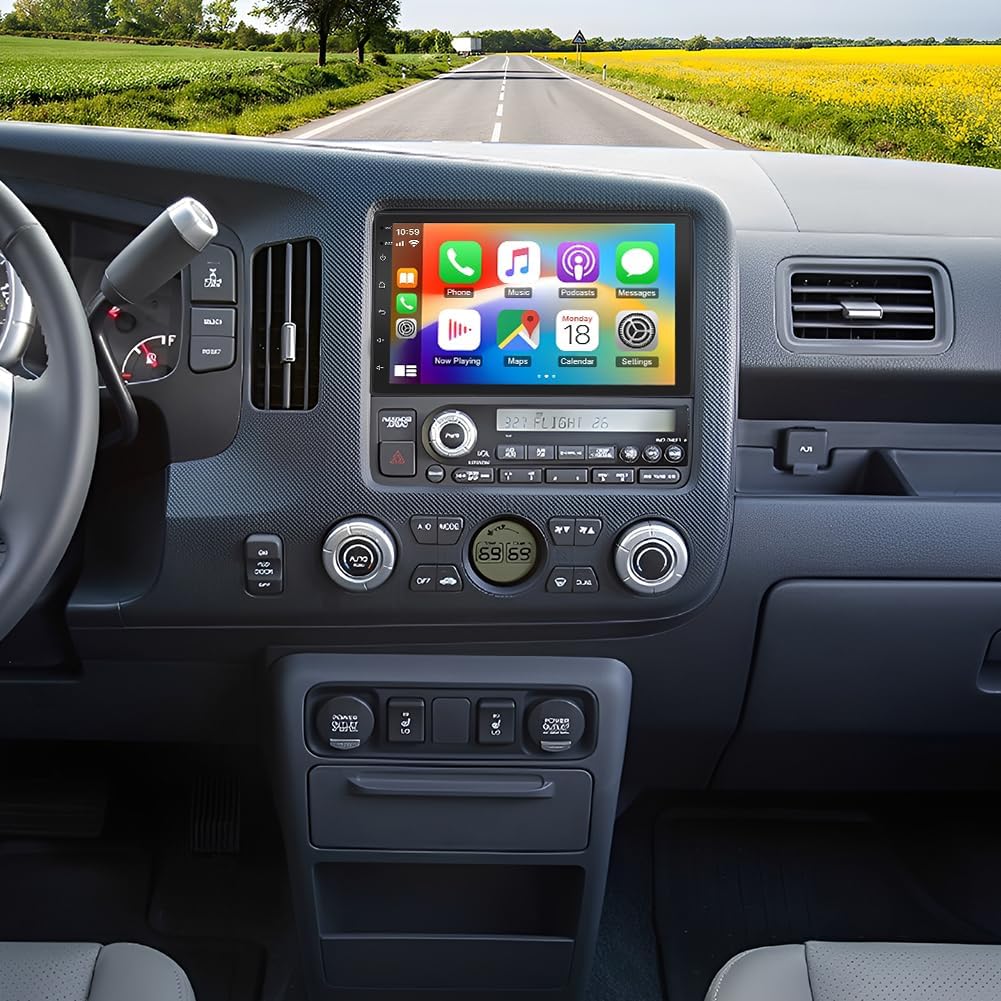
3. ikasus 7" Android 15 Double-DIN Car Stereo for Honda Ridgeline 2006–2014
| System | Android 15.0 |
|---|---|
| Memory | 2GB RAM + 64GB ROM |
| Screen | 7 inch IPS touch, 1024×768 |
| Power output | 4x45W |
| Bluetooth | Version 4.0 |
This ikasus head unit turns a Ridgeline dash into a modern infotainment center by combining Android 15, a 7-inch IPS touchscreen, and wired or wireless phone integration. It is installed as a double-DIN replacement and is typically used for hands-free calling, navigation, media playback and reversing support; the package includes an AHD backup camera, GPS antenna and wiring harness. Notable features include built-in online and offline navigation, split-screen mode, mirror link, FM/RDS radio and ample 64GB internal storage for apps and media. Bluetooth 5.0 and a 4x45W amplifier chip aim to keep audio reliable and loud enough for truck cabins. Practical benefits are a modern UI, offline maps for remote driving, and the bundled camera so you do not need separate purchases. Limitations are that the unit is not plug-and-play for the Ridgeline and requires cutting or adapting vehicle wiring plus aftermarket trim or modification to fit; the 2GB RAM is adequate but not high-performance for heavy multitasking. Expect a capable value upgrade if you are comfortable with a non-factory install.
Best for: Practical optimizers seeking a high-feature, budget-conscious infotainment upgrade for a Ridgeline who prioritize modern connectivity and bundled components over a factory-fit installation.
Less Ideal for: Buyers who want a factory-style, no-modification swap or who need top-tier processing power and the smoothest possible multitasking experience.
- Designed specifically for Honda Ridgeline 2006–2014 with included GPS antenna and backup camera
- Supports wired and wireless CarPlay and Android Auto plus mirror link for seamless phone integration
- 7-inch IPS touchscreen with split-screen and built-in online/offline navigation
- Bundled accessories and 64GB internal storage reduce the need for extra purchases
- Not a plug-and-play replacement; requires wiring modifications and likely trim work to fit
- 2GB RAM limits performance when running many apps or heavy multitasking
Verdict: A feature-packed, budget-friendly upgrade for Ridgline owners willing to accept wiring and trim work to get modern phone mirroring, navigation and a backup camera.
4. ikasus Android 13 Double-DIN Car Stereo for Honda Ridgeline (2006–2014)
| System | Android 13.0 |
|---|---|
| Screen size | 7 inch touch |
| Memory | 2GB RAM, 32GB ROM |
| Screen resolution | 1024×768 |
| Power output | 4x45W |
This ikasus double-DIN head unit replaces the factory radio in Honda Ridgeline models from 2006 to 2014 and brings modern smartphone integration without a high price. It runs Android 13 on a 7-inch 1024×768 touchscreen with 2GB RAM and 32GB storage, supports wireless CarPlay or wired Android Auto, and offers WiFi for online navigation and app downloads. The unit includes Bluetooth hands-free calling, FM/RDS radio, an external microphone, steering wheel control support, and an AHD backup camera with night vision. Power output and DSP features aim to improve in-car audio compared with older factory units. Installation is not plug-and-play and requires cutting wires and using a conversion harness or aftermarket trim for a secure fit, so plan for extra install time or professional help. For a low cost this unit delivers a lot of functionality, but buyers should accept DIY installation and the limitations of a budget chipset when it comes to snappier performance and long-term software updates.
Best for: Budget-conscious Ridgeline owners who want modern smartphone features and navigation without paying for premium head units and are comfortable arranging a DIY or paid install.
Less Ideal for: Drivers who need a seamless plug-and-play replacement, expect high-end audio processing or frequent software updates, or prefer factory-fit integration should consider higher-end, vehicle-specific options.
- Modern Android 13 platform with WiFi and app support for navigation and streaming
- Wireless CarPlay plus wired Android Auto for flexible phone integration
- Includes AHD backup camera, external mic, and steering wheel control support for safer driving
- Multiple audio/video format support and 4x45W power output for improved sound over older factory radios
- Not plug-and-play for Ridgeline; requires cutting wires and likely a conversion harness or trim modification
- Budget hardware (2GB RAM, entry chipset) may feel sluggish with heavy multitasking and future app demands
Verdict: A very affordable way to add CarPlay/Android Auto, GPS and a backup camera to a 2006–2014 Ridgeline if you accept DIY installation and modest hardware performance.
5. SJOYBRING JOY-W006 7" Wireless Double-DIN Car Stereo with Wireless Apple CarPlay and Android Auto

| Screen resolution | 1024 x 600 |
|---|---|
| Screen size | 7 inch |
| Output power | 240 Watts (60W x 4 listed) |
| Channels | 4.2 channel output |
| Connectivity | Bluetooth, Wi‑Fi, USB, RCA |
This SJOYBRING JOY-W006 is a double-DIN replacement head unit designed to bring wireless CarPlay and Android Auto into vehicles like the Honda Ridgeline. It installs in the dash opening and provides a 7 inch 1024×600 capacitive touchscreen with physical buttons and a volume knob for quick adjustments while driving. The unit supports wireless and wired phone connections, Bluetooth streaming, voice control with Siri or Google Assistant, and mirror-link via USB. Sound-wise it offers 4.2 channel output with pre-amp and twin subwoofer outputs and a 60W x 4 max output per channel, plus a 10-band EQ for tuning. The package includes a rear camera with night vision and basic mounting hardware, making it a practical all-in-one upgrade. Limitations to expect are varying vehicle-specific fitment and wiring work during installation on the Ridgeline, occasional connectivity glitches reported by some users, and the need to verify camera cable length and harness compatibility before installing. For buyers prioritizing reliable, feature-rich upgrades, planning for a careful installation or professional fit is advised.
Best for: Reliability-focused buyers who want a practical, cost-effective way to add wireless CarPlay/Android Auto and a backup camera to their Honda Ridgeline while preferring a unit that can be tuned and maintained over time.
Less Ideal for: Drivers who want a direct drop-in factory-look replacement without any dash or wiring modifications or those unwilling to troubleshoot phone connectivity or perform professional installation.
- Wireless Apple CarPlay and Android Auto for hands-free navigation and media
- Includes rear view camera with night vision and camera input
- Physical volume knob and buttons plus a responsive capacitive touchscreen for safer control
- 4.2 channel output with subwoofer pre-amps and 10-band EQ for customizable sound
- Package includes mounting brackets, harness and basic install hardware
- May require additional dash kit, wiring harnesses or camera cable extensions for proper fit in some vehicles
- Some users report intermittent CarPlay/Android Auto or Bluetooth disconnects
- Touchscreen and video features can exhibit occasional lag or freezing on certain phones
Verdict: Adds wireless CarPlay/Android Auto, a backup camera, and multi-channel audio tuning in one affordable double-DIN upgrade for the Honda Ridgeline.
6. Kenwood KMM-BT325 Bluetooth Digital Media Receiver (with Alphasonik Earbuds)

| Chassis Size | Full-DIN |
|---|---|
| Playback Formats | MP3/WMA/AAC/WAV/FLAC via USB |
| Preamp Outputs | Front, rear and subwoofer (3 sets 2.5V) |
| Bluetooth Profiles | HFP, PBAP, A2DP, AVRCP, SPP |
The Kenwood KMM-BT325 is a single-DIN digital media receiver designed to replace a factory radio when you no longer need a CD player. It provides Bluetooth hands-free calling and A2DP audio streaming, front USB and 3.5mm auxiliary inputs for phones and players, and three preamp outputs for adding an amp and sub. The unit includes an external wired microphone and supports two phones connected at once, which makes switching calls and music seamless on longer drives. Sound controls are robust for the price with a 13-band graphic equalizer, selectable tone curves and multiple EQ presets, so you can tune the Ridgeline’s factory speakers or feed aftermarket amplifiers. Practical conveniences include Android rapid charge and phone book display via PBAP. Limitations are its lack of a CD slot and no wireless remote, and the dated Bluetooth version means some newer phone features may not be supported by an app. Installation in a Honda Ridgeline is straightforward for a single-DIN swap but may require a dash kit for a factory-fit appearance.
Best for: Convenience-driven buyers who want a straightforward, feature-rich replacement head unit that improves phone integration, charging and audio tuning without extra complexity.
Less Ideal for: Drivers seeking built-in navigation, a touchscreen interface, wireless Apple CarPlay or Android Auto, or those who prefer a factory-matched double-DIN look should consider alternatives.
- Built-in Bluetooth for hands-free calling and music streaming with support for two phones simultaneously.
- Front USB and AUX inputs plus three preamp outputs make adding external storage or amplifiers easy.
- 13-band graphic equalizer and multiple tone curves allow precise tuning to match the Ridgeline’s cabin acoustics.
- Includes external wired microphone for clearer call audio and PBAP phone book display for caller ID.
- No CD player or touchscreen controls due to the digital media receiver design.
- Uses Bluetooth 3.0 which lacks some modern wireless features and app support for recent phones.
- No wireless remote or built-in navigation features.
Verdict: A practical, tuneable single-DIN receiver for Ridgeline owners who prioritize phone integration and audio control over touchscreen features.
7. Pioneer MVH-S322BT Single-DIN Bluetooth Digital Media Receiver

| Model | MVH-S322BT |
|---|---|
| Connectivity | Bluetooth, USB, AUX, RCA |
| Special features | Advanced Sound Retriever, MIXTRAX |
| Detachable face | Yes |
The Pioneer MVH-S322BT is a budget-friendly single-DIN receiver that brings wireless streaming and hands-free calling to a factory-style Honda Ridgeline dash. It pairs with smartphones over built-in Bluetooth for music and calls, and also accepts USB and auxiliary inputs for direct playback or charging. Notable features include Pioneer's Advanced Sound Retriever to improve compressed audio, MIXTRAX for continuous party-style playback, a detachable face for theft deterrence, and compatibility with the Pioneer Smart Sync app for extra controls from your phone. In everyday use it delivers clear Bluetooth audio, easy pairing, and ample tuning options for a simple sound upgrade without replacing speakers or adding an amplifier. Limitations are predictable for this class: the single-DIN form factor means no touchscreen or wireless Android Auto/Apple CarPlay, and its feature set is focused on audio playback rather than navigation or advanced vehicle integration. For Ridgeline owners wanting a reliable, straightforward replacement head unit that improves connectivity and sound tuning, this unit fits neatly into that role.
Best for: A risk-averse mainstream buyer looking for a dependable, factory-style audio upgrade for a Honda Ridgeline who prioritizes straightforward Bluetooth connectivity and reliable daily performance.
Less Ideal for: Buyers wanting a touchscreen multimedia hub, wireless smartphone mirroring, or extensive vehicle integration should consider double-DIN or higher-end units instead.
- Built-in Bluetooth for hands-free calling and wireless music streaming.
- USB and AUX inputs for direct playback and device charging.
- Advanced Sound Retriever and MIXTRAX for improved compressed audio and continuous mixes.
- Detachable faceplate adds theft deterrence and simple security.
- 4V preamp outputs and basic preamp level controls support future amplifier upgrades.
- No touchscreen or wireless Apple CarPlay/Android Auto support in this single-DIN unit.
- Feature set focuses on audio playback so it lacks navigation and deep vehicle integration.
- Limited display and menu real estate compared with double-DIN receivers.
Verdict: A practical, reliable single-DIN upgrade that brings wireless audio and solid sound tuning to a Ridgeline without the complexity of touchscreen multimedia systems.
Choosing the Right Honda Ridgeline Car Stereo: Key Factors to Consider
Fit and Mounting
Proper fit is the first thing to check because dashboard dimensions, trim pieces, and mounting brackets determine whether a unit installs cleanly. A head unit designed for standard DIN or double-DIN mounts reduces the need for dash cutting or custom brackets.
If a unit needs a spacer, adapter, or trim kit, factor that into the installation time and complexity. Secure mounting also affects road noise and vibration handling, which in turn influences perceived sound quality and long-term reliability.
Wiring and Integration
Wiring compatibility matters because modern vehicles use multiple harnesses, steering-wheel control wires, and sometimes factory amplifiers. A unit that supports standard aftermarket harnesses and offers clear wiring diagrams will greatly reduce installation errors.
Look for units that support retention adapters for steering-wheel controls and coded parking or reverse-camera inputs if you plan to reuse factory features. Ease of integration affects both the cost and the likelihood that the install will be done without professional help.
Connectivity and Smartphone Support
Connectivity options shape the daily user experience. Built-in Bluetooth is useful for hands-free calling and audio streaming, while Apple CarPlay and Android Auto provide a safer, app-based interface for navigation and messaging.
If you rely on navigation or voice commands, prioritize units with robust smartphone integration and responsive interfaces. Consider whether you need wired or wireless smartphone connections, as that can affect convenience and compatibility with newer phones.
Audio Performance and Processing
Audio quality depends on more than just speaker power. Look at preamp outputs, built-in amplifiers, equalization options, and whether the unit supports external amplifiers and crossovers. A head unit with adjustable EQ and time alignment can dramatically improve clarity and staging.
If you plan to keep factory speakers, ensure the unit offers sufficient gain and noise handling. For upgrades with new speakers or amplifiers, multiple preamp outputs and stable signal processing become more important.
User Interface and Controls
A clear, intuitive interface reduces distraction while driving. Physical buttons and knobs can be easier to use without looking, while a responsive touchscreen provides flexible control and visual feedback for maps and media.
Consider how the unit handles source switching, quick-access functions, and compatibility with steering-wheel controls. The layout and responsiveness of menus will affect daily usability, especially on longer drives.
Expandability and Future-Proofing
Think about how the head unit will fit into planned upgrades. Multiple preamp outputs, support for external amplifiers, camera inputs, and USB or auxiliary ports make it easier to expand the system over time.
Also consider firmware update options and modular accessories. A unit that receives software updates or offers optional modules will stay relevant longer as phone and connectivity standards evolve.
How We Chose the Best Honda Ridgeline Car Stereo
We focused on units that are compatible with the Ridgeline dashboard and common wiring harnesses to minimize installation complexity. We prioritized head units that offer reliable audio output, clear user interfaces, and the connectivity features drivers commonly ask for, such as hands-free calling, media streaming, and smartphone integration.Key evaluation criteria included physical fit and mounting options, wiring and harness compatibility, audio processing and output capability, connectivity and app support, and user interface ergonomics. We also considered build quality and long-term reliability signals like cooling and component layout.We excluded units that require significant dash modification, complex fabrications, or nonstandard mounting that would change the vehicle interior. Extremely niche or single-use devices were left out. The resulting list focuses on practical, install-friendly options that balance sound quality and everyday convenience.
Our full evaluation process is outlined in our review methodology.
FAQ
Will installing an aftermarket stereo affect steering-wheel controls?
It often depends on the adapter and head unit chosen. Many aftermarket head units support steering-wheel control retention when paired with the correct harness or interface. Using a dedicated retention adapter usually preserves button functions while keeping installation straightforward.
Do I need a special dash kit to fit a new head unit in the Ridgeline?
That depends on the new unit size and the vehicle trim. Double-DIN units typically fit standard openings, while single-DIN units may require a pocket or trim kit. Check mounting requirements before purchasing to avoid surprises during installation.
Is Bluetooth enough for modern smartphone integration?
Bluetooth covers basic hands-free calling and streaming, but smartphone-integrated systems like CarPlay or Android Auto provide safer access to navigation and messaging apps. If you rely on maps and voice commands, consider a unit with full app integration rather than Bluetooth alone.
Can I keep the factory amplifier and speakers with a new head unit?
In many cases you can, but it depends on the factory wiring and whether the head unit has compatible preamp outputs. Some vehicles use high-level outputs or proprietary connections that need adapters to interface correctly with the factory amplifier.
How difficult is the install if I want to do it myself?
Difficulty varies with the vehicle trim and the head unit features. Basic swaps that use standard harnesses and mounting kits are often doable for a competent DIYer. If the install requires console removal, custom wiring, or integration with factory systems, professional installation may save time and reduce risk.
Conclusion
Choosing the right Honda Ridgeline car stereo means balancing physical fit, wiring compatibility, and the connectivity features you use most. Prioritize units that match the dashboard mounting and simplify integration with steering-wheel controls and factory systems.Also weigh audio capabilities and expandability against installation complexity. If you plan future upgrades, favor head units with solid preamp options and multiple inputs so you can build the system over time without repeating major work.
Explore More:
- Check out all Honda Ridgeline parts & accessories
- Explore Electronics
- Browse all Accessories
