

Note: This article contains affiliate links. If you click on these links and make a purchase, I may earn a small commission at no extra cost to you. This helps support my research and content. Read my full affiliate disclosure here.
Fitting a dedicated Honda Civic Si backup camera can transform how you reverse and park by giving you a clear view behind the car and reducing blind spots. With tighter rear visibility on performance-tuned Si models, choosing the right camera matters for day-to-day driving, daily parking, and occasional tight maneuvers.This guide covers seven shortlisted backup camera options selected for the Civic Si, focusing on image quality, mounting style, and how they affect installation on the Si body and bumper. Read on to understand the evaluation criteria and which features matter most for dependable rear vision.
Looking for other parts? See all Honda Civic parts & accessories.
Top Picks at a Glance
| Best Overall Backup Camera A balanced, reliable replacement with good image and fitment | PixelMan PMD2A-S AHD 1080P Metal Backup Camera (170° Wide Angle) |  |
| Best Budget Backup Camera An inexpensive universal or basic OEM-style camera that saves money | QUICTO 170° Backup Camera with 12 LED Night Vision |  |
| Best License‑plate Mount Backup Camera Cameras built to mount on or behind the license plate for neat install | eRapta ERT01 HD License-Plate Backup Camera |  |
| Best AHD/1080P High‑definition Backup Camera High‑resolution AHD or 1080p cameras for sharper daytime and night images | PixelMan PMHD05A 1080P License Plate Backup Camera with Metal Housing |  |
| Best Metal‑housing All‑weather Backup Camera Rugged metal housings with IP68/IP69K ratings for harsh conditions | NATIKA Metal‑Housing Backup/Front View Camera (Wide‑Angle, 720p) |  |
| Best Backup Camera with Monitor Kit Complete kits that include a camera plus a wired or wireless monitor | LeeKooLuu LK13 7" 1080p Backup Camera Kit with Night Vision and License-Plate Mount |  |
1. PixelMan PMD2A-S AHD 1080P Metal Backup Camera (170° Wide Angle)
Best Overall Backup Camera

| Video Capture Resolution | 1080p (AHD switchable; defaults to 720P HD) |
|---|---|
| Field Of View | 170 Degrees |
| Optical Sensor Technology | CMOS |
| Connector Type | RCA |
| Voltage | 12.0 |
The PixelMan PMD2A-S is a surface-mount backup camera built for everyday reversing and parking use on a Civic Si with a monitor that accepts an RCA video feed. It delivers a wide 170 degree field of view and a large 1/2.7in image sensor that improves brightness and color compared with smaller-chip backup cams. The unit supports switching between HD and AHD output so you can get 1080p on AHD-capable displays or a stable 720p feed on standard RCA screens. The metal alloy housing, nano waterproof sealing and claimed IP69 protection make it robust against rain and road grime, while two mounting brackets (license-plate and small bracket) let you hide the camera or stick it to the bumper without drilling. Installation is straightforward if your Civic Si head unit has RCA input, and the included 26ft double-shielded cable helps with routing to the dash. Expect very good low-light performance and lively colors, though some users report a slight fisheye look and occasional confusion over the listing resolution, so confirm your head unit supports AHD to get true 1080p.
Best for: A Civic Si owner who prioritizes a dependable all-weather backup camera with strong low-light performance and flexible mounting options for a near-hidden install and clear rear visibility.
Less Ideal for: Drivers who want a wireless camera or who have a factory infotainment system that lacks RCA or AHD input should look at plug-and-play camera modules made specifically for their head unit or wireless systems.
- Large 1/2.7in sensor for brighter, more vivid daytime and night images
- 170° wide-angle glass lens captures a broad rear view and hitch area
- Metal alloy housing with nano-sealant and IP69 rating for strong weather resistance
- Includes two mounting options and a long 26ft double-shielded RCA cable for flexible, hidden installation
- Requires a monitor with RCA input and AHD support to access full 1080p capability
Verdict: The pick for buyers who want a dependable, well-rounded backup camera that balances clear daytime and night images, weather resistance, and easy installation.
2. QUICTO 170° Backup Camera with 12 LED Night Vision
Best Budget Backup Camera

| Voltage | 12 Volts |
|---|---|
| Field Of View | 170 Degrees |
| Optical Sensor Size | 1/3 inch |
| Connector Type | RCA |
| Lux rating | 1.5 Lux |
The QUICTO backup camera is a simple wired camera meant to restore useful rear visibility on a car-level system. It mounts to a license-plate area or other surface, connects to a 12 V reverse trigger, and outputs video over an RCA lead to an aftermarket monitor or factory screen adapter. The 170 degree wide angle and 1/3-inch CMOS sensor give a broad, usable view that helps eliminate blind spots while parking. Twelve built-in LED lights and a reported 1.5 lux rating improve low-light performance so the image stays readable at night for routine reversing. The unit is fully sealed to IP67 standards, so it tolerates rain and road spray. Expect a basic 420-line resolution image rather than a high-definition feed, and some users report occasional failures after months of use, so longevity is not guaranteed. Installation is straightforward for someone comfortable tapping a reverse wire and routing an RCA cable, but you will need a compatible display and possibly a custom mount to get a level picture.
Best for: Buyers who want the cheapest practical way to add a functioning rear camera to their Civic Si for safer parking and reversing, prioritizing easy installation and usable night view over HD image quality.
Less Ideal for: Drivers who need factory-level integration, high-definition video, or a wireless plug-and-play system should consider higher-end options or vehicle-specific modules instead.
- Very wide 170° field of view reduces rear blind spots.
- 12 LED lights improve visibility for night reversing.
- IP67 waterproofing for use in wet conditions.
- Simple wired RCA output works with most aftermarket monitors and head units.
- 420-line resolution is modest compared with modern HD cameras.
- Some reviewers report failures after several months, so reliability may vary.
Verdict: Choose this slot if you need a low-cost camera that restores basic rear visibility with acceptable night performance and straightforward mounting.
3. eRapta ERT01 HD License-Plate Backup Camera
Best License‑plate Mount Backup Camera

| Field Of View | 148 Degrees |
|---|---|
| Video Capture Resolution | 720p (CVBS/SD output) |
| Connector Type | RCA |
| Power | 12–24V DC |
| Optical Sensor Technology | CMOS |
The eRapta ERT01 is a compact license-plate style backup camera that connects with a 26 ft RCA cable and runs on 12–24V power, so it ties into a vehicle's reverse light for automatic activation. It mounts behind the license plate using the supplied metal brackets for a low-profile installation that keeps wiring hidden and avoids drilling in many setups. The camera offers a very wide 148–149 degree field of view, adjustable tilt, and built-in LED illumination for improved night visibility. It uses a 1/3" CMOS sensor and outputs an analog CVBS signal at standard-definition, which means image detail is sufficient for parking and obstacle awareness but not comparable to HD digital cameras. Installers should be prepared to route the RCA and power wires through trunk panels and may need basic splicing; the manual is terse so a bit of DIY experience helps. The metal housing and IP69K claim suggest good weather resistance, though long-term durability varies across user reports. For drivers wanting an unobtrusive plate-mounted camera and a straightforward wired connection to an aftermarket screen, this is a practical option.
Best for: Buyers who want a discreet, license-plate mounted camera that conceals wiring and pairs with an aftermarket display for routine parking and backup use.
Less Ideal for: Drivers who need high-resolution digital video, plug-and-play camera interfaces with factory infotainment systems, or who prefer a wireless solution should look elsewhere.
- Low-profile license-plate mounting hides the camera and wiring behind the plate
- Very wide 148–149 degree field of view reduces blind spots when reversing
- Includes long 26 ft RCA video cable and mounting brackets for many installation scenarios
- Built-in LED lights and low-light sensitivity support usable night vision
- Works with 12–24V systems and any display that accepts RCA/CVBS input
- Outputs analog CVBS/SD signal only, so image resolution is lower than modern HD cameras
- Manual and documentation are poorly translated and may require extra troubleshooting
- Thin supplied video wire can be fragile and may need replacement during installation
Verdict: Pick this when you prefer a discrete license‑plate or plate‑frame camera that hides wiring and offers easy, no‑drill mounting.
4. PixelMan PMHD05A 1080P License Plate Backup Camera with Metal Housing
Best AHD/1080P High‑definition Backup Camera

| Video Capture Resolution | 1080p |
|---|---|
| Real Angle of View | 170 Degrees |
| Optical Sensor Technology | CMOS |
| Connector Type | RCA |
| Voltage | 12 Volts |
The PixelMan PMHD05A is a wired, license-plate mount backup camera designed to deliver high-definition 1080p AHD video to compatible aftermarket displays. It uses a 1/2.7 inch CMOS sensor and a 170 degree fisheye lens to capture a wide field of view, and the metal housing plus nano sealing aims to improve long-term waterproofing. Typical installations mount the unit behind the plate and route the provided RCA and power leads to an AHD-capable head unit in the dash. In practice this camera produces sharp daytime images and surprisingly usable low-light performance thanks to its noise reduction processing. The included slim 4-pin connector and multiple brackets make tidy mounting easier, but the camera requires an RCA input and NTSC support so confirm your head unit accepts 1080p AHD signals. Expect to do some wiring work; the long video cable is helpful but the power lead may be short and you may need to add a ground or use a relay for clean integration. Some users report long-term reliability variability, so factor in that risk when planning installation.
Best for: A DIY installer who wants the highest image detail on an aftermarket 1080p/AHD head unit and is comfortable routing RCA and power wiring for a tidy license-plate mount fit.
Less Ideal for: Drivers who need a plug-and-play camera for a factory infotainment system or who cannot verify their Honda Civic Si display supports RCA/NTSC AHD inputs should consider simpler factory-compatible options.
- True 1080p AHD video resolution for sharper detail on compatible aftermarket displays
- Wide 170 degree fisheye lens gives a broad rear view useful for parking and detecting obstacles
- Robust metal housing with nano sealant and IP69 rating improves resistance to water and weather
- Slim 4-pin connector and license-plate brackets simplify a tidy, low-profile installation
- Requires RCA input and NTSC-compatible head unit so it will not work with all displays or PAL systems
- Power lead length and grounding arrangement may require adding wiring or a relay for neat, reliable hookup
- A few reports of failures over time indicate potential variability in long-term durability
Verdict: This slot suits DIYers who prioritize maximum image detail and clarity, especially on aftermarket 1080p displays and AHD‑capable monitors.
5. NATIKA Metal‑Housing Backup/Front View Camera (Wide‑Angle, 720p)
Best Metal‑housing All‑weather Backup Camera
| Voltage | 12 Volts |
|---|---|
| Optical Sensor Technology | CMOS |
| Field Of View | 170 Degrees |
| Video Capture Resolution | 720p |
| Lux rating | 0.01 Lux |
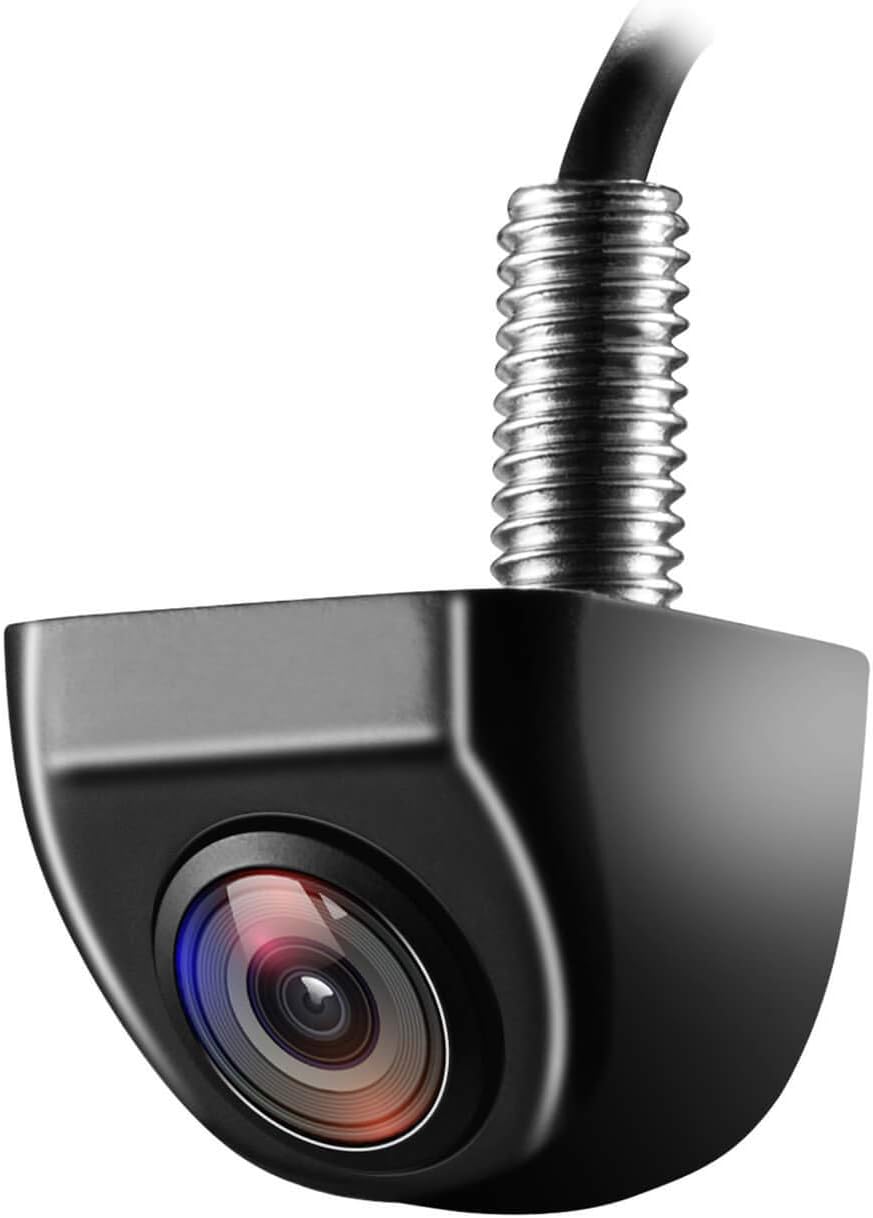
The NATIKA metal‑housing camera is built for outdoor vehicle use and designed to mount vertically or horizontally on a Civic Si where a small, durable camera is needed. It uses a 1/2.7" CMOS sensor and 720p video output over an RCA connector, giving a wide field of view (claimed 160 to 170 degrees) that helps reveal bumper corners and blind spots during parking and low‑speed maneuvers. The metal body and sealed glue construction make it feel more rugged than cheap plastic units, and the kit includes angled shims and wiring to adjust mounting angle and orientation for tailgate or license‑area installs. Low‑light sensitivity (0.01 Lux) and adjustable guide lines are useful for reversing at dusk. Practical downsides for a Civic Si install: image clarity is good but not razor sharp compared with modern high‑resolution factory cameras, and some users add extra silicone sealing around the housing and cable entry for long‑term resistance to intense car washes. Wiring requires an RCA input and a trigger from the reverse light or head unit, so plan for routing behind trim panels or using an adapter harness if integrating with your factory screen.
Best for: Drivers who prioritize a compact, tough replacement camera that looks like a factory unit and will be exposed to weather and regular car washes on a Honda Civic Si.
Less Ideal for: Drivers who need the absolute highest image resolution or want a direct plug‑and‑play integration with a factory screen without using an adapter harness.
- Alloy metal housing feels rugged and offers more durability than plastic housings
- Wide 160–170 degree field of view for good bumper and blind spot coverage
- Low‑light sensitivity (0.01 Lux) helps nighttime and dusk visibility
- Includes angled shims and mounting options for vertical or horizontal installation
- Standard RCA connector works with most aftermarket head units
- 720p resolution is adequate but not as crisp as newer high‑resolution cameras
Verdict: Select this option if you need a heavy‑duty camera with alloy housing and top waterproofing that withstands car washes, heat, and cold.
6. LeeKooLuu LK13 7" 1080p Backup Camera Kit with Night Vision and License-Plate Mount
Best Backup Camera with Monitor Kit

| Screen Size | 7 Inches |
|---|---|
| Video Capture Resolution | 1080p |
| Field Of View | 150 Degrees |
| Voltage | 12 Volts |
| Connector Type | USB |
This LeeKooLuu kit pairs a 7-inch 1080p monitor with a wide-angle license-plate backup camera to give a complete, self-contained reversing solution. The monitor installs on the dash or windshield with a suction cup or surface mount and can be powered from a USB or the vehicle cigarette lighter for a no-wires-to-headunit setup. The camera uses a 150-degree field of view and HD sensors to deliver color night vision out to about 33 feet and a stable wired connection to the monitor. Practical benefits include fast, no-drill installation, a noticeably larger viewing area than small displays, and IP69K water resistance that survives pressure washing and heavy rain. Limitations to expect on a Civic Si are the license-plate mount location may require creative routing or slight trimming to clear hatch or trunk designs and the suction-cup monitor mount is less integrated than a factory screen. Also the system uses a wired video lead rather than integration with the Civic Si infotainment, so steering-guideline behavior and in-dashboard switchers are not available.
Best for: Buyers who want a single purchase that adds a larger, independent rearview monitor and a rugged camera without modifying the Civic Si infotainment, and who prioritize quick DIY install and reliable wired video.
Less Ideal for: Drivers seeking seamless in-dash integration, factory-like appearance, or steering-linked dynamic guidelines should consider a solution built to interface with the Civic Si factory system instead.
- Complete kit includes a 7" 1080p monitor and license-plate camera for one purchase
- Plug-and-play power options (USB or cigarette lighter) avoid head unit modification
- 150° wide-angle lens and 1080p capture provide a broad, clear field of view
- IP69K rating gives strong water and high-pressure wash resistance for long-term durability
- Wired connection provides stable, zero-lag video compared with wireless kits
- License-plate mount can limit placement on some trunk/hatch designs and may need alternate mounting
- Monitor mounts with suction cup or surface bracket rather than in-dash integration
- No factory infotainment integration so features like steering-linked guidelines are unavailable
Verdict: Choose a kit when you want a one‑purchase solution—camera and display included—for quick DIY installation without modifying the factory infotainment.
Choosing the Right Honda Civic Si Backup Camera: Key Factors to Consider
Image Quality And Low-Light Performance
A backup camera's primary job is to provide a clear, timely view of what is behind the Civic Si. Higher-resolution sensors and good dynamic range make it easier to spot small obstacles, pedestrian legs, and low-contrast objects. Low-light performance matters because many parking situations happen at dawn, dusk, or at night; look for cameras with sensitive sensors, effective infrared or low-light modes, and a wide dynamic range to handle bright highlights from headlights or sun glare.
Also consider the camera's field of view. A wider angle reduces blind spots but can introduce fisheye distortion that makes judging distance harder. For the Civic Si you want a balance between a broad coverage area and usable perspective so you can accurately estimate how close objects are to the rear bumper.
Mounting Style And Fitment
How the camera mounts is important for aesthetics and watertight installation on the Civic Si. License plate-mounted units are easy to install but stick out from the plate area and can be susceptible to damage. Flush-mounted or bumper-integrated cameras offer a cleaner, factory-like appearance but may require trim removal and precise positioning to avoid interfering with bumper sensors or exhaust tips on the Si.
Check whether the camera includes vehicle-specific brackets or adjustable mounts. A model that allows small angle adjustments after installation will help fine-tune the view so that lane lines and the bumper edge appear correctly in the display.
Wired Versus Wireless Connection
Wired cameras generally provide a steady video feed with lower latency and are less prone to interference, making them a dependable choice for consistent rear imaging. For the Civic Si, running video cable through trunk grommets and along factory routing keeps the installation discreet and reduces exposure to the elements.
Wireless backup cameras offer easier installation because they avoid long video cables, but they can be subject to signal dropouts and interference from other devices. If choosing wireless, prioritize models with robust pairings and dedicated transmitter power sources rather than relying solely on battery-powered units.
Compatibility With In-Cabin Displays
Consider how the camera will interface with your Civic Si's existing display or whether you will add a separate monitor. Some cameras output composite video and plug into aftermarket displays, while others support HDMI or wireless streaming to a head unit. If you plan to use the vehicle's OEM screen, verify compatibility with the head unit's inputs or whether an interface harness is needed.
Also consider trigger behavior. The camera should activate reliably when you shift into reverse, ideally without extra latency or manual switching. If using a standalone monitor, check for mounting options and sightlines that do not obstruct your view forward.
Durability And Weather Resistance
A backup camera on the Civic Si is exposed to road grime, moisture, and temperature swings. Choose cameras with a solid IP water- and dust-resistance rating and corrosion-resistant housings and connectors. Operating temperature ranges indicate whether the unit will function in cold winters or hot summer days without image degradation.
Sealed cable joints and rubber grommets help prevent water ingress where the wiring passes through the trunk or tailgate. Corrosion-resistant mounting hardware will maintain alignment and prevent loosening over time, which keeps the camera angle consistent.
Parking Aids And Imaging Features
Extra features can make reversing easier. Look for clear, adjustable parking guidelines that match the Civic Si bumper geometry so you can judge distances reliably. Night-vision assist, HDR or wide dynamic range, and automatic exposure adjustments improve image usability across different lighting conditions. Some systems include motion detection or cross-traffic alert integrations that provide on-screen cues when a moving object is detected while reversing.
While these features are helpful, verify that added overlays do not obscure critical image detail. Adjustable guideline intensity and the option to toggle overlays on or off are useful for drivers who want a clean, unobstructed view in certain situations.
Installation Considerations Specific To The Civic Si
The Civic Si has a compact rear bumper profile and often a sporty diffuser or trim that can limit mounting clearance. Before buying, inspect the rear bumper and license plate area to identify suitable mounting locations and any trim clips that need removal. Plan the cable route from the chosen mount through the trunk and into the cabin using existing grommets when possible to avoid drilling.
Many owners prefer routes that stay clear of exhaust heat and suspension components. If the camera requires a license plate mount, verify that the bracket clears the bumper curvature so the camera angle stays stable. For flush or bumper-integrated installs, allow time for careful trimming or panel removal to maintain a secure seal and prevent rattles.
- Locate grommets and wiring channels in the trunk to minimize modifications
- Avoid routing cables near exhaust components to prevent heat damage
- Use foam or rubber gaskets to seal any penetration points
- Test camera angle and image before finalizing trim or fasteners
Power Wiring And Reverse Triggering
Most backup cameras for the Civic Si draw power from the reverse light circuit so the camera powers on only when you shift into reverse. Identify the reverse lamp wire in the trunk harness and use an inline fuse and a clean splice method to protect the vehicle electrical system.
If the install uses an aftermarket monitor or recorder, you may need an ignition-switched accessory power source to maintain settings or record events. When tapping into power, avoid high-current circuits and use proper gauge wiring, fuses, and connectors to prevent voltage drop that can cause the camera to flicker.
- Use an inline fuse sized to the camera's draw
- Secure splices with solder or high-quality crimp connectors and heat shrink
- Route power wires with zip-ties to prevent chafing and noise
Choosing The Right Field Of View For Parking
Field of view determines how much lateral coverage the camera shows. For the Civic Si, a 120 to 160 degree field often balances seeing curb edges and nearby objects without excessive distortion. Wider angles capture more of the rear corners but can make small objects appear farther away.
If you regularly parallel park in tight city spots, slightly wider coverage helps detect low curbs and pedestrians. For drivers who primarily use garages or larger spaces, a narrower field that reduces distortion can make distance judgment simpler.
- Wider FOV for urban parking and curb detection
- Narrower FOV for more accurate distance perception in open spaces
- Adjustable mounts help fine-tune where the camera points
Monitor Placement And User Interface
Where you display the backup feed affects how quickly you can interpret the image. If integrating with the factory screen is not possible, a separate mirror-mounted or dash monitor can provide a natural line of sight. Mount monitors to avoid blocking air vents, controls, or obstructing airbags.
Consider user interface features such as brightness adjustment, automatic night mode, and quick toggle between camera and other inputs. A simple, responsive interface reduces distraction while reversing and makes the camera more likely to be used consistently.
- Place monitor near your natural eyeline for minimal eye movement
- Avoid blocking visibility of essential controls
- Choose displays with anti-glare surfaces and adjustable brightness
Maintaining Camera Alignment And Cleaning
After installation, periodic checks ensure the camera alignment remains correct. Vibrations, minor impacts, and thermal expansion can shift the camera angle over time. Inspect the mounting hardware and tighten fasteners if you notice drift in the displayed bumper position.
Keep the lens clean from dirt, salt, and bug residue. Use a soft cloth and mild cleaner to avoid scratching coatings. In winter, avoid scraping the camera housing; use a soft brush or spray to remove ice and heavy deposits.
- Check alignment after initial installation and after a few weeks of driving
- Tighten mounting hardware if the view shifts
- Clean the lens regularly with non-abrasive materials
Still looking for the perfect fit?
Select your Honda Civic configuration to see the most relevant Backup Cameras recommendations
How We Chose the Best Honda Civic Si Backup Camera
Our shortlist was created to reflect the needs of Honda Civic Si owners who want reliable rear visibility without compromising the car's appearance or electrical system. We prioritized image quality in both daylight and low-light conditions, mounting compatibility with Civic Si rear bumper and license plate areas, and how the camera integrates with common in-cabin displays and wiring harnesses. Installation complexity and the availability of vehicle-specific mounting brackets were critical, as many owners prefer a clean, factory-like fit. Durability factors such as weatherproof rating, corrosion-resistant connectors, and operating temperature range were also considered for long-term reliability.We excluded options that required major bumper modification, permanently altering the vehicle structure, or those with poor documentation and no active technical support. Final selections balance ease of parking, minimal visual intrusion, and dependable performance across typical driving conditions.
Our full evaluation process is outlined in our review methodology.
FAQ
Will adding a backup camera void any vehicle warranty on my Honda Civic Si?
It often depends on how the camera is installed. A professional, non-invasive installation that uses existing wiring and does not alter structural components is less likely to cause warranty issues. If modifications require cutting or altering factory wiring or body panels, check warranty terms and consult a dealer or a qualified installer beforehand.
Can I install a backup camera without running wires through the trunk?
Yes, wireless systems avoid long video runs, but they still require a power connection for the camera, typically from the reverse light circuit. Wireless video links can be convenient but may be more susceptible to interference than a direct wired connection.
How do I ensure the parking guidelines match my Civic Si bumper?
Look for cameras that offer adjustable guideline calibration or allow you to tweak the angle during installation. Some monitors let you shift and scale guidelines so they align with the visible bumper edge; verify this capability before purchasing if guideline accuracy is important to you.
Is a license plate backup camera the best mounting option for the Civic Si?
License plate mounts are simple and usually avoid bumper modification, but they can protrude and be vulnerable to road debris. If you want a cleaner look, consider flush or bumper-integrated mounting options that fit within the Civic Si contours, keeping in mind those may require more careful installation.
Do backup cameras affect rear parking sensors or other safety systems?
A properly installed camera should not interfere with factory parking sensors or safety systems. Avoid placing the camera or routing wiring in a way that blocks sensor lines or tampers with factory connectors. If you are unsure, consult a professional installer to maintain system compatibility.
What maintenance does a backup camera need over time?
Routine tasks include cleaning the lens, checking seals and grommets for water ingress, and ensuring connectors remain tight and corrosion-free. Periodic alignment checks will catch shifts from vibrations or minor impacts and help preserve accurate visual feedback while reversing.
Final Verdict
Prioritize clear imaging, secure mounting, and reliable power and video connections when selecting a backup camera for your Honda Civic Si. Balance field of view with how you usually park, and choose a mounting style that fits the Si's rear profile without compromising aesthetics or functionality.Consider installation complexity and long-term durability as tradeoffs: simpler license plate mounts reduce labor but may affect appearance, while integrated installs look cleaner but can require more care during fitting. Focus on image quality, weather resistance, and compatibility with your in-cabin display to pick a solution that makes reversing safer and more consistent.
Explore More:
- Check out all Honda Civic parts & accessories
- Explore Electronics
- Browse all Accessories
