

Note: This article contains affiliate links. If you click on these links and make a purchase, I may earn a small commission at no extra cost to you. This helps support my research and content. Read my full affiliate disclosure here.
If you drive a 2006-2011 Honda Civic you already know how useful an added rear camera can be for tight parking maneuvers and reversing in low light. A dedicated Civic backup camera tailored to the 2006-2011 (FA and FG) chassis preserves sightlines, avoids blind spots, and reduces the guesswork when backing into driveways, garages, or crowded lots. This guide focuses on the top shortlisted backup camera options that fit this Civic range and explains the practical tradeoffs between image quality, installation complexity, and mounting style.Below you will find the top picks for this vehicle, plus the factors we used to assess them and straightforward advice on installation and setup to help you pick the right rear view camera system for your Civic.
Looking for other parts? See all Honda Civic parts & accessories.
Top Picks at a Glance
| Best Overall Backup Camera A well-rounded camera with clarity, durability, and easy install | PixelMan PMD2A-S 1080P AHD Metal Wide-Angle Backup Camera |  |
| Best Budget Backup Camera A low-cost universal camera that covers basic reversing needs | Deaelf Universal Backup Camera with 170° Wide Angle and 12 LED Night Vision |  |
| Best AHD / 1080P Backup Camera High-definition AHD cameras that output 1080P for sharper images | Jansite AHD 1080P Rotatable Backup Camera (RCA) |  |
| Best License‑Plate Frame Camera Long-frame cameras that mount to the license plate for easy fit | VKQTS License Plate Backup Camera with 8 LED Night Vision |  |
| Best Plug‑and‑Play Monitor Kit Self-contained camera + monitor kits that require minimal wiring or adapters | LeeKooLuu Backup Camera and 4.3" Monitor Kit (1080P, Night Vision) |  |
| Best All‑Weather Waterproof Camera Rugged IP68/IP69 cameras rated for wet, hot, and cold conditions | SanmuTu Rear-View Backup Camera for Honda Civic 2007–2011 (AHD 1080P, Fisheye) |  |
1. PixelMan PMD2A-S 1080P AHD Metal Wide-Angle Backup Camera
Best Overall Backup Camera

| Video Capture Resolution | 1080p (AHD switchable) |
|---|---|
| Field Of View | 170 Degrees |
| Optical Sensor Technology | CMOS |
| Connector Type | RCA |
| Voltage | 12.0 |
The PixelMan PMD2A-S is a straightforward license-plate style backup camera built for DIY replacement on vehicles that accept an RCA rear camera input, such as many 2006–2011 Civic head units or aftermarket screens. It uses a 1/2.7in AHD-capable sensor and an HD lens to deliver a wide 170 degree view and supports switching between HD and AHD output when paired with a compatible monitor. In practice the camera produces a bright, color-rich image and improved night visibility compared with smaller-chip units. The metal alloy housing and Nano waterproof sealing aim to resist weather and temperature cycles, and PixelMan supplies a long double-shielded RCA cable plus two mounting brackets so you can install without drilling or mount to the license plate. Expect a simple wired connection to the reverse lights and your display; the package includes power and ground leads. Limitations to note are the reliance on an RCA input and screen that supports AHD for true 1080p, plus a fisheye perspective that may distort straight-line distance judgment for precise parking. Installation is typical for a wired camera and suitable for routine DIY replacement on the Civic models covered by this article.
Best for: A Honda Civic owner seeking a single, reliable replacement backup camera that balances clear daytime and improved night imaging with durable weather protection and an uncomplicated wired install.
Less Ideal for: Not a good choice for drivers who need a wireless solution or who cannot access an RCA video input on their factory or aftermarket screen.
- Uses a larger 1/2.7in AHD-capable sensor for brighter, more color-accurate images than typical small-chip cameras
- 170 degree wide-angle lens gives a broad rear view useful for spotting obstacles and hitch receivers
- Metal alloy housing with Nano waterproof seal and IP69 rating improves durability in wet conditions
- Includes long double-shielded 26 ft RCA cable and two mounting brackets for hidden or plate-mounted installs
- Requires a display or head unit with an RCA input and AHD support to get full 1080p output
Verdict: Choose this slot if you want the single best all-around backup camera that balances image quality, weather resistance, and straightforward installation for routine DIY replacement.
2. Deaelf Universal Backup Camera with 170° Wide Angle and 12 LED Night Vision
Best Budget Backup Camera

| Voltage | 12 Volts |
|---|---|
| Viewing Angle | 170° |
| Night Vision | 12 LED lights |
| Material | Iron, plastic, copper wire |
This compact Deaelf backup camera is a straightforward, budget-focused reverse camera built to expand your rear visibility while parking. It mounts near the license plate or other rear locations and powers from a 12V vehicle supply, activating when the vehicle is put into reverse. The 170 degree adjustable lens and 12 integrated LEDs improve the field of view and low-light clarity so small obstacles and moving hazards are easier to spot at night. The housing is sealed for weather resistance and the supplied cabling lengths support common installation runs. Expect a simple wired install rather than a plug-and-play factory replacement and factor in basic picture processing rather than high-end image tuning. For drivers who want an inexpensive way to add reverse awareness to a 2006–2011 Honda Civic, this camera gives usable night vision and a wide viewing angle without extra features like parking guidelines or wireless connectivity.
Best for: Buyers who want an inexpensive, practical reverse camera to add basic night-time and wide-angle visibility to a 2006–2011 Honda Civic without spending much and who are comfortable with a simple wired install.
Less Ideal for: Drivers seeking a factory-style replacement with vehicle-specific mounting, wireless operation, advanced image processing, or built-in parking guides should look at higher-end or Civic-specific options.
- Wide 170° adjustable viewing angle increases coverage behind the car
- 12 LED lights improve visibility in low-light or nighttime reversing
- Weather-resistant sealed housing for reliable outdoor use
- Compact footprint that fits discreetly near the license plate
- Wired installation requires routing power and video cables and basic DIY skill
- No built-in parking guidelines or vehicle-specific mounting bracket
Verdict: Pick this when you need an inexpensive, no-frills backup camera that provides useful night vision and a wide field of view without spending much.
3. Jansite AHD 1080P Rotatable Backup Camera (RCA)
Best AHD / 1080P Backup Camera

| Video Capture Resolution | 1080p |
|---|---|
| Real Angle of View | 170 Degrees |
| Connector Type | RCA |
| Voltage | 12 Volts |
| Optical Sensor Technology | CMOS |
This Jansite AHD 1080P camera is built to deliver higher-resolution 1080p video to aftermarket displays that accept RCA/AHD inputs. It is typically installed as a rear-facing replacement for a factory camera or added to an aftermarket head unit on compact cars such as the 2006–2011 Honda Civic; the long 6 m cable and RCA connector make routing to the dash straightforward. Notable features include a 170° field of view for broader blind spot coverage, WDR and a multi-glass lens stack for improved low-light color, and a 360° rotatable housing so you can fine-tune the angle without repositioning the mount. The package includes two back covers for no-drill or bolt-on mounting and a step-down module plus shielded cable to reduce interference. Limitations: it only outputs true 1080p when paired with a display that supports AHD 1080P 25fps and it is intended for short-term reversing use rather than continuous monitoring; some users report fiddly lens set screws and occasional units arriving with signal issues that require vendor support.
Best for: Drivers who want a higher-resolution aftermarket backup camera for clearer reversing images and tighter parking judgments on a vehicle in the 2006–2011 Civic era and are comfortable wiring an RCA/AHD connection to an aftermarket display.
Less Ideal for: People who need a continuous-monitoring camera, who cannot access a compatible AHD-capable display, or who want a plug-and-play factory-style OEM replacement without any wiring or format changes.
- True 1080p AHD capability when used with a compatible display for clearer detail than CVBS cameras
- 170° ultra-wide lens reduces rear blind spots and helps with tight parking maneuvers
- 360° rotatable body and 45° lens adjustment let you mount in almost any orientation and still get the correct view
- IP69K-rated housing and double-layer shielded cable improve durability and reduce video interference
- Requires a head unit or monitor that supports AHD 1080P 25fps to get full resolution
- Designed for short-term reversing use only, not continuous surveillance
Verdict: Select this slot if you want an AHD-capable camera that delivers higher-resolution 1080P video for clearer detail when reversing or diagnosing parking tight spots.
4. VKQTS License Plate Backup Camera with 8 LED Night Vision
Best License‑Plate Frame Camera

| Real Angle of View | 170 Degrees |
|---|---|
| Video Capture Resolution | 1080p |
| Connector Type | RCA |
| Optical Sensor Technology | CMOS |
| Installation Type | Surface Mount |
This VKQTS license plate backup camera mounts in place of a standard U.S. plate and provides a wide 170 degree view for easier parking and reversing. It is built as a full metal plate frame so wiring hides behind the plate and installation uses the supplied screws and spacers without drilling. A 1080p CMOS sensor handles daytime detail while eight white LEDs switch on at night to illuminate low-light obstacles. The camera connects via RCA video and a simple power lead that ties into the reversing light circuit, and the 20 foot video cable gives plenty of reach to most factory monitors. IP68 sealing and a robust metal housing help the unit resist road debris and wet weather. Expect a straightforward DIY fit on a 2006–2011 Honda Civic with minimal modification, but note the unit is a wired RCA camera so it requires a compatible monitor or adapter and some basic splicing of the reverse light wiring. The camera’s size is intended for standard plates so verify fit before ordering.
Best for: Drivers who want a tidy, license-plate–mounted backup camera that conceals wiring and can be installed as a simple DIY replacement without drilling, prioritizing a wide field of view for safer reversing.
Less Ideal for: People seeking a wireless plug-and-play solution or those who cannot or do not want to splice into the vehicle reverse light circuit should consider a different camera type.
- True license-plate frame shape hides wiring and mounts using existing plate screws
- 170° wide-angle lens reduces rear blind spots for parking and low obstacles
- Eight built-in LEDs provide usable night illumination for dark environments
- All-metal frame offers stronger impact and deformation resistance than plastic frames
- IP68 waterproofing for reliable performance in rain and road spray
- Uses wired RCA output and requires tapping into the reversing light circuit and a compatible monitor or adapter
Verdict: Use this when you prefer a license-plate–mounted unit that hides wiring, installs without drilling, and gives a broad rear view for simple DIY mounting.
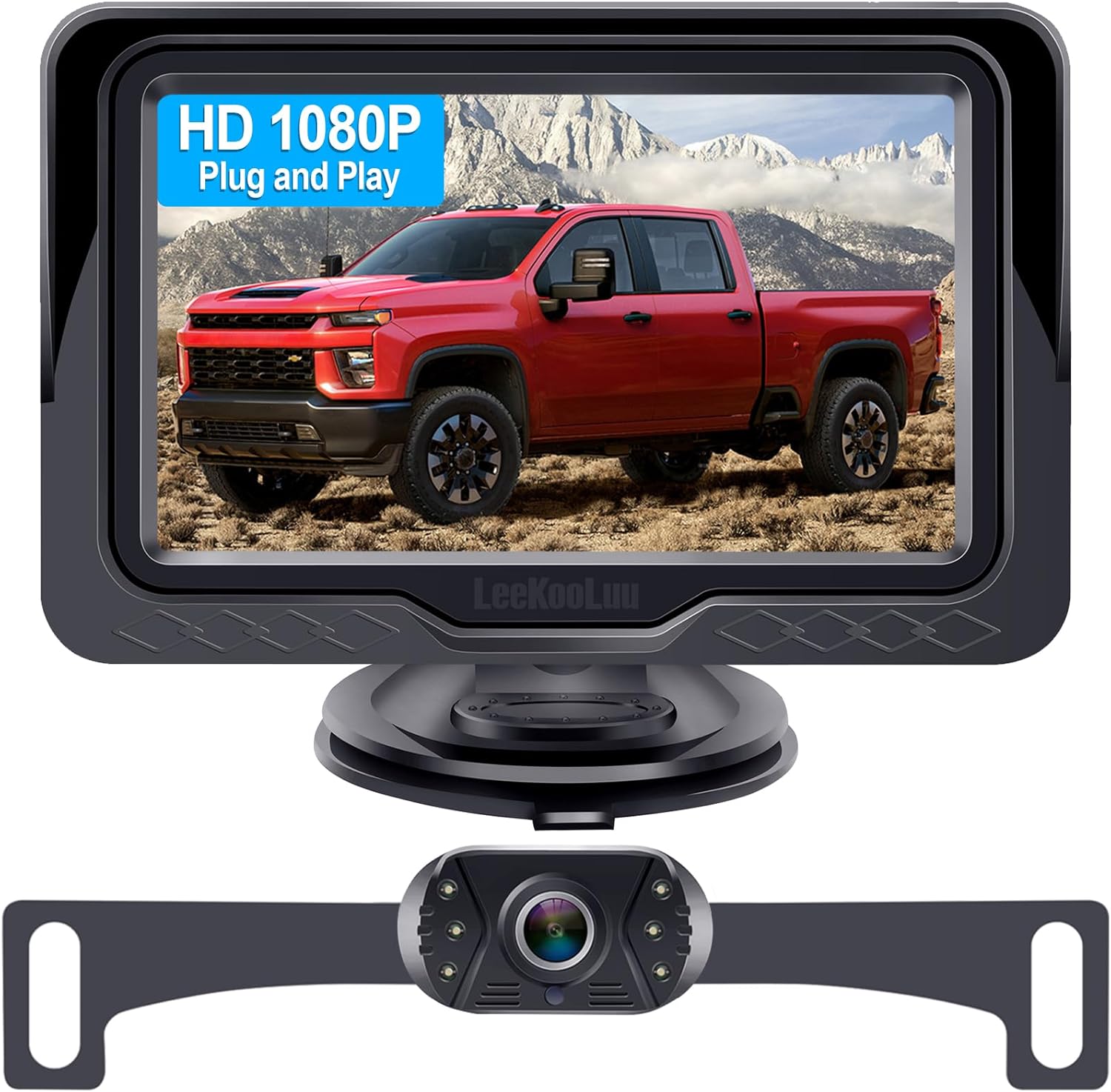
5. LeeKooLuu Backup Camera and 4.3" Monitor Kit (1080P, Night Vision)
Best Plug‑and‑Play Monitor Kit
| Screen Size | 4.3 Inches |
|---|---|
| Video Capture Resolution | 1080p |
| Field Of View | 149 Degrees |
| Connector Type | RCA |
| Voltage | 12 Volts |
This LeeKooLuu kit is a complete plug-and-play backup camera and monitor system designed to get you a working rear view without splicing into the factory wiring. The kit includes a weatherproof camera with wide-angle lens and built-in LEDs plus a 4.3-inch LCD screen that mounts to the dash or windshield with a suction bracket. Installation can be done in about 15 minutes by running the included cable from the rear to the monitor and powering via the cigarette lighter or by wiring to the reverse light for automatic activation. The monitor offers adjustable parking grid lines and basic image controls for brightness and contrast. In use it delivers a clear daytime 1080p image and a usable night view thanks to the LEDs, and reviews note long cable length and stable signal with minimal lag. The limitations are a small 4.3-inch display that may be less sharp than larger factory screens and night performance is not as good as higher-end systems; some users also reported occasional early failures so check connections and test after installation.
Best for: Drivers who want a fast, no-fuss retrofit that provides a working backup camera and monitor without tapping into factory wiring, especially when you prioritize quick installation and clear daytime visibility.
Less Ideal for: Drivers seeking a factory-style integrated display or the best low-light imaging should consider higher-end camera kits or professional installs rather than this basic monitor kit.
- Complete kit with camera and 4.3" monitor so no additional purchases are required
- True plug-and-play options: cigarette-lighter power or reverse-light trigger for quick install
- IP69-rated waterproof housing and long cable for mounting behind a license plate or higher on the hatch
- Adjustable parking grid lines and basic image settings let you tailor the view to your vehicle
- Stable wired signal with minimal lag and 1080p capture for clear daytime images
- 4.3-inch LCD is small and not as sharp as larger aftermarket or factory displays
- Night image quality is serviceable but not as detailed as premium camera systems
Verdict: Choose this if you want a complete plug‑and‑play system (camera plus monitor) so you can avoid tapping into factory harnesses and get a working setup fast.
6. SanmuTu Rear-View Backup Camera for Honda Civic 2007–2011 (AHD 1080P, Fisheye)
Best All‑Weather Waterproof Camera

| Voltage | 12 Volts |
|---|---|
| Optical Sensor Technology | CCD |
| Video Capture Resolution | 1080p |
| Field Of View | 180 Degrees |
| Installation Type | Surface Mount |
This SanmuTu rear-view camera is built as a direct-fit backup camera for Honda Civic 2007–2011 and focuses on durable, all-weather performance. It uses a CCD sensor and 1080p AHD imaging to deliver sharper reverse images than standard composite cameras and includes a fisheye wide-angle lens to reduce blind spots. The unit is IP69K rated, metal-shelled, and rated for -30°C to 80°C, so it stands up to heavy rain, pressure washing, and wide temperature swings. Night visibility is improved by starlight full-color support and automatic light sensing. Installation is surface-mount and uses an RCA connector with dual-signal output (AHD and CVBS) so it can work with aftermarket displays; parking guide lines are available and can be disabled by cutting a lead. Trade-offs are that connecting to a factory radio may require adapters and the camera defaults to CVBS until modified, so some installers will need to rewire for full AHD capability.
Best for: Buyers who need a robust, weatherproof replacement camera for a 2007–2011 Honda Civic and prioritize consistent image quality in rain, car washes, and extreme temperatures.
Less Ideal for: Drivers who want a plug-and-play connection to a factory infotainment unit without any wiring or adapter work should consider a camera specifically marketed as factory-radio compatible.
- Built to withstand harsh conditions with IP69K waterproofing and a metal shell for impact resistance
- 1080p AHD imaging with CCD sensor for clearer detail and improved low-light performance
- Wide fisheye lens and 180 degree field of view reduce rear blind spots
- Dual video output (AHD and CVBS) and RCA connector for compatibility with many aftermarket displays
- Surface-mount design sized for Honda Civic 2007–2011 for straightforward replacement fitment
- May require cutting/rewiring and adapters to enable full AHD output or tie into a factory radio
Verdict: Select this if you prioritize a weatherproof, impact‑resistant camera that keeps producing a clear image through heavy rain, car washes, and temperature swings.
Choosing the Right 2006-2011 Honda Civic Backup Camera: Key Factors to Consider
Image Quality and Low-Light Performance
Image clarity determines how well you can detect curbs, pedestrians, and obstacles when reversing. Look at resolution and effective pixel count, but also evaluate the camera sensor's low-light sensitivity. Many backup camera cameras list night-vision features or low-lux ratings; on a Civic used in evening or underground parking, good low-light performance reduces false positives and makes alignment easier.
Wide dynamic range or HDR handling matters when transitioning between bright sunlight and deep shadow behind the vehicle. A camera that washes out under contrast will hide hazards. Pay attention to white balance and color rendering too, because accurate contrast helps judge distance and surface detail.
Mounting Style and Fitment for the FA and FG Chassis
Different backup camera types mount in different places: license plate frames, flush bumper mounts, or third-brake-light housings. For the 2006-2011 Civic (FA and FG), consider how each mounting method interfaces with the rear bumper and license plate recess to avoid drilling or modifying trim unnecessarily. A license plate backup camera often provides the easiest install with minimal trim removal, while flush-mounts can give a cleaner factory look but may require cutting or making small holes.
Assess whether the camera housing will sit flush with the bumper or protrude. Protruding housings can snag road debris or impact aerodynamics at very high speeds. Also check the cable routing path from the chosen mount back to the cabin so you avoid routing issues around the trunk seal or spare tire well.
Wired Vs Wireless Systems and Signal Reliability
Wired connections typically give stable video with minimal latency, which helps when making precise reverse maneuvers. However, a wired parking camera install can be more involved because it requires running video cable through the vehicle body and connecting to a monitor or head unit. Wireless backup camera units simplify wiring by transmitting video to a receiver, but signal strength can vary based on interference, distance, and RF environment.
For the FA and FG Civic, where the cabin and trunk are relatively compact, a hardwired install tends to be straightforward and more reliable. If choosing wireless, prioritize systems with dedicated automotive-grade transmitters and low-latency codecs to reduce lag and improve responsiveness when reversing.
Monitor Compatibility and Display Options
Decide whether you will pair the camera with an existing in-dash display, an aftermarket monitor, or a standalone mirror monitor. The display resolution, input type (RCA, composite, or HDMI), and whether the monitor supports reverse-triggered activation will shape the overall experience. Some factory radios do not have video inputs, so verify compatibility before purchase.
Consider screen size and placement for sightlines while reversing. Larger monitors make obstacle identification easier, but they must not obstruct forward visibility. If you prefer minimal dash changes, look for displays that mount on the rearview mirror or integrate into an interior visor.
Durability, Weather Resistance, and Warranty
Backup cameras are exposed to water, road salt, and temperature swings. Check IP ratings to ensure adequate protection from moisture and dust. Metal housings or reinforced plastics resist impact better on vehicles that see rough roads or frequent curb contact. Corrosion-resistant connectors and marine-grade wiring help maintain signal integrity over time.
Also factor in warranty length and support options. A longer warranty reduces the risk of needing to reinstall or replace a unit soon after purchase, and clear support documentation helps with Civic-specific install questions.
Parking Aids and Guidelines
Some backup cameras include on-screen parking guidelines or distance markers to help you judge proximity to obstacles. Fixed guidelines are simple and reliable, but adjustable or dynamic guidelines that respond to steering input can provide a more accurate prediction of where the vehicle will travel. For the 2006-2011 Civic, where tight garage spaces are common, useful parking guides reduce headaches and give consistent reference points for alignment.
Be aware that guidelines are approximations and may need calibration relative to your monitor and mounting height. If you frequently tow a trailer or modify the rear bumper, choose a camera where guidelines can be toggled off or adjusted.
Common Mounting Locations on the 2006-2011 Civic
The Civic's rear design offers a few practical mounting zones for a backup camera. The license plate area is the most common because it provides a centered, factory-like vantage point and usually requires minimal trimming. Many owners prefer this option for a clean install and straightforward wiring paths into the trunk.
Flush or recessed bumper mounts yield a low-profile look but may demand cutting a small hole or removing the bumper fascia to secure the camera. These mounts can be worth the extra effort if you prioritize appearance and want the camera tucked out of the way.
Some mirror or interior monitor installs are visible inside the cabin and leave the rear exterior untouched. If you prefer no exterior modifications, pair a non-invasive mount with a monitor that accepts the camera signal and offers reverse-triggered activation.
- License plate mounts: easiest and least invasive
- Flush bumper mounts: cleaner look, more labor
- Third-brake-light integration: hides hardware but varies by Civic trim
Wiring Route Tips for a Smooth Install
Plan the cable run from the rear camera through the trunk and into the cabin before starting. Look for existing rubber grommets or access points in the trunk wall to pass wires without drilling. Use cable ties and protective loom to secure the video and power wires and keep them away from moving parts and sharp edges.
When routing power, tapping the reverse light circuit is standard so the camera powers on only when the vehicle is in reverse. Use proper automotive crimp connectors or solder with heat-shrink tubing to protect connections from moisture. If you choose a wireless option, ensure the transmitter has a stable mounting point and is clear of metal shielding that could block the signal.
- Use existing grommets to avoid body modifications
- Tap reverse light for automatic power-on
- Secure cables with ties and protective loom
Selecting the Right Monitor for Your Dashboard
If your Civic already has an aftermarket head unit with a video input, integrate the camera feed directly for a tidy, integrated look. For factory radios lacking inputs, consider a rearview mirror monitor or a clip-on display that mounts near the rearview mirror to keep the dashboard free of modifications.
Think about display size and aspect ratio. A wider aspect ratio typically shows more horizontal field of view, which is helpful for seeing approaching cars or posts. Verify the monitor supports the camera's video format and has low-latency switching to ensure the picture updates in real time as you back up.
- Use existing head unit inputs when available
- Mirror or visor monitors for non-invasive installs
- Match monitor input format and resolution
Calibration and Positioning for Accurate Distance Judging
Mount the camera at a consistent height centered on the vehicle whenever possible. After installation, test distances using known reference points to calibrate perceived object size and parking guidelines. Small adjustments in tilt affect how the ground plane appears and can improve close-range accuracy.
If your camera offers adjustable guidelines, tweak them while someone watches from inside the vehicle so you can confirm alignment with painted lines or known obstacles. Re-check alignment after a few days of use since wiring movement or settling hardware can shift the camera slightly.
- Mount centered and at consistent height
- Use real-world references to calibrate guidelines
- Re-check alignment after initial road use
Maintaining Your Backup Camera
Regularly clean the lens with a soft cloth to remove road grime and salt that can blur the image. Avoid harsh solvents that can damage lens coatings. For winter use, clear ice and snow before relying on the camera for tight maneuvers.
Inspect connectors and mounting hardware periodically for corrosion or looseness. Replace any torn loom or exposed wiring to prevent moisture intrusion. Keep the camera housing sealed and verify that any rubber gaskets remain supple and intact for continued weather resistance.
- Clean lens gently and often
- Check connectors and wiring for corrosion
- Verify mounting hardware stays tight
Still looking for the perfect fit?
Select your Honda Civic configuration to see the most relevant Backup Cameras recommendations
How We Chose the Best 2006-2011 Honda Civic Backup Camera
We evaluated candidates with the needs of 2006-2011 Honda Civic owners in mind, using clear, vehicle-specific criteria. Primary evaluation categories included image quality under varied lighting, mounting compatibility with the Civic body and license plate areas, and wiring or wireless options that match common Civic dash and trunk layouts. We also considered ease of installation, including whether the unit requires drilling, use of the license plate area, or integrates with common aftermarket monitors and factory radios. Durability and weather resistance were measured by IP ratings and construction materials suitable for year-round road exposure. Finally, we checked signal reliability for wireless options and video latency for systems with integrated monitors.Excluded items included multi-vehicle universal solutions that required extensive body modification beyond typical Civic owner capabilities, and products lacking stated IP or video specs. The final list prioritizes systems that balance clear reversal visibility, straightforward parking camera install paths for the FA and FG chassis, and dependable operation over time.
Our full evaluation process is outlined in our review methodology.
FAQ
Will a backup camera work with my Civic's factory radio?
It depends on whether your factory radio has a video input. Many factory head units from this era do not include a video input, so owners often use an aftermarket monitor or a mirror-mounted display instead. Check your radio manual for video input availability before buying.
Can I install a license plate backup camera without drilling?
Yes. Many license plate mount cameras are designed to use existing license plate hardware and do not require drilling. Ensure the mounting bracket matches the Civic's plate recess and plan cable routing through existing grommets to avoid body modifications.
Are wireless backup cameras reliable on the 2006-2011 Civic?
Wireless systems can be reliable if they use automotive-grade transmitters and operate on frequencies that avoid heavy interference. However, wired connections generally offer more consistent video and lower latency, which can be important for precise parking maneuvers.
Do I need to calibrate parking guidelines after installation?
Usually some adjustment is helpful. Fixed guidelines are often close enough for daily use, but adjustable or dynamic lines should be fine-tuned to match the camera's mounting height and the Civic's rear geometry for best distance estimation.
How do I protect the camera from winter salt and moisture?
Choose a camera with a solid IP rating and corrosion-resistant connectors. Clean the lens after winter trips and inspect seals and gaskets each season. Applying dielectric grease to exposed electrical connectors can help block moisture.
Final Verdict
When choosing a backup camera for a 2006-2011 Honda Civic focus on real-world visibility, mounting method, and how the system will integrate with your dashboard. Prioritize image quality and reliable signal transmission over extra features you will rarely use. If you want the most consistent performance and lower latency, a hardwired system routed through the trunk is often the best choice for the FA and FG chassis. For owners seeking the simplest install with minimal trimming, a license plate backup camera paired with a mirror or dash-mounted monitor offers a solid balance of convenience and function.
Explore More:
- Check out all Honda Civic parts & accessories
- Explore Electronics
- Browse all Accessories
