

Note: This article contains affiliate links. If you click on these links and make a purchase, I may earn a small commission at no extra cost to you. This helps support my research and content. Read my full affiliate disclosure here.
If you own a 2012–2016 Honda CR-V and want safer, easier reversing, a dedicated backup camera can make a big difference. Properly chosen, a camera reduces blind spots, helps with tight parking maneuvers, and gives you a clearer view when hitching trailers or loading cargo. This guide focuses on models and installation approaches that fit the 2012–2016 CR-V chassis and electrical systems.Below we shortlist the top options that suit this CR-V generation, explain why they were selected, and walk through the practical factors that matter when fitting a backup camera to your vehicle. Read on to find the right balance of image quality, wiring approach, and mounting style for your needs.
Looking for other parts? See all Honda CR-V parts & accessories.
Top Picks at a Glance
| Best Overall Backup Camera A reliable direct-replacement or universal camera with clear image and solid durability | Arokzn Rear View Backup Camera for Honda CR-V (2012–2013) |  |
| Best Budget Backup Camera An inexpensive, no-frills camera that delivers basic night vision and waterproofing | QUICTO Waterproof 170° Backup Camera with 12 LED Night Vision |  |
| Best OEM Replacement Backup Camera Direct-fit, OE-part-number replacement cameras that plug into factory harnesses for easy swap‑outs | GreenYi Rear View Backup Camera Replacement for Honda CR-V 2012–2013 |  |
| Best License‑plate Frame Backup Camera Integrated license‑plate frame cameras with LED night lights and wide viewing angles | ATOKIT License Plate Frame Backup Camera with 8 LEDs, 170° Wide Angle |  |
| Best 1080P / AHD Metal Backup Camera Higher-resolution AHD/1080P cameras with metal housings and IP69/IP68 waterproof ratings | PixelMan PMD2A-S AHD 1080P Metal 170° Wide-Angle Backup Camera |  |
| Best Camera + Monitor Kit Complete plug‑and‑play kits that include a camera and small monitor for easy DIY installs | Purthog Plug-and-Play Backup Camera with 4.6" Monitor |  |
1. Arokzn Rear View Backup Camera for Honda CR-V (2012–2013)
Best Overall Backup Camera
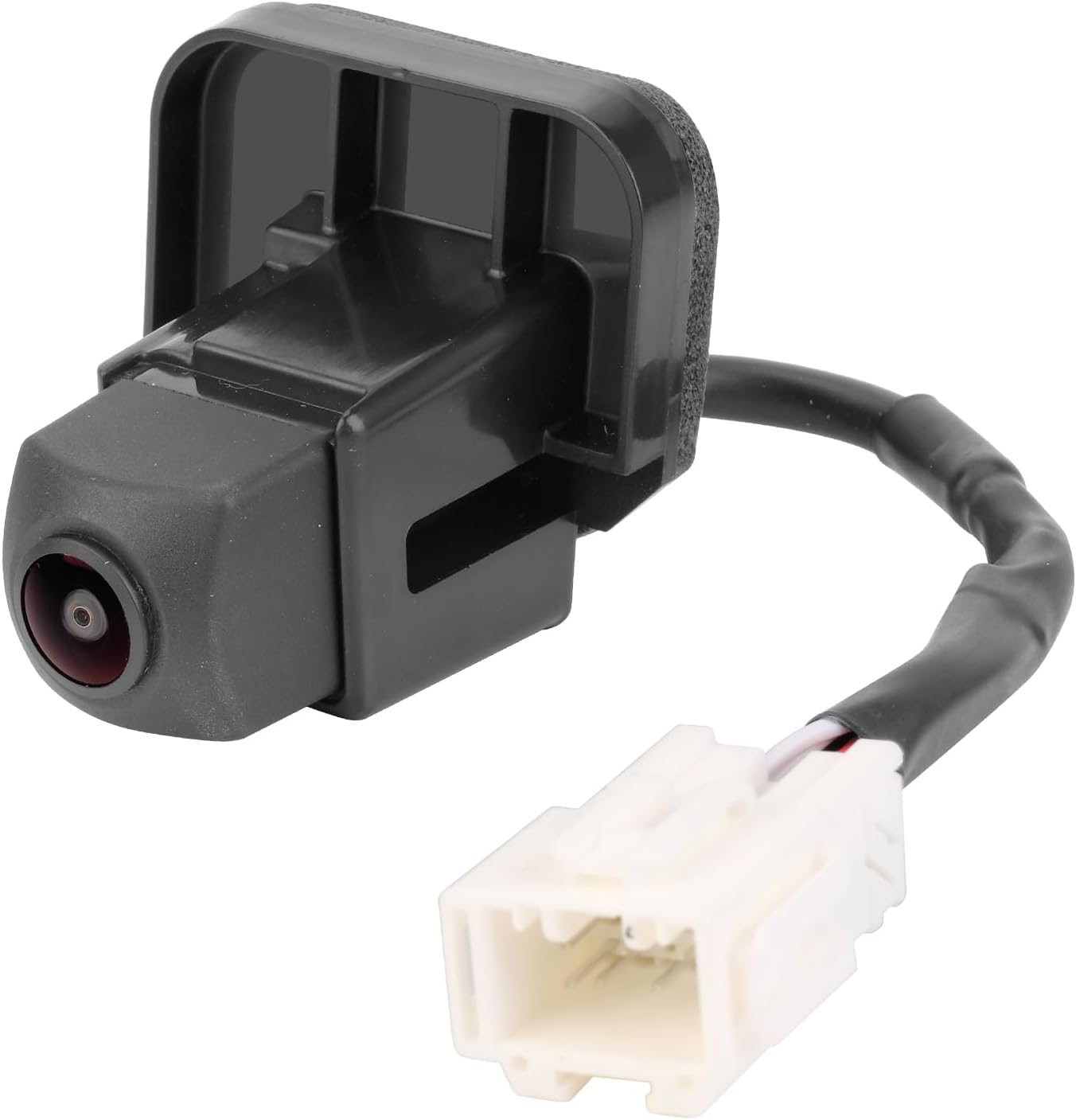
| Optical Sensor Technology | CMOS |
|---|---|
| Real Angle of View | 170 Degrees |
| Connector Type | RCA |
| Video Capture Resolution | 720p |
This Arokzn backup camera replaces the factory rear camera on 2012–2013 Honda CR-V models and connects directly to the vehicle video harness for a mostly plug-and-play install. It uses a 1/3-inch CMOS sensor with a 170 degree wide-angle lens and outputs 720p over an RCA connector, which yields a broad view that helps reveal blind spots while reversing. Installation is typical for an aftermarket wired camera and should be straightforward for a DIY mechanic who can access the tailgate harness; many users report quick installs with existing connectors. Practical benefits include a wide field of view, clearer daytime image than some older factory units, and compatibility with the stock monitor since it uses the same connector type. Limitations are that night/low-light performance can vary and some units show grain or slightly different framing compared with the original camera, and there have been occasional durability complaints from long-term exposure in harsh conditions. This camera is best when you want a functional, affordable replacement that keeps factory wiring and display intact.
Best for: Buyers who need a reliable, budget-friendly factory-style replacement for a 2012–2013 Honda CR-V camera and prefer a straightforward wired installation that ties into the original monitor.
Less Ideal for: Drivers who require premium low-light/night imaging, adjustable camera angles, or an all-new wireless system should consider higher-end or different-format alternatives.
- Direct plug-in to existing video harness for straightforward installation
- 170 degree wide-angle lens improves rear coverage and reduces blind spots
- Uses RCA output and 720p capture for compatible, clearer daytime images
- Aftermarket replacement for specific Honda CR-V part numbers so fitment is focused
- Night and low-light clarity is inconsistent across units
Verdict: The Best Overall slot is for a well-rounded backup camera that combines dependable image quality, weatherproof construction, and straightforward installation for most DIY mechanics.
2. QUICTO Waterproof 170° Backup Camera with 12 LED Night Vision
Best Budget Backup Camera

| Voltage | 12 Volts |
|---|---|
| Optical Sensor Technology | CMOS |
| Field Of View | 170 Degrees |
| Connector Type | RCA |
| Lux rating | 1.5 Lux |
This QUICTO backup camera provides a straightforward, low-cost way to add reversing vision to a 2012–2016 Honda CR-V that lacks a factory camera. It mounts to a license-plate area or a custom bracket and connects to an aftermarket monitor or head unit via RCA and a 12V reverse trigger. The 1/3-inch CMOS sensor and 12 built-in LEDs improve nighttime visibility and a 170 degree field of view reduces blind spots while parking. Installation is typical for universal cameras: surface-mount the unit, run the power and video cable, and tie the power lead to the reverse light trigger on the CR-V. Expect a clear daytime image with 420-line resolution but modest low-light detail compared with higher-end cameras, and some users report occasional defects after months of use. The package contains the camera and connection cable only so you will need a monitor or compatible radio. For a CR-V owner who wants a budget retrofit, this camera covers the basics without extras like wireless video or factory integration.
Best for: Drivers who need an inexpensive, functional way to add reversing visibility to a 2012–2016 CR-V and prioritize straightforward installation and basic performance over advanced features.
Less Ideal for: If you want factory-style integration, higher resolution imaging, or a wireless/plug-and-play kit for the CR-V, choose a more advanced camera system instead.
- Wide 170° field of view reduces rear blind spots during parking.
- 12 LED lights and 1/3" CMOS sensor improve night visibility compared with non-illuminated units.
- IP67 waterproof rating for use in rain and road spray.
- Simple RCA output and 12V reverse trigger make it compatible with most aftermarket monitors.
- 420-line resolution and modest low-light detail compared with higher-end cameras.
- No monitor or wireless transmitter included; requires an aftermarket display and wiring.
- Some users report durability issues after several months in service.
Verdict: Choose this budget pick if you want a cheap, functional backup camera that restores rear visibility without extra features or a high price tag.
3. GreenYi Rear View Backup Camera Replacement for Honda CR-V 2012–2013
Best OEM Replacement Backup Camera

| Compatible Devices | Honda CR-V 2012 2013 |
|---|---|
| Optical Sensor Technology | CCD |
| Field Of View | 170 Degrees |
| Video Capture Resolution | 960x480p |
| Voltage | 12 Volts (DC) |
This GreenYi backup camera is an OEM-style replacement intended to plug into the original harness and replace the factory unit on 2012–2013 Honda CR-V models. It uses a CCD sensor with a 1/3-inch optical size, a wide 170 degree field of view, and a fixed lens that provides a 960×480 capture resolution and low-light performance rated to 0.02 lux for improved night visibility. The unit is IP68 waterproof and housed in metal for durability in wet and harsh conditions. Installation is plug-and-play when your vehicle already has the factory camera wiring and connector, and the camera includes parking guidelines that mimic the original. Practical limitations are that installation instructions are not included and professional help may be needed if your vehicle lacks a factory camera harness or requires coding. Also this is an aftermarket part rather than a factory-made camera, so fit and finish can vary slightly from the original part. If you need a direct swap with original connector compatibility, this model aims to keep wiring simple while restoring rear-vision functionality.
Best for: Buyers who need a direct, plug-in replacement for a failed factory rear camera on a 2012–2013 Honda CR-V and prioritize matching original connectors and part numbers for an easy swap.
Less Ideal for: People installing a camera on a vehicle without a factory camera harness or anyone seeking an exact factory-made unit rather than an aftermarket replacement should consider other options.
- Direct-replacement design with original-style connector for plug-and-play swaps
- CCD sensor and 0.02 lux low-light rating for usable night vision
- Wide 170 degree field of view to improve rear visibility
- IP68 waterproof metal housing for weather resistance and durability
- No installation instructions included and some vehicles may require professional coding or setup
Verdict: This slot is for OEM-style replacement cameras that match original part numbers and connectors so you can swap the camera without splicing or major wiring changes.
4. ATOKIT License Plate Frame Backup Camera with 8 LEDs, 170° Wide Angle
Best License‑plate Frame Backup Camera

| Video output | RCA (CVBS NTSC) |
|---|---|
| Viewing angle | 170 Degrees |
| Night illumination | 8 white LEDs |
| Power | 12 Volts |
| Waterproof rating | IP67 |
This ATOKIT license‑plate frame camera mounts in place of a standard U.S. plate and feeds a CVBS (NTSC) RCA video signal to an aftermarket monitor or head unit. It is typically used as a low‑profile reversing aid: wire the power into the reverse light circuit so the camera turns on when you shift into reverse and run the RCA to the display. Notable features include a wide 170° field of view that reduces blind spots, adjustable tilt to show the bumper or ground close behind, and eight white LEDs that light the area for clearer night images without harsh IR bloom. The frame is rated IP67 so it tolerates rain and car washes, and the camera outputs 480p/480 TV lines compatible with many factory and aftermarket screens that accept NTSC. Important limitations are the wired RCA connection and NTSC-only output, which require confirming your CR-V display supports CVBS or using an adapter; the bundled connectors are large and may need drilling or wire cutting to route through the liftgate, and image resolution is standard definition so detail is lower than modern digital cameras.
Best for: Buy this if you want a neat license‑plate mount that keeps the camera out of the way and prioritizes clearer, LED‑lit night images over high resolution video for everyday reversing and parking.
Less Ideal for: Not a good choice if you need a wireless solution, a digital high‑definition IP camera, or a plug‑and‑play factory integration without any wiring or adapters.
- Wide 170° viewing angle reduces rear blind spots and helps when lining up a hitch or parking
- Eight white LEDs provide usable night illumination that displays in color rather than IR monochrome
- IP67 rating and shockproof design offer good resistance to rain, car washes, and road debris
- License plate frame form factor gives a clean, factory‑like mount that keeps the camera low profile
- CVBS/NTSC RCA output only, so it may require a compatible monitor or an adapter to work with some factory displays
- Connectors are nonremovable and bulky which can complicate routing through the tailgate and may require drilling or splicing
Verdict: Pick this license‑plate frame option when you prefer a clean, visible mount that adds built-in LEDs for improved low‑light reversing.
5. PixelMan PMD2A-S AHD 1080P Metal 170° Wide-Angle Backup Camera
Best 1080P / AHD Metal Backup Camera

| Video Capture Resolution | 1080p (AHD switchable) |
|---|---|
| Optical Sensor Technology | CMOS |
| Real Angle of View | 170 Degrees |
| Connector Type | RCA |
| Voltage | 12.0 |
The PixelMan PMD2A-S is a small metal backup camera built for improved image quality and durability. It outputs HD video and can be switched to AHD 1080P on compatible monitors, delivering a bright, high-contrast picture with vivid colors thanks to a 1/2.7in chip and a 170 degree wide-angle glass lens. Installation is straightforward using the included license-plate or surface brackets and a long double-shielded RCA cable, and the metal alloy housing with nano waterproof sealing and robust mounting hardware helps the unit resist weather and vibration. In practical use the camera provides a wide field of view that makes reversing and hitching easier both day and night; several users report strong low-light performance. Limitations to note are that the camera requires a monitor with an RCA input and in some setups the default output is 720P unless switched to AHD, so full 1080P depends on your display. The compact size and fish-eye lens can also produce noticeable distortion at the edges, which is common for wide-angle backup cams.
Best for: Drivers who want a tougher, weather-resistant replacement camera and higher-definition footage for safer reversing on a 2012–2016 Honda CR-V, prioritizing improved night and daylight visibility over perfect edge geometry.
Less Ideal for: People who need a plug-and-play camera for a factory-style connector or who cannot access a monitor that accepts RCA/AHD signals should consider a vehicle-specific factory-replacement option instead.
- Metal alloy housing and nano waterproof sealing for strong weather resistance
- Supports HD and switchable AHD output for up to 1080P on compatible screens
- Large 1/2.7in image sensor and 170° wide-angle glass lens for brighter, more vivid images
- Includes long double-shielded RCA cable and two mounting brackets for hidden or surface installation
- Requires a monitor with RCA input and AHD support to get true 1080P output
- Wide-angle glass lens creates fisheye distortion at the edges
Verdict: This pick suits buyers who want an upgraded high‑definition image and tougher metal housing for long-term durability in harsh conditions.
6. Purthog Plug-and-Play Backup Camera with 4.6" Monitor
Best Camera + Monitor Kit

| Screen Size | 4.62 Inches |
|---|---|
| Field Of View | 150 Degrees |
| Voltage | 12 Volts |
| Connector Type | RCA |
This Purthog kit pairs a compact 4.6-inch monitor with a sealed rear camera to provide a complete, self-install backup solution for vehicles without a factory screen. The camera mounts on the rear and connects to the monitor using the included long AV cable; power comes from the vehicle cigarette lighter or by tapping the reverse light so the display can switch with gear selection. The 150 degree wide-angle lens and 12 built-in LEDs improve visibility in tight spots and at night, while fixed reversing guide lines help judge distance. The monitor offers brightness and contrast adjustment but no color controls and the small screen is best for low-speed parking rather than detailed situational awareness at highway speeds. Installation is straightforward for a competent DIYer, though hiding the long wired run through trim takes time and the kit uses screws for the camera mount rather than adhesive. For a single purchase that gives both camera and monitor it delivers functional performance and reliable wired video without requiring a complex head unit swap.
Best for: DIYers who need a single-package replacement to add a camera and standalone monitor to a vehicle without a factory screen and who prioritize straightforward wiring and reliable wired video.
Less Ideal for: Drivers who want a large, high-resolution display or a color-accurate image should consider more advanced aftermarket systems or a head unit upgrade.
- Complete kit includes camera, 4.6" monitor, AV cable and power lead for one-purchase install
- 150° wide-angle lens and 12 LED lights provide broad daytime view and usable night vision
- Wired connection gives stable, low-latency video
- Monitor lets you adjust brightness and contrast for different lighting conditions
- Small 4.6" monitor has limited screen real estate and no color controls
- Camera mounts with screws only which may require drilling or panel access
Verdict: This kit is for DIYers who want a single purchase that provides both the camera and a monitor—ideal when the vehicle screen is absent or being upgraded.
Choosing the Right 2012-2016 Honda CR-V Backup Camera: Key Factors to Consider
Image Quality and Low-Light Performance
A camera with good resolution and low-light sensitivity directly affects how useful the view is in real situations. Higher resolution helps you discern small obstacles and read distance markers on the monitor, while strong low-light performance—including good dynamic range—reduces washout when the sun is low or when reversing under streetlights.
For the 2012–2016 CR-V, pay attention to image sensors and night-vision specs because the rear view often faces variable lighting. Cameras that list wide dynamic range or low lux ratings will usually give clearer nighttime images and better contrast when half the scene is bright and half is shaded.
Mounting Style and Fitment
How the camera mounts affects both appearance and installation complexity. Common styles include license-plate mount, bumper-embedded, and replacement trim pieces. License plate mounts tend to be the simplest to fit on the CR-V, while integrated bumper options offer a cleaner look but may need more precise placement or minor trim work.
Consider the CR-Vs rear contours and available mounting points. A camera that aligns with the vehicle's existing holes or replaces the license-plate light keeps modifications minimal. Verify that the chosen style does not obstruct sensors or the tailgate operation.
Wiring Method and Installation Complexity
Backup cameras come as hardwired kits, wireless transmitters, or plug-and-play modules. Hardwired kits route a video cable from the camera to a monitor or interface and often require tapping into the reverse light circuit to power the camera. Wireless systems reduce cable runs but can introduce latency, interference, or range limits.
For the 2012–2016 CR-V, evaluate how much interior routing you are comfortable with and whether you prefer a clean, permanent installation. If you plan to connect to an existing factory display, check for compatible video inputs or consider an interface harness to reduce dashboard disassembly.
Compatibility With Displays and Integration
Decide whether you will use an aftermarket monitor, a mirror-style display, or integrate with the factory screen. Some kits output standard composite video for easy connection to stand-alone monitors, while others offer wireless pairing or digital interfaces for more modern head units.
Confirm that the monitor or head unit you intend to use accepts the camera's signal type. If integrating with the CR-Vs factory display, ensure the kit provides a compatible interface or consider a monitor option that avoids integration work.
Durability and Weather Resistance
The rear of the vehicle is exposed to rain, road salt, and debris. Choose cameras with an IP65 rating or better and corrosion-resistant housings to ensure longevity. Look for stated operating temperature ranges if you live in extreme climates.
Sealed connectors, rubber grommets for bolt-through mounts, and corrosion-resistant screws reduce the chance of failure when the camera is exposed to water or winter road chemicals.
Guides and Installation Support
Good documentation and support make the difference between a smooth DIY install and a frustrating project. Look for kits that include clear wiring diagrams, voltage information for tapping into the reverse circuit, and recommended drill templates or trim-removal tips.
If you are not comfortable with vehicle wiring, choose a kit with professional support options or plug-and-play harnesses designed for the 2012–2016 CR-V to shorten install time and reduce the risk of electrical mistakes.
Wiring the Camera to the CR-V Reverse Light Circuit
Tapping the reverse light circuit is the most common method to power a hardwired backup camera because it ensures the camera only operates when the vehicle is in reverse. On the 2012–2016 CR-V, locate the reverse lamp wiring in the tailgate harness or behind the rear light cluster. Use a reliable tap connector or splice with heat-shrink insulation to avoid exposed wiring.
Run the video cable along factory wire channels when possible to keep the installation tidy. Secure the cable with zip ties and use grommets where it passes through metal to prevent abrasion. Finally, test the camera with the vehicle in reverse before reassembling trim to confirm the power tap and video feed are correct.
- Use multimeter to confirm which wire is the reverse feed before tapping
- Route cables away from high-heat components and exhaust
- Seal exterior mounting holes with automotive-grade sealant
Choosing Between Wired and Wireless Systems
Wired systems generally provide a stable, latency-free video feed and are less susceptible to interference. If you plan to retain a permanent connection to a monitor or factory display in the 2012–2016 CR-V, wiring the video gives the most reliable result.
Wireless kits are attractive for simpler installs because they eliminate the need to run a long video cable. However, expect potential pairing issues, occasional signal dropouts near heavy RF sources, and the need to manage transmitter and receiver power sources. If you live in an area with many wireless devices, a wired option is often the safer choice.
- Wired: consistent signal, better for factory integration
- Wireless: simpler routing, possible interference or latency
Mounting Tips for a Clean, OEM-Looking Installation
A license-plate mount is the quickest way to add a camera with minimal body modifications. Use stainless hardware and position the camera so it is centered and not blocked by the plate frame. If the kit includes angle shims, test different tilt settings to get the horizon and bumper perspective correct for parking.
For a more integrated appearance, consider a bumper or trim-mounted camera. These installations often require precise hole placement and sealants to prevent leaks. Measure twice and test-fit before making permanent cuts.
- Dry-fit mounting location and check field of view before final fastening
- Avoid mounting too low where road spray will consistently obscure the lens
- Tilt camera slightly downward to show bumper edge for distance reference
Understanding Parking Guidelines and Distance Markers
Most backup cameras display distance markers to help you judge how close objects are behind the vehicle. These markers are estimates and vary with camera mounting height and lens field of view. For the CR-V, position the camera so the bottom of the image includes the bumper edge to provide a useful reference.
If a kit allows marker calibration or disabling the overlay, use that feature to match the indicators to the observed distances during low-speed testing. Rely on visual checks and slow maneuvers while you become familiar with the camera's perspective.
- Test marker accuracy in a safe, open area using cones or boxes
- Disable markers if they create visual clutter or misrepresent true distances
Protecting the Camera From Road Debris and Moisture
Choose a mounting spot with some natural shielding from direct spray, such as under a small lip or tucked near the license plate recess. After installation, periodically clean the lens with a soft cloth and check seals for cracking or loosening.
Check mounting hardware for tightness after the first few weeks of use, since vibration can loosen screws and allow water intrusion. Replacement gaskets and silicone sealant are inexpensive ways to extend the life of the installation.
- Inspect seals seasonally, especially after winter
- Keep a microfibre cloth in the car to wipe the lens before reversing in low-light
Still looking for the perfect fit?
Select your Honda CR-V configuration to see the most relevant Backup Cameras recommendations
How We Chose the Best 2012-2016 Honda CR-V Backup Camera
We prioritized solutions that reliably adapt to the 2012–2016 Honda CR-V electrical and body layout and that meet common owner needs. Key evaluation criteria included image resolution and low-light performance to ensure useful visibility at night or in shaded parking spaces; mounting style and physical compatibility with the CR-V rear bumper and license plate area; wiring method and installation complexity, since owners may prefer hardwired kits, plug-and-play interfaces, or wireless options; camera durability and weather sealing to withstand road spray and winter conditions; and display and integration options, such as camera-only kits, units that feed an aftermarket monitor, or kits compatible with factory screens via standard video inputs.We excluded products that require major dashboard disassembly or nonstandard electrical modifications for this vehicle generation. We also filtered out cameras with poor weather ratings, reports of unreliable video feeds, or insufficient image quality. The final list favors systems that balance dependable performance with straightforward installation for typical DIYers and installers working on a 2012–2016 Honda CR-V.
Our full evaluation process is outlined in our review methodology.
FAQ
Can I install a backup camera myself on a 2012–2016 CR-V?
Often yes. Many kits are designed for do-it-yourself installation using the license-plate mount and a reverse-light power tap. If you are comfortable routing a cable through trim panels and making electrical taps, you can complete a straightforward install in a few hours.
Will a wireless backup camera work reliably on my CR-V?
Wireless systems can work well for simple installs, but they may experience occasional interference or limited range. For the most consistent performance—especially if you plan to use the factory screen or a permanent monitor—wired connections are more reliable.
Do I need to modify the tailgate to mount a camera?
Most common installations do not require major tailgate modification. License-plate and bumper-mounted options typically use existing fasteners or small drilled holes. If you choose an integrated bumper mount, minor trim work may be needed but full tailgate modification is rarely necessary.
How do I power the camera without draining the battery?
Tap the camera power to the reverse light circuit so the camera only receives power when the vehicle is in reverse. This prevents the camera from drawing current while the vehicle is parked and avoids battery drain.
Can I use the camera with the CR-Vs factory display?
Sometimes. Compatibility depends on the head unit inputs and the camera signal type. Look for kits that offer a composite video output or a compatible interface harness. If integration is unclear, a separate aftermarket monitor is an easier option.
Final Verdict
When adding a backup camera to a 2012–2016 Honda CR-V, prioritize image clarity, a mounting style that matches how you want the camera to look, and a wiring approach that fits your comfort level. Wired systems offer the most consistent video for permanent installations, while wireless kits simplify routing at the cost of potential interference. Also consider durability and ease of integration with your chosen display.Balance these tradeoffs based on how you use the vehicle. If you want the most dependable everyday view for parking and reversing, choose a well-sealed camera with clear low-light performance and hardwired power. If ease of fitment is most important, favor a plug-and-play or wireless solution and verify the feed quality before finalizing the install.
Explore More:
- Check out all Honda CR-V parts & accessories
- Explore Electronics
- Browse all Accessories
