

Note: This article contains affiliate links. If you click on these links and make a purchase, I may earn a small commission at no extra cost to you. This helps support my research and content. Read my full affiliate disclosure here.
If you drive a GMC Canyon, a mirror dash cam can add continuous front-and-rear recording and a clearer view while reversing. These devices combine a front-facing camera built into a rearview-mirror housing with a rear camera or backup feed to cover both lanes and the cab. Choosing the right mirror dash cam matters because road incidents, parking lot hits, and insurance questions are easier to resolve with reliable footage.This guide shortlists the top mirror dash cams for the GMC Canyon and explains the practical tradeoffs we considered. We evaluated video clarity, mounting and wiring for the Canyon, night performance, and parking features so you can pick a unit that fits your driving habits. Read on for the criteria we used and the key features to compare before you buy.
Looking for other parts? See all GMC Canyon parts & accessories.
Top Picks at a Glance
| Best Overall Mirror Dash Cam An all-around mirror dash cam that balances features, reliability, and value | FITCAMX HD2-D5800 Dual Dash Cam for GMC Canyon (Front 4K + Rear 1080P) |  |
| Best Budget Mirror Dash Cam A low-cost mirror dash cam that covers core recording needs affordably | Jansite 10" Touchscreen Mirror Dash Cam with Front and Rear 1080P Cameras | 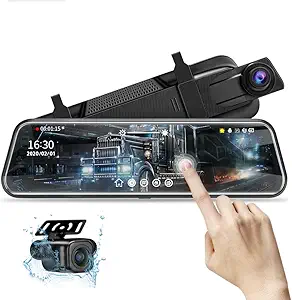 |
| Best Premium Mirror Dash Cam A higher-end mirror dash cam with top video quality and features | WOLFBOX G900 Tripro 3‑Channel 4K Mirror Dash Cam (Bumper Version) |  |
| Best 4K Mirror Dash Cam A mirror dash cam offering ultra-high 4K front-camera resolution for detail | pelsee S12 12" Mirror Dash Cam — True 4K Front + 2.5K Rear, Wi‑Fi 6, GPS |  |
| Best Dual-Lens Mirror Dash Cam A two-channel mirror dash cam with both front and rear coverage included | WOLFBOX G930 10" 4K Front + 1080P Rear Mirror Dash Cam with 5.8GHz WiFi |  |
| Best Compact Mirror Dash Cam A slim, low-profile mirror dash cam that preserves rearview visibility | Moly Magnolia 4.3" Mirror Dash Cam with Dual Front/Rear 1080P Cameras |  |
| Best Wi‑Fi Mirror Dash Cam A mirror dash cam with wireless connectivity for easy file transfer and app control | mangoal Front 4K & Rear 1080P OEM‑Style Dash Cam for GMC Canyon (Model B) |  |
1. FITCAMX HD2-D5800 Dual Dash Cam for GMC Canyon (Front 4K + Rear 1080P)
Best Overall Mirror Dash Cam

| Compatible Vehicle | GMC Canyon 2023-2026 |
|---|---|
| Video Capture Resolution | Front 2160P + Rear 1080P |
| Mounting Type | Rearview Mirror Mount |
| Control Method | App |
| Max Flash Memory Supported | 256 GB |
The FITCAMX HD2-D5800 is a mirror-mounted dual dash cam designed specifically for GMC Canyon 2023–2026 models with an auto-dimming rearview mirror. It records the front view at 2160P (4K) and the rear at 1080P simultaneously at 30 fps, using a f/1.6 aperture and WDR to improve low-light clarity. The unit is integrated behind the mirror for an OEM look and mounts without blocking the windshield. Built-in WiFi and the FITCAMX app let you preview and download clips to your phone, while loop recording and a G-sensor automatically save incident clips to the included SD card; the system supports up to 256 GB. Installation is designed for vehicles with an auto-dimming mirror so cable routing is minimal and the camera powers on and auto-records with the car. Notable limits are that the rear camera is not waterproof and parking mode requires an additional harness, and the camera may run warm under direct sun due to placement. For everyday driving it provides high-resolution footage and convenient app access in a discreet, factory-style package.
Best for: Buyers seeking a balanced, daily-use mirror dash cam for a GMC Canyon who prioritize discreet factory-style installation, high-resolution front video, and easy app access for reviewing footage.
Less Ideal for: Drivers who need a waterproof external rear camera or those requiring out-of-the-box 24/7 parking surveillance without additional accessories should consider other solutions.
- True dual recording with front 2160P and rear 1080P for clear, simultaneous coverage
- OEM-style mirror integration keeps the install discreet and avoids windshield obstruction
- Built-in WiFi and companion app let you preview and download footage without removing the SD card
- Includes 128GB microSD and supports up to 256GB with loop recording and G-sensor locked-event files
- f/1.6 aperture and WDR improve night and low-light image quality
- Rear camera is marked as not waterproof, limiting exposed or external mounting options
- Parking mode needs an extra harness to enable 24-hour monitoring
Verdict: The best overall mirror dash cam for buyers who want a balanced combination of video quality, ease of use, robust features, and dependable performance for everyday driving and recording.
2. Jansite 10" Touchscreen Mirror Dash Cam with Front and Rear 1080P Cameras
Best Budget Mirror Dash Cam

| Screen size | 10 Inches |
|---|---|
| Front video resolution | 1080p |
| Rear video resolution | 1080p |
| Rear camera cable length | 6 m (19.6 ft) |
| Max SD card | 128G |
This Jansite mirror dash cam turns your GMC Canyon's stock mirror into a 10-inch streaming display with simultaneous front and rear 1080p recording. The IPS touchscreen makes switching views and adjusting exposure or parking guide lines quick while driving. The included IP68 rear camera and its 6 m cable simplify routing to the Canyon's rear and provide a wide backup view with adjustable guide lines for parking assistance. Loop recording and a built-in G-sensor protect collision clips from being overwritten, and the unit supports up to a 128 GB SD card for extended recording. Night vision improvements and noise reduction help the rear camera capture clearer low-light details, though both cameras are 1080p rather than higher-resolution sensors. The internal battery only preserves settings so the device needs to stay powered while recording and a hardwire kit is required for 24-hour parking surveillance. Installation is generally DIY-friendly using the supplied straps and power cord, but verify the Canyon's mirror dimensions and wiring route before fitting.
Best for: Budget-minded GMC Canyon owners who want a large touchscreen mirror dash cam that records front and rear in 1080p, provides easy parking assist, and is simple to install without professional wiring for basic daily use.
Less Ideal for: Drivers who need higher-resolution video, continuous off-vehicle surveillance without additional hardware, or a unit that doubles as a functional reflective mirror when powered off should consider higher-end alternatives or different mirror styles.
- Dual 1080p front and IP68 rear camera for clear daytime footage
- 10-inch IPS touchscreen streaming display for easy real-time viewing and controls
- Long 6 m (19.6 ft) rear camera cable simplifies routing to the truck bed or bumper
- G-sensor and loop recording protect collision clips and enable continuous recording
- Adjustable parking guide lines and upgraded night vision improve reversing and low-light visibility
- Built-in battery only saves settings so the unit must remain connected to vehicle power for recording
Verdict: The best budget mirror dash cam for shoppers who prioritize a very affordable option that still provides clear front recording, basic parking features, and straightforward installation.
3. WOLFBOX G900 Tripro 3‑Channel 4K Mirror Dash Cam (Bumper Version)
Best Premium Mirror Dash Cam

| Video Capture Resolution | 2160p |
|---|---|
| Mounting Type | Rearview Mirror Mount |
| Field Of View | 170 Degrees |
| Screen Size | 12 Inches |
| Included Memory Card Size | 256 GB |
The WOLFBOX G900 Tripro is a mirror-mounted, three‑channel dash cam aimed at drivers who want top-tier footage and broad coverage. Its front STARVIS 2 IMX678 sensor records 4K at 30fps while the rear and bumper cameras capture 2.5K and 1080p respectively, giving a detailed, multi-angle record of drives. The 12-inch LCD mirror display makes playback and menu navigation straightforward, and 5.8GHz Wi‑Fi plus an app lets you pull clips to a smartphone quickly. Built-in GPS timestamps video for accurate location and speed data, and night‑vision enhancements improve low‑light capture. The kit includes long camera cables, an external GPS antenna, and a preinstalled 256GB card so it is ready to install. Expect a more involved installation if you use the bumper camera on a GMC Canyon because routing the longer cables and mounting the bumper unit may take extra time. Parking monitoring requires a separate hardwire kit. For drivers prioritizing the best recording quality and robust feature set in a mirror dash cam, this unit delivers strong performance.
Best for: Drivers who want a premium, high‑resolution mirror dash cam and are willing to invest in professional‑quality sensors, multiple cameras, and a large in‑mirror display for comprehensive recording on a GMC Canyon.
Less Ideal for: Buyers who need a simple plug‑and‑play single‑channel camera or who do not want to manage a multi‑camera installation and wiring on their vehicle.
- True 4K front capture with STARVIS 2 sensor for superior daytime and low‑light detail
- Three‑channel coverage (front, rear, bumper) for extensive situational awareness
- Large 12" mirror display simplifies live view and local playback
- 5.8GHz Wi‑Fi and app access for faster file transfers to a smartphone
- Includes 256GB card, external GPS antenna, and long camera cables for ready setup
- Parking mode needs a separately sold hardwire kit to enable continuous monitoring
- Bumper camera installation and cable routing can be more time consuming on some vehicles
Verdict: The best premium mirror dash cam for users willing to pay more for superior build quality, advanced sensors, longer feature sets, and the highest overall recording performance.
4. pelsee S12 12" Mirror Dash Cam — True 4K Front + 2.5K Rear, Wi‑Fi 6, GPS
Best 4K Mirror Dash Cam

| Front video resolution | 3840×2160P |
|---|---|
| Rear video resolution | 2560×1440P |
| Screen size | 12 Inches |
| Included memory | 64 GB |
| Connectivity | Wi‑Fi (Wi‑Fi 6) |
The pelsee S12 replaces your GMC Canyon’s factory rearview mirror with a 12-inch mirror dash cam that records a native 3840×2160 front feed and a native 2560×1440 rear feed simultaneously. It mounts over the existing mirror and is controlled via the touchscreen or the Pelsee app over Wi‑Fi 6, so you can download high-resolution clips quickly and view GPS-stamped routes and speeds. The S12 emphasizes night performance with an f/1.5 aperture and advanced image processing for brighter color night footage and reduced glare, which helps when capturing license plates or distant details. The included 19.6 ft rear cable and IP67-rated rear camera make rear mounting straightforward on mid-size trucks like the Canyon, and the 64 GB card gets you started. Expect clear, evidence-grade daytime detail and noticeably improved low-light footage, though full 24/7 parking surveillance requires a separately purchased hardwire kit and larger rear cable if you need routing for extended-cab or modified bed layouts. Installation is typical for in-mirror systems and may take modest trim work for a factory-integrated look.
Best for: Buyers who prioritize maximum image detail for license-plate and distant-object capture on a GMC Canyon and want a mirror-style system with app access and strong night performance.
Less Ideal for: Drivers who need built-in 24/7 surveillance without additional accessories or who prefer a fully hidden OEM-style installation.
- True native 4K front recording for detailed daytime evidence capture
- Native 2.5K rear camera with IP67 rating for reliable outdoor performance
- Wi‑Fi 6 transfer and app control for fast downloads and GPS-tagged clips
- Bright f/1.5 optics and image processing that improve low-light/license-plate visibility
- Includes 12" mirror display, GPS antenna, and 64 GB card for out-of-box use
- 24/7 parking monitoring needs an optional hardwire kit rather than built-in constant power
Verdict: The best 4K mirror dash cam for buyers who need maximum image detail for license-plate capture, evidence-grade footage, and clearer night or distance recording.
5. WOLFBOX G930 10" 4K Front + 1080P Rear Mirror Dash Cam with 5.8GHz WiFi
Best Dual-Lens Mirror Dash Cam

| Video Capture Resolution | 2160p front, 1080p rear |
|---|---|
| Screen Size | 9.66 inches |
| Real Angle of View | 170 Degrees |
| Included Memory Card Size | 64 GB |
| Wi-Fi | 5.8GHz |
The WOLFBOX G930 is a two-channel mirror dash cam that replaces your factory mirror and records front 4K video while simultaneously capturing a 1080p rear feed. It mounts over the existing mirror and uses a 10-inch touchscreen to switch between front, rear, and split-screen views; sliding the screen changes the viewing angle. Key features for on-vehicle coverage include a wide 170 degree front view, WDR and a 6-glass lens for improved contrast and low-light performance, an always-on GPS receiver for speed and location logging, and 5.8GHz WiFi for fast video downloads to the mobile app. The unit includes a 64GB card, long rear camera cable, and basic install hardware. Expect practical benefits like clearer evidence-quality front footage, simultaneous rear coverage during incidents, and easy access to clips over WiFi. Limitations are that the rear camera is 1080p rather than matching the front 4K, and full parking-monitor hardwiring or USB-C power stability may require an optional hardwire kit and professional routing for best results in a GMC Canyon cab layout.
Best for: Drivers who want continuous, simultaneous front-and-rear coverage built into a mirror replacement and value high-resolution front footage with easy wireless access to clips.
Less Ideal for: Users who need matching-resolution multi-camera setups or a fully hidden OEM-style installation without additional wiring work should consider alternative multi-channel systems or professional installs.
- True dual-channel recording with front 4K and rear 1080p for simultaneous coverage
- 10-inch touchscreen mirror that switches between front, rear, and split-screen views
- 5.8GHz WiFi and included 64GB card for fast file transfer and out-of-the-box recording
- WDR plus a multi-element lens for better contrast and night handling
- Includes external GPS and long rear cable for flexible mounting and location logging
- Rear camera records at 1080p, not the same resolution as the 4K front camera
Verdict: The best dual-lens mirror dash cam for drivers who want simultaneous front-and-rear (or interior) recording to capture more of an incident without adding a separate camera.
6. Moly Magnolia 4.3" Mirror Dash Cam with Dual Front/Rear 1080P Cameras
Best Compact Mirror Dash Cam

| Video Capture Resolution | 1080p |
|---|---|
| Screen Size | 4.3 Inches |
| Frame Rate | 30 FPS |
| Real Angle of View | 170 Degrees |
| Mounting Type | Rearview Mirror Mount |
This compact mirror dash cam installs over your GMC Canyon's factory rearview mirror to provide front and rear 1080p recording without adding a large, bulky unit. The 4.3-inch LCD touch display stays tucked behind the mirror surface and gives quick access to playback, loop recording, motion detection, and parking monitoring. The front lens offers a wide 170 degree view for road coverage while the rear camera supports backup view and parking assistance. Real-world benefits include discreet installation that preserves cabin sightlines, continuous loop recording at 30 fps for incident capture, and basic night vision for low-light driving. Expect a simple auxiliary power connection at 5V 1A and a compact footprint that minimizes obstruction. Limitations are the small screen size for live viewing and the modest 30 fps frame rate, which is fine for everyday documentation but not optimized for high-speed capture or advanced driver assistance features. Fitment and wiring should be straightforward on a GMC Canyon when mounted to the factory mirror area.
Best for: Buyers who want a low-profile dash cam solution that preserves the Canyon's factory mirror appearance while providing reliable front and rear recording and basic parking monitoring.
Less Ideal for: Drivers seeking a large-screen mirror display, higher frame-rate recording for sportier driving, or advanced driver assistance features should consider other mirror units with bigger displays and more processing power.
- Compact mirror-mounted design keeps the factory mirror profile and sightlines intact
- Dual front and rear recording with 1080p resolution for everyday incident capture
- 4.3-inch touch LCD for on-device control and quick playback
- Loop recording, motion detection, and parking monitoring for continuous protection
- Wide 170 degree front lens covers a broad field of view on the road
- Small 4.3-inch screen limits live visibility compared with larger mirror units
Verdict: The best compact mirror dash cam for customers who need a discrete, space-saving unit that minimizes mirror bulk while still delivering solid video and basic features.
7. mangoal Front 4K & Rear 1080P OEM‑Style Dash Cam for GMC Canyon (Model B)
Best Wi‑Fi Mirror Dash Cam

| Compatible with Vehicle Type | GMC Canyon 2023 2024 2025 2026 |
|---|---|
| Video Capture Resolution | Front 4K and Rear 1080P |
| Connectivity Technology | Wi-Fi |
| Included Memory Card Size | 128 GB |
| Frame Rate | 30 fps |
This mangoal mirror-style dash cam is a custom-fit two-channel system designed to tuck behind the auto-dimming rearview mirror on GMC Canyon 2023–2026 models. It records the front view in Ultra HD 4K and the rear in 1080p with a wide 150 degree front field of view and STARVIS IMX335 sensor for improved low-light detail. The unit includes built-in Wi‑Fi and a free app so you can preview clips, download footage to your phone, and apply updates without removing the microSD card. Installation is largely plug-and-play using the supplied auto-dimming mirror adapter or OBD/fuse power options to keep wiring hidden. Loop recording, parking monitoring (with hardwire adapter), G-sensor incident detection, and a packaged 128 GB card cover typical driving and security uses. Trade-offs to note are that the app preview is compressed compared with onboard AHD files, and the system requires the mirror plug power adapter to enable some parking features, so full functionality depends on your vehicle wiring and chosen power method.
Best for: Buyers who prioritize wireless convenience and seamless on-phone access to recorded footage on a GMC Canyon and want a dash cam that blends in with the factory mirror for a clean install.
Less Ideal for: Drivers without the required auto-dimming mirror plug or who cannot hardwire power may need additional adapters or professional installation to enable parking monitoring features.
- Custom-fit OEM look that mounts behind the auto-dimming mirror for a concealed, factory-style installation
- Front 4K and rear 1080p recording with STARVIS sensor for clearer low-light footage
- Built-in Wi‑Fi and companion app for on-phone preview, downloading clips, and firmware updates
- Includes hardwire/adapter options and a 128 GB microSD card so parking monitor and loop recording are ready out of the box
- App preview is compressed and lower quality than the original AHD files stored on the card
Verdict: The best Wi‑Fi mirror dash cam for users who value seamless wireless pairing, on-phone footage review, and convenient firmware updates without removing the memory card.
Choosing the Right GMC Canyon Mirror Dash Cam: Key Factors to Consider
Video Resolution and Field of View
Higher resolution provides more useful detail for license plates and facial features. A 1080p front camera is the practical minimum for evidence-grade footage, while 1440p or 4K front recording can capture finer details when needed. Rear camera resolution matters too; a low-resolution rear feed reduces the value of dual-channel recording.
Field of view determines how much of the road and neighboring lanes the camera captures. Wider lenses cover more of the road but can introduce fisheye distortion that affects plate legibility at the edges. For the GMC Canyon, pick a balance: a front FOV that captures multiple lanes and a rear lens with a narrower FOV focused on the lane behind and the truck bed area if you need backup coverage.
Night Performance and Dynamic Range
Many incidents happen in low light or at dusk, so strong low-light sensitivity and good dynamic range are critical. Look for mirror dash cams with large sensors, night-optimized processing, or HDR/WDR support to handle bright headlights and dark backgrounds simultaneously. Better night performance means clearer license plates and more usable contrast around light sources.
Dynamic range affects how the camera balances bright sky and shadowed road surfaces. For drivers in urban and rural settings with the GMC Canyon, a unit that retains detail in both highlights and shadows will reduce blown-out areas around headlights and streetlights.
Mounting, Fit, and Wiring for the GMC Canyon
Mirror dash cams mount over the factory rearview mirror or replace it outright. The unit should fit securely without obstructing the view or interfering with built-in sensors or auto-dimming functions. Evaluate the mounting style against the Canyon s mirror height and headliner clearance to avoid glare or bumping on rough roads.
Wiring options matter for a clean installation. Hardwiring kits allow parking mode and professional-style routing behind trim panels, while a cigarette-lighter connection is simpler but can leave cables exposed and may not support parking features. Consider the rear camera cable routing from the tailgate or cabin to avoid sharp bends or pinch points.
Parking Mode and Motion Detection
Parking mode records events while the vehicle is off, capturing hit-and-runs and vandalism. Different implementations exist: motion-activated recording, time-lapse low-power recording, or impact-triggered recording via a built-in G-sensor. For a truck like the Canyon that may be parked in public lots or job sites, a robust parking mode can provide crucial evidence after an incident.
Check whether parking mode requires constant power or a hardwire kit and whether the unit has battery protection to prevent draining the vehicle battery. Sensitivity settings and buffer times are important to balance between capturing events and conserving storage.
Display, Interface, and Usability
Mirror dash cams often include an integrated display that overlays video or shows a reversed rear feed. A clear, responsive display helps when reversing and when reviewing footage on the go. Touch controls or straightforward physical buttons reduce distraction while driving.
Consider how intuitive the menu system is for checking incident clips, adjusting sensitivity, or formatting storage. Easy access to emergency-save buttons is valuable so you can lock important files quickly after an event.
Storage, File Management, and Connectivity
Reliable loop recording with sensible file segmentation prevents footage loss and keeps the most recent clips available. Look for support for high-capacity microSD cards and clear recommendations for maximum card size. Automatic overwrite behavior and protected-file handling should be predictable and documented.
Connectivity features like Wi-Fi and app access simplify clip downloads without removing the card, while GPS logging adds location and speed data to recordings. For Canyon owners who need quick access to video for claims or evidence, wireless transfer and GPS metadata are practical conveniences.
Installation Tips Specific to the Canyon
Plan the route for the rear camera cable before beginning work. Access points behind the headliner and down the A-pillar can allow discrete runs to the dash mirror area without interfering with airbags or wiring harnesses. If you are uncomfortable routing trim, consider professional installation to avoid panel damage.
When mounting the mirror unit, ensure it does not block the factory sensors or the view through the windshield. Test the mirror position with different seat heights and with passengers to ensure it remains clear during typical use.
- Avoid routing cables near sharp metal edges; use grommets where wires pass through panels.
- Secure excess cable with adhesive clips to prevent rattle.
- If hardwiring, use an ignition-switched fuse for standard recording and a constant power source only if parking mode is configured with battery protection.
Wiring Choices: Plug-In Vs Hardwire
Plug-in power via a 12V outlet is fast and reversible but may not support parking mode reliably and can leave cords visible in the cabin. It is a good choice for renters or drivers who prefer a noninvasive setup.
Hardwiring offers a cleaner look and enables 24/7 parking surveillance when paired with battery-saving features. However, it requires more installation effort and attention to the Canyon s fuse box layout to ensure you tap the correct circuits without disabling safety systems.
- Plug-in: quick setup, limited parking features, easier to move between vehicles.
- Hardwire: professional appearance, parking mode support, requires fuse tap or professional install.
Understanding Dual-Channel Recording Benefits
A mirror dash cam with a dedicated rear camera records front and rear channels simultaneously. That provides a complete incident picture, showing the approach and what happened behind the vehicle. Dual-channel setups are especially useful for backing incidents, rear collisions, or documenting interactions at slow speeds.
Be aware that simultaneous high-resolution recording can increase storage needs and heat generation. Choose settings that balance clarity and recording time, and verify the unit s thermal handling if you plan to record in high-temperature conditions.
- Dual-channel increases evidentiary value for both forward and rear collisions.
- Monitor storage and set bitrate or resolution to get reliable loop lengths.
Using the Mirror Display as a Backup Aid
Many mirror units double as a rearview display when the vehicle is in reverse. This can replace or supplement the factory backup camera feed, offering a wider view or overlay guidelines. Make sure the display mode is responsive and that the rear camera angle is appropriate for trailer hitches or bed loading in the Canyon.
Calibrate any parking guidelines where possible and test the image at low speeds to ensure the preview helps rather than distracts during maneuvers.
- Check for lag between transmission and display to avoid misleading visuals while reversing.
- Prefer units that automatically switch to the rear camera when reverse gear is engaged.
Maintaining and Managing Recordings
Regularly inspect the microSD card and replace it at manufacturer-recommended intervals to avoid corruption from repeated writes. Formatting the card in-camera resets its allocation tables and can prevent unexpected errors.
Adopt a simple file-management routine: periodically back up critical footage to a computer or cloud storage and label clips with the date and location when possible. This makes retrieval easier if you need evidence for insurance or police reports.
- Use high-endurance microSD cards rated for continuous recording.
- Format the card monthly or after firmware updates to maintain reliability.
How We Chose the Best GMC Canyon Mirror Dash Cam
For this GMC Canyon roundup we applied vehicle-focused filters and real-world buyer priorities to narrow the field to dependable mirror dash cams. We prioritized video quality with concrete metrics: at minimum 1080p front recording and a dedicated rear input or integrated rear lens. Night and HDR performance were emphasized because the Canyon is often driven in mixed-light conditions. We also evaluated mounting and wiring options that suit the Canyon s cabin and rear camera routing, plus how each unit handles parking surveillance.Other criteria included reliability of loop recording and file management, responsiveness and clarity of any on-mirror display, and whether the unit supports common convenience features like GPS logging and Wi-Fi for reviewing clips. We excluded single-lens or novelty units without a proper rear camera input or those that require invasive permanent modifications to the factory mirror mount. Units that lacked basic safety features such as parking motion detection or stable loop recording were also omitted. The final picks balance clear daytime and nighttime footage, straightforward installation for the Canyon, and essential safety features for everyday driving.
Our full evaluation process is outlined in our review methodology.
FAQ
Will a mirror dash cam interfere with the Canyon s auto-dimming mirror or built-in sensors?
It depends on the mounting method. Clip-over mirror units are designed to coexist with auto-dimming mirrors, but you should confirm clearance and sensor placement before installation. Replacement-style mirrors may require checking that any factory sensors remain unobstructed.
Can I hardwire a mirror dash cam to enable parking mode on a GMC Canyon?
Yes. Hardwiring to a constant power source plus using a low-voltage cutoff or battery protection module enables parking mode. Ensure taps are made at appropriate fuses and follow safe wiring practices or consult a professional installer.
How much storage do I need for dual-channel recording on a mirror dash cam?
Storage depends on resolution and bitrate. Dual 1080p recording typically consumes more than single-channel setups, so high-capacity, high-endurance microSD cards are recommended. Expect faster fills at higher resolutions, and configure loop length accordingly.
Do mirror dash cams record while my Canyon is parked and turned off?
Many models support parking surveillance, but the feature often requires a hardwire connection and consumes power. The specific operation varies by unit: some use motion-triggered recording, others record buffered pre-event clips when impact is detected.
Is it possible to view footage on the mirror display immediately after an incident?
Yes. Most mirror dash cams let you play back recent clips directly on the integrated display. If the unit has Wi-Fi or app support, you can also transfer clips wirelessly to a phone for quicker sharing.
Will the rear camera work if I install the mirror unit but keep the factory backup camera?
Some mirror dash cams accept an additional rear camera input while others replace the factory feed. Verify whether the unit can take an auxiliary rear camera and whether it supports automatic switching when you engage reverse gear.
Final Verdict
When choosing a mirror dash cam for your GMC Canyon, prioritize reliable front and rear video quality, practical mounting and wiring that suits the truck s cab, and a parking mode implementation that matches how and where you park. Balance resolution against storage needs so you get usable footage without frequent card swaps.Focus on ease of installation and a clear, responsive display if you plan to use the unit for reversing. By weighing these tradeoffs and matching features to your daily driving and parking habits, you can select a mirror dash cam that delivers consistent protection and peace of mind.
Explore More:
- Check out all GMC Canyon parts & accessories
- Explore Electronics
- Browse all Accessories
