

Note: This article contains affiliate links. If you click on these links and make a purchase, I may earn a small commission at no extra cost to you. This helps support my research and content. Read my full affiliate disclosure here.
Driving a GMC Canyon brings capability and confidence, but it does not protect you from the unexpected. A properly chosen GMC Canyon dash cam documents incidents, deters fraud, and records scenic drives for later review. You want clear daytime and nighttime video, a dependable mount that suits the Canyon windshield, and features that match how you use the truck.This guide covers the top shortlisted dash cams suited for the GMC Canyon, with attention to video quality, mounting and power options, parking surveillance, and usability. Read on to see which features matter most and how we evaluated each option before the product list.
Looking for other parts? See all GMC Canyon parts & accessories.
Top Picks at a Glance
| Best Overall Dash Cam The top all-around dash cam balancing video, features, and reliability | FITCAMX HD2-D5800 4K Dash Cam for GMC Canyon (2023–2026) — OEM-Style, WiFi & App |  |
| Best Budget Dash Cam A low-cost, no-frills camera that still records reliably | AVAPOW 4K Front Dash Cam with WiFi 6 and Hardwire Kit |  |
| Best Premium Dash Cam A higher-end unit with advanced features and build quality | VIOFO A329S 3‑Channel Dash Cam (4K Front, 2K Cabin & Rear) |  |
| Best Compact Dash Cam A small, unobtrusive camera that preserves windshield sightlines | Garmin Dash Cam 67W — Compact 1440p Dash Camera with 180° Field of View |  |
| Best Dual-Channel Dash Cam Front-and-rear recording to capture incidents on both sides | ROVE R2-4K DUAL Front and Rear Dash Cam (4K Front, 1080p Rear) |  |
| Best 4K Dash Cam Ultra-high-resolution recording for maximum detail and clarity | REDTIGER ViewClear 70 Dual-Channel 4K Front + 2.5K Rear Dash Cam |  |
| Best Parking Mode Dash Cam Reliable parked-vehicle monitoring with motion or impact triggers | VANTRUE N4S 3-Channel Dash Cam with STARVIS 2 and PlatePix |  |
1. FITCAMX HD2-D5800 4K Dash Cam for GMC Canyon (2023–2026) — OEM-Style, WiFi & App
Best Overall Dash Cam

| Compatible Vehicle Type | GMC Canyon 2023-2026 |
|---|---|
| Video Capture Resolution | Front 2160P Only |
| WiFi | 2.4Ghz |
| Frame Rate | 20 fps |
| Flash Memory Supported Size Maximum | 256 GB |
The FITCAMX HD2-D5800 is a factory-style 2160P front dash cam made to fit GMC Canyon models from 2023 to 2026. It mounts near the ceiling for a low-profile, OEM look and starts recording automatically when the engine runs. Video is captured at UHD 2160P with a f/1.6 aperture and CMOS sensor, plus WDR support and a Novatek processor to improve exposure in mixed lighting. The unit offers built-in 2.4 GHz WiFi and a companion app for live preview and file downloads to your phone, and it saves footage to a microSD card (64GB included, supports up to 256GB). Practical features include loop recording and a G-sensor that locks incident clips. Installation is plug-and-play when the vehicle has an auto-dimming mirror; otherwise a hardwire to fuse or OBD is required for power. Limitations to note are a 20 fps frame rate listed and no built-in parking mode unless you add an extra harness, so continuous 24-hour monitoring requires additional accessories.
Best for: Drivers who want a near-factory replacement dash cam that delivers high-resolution front footage, simple app control, and a tidy installed appearance for daily driving and occasional incident recording.
Less Ideal for: Users who need built-in 24/7 parking surveillance or higher frame-rate capture for fast-motion events without purchasing additional accessories.
- Designed to integrate flush with GMC Canyon interior for a discreet, factory look
- 2160P UHD front recording with f/1.6 aperture and WDR for improved daytime and low-light capture
- Built-in 2.4 GHz WiFi and FITCAMX app for live preview and easy download of footage
- Includes 64GB microSD and supports up to 256GB for long recording capacity
- Automatic engine-start recording and G-sensor locking for incident preservation
- Frame rate listed at 20 fps, which may produce less fluid motion than 30 fps competitors
- No parking mode out of the box; requires an extra harness for 24-hour monitoring
Verdict: The best all-around dash cam that balances clear daytime and nighttime video, dependable recording features, ease of use, and solid build quality for most drivers.
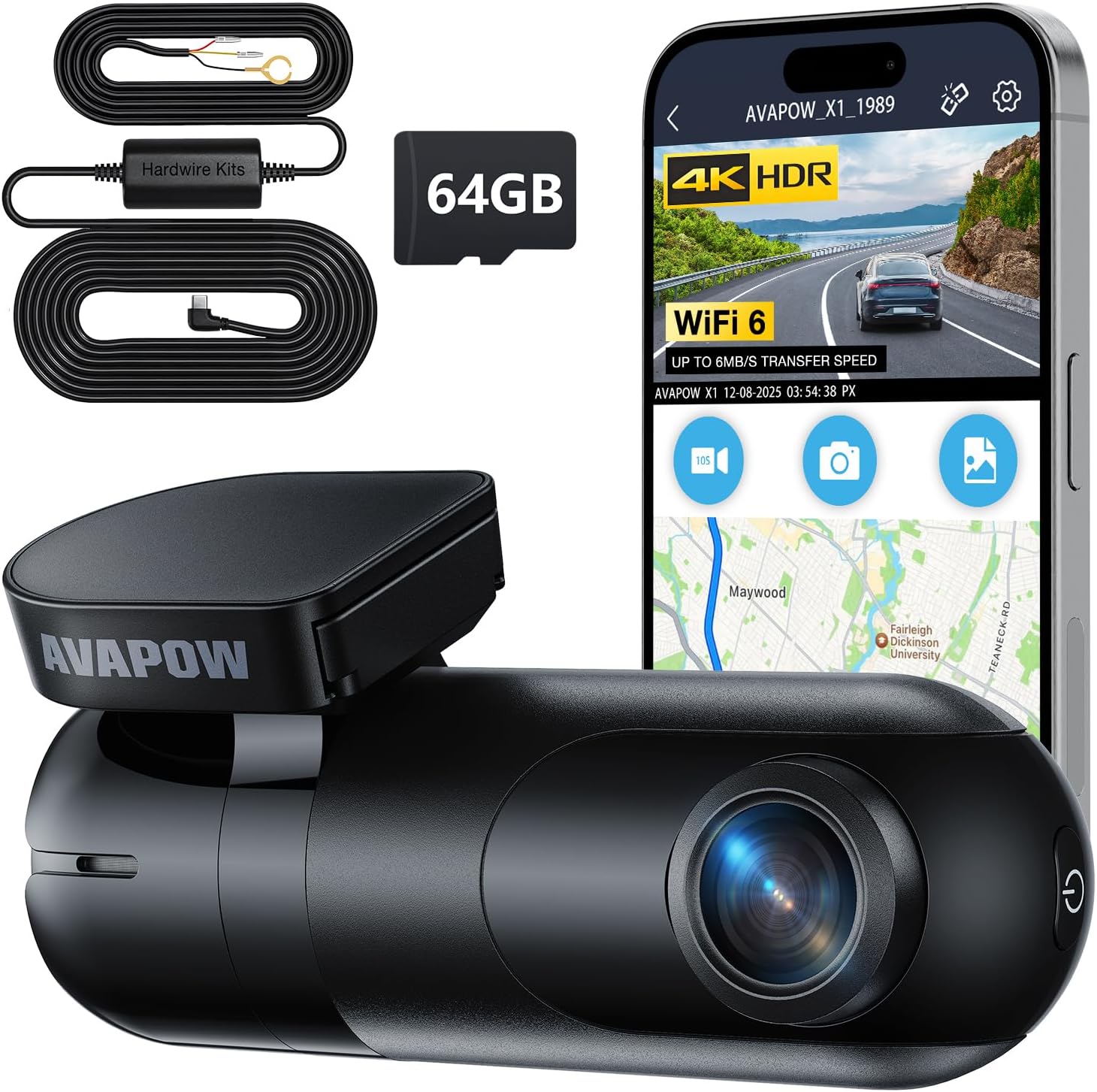
2. AVAPOW 4K Front Dash Cam with WiFi 6 and Hardwire Kit
Best Budget Dash Cam
| Resolution | 3840×2160 @30fps |
|---|---|
| Field of view | 170° wide angle |
| Connectivity | Wi-Fi 6 |
| Included storage | 64GB microSD |
| Special features | G-sensor, loop recording, parking monitor |
The AVAPOW 4K front dash cam records ultra-sharp 3840×2160 at 30 fps through a 170° wide-angle lens and is designed for simple, discreet installation on a windshield. It is typically used as a primary forward-facing recorder to capture drives and provide parking surveillance using the included hardwire kit. Notable features include WiFi 6 with a companion app for quick file transfers and OTA firmware updates, WDR/HDR night-vision processing for improved low-light detail, loop recording, and a G-sensor that automatically locks collision footage. Practical benefits are clear footage of license plates and signs in many lighting conditions, convenient wireless downloads to a phone, and continuous parking monitoring without needing aftermarket wiring work. Trade-offs are that it is a single-channel front camera only, so no rear coverage is included, and advanced driver assistance features are absent; buyers should also plan for occasional app fiddling to transfer large 4K files. For a budget-focused pick it strikes a solid balance of image quality and essential recording reliability for everyday use.
Best for: Buyers who need a reliable, low-cost forward-facing recorder that captures detailed evidence and provides round-the-clock parking monitoring without extra frills.
Less Ideal for: Drivers who want full dual-channel coverage, integrated driver aids, or a plug-and-play fleet telematics solution should consider other models.
- True 4K 3840×2160 recording at 30 fps for clear daytime detail
- Built-in WiFi 6 and app control for faster wireless file transfers and OTA updates
- Hardwire kit included enables 24/7 parking monitoring with timelapse and motion detection
- G-sensor and loop recording automatically protect and manage incident footage
- Compact, low-profile design that is easy to install and stays out of the driver’s view
- Single-channel front-only camera with no bundled rear camera option
- Large 4K files can require frequent transfers or a higher-capacity SD card
Verdict: The best low-cost dash cam that provides dependable continuous recording and basic incident capture without unnecessary extras, ideal for shoppers on a tight budget.
3. VIOFO A329S 3‑Channel Dash Cam (4K Front, 2K Cabin & Rear)
Best Premium Dash Cam

| Video capture resolution | 4K + 2K + 2K |
|---|---|
| Field of view | 210 degrees (cabin) |
| Frame rate | 30fps, 30fps, 30fps |
| Connectivity Technology | Type‑C, Wi‑Fi 6 |
| Flash Memory Supported Size Maximum | 512 GB |
The VIOFO A329S is a high‑end three‑camera system designed to capture the road, interior, and rear in high detail for confident evidence and passenger monitoring. It records 4K@30fps on the front and 2K@30fps for both cabin and rear feeds, using STARVIS 2 sensors and HDR to keep license plates and faces readable in challenging light. The ultra‑wide 210° cabin lens removes interior blind spots, useful for rideshare or family monitoring, while the included CPL reduces windshield glare. Next‑gen Wi‑Fi 6 and a USB 3.0 port make downloading large clips fast, and built‑in GPS logs precise location and speed. For long trips or fleet use you can attach up to a 4TB SSD or 512GB microSD to avoid frequent overwrites. Parking modes include impact‑triggered low‑power recording and hybrid modes when hardwired. Expect a cleaner installation thanks to slim coaxial cables, but note the hardwire kit and SSD cable are optional extras you must buy separately if you want full parking or SSD support.
Best for: Buyers who prioritize the highest possible video detail, comprehensive three‑camera coverage, and fast data transfer for confident evidence collection and long trips.
Less Ideal for: If you need a purely budget single‑camera setup or want a plug‑and‑play dash cam with no additional accessories, this multi‑camera premium system may be more complex than necessary.
- True 4K front and 2K cabin/rear recordings for clear license plate and interior detail.
- STARVIS 2 image sensors with HDR yielding better low‑light clarity and reduced motion blur.
- Supports up to 4TB SSD or 512GB microSD for extended continuous recording.
- Wi‑Fi 6 and USB 3.0 enable very fast downloads and convenient firmware updates.
- Built‑in GPS and voice notifications improve evidence context and in‑car usability.
- Hardwire kit and SSD cable required for full parking mode and SSD use are sold separately.
Verdict: The best premium dash cam for buyers who want top-tier video resolution, advanced driver-assist features, and robust hardware for long-term, high-confidence use.
4. Garmin Dash Cam 67W — Compact 1440p Dash Camera with 180° Field of View
Best Compact Dash Cam

| Video Capture Resolution | 1440p |
|---|---|
| Field Of View | 180 degrees |
| Frame Rate | 60 FPS |
| Included Memory Card Size | 16 GB |
| Mounting Type | Dashboard Mount |
The Garmin Dash Cam 67W is a compact windshield camera designed to stay out of sight while capturing wide, detailed footage. It records 1440p video at up to 60 fps through an extra-wide 180-degree lens, which helps capture cross traffic and surroundings rather than just a narrow forward view. Installation is straightforward: a low-profile magnetic mount and vehicle power cables attach it near the windshield for a discreet fit that minimizes driver distraction in a GMC Canyon cab. The unit supports voice commands for hands-free saving of clips and stills, and recorded clips can automatically upload over Wi‑Fi to Garmin Vault for remote viewing. Parking Guard and Live View features add remote monitoring when constant power and app connectivity are available. Practical limitations include a small 2-inch screen that makes onsite review limited and some advanced alerts and features require a connected smartphone and Wi‑Fi to work fully. Overall it delivers dependable, wide-angle footage in a minimal footprint well suited to drivers who want a low-visibility install.
Best for: Drivers who want a nearly invisible dash cam installation in their GMC Canyon and value wide, reliable incident footage with simple hands-free operation and cloud access.
Less Ideal for: Users who need large on-device displays for immediate playback or who cannot provide constant power and smartphone connectivity for remote features.
- Very compact, low-profile magnetic mount keeps the camera discreet on the windshield
- 1440p recording at 60 fps with 180-degree field of view captures wide, detailed footage including cross traffic
- Voice control enables hands-free saving of incidents and taking stills
- Wi‑Fi upload to Garmin Vault and Live View provide remote access and easy sharing
- Includes 16 GB microSD card and supports up to 512 GB for long recording times
- Small 2-inch screen limits convenient on-device playback and setup feedback
Verdict: The best compact dash cam for drivers who prioritize minimal visual intrusion and easy discreet installation while still getting dependable footage.
5. ROVE R2-4K DUAL Front and Rear Dash Cam (4K Front, 1080p Rear)
Best Dual-Channel Dash Cam

| Front resolution | 3840x2160P @30fps |
|---|---|
| Rear resolution | 1920x1080P @30fps |
| Sensor | Sony IMX675 STARVIS 2 |
| Storage support | Includes 128GB microSD, up to 1TB external |
| Connectivity | Dual-band WiFi (5GHz/2.4GHz), USB |
The ROVE R2-4K DUAL pairs a 4K front camera with a 1080p rear unit to give continuous, simultaneous coverage of both directions while you drive a GMC Canyon. The front uses a Sony STARVIS 2 sensor and an f/1.5 aperture for clearer daytime detail and improved night footage, while the rear captures wider rearward context at 1080p. It records GPS-tagged speed and location on files and offers loop recording, G-sensor event lock, and a three-mode 24/7 parking mode when hardwired. The 3" IPS screen makes setup and playback easy on the truck dash and the included 128GB microSD and long rear extension cable simplify installation. Fast 5GHz WiFi and the ROVE app let you download clips to your phone quickly for evidence sharing. Expect practical benefits like crisp license-plate capture up front, seamless dual recording, and useful vehicle-location data; limitations include the need to buy a hardwire kit separately for continuous parking monitoring and that the rear camera records at 1080p rather than 4K like the front.
Best for: Buyers who want comprehensive front-and-rear documentation of incidents and clear, shareable footage from their GMC Canyon for insurance or legal purposes.
Less Ideal for: Users who need full 4K resolution on both front and rear cameras or those who do not want to install a hardwire kit for continuous parking surveillance.
- True 4K front recording for high-detail evidence capture
- Sony STARVIS 2 sensor and wide apertures for strong low-light performance
- Simultaneous front and rear recording with GPS data and event locking
- Fast dual-band 5GHz WiFi plus an included 128GB microSD card for quick transfers
- 3" IPS display and long rear extension cable simplify installation and use in a truck cab
- Parking mode requires a separately sold hardwire kit for 24/7 monitoring
Verdict: The best dual-channel dash cam for users who want simultaneous front and rear coverage to document incidents, capture license plates, and provide comprehensive evidence.
6. REDTIGER ViewClear 70 Dual-Channel 4K Front + 2.5K Rear Dash Cam
Best 4K Dash Cam

| Video Capture Resolution | 2160p front |
|---|---|
| Rear Resolution | 2.5K |
| Frame Rate | 30 FPS |
| Included Memory Card Size | 128 GB |
| Connectivity Technology | Wi-Fi (5.8 GHz) |
The REDTIGER ViewClear 70 is built around a 4K front sensor and a 2.5K rear sensor to capture high-detail footage for license plates and incident documentation. It uses STARVIS 2 imaging and dual HDR to balance highlights and shadows, and NiteGuard Hyper Night Clarity to keep color and detail in low light. Typical use is windshield-mounted recording for driving and overnight parking monitoring; the included 128 GB card and loop recording mean it will continuously capture and overwrite footage without user intervention. Built-in GPS timestamps speed and route data for forensic value, and the 5.8 GHz Wi‑Fi with app control lets you pull large 4K files quickly. A 3-inch touchscreen plus voice control makes on-device playback and settings easy. Trade-offs include the need for a separate hardwire kit for true 24/7 always-on power and that high-resolution files demand significant storage and longer review times. The removable bracket and long rear cable simplify installation on a GMC Canyon and allow clean routing to the rear camera position.
Best for: Drivers who prioritize forensic-quality video for license-plate capture and thorough incident documentation on a GMC Canyon and want a feature-rich dual-channel setup they can manage via phone or touchscreen.
Less Ideal for: Buyers who prefer a fully hardwired out-of-the-box parking solution without additional accessories or those who want the simplest, lowest-maintenance single-camera setup.
- True 4K front and 2.5K rear recording for clear license-plate detail
- STARVIS 2 sensors and dual HDR improve dynamic range in bright and low-light scenes
- Built-in GPS and timestamping provide route and speed data for evidence
- 5.8 GHz Wi‑Fi with fast transfer speeds and app control for quick file access
- Includes 128 GB card and loop recording for continuous capture out of the box
- Requires a separate hardwire kit for uninterrupted 24/7 parking power and monitoring
Verdict: The best 4K dash cam for buyers who need the highest possible video detail for license-plate capture and forensic-quality evidence in varied lighting.
7. VANTRUE N4S 3-Channel Dash Cam with STARVIS 2 and PlatePix
Best Parking Mode Dash Cam

| Video resolution | 2.7K front + 1440P interior + 1440P rear |
|---|---|
| Field of view | 360 Degrees |
| Frame rate | 30 FPS |
| Flash Memory Supported Size Maximum | 1 TB |
| Connectivity Technology | USB, Wi-Fi |
The VANTRUE N4S is a three-channel dash camera designed to provide continuous coverage for front, cabin, and rear views, which makes it well suited to monitoring a parked GMC Canyon. It records 2.7K front and 1440P interior and rear footage using STARVIS 2 sensors and PlatePix processing to keep license plates and low-light details readable. Installation is largely tool-free with a magnetic GPS mount and a rotating rear camera that can point inward to watch cargo or pets. For unattended surveillance the N4S offers four parking modes including motion detection, collision detection with auto-lock, buffered pre-event recording, and low-bitrate/frame-rate options to extend recording time. A supercapacitor design improves heat tolerance for long parking periods, and 5 GHz Wi‑Fi plus quad GPS make footage access and logging fast. The main compromises are that it needs a proper hardwire or constant-power setup to run 24/7 without draining the truck battery and that advanced features depend on correct configuration of parking mode and sensitivity settings.
Best for: GMC Canyon owners who prioritize dependable parked-vehicle monitoring and clear night or license-plate capture while their truck is unattended, and who are comfortable hardwiring or installing a constant‑power feed.
Less Ideal for: Drivers who need a simple plug-and-play unit without any wiring or those who will not provide a constant power source for extended parking surveillance.
- Three-channel coverage (front, cabin, rear) for full vehicle surveillance.
- STARVIS 2 sensors plus PlatePix that improve low-light and license plate capture.
- Buffered parking mode with motion detection and collision-triggered auto-locking of clips.
- Supercapacitor design tolerates higher temperatures for reliable parked operation.
- 5 GHz Wi‑Fi and quad GPS for fast file access and accurate location/speed logging.
- Requires hardwiring or a separate constant-power solution for truly continuous 24/7 recording without risking the truck battery.
Verdict: The best dash cam with parking mode for owners who need dependable low-power surveillance, impact detection, and time-lapse or motion-activated recording while the vehicle is unattended.
Choosing the Right GMC Canyon Dash Cam: Key Factors to Consider
Video Quality and Low-Light Performance
Video resolution and sensor quality determine what you can read from a recording. Higher-resolution captures, such as true 1080p or better, help preserve license plate and facial detail at distance. However, resolution alone is not enough. The sensor size, image processing, and aperture influence low-light clarity during dawn, dusk, and nighttime highway driving.
For GMC Canyon owners, prioritize a dash cam that balances daytime sharpness with strong low-light imaging. Trucks often operate at varying speeds and lighting conditions, so a camera that preserves contrast and reduces glare will be more useful for incident review. Consider models that advertise wide dynamic range or HDR to handle bright skies and darker road surfaces in the same frame.
Mounting, Size, and Sightlines
Mount type and camera size affect visibility and ease of installation in the Canyon cabin. A compact dashboard camera or low-profile windshield mount reduces obstruction to the driver's view and is less likely to interfere with rearview mirrors or factory cameras. Adhesive mounts tend to be more stable, while suction mounts allow repositioning but may lose grip over time.
Also consider the angle and field of view. A wider-angle lens captures more of the road and adjacent lanes, which is useful for multi-lane incidents, but extreme wide angles can distort details at distance. Ensure the chosen position clears the Canyon's bonnet line and does not block factory sensors or mirror-mounted features.
Powering Options and Parking Surveillance
How the dash cam gets power determines its convenience and parking capabilities. Plug-and-play use with a 12V accessory outlet is easy but usually disables parking surveillance when the vehicle is off. Hardwiring or using a dedicated parking power kit lets the camera monitor events while parked, capturing impacts or motion-triggered incidents.
For truck owners who park on streets or are concerned about hit-and-runs, a camera with reliable parking mode and voltage-cutoff settings is valuable. Also check for low-voltage protection to prevent battery drain and for integrated battery or capacitor designs that tolerate high-heat environments in the truck cabin.
Recording Features and File Management
Recording modes and how the camera handles incident files affect long-term usability. Loop recording enables continuous capture by overwriting the oldest files, which is essential for daily drivers. Event or G-sensor-triggered locking prevents crucial clips from being overwritten after collisions or sudden impacts.
Look for convenient file retrieval features such as Wi-Fi or a removable memory card. Time stamping, GPS tagging, and clear file naming help when assembling incident timelines. For GMC Canyon owners who use the truck for work and long trips, reliable loop recording and robust event protection are must-haves.
Connectivity and Usability
User interface and connectivity options determine how easily you configure the camera and access footage. Wi-Fi-enabled dash cams let you download clips to a phone for quick sharing and review, while models without wireless require removing the memory card or connecting a PC.
Ease of menu navigation, app stability, and physical button placement matter when you adjust settings in tight spaces inside the Canyon. Consider whether the camera supports firmware updates and whether the companion app allows firmware installation and easy playback.
Durability and Warranty
A truck cabin faces heat, dust, and vibration, so build quality and warranty support matter. Metal housings and quality mounts resist warping and loosening over time. Components like capacitors are preferable in heat-prone climates because they tolerate higher temperatures better than small batteries.
Check warranty length and support responsiveness when choosing a dash cam for the GMC Canyon. A solid warranty and good documentation reduce downtime if you experience failures or need assistance with installation or firmware updates.
Front, Rear, and Dual-Camera Considerations
Deciding between a front-only setup and a dual front-and-rear configuration depends on how and where you drive the Canyon. A front camera covers most incident types, but a paired rear camera captures hit-and-run events and rear impacts, which are common in parking situations and low-speed collisions.
When installing a rear camera in the Canyon bed or rear window, plan for cable routing that avoids moving parts and secures connections against weather and vibration. Ensure the rear lens angle and mounting height provide a clear view of the vehicle behind without excessive reflection from the tailgate or rear glass.
- Dual setups require additional wiring and possibly in-cabin routing through trim panels.
- Rear lenses should have a suitable field of view to reduce blind spots while maintaining detail.
- Look for synchronized time stamping between front and rear units for coherent incident timelines.
Mounting Location Tips for the GMC Canyon
Choose a mounting spot that preserves driver sightlines and avoids obstructing factory sensors or rain-sensing wipers. For most GMC Canyon owners, the area behind the rearview mirror provides a low-profile location that keeps the camera out of sight and reduces glare.
Test different angles before permanently fixing an adhesive mount. Small adjustments can significantly change how the road and hood appear in frame. Verify that the camera does not record the vehicle interior excessively, which can impact license plate legibility on approaching vehicles.
- Mount behind the rearview mirror when possible to minimize distraction.
- Confirm the mount adhesive or bracket is rated for dashboard temperatures.
- Route power cables along factory trim seams for a clean install.
Storage Capacity and Memory Card Choices
Dash cams rely on microSD cards and the right card speed and capacity to maintain stable recording. Higher capacity cards allow longer uninterrupted recording between file overwrites, which is helpful for long road trips or busy workdays in the Canyon. Use cards rated for continuous video recording and follow manufacturer recommendations to reduce the risk of file corruption.
Regularly format the card in-camera to keep the file system healthy. If you expect to rely on parking mode for extended periods, larger capacity cards paired with loop recording offer the best balance of coverage and manageability.
- Choose high-endurance microSD cards to reduce wear from loop recording.
- Consider 32GB to 128GB capacities depending on resolution and recording retention needs.
- Replace or reformat cards periodically to avoid accumulating corrupted files.
Legal and Privacy Considerations
Using a dash cam in the GMC Canyon is generally legal for recording public roads, but rules vary by location regarding audio recording and in-cabin footage. Disable audio capture if local regulations require consent from recorded occupants or if you prefer greater privacy.
When sharing footage, blur bystanders or personal data if required by law or to protect privacy. Secure stored footage on a phone or computer and consider periodic offloading to keep sensitive clips safe.
- Check local laws about audio recording and in-cabin cameras.
- Store incident footage securely and limit public sharing when it contains personal data.
- Use GPS timestamps responsibly when submitting footage to authorities or insurers.
Installation Approaches for DIY Vs Professional Wiring
Basic plug-and-play installation using the accessory power outlet is straightforward and ideal for owners who prefer a reversible setup. This approach is fine if you do not need parking surveillance or plan short-term use. For reliable parking mode and a cleaner look, hardwiring the camera to a fused ignition or a dedicated parking power source is better.
Professional installation ensures tidy cable routing, correct fuse tap selection, and avoids interference with airbags or vehicle electronics. If you plan to keep the camera long-term and want full parking features, factor in the additional effort or cost of hardwiring.
- Plug-in installations are quick but usually disable recording when the truck is off.
- Hardwiring enables parking mode and a cleaner interior appearance.
- Professional installers can integrate with the Canyon's fuse box to prevent battery drain.
How We Chose the Best GMC Canyon Dash Cam
We focused on practical performance and real-world fit for the GMC Canyon when assembling this list. Priority criteria included: video resolution and low-light performance to ensure readable license plates and facial details in typical driving conditions; mounting and footprint so the camera clears the Canyon windshield view and stays stable over bumps; power options and wiring flexibility, including hardwire and accessory-power choices for reliable parking surveillance; recording features such as loop recording and incident-triggered file locking for continuous coverage without manual intervention; build quality and heat tolerance appropriate for a truck cabin exposed to sun and temperature swings; and connectivity features like Wi-Fi and parking-mode access for easy file transfer and configuration.We excluded units that lack clear parking surveillance modes, do not offer durable mounts, or fail to provide event-file protection. We also filtered out cameras with unclear documentation or poor user interface design, since ease of installation and everyday use matter for truck owners. The final selections reflect a balance of dependable recording, installable form factors for the GMC Canyon, and the core features that matter to truck drivers.
Our full evaluation process is outlined in our review methodology.
FAQ
Will a dash cam void any vehicle warranties on my GMC Canyon?
Installing a dash cam typically does not void vehicle warranties, but it depends on how it is installed. Plug-and-play units that use the accessory outlet are unlikely to affect warranties, while permanent modifications to wiring could have implications if they directly cause related failures. Keep receipts and installation documentation and consult your dealer if you have warranty concerns.
Can I install a rear camera in the bed area of the GMC Canyon?
Yes, but you should choose a mounting position that protects the lens from road spray and debris and route cables to avoid moving tailgate parts. A rear-window or cab-mounted location usually offers better protection and clearer footage than an exposed bed mount.
How much storage do I need for continuous 1080p recording in a Canyon?
Storage needs depend on bitrate and frame rate, but a general guideline is that a 1080p dash cam will record several hours per 32GB of high-endurance storage. For continuous daily use and parking mode coverage, many owners choose 64GB or 128GB cards to keep multiple hours of footage before loop overwrite.
Is hardwiring necessary to get parking surveillance on my dash cam?
Hardwiring is the most reliable way to enable parking surveillance because it provides a dedicated power source when the vehicle is off. Some cameras offer external battery packs or supercapacitor solutions that allow limited parking monitoring without hardwiring, but these options generally provide shorter monitoring windows.
Will a dash cam affect the Canyon's interior sensors or airbags?
A properly mounted dash cam should not interfere with airbags or interior sensors. Avoid placing mounts or routing cables over airbag deployment zones and follow manufacturer placement instructions. If in doubt, have a professional installer handle the wiring and placement to ensure safety systems remain unobstructed.
Can I use Wi-Fi to download large incident files from a dash cam quickly?
Wi-Fi is convenient for previewing clips and downloading short files, but large, high-bitrate incident files can be slower to transfer over wireless. For full-resolution downloads, removing the microSD card or connecting the camera to a PC often yields faster transfer speeds.
Final Verdict
Choose a dash cam that balances the recording quality and features you actually need for the GMC Canyon. Prioritize strong daytime and low-light video, reliable mounting that preserves sightlines, and power options that support parking surveillance if you frequently leave the truck unattended. Consider ease of use, storage capacity, and durability when weighing tradeoffs between compact convenience and extended monitoring.Focus on the few features that match how you use the Canyon rather than chasing every advanced capability. That approach will yield a dependable dash cam setup that provides clear evidence when you need it and minimal fuss the rest of the time.
Explore More:
- Check out all GMC Canyon parts & accessories
- Explore Electronics
- Browse all Accessories
