

Note: This article contains affiliate links. If you click on these links and make a purchase, I may earn a small commission at no extra cost to you. This helps support my research and content. Read my full affiliate disclosure here.
Upgrading the stereo in your Mitsubishi Outlander can make daily drives more enjoyable, improve call clarity, and unlock modern connectivity. Choosing the right unit matters because it affects sound quality, dashboard fit, and which features like phone integration or expanded audio tuning you actually get. This guide shortlists the top options for this vehicle and explains the features and fitment considerations that mattered in our selection process. Read on to see the picks and why they made the list.
Looking for other parts? See all Mitsubishi Outlander parts & accessories.
Top Picks at a Glance


Rimoody 10.1" Android 15 Car Stereo with Wireless CarPlay for Mitsubishi Outlander Sport/ASX/RVR (6GB+128GB)

| Display Size | 10.1 Inches |
|---|---|
| Memory | 6GB RAM + 128GB ROM |
| Processor | 8 Core Android 15 |
| Bluetooth | Bluetooth 5.0 |
| Compatibility | Mitsubishi Outlander Sport 2011-2017, ASX 2013-2015, RVR 2011-2017 |
This Rimoody 10.1-inch Android 15 head unit replaces the factory radio in select Mitsubishi Outlander Sport, ASX, and RVR models and brings smartphone integration, navigation, and upgraded audio to the cabin. It runs on an 8-core processor with 6GB RAM and 128GB storage so apps and maps load quickly and multitask without noticeable lag. The unit supports wireless CarPlay and wireless Android Auto plus mirror-link for older phones, Bluetooth 5.0, built-in WiFi and GPS, and a DSP equalizer to tune sound quality. Practical additions include steering wheel control learning, reversing camera input, split-screen display, and optional features like 360 panoramic view and AI DSP for advanced installations. Important limitations are that some advanced options require separate activation and accessories such as camera or OBDII adapters, and fitment requires wiring harnesses and possible dash trim adjustments. Installer familiarity with vehicle wiring will make the experience smoother. For a balanced buyer this unit upgrades connectivity and audio without requiring a top-tier budget or professional customization.
Best for: Balanced buyers who want a significant tech and audio upgrade to their Mitsubishi Outlander Sport/ASX/RVR without committing to a premium installer-only solution, valuing features and everyday usability.
Less Ideal for: Buyers seeking a simple plug-and-play swap with no wiring or dash work, or those who want factory-identical materials and finishes without aftermarket trim changes should look elsewhere.
- Modern Android 15 platform with 6GB RAM and 128GB storage for smooth multitasking and app installs
- Wireless CarPlay and wireless Android Auto support for hands-free phone, navigation, and media
- Built-in GPS and WiFi with mirror-link options for online and offline navigation
- DSP audio processing and multi-band equalizer for clearer, customizable sound
- Supports reversing camera input and steering wheel control learning for OEM-like convenience
- Some optional features like 360° camera and AI DSP require paid activation or extra hardware
- May need additional wiring harnesses or dash adapters for clean installation in specific Outlander dash trims
Verdict: A feature-packed, performance-oriented aftermarket head unit that brings modern smartphone integration and improved audio to compatible Mitsubishi Outlander models with modest installation effort.
Dasaita 7" Android 13 Double-Din Head Unit for Mitsubishi Outlander/Lancer/ASX/Pajero
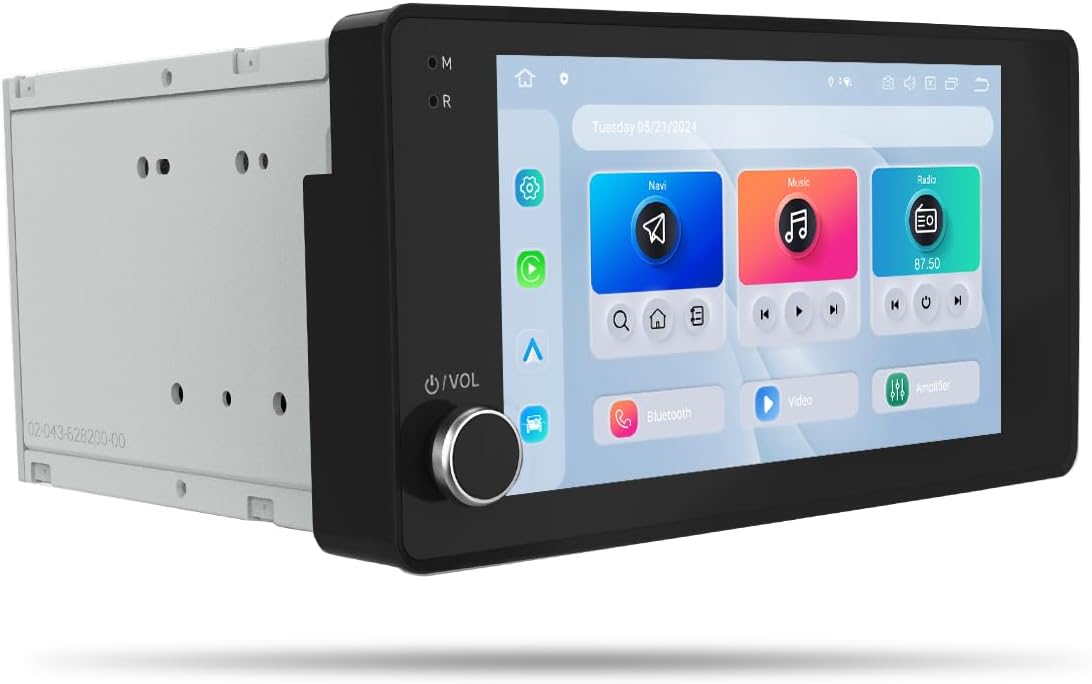
| Compatible vehicles | Mitsubishi Outlander/Lancer/ASX/Pajero 2007–2019 |
|---|---|
| Operating system | Android 13 |
| Memory & storage | 6GB RAM + 64GB storage |
| Display | 7-inch fully laminated 1280×720 touchscreen |
| Connectivity | Wireless CarPlay, Android Auto, Bluetooth 5.0, 4G SIM, WiFi hotspot |
This Dasaita 7-inch double-din head unit replaces the factory radio in compatible 2007–2019 Mitsubishi Outlander, Lancer, ASX, and Pajero dashboards to add a modern touchscreen, navigation, and smartphone integration. It runs Android 13 on a Snapdragon 665 with 6GB RAM and 64GB storage, so apps, split-screen navigation, and media run smoothly while driving. Key features include wireless Apple CarPlay, wired or wireless Android Auto, built-in GPS with preloaded North America maps, Bluetooth 5.0, 4G SIM support and hotspot-capable WiFi for streaming on the road. The unit also includes an inclinometer for roll and pitch alerts, a built-in amplifier with optical output for improved audio, and a fully laminated 1280×720 touchscreen for clearer visuals. Installation is designed to be plug-and-play for the specified Mitsubishi models and preserves steering-wheel controls and knobs. Consider that advanced features like 4G require a carrier SIM and some drivers may prefer a larger screen or factory-style UI; warranty and dealer support vary by installer. For performance-focused buyers this is a feature-packed upgrade that prioritizes responsiveness and connectivity.
Best for: Performance-oriented Mitsubishi owners who prioritize fast, feature-rich infotainment and modern connectivity to upgrade an older factory radio and improve in-car navigation and audio experience.
Less Ideal for: Drivers who prefer larger aftermarket screens or want dealer-backed factory replacement service should consider alternatives that match those priorities.
- Modern Android 13 platform with Snapdragon 665 and 6GB RAM for responsive multitasking
- Wireless Apple CarPlay and wired/wireless Android Auto for seamless smartphone integration
- Built-in GPS with preloaded North America maps plus Bluetooth 5.0 and 4G/5G hotspot support for reliable navigation and streaming
- Integrated amplifier with optical output and DSP-style delay settings for improved sound tuning
- Plug-and-play fitment for specified 2007–2019 Mitsubishi dashboards while retaining steering-wheel controls
- Requires a carrier SIM or hotspot for built-in 4G/5G connectivity to work
- Screen is 7 inches which may be small for users wanting a larger display
- Support and warranty handling depend on installer or seller rather than vehicle dealer
Verdict: A high-performance, plug-and-play infotainment upgrade for 2007–2019 Mitsubishi models that delivers modern connectivity and responsive Android performance.
AMprime Android 15 10.1" Car Stereo for Mitsubishi ASX RVR Outlander Sport with Wireless CarPlay & Android Auto

| Display Size | 10.1 Inches |
|---|---|
| Operating System | Android 15 |
| Memory | 4G RAM + 64G ROM |
| Video Support | Supports 1080p |
| Voice Command | Microphone, Touchscreen |
This AMprime Android 15 head unit replaces the factory radio in the Mitsubishi ASX RVR Outlander Sport (2019–2021) and brings a smartphone-style interface to the dash. It runs Android 15 on a 10.1-inch 1280×720 capacitive touchscreen with 4GB RAM and 64GB storage, supports wireless CarPlay and Android Auto, mirror link, built-in WiFi and GPS, plus AHD rear camera input. Typical use is daily driving where you want navigation, streaming, hands-free calling and improved audio control; the built-in DSP and 32-band EQ let you tune sound to compensate for factory speakers. The included steering wheel control support and microphone make basic integration straightforward, while the unit supports 1080p video playback and app installs like a phone. Expect a fuller feature set than a simple replacement radio, but installation may require a dash kit, wiring harness and minor adjustments for perfect fitment in some vehicles, and advanced tuning takes some time to learn. The product offers a strong set of modern features for the price if you want a capable, smartphone-like infotainment upgrade for your Outlander Sport.
Best for: Practical optimizers who want the most infotainment features for the money and are willing to do a modest DIY or aftermarket install to modernize an Outlander Sport's dashboard.
Less Ideal for: Buyers seeking a strictly plug-and-play factory-identical replacement with professional installation included or those who prefer a very simple basic radio without smartphone-style features.
- Wireless CarPlay and Android Auto for phone mirroring and hands-free control
- Android 15 platform with 4GB RAM and 64GB storage allows app installs and smooth multitasking
- Built-in WiFi and GPS with offline North America map support for navigation without constant tethering
- DSP and 32-band EQ provide detailed audio tuning to improve factory speaker performance
- May need dash kit or wiring adapter and some trimming to achieve a clean factory-quality installation
- Advanced audio tuning and feature setup have a learning curve for nontechnical users
Verdict: A feature-packed, budget-friendly Android head unit that modernizes an Outlander Sport with wireless CarPlay/Android Auto and deep audio tuning if you accept a modest installation effort.
Fuluku 9" Android Car Stereo with Wireless CarPlay for Mitsubishi Outlander (2008–2015)

| Display Size | 9 Inches |
|---|---|
| Memory | 2GB RAM + 64GB ROM |
| Compatibility | Mitsubishi Outlander 2008-2015 |
| Operating System | Android (quad-core) |
This Fuluku 9-inch Android car stereo replaces the factory radio in Mitsubishi Outlander models from 2008 to 2015 and brings modern smartphone integration to an older dashboard. It installs as a plug-and-play double-din replacement and is intended to retain factory features such as steering wheel controls, door information, reversing camera input and amplifier functions. The unit runs Android with a quad-core CPU, 2GB RAM and 64GB storage, a capacitive 9-inch screen with tempered glass and multiple UI themes. It supports wired and wireless CarPlay and Android Auto for navigation, calls and media, plus GPS navigation, WiFi, Bluetooth hands-free calling and full 1080p video playback. Practical benefits include restoring multimedia and connectivity to an older Outlander and adding a backup camera. Limitations to expect are modest onboard RAM for heavy multitasking, possible need for professional installation for full feature retention, and that some factory-specific functions may require verification before purchase.
Best for: Budget-conscious Outlander owners who want a modern infotainment experience without replacing the whole dash and who prioritize connectivity and smartphone mirroring over top-tier processing power.
Less Ideal for: Buyers seeking the fastest Android performance, guaranteed full replication of every factory instrument display, or a completely plug-and-play install with zero wiring adjustments should consider higher-end or vehicle-specific options.
- Plug-and-play double-din design that preserves many factory features including steering wheel control and amplifier function
- Wireless and wired CarPlay and Android Auto support for hands-free navigation and media
- Built-in GPS plus WiFi and Bluetooth for online and offline navigation and app installs
- Includes reverse camera support and supports 1080p video playback for improved parking and media quality
- 2GB RAM may limit performance when running multiple apps or heavy navigation tasks
- May require professional wiring or dash kit for perfect fit and retention of all factory controls
- Some factory-specific displays or joystick controls might not be fully replicated without vehicle-specific adapters
Verdict: A wallet-friendly way to add wireless CarPlay/Android Auto and navigation to an Outlander 2008–2015, but expect modest performance and possible installation work.
Rimoody 10.1" Android 15 Car Stereo with Wireless CarPlay for Mitsubishi Outlander Sport/ASX/RVR

| Display Size | 10.1 Inches |
|---|---|
| Memory | 4GB RAM + 64GB ROM |
| Operating System | Android 15 |
| Connectivity | Wireless CarPlay, Wireless Android Auto, WiFi, Bluetooth |
| CPU | 8 Core |
This Rimoody 10.1-inch Android car stereo is a full replacement head unit tailored for Mitsubishi Outlander Sport/ASX/RVR model years listed, combining an 8-core Android 15 platform with 4GB RAM and 64GB storage for smooth operation and app installs. It is typically installed in-dash to provide navigation, media, and phone integration; wireless CarPlay and wireless Android Auto let you mirror phone apps without a cable while built-in WiFi and GPS support online/offline maps. The DSP audio tuning, Bluetooth hands-free, FM/RDS, and steering-wheel control support make it a practical daily driver upgrade that can noticeably improve sound and convenience compared with the factory radio. Notable extras include split-screen multitasking, many UI themes, and a reversing camera input. Expect some limitations: the touchscreen and trim quality are not premium, third-party app behavior depends on compatibility, and some installations may require additional harnesses or configuration to avoid dashboard warnings. For reliability-focused buyers allow time for a proper install and initial setup to ensure stable operation.
Best for: Reliability-focused buyers who prioritize a stable, feature-rich factory-replacement stereo and want long-term functionality rather than flashy premium materials.
Less Ideal for: Buyers seeking a factory-level luxury finish or plug-and-play simplicity without any additional wiring or configuration should consider higher-end dealer options or professional installation services.
- 8-core Android 15 platform with 4GB RAM and 64GB storage for responsive multitasking and app installs
- Wireless CarPlay and wireless Android Auto for cable-free phone integration
- Built-in GPS and WiFi for navigation, online content and app downloads
- DSP tuning, Bluetooth hands-free, FM/RDS and steering-wheel control support for improved audio and convenience
- Front panel materials and trim feel budget-oriented compared with factory-quality units
- Some vehicle integrations require additional wiring harnesses or configuration to prevent dashboard errors
Verdict: A feature-packed, reliability-minded Android head unit that adds wireless CarPlay/Android Auto and navigation to compatible Mitsubishi Outlander models if you accept a budget trim finish and may need extra wiring for a clean install.
EKAT 9" Android Touchscreen Car Radio for Mitsubishi Outlander (2008–2015) with CarPlay, Android Auto and Backup Camera

| Compatibility | Mitsubishi Outlander 2008-2015 |
|---|---|
| Operating System | Android 13 |
| Screen | 9 Inches, 1080P |
| Storage | 64GB ROM, 2GB RAM |
| Features | Wired/Wireless CarPlay, Android Auto, Bluetooth, GPS |
This EKAT 9-inch Android head unit replaces the factory radio in Mitsubishi Outlander (2008–2015) and brings smartphone integration, navigation and media playback to an older dash. It runs Android 13 with a quad-core CPU, supports wired or wireless CarPlay and Android Auto, and offers split-screen 1080p display, Bluetooth hands-free calling and Hi-Fi audio. The kit ships with necessary wiring, supports steering-wheel controls and works with an AHD rear camera and external microphone so you can restore backup view and voice control. Installation is plug-and-play for matching Outlander center consoles, but some buyers reported fitment and wiring issues so careful verification of your trim and attention during wiring is important. The system provides a lot of features for the price and is useful if you want modern apps, maps and media in an older Outlander, though advanced users should expect occasional quirks like software setup steps and the need to troubleshoot GPS or connector problems reported by other owners.
Best for: Convenience-driven buyers who want to modernize an older Mitsubishi Outlander quickly with smartphone integration, navigation and hands-free features without sourcing separate components.
Less Ideal for: Drivers who prefer a factory-identical replacement or who are not comfortable with vehicle wiring and occasional software troubleshooting should consider professionally installed or dealer-grade alternatives.
- Android 13 platform with 64GB storage lets you install navigation and streaming apps
- Supports wired and wireless CarPlay and Android Auto for phone mirroring and voice control
- 9-inch 1080p touchscreen with split-screen lets navigation and media run simultaneously
- Includes wiring harness, AHD backup camera compatibility and microphone for hands-free use
- Some customers report fitment problems, connector defects or wiring complications during installation
- Occasional software or setup quirks may require troubleshooting or vendor support
Verdict: A feature-packed, convenience-focused head unit that brings modern smartphone integration to an older Outlander but may require careful fitment checks and occasional troubleshooting.
CGOGC 9" Touchscreen Car Stereo with Wireless CarPlay and Android Auto for Mitsubishi Outlander (2014–2019)

| Display Size | 9 Inches |
|---|---|
| Processor | Octa Core 2.0GHz |
| Memory | 2GB RAM, 32GB ROM |
| Screen Resolution | 1280×720 (IPS) |
| Wireless | Wireless CarPlay, Android Auto, 5G WiFi |
This 9-inch CGOGC head unit is a direct-fit multimedia upgrade for the Mitsubishi Outlander (2014–2019) that replaces the stock radio with modern connectivity and navigation. It runs an Android-based system on an octa-core 2.0 GHz processor with 2 GB RAM and 32 GB storage, so wireless Apple CarPlay and Android Auto, map navigation, streaming over 5G WiFi, and app installs feel responsive. The IPS 1280×720 display is bright and readable, and the bundle includes a backup camera and wiring harness to simplify installation. Audio is handled by a DSP chip and TDA7388 amplifier with multiple EQ presets, which helps tailor sound to the cabin. Practical limitations to expect are slightly longer boot times compared with factory units, potential occasional wireless hiccups versus wired connections, and radio sensitivity that may be lower in fringe reception areas. Installation is straightforward for someone comfortable with dash panels, but vehicles with aftermarket amps or OEM camera systems may need adapters to retain every factory function.
Best for: Buyers who prioritize a reliable, factory-style connectivity upgrade for a Mitsubishi Outlander and want modern phone integration, navigation, and improved infotainment without experimental or niche features.
Less Ideal for: Drivers who need guaranteed factory-level radio reception or who rely on complex dealer-installed amplifier or camera systems without willingess to fit adapters should consider other solutions.
- Designed specifically for Mitsubishi Outlander 2014–2019 for a clean dashboard fit
- Wireless Apple CarPlay and Android Auto for hands-free navigation, calls, and media
- Octa-core 2.0 GHz processor with 2 GB RAM and 32 GB storage for smooth app performance
- Built-in DSP and TDA7388 amplifier with multiple EQ modes to improve in-cabin sound
- Includes backup camera and installation harness to simplify setup
- Wireless connections can be less stable than wired CarPlay/Android Auto on long drives or in congested areas
- Radio reception may be weaker than factory tuners in fringe coverage areas
- May require adapters to retain certain factory amplifiers or OEM camera interfaces
Verdict: A practical, direct-fit infotainment upgrade for Outlander owners who want wireless CarPlay/Android Auto and improved multimedia while accepting a few reception and wireless quirks.
Choosing the Right Mitsubishi Outlander Car Stereo: Key Factors to Consider
Dashboard Fit and Mounting
A proper fit determines how much dashboard modification is required and whether the unit looks integrated. For the Outlander, confirm whether the dash opening accepts single DIN or double DIN sizes and whether trim panels or mounting brackets are available.
Poor fit can lead to gaps, loose trim, or rattling, which affects perceived quality. Units designed for standard mounting rails or that work with common Outlander dash kits will usually install more cleanly and maintain factory appearance.
Wiring and Vehicle Integration
Compatibility with the Outlander wiring harness and steering-wheel controls simplifies installation and preserves factory functions. Using proper harness adapters and interface modules avoids wire splicing and retains horn, airbag, and other electrical integrity.
Integration modules can also pass through CAN-bus data needed for some climate or vehicle status displays. Ensuring the stereo supports common Outlander wiring conventions reduces installation time and the chance of electrical issues.
Audio Quality and Tuning Options
Sound quality depends on the head unit's preamp outputs, built-in equalization, and signal-to-noise ratio. For meaningful improvements, look for units with clean line outputs, adjustable crossovers, and multi-band EQs to match the Outlander cabin acoustics.
A head unit with good preamp voltage and tuning features makes it easier to add amplifiers or tune factory speakers without distortion. Better native processing also helps with clarity at different volume levels and with varied source material.
Connectivity and Smartphone Integration
Modern driving often relies on smartphone features like navigation and media streaming. Choose a unit that supports CarPlay or Android Auto, Bluetooth hands-free calling, and reliable media playback from phones or USB drives.
Consider whether you need wired or wireless phone integration, as wireless features can be more convenient but sometimes less stable. Also check support for multiple devices and how easily the system reconnects after starting the vehicle.
Display and Controls
The display size and control layout affect usability while driving. Touchscreen panels provide quick access to features, but tactile buttons or a rotary knob can be safer to operate without looking. For the Outlander, ensure the display does not obstruct vents or dash indicators when installed.
Brightness, anti-glare properties, and intuitive menu structure matter for daytime and nighttime use. Larger displays improve map readability, while well-placed physical controls help with common tasks like volume and track changes.
Expansion and Future Upgrades
Think about whether you might add amplifiers, a subwoofer, or rear cameras later. Choose a head unit with multiple preamp outputs, camera inputs, and support for external amplifiers to avoid replacing the head unit later.
Flexible expansion options also include USB ports, auxiliary inputs, and enough power to drive aftermarket speaker systems. Planning for upgrades now saves time and expense when you decide to improve the Outlander audio system further.
Why Upgrade the Mitsubishi Outlander Car Stereo
Upgrading the Mitsubishi Outlander car stereo brings more than just louder sound. Modern head units add smartphone integration, clearer voice calls, improved navigation, and user interfaces designed for safer in-car use. For many owners the stock unit limits connectivity and audio tuning options. Replacing it can unlock Apple CarPlay, Android Auto, better Bluetooth handling, and a touchscreen experience that works with current apps and services.
An upgrade is also an opportunity to address the entire audio chain. A new head unit can drive aftermarket amplifiers and processors that reveal better detail from your speakers. If you plan to keep the Outlander for several years, investing in a more capable car stereo system now makes future speaker and amplifier upgrades easier and more effective.
- Adds modern smartphone integration and navigation support
- Improves call quality and Bluetooth stability
- Enables advanced audio tuning and external amplification
- Provides a refreshed user interface and touchscreen controls
Single DIN Versus Double DIN for the Outlander
The Outlander dash can accept either single DIN car stereo or double DIN head unit configurations depending on the model year and factory trim. Single DIN units are compact and can be paired with a separate digital media receiver or pocket for storage. They are useful when you prefer a simpler interface or want to retain dash features that occupy the double DIN space.
Double DIN head units offer a larger touchscreen, integrated backup camera support, and more on-screen controls. If you want built-in navigation, a larger display for maps, or an Apple CarPlay head unit, double DIN is often the better route. Keep in mind that switching to double DIN may require a dash kit and trim bezel to achieve a factory-like fit, and some climate control or hazard switch repositioning may be necessary.
- Single DIN: compact, simpler install, keeps dash elements intact
- Double DIN: larger touchscreen, more integrated features, better for navigation
- Double DIN installations usually need a custom panel and mounting kit
Connectivity Options: Smartphone Integration and Wireless Features
Modern aftermarket units for the Outlander emphasize smartphone-first functionality. If you rely on Apple devices, look specifically for an Apple CarPlay head unit that supports wired and wireless connections. For Android users, choose a unit that lists Android Auto car stereo support. Both platforms provide hands-free calls, messaging, turn-by-turn navigation, and music apps through the vehicle display.
Bluetooth car stereo performance differs by unit. Better modules handle multiple devices smoothly, offer clearer call audio, and maintain stable streaming. If you prefer touch control, a touchscreen car stereo with an intuitive layout reduces driver distraction. Consider whether you need wireless mirroring, multiple USB inputs, or an onboard Wi-Fi hotspot for over-the-air updates and app access.
- Choose Apple CarPlay or Android Auto support based on your phone
- Prioritize Bluetooth stability and multi-device pairing
- Touchscreen responsiveness affects usability and safety
Improving Sound: Outputs, Amplifiers, and Tuning
A head unit determines the quality and strength of preamp outputs. If you plan a full sound upgrade in the Outlander, select a unit with multi-channel preouts and adjustable high and low pass filters. These outputs let you connect aftermarket amplifiers, subwoofers, and time-correction processors to build a balanced system that suits cabin acoustics.
Consider whether the stereo offers built-in equalization and digital signal processing. Basic EQs help, but advanced DSP features allow for time alignment and multi-band parametric adjustments that address the Outlander cabin's reflections and speaker placement. If you do not want to add an external amp immediately, pick a unit with higher voltage preouts and strong internal power to drive upgraded speakers more effectively.
- Look for multi-channel preouts and variable crossover settings
- DSP and parametric EQ improve imaging and compensate for the cabin
- High-voltage preouts are better for future amplifier integration
Installation and Compatibility with Outlander Systems
A clean installation preserves factory features like steering wheel audio controls, backup camera, and vehicle information displays. Use vehicle-specific wiring harnesses and CAN bus adapters to retain these functions. Many aftermarket head units offer adapters that translate steering commands and display vehicle warnings. Verify compatibility with your Outlander year and trim before purchasing wiring components.
If your Outlander has factory safety systems that interact with the radio area, plan the installation to avoid interfering with sensors or vents. Professional installation is recommended if you are not comfortable with dash disassembly or soldering. Proper mounting and ground connections reduce noise and ensure the head unit functions reliably with the vehicle's electrical system.
- Use Outlander-specific wiring harnesses and dash kits
- CAN bus adapters preserve steering wheel controls and warnings
- Professional installation reduces the risk of electrical noise and errors
Personalization and User Experience Choices
Decide how you want the stereo to behave day to day. Some units focus on a straightforward interface with large buttons for safer operation. Others prioritize customization with skins, adjustable color schemes, and programmable buttons. If you frequently switch drivers, consider a unit with multiple user profiles to keep presets and EQ settings separate.
Another consideration is expandability. If you want features like a rear entertainment connection, multiple camera inputs, or dedicated satellite radio tuners later, choose a head unit with those inputs or auxiliary ports. Think about how you use audio in the Outlander. If hands-free calling and navigation are most important, prioritize those features. If you are an audiophile, plan the head unit as the first step in a broader car audio head unit upgrade path.
- Pick an interface style that matches your driving habits
- Look for user profiles and customizable control layouts
- Choose a unit with future inputs if you plan additional upgrades
How We Chose the Best Mitsubishi Outlander Car Stereo
We focused on upgrades that fit the Mitsubishi Outlander and that enhance real-world driving experience. Our evaluation emphasized audio performance, installation compatibility with the Outlander dash and wiring, and feature sets such as phone integration, Bluetooth, and expansion for amplifiers or subwoofers. We also considered user-facing controls and display clarity, prioritizing options that keep operation simple while driving.We excluded units that require extensive dash modification, obsolete connectivity standards, or lack documented fitment for the Outlander. Units that do not support common installation adapters, mounting brackets, or standard wiring harnesses were removed. Final choices balanced sound clarity and installation practicality with convenient features so the selected units work well in everyday use for this vehicle.
Our full evaluation process is outlined in our review methodology.
FAQ
Will a double din head unit fit my Mitsubishi Outlander?
Many Outlander model years accept double DIN units, but fit depends on the specific dash opening and trim. Check the vehicle's dash dimensions and confirm whether factory mounting brackets or a dash kit are required. Installation guides and harness adapters can simplify fitting a double DIN unit without permanent dash modification.
Can I keep steering-wheel audio controls after upgrading the stereo?
Often yes, but it usually requires a compatible steering control interface or wiring adapter. These modules translate the Outlander's control signals to standard commands the new head unit understands. Verify compatibility between the interface, the head unit, and the Outlander model year before buying.
Is Bluetooth audio good enough for music in the Outlander?
Bluetooth offers convenient wireless playback and hands-free calling and is usually fine for casual listening. For higher fidelity, wired connections or using the head unit's high-quality digital inputs can provide better sound. Bluetooth performance also varies by codec support and signal stability in the vehicle environment.
Do I need a professional installer for this upgrade?
You can install some units yourself if you have basic tools and wiring experience, but professional installation reduces risk of wiring errors, poor fitment, or electrical issues. Pros can handle dash kits, steering control interfaces, and integration with vehicle systems more reliably.
Will an aftermarket radio affect vehicle electronics or warranty?
Installing an aftermarket radio can affect factory-installed features if wiring is altered improperly. Using proper harness adapters and preserving factory connectors minimizes risk. Warranty impacts vary by manufacturer and region, so consult vehicle documentation or a dealer for specifics about warranty coverage.
Final Verdict
When choosing a stereo for the Mitsubishi Outlander, prioritize dash fit and wiring compatibility first to avoid costly modifications. After that, weigh audio quality and smartphone integration based on how you use the vehicle.Consider long-term expansion when selecting a unit so you can add amplifiers, subwoofers, or cameras later without replacing the head unit. Balancing ease of installation with the features you value will yield the most satisfying upgrade.
Explore More:
- Check out all Mitsubishi Outlander parts & accessories
- Explore Electronics
- Browse all Accessories
