

Note: This article contains affiliate links. If you click on these links and make a purchase, I may earn a small commission at no extra cost to you. This helps support my research and content. Read my full affiliate disclosure here.
If you park, tow, or maneuver a GMC Sierra 2500 HD in tight spaces, a reliable backup camera can make reversing safer and easier. The right camera improves sightlines behind the truck, reduces the risk of collisions when towing, and helps you place the hitch or trailer more accurately. This guide covers the top five backup camera options chosen for their image clarity, mounting options, and installation practicality specifically for the Sierra 2500 HD.Below you will find our shortlisted picks along with the evaluation criteria we used and practical advice for installation, wiring, and choosing the right features for your driving and towing needs.
Top Picks at a Glance
| Best Overall Backup Camera A reliable all-around camera balancing image, features, and ease of install | T1A Replacement Backup Camera for 2016–2019 Chevrolet Silverado / GMC Sierra (Part 84062896) |  |
| Best Budget Backup Camera A low-cost option that still offers basic reversing visibility and safety | ACAUTO Rear View Backup Camera for Chevy Silverado / GMC Sierra (2016–2018) |  |
| Best Premium Backup Camera Higher-end model with superior image quality and extra features | GM Genuine Parts 84062896 Rear Park Assist Camera |  |
| Best Night-Vision Backup Camera Optimized low-light performance and infrared or enhanced sensor tech | Rayjorman Rear View Backup Camera for Chevy Silverado/GMC Sierra (2016–2019) |  |
| Best Wide-Angle Backup Camera A camera with an expanded field of view to reduce blind spots | TACHUNE 1080p Wide-Angle Backup Camera for GMC Sierra 2016–2019 |  |
1. T1A Replacement Backup Camera for 2016–2019 Chevrolet Silverado / GMC Sierra (Part 84062896)
Best Overall Backup Camera
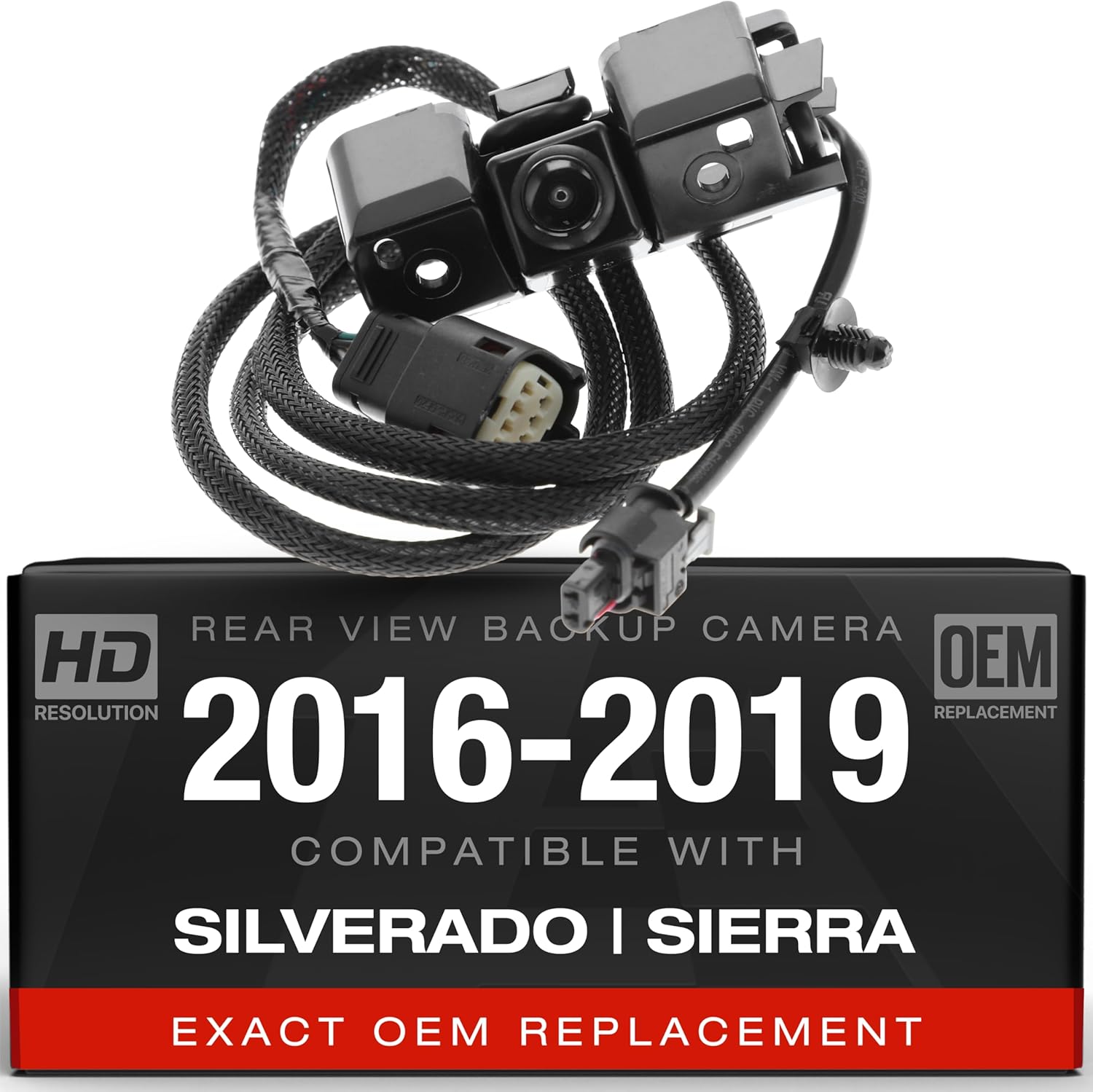
| Compatible Vehicles | 2016–2019 Silverado and GMC Sierra models (listed fitment) |
|---|---|
| Field of View | 120 Degrees |
| Optical Sensor Technology | CMOS |
| Connector Type | RCA |
| Video Capture Resolution | 720p |
This T1A backup camera is built as a direct replacement for select 2016–2019 Chevrolet Silverado and GMC Sierra rear cameras, matching the listed part numbers for plug-and-play fitment. It uses a CMOS sensor with a wide-angle lens and a 120 degree field of view to give a broad perspective when reversing, and records at up to 720p in MP4 format if your display or recorder supports that. The camera is bracket-mounted and connects via RCA, so installation is familiar to most DIYers and integrates with factory-style monitors that accept an RCA input. Construction combines plastic and metal elements intended to withstand typical weather exposure on a pickup tailgate. Limitations include a modest 720p resolution rather than higher-definition imaging and reliance on RCA analog connection instead of digital video outputs, which may affect image clarity on newer screens. For buyers who want an affordable, factory-style replacement that installs without modification, this camera covers the essentials for everyday reversing and parking assistance on compatible Sierra 2500 HD trucks.
Best for: Buyers who need a reliable, factory-style replacement camera for a 2016–2019 Silverado or GMC Sierra 2500 HD and prioritize straightforward DIY installation and dependable daytime/nighttime visibility.
Less Ideal for: Drivers seeking the highest-resolution or digital-output cameras for aftermarket infotainment upgrades should consider higher-definition, digitally connected options instead.
- Direct-fit replacement matching part numbers for simple swap-in installation
- Wide 120 degree field of view for good coverage when backing up
- Bracket-mount design and RCA connector compatible with common factory monitors
- Durable mixed plastic and metal construction intended for exterior truck use
- 720p capture and MP4 format allow basic recording on supported devices
- 720p resolution is lower than many modern HD or digital cameras
- Uses RCA analog output rather than a digital video connection
Verdict: The best all-around backup camera that balances clear daytime and nighttime imaging, dependable performance, and straightforward installation for most DIY mechanics.
2. ACAUTO Rear View Backup Camera for Chevy Silverado / GMC Sierra (2016–2018)
Best Budget Backup Camera

| Compatible Devices | Fit for Chevy Silverado 2016-2018 |
|---|---|
| Real Angle of View | 170 Degrees |
| Optical Sensor Technology | CCD CMOS |
| Connector Type | RCA |
| Video Capture Resolution | 720p |
This ACAUTO backup camera is a direct-fit, surface-mount replacement for 2016–2018 Silverado and Sierra trucks and is intended to restore or upgrade rear visibility without adding extra systems. It uses a 1/2-inch CCD/CMOS sensor and a wide 170 degree lens to give a broad field of view and includes reversing guidance lines when the vehicle system supports them. The camera outputs video over an RCA connection at up to 720p resolution and is rated IP68 for weather resistance, so it handles rain and snow and performs in low-light conditions thanks to night-vision capability. Installation is plug-and-play for compatible wiring and replaces the factory camera footprint, making it practical for owners who want a straightforward swap. Limitations are that it relies on an RCA input and a compatible display, does not add wireless or advanced image processing features, and image quality is appropriate for everyday parking and reversing rather than high-resolution recording or professional-grade optics.
Best for: Buyers who need a low-cost, reliable replacement camera to restore factory-style rear visibility on a 2016–2018 Silverado or Sierra and prefer a simple plug-and-play installation over feature-rich upgrades.
Less Ideal for: Drivers who want wireless connectivity, advanced image processing, higher than 720p video, or an aftermarket system with recording and multiple camera inputs should consider other options.
- Direct-fit surface-mount design for 2016–2018 Silverado and Sierra reduces installation complexity
- 170 degree wide-angle lens reduces rear blind spots for easier reversing
- IP68 rating offers strong protection against water and dust in wet conditions
- Supports reversing guidance lines to assist with parking alignment
- Uses an RCA wired connection so it requires a compatible head unit or adapter and no wireless option is provided
Verdict: The best budget backup camera for buyers who need reliable reversing visibility and essential features at a low price without premium extras.
3. GM Genuine Parts 84062896 Rear Park Assist Camera
Best Premium Backup Camera

| Real Angle of View | 120 degrees |
|---|---|
| Video Capture Resolution | 1080p |
| Display Technology | LCD |
| Voltage | 12 volts |
| Lux rating | 1 lux |
This GM Genuine Parts rear park assist camera is a factory-style backup camera engineered for GM trucks and SUVs. It mounts as a surface unit and feeds a 120-degree wide-angle view to compatible monitors, capturing 1080p video in MP4 format and operating down to about 1 lux for low-light situations. The camera uses a CMOS sensor and offers HDMI or USB connectivity for modern displays. In practice it supports factory driver assistance features such as parking assist and other ADAS functions when paired with the vehicle systems it was designed for. Being a genuine GM part means fitment and signaling match factory expectations and installation tends to integrate cleanly with existing wiring and mounts. The main trade-offs are that this is a vehicle-specific, factory replacement component rather than a universal aftermarket system, and features like night enhancement, parking guidelines, or wireless connectivity are not highlighted in the specifications. Expect straightforward installation and reliable, OEM-grade imaging for drivers who want a direct replacement that preserves original system behavior.
Best for: Buyers who prioritize factory-matching replacement parts and want premium image clarity and reliable integration with GM vehicle systems for backup and ADAS functions.
Less Ideal for: Drivers looking for a universal, feature-rich aftermarket kit with wireless display, dynamic guidelines, or specialized night vision should consider purpose-built aftermarket systems instead.
- Factory-quality fit and signaling for GM vehicles which simplifies integration with vehicle systems
- 120-degree wide-angle lens for broad rear coverage
- 1080p video capture and MP4 format for clear, recordable footage
- Low-light sensitivity around 1 lux for usable nighttime performance
- Not a universal aftermarket camera so compatibility is limited to intended GM applications
- No built-in wireless transmission or clearly documented advanced night vision or dynamic parking guidelines
Verdict: The best premium backup camera for users willing to pay more for top-tier image clarity, advanced features, and longer-term durability.
4. Rayjorman Rear View Backup Camera for Chevy Silverado/GMC Sierra (2016–2019)
Best Night-Vision Backup Camera

| Real Angle of View | 170 Degrees |
|---|---|
| Video Capture Resolution | 1080p |
| Optical Sensor Technology | CMOS |
| Waterproof Rating | IP67 |
| Power Supply | 9V-15V |
This Rayjorman rear view camera is a plug-and-play replacement for 2016–2019 Chevy Silverado and GMC Sierra trucks, providing a wide 170 degree field of view and 1080p video capture. It installs using the factory-style connector so it ties into the existing wiring harness and activates with reverse gear; typical use is reversing and parking where a broad rear perspective and obstacle detection matter. The camera uses a CMOS sensor with a 7-layer lens and infrared filtering to improve contrast and low-light clarity, and IP67 construction plus an automotive-grade ABS housing keeps the unit working through rain, dust, and temperature swings. Practical benefits include sharply wider coverage to reduce blind spots and usable images at night for mechanics who need to verify clear visuals in dim conditions. Limitations are that it is a vehicle-specific replacement so fitment must match the listed part numbers and it relies on the vehicle display system for image quality and features rather than providing its own monitor or advanced image processing.
Best for: Mechanics who prioritize clear, usable nighttime images for diagnosing, testing, and verifying backup-camera performance on 2016–2019 Chevy Silverado or GMC Sierra trucks.
Less Ideal for: Shops that need a universal camera solution, an integrated monitor, or extra processing features like lane overlays or dynamic guidelines should consider other options.
- Direct-fit plug-and-play connector for factory wiring harnesses
- 170° ultra-wide lens reduces rear blind spots
- 1080p capture with 7-layer lens and infrared filter for improved night clarity
- IP67 waterproof and automotive-grade ABS housing for durable outdoor use
- Compatibility limited to specified Silverado and Sierra 2016–2019 models and matching OEM part numbers
Verdict: The best night-vision backup camera for mechanics who need clear, usable images in low-light conditions and during nighttime reversing.
5. TACHUNE 1080p Wide-Angle Backup Camera for GMC Sierra 2016–2019
Best Wide-Angle Backup Camera

| Video Capture Resolution | 1080p |
|---|---|
| Field Of View | 170 degrees |
| Optical Sensor Technology | CMOS |
| Connector Type | OEM-style connector |
| Installation Type | Flush Mount |
This TACHUNE backup camera replaces the factory unit on 2016–2019 GMC Sierra 2500/3500 trucks and is built to maximize rear coverage while providing clearer video. It captures 1080p video with a 170 degree fixed wide-angle lens, so curbs, trailers, and low obstacles are easier to spot when backing up. The CMOS sensor and improved low-light performance make it useful both day and night, and the IP68-rated housing protects the unit from rain, snow, and high-pressure car washes. Installation is straightforward for compatible Sierras thanks to the OEM-style connector and flush-mount form, which fits the factory harness without splicing. Practical benefits include better situational awareness in tight driveways and while hitching trailers, plus a durable sealed housing for year-round use. Limitations are that the viewing angle is fixed so you cannot adjust the framing, and it only fits the specified Sierra model years and configurations, so confirm your truck’s connector before buying.
Best for: Buyers who prioritize maximum rear coverage and clearer image quality when reversing a 2016–2019 GMC Sierra and want a direct-replacement camera that minimizes installation complexity.
Less Ideal for: Drivers who need an adjustable or motorized camera framing, or who plan to use the camera on vehicles outside the specified Sierra model years and factory harnesses.
- Native 1080p video capture for sharper rear image than standard low-resolution cameras
- Ultra-wide 170 degree field of view to cover blind spots behind the truck
- IP68 sealed housing resists water, snow, and high-pressure washes for reliable outdoor use
- OEM-style connector and flush-mount design for plug-and-play replacement on compatible Sierra models
- Fixed wide-angle lens cannot be adjusted for different framing or zoom preferences
- Compatibility limited to 2016–2019 GMC Sierra factory camera locations and harnesses
Verdict: The best wide-angle backup camera for those who want maximum rear coverage to minimize blind spots and improve situational awareness when reversing.
Choosing the Right GMC Sierra 2500 HD Backup Camera: Key Factors to Consider
Image Quality and Low-Light Performance
A clear, high-resolution image is essential for identifying obstacles, pedestrians, or trailer couplers behind a large truck. Cameras with better sensors and wider dynamic range handle shadows and bright backgrounds more effectively, which matters when the sun is low or when backing out of a shaded area into daylight. Night performance is equally important; look for cameras with good low-light sensitivity or integrated infrared LEDs to provide usable images after dark.
Poor image quality increases the time you spend correcting maneuvers and can create blind spots that defeat the purpose of an aftermarket system. For the Sierra 2500 HD, where visibility behind the bed can be particularly limited, a camera that preserves detail at various distances makes hitching and parking faster and safer.
Mounting Location and Field Of View
Where the camera mounts changes what you see and how easy it is to install. License plate or tailgate-mounted cameras provide a lower vantage point and often a wide horizontal field of view, which is useful for seeing traffic and obstacles. Bed rail or bumper mounts can be positioned higher or offset to show trailer couplers or the truck bed lip. Consider how the chosen location interacts with the Sierra 2500 HD tailgate design and any factory features like integrated sensors or trim panels.
The field of view specification matters: wider angles capture more area but can introduce distortion and make depth judgment harder. A camera with a moderate wide-angle lens and optional parking guidelines or on-screen distance markers helps you gauge how close objects are, particularly when lining up a trailer.
Durability and Weather Resistance
The camera will be exposed to road debris, salt, water spray, and temperature extremes. Choose a unit with robust housing, rust-resistant mounting hardware, and a high IP rating to ensure long-term reliability. Corrosion-resistant connectors and sealed cable entry points reduce the chance of water ingress that causes intermittent faults or image degradation.
Durability also includes impact resistance and flexible cabling so the camera can survive bumps or contact with cargo. For owners who frequently tow or haul, rugged construction reduces maintenance headaches and keeps the system operational through heavy use.
Wired Vs Wireless Connectivity
Wired systems typically deliver a more stable video feed and are less susceptible to interference, which matters when precise visuals are needed for hitching. Wiring to an existing in-dash monitor or a dedicated display requires routing cables through the cab and can be more labor-intensive, but it yields consistent performance.
Wireless kits simplify installation by removing long video runs, making them attractive for quick retrofits. However, wireless signals can be affected by interference, range limits, and power management. Consider the tradeoffs between installation ease and signal reliability for the Sierra 2500 HD, especially if you frequently tow heavy loads and rely on continuous, lag-free imaging.
Compatibility With Monitors and Existing Electronics
Confirm that the camera output matches the display you plan to use. Some cameras provide composite video outputs, while others support digital or proprietary interfaces. If you intend to tap into an existing factory display or an aftermarket head unit, check for any needed converters or interface modules and whether the system supports triggering the display automatically when the truck is placed in reverse.
Power requirements and trigger wires are also important. Systems that integrate with the Sierra 2500 HD reverse light circuit or offer adjustable trigger behavior simplify operation. Verify that the camera does not draw excessive current and that any additional modules are compatible with the truck electrical system to avoid unwanted drain or fault codes.
Installation Complexity and Instructions
Installation difficulty influences both the cost and the likelihood you will complete a quality job. Systems with vehicle-specific mounting brackets, plug-and-play harnesses, and clear step-by-step instructions reduce installation time and the chance of wiring errors. Consider whether routing cables requires removing interior trim panels, drilling, or soldering.
Good documentation and labeled connectors make future maintenance easier. For the Sierra 2500 HD, select solutions that account for the truck's cab-to-bed routing paths and provide routing strategies that avoid interference with tailgate movement or hitch components.
Mounting Options for the Sierra 2500 HD
The GMC Sierra 2500 HD offers multiple practical camera mounting spots that affect visibility and installation approach. Tailgate or license plate mounts are common because they keep the camera low and centered, giving a wide view of the area immediately behind the truck. For towing, mounts near the center of the bed or on the tailgate handle can provide a better angle to see the hitch and trailer coupler.
Raised bumper or bed-rail mounts can reduce exposure to road spray and give a less obstructed view when the tailgate is open. Consider whether the mount location interferes with bed covers, toolboxes, or the truck's trim. Choose a mount that balances a clear view with protection from damage.
- License plate or tailgate handle mounts: wide, centered perspective
- Bed rail or bumper mounts: higher placement, less spray
- Recessed mounts: protected but may require more precise aiming
Wiring Paths and Power Sources
Plan the wiring route before starting the install. Common paths run from the camera through the tailgate cavity or body grommet and along the frame into the cab. Avoid routing wires near heat sources or moving suspension components. Use grommets and protective loom to prevent chafing.
Power is typically tied to the reverse light circuit so the monitor activates only when reversing. Some setups use a dedicated switched power source or relay to manage power for wireless transmitters. Make sure you have access to adequate grounding points and use insulated connectors to maintain a reliable connection.
- Route cables through existing grommets to avoid drilling
- Use the reverse light for trigger power to automate the display
- Protect wiring with conduit and secure with clips to prevent snagging
Choosing The Right Display
You can use an existing in-dash monitor, an overhead or rearview-mirror display, or a standalone dash-mounted screen. In-dash displays provide a tidy installation and centralized integration, while portable or mirror-mounted monitors are easier to install and remove if needed. Make sure the screen size and mounting position do not obstruct sightlines or interfere with airbag zones.
Consider whether you need split-screen capability for multiple cameras, such as a trailer-facing rear view plus a side-facing camera. Also check if the display offers brightness adjustments and parking guidelines to aid depth judgment in different lighting conditions.
- In-dash units: clean integration, professional look
- Mirror or dash monitors: simpler retrofit, portable
- Split-screen displays: useful for towing and multi-angle views
Maintaining Your Camera System
Routine maintenance extends the life and performance of a backup camera. Keep the lens clean of dirt, salt, and road grime to preserve image clarity. Inspect mounts and wiring periodically for loosened fasteners or worn insulation, especially after heavy towing or off-road use.
Apply dielectric grease to exposed connectors to prevent corrosion and check seals where cables pass through the body. If the image becomes intermittently fuzzy, verify grounding and connector seating before assuming the camera itself is faulty.
- Clean lens regularly with a soft cloth and mild cleaner
- Check fasteners and wiring after heavy use
- Seal connectors and use dielectric grease to prevent corrosion
Using Camera Settings to Improve Usability
Many cameras and monitors offer adjustable settings such as brightness, contrast, mirror mode, and parking guideline toggles. Tailor these settings for the typical lighting conditions you encounter. For daytime towing on bright highways, lowering contrast can preserve detail. For nighttime driving, increase brightness moderately without washing out the image.
If the system includes dynamic guidelines, ensure they are calibrated or positioned so the on-screen lines correspond to actual distances behind the truck. Incorrect guidelines can be misleading, so disable or adjust them if they do not match reality.
- Adjust brightness and contrast for different lighting conditions
- Use mirror mode if the camera is installed upside down
- Calibrate or verify parking guidelines before relying on them
How We Chose the Best GMC Sierra 2500 HD Backup Camera
We shortlisted backup cameras based on features and attributes that matter for a heavy-duty truck like the GMC Sierra 2500 HD. Evaluation prioritized image quality under varied lighting, durable weatherproof construction, and camera placement options that work with the Sierra 2500 HD bed and tailgate profiles. We also weighed mounting types, such as license plate, tailgate, and bed rail mounts, and checked whether the camera offered guidelines for hitch alignment or dynamic trajectory lines useful while towing.Installation considerations were a major filter: we favored designs with clear wiring plans, vehicle-specific harness compatibility, and options that minimize drilling. Connectivity and display options were evaluated, including wired feeds to an in-dash or dash-mounted monitor and wireless transmitters for easier retrofits. Reliability and power management were also considered so the system remains stable while the truck is running or in reverse.Products were excluded if they lacked adequate ingress protection for road spray, had unclear wiring instructions, or offered low-resolution imaging that hinders night or low-light visibility. Final picks balance durability, practical installation for the Sierra 2500 HD, and features that help owners reverse and tow more confidently.
Our full evaluation process is outlined in our review methodology.
FAQ
Can I install a backup camera myself on a Sierra 2500 HD?
Yes, many owners install cameras themselves if they have basic wiring skills and the right tools. Choose systems with clear instructions and vehicle-compatible harnesses, and follow wiring best practices to protect connectors and routing paths.
Will a wireless backup camera still work while towing a trailer?
Wireless cameras can work while towing, but performance depends on transmitter power and interference from trailer wiring or metal. For consistent, interference-free imaging while towing heavy trailers, many owners prefer wired connections.
Where is the best place to mount a camera for hitch alignment?
Mounts centered near the tailgate handle or slightly above the bumper give a good view of the hitch and trailer coupler. Position the camera so the ball and coupler are visible at the bottom of the frame when the truck is level.
Do these systems draw power when the truck is off?
Most systems draw little to no power when wired to the reverse light trigger since they are only powered in reverse. Systems with continuous wireless transmitters or dedicated monitors may need a switched power source or relay to avoid parasitic drain.
How do I protect the camera from road salt and corrosion?
Choose weatherproof units with high ingress protection and use corrosion-resistant hardware. Regularly rinse and inspect the camera, and apply dielectric grease to exposed connectors to slow corrosion from salt exposure.
Can a backup camera be integrated with the truck's factory display?
Integration is possible but depends on the display input and available interface modules. Check the monitor input type and whether a compatible adapter is required to accept an aftermarket video feed.
Final Verdict
Prioritize image clarity, mounting location, and installation reliability when choosing a backup camera for the GMC Sierra 2500 HD. Decide whether a wired feed or a wireless retrofit better suits your tolerance for installation complexity and signal stability, and select a mount that shows the hitch and immediate rear area clearly.Focus on durable, weatherproof components and proper wiring to minimize maintenance. By weighing these tradeoffs and matching camera features to your towing and parking habits, you can pick a system that improves safety and confidence when reversing the Sierra 2500 HD.
