

Note: This article contains affiliate links. If you click on these links and make a purchase, I may earn a small commission at no extra cost to you. This helps support my research and content. Read my full affiliate disclosure here.
If you drive a 2013-2017 Subaru Crosstrek, adding a dedicated backup camera makes everyday parking and reversing more confident and safer. Older Crosstreks left many owners relying on mirrors alone, and a modern backup camera reduces blind spots, helps spot low obstacles, and makes tight maneuvers faster.This guide covers the top shortlisted backup camera options suited to the 2013-2017 Crosstrek. We evaluated systems based on image clarity, mounting style and fit for the Crosstrek, wiring or wireless installation effort, and in-car monitor or display compatibility. Read on to see the kinds of camera designs and installation approaches that work best for this vehicle, then pick the option that matches how you drive and how you plan to install it.
Looking for other parts? See all Subaru Crosstrek parts & accessories.
Top Picks at a Glance
| Best Overall Backup Camera A well-rounded, reliable camera with clear imaging and easy install | YIMU K4302 4.3" Wired Backup Camera Kit with License Plate Mount |  |
| Best Budget Backup Camera An inexpensive universal camera that covers basic reversing needs affordably | QUICTO Waterproof 170° Backup Camera with 12 LED Night Vision |  |
| Best OEM‑Fit Replacement Camera Direct‑replacement cameras made to match factory plugs and mounting exactly | A-Premium Rear View Backup Camera for 2012–2014 Subaru Impreza / 2013–2014 XV Crosstrek |  |
| Best License‑Plate Frame Camera Integrated license‑plate frame cameras that include long frame and LEDs | VKQTS License Plate Backup Camera with 8 LED Night Lights |  |
| Best All‑Weather / Heavy‑Duty Camera Rugged cameras with high IP ratings and metal or sealed housings | ecocstm AHD 1080P License Plate Backup Camera with Metal Housing |  |
| Best Night‑Vision LED Camera Cameras with multiple LEDs or enhanced low‑light sensors for night driving | BLAU GRUN Waterproof 720p CCD Rear Backup Camera with Movable Guidelines |  |
| Best Plug‑and‑Play Camera Kit (with Monitor) Complete camera + monitor kits that require minimal wiring and setup | Purthog Plug-and-Play Backup Camera with 4.6" Monitor |  |
1. YIMU K4302 4.3" Wired Backup Camera Kit with License Plate Mount
Best Overall Backup Camera

| Screen Size | 4.3 inches |
|---|---|
| Video Capture Resolution | 720p |
| Field Of View | 150 degrees |
| Connector Type | RCA |
| Voltage | 12 volts_of_direct_current |
The YIMU K4302 is a compact wired backup camera kit built for straightforward DIY installation and reliable everyday reversing use on vehicles like the 2013–2017 Subaru Crosstrek. The system pairs a 4.3-inch LCD monitor with a 720p-capable rear camera that uses a 26-foot video cable and a cigarette-lighter power lead for a mostly plug-and-play setup or optional hardwire to the reverse light. The 150° wide-angle lens and 1/3-inch image sensor deliver a wide, usable view for parking and trailer hitching, while adjustable brightness, contrast, saturation, and movable parking guide lines let you tune the image for your vehicle and mounting position. Night-vision capability and an IP69K waterproof rating mean the camera holds up in wet conditions and low light. Because it is wired, signal stability is strong compared with many wireless kits, but you will need to route the cable through the hatch or trim during installation. The small monitor is best for drivers wanting a compact, distraction-minimizing display rather than a large dash screen. Overall this kit balances clarity, weather resistance, and DIY-friendly installation for owners fitting it to a Crosstrek within the stated model years.
Best for: DIY-minded owners who prioritize a dependable wired connection, clear daytime and nighttime visibility, and a weatherproof camera that is straightforward to mount and tune for their Crosstrek.
Less Ideal for: Drivers who want a large integrated dash display, a factory-style OEM installation, or a fully wireless kit that avoids running cables through the vehicle.
- Plug-and-play wired connection with a long 26 ft video cable for flexible routing
- 150° wide-angle lens and 1/3" sensor for a broad, usable rear view
- Adjustable display settings and movable parking guidelines to match mounting position
- IP69K waterproof rating and night vision for reliable performance in bad weather and low light
- Monitor is small at 4.3 inches, which may be harder to read than larger dash-mounted displays
- Wired installation requires cable routing through the vehicle and may take more time than wireless kits
Verdict: For DIYers who want a dependable, high‑quality backup camera that balances image clarity, weatherproofing, and straightforward installation.
2. QUICTO Waterproof 170° Backup Camera with 12 LED Night Vision
Best Budget Backup Camera

| Voltage | 12 Volts |
|---|---|
| Optical Sensor Technology | CMOS |
| Real Angle of View | 170 Degrees |
| Connector Type | RCA |
| Lux rating | 1.5 Lux |
This QUICTO backup camera is a low-cost, surface-mount reversing camera that provides a wide 170 degree field of view and onboard 12 LED lights for improved night visibility. It uses a 1/3-inch CMOS sensor with a 420-line capture resolution and outputs video via a standard RCA connector so it can feed an aftermarket monitor or the Crosstrek's installed screen if you have a compatible video input and adapter. The camera is rated IP67, so it survives rain and road spray, and the angle is adjustable to tune the view for your vehicle. Installation is straightforward when mounting to a license plate frame and running a single 12V power connection and RCA cable to the cabin. Expect a clear, usable picture for parking and reversing at this price, but image detail and low-light performance are modest compared with higher-end cameras and you will need a separate monitor or install harness to use it with the Crosstrek's factory screen.
Best for: Buyers who want an inexpensive, universal rear camera to restore basic rear visibility on a 2013–2017 Subaru Crosstrek without a factory-specific unit or complex integration.
Less Ideal for: Drivers who need crisp, high-resolution imaging, advanced parking guides, or a plug-and-play factory-screen integration should consider higher-end or vehicle-specific options.
- Wide 170° field of view reduces blind spots while reversing
- 12 built-in LEDs and a 1/3" CMOS sensor improve night-time visibility
- IP67 waterproof rating for reliable all-weather use
- Standard RCA output and 12V power work with common aftermarket monitors and harnesses
- 420-line resolution and basic sensor limit image detail compared with premium cameras
Verdict: Choose this if you need a low-cost, universal backup camera that restores rear visibility without spending much or needing OEM fitment.
3. A-Premium Rear View Backup Camera for 2012–2014 Subaru Impreza / 2013–2014 XV Crosstrek
Best OEM‑Fit Replacement Camera

| Compatible vehicles | Subaru Impreza 2012–2014, XV Crosstrek 2013–2014 |
|---|---|
| Resolution | Up to 800 TVL |
| Viewing angle | Diagonal 168° / Vertical 100° / Horizontal 136° |
| Low light sensitivity | 0.1 lux |
| Ingress protection | IP69K |
This A-Premium rear view backup camera is built as a direct replacement for the factory unit on select Subaru Impreza and XV Crosstrek models, offering a plug‑and‑play installation that uses the original mount and connector. It provides a wide field of view and a high‑definition video output (advertised up to 800 TVL) that helps when reversing or parking, and its low‑light sensitivity and IP69K rating mean it is intended to stay reliable in wet, dusty, and cold conditions. The camera is factory‑style in size and shape so it drops into the stock location without trimming or custom brackets, which keeps installation quick for anyone comfortable with basic rear bumper or tailgate wiring. Buyers should note that image quality metrics like TVL are manufacturer figures and actual picture sharpness depends on the vehicle display and wiring; professional calibration may be needed for optimal alignment. The two‑year unlimited‑mileage guarantee adds confidence for long‑term ownership.
Best for: Buyers who prioritize a hassle‑free, factory‑style replacement that installs with the original connector and mounting for Subaru Impreza and XV Crosstrek models from the specified years.
Less Ideal for: Drivers wanting a universal aftermarket camera with adjustable aftermarket mounts, wireless connectivity, or significantly higher resolution than factory‑style replacements should consider other options.
- Designed for direct fit into the factory mount and connector for covered Subaru models for straightforward plug‑and‑play installation
- Advertised 800 TVL resolution and wide viewing angles to improve rear visibility when reversing
- IP69K waterproof rating and -40℃ to 105℃ operating range for durability in harsh weather
- Low‑light sensitivity down to 0.1 lux helps produce usable images at dawn, dusk, or in poorly lit areas
- Performance depends on the vehicle head unit and installation quality rather than the camera alone
Verdict: Pick an OE‑fit replacement when you want a plug‑and‑play camera that uses the original connector and mounts for hassle‑free, factory‑like installation.
4. VKQTS License Plate Backup Camera with 8 LED Night Lights
Best License‑Plate Frame Camera

| Field Of View | 170 Degrees |
|---|---|
| Video Capture Resolution | 1080p |
| Connector Type | RCA |
| Installation Type | Surface Mount |
| Optical Sensor Technology | CMOS |
This VKQTS license‑plate frame camera combines a bolt‑on mounting plate and an integrated backup camera so the whole unit replaces your existing license plate frame. It uses a 170° wide‑angle fixed lens and a 1080p CMOS sensor to give a broad rear view, and eight built‑in LEDs automatically light the scene at night for clearer low‑light reversing. The all‑metal frame is sturdier than plastic frames and resists deformation from bumps and road debris. Installation is the usual plate‑frame method: align and screw the frame to the plate area, run the included power and RCA video cables, and tie the power into the reverse light circuit. The camera is IP68 rated, so it handles rain and road grime, but the kit uses an RCA connector and a 20 ft video lead which means you need a compatible monitor or an adapter for factory displays. Cable length and wiring access on some Crosstreks may require trimming or routing work. For buyers wanting a hidden, bolt‑on replacement that adds illumination, this is a practical, durable option that delivers a wide field of view and usable night visibility.
Best for: Drivers who want a low‑profile, bolt‑on replacement for their plate that bundles the camera and illumination into one metal frame for everyday reversing and parking.
Less Ideal for: Anyone who needs direct plug‑and‑play integration with Subaru factory infotainment without using an RCA adapter or professional wiring modification.
- Integrated license‑plate frame design for a concealed, bolt‑on installation
- 170° wide‑angle lens with 1080p CMOS sensor provides a broad, detailed rear view
- Eight built‑in LEDs automatically improve night visibility
- All‑metal frame offers higher impact and deformation resistance than plastic frames
- IP68 waterproof rating for reliable performance in wet and dusty conditions
- Uses an RCA video connector which may need an adapter for Subaru factory screens
Verdict: Opt for a license‑plate frame camera if you prefer a concealed, bolt‑on install that bundles the camera with a plate frame and built‑in illumination.
5. ecocstm AHD 1080P License Plate Backup Camera with Metal Housing
Best All‑Weather / Heavy‑Duty Camera
| Resolution | 1920×1080 AHD |
|---|---|
| Viewing angle | 170° |
| Sensor size | 1/2.7 inch |
| Aperture | F1.4 |
| Waterproof rating | IP68 |
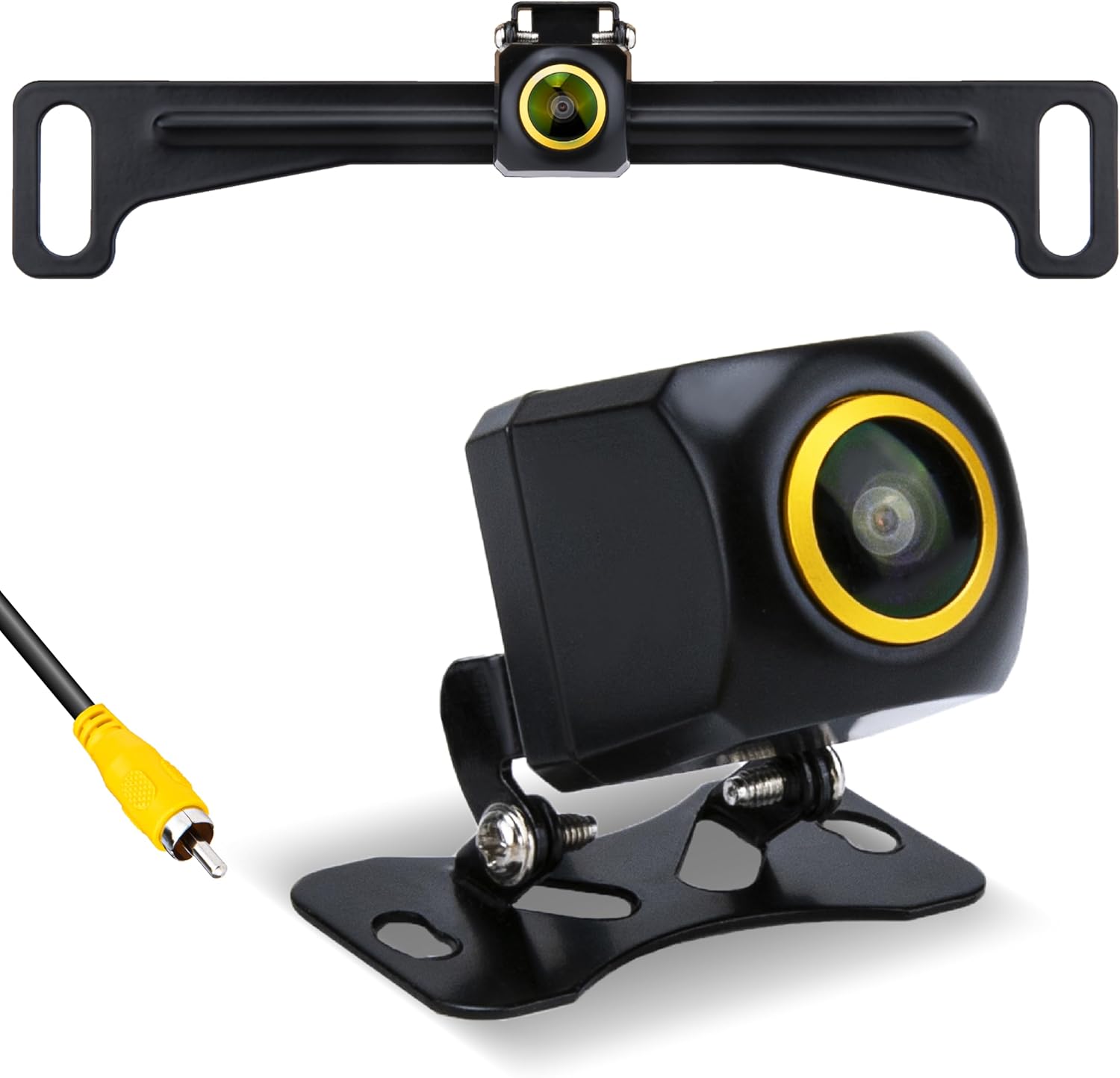
This ecocstm backup camera is a wired license-plate style camera that delivers 1920×1080 AHD video through an RCA output and is built for long-term outdoor service. Its alloy housing, nano waterproof sealing and IP68 rating mean the unit resists water, dust, and road grime, while the pure copper shielded cable and mini 4-pin pass-through connector help maintain a steady signal to an RCA-capable monitor. The 1/2.7-inch sensor, F1.4 aperture and 170-degree fisheye lens produce a very wide view that makes reversing and parking easier, and the glass lens plus larger aperture improve low-light performance. Installation supports two mounting brackets for a nearly hidden fit behind a license plate and the kit includes basic hardware. Important limits are that it requires a display with an RCA input and is not compatible with mirror or GPS-based camera inputs, so check your Crosstrek's screen or aftermarket head unit before buying. For a 2013–2017 Subaru Crosstrek this camera focuses on durability and clear wired video rather than wireless convenience or plug-and-play mirror integration.
Best for: Someone who prioritizes a rugged, weatherproof wired backup camera for long-term exterior mounting on a 2013–2017 Subaru Crosstrek and who can connect to an RCA-capable display.
Less Ideal for: Drivers who need a wireless camera, plug-and-play mirror camera, or who do not have an RCA input on their Crosstrek's factory or aftermarket screen.
- IP68-rated alloy housing and nano waterproof sealing for strong resistance to rain, snow, and road grime.
- 1920×1080 AHD output with a 1/2.7-inch sensor and F1.4 aperture for improved brightness and low-light clarity.
- 170° wide-angle lens provides a broad field of view to reduce blind spots while reversing.
- Shielded pure copper cable and mini 4-pin connector for stable wired signal transmission.
- Includes two mounting brackets and hardware for discreet license-plate mounting without drilling.
- Requires an RCA-input display and will not work with mirror- or GPS-integrated camera inputs.
Verdict: Buy an all‑weather, heavy‑duty camera when you need a unit built to resist water, dust, and road grime for long‑term outdoor use.
6. BLAU GRUN Waterproof 720p CCD Rear Backup Camera with Movable Guidelines
Best Night‑Vision LED Camera

| Optical Sensor Technology | CCD |
|---|---|
| Video Capture Resolution | 720p |
| Field Of View | 155 degrees |
| Connector Type | RCA |
| Voltage | 24 volts |
This small BLAU GRUN backup camera is a surface-mount CCD unit intended to provide clearer low-light reversing views for vehicles. It uses a 1/3 inch CCD sensor that outputs 960×720 stills and 720p video over an RCA connection, and the 155 degree lens gives a broad rear field of view. The camera offers built-in movable distance guidelines that adjust with steering to make parking and trailer hookup easier, and the zinc-alloy housing plus silicone sealing delivers strong water resistance for wet or snowy conditions. It runs on 12–24V systems and includes a long video cable and power lead for routing to a dash monitor or head unit. Expect improved night contrast compared with typical CMOS cameras, but installation requires RCA input and some wiring effort; image interference or flicker can occur if grounding and cable routing are not done carefully. The unit is compact and mostly hidden after mounting, but it lacks digital video output options and needs a compatible monitor that accepts NTSC or PAL RCA input.
Best for: Drivers of a 2013–2017 Subaru Crosstrek who frequently reverse in poorly lit areas and prioritize improved night-time image contrast and clearer parking guidance.
Less Ideal for: Buyers who want a plug-and-play USB or digital camera solution or those unwilling to run RCA wiring and perform a wired installation.
- 720p CCD sensor for stronger low-light contrast compared with many CMOS units
- Wide 155° field of view covers blind spots when reversing
- IP68-style waterproof zinc-alloy housing and silicone sealing for reliable outdoor use
- Movable distance guidelines that change with vehicle movement to aid parking
- Includes long video and power cables for routing to a monitor or head unit
- Requires RCA-compatible monitor and manual wiring; no digital/video-over-CAN outputs
- May need careful grounding and cable routing to avoid interference or flicker
Verdict: Choose a night‑vision LED camera if reversing in poorly lit areas is common and you want improved low‑light contrast and visible detail after dark.
7. Purthog Plug-and-Play Backup Camera with 4.6" Monitor
Best Plug‑and‑Play Camera Kit (With Monitor)

| Screen Size | 4.62 Inches |
|---|---|
| Voltage | 12 Volts |
| Field Of View | 150 Degrees |
| Connector Type | RCA |
| Installation Type | Surface Mount |
This Purthog kit pairs a compact 150° wide-angle rear camera with a 4.6-inch monitor and long video cable to deliver a complete plug-and-play reversing system for 12V vehicles. Installation is straightforward: mount the surface camera, run the supplied RCA video cable, and power the monitor from the cigarette lighter so you avoid tapping factory wiring. The kit includes reversing distance guidelines, a brightness/contrast adjustment on the monitor, and 12 built-in LEDs that improve low-light visibility. Sealed camera housing and a wired connection promise steady, low-latency video. Practical benefits include fast DIY setup, a dedicated display that can be positioned where you need it, and night vision for parking in dim conditions. Limitations are that it is intended only for 12V cars and SUVs and uses RCA wiring and a separate monitor rather than integrating with a factory screen, so the look and wiring are more aftermarket and may not match a Subaru Crosstrek factory aesthetic or conceal wiring behind panels without extra effort.
Best for: Buyers who want a fast DIY backup solution that includes its own display and avoids tapping factory wiring, especially if you prioritize easy installation and immediate functionality.
Less Ideal for: Drivers seeking an OEM-style integration with the Crosstrek factory screen or those who prefer a wireless or hardwired chassis-powered install that conceals all wiring behind panels.
- Includes both camera and 4.6-inch monitor for a complete, self-contained system
- 150° wide-angle lens gives a broad rear view to reduce blind spots
- Built-in 12 LED lights improve visibility in low light and at night
- Wired RCA connection and sealed camera housing provide stable, low-latency images and weather resistance
- Simple plug-and-play power via cigarette lighter avoids splicing into vehicle wiring
- Not compatible with 24V vehicles such as larger trucks and some vans
Verdict: Go with a plug‑and‑play camera kit when you want a self‑contained system—camera and display included—for fast DIY installation without tapping factory wiring.
Choosing the Right 2013-2017 Subaru Crosstrek Backup Camera: Key Factors to Consider
Image Quality and Low-Light Performance
A camera with good resolution, dynamic range, and low-light sensitivity makes a tangible difference when reversing in dawn, dusk, or poorly lit parking areas. Higher resolution helps you distinguish curbs, poles, and small objects behind the vehicle, while wide dynamic range prevents blown highlights when bright reflections occur.
Low-light performance is often determined by sensor sensitivity and lens aperture. Look for cameras with night vision features, such as infrared LEDs or enhanced low-light sensors, but be aware that infrared can wash out nearby reflective surfaces. For the Crosstrek, prioritize a camera that presents a crisp image at typical reversing distances so you can judge space accurately without relying solely on mirrors.
Mounting Method and Fitment
How a camera mounts to your Crosstrek affects both appearance and installation complexity. Common mounting methods include license-plate frames, bumper-recess units that tuck into the trim, and surface-mounted housings. Choose a mounting style that aligns with the Crosstrek's rear geometry to avoid obstructing the tailgate or trunk release mechanism.
Proper fitment reduces the need for drilling or trimming. If you prefer a near-factory look, a license plate or bumper-recess design is usually the best choice. If you want flexibility in camera angle, surface-mounted housings offer adjustability but may be more visible. Consider how the mount will route power and signal wiring while keeping connections protected from water and road debris.
Wired Vs Wireless Installation
Wired systems deliver a dedicated video feed and typically provide more consistent image quality with low latency, but require running a video cable through the hatch and vehicle interior. That may involve removing trim panels and fishing cables past the rear hinge area on the Crosstrek. Assess your comfort level with basic vehicle wiring or plan for professional installation if needed.
Wireless systems reduce the need to run long cables and can be faster to install, but they may be susceptible to interference, pairing issues, or compressed video that impacts image clarity. If you regularly tow a trailer or carry metal cargo near the rear, a wired connection usually delivers the most reliable signal for precise parking maneuvers.
Monitor Compatibility and Display Options
Decide whether you will use an existing in-dash display, an aftermarket head unit, or a dedicated monitor. Some cameras output composite video (RCA) while others use wireless transmitters or digital interfaces that require specific receivers. Confirm the video input type and wiring harness compatibility before purchasing.
For the 2013-2017 Crosstrek, many owners add a small dash or rearview-mirror monitor if the factory stereo lacks a camera input. Consider the monitor size and mounting location so the view is visible without distracting the driver. Also evaluate trigger options: some systems switch the display automatically when the vehicle goes into reverse, while others require manual switching.
Durability and Weather Resistance
Backup cameras are exposed to road spray, temperature swings, and UV exposure, so robust construction matters. Look for IP67 or higher ingress protection ratings to ensure resistance to dust and temporary immersion. Corrosion-resistant connectors and sealed housings prevent water intrusion that can degrade image quality over time.
Also consider temperature ratings for both the camera and any wireless transmitter. The Pacific Northwest and northern climates can subject a Crosstrek to freezing temperatures; a rugged camera with wide operating ranges will maintain reliability season after season.
Field Of View and Parking Guidelines
Field of view determines how much of the rear area the camera captures. Wide-angle lenses provide broader coverage and make it easier to spot cross-traffic and pedestrians, but extreme wide angles can distort distances and make objects appear farther away than they are. A balanced field of view helps you judge the true proximity of obstacles when reversing.
Consider whether you want auxiliary parking guides or adjustable guidelines. Some systems offer on-screen overlays that assist with alignment when parallel parking or hitching a trailer. For vehicle owners who frequently park in tight spaces, a camera with a mid-wide field of view and optional guidelines is often the most practical choice.
Types of Backup Camera Designs Suitable for the Crosstrek
There are several camera housing styles that fit the 2013-2017 Crosstrek rear. License-plate frame cameras mount around the plate and are generally the simplest to install. Bumper- or trim-recess cameras sit close to the bodywork and provide a cleaner, near-factory appearance. Surface-mount housings attach to the body surface and allow more angle adjustment but are more conspicuous.
Choose the design that balances aesthetics and installation effort for you. If you prefer a tidy look with minimal visible hardware, a bumper-recess or plate-mount camera is usually the best option. If you need extra adjustability to compensate for aftermarket bumpers or accessories, a surface-mount unit gives you more freedom.
- License plate mount: easiest to install, visible but unobtrusive
- Bumper-recess: near-factory look, cleaner integration
- Surface-mount: adjustable angle, more visible hardware
Wiring Tips for a Clean Install
A neat installation extends the life of the system and prevents water ingress at connection points. When routing wires into the Crosstrek hatch area, use existing grommets where possible and avoid sharp bends that can pinch cables during tailgate movement. Secure cables with zip ties or adhesive mounts to prevent chafing against metal edges.
For power, tapping the reverse light circuit is the common approach to provide a switched source that activates when you shift into reverse. If you are unsure of electrical connections or prefer not to splice factory wiring, consider using plug-and-play wiring adapters designed for the vehicle or have a professional complete the connection.
- Use factory grommets to route cables through the hatch
- Secure wiring away from hinges and pinch points
- Tap reverse light circuit for switched power or use adapters
Choosing Between Onboard and Mirror-Mounted Monitors
If your Crosstrek has no factory camera input, you can add either an in-dash screen, a dedicated dash-mounted display, or a rearview-mirror monitor with integrated screen. Mirror monitors are unobtrusive and keep the camera view in the driver sightline, but they vary in size and mirror functionality. Standalone dash monitors offer larger screens but require additional mounting space.
Consider ergonomics and legibility. A monitor that is too small will force frequent head movement, while a screen placed too low can be hard to see quickly. Evaluate whether the monitor switches automatically when reversing and if it allows brightness adjustments for night driving.
- Mirror monitor: driver sightline friendly, compact
- Dash monitor: larger display, requires mounting
- In-dash integration: seamless with compatible head units
Dealing With Nighttime and Glare Conditions
Nighttime performance depends on sensor sensitivity and whether the camera offers supplemental lighting. Infrared LEDs can illuminate immediate areas but may reduce contrast on reflective surfaces. Cameras with improved low-light sensors maintain natural color and better depth cues under street lighting or reverse lights.
Glare from sun or headlights can wash out the image. Cameras with automatic exposure control and wide dynamic range handle bright highlights and shadows more gracefully. Consider angling the camera slightly downward to minimize sun glare across the lens while still maintaining a useful field of view for parking.
- Look for wide dynamic range or low-light sensors
- Avoid direct sun-facing mounts to reduce glare
- Consider supplemental lighting if reversing in unlit areas
Legal and Practical Considerations for Mounting
Ensure the camera mounting location does not obscure the license plate or violate local visibility laws. License-plate-mounted cameras are generally compliant because they sit around the plate. If using a bumper-recess camera, check that it does not cover required lights or reflectors. Secure mounts tightly to avoid movement that could change the view while driving.
Also consider how any added wiring or housing affects hatch operation and water shedding. Test the camera view after installation and after a few wash cycles to confirm the mount stays sealed and the image remains stable.
- Avoid blocking license plate or lights
- Test hatch operation and water resistance after install
- Secure mount to prevent vibration and misalignment
Still looking for the perfect fit?
Select your Subaru Crosstrek configuration to see the most relevant Backup Cameras recommendations
How We Chose the Best 2013-2017 Subaru Crosstrek Backup Camera
We narrowed candidates using criteria specific to installing a backup camera on a 2013-2017 Subaru Crosstrek. First, we prioritized image quality under varied lighting, including low-light and backlit conditions, because clear contrast and good night performance are essential for safe reversing. Second, fit and mounting options were important; we favored cameras that can be mounted to the Crosstrek rear bumper area or license plate recess without significant body modification. Third, installation complexity was assessed: we evaluated wired systems that require routing power and video cables through the hatch versus wireless kits that reduce cable runs but add pairing and interference considerations. Fourth, compatibility with common in-dash and aftermarket monitors was considered so the system integrates with the vehicle display or a standalone monitor. Finally, durability factors such as waterproof rating, connector quality, and temperature tolerance were used to filter out less rugged options.We excluded products that require major bodywork or custom fabrication, cameras without documented weatherproofing, and systems that lacked clear wiring or pairing instructions. The remaining selections reflect options that balance reliable performance with realistic installation effort for Crosstrek owners.
Our full evaluation process is outlined in our review methodology.
FAQ
Can I install a backup camera myself on a 2013-2017 Crosstrek?
Often yes, if you are comfortable removing interior trim and routing cables. License-plate mounts and wireless kits are generally simpler. For routed wired systems that require running video cable through the hatch, some owners prefer professional installation to avoid damaging trim or electrical connectors.
Will a wireless camera maintain a reliable signal on the Crosstrek?
Wireless systems can be reliable for everyday parking, but performance may vary with interference from other electronics or with heavy cargo near the rear. If signal stability is critical, a wired connection typically provides a more consistent feed with lower latency.
Do I need a special monitor for a backup camera on this vehicle?
It depends on your existing stereo. If the factory head unit lacks a camera input, you can add a standalone dash monitor or a mirror-mounted display. Confirm the camera video output type and the monitor input so they are compatible before purchasing.
How do I power the camera so it only turns on in reverse?
Most installations tap the camera power to the reverse light circuit so the camera receives power only when the vehicle is in reverse. This avoids constant drain on the battery and ensures the camera activates automatically when needed.
Are there legal rules about where I can mount a backup camera?
Regulations vary by location, but generally you should not obscure the license plate, lights, or reflectors. Choose a mounting location that maintains required visibility and complies with local vehicle equipment rules.
How do I keep the camera lens clean and clear on the Crosstrek?
Routine maintenance includes rinsing the lens after heavy road grime or salt exposure and wiping with a soft cloth. Installing the camera slightly recessed or with a small hood can reduce splash and deposit buildup, improving long-term visibility.
Final Verdict
When choosing a backup camera for a 2013-2017 Subaru Crosstrek, prioritize clear image quality, an appropriate mounting method, and the installation approach that matches your skill level. Wired systems offer consistent video and lower latency for precise maneuvers, while wireless kits reduce routing work at the potential cost of occasional interference. Consider monitor compatibility, weather resistance, and the camera field of view to ensure the system meets your typical parking scenarios.Balance these tradeoffs based on how often you reverse in low light, whether you want a near-factory look, and whether you will handle the installation yourself. Focusing on these core factors will help you pick a durable, user-friendly backup camera that makes parking and reversing safer on your Crosstrek.
Explore More:
- Check out all Subaru Crosstrek parts & accessories
- Explore Electronics
- Browse all Accessories
