

Note: This article contains affiliate links. If you click on these links and make a purchase, I may earn a small commission at no extra cost to you. This helps support my research and content. Read my full affiliate disclosure here.
Adding a backup camera to a 2005-2009 Subaru Outback can transform daily driving by improving rear visibility and reducing the risk of low-speed collisions. Whether you park in tight lots, navigate crowded streets, or tow occasional loads, the right camera helps you see obstacles that are otherwise hidden in the Outback's blind zone.This guide shortlists the top choices for this model year range, focusing on dependable image quality, fitment and mounting options, and how straightforward each option is to install. Below you will find concise evaluations that emphasize the features and installation considerations that matter most for the 2005-2009 Outback.
Looking for other parts? See all Subaru Outback parts & accessories.
Top Picks at a Glance
| Best Overall Backup Camera A reliable, all-around camera that balances clarity, durability, and fit. | QUICTO 170° Waterproof Backup Camera with 12 LED Night Vision |  |
| Best Budget Backup Camera A no-frills, low-cost camera that still offers night vision and basic protection. | UHANBUT Car Backup Camera with 12 LED Night Vision, 170° Wide Angle |  |
| Best License-Plate Frame Camera Wide-frame unit that replaces your plate and includes built-in LED night lights. | VKQTS License Plate Backup Camera with 8 LEDs and 170° Wide Angle |  |
| Best Plug-and-Play Camera Kit Complete kit with camera, monitor or power harness for fast, tool-light setup. | YIMU 4.3" Wired Backup Camera Kit with License Plate Mount and Night Vision |  |
| Best OEM Replacement Camera Direct-fit unit matching factory connectors and OE part numbers for seamless swap. | TheCoolCube Sony CCD Car Rear View Backup Camera for Subaru Outback/Forester/Impreza |  |
| Best Flush-Mount / Compact Camera Small, 18–20mm or flush-mount camera for tidy installs and hidden placement. | Bawkars 18.5mm Flush-Mount Backup Camera, 170° Wide-Angle, IP68 |  |
| Best Weatherproof / Heavy‑Duty Camera Rugged, IP68/IP69-rated units built to survive washes, rain, and road grime. | Purthog License Plate Backup Camera with Metal Frame and 170° Wide Angle |  |
1. QUICTO 170° Waterproof Backup Camera with 12 LED Night Vision
Best Overall Backup Camera

| Voltage | 12 Volts |
|---|---|
| Optical Sensor Technology | CMOS |
| Field Of View | 170 Degrees |
| Connector Type | RCA |
| Lux rating | 1.5 Lux |
The QUICTO backup camera is a compact, surface-mount reversing camera designed to give a wide, clear view when backing up. It connects via an RCA video lead to an aftermarket monitor or compatible head unit and is powered from a 12V reverse circuit. The 170 degree field of view and 1/3-inch CMOS sensor reduce blind spots, while 12 built-in LEDs and a 1.5 lux rating improve nighttime visibility. The camera is IP67-rated, so it holds up to rain and road spray, and the angle can be adjusted during installation for the best framing. Expect a simple DIY install when mounting to a license plate area and routing the RCA and power wires to the cabin. Image clarity is suitable for everyday reversing and parking in daylight and low light, though resolution is limited to the listed 420-line spec so fine detail will not match higher-resolution aftermarket cameras. The package includes the camera and cable only, so you will need a compatible display if your Subaru lacks one.
Best for: Someone restoring or upgrading a 2005–2009 Subaru Outback who wants an affordable, reliable rear camera that delivers clear daytime and usable night views and can be installed with basic DIY skills.
Less Ideal for: Drivers who need the highest-resolution image for detailed backing guidance or those who prefer a plug-and-play camera that integrates with an OEM Subaru display without an aftermarket head unit or adapter.
- Very wide 170 degree field of view reduces rear blind spots
- 12 LED lights and upgraded 1/3-inch CMOS sensor for improved night visibility
- IP67 waterproof rating for reliable all-weather use
- Simple surface-mount design fits license plate mounting and supports DIY installation
- 420-line resolution limits fine image detail compared with higher-resolution cameras
Verdict: Pick this when you want a dependable, well-rounded backup camera that gives clear daytime and night images and installs cleanly for most DIY installs.
2. UHANBUT Car Backup Camera with 12 LED Night Vision, 170° Wide Angle
Best Budget Backup Camera

| Voltage | 12 Volts |
|---|---|
| Field Of View | 170 Degrees |
| Connector Type | RCA |
| Installation Type | Surface Mount |
This compact UHANBUT backup camera is a straightforward, budget-focused reverse camera intended to replace a nonworking unit on a 2005–2009 Subaru Outback. It mounts on a license plate frame or surface and connects to a monitor via an RCA connector and 12V power. The 170° field of view and adjustable angle help eliminate blind spots while the 12 built-in LEDs and image sensor improve visibility in low light. Construction combines plastic, metal, and copper wiring with an IP68 rating so the unit resists rain and car washes. Expect clear, usable images for routine parking and reversing, though the small housing and inexpensive optics mean detail at long distances will be limited compared with higher-end units. Installation is basic but requires running power and video cables to an in-cabin monitor, and there is minimal advanced functionality such as parking guides or wireless connectivity. For replacing a dead factory camera on a Subaru Outback, this delivers essential visibility and night illumination on a tight budget.
Best for: Buyers who need an inexpensive, no-frills replacement camera for routine reversing and parking on a 2005–2009 Subaru Outback and prioritize workable night vision and weather resistance over extras.
Less Ideal for: Drivers who want high-resolution imaging, built-in parking assist features, or wireless/plug-and-play integration should consider more advanced camera systems.
- Wide 170° viewing angle reduces rear blind spots for typical parking maneuvers
- 12 integrated LEDs improve night and low-light visibility
- IP68 waterproof rating and sealed construction for weather resistance
- Simple wired RCA/12V setup compatible with most in-dash monitors
- Compact surface or license-plate-frame mount that does not obstruct plating
- No advanced features such as wireless transmission, dynamic parking lines, or on-screen calibration
- Image detail and long-range clarity are limited compared with higher-end cameras
Verdict: Choose this if you’re replacing a nonworking camera on a tight budget and need a simple, affordable unit that provides workable night vision and weather resistance.
3. VKQTS License Plate Backup Camera with 8 LEDs and 170° Wide Angle
Best License-Plate Frame Camera

| Field Of View | 170 Degrees |
|---|---|
| Video Capture Resolution | 1080p |
| Connector Type | RCA |
| Optical Sensor Technology | CMOS |
| Installation Type | Surface Mount |
This license-plate frame camera mounts in place of a standard plate and provides a wide 170° view to reduce rear blind spots while reversing. It is built around a metal license-frame housing with a small integrated camera and eight white LEDs that automatically illuminate at night, giving clearer detail in low light; daytime imaging relies on the camera's 1080p-capable CMOS sensor. Installation follows a surface-mount routine: bolt the frame over the plate, run the included power cable to the reverse light circuit and route the 20-foot video cable to a monitor or aftermarket head unit with an RCA input. The all-metal construction should resist bending and road debris better than plastic frames, but the unit requires a monitor with an RCA input and basic wiring to the reversing light so expect a hands-on install. Its universal plate fit and built-in illumination make it a discreet option for drivers who prefer a near-factory look over bulky aftermarket mounts.
Best for: Drivers who want an unobtrusive, license-plate-mounted camera with built-in night illumination and a tidy appearance that blends into the rear bumper area.
Less Ideal for: Drivers who prefer a plug-and-play wireless camera or vehicles lacking an RCA-capable monitor without adding an adapter or display.
- Integrated license-plate frame keeps camera discreet and factory-like
- 170° wide-angle lens covers a broad rear area to reduce blind spots
- Eight built-in LEDs improve visibility for night reversing
- All-metal frame offers stronger impact and deformation resistance than plastic
- Includes installation hardware and a 20 ft video cable for routing to a monitor
- Uses RCA video connector requiring a compatible monitor or adapter
Verdict: This slot is for cameras integrated into a license-plate frame when you want an unobtrusive mount, built-in LEDs for night use, and an easy plate-area install.
4. YIMU 4.3" Wired Backup Camera Kit with License Plate Mount and Night Vision
Best Plug-and-Play Camera Kit

| Screen Size | 4.3 inches |
|---|---|
| Video Capture Resolution | 720p |
| Field Of View | 150 degrees |
| Connector Type | RCA |
| Voltage | 12 volts of direct current |
This YIMU kit is a self-contained wired backup camera system designed for quick plug-and-play installation. The package includes a 4.3-inch LCD monitor and a 720p rear camera with a 150 to 170 degree wide-angle lens, a 26ft video cable and a cigarette-lighter power lead so you can have a working rearview without splicing vehicle wiring. The monitor offers adjustable brightness, contrast and saturation plus DIY parking guide lines that can be moved or turned off to match your vehicle. The camera is IP69K rated for heavy-duty weather resistance and has night-vision capability for low-light reversing. Because it is wired, signal stability is strong and you should see consistent, low-latency video compared with many wireless kits. Limitations: the system uses a smaller 4.3-inch display so image detail and screen real estate are modest, and the kit powers from a 12V lighter or can be tied to reverse lights for automatic activation which may require basic wiring for that behavior. Overall, it is a compact, reliable plug-and-play option when you want a complete monitor-plus-camera solution with minimal installation effort.
Best for: Buyers who want a self-contained, minimal-wiring backup solution that installs quickly and provides a reliable wired video feed without needing extensive vehicle wiring knowledge.
Less Ideal for: Drivers who want a large, high-resolution display or a wireless/trim-integrated factory-style system should look at other options.
- Complete monitor-plus-camera kit for true plug-and-play setup
- Long 26ft video cable fits typical sedan and wagon rear-to-dashboard runs
- Adjustable display settings and movable parking guide lines for easier alignment
- IP69K waterproof camera and night vision improve reliability in bad weather and low light
- Small 4.3-inch screen gives less detail than larger monitors
Verdict: Select a plug-and-play kit when you want a self-contained system (camera plus monitor or harness) that gets you a working rearview with minimal wiring and no splicing.
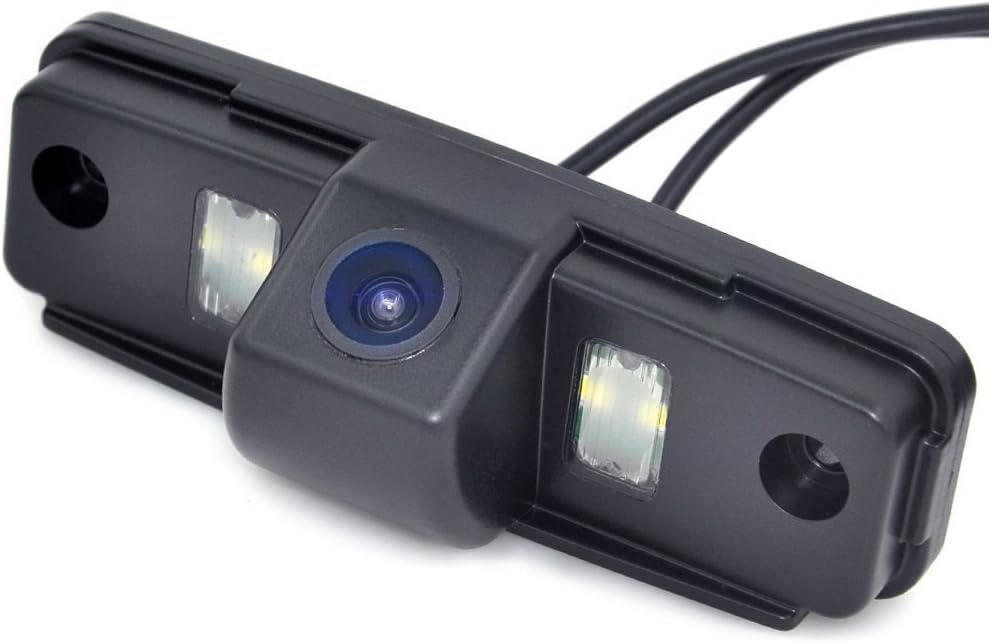
5. TheCoolCube Sony CCD Car Rear View Backup Camera for Subaru Outback/Forester/Impreza
Best OEM Replacement Camera
| Compatible Devices | Subaru Forester Outback Impreza Sedan |
|---|---|
| Voltage | 12 volts |
| Optical Sensor Technology | ccd,cmd,cmos,cmos/cmd |
| Field Of View | 170 degrees |
| Video Capture Resolution | 480p |
This TheCoolCube camera is built as a direct-style replacement meant to mount in the license-plate light cavity on selected Subaru models from the same generation as the Outback, Forester, and Impreza. It uses a 1/3" Sony CCD sensor and a fixed wide-angle lens with a 170 degree field of view, producing 480-line video over a standard RCA output. Installation follows the factory pattern: remove the stock license lamp, bolt the camera in place, tie its lamp power into the existing wiring, and run the video lead to the monitor. The CCD sensor and Sony chip give clearer low-light performance and higher effective resolution than basic CMOS modules, which helps when reversing at night. Because it uses factory-style mounting and 12 V lamp wiring, the unit minimizes wiring changes and avoids custom adapters for many Subaru owners. Limitations include basic 480p video resolution rather than modern HD and a supplied RCA connection that may need an adapter for some aftermarket screens. The camera is surface mount only and relies on the vehicle license lamp power feed rather than a dedicated reverse trigger input.
Best for: Buyers who want a near factory-style swap to restore rearview function without major wiring changes and who prioritize compatibility with Subaru license-plate light wiring and mounting.
Less Ideal for: Drivers seeking HD image quality, camera systems with digital interfaces, or a fully sealed OEM housing that exactly replicates factory trim should consider other options.
- Sony 1/3" CCD sensor for clearer low-light imaging than basic CMOS modules
- 170 degree wide-angle lens covers typical rear blind spots for reversing
- Designed to mount in the license-plate light area for near-direct fitment on listed Subaru models
- Uses standard 12 V lamp wiring so it can tap into existing license-plate power without major rewiring
- Video output is standard-definition 480p over RCA rather than HD or digital connection
- Surface-mount installation may not fully match factory-integrated housings or weather seals
Verdict: Pick an OE-style replacement when you need exact-fit compatibility with factory wiring and connectors to preserve original function and avoid adapter headaches.
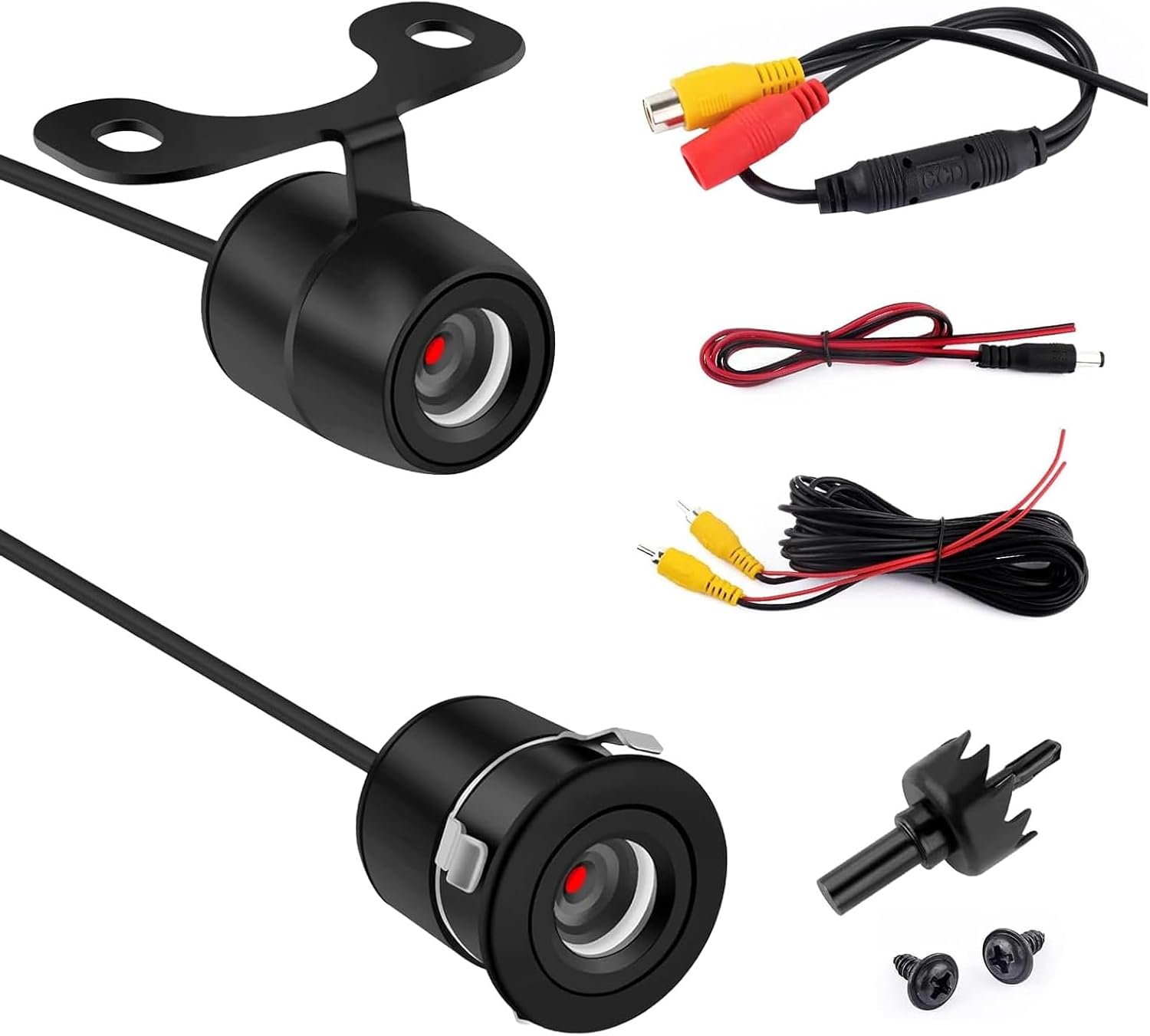
6. Bawkars 18.5mm Flush-Mount Backup Camera, 170° Wide-Angle, IP68
Best Flush-Mount / Compact Camera
| Video Capture Resolution | 720p |
|---|---|
| Field Of View | 170 Degrees |
| Connector Type | RCA |
| Voltage | 12 Volts |
| Installation Type | Flush Mount |
This compact Bawkars camera is designed for low-profile flush mounting in tight trim locations, making it a good choice where a tidy exterior look matters. It captures 720p video through a 170 degree fixed wide-angle lens and uses a CMOS sensor with built-in night vision so you get usable images in low light when reversing or parking. The unit is rated IP68, so the sealed housing resists water, fog, and mist for reliable performance during rain or car washes. Installation is straightforward for vehicles with a compatible 18.5mm hole: the package includes a bracket option plus video and power harness so you can run the RCA video and 12V power to a compatible monitor or factory screen with an adapter. The sturdy bracket and anti-shake design help keep the image steady over rough surfaces. Limitations include a 720p resolution rather than higher-definition options and RCA output which may require an interface for modern factory displays on the 2005 to 2009 Subaru Outback.
Best for: Buyers who want a discreet, compact backup camera that installs through a small hole and preserves a clean exterior appearance while improving rear visibility.
Less Ideal for: Drivers seeking the highest possible image resolution or direct plug-and-play compatibility with modern OEM displays should consider higher-resolution digital cameras or model-specific interfaces.
- True flush-mount 18.5mm design for a low-profile, factory-like install
- 170° wide-angle lens reduces blind spots when reversing or parking
- IP68 fully sealed housing for reliable weather and car-wash resistance
- Includes bracket and wire harness for bracket or flush installation without cutting
- 720p CVBS (RCA) output may need an adapter to work with modern factory screens
Verdict: Choose a compact flush-mount camera when you prefer a low-profile install through a small hole or in tight trim locations that keeps the exterior tidy.
7. Purthog License Plate Backup Camera with Metal Frame and 170° Wide Angle
Best Weatherproof / Heavy‑Duty Camera

| Field Of View | 170 degrees |
|---|---|
| Connector Type | RCA |
| Screen Size | 3.55 inches |
| Installation Type | Aftermarket, Wired |
| Material | Metal |
This Purthog license plate camera mounts in the plate frame and provides a wide 170° view for reversing on tight driveways and crowded parking lots. It is built into a stamped metal frame rather than plastic, so the housing resists bending from vibration and light impacts. Eight white LEDs plus a low-light image processor improve night visibility with a natural color cast, and the camera connects via a standard RCA video lead and a simple wired power tap to the reverse light. IP68 sealing and a metal shell mean it is intended to withstand heavy exposure to water, mud, and frequent car washes for long-term outdoor use. Installation is typical for wired plate cameras and requires routing a 20 ft video cable to a display and splicing power to the reversing light, so plan for modest wiring work. The product includes basic mounting hardware and a short reverse cable, but buyers should confirm the 12.2 by 6.3 inch frame fits their plate area and expect no wireless or parking-guideline electronics in this basic wired unit.
Best for: Buyers who need a rugged, weatherproof backup camera for long-term outdoor use and who are willing to run wiring for a plate-mount installation.
Less Ideal for: Drivers who want a wireless plug-and-play solution, factory-style parking guidelines, or a no-install option that avoids splicing into the vehicle wiring.
- Metal license-plate frame resists bending and holds alignment under road vibration
- IP68-rated sealing for reliable water and dust resistance in wet or muddy conditions
- 170° wide-angle lens reduces rear blind spots for better situational awareness
- Eight white LEDs and image processing improve night-time visibility
- Includes mounting hardware and a 20 ft video cable for routed wired installation
- Wired RCA connection requires routing cable to a compatible monitor and splicing to reverse light power
Verdict: This slot is for highly sealed, durable cameras designed for long-term outdoor use when you expect heavy exposure to water, mud, or frequent car washes.
Choosing the Right 2005-2009 Subaru Outback Backup Camera: Key Factors to Consider
Image Quality and Night Performance
Clear daytime video and usable low-light performance matter because you will rely on the camera when reversing in dim conditions such as early morning, late evening, or poorly lit parking garages. A camera with higher resolution and a sensor optimized for low light gives sharper edges and better contrast, which helps you judge distances to obstacles. Infrared or low-light enhancement modes are beneficial, but consider that some IR systems create a harsher monochrome picture at close range; a balanced color image with good exposure handling can be more intuitive for judging bumper-to-object gaps.
Also account for glare and lens flare control. Wide dynamic range helps preserve detail when part of the scene is brightly lit and another part is shadowed. Since the Outback may carry groceries or other cargo that shift line-of-sight angles, consistent image rendering across lighting conditions reduces surprises during routine reversing.
Field Of View And Image Geometry
The camera's field of view determines how much of the area behind the Outback is visible. A wider field of view reveals more peripheral obstacles and is useful for spotting children, poles, or vehicles approaching from the side. However, excessive wide-angle distortion can make objects appear farther than they are, so balance coverage with usable perspective. Look for cameras that specify both horizontal and diagonal viewing angles or provide simulated mounting images.
Consider whether the camera offers guidelines or selectable parking lines. Fixed on-screen guides calibrated to the Outback's bumper height make distance estimation easier. Some systems allow you to toggle or adjust overlay lines; this can be helpful if you need more precise alignment when hooking up a trailer or backing into a tight space.
Mounting Style And Fitment
Different cameras mount to the license plate, bumper, or can replace a trim piece. For the 2005-2009 Outback, license-plate mounting is often the least invasive option and avoids drilling if you can reuse existing fasteners. Bumper or recessed mounts can offer a cleaner look but may require drilling or removal of the lower trim. Evaluate how each mounting option sits relative to the Outback's rear bumper lip and whether it will be exposed to spray from the tires.
Also check whether the camera housing is adjustable for pitch so you can aim the view precisely for typical cargo and hitch heights. A low-profile housing reduces the chance of damage from loading and unloading items on the rear bumper.
Wired Versus Wireless Systems
Wired systems typically give a more reliable, lag-free video feed and are less prone to interference. They do require running a video cable through the cabin or under trim panels and connecting to a power source from the reverse light circuit. Wireless systems reduce installation time and avoid long video runs, but can suffer from signal dropouts, interference from other electronics, and might introduce slight latency in the image.
For the Outback, consider how frequently you will use the camera and whether you plan to keep the installation permanent. If you need a portable or temporary solution, a wireless camera or a detachable kit may be appropriate. If you value a consistently sharp, real-time image for towing or precise parking, a hardwired setup is generally preferable.
Power, Integration, And Monitor Compatibility
Decide how the camera will display video. Some kits include a dedicated monitor that mounts on the dash or replaces a mirror; others integrate with an existing head unit or factory display via video input. Confirm that the monitor or display supports the camera's signal type and resolution. If you plan to route the camera to an aftermarket or factory screen, ensure you have the correct connectors and, if necessary, an adapter.
Power sourcing is usually from the vehicle reverse light circuit so the camera activates when you shift into reverse. Verify that the camera's power draw is compatible with the Outback's wiring and that the kit includes a reliable power connector. For systems with additional features like automatic dimming or parking guidelines, check how those functions are triggered and whether extra wiring or configuration is required.
Durability And Weather Resistance
The rear of a Subaru Outback is exposed to road spray, salt, and temperature swings. Choose a camera with a robust weather rating and corrosion-resistant housing. Look for an IP rating that indicates protection against water and dust intrusion, and prefer metal or reinforced plastics for housings in areas where stone chips or impacts are likely.
Also consider cable protection and strain relief where the harness passes through the body. Long-term reliability depends on secure cable routing and connectors that resist corrosion. Units with replaceable mounting screws or gasketed housings tend to maintain a tight seal longer in wet climates.
Installation Options For The Outback
Installation approach depends on whether you choose a license-plate, bumper, or flush-mount camera. License-plate mounts typically reuse the stock fasteners and only require a short wiring run to the trunk and toward the cabin. Bumper or flush mounts can look cleaner but often need trimming or drilling of the plastic bumper cover.
Running wiring through the hatch requires feeding the video and power leads past the liftgate hinge grommet and into the cabin. If you prefer not to modify trim, consider kits that provide adhesive mounts and self-contained monitors. For any installation, plan routing to avoid pinch points and secure cables with clips or zip ties to minimize rattles.
- License-plate mounting minimizes bodywork and is usually reversible
- Flush mounts give a factory look but may need drilling
- Wireless kits cut down on video cable runs at the cost of potential interference
- Use existing grommets to route cables through the liftgate when possible
Choosing A Monitor Or Using The Factory Screen
If your Outback has an aftermarket head unit with a video input, you can route the camera feed there for a clean integrated display. Otherwise, standalone monitors that clip to the sun visor or dash offer a straightforward installation and portability. Rearview-mirror monitors that replace or overlay the mirror combine two functions into one tidy package.
When selecting a monitor, check aspect ratio and resolution compatibility with the camera. A larger screen helps with detail but may obstruct sightlines if mounted poorly. Consider mounting position and anti-glare properties for daytime usability.
- Aftermarket head unit video in is the most integrated solution
- Mirror-mounted monitors preserve dashboard space
- Portable monitors are good for temporary installs or loaner vehicles
Wiring Tips And Common Pitfalls
Tap the reverse light for power so the camera only activates when you are backing up. Use crimped connectors, solder, and heat-shrink where possible to ensure a secure long-term electrical connection. Protect the video cable with split loom where it runs under the vehicle or through door jambs.
Common pitfalls include routing the video cable near high-current wiring which can introduce interference, leaving connectors exposed to road spray, and not accounting for hinge movement in the hatch which can fatigue wires. Test the camera and monitor before reassembling trim to confirm image orientation and parking line calibration.
- Use the factory reverse lamp circuit for switched power
- Avoid running video cable next to speaker or ignition wiring
- Leave slack near the hatch hinge to prevent wire chafing
- Seal exterior connections with dielectric grease or boots
Adjusting Camera Aim And On-Screen Guides
Proper camera angle affects distance perception. Aim the camera slightly downward to show the area directly behind the bumper while retaining enough forward view to see approaching cross-traffic. After mounting, test with a visible ground reference to ensure the parking guides align with actual bumper edges.
If the system includes adjustable or switchable guidelines, set them to match the Outback's bumper height and typical load conditions. Some users prefer fixed guidelines for consistent reference, while others like adjustable overlays for hitching or tight maneuvers.
- Aim downward enough to see the bumper and ground directly behind it
- Calibrate on-screen guides against a measured distance marker
- Re-check angle after closing all trim and loading typical cargo
Maintaining Your Camera System
Keep the lens clear of mud and ice for reliable performance. Periodic cleaning with a soft cloth and mild cleaner prevents haze from road film. In winter climates, remove accumulated snow or ice rather than relying on defrosters that may not reach the lens area.
Inspect wiring runs annually for abrasion and check that connectors remain tight. Replace any cracked housings or seals to preserve waterproofing. If the image degrades over time, check ground connections and clean contacts before assuming the camera has failed.
- Clean lens regularly to avoid glare and blurry images
- Inspect harness routing and seals yearly
- Protect exposed connectors with boots or dielectric grease
Still looking for the perfect fit?
Select your Subaru Outback configuration to see the most relevant Backup Cameras recommendations
How We Chose the Best 2005-2009 Subaru Outback Backup Camera
We prioritized items that offer reliable rearward visibility and practical fitment for the 2005-2009 Subaru Outback. Evaluation criteria included video resolution and low-light performance to ensure usable images in dusk or nighttime reversing, and lens field of view to cover common blind spots behind the Outback. We also weighed mounting compatibility and hardware: license-plate and bumper-mount footprints that adapt to the Outback's rear geometry were favored. Installation complexity was measured by required wiring runs, need for drill holes, and whether the unit supports simple power taps from reverse lights or dedicated harnesses. Durability factors included waterproof ratings and corrosion-resistant materials given exposure to road spray and winter salt.We excluded products that were clearly intended only for heavy trucks or non-passenger vehicles, and any systems that lack documented 12-volt compatibility or reasonable warranty terms. Units recommended here balance image usability, installation effort, and long-term reliability for the 2005-2009 Subaru Outback owner.
Our full evaluation process is outlined in our review methodology.
FAQ
Can I install a backup camera myself on a 2005-2009 Outback?
Often you can if you are comfortable removing trim panels and routing cables. License-plate mounts are the easiest. Expect to spend a few hours and have basic tools. If the install requires drilling or integration with a factory screen, professional installation may be advisable.
Will a wireless backup camera work reliably on my Outback?
Wireless cameras can work well for casual use and reduce installation time, but reliability depends on signal quality and interference. For consistent, lag-free video—especially when towing or in areas with many radios—a wired system is usually more dependable.
How do I power the camera so it only turns on in reverse?
Tap the camera's power lead to the vehicle reverse light circuit so the camera receives 12 volts when the car is in reverse. Use proper connectors or solder and heat-shrink for a durable connection and test operation before reassembling trim.
Do I need to drill holes to mount a camera on the Outback?
Not necessarily. License-plate mount cameras typically reuse existing screw locations. Bumper or flush-mount cameras may require drilling or modifying trim. Choose a mount type that fits your tolerance for bodywork.
How do I keep the camera lens clear in winter?
Regularly clear snow and ice by hand and avoid spraying high-pressure washers directly into seams. Using a mild cleaner and a soft cloth prevents buildup of road film. Ensure seals and gaskets remain intact so moisture does not penetrate the housing.
Can I use an aftermarket monitor with my Outback's factory wiring?
Yes, many aftermarket monitors accept a 12-volt trigger or video input from a backup camera. Confirm connector compatibility and that the monitor can accept the camera's signal type. Some installations require an adapter or minor wiring for integration with factory systems.
Final Verdict
For the 2005-2009 Subaru Outback, prioritize a camera that provides clear daytime and low-light images, a field of view that balances coverage with manageable distortion, and a mounting style you are comfortable installing. If you need a permanent, always-on solution for towing or precise parking, a hardwired system with integration into a monitor or head unit is preferable. If you want a simpler, noninvasive setup, a license-plate mount or wireless kit will reduce installation time but may trade off some reliability.Weigh the tradeoffs between installation complexity and everyday usability, and focus on weather resistance and secure wiring to ensure the system remains dependable through seasons. With those priorities in mind, you can choose a backup camera that makes reversing and parking your Outback safer and less stressful.
Explore More:
- Check out all Subaru Outback parts & accessories
- Explore Electronics
- Browse all Accessories
