

Note: This article contains affiliate links. If you click on these links and make a purchase, I may earn a small commission at no extra cost to you. This helps support my research and content. Read my full affiliate disclosure here.
If you own a 2026 Honda Ridgeline or a model from the 2017–present range, fitting a quality backup camera can dramatically reduce blind spots and make reversing safer and less stressful. The right camera improves nighttime clarity, provides a stable view during hitching and parking, and integrates with your Ridgeline's layout without major modifications.This guide covers our top six shortlisted backup camera options for the Ridgeline, chosen for their image quality, installation approach, and compatibility with truck use. Below you will find what matters most when choosing a system and practical guidance on installation styles, wiring approaches, and viewing options to help you pick the best match for your vehicle and driving habits.
Looking for other parts? See all Honda Ridgeline parts & accessories.
Top Picks at a Glance
| Best Overall Backup Camera A reliable all-around rear camera with clear image and weatherproofing | FITCAMX DZ-0337 Front 4K + Rear 1080P Integrated Dash Cam for Honda Ridgeline (2017–2026) |  |
| Best Budget Backup Camera An inexpensive universal camera that covers basic reversing needs | GreenYi Rear View Backup Camera Replacement for Honda Ridgeline (2017–2019) |  |
| Best OE Plug-and-Play Replacement A direct-fit OEM-style camera that uses the vehicle's factory harness | Master Tailgaters Replacement Rear View Backup Camera for Honda Ridgeline (2017–2020) |  |
| Best License-Plate Frame Camera A license-plate–mounted camera with integrated LEDs and wide view | VKQTS License Plate Backup Camera with 8 LEDs and 170° Wide Angle |  |
| Best Heavy-Duty Weatherproof Camera A metal-housed, IP68/IP69K-rated camera built for harsh conditions | NATIKA WD-011 Backup/Reversing Camera — Metal OEM-Style, Wide Angle |  |
| Best Camera + Monitor Kit A complete wired or wireless kit that includes a monitor and camera | ZEROXCLUB B7 Wired Backup Camera Kit with 7" HD Monitor |  |
1. FITCAMX DZ-0337 Front 4K + Rear 1080P Integrated Dash Cam for Honda Ridgeline (2017–2026)
Best Overall Backup Camera

| Video Capture Resolution | Front 2160p, Rear 1080p |
|---|---|
| Field Of View | 170 degrees |
| Connectivity Technology | Wi-Fi |
| Included Memory Card Size | 128 GB |
| Frame Rate | 30fps |
The FITCAMX DZ-0337 replaces the overhead mirror assembly to provide a factory-style dual dash cam tailored for the 2017–2026 Honda Ridgeline. It records the front view at 2160p and the rear at 1080p, both at 30 fps, and uses WDR to help keep exposure balanced in mixed lighting. Installation is designed to hide wiring and match the vehicle trim when you pick the correct model for your overhead console, so the unit looks like a factory fitment rather than an aftermarket add-on. The built-in WiFi and FITCAMX app let you preview and download clips without disturbing CarPlay or Bluetooth use, and footage is stored to the included 128 GB microSD card (supports up to 256 GB). Practical limits to note are model-specific fitment requirements and that adding a rear camera separately is not supported for this front-version PCB. Parking mode and 24-hour monitoring require an extra harness and configuration from the manufacturer.
Best for: Buyers who prioritize a factory-quality, integrated camera for daily reversing and towing on a 2017–2026 Ridgeline and want clear front and rear video with simple app access.
Less Ideal for: Drivers who need an off-vehicle portable camera, a multi-vehicle solution, or plug-and-play parking mode without buying an additional harness should look elsewhere.
- True OEM-style integration hides wiring and preserves interior appearance
- High-resolution front 2160p plus rear 1080p recording for clear incident capture
- Built-in WiFi and app let you preview and download footage without interrupting CarPlay or Bluetooth
- Includes 128 GB microSD card and supports up to 256 GB for extended storage
- WDR and f/1.6 aperture improve low-light exposure and night visibility
- Requires selecting the exact model that matches the Ridgeline overhead cover or installation will fail
Verdict: The pick for readers who want a dependable, weatherproof backup camera that balances image clarity, wide field of view, and straightforward installation for everyday reversing and towing tasks.
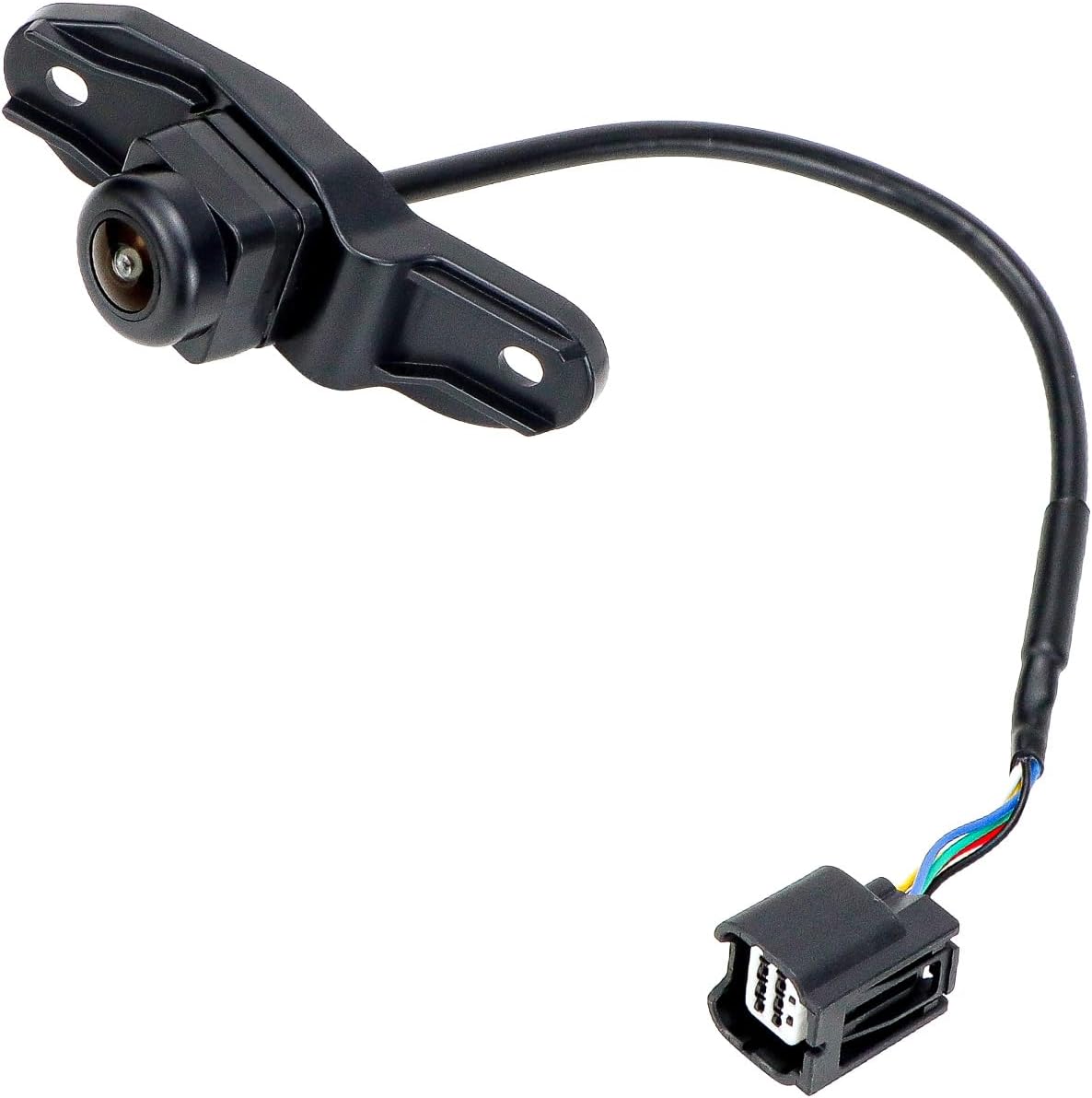
2. GreenYi Rear View Backup Camera Replacement for Honda Ridgeline (2017–2019)
Best Budget Backup Camera
| Fitment | Honda Ridgeline 2017, 2018, 2019 |
|---|---|
| Replaces part | 39530-T6Z-A01 / 39530T6ZA01 |
| Ingress protection | IP68 |
| Housing | Metal |
This GreenYi rear view camera is a straightforward aftermarket replacement for the Honda Ridgeline 2017–2019 that aims to match the factory mounting and connector for a simple swap. Designed as a plug-and-play unit, it connects to the existing harness and supports the original camera functions after coding where required. The camera advertises high-definition imaging and improved low-light performance for usable night vision, and the metal housing with IP68 rating promises weather and wash resistance for long-term reliability. Installation instructions are not included so buyers should be comfortable with basic vehicle electronics or seek professional help; some vehicles may need coding to enable all features. As a budget option it focuses on core functionality rather than extra features like parking guides or wireless modules, making it a practical, low-cost way to restore a disabled or damaged factory camera on compatible Ridgelines.
Best for: Buyers who want a low-cost, factory-style replacement that reinstalls the original camera functions with minimal wiring work and provides usable night vision for everyday reversing.
Less Ideal for: Drivers who want advanced features like wireless connectivity, dynamic parking guides, or a multi-camera system should consider more feature-rich alternatives.
- Direct replacement for part numbers 39530-T6Z-A01 and 39530T6ZA01 for 2017–2019 Ridgeline models
- Plug-and-play connector designed to mate with the existing factory harness
- IP68-rated metal housing offers solid protection against water and road grime
- Advertised improved low-light/night vision for clearer reversing images
- No installation instructions included and some vehicles may require professional coding
- Aftermarket product so finish and image tuning may differ from factory camera
Verdict: Choose this slot if you need a low-cost, plug-and-play backup camera that gives usable night vision and a wide angle without extra bells and whistles.
3. Master Tailgaters Replacement Rear View Backup Camera for Honda Ridgeline (2017–2020)
Best OE Plug-and-Play Replacement

| Voltage | 12 volts |
|---|---|
| Optical Sensor Technology | CMOS |
| Field Of View | 170 degrees |
| Lux rating | 0.1 |
| Connector Type | RCA |
This Master Tailgaters camera is a plug-and-play replacement made to match the Honda Ridgeline rear camera part number 39530-T6Z-A01 for 2017–2020 models. It installs as a surface-mount unit and connects to the existing OEM video harness with an RCA-style connector so no coding or extra wiring is required for basic operation. The module uses a CMOS sensor with a wide-angle lens and a reported field of view around 170 degrees, which gives a broad rear view useful for parking and hitching. It is rated for low-light use down to 0.1 lux and claimed waterproofing to IP69K, which helps it survive wet and dusty conditions and extreme temperatures. Image resolution is listed in TV lines and should be adequate for reversing guidance though not as sharp as modern high-definition cameras. If you want a straightforward factory-style swap that keeps factory display and features intact, this model delivers that convenience; buyers seeking higher-resolution or additional features like dynamic guidelines or wireless connectivity will need a different product.
Best for: Buyers who want a simple, factory-like replacement that reconnects to the vehicle wiring and restores the original camera function with minimal fuss.
Less Ideal for: Drivers who prioritize high-definition video, wireless features, or advanced camera functions such as active dynamic guidelines should consider a more feature-rich upgrade.
- Direct replacement designed to match the Ridgeline OEM part number for 2017–2020 for easy swap-in
- Plug-and-play connection to existing OEM video harness with no coding required
- Wide-angle lens (around 170 degrees) provides broad rear coverage for parking and towing
- Low-light sensitivity down to 0.1 lux and IP69K-level waterproofing for durable all-weather use
- Resolution specified in TV lines rather than modern pixels, so image detail is modest compared with HD cameras
Verdict: Pick this when you prefer a direct-replacement camera that plugs into the original wiring and preserves factory features with minimal wiring or coding.
4. VKQTS License Plate Backup Camera with 8 LEDs and 170° Wide Angle
Best License-Plate Frame Camera

| Field Of View | 170 Degrees |
|---|---|
| Video Capture Resolution | 1080p |
| Connector Type | RCA |
| Optical Sensor Technology | CMOS |
| Installation Type | Surface Mount |
This VKQTS license plate backup camera mounts in place of a standard U.S. license plate and provides a wide 170 degree field of view and 1080p video for a broader rearward picture. It is built as an all-metal frame to resist deformation and impacts better than plastic frames, and the eight integrated white LEDs plus an HD image chip improve low-light visibility. Installation uses the supplied screws and spacers and a surface-mount style that routes a video RCA to your monitor and wires the power into the reverse light circuit, so wiring remains tidy behind the bumper. Practical benefits include a wide coverage area that reduces blind spots around curbs and low obstacles and a durable, weatherproof (IP68-style) housing for year-round use. Limits to note are the RCA analog connection and fixed lens angle, which require a compatible display input and precise aiming during install, and you should confirm the Ridgeline's license plate bracket depth and cable routing before buying.
Best for: Buyers who want a straightforward license-plate mount camera that delivers a wide field of view and built-in LEDs for easier night backups on a Honda Ridgeline and prefer a tidy, routed wired installation.
Less Ideal for: If you need a wireless camera or a plug-and-play digital interface with your factory infotainment, choose a camera designed for digital or vehicle-specific integration instead.
- 170° wide-angle lens covers a broad rear area to reduce blind spots
- Eight built-in LEDs and HD image processing improve night and low-light visibility
- All-metal license plate frame offers stronger impact and deformation resistance than plastic
- Includes mounting hardware, 20 ft video cable, and power cable for complete install
- Uses RCA analog video connector rather than a digital or wireless interface
- Fixed lens angle requires careful aiming during installation to get the desired view
Verdict: This slot is for shoppers who want a license-plate mount camera offering broad coverage and built-in night LEDs for simple installation and clean routing.
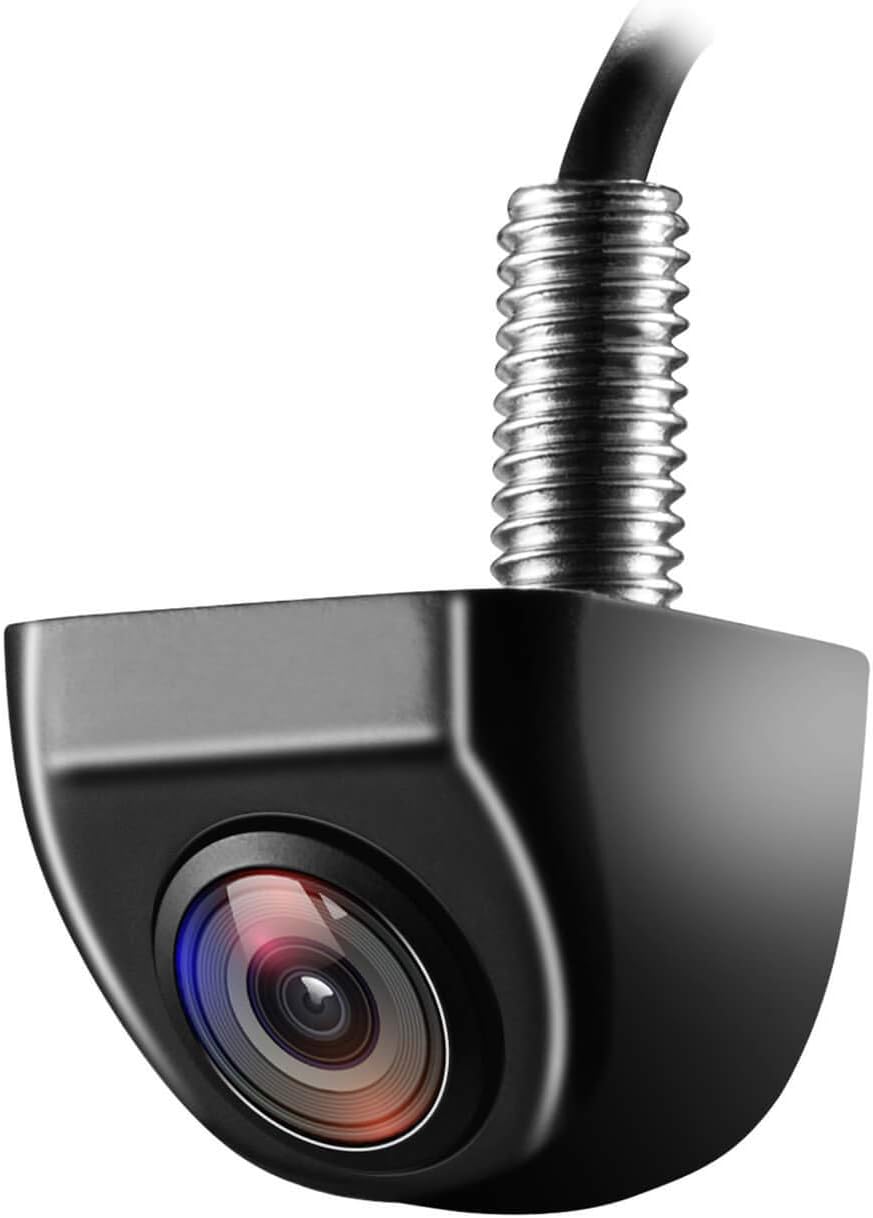
5. NATIKA WD-011 Backup/Reversing Camera — Metal OEM-Style, Wide Angle
Best Heavy-Duty Weatherproof Camera
| Voltage | 12 Volts |
|---|---|
| Optical Sensor Technology | CMOS |
| Field Of View | 170 Degrees |
| Video Capture Resolution | 720p |
| Lux rating | 0.01 Lux |
The NATIKA WD-011 is a small metal backup camera designed for rugged exterior mounting and clear rear visibility. It connects via an RCA video feed to most aftermarket and many factory screens and runs on 12 volt systems, delivering 720p video with a 1/2.7" CMOS sensor and very low-light sensitivity for use at night. The metal housing and fully sealed glue-fill construction resist water intrusion and make the unit suitable for exposed locations; the listing highlights an IP69K-level waterproof build and the ability to mount vertically or horizontally. A wide field of view and selectable guide lines help with parking and blind spot coverage, and built-in wiring loops let you flip the image or choose a downward tailgate view. Installation requires a compatible video input and may need a separate harness for some factory screens, and the camera uses an RCA connector rather than a plug-and-play factory harness, so expect basic wiring work for integration. For hard-use exterior mounting the WD-011 balances toughness and simple functionality, but it is not a vehicle-specific OEM plug-in solution.
Best for: Buyers who prioritize a rugged, water-resistant exterior camera for heavy-duty use and want a straightforward wide-angle reversing view that can be mounted in exposed locations.
Less Ideal for: Shoppers seeking a direct plug-and-play factory replacement or a camera that integrates without any wiring or harness changes should consider vehicle-specific options instead.
- Metal, OEM-style housing with fully sealed glue-fill construction for strong water and dust resistance
- Very low light sensitivity (0.01 Lux) for improved night-time visibility
- Wide field of view and selectable guide lines to aid parking and blind spot coverage
- 720p video using a 1/2.7" CMOS sensor for sharper image than basic analog cameras
- Flexible mounting: supports vertical and horizontal installation and selectable viewing orientation
- Uses RCA video connector and may require an additional harness or wiring for factory screens
- Not a vehicle-specific plug-and-play unit so installation can require more time and basic wiring skills
- Effective still resolution listed lower than modern HD sensors, so fine detail at distance is limited
Verdict: Choose this option if you need a rugged, corrosion-resistant backup camera that holds up to pressure washing, road grime, and extreme temperatures.
6. ZEROXCLUB B7 Wired Backup Camera Kit with 7" HD Monitor
Best Camera + Monitor Kit

| Screen Size | 7 Inches |
|---|---|
| Video Capture Resolution | 1080p |
| Field Of View | 149 Degrees |
| Connector Type | 4-Pin |
| Voltage | 12 Volts |
The ZEROXCLUB B7 kit bundles a 1080p license-plate backup camera and a dedicated 7-inch LCD monitor aimed at DIY installation. The camera offers wide-angle optics, built-in LEDs for night visibility, and an IP69K waterproof rating so it survives wet and dirty conditions. The monitor mounts with a suction cup or can be wired for continuous power; the system can be powered from the reverse light for automatic activation or via a 12V accessory socket for constant operation. Connection uses the included mini 4-pin and DC plugs and the manufacturer supplies a long extension cable to reach larger vehicles. Adjustable parking guidelines and an image-flip function make lining up trailers or tight spots easier. Limitations: the screen only works with this supplied camera and does not accept standard RCA inputs, polarized sunglasses can reduce screen visibility, and the camera LEDs turn on whenever the unit has power. For someone fitting a single-purpose, plug-and-play kit to a Ridgeline, this gives a complete, straightforward solution without sourcing separate parts.
Best for: DIYers who want a single kit that includes both camera and monitor for a quick, no-guesswork installation and prefer a wired system with flexible power options.
Less Ideal for: Drivers who need integration with an existing head unit or RCA-equipped display or who require a monitor readable while wearing polarized sunglasses.
- Includes both a 7-inch HD monitor and a 1080p rear license-plate camera for a single purchase install
- IP69K waterproof camera and LEDs for reliable performance in rain and dirt
- Multiple power options: reverse-light trigger or continuous 12V accessory power for flexible installation
- Long extension cable provided to reach larger vehicles and mounting locations
- Adjustable parking grid lines and image flip for easier alignment when reversing
- Monitor is proprietary and will not accept standard RCA video inputs
- Camera LEDs illuminate whenever the unit receives power and cannot be switched off independently
- Screen visibility can be affected by polarized sunglasses
Verdict: This label suits DIYers who want a single purchase that includes a camera and display for fast installation without sourcing separate components.
Choosing the Right 2026 Honda Ridgeline Backup Camera: Key Factors to Consider
Image Quality and Low-Light Performance
Image clarity is the most direct safety factor when choosing a backup camera. Look for sensors and lenses that deliver a sharp, distortion-minimized view across the typical reversing distance for a pickup. Low-light performance matters because you will use the camera at night, in garages, and during dawn or dusk. A camera with good dynamic range better handles bright highlights and deep shadows, which is useful if sun glare hits the rear or if you back toward reflective surfaces.
Resolution influences detail but not the full picture; lens field of view and software processing also shape what you actually see. For truck owners who frequently hitch trailers, the camera should retain clarity across the central and peripheral areas of the frame. Test footage or sample images are helpful when available. Also consider whether the system offers adjustable brightness and contrast so you can tune the feed to local lighting and your monitor's display characteristics.
Mounting Style and Vehicle Fitment
How a camera mounts on the Ridgeline affects aesthetics, vulnerability to damage, and ease of installation. Common mounting styles include license plate brackets, recessed bumper mounts, and flush or surface mounts under the tailgate trim. Each style has tradeoffs: license plate mounts are often easiest to install but sit exposed; recessed mounts offer protection but may require trimming or drilling; integrated mounts provide a factory look but can be more complex to fit.
Fitment clarity is crucial. Prefer systems that document compatibility with the Ridgeline's license plate location and bumper contours or that provide adjustable brackets to accommodate slight variations across model years. Consider how the chosen mount interacts with tailgate operation and any rear sensors or loading features. A well-fitting mount minimizes water ingress and reduces the chance of accidental knocks from loading gear or tailgate use.
Wiring Options and Integration With Displays
Decide whether you want a wired feed, a wireless transmitter, or a hybrid approach. Wired systems deliver consistent video with minimal interference but require running cable through the cargo area and tailgate or along the frame. Wireless systems simplify installation by avoiding a long video cable but can suffer from interference, latency, or reduced image fidelity, especially around metal truck bodies.
Integration matters for how you view the camera. Some systems are designed to tie into a factory or aftermarket monitor via composite video or specialized adapters. Others include a dedicated display or mirror monitor. Confirm that the output type matches your chosen display and check whether reverse-triggering works with the Ridgeline's wiring so the image appears automatically when you shift into reverse. Plan for power sourcing as well, typically from the reverse light circuit or an accessory power feed.
Durability and Weather Resistance
Pickup trucks face harsh exposure: road spray, salt, gravel, and impacts from loading and towing. Choose a camera with an IP rating indicating strong protection against water and dust. Metal or reinforced housings and secure lens guards can reduce damage from debris. Temperature tolerance is also relevant if you live in regions with wide seasonal swings.
Check for corrosion-resistant connectors and robust mounting brackets. Sealed cable assemblies and strain-relief grommets are valuable for tailgate installations where cables flex regularly. A design that allows straightforward replacement of the camera module or lens cover extends long-term serviceability without replacing the entire unit.
Viewing Features and Driver Aids
Features beyond a raw video feed can make reversing easier and reduce cognitive load. Look for adjustable or toggleable parking guidelines that provide perspective cues for distance and trailer alignment. Some systems offer multiple viewing modes, such as wide angle for parking or a narrow, centered view for hitching. Night-vision LEDs or low-light enhancement modes help in poor lighting.
Consider whether the system supports overlayed distance markers calibrated to truck dimensions, and whether those markers can be turned off if they do not match your setup. For towing, a split-screen or zoomed-in option focused on the hitch area can be useful. Ensure any driver-assist overlays do not obstruct critical visual information.
Monitor Compatibility and User Interface
Decide how you will view the camera feed. If you want integration with the Ridgeline's factory screen, confirm compatibility with the vehicle's video inputs or available adapter solutions. Aftermarket monitors, rearview mirror displays, and standalone screens vary in resolution, mounting options, and input types. A higher-resolution monitor displays more detail but may require a higher-bandwidth signal and a compatible camera output.
The user interface should be simple to operate while driving. Look for intuitive menus, easy toggling between views, and automatic reverse activation. If you choose a wireless monitor, check for solid mount options on the dash or mirror and a clear view line from the monitor to the camera transmitter to minimize signal dropouts.
Mounting Options Specific to the Ridgeline
The Ridgeline's tailgate and bumper layout offers a few straightforward mounting approaches. License plate mounts are often the least invasive, using the existing plate location and requiring only a short cable run or transmitter near the tailgate. Recessed bumper or tailgate-edge mounts provide a cleaner, lower-profile appearance and better protection, though they may require trimming or drilling around the trim pieces.
When choosing a mount, think about tailgate articulation and whether cargo or accessories will block the camera's field of view. Adjustable-angle brackets help align the camera vertically and horizontally to cover the hitch area or provide a wider field for parking.
- License plate mount: easiest install, more exposed
- Recessed mount: protective, may need modification
- Surface mount under tailgate trim: balance of protection and simplicity
Wired Vs Wireless Systems: Practical Tradeoffs
Wired connections give the most reliable, low-latency video and are less susceptible to interference from other electronics. However, wiring a camera on a Ridgeline often means dealing with the tailgate hinge or running cable along the cargo bed and through seals, which adds time and requires careful sealing.
Wireless systems reduce installation work by sending video to a receiver in the cab, but they can be affected by metal body interference and other transmitters. For owners who prefer minimal modification, wireless kits can be attractive, but be realistic about potential signal dropouts and range limits.
- Wired: stable, higher effort to install
- Wireless: easy install, potential interference
- Hybrid: wired power with wireless video can balance pros and cons
Integrating With the Ridgeline Display or Adding a Monitor
If you want the camera feed on the factory infotainment display, check the Ridgeline's available video inputs and whether an adapter is needed. Some aftermarket systems are designed to plug into aftermarket head units instead, so consider an installation path that preserves steering wheel controls and other factory functions.
Standalone monitors or mirror-mounted displays are flexible and can be fitted without altering factory systems. Choose a screen size and mounting approach that does not block sightlines or interfere with airbags and driver controls.
- Confirm video input type before buying
- Mirror displays can be less obtrusive
- Standalone monitors offer flexible placement options
Towing Considerations and Hitch-Centered Views
For Ridgeline owners who tow, optimizing the camera's aim and field of view for hitch alignment is important. A camera with a zoom option or a secondary narrow-angle mode helps center the hitch ball and trailer coupler for precise alignment. Mount placement should ensure an unobstructed view of the hitch even when the tailgate is open or accessories are mounted.
Also consider whether any aftermarket hitch accessories will obscure the camera and whether you need a detachable camera solution for when the hitch is in use. Adjustable guidelines that can be calibrated to your trailer setup are especially helpful when backing up to a trailer.
- Look for narrow-angle or zoom modes for hitching
- Ensure mount clears hitch accessories
- Calibratable guidelines help align trailers accurately
Maintaining and Protecting the Camera
Routine maintenance helps preserve image quality and function. Keep the lens clean from road grime, and check the housing and cable seals periodically for signs of wear. In winter months, clear away salt and ice which can accelerate corrosion around connectors.
Consider protective measures like a small overhang or guard on exposed mounts and route cables where they are less likely to be pinched by the tailgate. If the system uses a transmitter, protect it from excessive heat and moisture by placing it in a shielded area inside the tailgate or cargo box.
- Clean lens regularly to maintain clarity
- Inspect seals and connectors for corrosion
- Use protective guards for exposed mounts
Still looking for the perfect fit?
Select your Honda Ridgeline configuration to see the most relevant Backup Cameras recommendations
How We Chose the Best 2026 Honda Ridgeline Backup Camera
We selected systems based on criteria that matter for Honda Ridgeline owners and truck-specific usage. Primary evaluation focused on image quality, including low-light performance and wide-angle coverage, since clear visuals are essential for safe reversing and hitching. Fitment and mounting options were next: we prioritized cameras that mount cleanly on the Ridgeline's rear—whether under the tailgate trim, in the license plate area, or integrated into a bumper—without requiring major bodywork.Installation complexity and wiring options were important. We compared hardwired, wireless, and hybrid systems while assessing how easily each can integrate with existing factory displays or aftermarket monitors. Durability for truck use was a key filter, including water and dust resistance ratings and housing design to resist road debris. We also considered feature sets such as adjustable guidelines, night-vision LEDs, and wide dynamic range for high-contrast scenes. Systems that required extensive modification, non-repairable housings, or lacked clear fitment information for the Ridgeline were excluded. Our picks emphasize realistic balance between performance, fit, and installation practicality.
Our full evaluation process is outlined in our review methodology.
FAQ
Will a universal backup camera fit my 2026 Honda Ridgeline?
Many universal cameras can be adapted to the Ridgeline using license plate or surface mounts, but fit varies. Check mounting dimensions and whether the kit provides adjustable brackets to match the Ridgeline's plate location or bumper profile.
Is a wireless backup camera reliable on a Ridgeline?
Wireless cameras can work well but may be prone to interference from the truck body and other electronics. For consistent performance, choose a well-shielded transmitter and install the receiver where the signal path to the camera is least obstructed.
Can I tie a backup camera into the Ridgeline's factory screen?
Integration is possible with the right video interface or adapter, but compatibility depends on the infotainment configuration. Confirm the monitor input type and the vehicle's reverse-trigger wiring before purchasing an adapter or camera system.
Do backup cameras need a separate power source?
Most backup cameras draw power from the reverse light circuit so they activate when you shift into reverse. Some systems offer alternate power options from accessory circuits if you want constant power for features like a dash monitor or wireless transmitter.
How do I prevent fogging and condensation in the camera lens?
Choose a camera with good sealing and an IP rating designed for exterior use. Properly sealed connectors and desiccant-lined housings help, and regularly checking seals and cable grommets reduces the chance of moisture ingress.
Are parking guidelines accurate for trailer hitching on the Ridgeline?
Guidelines provide helpful reference points but may not be perfectly accurate for every trailer setup. Prefer systems that allow guideline adjustment or calibration so you can align overlays with the Ridgeline's hitch geometry and your trailer coupling.
Final Verdict
Picking the right backup camera for a 2026 Honda Ridgeline comes down to balancing image clarity, mounting fit, and installation approach. Prioritize a camera that provides clear low-light performance and a mounting solution that stays protected without interfering with tailgate operation or trailer use.Weigh the tradeoffs between wired reliability and wireless convenience, and choose a display path that matches your comfort with integration work. Focus on durability and ease of maintenance so the system remains dependable in real-world truck use, and you will get the most practical safety benefit from your backup camera upgrade.
Explore More:
- Check out all Honda Ridgeline parts & accessories
- Explore Electronics
- Browse all Accessories
