

Note: This article contains affiliate links. If you click on these links and make a purchase, I may earn a small commission at no extra cost to you. This helps support my research and content. Read my full affiliate disclosure here.
If you want clearer audio, easier controls, and modern connectivity in your Hyundai Tucson, choosing the right car stereo matters. The wrong unit can complicate installation, limit features, or mismatch your vehicle’s wiring and dash space. This guide shortlists the top options we vetted for the Tucson and explains the practical tradeoffs buyers face.We evaluated models for audio performance, compatibility with vehicle wiring and dash dimensions, connectivity options, and user-friendly controls. Below you will find our top picks and the key factors to consider before buying.
Looking for other parts? See all Hyundai Tucson parts & accessories.
Top Picks at a Glance


1. CAMECHO Android 13 Car Stereo for Hyundai Tucson IX35 (2010–2015) 10.1" Touchscreen with Wireless CarPlay/Android Auto

| Operating System | Android 13 |
|---|---|
| Screen Size | 10.1 Inches |
| Resolution | 1024 x 600 |
| Memory Storage Capacity | 64 GB |
| Additional Features | Wireless CarPlay & Android Auto, AHD Backup Camera, GPS, Wi‑Fi |
This CAMECHO unit replaces the stock radio in a 2010–2015 Hyundai Tucson IX35 and turns the dash into a modern Android 13 infotainment system. It installs into the dash and provides a 10.1" 1024×600 capacitive touchscreen, built-in GPS with offline maps, Wi‑Fi, Bluetooth hands‑free and a 16‑band EQ for on‑car audio tuning. Wireless Apple CarPlay and Android Auto work through the unit’s ZLINK implementation while the included AHD backup camera enables automatic reverse view on the screen. The head unit ships with installation accessories and supports steering wheel controls after selecting the correct protocol. Practical benefits include large internal storage for apps, phone integration without a wired connection, and an integrated mic for voice calls. Important limitations are modest 2GB RAM which can slow heavy apps, occasional reports of camera or channel glitches, and potential need for an extra harness or CAN adapter on certain trim levels to support factory amplifiers or specific wiring. Expect to verify dashboard connectors and, if needed, contact the seller for the correct harness before installation.
Best for: A reliability-focused buyer who wants a factory-replacement style upgrade for a Hyundai Tucson IX35 2010–2015 that modernizes infotainment while keeping practical, serviceable hardware.
Less Ideal for: Drivers who need high-end processing for gaming or heavy multitasking, or those who prefer plug-and-play swaps without any possibility of wiring or CANBUS adjustments should look elsewhere.
- Designed specifically for Hyundai Tucson IX35 2010–2015 for dash-fitment and steering wheel control support after setup
- Wireless Apple CarPlay and Android Auto for phone mirroring without a cable
- Built-in GPS with offline maps plus Wi‑Fi and 64GB storage for apps and media
- Includes AHD backup camera and accessories to show reverse view automatically
- 16‑band EQ and HiFi radio modes for customizable audio tuning
- 2GB RAM is limited for heavy multitasking and some navigation apps may feel slow
- Some users report intermittent issues with backup camera or audio channel that may require troubleshooting
- May require an additional wiring harness or CANBUS adapter for vehicles with factory amplifiers or nonstandard connectors
Verdict A practical, vehicle-specific Android 13 head unit that brings modern phone integration and navigation to Hyundai Tucson IX35 owners, but plan for possible harness or performance limitations.
2. Fuluku 10" Android 15 Car Stereo for Hyundai Tucson (2010–2015) with Wireless CarPlay and Backup Camera

| Screen Size | 10 Inches |
|---|---|
| Operating System | Android 15 |
| Memory Storage Capacity | 64 GB |
| Memory | 2 GB (RAM) |
This Fuluku head unit replaces the factory radio in Hyundai Tucson (2010–2015) to add a 10-inch capacitive IPS touchscreen, Android 15 platform, and phone integration via wireless CarPlay and Android Auto. It is used as a daily infotainment upgrade to run navigation, stream music, handle hands-free calls, and display a backup camera. The unit includes 2 GB RAM and 64 GB storage, supports Wi-Fi, Bluetooth and dual USB ports, and has built-in DSP and a YD7388 amplifier chip for adjustable audio tuning. Installation is intended to fit the Tucson dash with steering wheel control retention and factory camera compatibility, so it looks integrated once mounted. Be aware that some buyers report harness or fitment issues, so minor wiring adapters or professional installation may be required. The system offers many convenience features for modern smartphone-centric use, but its midrange hardware means high-demand apps or heavy multitasking will be less snappy than premium aftermarket options.
Best for: Buyers who prioritize convenience and smartphone-style features over high-end performance and want a one-piece infotainment upgrade that modernizes a Tucson with easy phone connectivity and navigation.
Less Ideal for: Drivers who want the fastest performance, advanced audio separates, or a plug-and-play OEM-perfect harness without any installation adjustments should consider higher-end units or professional installers.
- Tailored fit and mounting for Hyundai Tucson 2010–2015 for a clean dashboard install
- Wireless CarPlay and Android Auto plus MirrorLink for easy phone integration
- Built-in GPS with offline and online maps and support for multiple satellite systems
- Generous 64 GB storage and dual USB ports for apps, media and firmware updates
- DSP and dedicated amplifier chip for customizable in-car audio tuning
- 2 GB RAM and midrange processor can feel sluggish with many apps open
- Some users reported wiring harness or compatibility issues requiring an adapter or pro install
Verdict A convenient, feature-rich infotainment retrofit for Hyundai Tucson (2010–2015) that brings wireless phone integration and navigation at a midrange performance level.
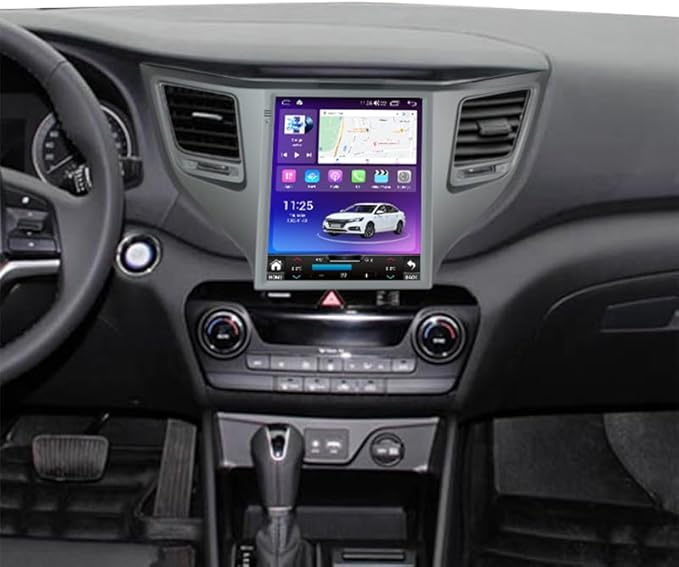
3. FELLOSTAR Android 11 Car Stereo with 9.7" Vertical Screen for Hyundai Tucson 2015–2018
| Operating System | Android 11 |
|---|---|
| Screen Size | 9.7 Inches |
| Memory Storage Capacity | 32 GB |
| Connectivity Technology | Bluetooth, USB |
This FELLOSTAR unit replaces the factory head unit in a Hyundai Tucson (2015–2018) with a 9.7-inch vertical Android 11 touchscreen that brings smartphone integration and navigation to the dash. It is typically used as a daily-driver infotainment upgrade for drivers who want faster performance, native CarPlay/Android Auto over a wired connection, Bluetooth hands-free calling, and offline GPS with optional online maps when tethered. The 32 GB of storage and capacitive touch screen make media playback and app use responsive, and split-screen support helps run navigation and media simultaneously. Installation requires correct wiring and dash trim for the Tucson vertical screen and the seller offers vehicle-specific harnesses and support to assist fitment. Limitations include the need to use the provided USB cable for CarPlay/Android Auto rather than wireless, potential fitment or clip issues on arrival that may require replacement parts, and reliance on third-party maps if you prefer an OEM navigation experience.
Best for: Performance-oriented Tucson owners who prioritize a responsive, app-capable infotainment system and modern smartphone integration for daily driving and navigation.
Less Ideal for: Drivers who want a fully factory-identical navigation experience or wireless CarPlay/Android Auto should consider other options that match those priorities more closely.
- Android 11 OS provides up-to-date app compatibility and smoother performance
- Built-in wired CarPlay and Android Auto for phone integration and voice assist
- 9.7-inch capacitive touchscreen with split-screen support for simultaneous navigation and media
- 32 GB internal storage for apps, maps, and media without relying on external drives
- Requires wired connection for CarPlay/Android Auto rather than wireless convenience
- May need vehicle-specific wiring harness or frame adjustments for perfect fitment
- Some units arrived with broken mounting clips requiring replacement parts
Verdict A performance-focused Android upgrade for Hyundai Tucson 2015–2018 that adds modern apps, navigation, and wired CarPlay/Android Auto but may require attention to fitment and wiring.
4. Ohradio Hikity 10.1" Android 15 Car Stereo for Hyundai Tucson 2006–2009

| Compatible with Vehicle Type | for hyundai tucson 2006 2007 2008 2009 |
|---|---|
| Screen Size | 10.1 Inches |
| Operating System | Android 15 |
| Memory Storage Capacity | 64 GB |
| Connectivity Technology | Bluetooth, USB, Wi-Fi |
This Ohradio Hikity unit replaces the factory dash radio in a 2006–2009 Hyundai Tucson with a 10.1-inch capacitive touchscreen running Android 15. It provides both wireless and wired CarPlay and Android Auto, mirror link, built-in GPS and Wi-Fi so you can use navigation apps, streaming and offline maps. The kit includes wiring harnesses, GPS antenna, external microphone and an AHD backup camera input so reversing and hands-free calling integrate into the car. The 64 GB storage and 2 GB RAM let you install apps from the Play Store and switch between media and navigation, while split-screen and multiple themes improve usability. Expect an aftermarket installation that may require trimming trim pieces, confirming amplifier wiring, and some CANBUS configuration for steering wheel controls and airbag indicator behavior. The screen resolution and Bluetooth 4.2 are adequate for navigation and audio, but advanced users may find occasional app compatibility quirks and the system is not a plug-and-play factory match for every trim level.
Best for: Practical, budget-conscious buyers who want a modern touchscreen, phone integration and navigation in an older Hyundai Tucson without paying for a premium OEM-style replacement.
Less Ideal for: Drivers seeking a factory-identical fit, the absolute newest wireless connectivity specs, or plug-and-play compatibility with every trim should consider higher-end, vehicle-specific alternatives.
- Wireless and wired CarPlay and Android Auto for easy phone integration while driving
- Built-in GPS, Wi-Fi and Play Store access so you can use online and offline navigation and streaming apps
- Includes installation accessories and backup camera input for a more complete retrofit
- Large 10.1-inch capacitive touchscreen with split-screen support improves visibility and multitasking
- May require physical modifications to trim and checking amplifier wiring for full compatibility with some factory systems
- Bluetooth 4.2 and occasional app compatibility limits compared with newer, higher-end head units
Verdict A budget-friendly retrofit that brings modern infotainment and navigation to a 2006–2009 Hyundai Tucson with reasonable features for the price.
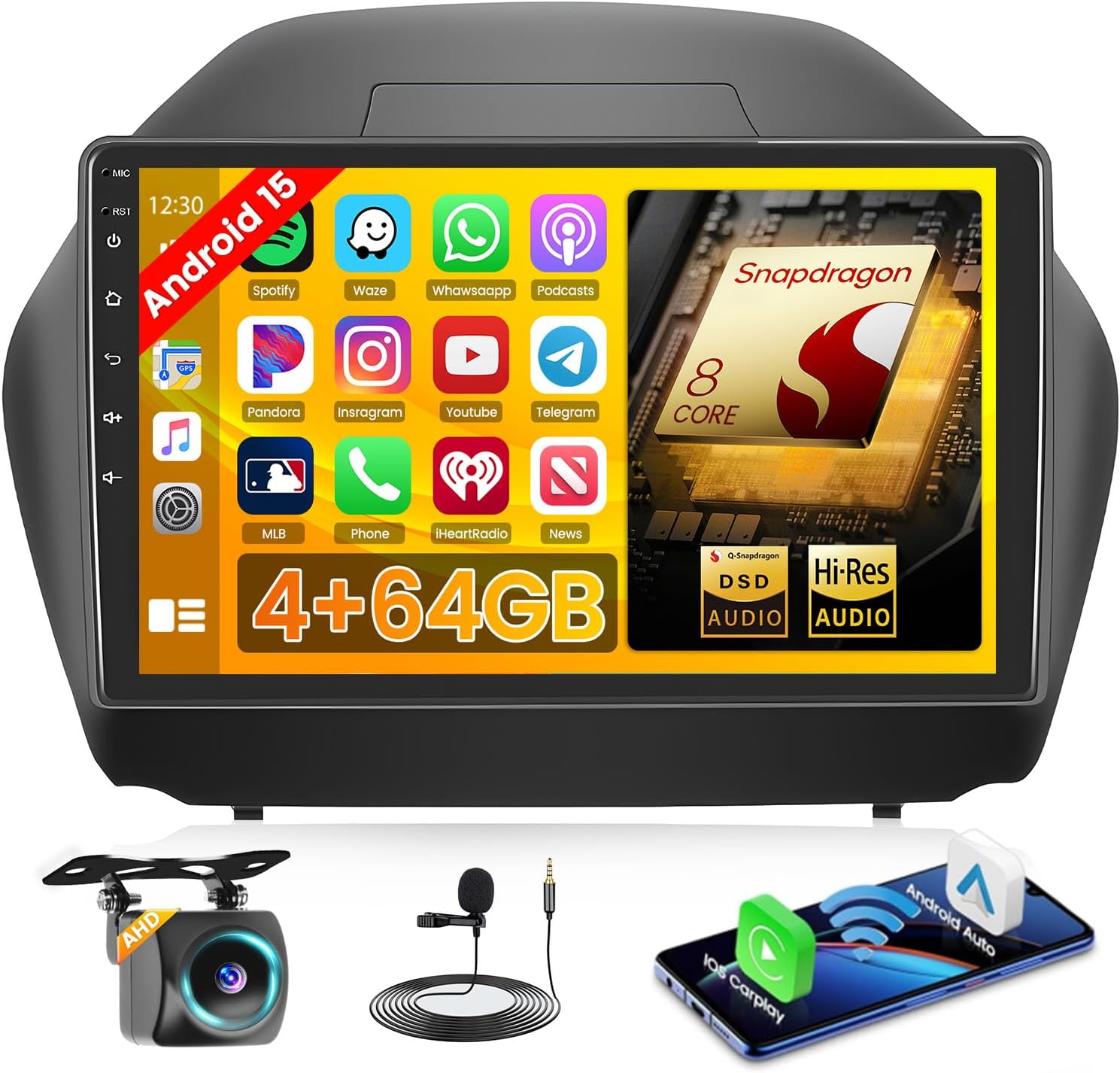
5. Hikity 10" Android 15 Car Stereo with Qualcomm Snapdragon for Hyundai Tucson IX35 (2010–2015)
| Operating System | Android |
|---|---|
| Screen Size | 10 Inches |
| Memory Storage Capacity | 64 GB |
| Connectivity Technology | Bluetooth, USB, FM, AUX, Wireless, WiFi |
| Additional Features | Carplay, Android Auto, DSP, Bluetooth5.1, GPS Navigation |
This Hikity in-dash replacement is a purpose-built 10-inch Android 15 stereo for the Hyundai Tucson IX35 (2010–2015) that replaces the factory unit with a modern touchscreen interface. It runs on a Qualcomm SM4250 Snapdragon-based 8-core processor with 4 GB RAM and 64 GB storage, which makes app switching, media playback and navigation responsive in everyday driving. Wireless CarPlay and Android Auto, mirror link and Bluetooth 5.1 cover smartphone integration for calls, music and turn-by-turn directions while DSP tuning and a built-in voice assistant help tailor audio and control options without distracting the driver. The unit includes GPS, FM RDS, multiple USB ports, a backup camera and steering-wheel control support for easier installation and use in the Tucson. Trade-offs to consider are that this is a full dash replacement so professional installation is recommended and some advanced vehicle features may require additional adapters or configuration to match factory behavior. For buyers who want a feature-rich, modern infotainment upgrade for their Tucson, this unit delivers a capable, well-rounded package.
Best for: Risk-averse mainstream buyers seeking a dependable, feature-rich infotainment upgrade for a Hyundai Tucson IX35 who prioritize proven smartphone integration and straightforward daily usability.
Less Ideal for: Drivers who want a plug-and-play retainment of every factory feature without any wiring changes or those who prefer a dealer-installed OEM replacement should consider alternatives.
- Qualcomm Snapdragon 8-core processor with 4 GB RAM and 64 GB storage for smooth performance
- Wireless CarPlay and Android Auto plus mirror link for seamless smartphone integration
- Built-in GPS navigation and support for worldwide map types
- DSP audio tuning and voice assistant for in-car control and sound customization
- Full dash replacement may require professional installation and possible wiring adapters
- Some factory features or controls might need extra configuration or modules to work exactly like the original unit
Verdict A capable, smartphone-focused Android head unit designed to modernize a Hyundai Tucson IX35 with strong performance and integrated navigation at the cost of a full dash swap.
6. Realdio 10.1" Android 15 Car Radio for Hyundai Tucson (2010–2015)

| Compatible with Vehicle Type | Hyundai Tucson 2010-2015 / ix35 2010-2015 |
|---|---|
| Screen Size | 10.1 Inches |
| Memory Storage Capacity | 128 GB |
| Operating System | Android 15 |
| Connectivity Technology | Wireless/Bluetooth/WiFi |
This Realdio 10.1-inch Android 15 head unit swaps into the Hyundai Tucson/ix35 center console to add modern smartphone integration, navigation and media playback. Installation typically replaces the factory radio and uses the included wiring, GPS antenna and mounting brackets; steering wheel control support and a microphone keep hands-free features functional. The unit offers wireless CarPlay and Android Auto, Bluetooth streaming, Wi-Fi for online services, offline GPS maps and a responsive in-cell capacitive touch screen. Audio formats and a multi-band EQ plus four 45W outputs give flexible sound tuning for upgrades. It ships with a backup AHD camera and dual USB ports for media and charging. Expect a feature-rich upgrade at a budget-friendly price, but plan for basic fitment work and occasional setup of map data or phone pairing. The software experience is Android-based and may differ from factory menus, and advanced installers may want to verify vehicle-specific connector adapters to preserve all steering wheel functions.
Best for: A practical optimizer who wants modern smartphone integration, navigation and backup camera functionality for a 2010–2015 Hyundai Tucson without paying dealer prices.
Less Ideal for: Buyers seeking a plug-and-play OEM-identical replacement with factory software behavior or those unwilling to perform minor wiring or setup work should consider dealer options or pro installation services.
- Wireless CarPlay and Android Auto for hands-free navigation and media without a cable
- Built-in GPS with offline map support plus Wi-Fi for updates and streaming
- Responsive 10.1-inch in-cell capacitive touchscreen with split-screen and picture-in-picture
- Includes AHD backup camera, GPS antenna, dual USB cables and installation hardware
- 4x45W outputs and multi-band EQ for improved sound control and aftermarket speaker tuning
- May require trimming, connector adapters or professional installation for perfect fit and retained functions
- Android-based UI and bundled apps can differ from factory menus and may need time to configure
Verdict A feature-packed, budget-friendly head unit that brings wireless CarPlay/Android Auto, navigation and a backup camera to 2010–2015 Hyundai Tucson owners willing to handle basic installation.
7. SIXTOP 10.1" Android Car Stereo with Qualcomm Processor for Hyundai Tucson IX35 (2010–2015)

| Compatible with Vehicle Type | For Hyundai Tucson IX35 2010-2015 |
|---|---|
| Screen Size | 10.1 Inches |
| Memory Storage Capacity | 64 GB |
| Operating System | Android |
| Resolution | 720 x 1280 |
This SIXTOP head unit replaces the factory radio in Hyundai Tucson IX35 (2010–2015) and turns the dash into a modern Android infotainment center. It runs a Qualcomm 8-core processor with 4GB RAM and 64GB storage so apps and navigation load quickly, and the 10.1-inch IPS touchscreen (1280×720) supports split-screen and picture-in-picture for simultaneous navigation and media. Built-in dual-band Wi‑Fi 6 and Bluetooth 5.1 keep phone connections stable, and wireless CarPlay and Android Auto let you access maps, calls and voice control without cables. The unit includes DSP audio processing, RCA preouts for aftermarket amplification and a 720P AHD backup camera for reversing. Real-world limitations include potential wiring or harness differences with upgraded factory systems, occasional software stability complaints in reviews, and the need for professional installation to retain steering-wheel controls and proper speaker connections. For a balanced upgrade this unit adds modern connectivity and sound tuning at a lower cost than dealer options, but expect some installation work and occasional software updates to keep it running smoothly.
Best for: Buyers who want a balanced, full-featured upgrade that modernizes connectivity and audio in a 2010–2015 Hyundai Tucson while avoiding premium dealer-priced units; ideal for owners who value a mix of usability, performance and value.
Less Ideal for: Drivers seeking a completely OEM-identical system with factory-supported software and warranty should consider dealer replacements or professionally integrated solutions instead.
- Direct fitment for Hyundai Tucson IX35 2010–2015 for a factory-style dashboard replacement
- Qualcomm 8-core CPU with 4GB RAM and 64GB storage for responsive app performance and navigation
- Wireless CarPlay and Android Auto plus dual-band Wi‑Fi 6 and Bluetooth 5.1 for modern phone integration
- DSP audio and RCA preouts enable improved sound tuning and easy connection to aftermarket amplifiers
- Includes a 720P AHD backup camera and supports steering wheel control retention when wired correctly
- Some users report occasional software stability issues requiring updates or vendor troubleshooting
- May not be plug-and-play on vehicles with upgraded factory screens or nonstandard harnesses, requiring adapter or professional wiring
- Camera and certain features may require changing factory settings to the correct resolution or mode
Verdict A value-oriented, feature-rich Android head unit that modernizes a 2010–2015 Hyundai Tucson with wireless CarPlay/Android Auto and strong audio features but may need professional installation and occasional software attention.
Choosing the Right Hyundai Tucson Car Stereo: Key Factors to Consider
Physical Fit and Dash Compatibility
Confirming physical fit prevents costly modifications. The Hyundai Tucson uses specific dash opening dimensions and mounting points, so pick a unit that matches single DIN or double DIN space as applicable. Mismatched units may require trim kits, extra brackets, or dash cutting, which increases labor and can reduce resale value.
Check depth and connector clearance too. Some head units have deep chassis or rear connectors that conflict with factory HVAC ducts, wiring bundles, or airbags. Measuring available depth and comparing it to the stereo’s chassis depth reduces surprises during installation.
Wiring and Harness Compatibility
A straightforward wiring process speeds installation and reduces the risk of electrical issues. Look for units compatible with standard vehicle harnesses or that work with readily available harness adapters for the Hyundai Tucson. Proper adapter use preserves factory steering-wheel controls, amplifier connections, and backup camera wiring where applicable.
Consider whether you need additional modules for retained features such as factory chimes, amplified speaker lines, or OEM microphone interfaces. Planning harness needs in advance avoids interim workarounds and preserves factory functionality.
Connectivity and Smartphone Integration
Modern connectivity affects daily usability and safety. Built-in Bluetooth for calls and audio streaming is now a baseline expectation, while Apple CarPlay and Android Auto provide hands-free navigation and messaging through the stereo interface. Decide which smartphone integrations you require and whether you prefer wired or wireless implementations.
Also consider additional connectivity like multiple USB ports, auxiliary inputs, and Bluetooth profiles. Units with reliable connection stability and clear voice-call handling will improve everyday usability and reduce driver distraction.
Audio Performance and Tuning Options
Sound quality depends on the stereo’s native output, equalization options, and preamp output levels. Units with flexible EQ, time alignment, and multi-band crossovers allow better tuning to the Tucson’s cabin acoustics and your speaker setup. Higher preamp voltages give more headroom and cleaner signal when using aftermarket amplifiers.
If you plan to upgrade speakers or add an amplifier and subwoofer, verify the head unit’s fixed and variable outputs, number of channels, and whether it supports external DSP or processor modules for advanced tuning.
User Interface and Control Layout
A clear, responsive interface improves safety and reduces frustration while driving. Consider screen size, touchscreen responsiveness, button placement, and steering-wheel control compatibility. Physical controls are useful for quick adjustments, while well-designed menus reduce time spent navigating screens.
If you frequently use navigation or streaming services, prioritize units with intuitive menu structures and quick-access controls for volume, source, and track skipping to minimize driver distraction.
Installation Complexity and Professional Support
Installation difficulty influences total cost and time to completion. Some units are straightforward plug-and-play with harness adapters, while others require advanced wiring, custom mounting, or antenna adapters. Assess your own skills honestly and factor in the need for tools, trim removal, and possible HVAC panel access.
Also consider the availability of installation guides, community support, and professional installers familiar with the Hyundai Tucson. Units with clear documentation and widespread installer familiarity reduce the chance of errors and post-install issues.
FAQ
Will a double DIN head unit fit in my Hyundai Tucson?
Many Hyundai Tucson model years accept double DIN head units, but fit depends on the specific dashboard trim and factory bezel. Check your vehicle’s dash opening dimensions and clearance depth before buying. If the opening does not match, a trim kit or professional dash modification may be required.
Do I need a special wiring harness to install an aftermarket stereo in a Tucson?
Using a vehicle-specific wiring harness adapter is often recommended. Harness adapters allow you to connect the aftermarket unit without cutting factory wires and can preserve features like steering-wheel controls and amplifier connections. Assess whether additional modules are needed to retain any factory systems.
Is wireless Apple CarPlay or Android Auto reliable in a car stereo?
Wireless implementations are convenient but can be sensitive to phone model and wireless interference. Wired connections are generally more stable for audio streaming and navigation. If you value seamless connectivity, consider whether the head unit supports both wired and wireless modes and test compatibility with your phone.
How can I improve sound quality after installing a new head unit?
Start by tuning the stereo’s EQ and using any available time alignment or crossover settings. Ensure speakers are in good condition and consider upgrading door speakers or adding sound-deadening material to reduce road noise. If more power is needed, add a compatible external amplifier and use the head unit’s preamp outputs for the cleanest signal.
Can I keep my factory backup camera and steering controls with an aftermarket head unit?
In many cases you can retain those features using the correct interface modules and wiring harness adapters. Confirm that the head unit supports rear camera input and that a compatible adapter exists for your Tucson’s steering-wheel control signals. Professional installers can verify compatibility and handle necessary integrations.
How We Chose the Best Hyundai Tucson Car Stereo
We focused on options that fit the Hyundai Tucson’s dashboard dimensions and wiring harness standards while delivering clear audio and dependable connectivity. Main evaluation criteria included audio fidelity and equalization flexibility, physical fit and mounting compatibility with the Tucson dash, connectivity features such as Bluetooth and smartphone integration, ease of installation and wiring, and user interface clarity including touchscreen responsiveness and control layout.We excluded products that required significant custom dash fabrication, rare wiring adapters, or lacked common installation brackets for the Tucson. We also filtered out units that did not offer basic safety features like clear voice-call handling and stable hands-free operation. The resulting shortlist prioritizes practical compatibility, reliable performance, and straightforward installation for typical owners looking to upgrade their Tucson’s factory stereo.
Our full evaluation process is outlined in our review methodology.
Conclusion
Prioritize fit, wiring compatibility, and the connectivity features you use most when choosing a Hyundai Tucson car stereo. Good audio performance matters, but it should be balanced with installation simplicity and the ability to retain factory features like steering controls and backup camera input.Weigh the tradeoffs between advanced touchscreen convenience and straightforward physical controls, and plan wiring and mounting needs before purchase. That approach reduces surprises during installation and ensures the final setup meets both your listening and driving needs.
Explore More:
- Check out all Hyundai Tucson parts & accessories
- Explore Electronics
- Browse all Accessories
