

Note: This article contains affiliate links. If you click on these links and make a purchase, I may earn a small commission at no extra cost to you. This helps support my research and content. Read my full affiliate disclosure here.
Upgrading to a touchscreen car stereo can transform how you use your Nissan Frontier every day. A modern head unit can simplify navigation, phone calls, media playback, and in-cab controls while improving audio clarity and user convenience. For many Frontier owners, the right touchscreen balances intuitive software, reliable connectivity, and a fit that does not require complex dash modifications.This guide covers the seven top shortlisted touchscreen car stereos for the Nissan Frontier and explains the practical reasons each option made the cut. We evaluate user-facing features like connectivity and sound, plus installation-related factors such as dash compatibility and wiring. Read on to find a touchscreen replacement that fits your driving habits and technical comfort level.
Looking for other parts? See all Nissan Frontier parts & accessories.
Top Picks at a Glance
| Best Overall Car Stereo Our top pick balancing features, fitment, and performance for Frontier owners | amzlegend QLED 10.1" Touchscreen Radio for Nissan Frontier/Xterra (2009–2012) |  |
| Best Budget Car Stereo A wallet-friendly touchscreen stereo that covers the essentials affordably | Leadfan 7" Double-Din Car Stereo with Backup Camera |  |
| Best 9‑Inch Car Stereo Large‑screen 9-inch head units for easier navigation and split-screen use | AUMUME 9" Linux Double-DIN Car Stereo for Nissan Frontier/Xterra 2009–2012 with Wireless CarPlay & Android Auto |  |
| Best 7‑Inch Car Stereo Compact 7-inch double‑din options that fit tight dash openings neatly | PHEZEN 7" Android 13 Touchscreen Car Stereo with CarPlay and Android Auto |  |
| Best High‑performance Car Stereo Octa‑ or multi‑core units with extra RAM and large internal storage | AMprime Android 15 9" 8-Core Car Stereo for Nissan Frontier Xterra with Wireless CarPlay & Android Auto |  |
| Best Plug‑and‑Play Upgrade Radios engineered for direct fit with factory harnesses and no splicing | amzlegend 7" QLED Touchscreen Radio for Nissan Frontier Xterra (2005–2008) |  |
| Best QLED / High‑visibility Display Premium screen tech (QLED/In‑cell) for brighter, higher‑contrast touchscreens | Kissound 10.1" QLED Double‑Din Car Stereo with Wireless CarPlay & Android Auto |  |
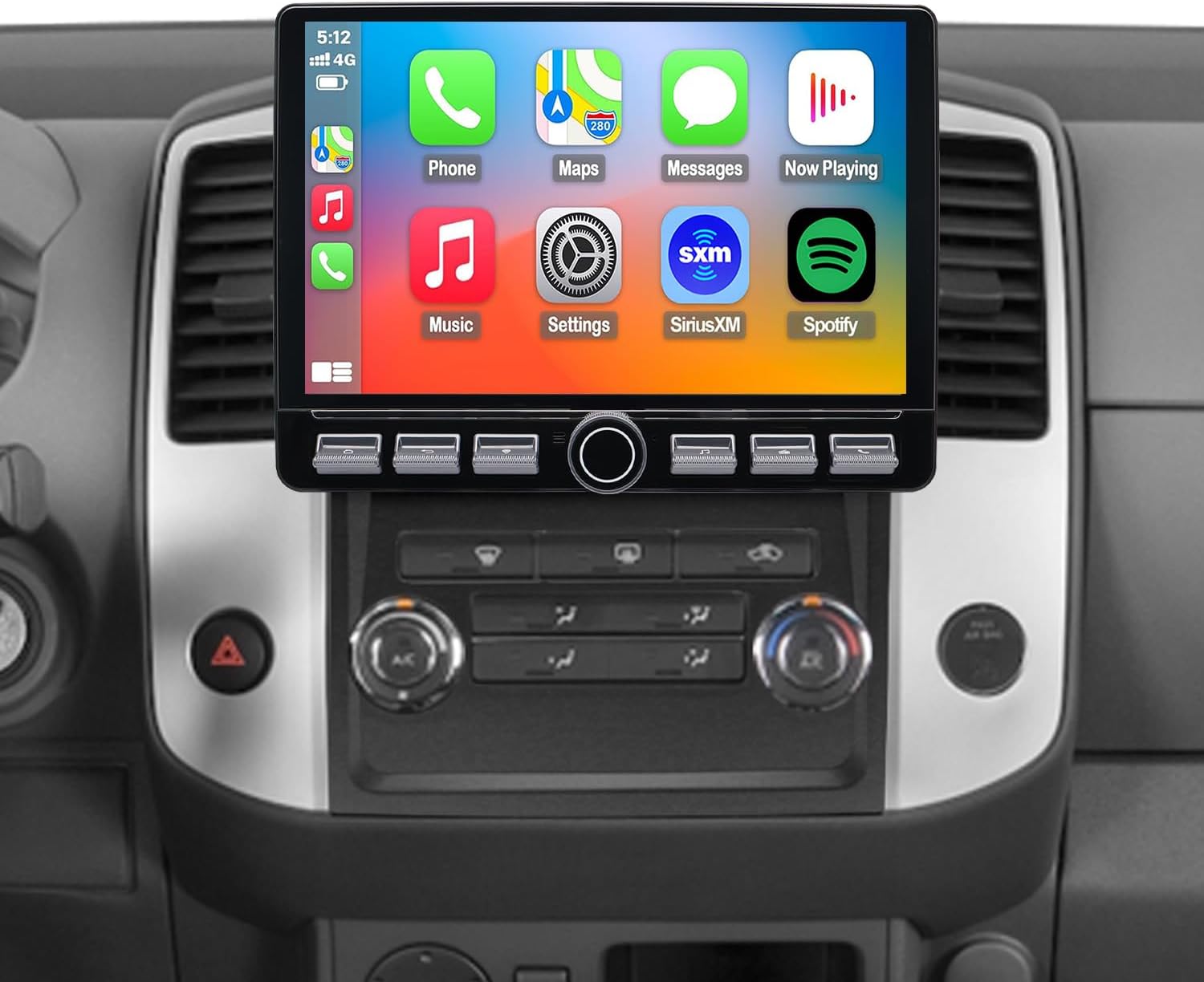
1. amzlegend QLED 10.1" Touchscreen Radio for Nissan Frontier/Xterra (2009–2012)
Best Overall Car Stereo
| Compatible with Vehicle Type | SUV |
|---|---|
| Screen Size | 10.1 inches |
| Operating System | Android |
| Memory Storage Capacity | 32 GB |
| Additional Features | Wireless Apple CarPlay, Wireless Android Auto, Built-In Wi-Fi |
This amzlegend QLED radio is a direct-fit replacement for 2009–2012 Nissan Frontier and Xterra dashboards, designed for DIY installers who want modern infotainment without dash modification. It installs using the included dash frame kit and plug-and-play wiring harness, so the factory look is preserved while adding a bright 10.1-inch QLED touchscreen, capacitive touch input and a responsive Android interface. Wireless Apple CarPlay and Android Auto let you use maps, music and calls without plugging in, and built-in Wi-Fi, Bluetooth and optional 4G LTE keep streaming and navigation responsive on the go. The unit includes a 32 GB storage option, GPS module, FM antenna and steering wheel control compatibility for a complete system upgrade. Expect much better display clarity and snappier multitasking thanks to the octa-core processor, though advanced audio tuning tools are limited compared with high-end aftermarket head units. For most Frontier owners this gives a roomy touchscreen, modern connectivity and straightforward installation in one package.
Best for: DIY owners of 2009–2012 Nissan Frontier or Xterra who prioritize a clean factory-style install, large touchscreen usability, and modern smartphone connectivity.
Less Ideal for: Audiophiles seeking studio-level tuning or users who want the most advanced sound customization and external DSP features.
- Made for 2009–2012 Frontier/Xterra with plug-and-play harness for easy DIY installation
- Large 10.1-inch QLED capacitive touchscreen provides brighter, sharper visuals than standard LCDs
- Wireless Apple CarPlay and Android Auto for cable-free smartphone integration
- Built-in Wi‑Fi, Bluetooth and optional 4G LTE for reliable streaming and navigation
- Includes GPS module, dash kit, antenna and steering wheel control compatibility for a complete upgrade
- Limited advanced audio tuning compared with premium aftermarket stereos
Verdict: This is the one-car-stereo we recommend first for most DIY installers because it combines reliable fit, responsive touchscreen, smartphone integration, and stable audio performance.
2. Leadfan 7" Double-Din Car Stereo with Backup Camera
Best Budget Car Stereo

| Screen resolution | 1024×600 HD |
|---|---|
| Connectivity | Bluetooth 5.0, USB, AUX, TF card |
| Audio outputs | 4-channel, RCA preouts |
| Power output | 45 Watts |
This Leadfan 7-inch double-din unit is a budget-friendly replacement head unit that combines a capacitive touchscreen, Bluetooth 5.0 hands-free calling, phone mirror-link, FM radio, and a wired backup camera. Typical installation replaces the factory radio in vehicles with a standard double-din opening; the unit supports steering wheel controls (requires an additional interface) and provides RCA preouts for adding an amp or subwoofer. In daily use the touchscreen and separate volume knob make basic audio and navigation mirroring straightforward, and Bluetooth playback plus USB/TF/AUX inputs cover common media sources. The included night-vision rear camera automatically displays when the vehicle is shifted into reverse, which is handy for parking in a Nissan Frontier. Limitations include a basic user interface and mirror-link that requires a wired connection and has phone/OS compatibility limits; this is not a wireless CarPlay/Android Auto solution and advanced apps run from the phone rather than the head unit. Expect modest audio processing compared with higher-end stereos but solid core features for the price.
Best for: Buyers who want the cheapest practical touchscreen upgrade for their Nissan Frontier that adds hands-free Bluetooth, phone mirroring, and a backup camera without paying for wireless CarPlay/Android Auto.
Less Ideal for: Do not pick this if you need wireless CarPlay or Android Auto, a polished UI, or audiophile-level sound processing; consider higher-end head units for those needs.
- Affordable way to add a 7" touchscreen and backup camera to a double-din dash
- Bluetooth 5.0 for hands-free calling and wireless audio streaming
- Multiple inputs (USB, TF card, AUX, RCA preouts) for flexible media and amp/sub expansion
- Automatic reverse-camera activation with night-vision improves parking visibility
- Mirror-link requires a wired connection and has phone/version compatibility limits
- Interface and processing are basic compared with factory-quality or premium aftermarket stereos
Verdict: Choose this unit if you want basic wireless CarPlay/Android Auto, Bluetooth, and a usable touchscreen at the lowest price without unnecessary extras.
3. AUMUME 9" Linux Double-DIN Car Stereo for Nissan Frontier/Xterra 2009–2012 with Wireless CarPlay & Android Auto
Best 9‑Inch Car Stereo

| Compatible with Vehicle Type | Car |
|---|---|
| Screen Size | 9 inches |
| Operating System | Linux |
| Display Type | IPS |
| Touch Screen Type | Capacitive |
This 9-inch AUMUME double-DIN stereo replaces the factory radio in Nissan Frontier and Xterra models from 2009 to 2012 and brings a much larger, clearer touchscreen for navigation and media. The capacitive IPS display (1280×724) improves viewing angles and touch responsiveness for maps and on-screen controls, and the unit supports wireless and wired CarPlay and Android Auto for familiar phone-based navigation and voice control. It includes Bluetooth hands-free calling, FM radio with station presets, and a 720p backup camera in the box, plus dual USB interfaces for charging and media. Installation is advertised as plug-and-play using a special connector so the dash can be upgraded without cutting wires, and the unit supports steering wheel control signals. Limitations to note are its Linux-based firmware, which may behave differently than factory or aftermarket systems and could lack some advanced apps or updates, and the compatibility warning that it will not work with vehicles that already use a factory camera. For drivers who want a larger screen for easier touch targets and split-screen use, this unit delivers the core features needed for everyday navigation and media in the Frontier/Xterra dash.
Best for: Buyers who prioritize a larger, easier-to-read touchscreen for clearer navigation and simpler multitasking and who want built-in CarPlay/Android Auto and a packaged backup camera for a 2009–2012 Nissan Frontier or Xterra.
Less Ideal for: Drivers who need continuous manufacturer-style software updates, a broad built-in app store, or those whose vehicle already uses a factory camera should consider other options.
- Large 9-inch IPS capacitive touchscreen improves visibility and touch accuracy for maps and menus
- Supports wireless and wired CarPlay and Android Auto for phone navigation and voice control
- Includes a 720p backup camera and necessary wiring in the package
- Bluetooth hands-free calling and dual USB ports for media playback and charging
- Plug-and-play connector and steering wheel control support for easier installation
- Linux-based system may have limited app ecosystem and receive fewer firmware updates than mainstream platforms
- Not compatible if the vehicle originally had a factory-installed camera
Verdict: Pick this 9-inch model when you want a bigger display for clearer maps, easier touch targets, and comfortable split‑screen multitasking while you drive.
4. PHEZEN 7" Android 13 Touchscreen Car Stereo with CarPlay and Android Auto
Best 7‑Inch Car Stereo

| Compatible with Vehicle Type | Truck |
|---|---|
| Screen Size | 7 inches |
| Additional Features | Android Auto, Apple CarPlay, Built-In Bluetooth |
| Memory Storage Capacity | 32 GB |
| Supported Satellite Navigation System | GPS |
This PHEZEN 7-inch head unit is a compact Android 13 car stereo made to replace the factory radio in Nissan Frontier models and keep a small dash footprint. It delivers wireless and wired CarPlay and Android Auto, mirror link support, Bluetooth hands-free calling, and an IPS capacitive touchscreen with wide viewing angles. Typical use cases are daily driving and weekend trips where you want smartphone navigation, streaming audio, and hands-free control without a large double-din display. The unit includes GPS navigation support, split-screen multitasking, steering wheel control learning, FM/RDS radio, and a backup camera input that automatically shows reverse view. Practical benefits are modern smartphone integration, built-in storage for apps and media, and clear on-screen navigation cues in bright light. Important limitations are modest 2GB RAM which may limit heavy multitasking and the note that installation requires dash modification, so professional fitting or DIY experience is recommended.
Best for: Buyers who need a compact, dash-friendly upgrade for a Nissan Frontier and prioritize smartphone integration, navigation, and a factory-style fit without a larger double-din display.
Less Ideal for: Drivers who want high-performance multitasking, audiophile-level sound processing, or a plug-and-play installation experience without any dash modification.
- Wireless and wired CarPlay and Android Auto for smartphone mirroring and voice control
- 7-inch capacitive IPS touchscreen with 178° viewing angle for clear visibility
- Built-in GPS and Wi-Fi support for online and offline navigation
- Supports steering wheel control learning and automatic backup camera display when reversing
- 32 GB onboard storage plus Bluetooth hands-free calling and FM/RDS radio
- 2 GB RAM may feel limited for heavy app multitasking or long-term responsiveness
Verdict: Opt for a 7‑inch head unit if you need a smaller footprint that fits common double‑DIN spaces or preserves more dash trim while still offering CarPlay/Android Auto.
5. AMprime Android 15 9" 8-Core Car Stereo for Nissan Frontier Xterra with Wireless CarPlay & Android Auto
Best High‑performance Car Stereo

| Screen Size | 9 inches |
|---|---|
| Operating System | Android 15 |
| Memory Storage Capacity | 64 GB |
| Human-Interface Input | Touchscreen |
| Connectivity Technology | Wi-Fi |
This AMprime 9-inch Android 15 head unit replaces the factory radio in Nissan Frontier and Xterra models from 2009–2012 and aims at performance-minded users. It runs an 8-core processor with 4GB RAM and 64GB storage, so menus, navigation and streaming apps feel responsive and you can keep offline maps and media on the unit. Wireless CarPlay and Android Auto plus mirror link let you project phone apps without a wired connection, while built-in Wi‑Fi and GPS support online navigation and map updates. Audio features include a DSP equalizer with multi-band tuning and Bluetooth 5.1 for more reliable wireless audio and calls. Practical extras include steering wheel control support, an included AHD reverse camera with wide-angle night vision, customizable UI themes and a cooling fan to maintain performance under load. Downsides are that touchscreen size and fitment are fixed to the specified Nissan dash applications and advanced features will require careful installation and occasional app management to avoid background resource use.
Best for: Drivers who prioritize a fast, app-capable head unit for streaming, navigation and media storage and want a responsive touchscreen upgrade tailored to the Nissan Frontier/Xterra dash.
Less Ideal for: Buyers who prefer a simple plug-and-play radio with minimal setup or those needing a universal fit solution for multiple vehicle models.
- 8-core Android 15 platform with 4GB RAM and 64GB storage for snappy menus and room for offline maps
- Wireless CarPlay and Android Auto plus mirror link for phone integration without a cable
- Built-in WiFi and GPS support online navigation and map downloads
- DSP 36-band equalizer and Bluetooth 5.1 improve sound tuning and stable wireless audio
- Includes AHD rear camera with wide 170° view and steering wheel control support
- Designed specifically for Nissan Frontier/Xterra 2009–2012 so fitment is not universal
- Advanced features and apps may require hands-on setup and occasional maintenance to avoid background slowdowns
Verdict: Select this high‑performance stereo when you run heavy apps, stream over Wi‑Fi, or want snappy menus and room for offline maps and media thanks to faster CPUs and larger RAM/ROM.
6. amzlegend 7" QLED Touchscreen Radio for Nissan Frontier Xterra (2005–2008)
Best Plug‑and‑Play Upgrade

| Compatible with Vehicle Type | Truck |
|---|---|
| Screen Size | 7 inches |
| Operating System | Android |
| Memory Storage Capacity | 32 GB |
| Touch Screen Type | Capacitive |
This amzlegend head unit swaps into Nissan Frontier and Xterra dashboards from 2005 to 2008 using the factory mounting and wiring harness for a near-instant install. The 7-inch QLED capacitive touchscreen runs Android on an octa-core processor, so navigation, streaming and app switching feel responsive. Wireless Apple CarPlay and Android Auto let you pair phones without a cable while built-in Wi-Fi and Bluetooth handle streaming, hands-free calls and map updates. The kit includes a dash frame, plug-and-play harness, GPS module and basic install tools to simplify fitting. In daily use the bright QLED display improves visibility for maps and media, and stereo outputs plus RCA make expanding audio straightforward. Expect easier installation and preserved vehicle wiring compared with universal stereos, though some advanced steering wheel or vehicle-specific functions may need an additional adapter and full integration can depend on the vehicle trim. Support and a one-year warranty provide added peace of mind for installers.
Best for: Buyers who prioritize an easy, factory-preserving stereo swap into a 2005–2008 Nissan Frontier or Xterra and want modern phone integration without complicated wiring.
Less Ideal for: Drivers who need full factory-level integration of every vehicle-specific control or those who prefer a custom audio build requiring separate amplifiers and processors.
- True plug-and-play design that uses factory dashboard kit and wiring harness for simplified installation
- Wireless Apple CarPlay and Android Auto for cable-free phone integration
- QLED capacitive 7-inch display for brighter, clearer navigation and media visuals
- Octa-core Android processor and built-in Wi-Fi for smooth multitasking and quick map updates
- Some steering wheel controls or vehicle-specific features may require an extra adapter for full compatibility
Verdict: Buy this plug‑and‑play unit if you want a straightforward install that uses factory connectors and mounting brackets to preserve the vehicle wiring and simplify installation.
7. Kissound 10.1" QLED Double‑Din Car Stereo with Wireless CarPlay & Android Auto
Best QLED / High‑visibility Display
| Screen size | 10.1-inch QLED |
|---|---|
| Resolution | 1280×800 |
| CarPlay/Android Auto | Wireless & wired |
| Audio outputs | 4 RCA outputs + 2 subwoofer outputs |
| Power | 4×60W peak |
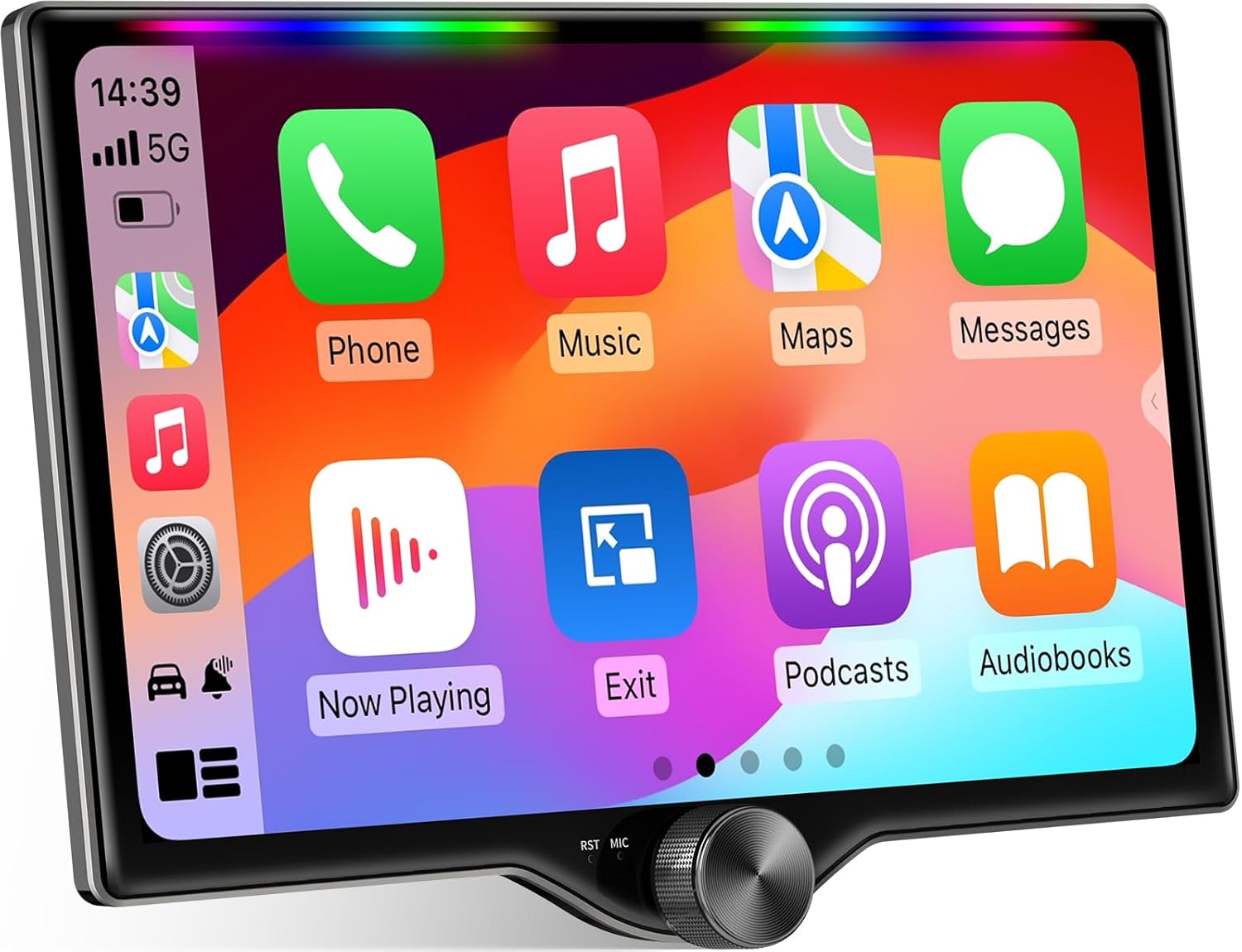
This Kissound 10.1" QLED double‑din head unit is built around a high‑visibility 1280×800 touchscreen meant to keep navigation and media readable in bright cabins. It connects wirelessly or by USB to CarPlay and Android Auto for maps, voice control, and streaming, and includes an external microphone and steering‑wheel control support to keep interactions hands free. The unit adds audio flexibility with a built‑in DSP, 10‑band EQ, 4×60W peak outputs and dual subwoofer outputs for fuller bass when paired with aftermarket speakers or an amp. Practical install items in the box include a backup AHD camera, two USB leads, mounting brackets and an ISO harness but many Frontier dashboards will still need a vehicle‑specific dash kit, wiring harness adapter and possibly a steering interface to integrate factory controls. The rhythmic LED light bar and big volume knob are nice touches, though advanced setup and tuning will benefit from professional installation to avoid wiring or fitting issues in a Nissan Frontier dash.
Best for: Drivers who want a high‑visibility touchscreen that keeps maps and media sharp in sunlight and who plan to upgrade audio and navigation functionality in their Nissan Frontier.
Less Ideal for: People seeking a direct plug‑and‑play replacement without any dash kit, wiring adapter, or professional installation assistance should consider a model tailored specifically to the Frontier for simpler fitment.
- Bright 10.1‑inch QLED touchscreen with 1280×800 resolution for improved daytime visibility
- Wireless and wired CarPlay and Android Auto with voice assistant support for safer navigation and hands‑free use
- Built‑in DSP and 10‑band EQ plus dual subwoofer outputs for flexible sound tuning and stronger bass
- Includes AHD backup camera and dual USB ports for common integration needs
- Physical volume knob and steering wheel control support for intuitive in‑car operation
- Universal double‑din fit may require a Nissan Frontier dash kit and wiring adapters not included
Verdict: Choose this model if you prioritize a bright, high‑contrast display that stays readable in sunlight and gives sharper navigation and media visuals.
Choosing the Right Nissan Frontier Touchscreen Car Stereo: Key Factors to Consider
Fitment and Dash Compatibility
Confirm whether your Frontier requires a single DIN or double DIN head unit and whether any trim adapters are necessary. A correct fit reduces installation time and avoids cutting or modifying the dash, which can compromise vehicle resale and structural integrity.
Also check mounting depth and clearance behind the dash for ventilation and wiring. Some accessories and brackets that come with a head unit will not match the Frontier's factory mounting points, so plan for trim bezel kits or pocket inserts if swapping sizes. Steering wheel control adapters and OEM climate control interfaces may also be required to preserve functionality.
Connectivity Options
Modern touchscreen car stereos vary in how they connect to phones and audio sources. Prioritize units with dependable Bluetooth for hands-free calling and audio streaming, and consider Apple CarPlay or Android Auto support if you rely on phone navigation or voice assistants.
Also look for multiple USB inputs for charging and media playback, a reliable AM/FM tuner, and auxiliary inputs for older devices. If you plan to add external amplifiers or subwoofers, ensure the unit offers preamp outputs and adequate signal-to-noise ratios for cleaner sound.
Screen Quality and Usability
A responsive touchscreen with good brightness and contrast matters for safe operation while driving. Higher resolution screens improve map readability and album art clarity, while anti-glare coatings can reduce reflections during daytime use.
Consider screen size relative to your dash and how intuitive the user interface is. Physical buttons or a rotary control can help with quick adjustments without relying solely on the touchscreen, which is useful when driving on uneven roads.
Audio Performance and Tuning
Even a compact Frontier cabin can reveal differences in audio quality. Look for units with adjustable EQ, time alignment, and built-in crossovers if you want to tailor sound to the vehicle. Preamp voltage levels affect how well the head unit drives aftermarket amplifiers; higher and cleaner preamp outputs usually mean less noise and more headroom.
If you plan to upgrade speakers or add an amplifier, confirm the head unit supports multiple RCA outputs and has sufficient channels. Sound tuning features can compensate for the Frontier's interior reflections and speaker placement limitations.
Installation Complexity and Wiring
Consider how comfortable you are with vehicle wiring and whether professional installation is needed. Some touchscreen units are near plug-and-play when used with a compatible wiring harness and dash kit, while others require splicing or extra modules to retain factory features like backup camera or steering wheel controls.
Evaluate the need for additional accessories such as CAN bus adapters, microphone extension leads, and backup camera interfaces. A cleaner install that preserves factory connectors will save time and reduce the risk of electrical issues.
Software Updates and Long-Term Support
A touchscreen head unit is often a long-term investment, so consider the manufacturer's track record for firmware updates and bug fixes. Units with ongoing support can receive feature improvements, stability patches, and expanded compatibility with newer phones.
Accessible update methods, such as USB or Wi-Fi updates, make it easier to apply fixes. Lack of updates can leave you with connectivity quirks over time, especially as mobile operating systems evolve.
Single DIN Vs Double DIN Considerations
The Nissan Frontier dash can accept either a single DIN or a double DIN head unit depending on trim and year. Single DIN stereos are more compact and often pair with a separate pocket or climate control stack, while double DIN units offer larger touch displays and integrated controls. Choose the form factor that preserves dash aesthetics and leaves room for any OEM controls you want to retain.
If you choose a different footprint from your factory radio, plan for a dash kit and check ventilation and mounting depth behind the dash. A snug installation reduces vibration and avoids rattle, which improves perceived audio quality.
- Single DIN: smaller footprint, may require pocket insert
- Double DIN: larger display, more integrated features
- Check mounting depth and trim kit requirements
Retaining Steering Wheel Controls and Camera
If your Frontier has steering wheel audio controls or a backup camera, confirm that the replacement touchscreen supports integration. Many aftermarket head units work with adapters that translate factory control signals and maintain camera feed functionality.
Failing to retain these features can reduce convenience and resale value. Plan for appropriate adapters and ensure the head unit has the necessary input for a reverse camera to keep the original camera functional.
- Verify compatibility with steering wheel control adapters
- Ensure the head unit has a rear-camera input
- Plan for microphone and USB routing for clean installation
Phone Integration: CarPlay and Android Auto
Apple CarPlay and Android Auto offer safer access to navigation, messages, and audio via the head unit interface. If you rely on phone navigation or voice control, prioritize a unit with wired or wireless support for these platforms to reduce distraction and keep your dashboard unified.
When choosing a unit, check whether CarPlay or Android Auto operates over USB or wireless and whether both options are supported. Wireless connections add convenience but can be more sensitive to phone charging behavior.
- Wired CarPlay/Android Auto: more stable connection
- Wireless: convenient but may drain phone battery
- Confirm microphone placement for reliable voice commands
Power and Amplification Planning
Think about whether the head unit will be used with factory speakers or as part of a larger system with external amplifiers. If you plan to add amplification, check for multiple RCA preouts and a decent preamp voltage. This reduces the need for signal boosters and maintains better dynamic range.
Also consider the head unit's built-in amplifier strengths and whether it supports speaker-level inputs for systems that retain factory speaker wiring. Proper gain staging during installation prevents distortion and protects speakers.
- Look for multiple preamp outputs for multi-amp setups
- Verify preamp voltage for cleaner signal to amplifiers
- Use proper gain structure to avoid distortion
User Interface and In-Car Safety
A well-designed user interface reduces the time your eyes are off the road. Large, clearly labeled icons and simple menus help with quick operation. Some units also offer physical volume knobs and shortcut buttons that are safer to use while driving.
Test responsiveness and menu depth: too many nested menus force longer glances at the screen. Adjustable brightness, automatic day/night modes, and steering wheel control compatibility also contribute to safer use.
- Prefer large icons and minimal menu layers
- Physical controls help with quick adjustments
- Automatic brightness and day/night modes improve visibility
Still looking for the perfect fit?
Select your Nissan Frontier configuration to see the most relevant Car Stereos recommendations
How We Chose the Best Nissan Frontier Touchscreen Car Stereo
We focused on durability, connectivity, ease of installation, sound performance, and user interface when selecting touchscreen car stereos for the Nissan Frontier. Durability criteria included build quality and temperature tolerance for vehicles used in varied climates. For connectivity we prioritized reliable Bluetooth pairing, support for Apple CarPlay and Android Auto when available, and stable USB or auxiliary inputs for legacy devices.Installation factors looked at dash fitment, wiring harness compatibility, steering wheel control integration, and whether a single DIN or double DIN footprint is required. Audio performance assessment considered preamp outputs, EQ flexibility, and amplifier compatibility for owners planning further upgrades. Additional practical filters included screen responsiveness, physical button layout for driving safety, and firmware update paths.We excluded units that require extensive custom fabrication or modify structural dash elements. Products lacking common connectivity options or with persistent user interface complaints were also removed. The final list favors units that balance in-car ergonomics, reliable connectivity, and installation paths suited to the Frontier.
Our full evaluation process is outlined in our review methodology.
FAQ
Will a touchscreen head unit fit my Nissan Frontier without cutting the dash?
It depends on the unit size and your Frontier's trim. Many owners can install a properly sized double DIN or single DIN with a dash kit and standard mounting brackets. Confirm mounting depth and trim compatibility before purchase.
Can I keep my factory backup camera when I install a new touchscreen stereo?
Usually yes. Most aftermarket touchscreen units include a rear-camera input and adapters exist to preserve the factory camera feed. Ensure the replacement unit supports a camera input and check whether any adapter is needed for the Frontier.
Do touchscreen stereos support Apple CarPlay and Android Auto wirelessly?
Some units support wireless CarPlay and Android Auto, while others require a USB connection. Wireless setups are convenient but can be less stable and may affect phone battery life, so wired connections remain a reliable choice.
How hard is it to install a touchscreen stereo if I want to keep factory steering wheel controls?
Retaining steering wheel controls typically requires an additional adapter that translates factory signals. Installation difficulty ranges from straightforward plug-and-play to more involved wiring, depending on the adapter and head unit chosen.
Will a new touchscreen improve my Frontier's sound without new speakers?
A higher-quality head unit can improve clarity, provide better EQ controls, and offer cleaner preamp outputs, which may noticeably enhance sound even with factory speakers. However, speaker upgrades will yield the most dramatic audio improvements.
What should I do about wired connections like USB routing and microphone placement?
Plan routing so cables are secured behind the dash and away from moving parts. Mount the microphone in a location that captures voice clearly without wind noise, typically near the overhead console or A-pillar trim, and test voice command reliability before final reassembly.
Final Verdict
When upgrading the Nissan Frontier with a touchscreen car stereo, prioritize fitment and connectivity first, then audio capabilities and installation simplicity. Decide whether you need a single DIN or double DIN footprint, confirm support for steering wheel controls and backup camera inputs, and choose a unit with the connectivity features you use most often.Tradeoffs are inevitable: larger screens and integrated phone platforms improve convenience but can increase installation complexity. Focus on a unit that balances intuitive controls, reliable phone integration, and the wiring compatibility that matches your comfort level. That approach will give you a practical, long-lasting head unit upgrade for your Frontier.
Explore More:
- Check out all Nissan Frontier parts & accessories
- Explore Electronics
- Browse all Accessories
