

Note: This article contains affiliate links. If you click on these links and make a purchase, I may earn a small commission at no extra cost to you. This helps support my research and content. Read my full affiliate disclosure here.
If you drive a 2012-2016 Honda CR-V you need a phone mount that fits the dash layout, keeps the screen visible, and stays secure over bumps. The wrong mount can block vents, interfere with controls, or fail under normal road vibration. This guide reviews a short list of well-suited phone mounts for the 2012-2016 CR-V and explains the differences in mounting style, reach, and stability.Each option here was shortlisted for practical fit in the CR-V, ease of installation, and in-vehicle usability. We evaluated stability, mounting location, and compatibility with typical smartphone sizes to help you pick the style that matches how you use your phone while driving.
Looking for other parts? See all Honda CR-V parts & accessories.
Top Picks at a Glance
| Best Overall Phone Mount The best all-around mount balancing grip, placement, and ease | YEGZA Car Phone Holder for Honda CR-V 2012–2016 |  |
| Best Budget Phone Mount A low-cost mount that performs reliably without extra features | JDHDL 7th Generation Rear View Mirror Phone Holder |  |
| Best Premium Phone Mount A higher-end mount with superior materials, polish, and extras | Course Motorsports DirectFit Automatic Gripping Wireless Charging Phone Mount for Honda CR-V (2012-2016) |  |
| Best Magnetic Phone Mount A magnet-based mount offering quick one-handed attachment and removal | JIEZMO Magnetic Dashboard Phone Mount for Honda CR-V (2012–2016) |  |
| Best Wireless Charging Phone Mount A mount that also provides Qi wireless charging while mounted | FFIHTY 15W Magnetic Wireless Charging Vent Mount for Honda CR-V 2012–2016 |  |
| Best Compact Phone Mount A small, unobtrusive mount that preserves dash and sightlines | FALVFUN Car Phone Holder with Suction and Vent Mount |  |
| Best Heavy-Duty Phone Mount A rugged, extra-stable mount built for vibration and long trips | YGDMD Magnetic Car Phone Holder with Vacuum Suction Cup, 360° Rotation |  |
1. YEGZA Car Phone Holder for Honda CR-V 2012–2016
Best Overall Phone Mount

| Compatible vehicles | Honda CR-V 2012-2016 |
|---|---|
| Mounting type | Dashboard |
| Compatible device size | 4 to 7 inches |
| Case clearance | Up to 12 mm |
This YEGZA mount is a vehicle-specific dashboard cradle made to sit in an optimized location for Honda CR-V models from 2012 through 2016. It installs without tools using a special car base and adhesive designed not to damage the interior, then locks the phone in place with a Lock & Release mechanical design. The holder supports phones roughly 4 to 7 inches and accommodates devices in thick cases up to about 12 mm while leaving a cutout for charging. A 360 degree ball joint makes it easy to switch between landscape and portrait with one-hand operation, and the metal and PVC construction feels stable in everyday driving. Because the product is tailored to the CR-V dash, it offers a cleaner, lower-profile look than generic suction or vent mounts and keeps the screen in the driver’s sightline. Limitations are that it is not universal and will not fit other vehicles or non-matching dash shapes, and the fixed base means repositioning requires removing and reinstalling the unit.
Best for: Drivers of 2012–2016 Honda CR-Vs who prioritize a secure, vehicle-integrated mount with easy one-handed adjustment and steady viewing placement while driving.
Less Ideal for: People who need a universal mount that moves between multiple vehicles or who want a vent-clip or suction-cup solution for varied dashboards.
- Custom-fit design for Honda CR-V 2012–2016 provides a clean, integrated placement
- Lock & Release mechanical structure secures phone quickly and allows one-hand operation
- 360° ball-joint rotation supports both portrait and landscape viewing
- Holds phones with thicker cases and reserves space for charging access
- Metal and PVC build offers a stable mount with scratch-resistant surfaces
- Designed for a specific dash shape so it will not fit other vehicle models
Verdict: The best all-around phone mount for drivers who want secure, easy-to-adjust placement, reliable grip, and straightforward installation.
2. JDHDL 7th Generation Rear View Mirror Phone Holder
Best Budget Phone Mount

| Compatible Phone Models | All Smartphones between 4-7 inches |
|---|---|
| Mounting Type | Rear View Mirror |
| Additional Features | Adjustable |
| Weight Capacity Maximum | 15 Pounds |
This JDHDL rear view mirror phone holder attaches over the mirror and positions your phone close to eye level for navigation and hands-free use in the car. Installation is tool-free and the adjustable clamp, telescoping arm and 180-degree rotation let you fine-tune position and angle for different drivers and routes. The four-slider clamp and upgraded fixed slider aim to keep the mount stable on bumpy roads, and the one-touch retractable dock makes single-handed phone removal quick while driving. It is case-friendly and supports a wide range of phones between 4 and 7 inches. Limitations to expect include mirror compatibility—the clamp fits most mirrors within a specific height and thickness range, so vehicles with nonstandard mirror shapes or camera-equipped mirrors may not work, and a few users report the clamp loosening after months of use. For a low-cost option that keeps navigation at eye level without dashboard drilling, this mount is a straightforward pick.
Best for: Drivers who want an inexpensive, no-tools phone mount that keeps navigation close to eye level and installs quickly for regular in-car navigation or delivery work.
Less Ideal for: Anyone whose CR-V has a camera-equipped or unusually shaped rearview mirror or who needs a permanently rigid mount for heavy daily use should consider a dash or vent alternative instead.
- Positions phone at eye level for easier navigation and hands-free use
- Tool-free over-the-mirror installation that most users complete quickly
- Adjustable telescoping arm and 360-degree rotation for flexible viewing angles
- 4-slider clamp design intended to increase stability on bumpy roads
- Requires a compatible rearview mirror shape and size so it may not fit mirrors with integrated cameras or unusual profiles
- Some users report loosening or reduced stability after several months of heavy use
Verdict: The best budget phone mount for shoppers who need a simple, dependable hold and straightforward installation at the lowest reasonable price.
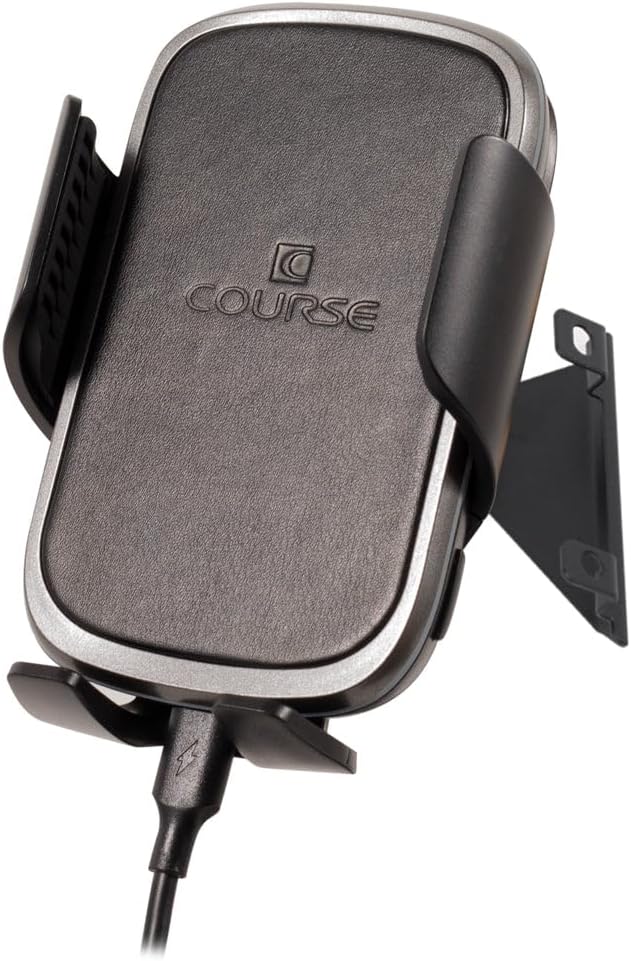
3. Course Motorsports DirectFit Automatic Gripping Wireless Charging Phone Mount for Honda CR-V (2012-2016)
Best Premium Phone Mount
| Compatible Devices | Samsung, Motorola, IPhone |
|---|---|
| Mounting Type | Dashboard |
| Enclosure Material | Magnetic |
| Unit Count | 1.0 Count |
This DirectFit phone mount from Course Motorsports is a vehicle-specific dashboard cradle engineered to integrate cleanly into a 2012–2016 Honda CR-V. It replaces or mounts with factory-style hardware for a near-factory look and installs in minutes without drilling. The mount uses precision CNC-machined components and a magnetic enclosure with an available automatic gripping wireless charger option that will hold modern Motorola, Samsung, and iPhone devices while charging them wirelessly. In daily use it positions the phone within easy view, making navigation and hands-free calls more convenient and safer. Build quality leans premium thanks to powdercoated brackets and an anodized pivot ball that resist vibration and wear. The main compromises are that it is vehicle-specific so it will only fit the stated CR-V years and the listing emphasizes magnetic mounting which may require a thin metal plate or MagSafe-compatible phone accessory for best performance. For buyers who prioritize a refined, durable, and integrated look with the convenience of automatic gripping and wireless charging, this mount delivers.
Best for: Buyers who want a high-end, vehicle-integrated phone mount for a 2012–2016 Honda CR-V and value refined fit, durable materials, and the convenience of automatic gripping and wireless charging.
Less Ideal for: People who need a universal mount for multiple vehicles or those who prefer a removable suction or vent solution that can be moved between cars.
- Vehicle-specific design installs using factory hardware for a clean, OEM-style appearance
- CNC-machined components and anodized pivot ball for durable, vibration-resistant construction
- Optional automatic gripping wireless charger supports hands-free charging for compatible phones
- Quick no-drill installation that typically takes only a few minutes
- Fits only 2012–2016 Honda CR-V so not suitable for other vehicles
- Magnetic mounting may require a metal plate or MagSafe accessory for optimal hold
Verdict: The best premium phone mount for buyers willing to pay more for refined fit, durable materials, nicer finishes, and extra convenience features.
4. JIEZMO Magnetic Dashboard Phone Mount for Honda CR-V (2012–2016)
Best Magnetic Phone Mount

| Compatible Phone Models | iPhone 17/16/15/14/13/12 Series (with Magsafe), other phones (with magnetic ring) |
|---|---|
| Mounting Type | Dashboard |
| Additional Features | Adjustable, Magnetic, One-Hand Operation, Rotatable |
| Enclosure Material | Acrylonitrile Butadiene Styrene, Neodymium Iron Boride |
This JIEZMO mount is a purpose-built dashboard mount shaped to integrate with the Honda CR-V 2012–2016 interior and provide fast, one-handed phone placement. It uses an array of N55 neodymium magnets in a double-layer layout to deliver a reported 30N grip and a 6 kg hold, so phones stay put over bumps while you dock or remove them with one hand. The holder supports MagSafe iPhones directly and includes a metal ring for other phones or cases. A hollow circular design increases airflow behind the phone to limit heat buildup during long navigation or video use, and dual 360° rotation on the ball head and magnetic head lets you switch between portrait and landscape without reorienting the mount. The mount is molded to match the CR-V dash area for a low-profile, factory-integrated look. Expect strong magnetic pull and easy operation, but if you need wireless charging through the mount or a universal vent clip instead of a dash mount, this model does not provide those features.
Best for: Drivers who want a low-profile, factory-fit dash mount for a 2012–2016 Honda CR-V that lets them dock and remove their phone quickly with one hand while keeping the display visible for navigation.
Less Ideal for: People who need integrated wireless charging or who prefer a vent-mounted or suction-cup style solution for frequent transfer between vehicles.
- Designed specifically to fit Honda CR-V 2012–2016 dash for a flush, factory-style installation
- Strong N55 neodymium magnet array providing high holding force for stable one-handed docking
- MagSafe compatibility plus included metal ring makes it usable with MagSafe iPhones and other phones
- Dual 360° rotation gives flexible portrait and landscape viewing without repositioning the base
- Hollow circular design improves airflow to reduce phone overheating during long use
- Does not include built-in wireless charging; phone stays powered through your existing cable only
- Mounting method is dashboard specific so it is not a vent or suction alternative
Verdict: The best magnetic phone mount for drivers who prioritize ultra-fast, one-handed docking and a low-profile mounting solution with sufficient magnetic holding strength.
5. FFIHTY 15W Magnetic Wireless Charging Vent Mount for Honda CR-V 2012–2016
Best Wireless Charging Phone Mount

| Compatible Devices | Smartphones |
|---|---|
| Mounting Type | Vent |
| Additional Features | Rotatable, One-Hand Operation, Hand Free |
| Compatible with Vehicle Type | Honda CR-V 2012-2016 |
| Enclosure Material | Acrylonitrile Butadiene Styrene |
This FFIHTY charger combines a vehicle-specific snap-on vent clip with a 15W magnetic wireless charging puck to keep phones topped up without cables while driving. Designed for Honda CR-V 2012–2016, the mount clips into original vent slots for a low-profile, factory-like fit and uses an internal N52 magnet plus an included metal ring to hold MagSafe and non-MagSafe phones securely. The 360° swivel ball joint and moderate damping let you angle the phone with one hand and prevent rebound while driving. Construction in anti-aging ABS gives a matte finish that integrates with the dash and resists deformation from heat or cold. Installation is straightforward but requires correct alignment of the vehicle vent and careful clipping to avoid looseness; improper installation can cause instability. Also this is vent-mounted so it does not provide charging when the car is off and may partially block airflow depending on vent position.
Best for: Buyers who prioritize cable-free in-car charging and want a mount that visually and mechanically integrates with a 2012–2016 Honda CR-V interior while holding MagSafe-equipped phones securely.
Less Ideal for: Drivers who prefer dash or windshield mounts, need constant charging with the vehicle off, or who avoid any vent airflow obstruction should consider other mount types.
- Vehicle-specific snap-on clip for a precise fit in Honda CR-V 2012–2016 vents
- Magnetic 15W wireless charging compatible with iPhone 12–17 MagSafe and includes a metal ring for other phones
- Strong N52 magnet and snap-on base reduce wobble on bumpy roads
- 360° swivel ball joint with damping enables one-hand positioning without rebound
- Durable anti-aging ABS construction and matte finish for long-term use and OEM-like appearance
- Vent-mounted design may interfere with airflow and will not charge if the car power is off
- Requires careful alignment and clipping during installation to avoid looseness or falling
Verdict: The best wireless charging phone mount for users who want to keep their phone topped up without cables while driving, pairing secure holding with wireless power.
6. FALVFUN Car Phone Holder with Suction and Vent Mount
Best Compact Phone Mount

| Compatible Devices | Smartphones |
|---|---|
| Mounting Type | Dashboard, Windshield, Air Vent |
| Additional Features | Rotatable, One-Hand Operation |
| Weight Capacity Maximum | 3.95 Ounces |
This compact FALVFUN phone holder gives three mounting options—dashboard or windshield suction and an air-vent hook—so you can position a phone low and out of the main windshield sightline. It uses an automatic one-handed clamp that grips phones as you drop them in and a ball-joint head that rotates 360 degrees to set landscape or portrait viewing. The suction base locks down for a stable dashboard or windshield install while the included vent hook offers a lower-profile attachment when you want the mount to stay out of sight. Materials listed include PC, TPU, ABS, and metal parts, which should deliver reasonable durability for daily navigation and calls. Limitations to expect: the suction performance depends on a flat, clean dashboard surface and the vent hook may not fit every vent style or support heavier phones with large cases. For a compact mount that stays mostly out of view on a 2012–2016 Honda CR-V dash and holds everyday smartphones securely, this is a practical choice.
Best for: Buyers who prioritize a small, unobtrusive mount that can be tucked low on the dash or clipped to a vent and still hold a smartphone securely during routine driving.
Less Ideal for: Drivers who want a heavy-duty, high-load mount for oversized phones with thick cases or those who have irregular vent shapes that prevent secure vent mounting.
- Three mounting options: suction for dashboard or windshield plus an air-vent hook for low-profile placement.
- Automatic one-handed clamp for quick, single-handed phone insertion and removal.
- 360-degree rotation via ball-joint head for flexible landscape or portrait viewing.
- Constructed from mixed plastics and metal components for everyday durability.
- Suction base needs a clean, flat surface to hold reliably and can lose grip on textured dashboards.
- Vent hook may not fit all vent designs and can struggle with very large or heavy phones.
Verdict: The best compact phone mount for buyers who need a minimal, low-profile solution that stays out of the way yet holds phones securely.
7. YGDMD Magnetic Car Phone Holder with Vacuum Suction Cup, 360° Rotation
Best Heavy-Duty Phone Mount

| Compatible Devices | iPhone 12 and above or Android with magnetic ring |
|---|---|
| Mounting Type | Vehicle Mount |
| Additional Features | Suction Cup Mount, Magnetic, Folding |
| Weight Capacity Maximum | 5.68 Ounces |
| Enclosure Material | PC+ ABS + TPU + Metal Body |
This YGDMD mount combines a strong magnetic disk and a vacuum suction cup to keep phones steady on long drives and bumpy roads. Installation uses an adhesive ring plus a rotary-knob suction lock intended for smooth dashboards or windshields; the package includes a metal ring for non-MagSafe phones. The zinc alloy support arm resists bending and the mount offers 180 degree arm adjustment plus 360 degree rotation so you can switch between portrait and landscape and fine-tune viewing angle while driving. In practice the magnetic array is powerful and holds larger phones securely, and the folding design tucks away when not in use. Expect good day-to-day durability from the metal arm and reinforced enclosure materials. However suction performance depends on surface smoothness and cleanliness, and some users report the suction weakens over time so placement and occasional cleaning matter. The mount is suitable for routine navigation and media use but requires careful mounting on a compatible CR-V dash surface and 24-hour adhesive cure time before heavy use.
Best for: Drivers who prioritize a stable, durable mount for extended driving and rough roads and who can install it on a smooth, flat dashboard surface in their 2012–2016 Honda CR-V.
Less Ideal for: Those who need a strictly non-adhesive or vent-mounted solution or who have highly textured or curved dash panels that prevent a reliable suction seal.
- Very strong magnetic array that holds large phones firmly during braking and bumps
- Zinc alloy support arm provides rigidity and long-term resistance to bending
- 360° rotation and 180° arm adjustment for flexible viewing angles
- Locking vacuum suction with rotary knob offers high initial grip on smooth surfaces
- Includes metal ring and cleaning wipes for phones and cases without built-in magnetic alignment
- Suction adhesion is surface-dependent and can lose strength over time even when installed per instructions
- Not compatible with rough or textured dash surfaces without an appropriate flat area
Verdict: The best heavy-duty phone mount for drivers who want maximum stability and durability during long drives, bumpy roads, or frequent use.
Choosing the Right 2012-2016 Honda CR-V Phone Mount: Key Factors to Consider
Mounting Location and Dash Fit
Where the mount attaches determines visibility, accessibility, and whether it interferes with controls. In the 2012-2016 CR-V, consider dash curvature, vent placement, and the slope of the windshield. A mount that sits too high can obscure sightlines; one too low or too far from the driver makes small-screen interaction awkward.
Different attachment points change how the mount behaves while driving. Vent mounts must match vent blade thickness and orientation to avoid sagging. Adhesive or suction mounts need a flat or slightly textured surface to stay secure. Consider how often you move the mount between vehicles and whether a semi-permanent installation is acceptable.
Stability and Vibration Resistance
Stable holding under bumps and during turns is crucial for safe, glanceable use. The CR-V experiences typical compact SUV suspension movement, so mounts should resist twisting and keep the phone from bouncing or rotating. Stability depends on the clamping mechanism, arm rigidity, and the quality of the attachment interface with the vehicle.
Test how a mount performs when the phone is weighted by a protective case or when charging cable tension is applied. Some mounts incorporate reinforced arms or locking joints that substantially reduce micro-vibration and make touch interactions reliable while parked or moving slowly.
Adjustability and Reach
Adjustable tilt, rotation, and extension let you position the phone for driver comfort and minimal distraction. In the CR-V cabin, a flexible reach helps avoid blocking vents and allows the device to clear the instrument cluster. Ball-joint heads and telescoping arms offer a range of angles; check that adjustments lock securely and do not loosen over time.
Consider whether you need portrait and landscape orientations and how easy it is to switch between them. Adjustability also affects charging: a mount that holds the device while allowing a charging cable to sit naturally reduces strain on ports.
Compatibility With Phone Size and Cases
Modern phones come in a wide range of sizes and many drivers use protective cases. Make sure the mount can securely grip the largest and smallest phones you might use, including phones in thicker cases or with battery packs. Some mounts use spring-loaded clamps or adjustable cradles that accommodate a broad width range.
Magnetic mounts are compact but require a metal plate or a compatible case; verify that any required plate does not interfere with wireless charging if you rely on that feature. Compatibility ensures you will not have to remove a case every time you mount the phone.
Installation Effort and Reversibility
How the mount installs affects whether it fits your ownership habits. Many CR-V owners prefer no-drill or no-permanent methods that preserve resale value. Suction and adhesive mounts offer quick installs but vary in long-term holding power. Vent clips install fast but may stress vent blades if too tight.
Also consider how easily the mount is removed and whether it leaves residue or marks. If you transfer the mount between vehicles or want to store it when not in use, choose an option that balances secure holding with clean removal.
Charging and Cable Management
A mount that facilitates an easy charging connection reduces fumbling while parked. Look for designs that leave the phone port accessible and offer routing options for a charging cable without tugging the phone loose. In the 2012-2016 CR-V the charging and USB locations vary by trim, so plan for the cable path from the mount to the center console or power outlet.
Some mounts include built-in channels or clips for cables; others simply position the phone so a cable can run unobstructed. Cable management affects convenience and prevents repeated stress on charging ports, which can shorten port life or produce intermittent charging.
Mount Styles That Work Best in the 2012-2016 CR-V
Several mounting approaches suit the CR-V interior. Vent mounts offer a low-profile installation that keeps the dash clear and are easy to remove. Dashboard and windshield mounts can provide a higher sightline but need careful placement to avoid blocking view or HVAC controls. Magnetic mounts give fast docking but require a metal plate or compatible case and may impact wireless charging.
When choosing a style, think about daily use. If you frequently switch drivers or remove the mount, a vent or suction cup solution is convenient. For a more permanent, stable setup that prioritizes ergonomics, a stick-on dash mount positioned to the side of the center stack may be preferable.
- Vent mounts: compact and easy to install, best for keeping the dash uncluttered
- Dash mounts: stable placement but require a suitable flat area and careful positioning
- Windshield mounts: higher view but may be affected by heat and leave residue
- Magnetic mounts: quick docking, check case compatibility and charging impact
Positioning Tips to Preserve Visibility and Airflow
Place the mount so it does not obstruct the instrument cluster or sightlines. In the CR-V, positioning slightly to the right of the steering column often provides a balance between visibility and reach. Avoid placements that force your eyes off the road for extended glances.
Consider HVAC effectiveness. Mounting directly in front of main vents can redirect airflow away from passengers or cool the device unintentionally. If you plan to use heat or defrost regularly, ensure the mount does not block vent operation.
- Aim for quick, low-glance interactions when placing the mount
- Keep vents free for effective climate control
- Test positioning with a phone in place before committing to adhesive or permanent installs
Maintaining a Clean Mount and Vehicle Trim
Regular cleaning preserves suction strength and prevents grime transfer to dash surfaces. For suction attachments, wipe both the mounting pad and dash area with a damp cloth and allow to dry before reattaching. Adhesive pads should be applied to clean, oil-free surfaces to maximize hold.
Check vent clips for wear and ensure they do not scratch vent fins. If you frequently swap mounts between vehicles, store adhesive pads flat and replace them when elasticity declines to maintain secure mounting.
- Clean mounting surfaces before installation
- Replace worn adhesive or suction pads periodically
- Inspect vent clips to avoid long-term stress on vent blades
Using a Phone Mount Safely While Driving
Position the phone so you can perform glanceable tasks only. Avoid extended interaction while the vehicle is moving. Set up navigation and music before you put the vehicle in motion and use voice controls when possible.
Ensure the mount does not block airbag zones or distract from important gauges. Securely fasten the phone so it does not become a projectile in sudden stops. Regularly check the mount's tightness, especially after longer trips or exposure to temperature extremes.
- Preprogram navigation before driving
- Use voice commands for calls and messaging
- Check mount tightness periodically
Integrating Wireless Charging and Phone Mounting
If you want passive wireless charging while mounted, verify that the chosen location allows the phone to sit flat against the charging surface and that the mount does not include metal plates in the charging area. Many magnetic or metal-plate mounts interfere with wireless charging, so plan accordingly.
Think about heat buildup during long charging sessions. Placing the phone directly in airflow can help, but avoid blocking essential vents. For longer trips, consider a mount position that balances charging efficiency with thermal management to protect battery health.
- Confirm wireless charging compatibility before relying on magnetic mounts
- Avoid prolonged charging in direct sunlight or confined spots that trap heat
- Route charging cables to avoid tension on the phone port
Still looking for the perfect fit?
Select your Honda CR-V configuration to see the most relevant Phone Mounts recommendations
How We Chose the Best 2012-2016 Honda CR-V Phone Mount
We narrowed the field using criteria specific to the 2012-2016 Honda CR-V interior and common owner needs. First, fit compatibility with the CR-V dash, vents, and windshield rake was required; mounts that would obstruct HVAC controls or the driver view were excluded. Stability under real-world road vibration and bumpy suburban driving was a primary filter because the CR-V is often used for daily commuting and light hauling.We prioritized mounts that offer adjustable reach and angle so drivers can position a device without blocking instrument clusters. Installation method and tools required were assessed to favor options that install quickly and do not damage trim. Phone size and case compatibility were checked to ensure common modern smartphones fit securely. Ease of use for single-handed mounting and secure locking mechanisms were also key considerations.Excluded items included specialty mounts designed only for oversized trucks, fixtures that require permanent modification to the dash, and solutions that relied solely on weak adhesive for long-term hold. The final list balances stability, convenience, and in-car fit for typical CR-V usage scenarios.
Our full evaluation process is outlined in our review methodology.
FAQ
Will a vent mount damage the vents in my 2012-2016 CR-V?
Vent mounts can stress vent fins if they clamp too tightly or are left installed for long periods. Choose a mount with a padded clip and avoid overtightening. Periodically remove the mount and inspect the vent blades for any wear.
Can I use a magnetic mount without affecting wireless charging?
Magnetic mounts often require a metal plate that can interfere with wireless charging. Some cases are designed to work with magnetic systems and pass charging through, but compatibility varies. If wireless charging is important, verify the mount and case combination before relying on it.
What's the best place to mount a phone for navigation in the CR-V?
A position slightly to the right of the steering column or on the dash beside the center stack typically provides a good sightline for navigation while minimizing obstruction. Test the location to ensure it does not block crucial gauges or vents.
Are suction-cup mounts reliable in varying temperatures?
Suction performance can degrade with extreme heat or cold, and dust reduces adherence. Clean both surfaces before installation and periodically check the bond. For long-term reliability, consider mounts that combine suction with a stabilizing arm or a stick-on pad.
How do I keep charging cables from pulling my phone out of the mount?
Choose a mount that allows the charging cable to enter naturally without sharp angles. Use short or right-angle cables and route them so there is slack between the connector and the power source. Some mounts include cable guides that reduce strain on the port.
Final Verdict
For the 2012-2016 Honda CR-V, prioritize a mount that balances stability, driver sightlines, and ease of use. Decide whether you value quick docking and portability or a more stable, semi-permanent solution; that choice informs whether a vent, suction, or adhesive mount is best. Consider phone size, case compatibility, and how you will charge the device to avoid surprises after installation.Focus on secure attachment and adjustability to minimize distraction and ensure reliable operation on daily drives. With those tradeoffs in mind, you can confidently choose a mount that fits your driving habits and the CR-V cabin layout.
Explore More:
- Check out all Honda CR-V parts & accessories
- Explore Interior Accessories
- Browse all Accessories
