

Note: This article contains affiliate links. If you click on these links and make a purchase, I may earn a small commission at no extra cost to you. This helps support my research and content. Read my full affiliate disclosure here.
A dash cam is one of the most practical upgrades you can make to a Subaru Legacy. The right Subaru Legacy dash cam captures critical evidence from accidents, documents scenic drives, and provides continuous parking protection when you are away from the vehicle. Because the Legacy sees a mix of highway mileage and daily commuting, you want a camera that balances daytime detail, low-light performance, and dependable loop recording.This guide shortlists seven top dash cams tailored for Subaru Legacy owners. Each pick was chosen for real-world performance factors such as video resolution, field of view, mounting options, and parking surveillance. Read on to see the evaluation criteria and practical considerations that will help you pick the best dash cam for your driving needs.
Looking for other parts? See all Subaru Legacy parts & accessories.
Top Picks at a Glance
| Best Overall Dash Cam The best all-around dash cam balancing features, reliability, and value | mangoal Front 4K + Rear 1080P OEM-Style Dash Cam for Subaru Legacy (2019–2025) |  |
| Best Budget Dash Cam A low-cost unit that still records dependable daytime footage | HKOIZNBL F50 Dual-Channel 4K Front + 2.5K Rear Dash Cam with 5G Wi‑Fi |  |
| Best Compact Dash Cam A small, low-profile camera for discreet mounting and minimal obstruction | Garmin Dash Cam Mini 3 — Ultracompact 1080p Dash Camera with 140° Field of View |  |
| Best Dual-Channel Dash Cam Front-and-rear recording for full incident coverage of vehicle surroundings | ROVE R2-4K DUAL Front and Rear Dash Cam with STARVIS 2 Sensor |  |
| Best 4K Dash Cam Ultra-high-resolution recording for maximum detail and license-plate clarity | REDTIGER F17 4K 3-Channel Dash Cam with STARVIS 2 |  |
| Best Parking-Mode Dash Cam Designed to monitor and capture events while the vehicle is parked | AZDOME GS63H Pro 4K Dual-Channel Dash Cam (Front + Rear) |  |
| Best Premium Dash Cam A higher-end model with superior sensors, features, and build quality | VIOFO A329S 3-Channel 4K+2K+2K Dash Cam with STARVIS 2 and Wi‑Fi 6 |  |
1. mangoal Front 4K + Rear 1080P OEM-Style Dash Cam for Subaru Legacy (2019–2025)
Best Overall Dash Cam

| Compatible Vehicles | Subaru Legacy 2019-2025 |
|---|---|
| Video Resolution | Front 4K (2160P) / Rear 1080P |
| Connectivity Technology | Wi-Fi (app control) |
| Included Memory Card Size | 128 GB |
| Field Of View | 150 degrees |
This mangoal dash cam is designed to integrate behind the Subaru Legacy mirror and capture crisp front 4K/2160p footage at 30 fps with a rear 1080p camera for full coverage. It mounts to the windshield with factory-style housing to hide wiring and keeps controls and settings in a smartphone app over built-in WiFi. Notable features include a STARVIS IMX335 sensor and f/1.8 aperture for improved low-light performance, loop recording with G-sensor impact locking, motion-sensing parking monitor and a supercapacitor for safer power handling. The packaged 128GB card and included rear cable and Y-adapter simplify installation. Limitations to note are vehicle-specific fitment so it must match the Legacy sensor cover exactly and the camera WiFi only connects locally when the car is on, so remote access is not available; the app preview is compressed compared with saved AHD files. If you want a discreet, high-resolution, factory-style install for a Subaru Legacy, this unit delivers strong video quality and practical monitoring features with modest setup effort.
Best for: Drivers of Subaru Legacy who prioritize a clean, factory-style install and want reliable high-resolution front and rear video with simple phone-based control and parking monitoring.
Less Ideal for: Users who need remote live access to the camera over the internet or those with multiple different vehicle styles who require universal fitment.
- True 4K front recording (2160p/30fps) for clearer detail in daytime and high-contrast scenes.
- STARVIS IMX335 sensor and f/1.8 aperture improve low-light/night visibility.
- OEM-style housing hides wiring for a clean, integrated look and easier permanent install.
- Includes rear 1080p camera, 128GB MicroSD card, rear cable and power Y-adapter for a complete package.
- Parking monitor, motion sensing and G-sensor secure and automatically protect important clips.
- Fitment is vehicle-specific and will not install correctly on the wrong model variant.
- WiFi connection only works locally with the engine on so remote viewing is not supported.
- App preview uses a compressed stream that is lower quality than recorded files.
Verdict: The best all-around dash cam for drivers who want reliable video quality, useful features, and simple operation without major compromises.
2. HKOIZNBL F50 Dual-Channel 4K Front + 2.5K Rear Dash Cam with 5G Wi‑Fi
Best Budget Dash Cam

| Video Capture Resolution | 4k front, 2.5k rear |
|---|---|
| Frame Rate | 30 FPS |
| Field Of View | 170° front, 150° rear |
| Included Memory Card Size | 32 GB |
| Connectivity Technology | Wi-Fi (5G) |
This HKOIZNBL F50 is a budget-focused dual-channel dash cam intended to capture clear daytime footage on a Subaru Legacy. The front camera records 4K at 30 fps while the rear captures 2.5K, and both lenses offer wide viewing angles to cover multiple lanes. It includes 5G Wi‑Fi and a smartphone app for live view, downloading clips, and adjusting settings without removing the unit. Practical features include loop recording with automatic overwrite, a G-sensor that locks impact clips, and a 24-hour parking monitor that triggers on vibration. The small footprint and adhesive mount keep the unit out of the driver sightline, and the touch LCD helps with aim and playback. Limitations to expect at this price are a 30 fps cap which may reduce motion smoothness, reliance on the app for advanced configuration, and that night performance, while improved by the F1.8 aperture, will not match premium sensors. For Subaru Legacy drivers who want affordable, clear daytime evidence and straightforward installation, this covers the essentials without extras found on higher-end models.
Best for: Subaru Legacy drivers on a tight budget who need reliable daytime evidence and simple, DIY installation with basic safety recording features.
Less Ideal for: Buyers who need high-frame-rate video, best-in-class low-light/night performance, or enterprise features like cloud backup and fleet management should look at higher-end models.
- True 4K front and 2.5K rear recording for detailed daytime footage
- Built-in 5G Wi‑Fi and smartphone app for easy live view and file transfer
- G-sensor and loop recording that preserve incident clips automatically
- Compact adhesive mount and touch LCD for unobtrusive installation and easy aiming
- Frame rate limited to 30 FPS which can reduce motion smoothness in fast scenes
- Advanced settings and playback depend heavily on the mobile app
Verdict: The best low-cost dash cam for buyers prioritizing affordability while still needing clear daytime recording and basic safety features.
3. Garmin Dash Cam Mini 3 — Ultracompact 1080p Dash Camera with 140° Field of View
Best Compact Dash Cam

| Video Capture Resolution | 1080p |
|---|---|
| Field Of View | 140 Degrees |
| Frame Rate | 24 FPS |
| Connectivity Technology | Bluetooth, USB, Wi‑Fi |
| Mounting Type | Windshield Mount |
The Garmin Dash Cam Mini 3 is a nearly key-sized windshield-mounted camera designed to stay out of sight while recording essential front-view footage at 1080p and 24 fps. It mounts with a low-profile adhesive and runs from the vehicle power cable so it is suitable for continuous use in daily driving. The 140-degree field of view captures wide traffic context and Garmin Clarity HDR plus a built-in polarizer help reduce windshield glare for clearer details in bright and low-light conditions. Voice control makes it easy to save clips or toggle audio without touching the camera, and the device pairs with the Garmin Drive app over Wi-Fi for clip transfer and optional cloud storage via Garmin Vault. Practical limits include a single memory slot and modest 1080p resolution rather than 4K, and some remote features require a paid Vault subscription plus constant power and an active Wi-Fi connection. For Subaru Legacy owners this compact profile preserves the windshield sightlines while still providing reliable front-facing evidence capture.
Best for: Buyers who prioritize a discreet, minimally intrusive camera that preserves windshield visibility while still capturing reliable front-facing footage for everyday driving in a Subaru Legacy.
Less Ideal for: Drivers who need ultra-high resolution footage, multi-camera bundled systems, or extensive onboard storage without relying on cloud services should consider larger or higher-spec models instead.
- Extremely small, low-profile form factor that stays out of driver sightlines
- 1080p recording with 140-degree field of view for broad traffic coverage
- Built-in Clarity polarizer and HDR optics reduce windshield glare for clearer footage
- Voice control and smartphone app make saving and transferring clips hands-free
- Parking guard and remote live view available with cloud subscription for added security
- Single memory slot limits onboard storage flexibility and may require frequent offload
- Advanced remote features require a paid subscription and active Wi-Fi connection
Verdict: The best compact dash cam for drivers who want a discreet, easy-to-hide unit that preserves cabin sightlines while capturing essential footage.
4. ROVE R2-4K DUAL Front and Rear Dash Cam with STARVIS 2 Sensor
Best Dual-Channel Dash Cam

| Front resolution | 3840×2160 @30fps |
|---|---|
| Rear resolution | 1920×1080 @30fps |
| Sensor | Sony STARVIS 2 (IMX675 front) |
| Storage support | Supports up to 1TB microSD; 128GB card included |
| Connectivity | Dual-band WiFi and USB |
The ROVE R2-4K DUAL captures simultaneous front and rear footage, recording the front at 3840×2160@30fps and the rear at 1920×1080@30fps so you get clear, time-synced evidence from both directions. Installation uses the included rear extension cable and windshield mounts and the unit runs on a supercapacitor for better heat tolerance; a hardwire kit is recommended for continuous parking mode. Notable features include a Sony STARVIS 2 sensor with wide apertures for stronger low-light performance, built-in GPS for speed and location stamps, and dual-band 5GHz WiFi that lets you download clips quickly to the ROVE app. The 3-inch IPS screen, voice guidance, loop recording, G-sensor event lock, and a complimentary 128GB microSD card make it a ready-to-use system out of the box. The main compromises are that true 24/7 unattended parking recording requires a separately sold hardwire kit and that high-resolution 4K files use significant storage and may need frequent offloading for long drives.
Best for: Drivers who want reliable, time-synced front and rear video to document incidents and provide clear evidence, especially useful for routine commuting and longer trips.
Less Ideal for: Buyers who need continuous parked-vehicle monitoring without additional accessories or those unwilling to manage large 4K video files and periodic offloading.
- Simultaneous 4K front and 1080p rear recording for paired evidence
- Sony STARVIS 2 sensor and wide apertures for improved low-light capture
- Built-in GPS embeds speed and location data into video
- Fast dual-band 5GHz WiFi with app support for quick downloads
- Includes a 128GB microSD card and supports up to 1TB external storage
- Hardwire kit sold separately to enable full 24/7 parking surveillance
Verdict: The best dual-channel dash cam for drivers who want simultaneous front and rear video to document incidents from both perspectives.
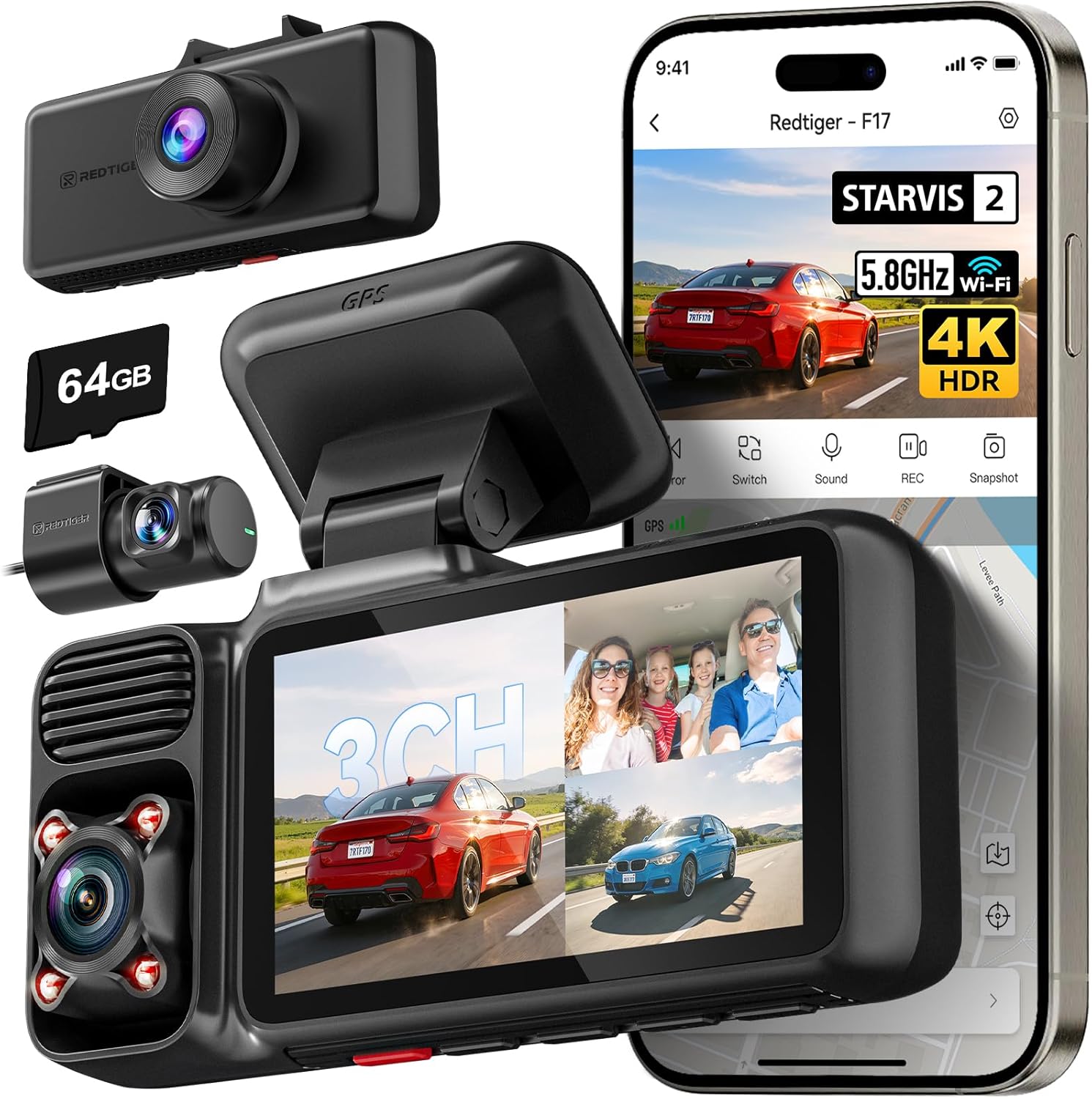
5. REDTIGER F17 4K 3-Channel Dash Cam with STARVIS 2
Best 4K Dash Cam
| Video Capture Resolution | 2160p |
|---|---|
| Included Memory Card Size | 64 GB |
| Connectivity Technology | Wi-Fi |
| Field Of View | 150 Degrees |
| Screen Size | 3 Inches |
The REDTIGER F17 is a three-camera dash system built to capture high-detail evidence on the road. Its 4K front camera uses a STARVIS 2 IMX675 sensor with HDR/WDR to improve dynamic range and low-light detail, while the inside and rear modules record at 1080p for full 360 degree coverage. Typical use is windshield mounting for continuous driving capture plus a hardwired parking mode that records time-lapse or collision-triggered events when parked. The built-in 5GHz WiFi and REDTIGER app let you quickly transfer clips and view GPS-tagged footage on your phone, and a supercapacitor improves temperature reliability compared with small batteries. Notable features include loop recording, G-sensor event lock, an included 64GB card, and a 3-inch display for quick playback. Trade-offs are that interior and rear cameras are lower resolution than the front and full 4K recording requires disabling the cabin camera, so you must choose between maximum front detail or three-channel coverage.
Best for: Drivers who need the clearest possible front-camera detail to identify plates and signs while still wanting interior and rear coverage available when needed on their Subaru Legacy.
Less Ideal for: Shoppers who need continuous simultaneous 4K across multiple channels or who prefer a touchscreen interface for in-car configuration should consider alternatives.
- True 4K front recording with STARVIS 2 sensor for strong fine-detail and low-light performance
- Three-channel coverage (front, cabin, rear) for comprehensive incident evidence
- 5GHz WiFi and app support for faster file transfer and GPS-tagged playback
- Supercapacitor power design for more reliable operation in heat and cold than small lithium cells
- Includes 64GB card and long rear/cabin cables for neat installation
- To get full 4K front footage you must disable the cabin camera, reducing simultaneous coverage
Verdict: The best 4K dash cam for users who prioritize the highest possible video detail for identifying plates, signs, and fine evidence.
6. AZDOME GS63H Pro 4K Dual-Channel Dash Cam (Front + Rear)
Best Parking-Mode Dash Cam

| Video Capture Resolution | 2160p front |
|---|---|
| Field Of View | 150 degrees |
| Included Memory Card Size | 64 GB |
| Flash Memory Supported Size Maximum | 512 GB |
| Control Method | App, Push Button |
The AZDOME GS63H Pro is a dual-channel dash cam that records 4K front footage and 1080p rear video while offering features oriented to parked-vehicle monitoring. It installs on the windshield and runs continuously in parking mode, using motion detection, time-lapse, and collision-triggered emergency lock to capture incidents when the car is unattended. Built-in GPS stamps route and speed data to files and WiFi lets you pull clips to a phone without removing the card. The included 64 GB microSD and support for up to 512 GB give plenty of storage for long parking surveillance, and the 150 degree front field of view plus CMOS sensor with WDR-style night improvements helps retain usable detail after dark. Practical limits are that true 24 hour operation depends on how you power the unit when the Subaru Legacy is parked and on card management for long loops; some advanced parking setups may require a hardwire kit or external battery to avoid draining the car battery. For Legacy owners who want dependable impact and motion-triggered evidence while parked, this model covers the essentials with clear footage and convenient connectivity.
Best for: Owners prioritizing reliable parked-vehicle monitoring who want motion- and impact-triggered recordings with GPS data and easy smartphone access to clips.
Less Ideal for: Drivers who cannot or will not add a dedicated hardwire or battery solution and expect continuous round-the-clock surveillance without managing vehicle power.
- True dual-channel recording with 4K front and 1080p rear for clear incident evidence
- Built-in GPS tags location and speed to video files for accurate event context
- Motion detection, G-sensor collision detection, and emergency file lock for parking-event capture
- Supports up to 512 GB microSD and includes a 64 GB card for extended loop recording
- WiFi connectivity enables quick file transfer to smartphone without removing the card
- Reliable 24H unattended operation requires a hardwire kit or external battery to avoid draining the vehicle battery
Verdict: The best parking-mode dash cam for owners who need reliable motion- or impact-triggered recording and low-power standby monitoring when parked.
7. VIOFO A329S 3-Channel 4K+2K+2K Dash Cam with STARVIS 2 and Wi‑Fi 6
Best Premium Dash Cam

| Video Resolution | 4K+2K+2K |
|---|---|
| Field Of View | 210 degrees |
| Frame Rate | 30fps, 30fps, 30fps |
| Connectivity Technology | Type-C, Wi‑Fi 6 |
| Flash Memory Supported Size Maximum | 512 GB |
The VIOFO A329S is a premium three-channel dash cam built to capture the road ahead, the cabin, and the rear with high detail for evidence and passenger monitoring. In everyday use it mounts to the windshield and records 4K@30fps front footage plus 2K@30fps interior and rear views; STARVIS 2 sensors and HDR help retain license plate and face detail in low light. The 210 degree cabin lens removes blind spots for rideshare or family trips, while built-in GPS timestamps routes for playback. Advanced features include Wi‑Fi 6 for very fast downloads to the app, USB 3.0 transfer, voice control, OTA updates, and parking modes with impact detection to limit battery drain when hardwired. Storage flexibility is strong with support for up to 512GB microSD or a 4TB SSD for long recordings. The main compromises are complexity and installation: a tidy three-camera fit on a Subaru Legacy may need professional routing and optional hardwire accessories to enable full parking features, and you will need to purchase high-capacity storage separately.
Best for: Buyers who want a top-tier, professional-quality dash cam for a Subaru Legacy and prioritize image detail, extensive features, and long-term reliability over a simple single-channel unit.
Less Ideal for: Drivers seeking a plug-and-play single-camera solution or those unwilling to arrange a tidy three-camera installation or buy separate storage and hardwiring accessories.
- True 3-channel recording with 4K front and 2K cabin and rear for comprehensive coverage.
- All-channel STARVIS 2 sensors and HDR improve low-light clarity and reduce motion blur.
- Wi‑Fi 6 and USB 3.0 enable very fast video downloads and convenient firmware updates.
- Supports large external storage including up to 4TB SSD for multi-week continuous recording.
- Built-in GPS, voice control, OTA updates, and included CPL for glare reduction.
- Full parking functionality requires a separate hardwire kit and a careful installation to prevent battery drain.
Verdict: The best premium dash cam for buyers willing to pay more for top-tier sensors, advanced features, longer warranty, and professional-grade reliability.
Choosing the Right Subaru Legacy Dash Cam: Key Factors to Consider
Video Resolution and Frame Rate
Higher resolution and frame rate improve the clarity of license plates, road signs, and fine details in incidents. For Subaru Legacy owners who drive on highways and city streets, at least 1080p daytime recording is the baseline; higher-resolution sensors help when you need to read plates at speed or capture critical details in a collision.
Frame rate matters for motion clarity. A 30 fps recording is generally adequate for everyday driving, but 60 fps reduces motion blur during faster events such as freeway merges. Consider how footage will be used — insurance claims or police reports benefit most from crisp, legible video.
Low-Light Performance
Many incidents occur at dawn, dusk, or in poorly lit parking areas, so sensor sensitivity and lens aperture impact nighttime usability. A dash cam with good dynamic range will preserve highlight and shadow detail when headlights or streetlights create stark contrasts.
For Subaru Legacy drivers who park on dim residential streets or drive early or late, prioritize cameras with proven low-light sensors and noise reduction algorithms. This reduces grainy footage and increases the chances of capturing useful evidence after dark.
Parking Surveillance and Power Management
Parking mode is essential for protecting a parked Legacy from hit-and-runs, vandalism, or theft attempts. Look for devices that offer multiple parking options such as motion-triggered recording, time-lapse, and impact-triggered clips using a G-sensor.
Power management is critical. Hardwiring kits with low-voltage cutoff prevent battery drain, while models that support an external battery pack or a dedicated parking power mode provide longer unattended protection without compromising the vehicle battery. Make sure the chosen setup works with the Legacy electrical system and your typical parking habits.
Field of View and Mounting Position
Field of view determines how much of the road and cabin the camera captures. A wider angle captures more peripheral action but can introduce distortion that makes plates harder to read. For the Legacy, a balanced field of view that covers both lanes and the vehicle hood is usually best.
Mounting position affects sightlines and obstruction. Consider whether you prefer a rearview-mirror-mounted camera or a low-profile adhesive mount on the windshield. The mount should not block the driver's sightlines and must align with local regulations about windshield obstruction.
Storage, File Management, and Loop Recording
Dash cams continuously record and manage footage through loop recording, overwriting the oldest files as storage fills. Reliable file segmentation and corruption-resistant writing reduce the risk of losing critical clips. Check what microSD card capacities and classes are supported and whether the camera performs automatic file integrity checks.
Also consider how easy it is to extract footage. Models with Wi-Fi or a companion app speed up transfer to a phone, while simple on-device access via a microSD card can be more robust in areas with weak wireless connections.
Connectivity and Ease of Use
Connectivity features like Wi-Fi and GPS add convenience and context to recordings. Wi-Fi enables quick clip downloads to your smartphone, and GPS logging provides speed and location overlays that can corroborate events. However, added features should not complicate daily operation.
A user interface that allows intuitive setup, clear LED or screen feedback, and straightforward firmware updates reduces frustration. For owners who prefer minimal interaction, automatic upload and simple incident tagging through a G-sensor are particularly valuable.
Why a Dedicated Dash Cam Matters for Subaru Legacy Owners
Subaru Legacy owners benefit from a dedicated dash cam because it provides objective documentation for incidents that happen during everyday commutes and weekend trips. The Legacy's balanced use between highway and urban driving means the camera must perform across a range of speeds and lighting conditions.
A properly configured device reduces uncertainty after minor collisions, captures interactions with other road users, and records memorable drives. It also serves as a deterrent in parking situations when visible footage options are present.
- Documents on-road incidents and near-misses
- Provides timestamped evidence including speed and location when GPS is enabled
- Acts as a passive theft and vandalism deterrent when visible
Mounting and Placement Tips for the Legacy Windshield
Place the camera high on the windshield near the rearview mirror to minimize obstruction and maximize the forward field of view. This position keeps the camera out of the driver's primary sightlines while giving an unobstructed view of the road.
Use included adhesives or a suction mount depending on whether you want a removable setup. Make sure the lens has a clean view past the hood and that any automatic wipers or rain sensors are not blocked by the device.
- Mount close to mirror for discrete placement
- Avoid areas affected by windshield tint bands or sensor housings
- Test angle by recording short clips during daylight and nighttime
Hardwiring Vs Cigarette Adapter: What Works Best
Hardwiring a dash cam to the Legacy fuse box offers a clean installation and enables true parking mode without relying on a dash power adapter. It is the best choice for owners who want continuous protection and are comfortable with permanent wiring or professional installation.
A cigarette adapter is simpler and portable but may disable parking mode when the vehicle is off, depending on the outlet behavior. If you choose the adapter route, look for one with low-voltage cutoff to protect the car battery.
- Hardwire for continuous parking surveillance and cleaner cable routing
- Use a professional installer if you are not comfortable with vehicle wiring
- Portable adapters are fine for short-term or rental use
Essential Settings to Configure After Installation
After installation, configure resolution, frame rate, and exposure settings to match typical driving conditions. If you frequently drive at night or through tunnels, favor settings that improve low-light sensitivity even if that slightly reduces file size efficiency.
Enable G-sensor sensitivity at a level that captures true incidents without constant false positives from speed bumps. Turn on timestamping and, if available, GPS logging so recorded clips include location and speed context for official reports.
- Set resolution and frame rate according to lighting and speed
- Adjust G-sensor to avoid excessive false event files
- Enable timestamp and GPS overlays for legally useful evidence
Maintaining Your Dash Cam for Long-Term Reliability
Regular maintenance helps avoid footage loss and ensures day-to-day readiness. Inspect mounting adhesive and cable routing to prevent loosened connections after temperature cycles, and periodically format the microSD card in-camera to clear fragmented files.
Keep firmware updated to address stability and compatibility improvements. Replace worn cables and check any hardwiring connections if you notice intermittent power or recording issues.
- Format the microSD card every few months in-camera
- Check mounts and cables after seasonal temperature changes
- Update firmware when manufacturers release stable updates
How We Chose the Best Subaru Legacy Dash Cam
We prioritized real-world reliability and features that matter specifically to Subaru Legacy owners. Evaluation centered on video quality under varying light, continuous loop recording stability, and parking surveillance options to capture events while the vehicle is parked. We also weighed installation flexibility, mounting and hardwiring compatibility with the Legacy dash, and the availability of useful connectivity such as Wi-Fi for quick file transfer.Other criteria included build quality and thermal tolerance to withstand hot dashboard temperatures, ease of use for drivers who want minimal daily interaction, and power management features to avoid draining the vehicle battery during extended parking. We excluded devices that lack basic safety recording features such as loop overwrite, G-sensor incident tagging, or that do not offer at least 1080p daytime recording. Models with poor low-light performance or unclear storage management were also removed from consideration.In short, selections reflect a balance of dependable recordings, straightforward installation options for the Legacy, and features that protect the vehicle when parked. Product-specific testing notes and hands-on verification informed editorial judgment where available.
Our full evaluation process is outlined in our review methodology.
FAQ
Will a dash cam drain my Subaru Legacy battery while parked?
It depends on the power setup and features enabled. Hardwiring with a low-voltage cutoff or using an external battery pack prevents battery drain. If you use the cigarette adapter, parking mode may not run when the vehicle is off unless the outlet is switched.
Do I need a rear camera for the Legacy or is a front-only unit sufficient?
A front-only camera captures most forward-facing incidents, which are common in collisions. A front and rear dash camera provides additional coverage for rear impacts and parking events, which can be useful depending on where and how you typically park the vehicle.
What microSD card should I use for continuous recording?
Choose a high-endurance microSD card rated for continuous write operations and compatible with the camera's maximum supported capacity. Cards designed for surveillance or dash cams reduce the chance of corruption during loop recording.
Can I install a dash cam myself in the Legacy?
Many owners can perform a simple installation using adhesive mounts and a cigarette adapter. For hardwiring to enable full parking mode, professional installation or good knowledge of vehicle fuse boxes is recommended to avoid voiding warranties or causing electrical issues.
Is GPS logging necessary for insurance or police reports?
GPS is not always required, but it adds verified speed and location context that can strengthen a report. It is helpful when exact positioning or speed is relevant to an incident, though footage without GPS can still be valuable evidence.
How much storage do I need for regular commuting and occasional long trips?
Storage needs depend on resolution and bitrate. For typical commuting, a 32GB to 64GB card often suffices with loop recording; for frequent long trips or higher-resolution settings, 128GB provides more buffer before files overwrite.
Final Verdict
Prioritize clear daytime footage, solid low-light performance, and reliable parking surveillance when choosing a dash cam for your Subaru Legacy. Balance features like GPS and Wi-Fi against ease of use and power management so the camera operates consistently without burdening the vehicle battery.Focus on installation style and file management that match your driving and parking habits. With those tradeoffs in mind, pick the option that best meets your need for clear evidence on the road and dependable protection when parked.
Explore More:
- Check out all Subaru Legacy parts & accessories
- Explore Electronics
- Browse all Accessories
