

Note: This article contains affiliate links. If you click on these links and make a purchase, I may earn a small commission at no extra cost to you. This helps support my research and content. Read my full affiliate disclosure here.
If you drive a Ram 1500, a dedicated dash cam can protect you from false claims, document incidents, and capture memorable road-trip footage. Choosing the right Ram 1500 dash cam matters because fit, mounting position, and wiring options affect both footage quality and how discreet the device sits behind the rearview mirror.This guide shortlists seven top-rated dash cams that suit the Ram 1500's cab layout and typical driving use. We considered video resolution, night performance, mounting and wiring options, and features like loop recording and Wi-Fi transfer to help you find the best dash cam for your needs. Read on for quick buying guidance and practical installation and use tips before the product list.
Looking for other parts? See all Ram 1500 parts & accessories.
Top Picks at a Glance
| Best Overall Dash Cam The best all-around dash cam that balances features and reliability | FITCAMX Integrated Front 4K + Rear 1080P Dash Cam for RAM 1500 (Model B) 2019–2024 |  |
| Best Budget Dash Cam A low-cost option that records essential footage without extras | galphi Q2 4K Front Dash Cam with 5GHz Wi‑Fi and 64GB Card |  |
| Best Premium Dash Cam A higher-end pick with top video quality and advanced features | THINKWARE U3000 PRO 2-Channel 4K Front + 2K Rear Dash Cam |  |
| Best Compact Dash Cam A small, unobtrusive camera that mounts discreetly behind the mirror | VANTRUE E1 Lite 1080p Compact Dash Cam with GPS and Wi‑Fi |  |
| Best 4K Dash Cam Ultra-high-resolution recording for maximum detail in footage | VIOFO A229 Pro 2CH Dash Cam — 4K Front / 2K Rear with Dual STARVIS 2 Sensors |  |
| Best Dual-Lens Dash Cam Front-and-rear or interior-plus-front coverage in one unit | REDTIGER F17 3‑Channel 4K Dash Cam (Front 4K, Inside 1080p, Rear 1080p) |  |
| Best Hardwire-Ready Dash Cam Designed for clean hardwire installation and continuous parking monitoring | VANTRUE S1 Pro Front-and-Rear Dash Cam (1440P@60fps, STARVIS 2) |  |
FITCAMX Integrated Front 4K + Rear 1080P Dash Cam for RAM 1500 (Model B) 2019–2024
Best Overall Dash Cam

| Compatible Vehicle Type | RAM 1500 (Model B) 2019-2024 |
|---|---|
| Video Capture Resolution | Front 2160P + Rear 1080P |
| Connectivity Technology | Wi-Fi |
| Field Of View | 170 Degrees |
| Included Memory Card Size | 128 GB |
This FITCAMX unit is a factory-style dual dash cam designed specifically for RAM 1500 Model B (2019–2024). It replaces the overhead module for a concealed, factory-fitted look and records front video at 2160P and rear at 1080P with a wide 170 degree view. Installation is mostly plug-and-play once the trim is removed and the included harness connects to the vehicle, producing a clean, no-visible-cable installation. The built-in Wi‑Fi and FITCAMX app let you preview and download clips to your phone while the microSD stores looped footage and a G-sensor automatically locks collision files. Practical benefits are clear: very discreet appearance, high-resolution front footage for plate and incident capture, and simple in-vehicle storage management. Important limitations are its strict vehicle fitment for RAM 1500 Model B only, occasional app connectivity quirks when CarPlay is active, and the need to remove the memory card or have the truck powered and on Wi‑Fi to access files remotely. Some users also warn that trim removal can be tricky and may risk damage if done carelessly.
Best for: Drivers who prioritize a discreet, factory-style dash cam for their RAM 1500 and want high-resolution front footage with simple in-vehicle storage and app access.
Less Ideal for: People who need multi-vehicle compatibility, cloud backup of clips, or who prefer a windshield-mounted, easily transferable dash camera.
- OEM-style integration hides camera and wiring for a factory look
- Front 2160P and rear 1080P simultaneous recording with 170° field of view
- Built-in Wi‑Fi and FITCAMX app for on-the-road preview and downloads
- G-sensor and loop recording automatically protect and manage footage
- Includes 128 GB microSD and supports app control without constant connection
- Fits only RAM 1500 Model B 2019–2024 and will not install on other models
- App connection can conflict with CarPlay and requires the vehicle to be on to access camera Wi‑Fi
- Trim removal for installation can be difficult and risks windshield or trim damage if not done carefully
Verdict: The best all-around dash cam that balances video quality, reliability, ease of use, and necessary features for most drivers and DIY mechanics.
galphi Q2 4K Front Dash Cam with 5GHz Wi‑Fi and 64GB Card
Best Budget Dash Cam

| Video resolution | 2160p |
|---|---|
| Field of view | 160 Degrees |
| Frame rate | 30 fps |
| Included memory | 64 GB |
| Connectivity | 5GHz Wi‑Fi |
The galphi Q2 is a compact, screenless front dash cam aimed at buyers who want clear daytime footage and core recording features without a big price tag. It records 4K/2160p at 30 fps with a 160 degree lens, so license plates and road signs are usually readable in normal daylight, and the F/1.6 aperture plus WDR helps low‑light performance. Installation is straightforward using the adhesive mount and included power cable, and the app connects over built‑in 5GHz Wi‑Fi for faster downloads than 2.4GHz models. The camera supports loop recording, a G‑sensor that locks collision files, and a 24‑hour parking mode when hardwired. Practical limits: there is no display on the unit so setup and playback rely on the phone app, parking mode needs a separate hardwire kit, and the camera uses a proprietary power cable which may restrict power routing in some trucks. For a budget pick that prioritizes video clarity and core safety features, the Q2 delivers solid value.
Best for: Buyers looking for a low‑cost dash cam that emphasizes clear daytime video and reliable automatic recording features while keeping installation simple and unobtrusive in a Ram 1500.
Less Ideal for: Drivers who want an integrated screen, built‑in cloud connectivity, or an out‑of‑the‑box 24/7 parking solution without additional hardware should consider higher‑end models.
- True 4K 2160p capture for clearer daytime detail
- Built‑in 5GHz Wi‑Fi and app make transfers noticeably faster
- Includes 64GB microSD and supports up to 256GB for longer recording
- G‑sensor and loop recording automatically protect incident clips
- Compact, low‑profile design that mounts behind the rearview mirror
- No built‑in display so live view and configuration require a smartphone app
- Parking surveillance requires a separate hardwire kit not included
- Uses a manufacturer‑specific power cable which may limit power routing options
Verdict: A low-cost dash cam that provides clear daytime recording and dependable basic features for buyers prioritizing affordability over advanced functionality.
THINKWARE U3000 PRO 2-Channel 4K Front + 2K Rear Dash Cam
Best Premium Dash Cam

| Video Capture Resolution | 1440p, 2160p |
|---|---|
| Included Memory Card Size | 64 GB |
| Flash Memory Supported Size Maximum | 512 GB |
| Connectivity Technology | Wi‑Fi |
| Frame Rate | 30 FPS |
The THINKWARE U3000 PRO is a high-end two-channel dash cam intended to capture ultra-clear front and rear evidence for everyday driving and long-term parked protection. The front camera records in 4K using a Sony STARVIS 2 sensor and Ambarella processor while the rear records in 2K; combined WDR, HDR and Super Night Vision 4.0 keep license plates and road signs legible in harsh light and at night. Built-in low-power radars and event-ready motion/impact recording provide buffered 20-second clips that include 10 seconds before the trigger, which helps reconstruct incidents and parking hits without constantly draining the vehicle battery when hardwired or using the included OBD cable. The unit supports 5GHz Wi-Fi and GPS tagging for quick transfers and speed/location data, plus up to 512 GB microSD for long retention. Downsides to expect are the premium price and occasional reports of finicky connectivity or inconsistent quality control, and the app interface for pulling older clips can be clumsy enough that some owners prefer reading the SD card directly. Installation for a pickup like the Ram 1500 is straightforward for DIYers or pros, and the U3000 PRO prioritizes image clarity and parked surveillance over bargain pricing.
Best for: Buyers who prioritize the clearest possible evidence, dependable parking surveillance, and long-term performance over initial cost, especially if they plan to keep the dash cam installed on a Ram 1500 for years.
Less Ideal for: Drivers who need a budget solution or who prefer a simpler plug-and-play camera with minimal app interaction and lower upfront cost should consider less feature-rich models.
- True 4K front video with STARVIS 2 sensor for readable license plates and fine detail.
- Advanced parking protection using dual low-power radar with buffered event clips.
- Strong low-light performance via Super Night Vision 4.0, WDR and HDR processing.
- Dual-band 5GHz Wi-Fi and GPS tagging for quick access to footage and location data.
- Supports up to 512 GB microSD for extended recording retention.
- Premium cost and occasional quality-control or connectivity issues reported by some users.
- Mobile app file browsing and long-clip retrieval can be slow or cumbersome compared with reading the SD card.
Verdict: A premium dash cam that delivers the highest video resolution, superior build quality, and advanced features for buyers willing to pay more for long-term performance.
VANTRUE E1 Lite 1080p Compact Dash Cam with GPS and Wi‑Fi
Best Compact Dash Cam
| Video Resolution | 1080p |
|---|---|
| Field of View | 160 Degrees |
| Aperture | f/1.8 |
| Storage Type | microSD (supports up to 512GB) |
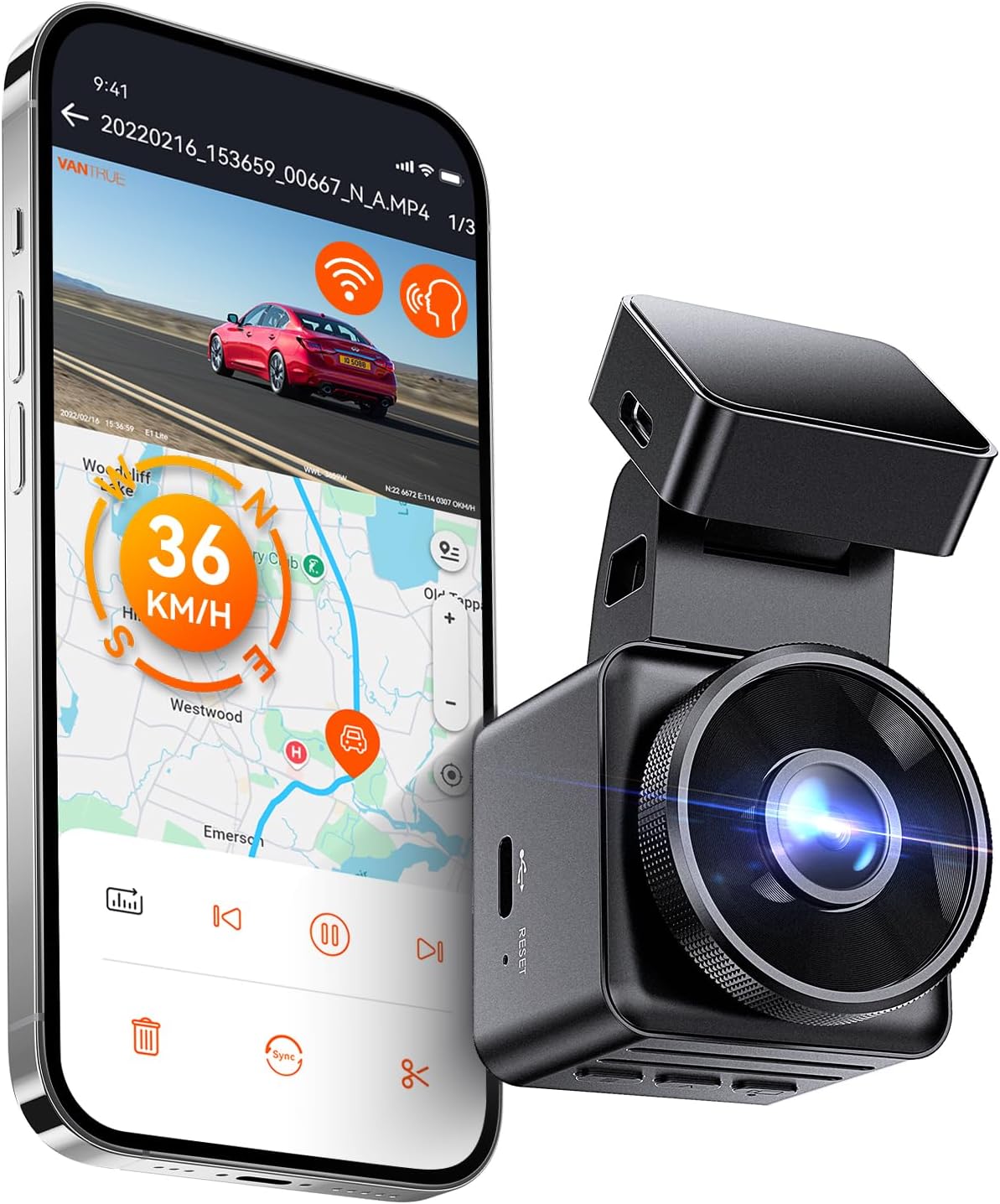
The VANTRUE E1 Lite is a compact front dash cam intended to sit unobtrusively behind the rearview mirror while capturing day and night driving. It records 1080p HDR video with a wide 160 degree field of view and an f/1.8 aperture to preserve detail in varied lighting. Built-in GPS logs speed and route so footage can be reviewed with location and timestamp, and Wi‑Fi plus the Vantrue app let you preview and download clips without removing the card. Voice control and a small LCD make basic hands‑free commands and on-device setup straightforward. The camera uses a supercapacitor design for heat resilience and offers motion/impact-triggered parking mode when hardwired. Trade-offs are typical for a compact unit: 1080p is fine for everyday evidence but not as detailed as 2.7K/4K models for distant plate reading, and some users report occasional Wi‑Fi connection hassles that make direct SD access more reliable. Overall it is a low‑profile, easy‑to-install option for drivers who prioritize a small footprint and dependable front-facing recording.
Best for: Drivers who want a low‑profile front dash cam that installs quickly and stays out of the way while still recording reliable, timestamped footage for everyday driving on a full‑size pickup like the Ram 1500.
Less Ideal for: Buyers who need the highest possible image detail for reading distant license plates or who require multi‑camera/driver‑monitoring features should consider higher‑resolution or multi‑channel systems.
- Truly compact design minimizes obstruction of the windshield and sightlines
- 1080p HDR recording with f/1.8 aperture for improved low‑light performance
- Built‑in GPS records speed, route and timestamped location with footage
- Wi‑Fi and Vantrue app enable live view and clip download without removing the microSD card
- Supercapacitor and parking mode support reliable operation in hot environments when hardwired
- 1080p resolution limits fine detail at longer distances compared with higher‑res dash cams
- Wi‑Fi connection can be inconsistent for some users, requiring SD removal for reliable file access
Verdict: A compact dash cam designed for drivers who want minimal visual intrusion while still capturing reliable front‑facing footage and easy installation.
VIOFO A229 Pro 2CH Dash Cam — 4K Front / 2K Rear with Dual STARVIS 2 Sensors
Best 4K Dash Cam

| Front resolution | 2160p (4K) @30fps |
|---|---|
| Rear resolution | 1440p (2K) @30fps |
| Image sensors | Sony STARVIS 2 IMX678 (front) + IMX675 (rear) |
| Max microSD | 512 GB |
| Connectivity | 5GHz Wi-Fi, Type-C |
The VIOFO A229 Pro is built around a 4K front STARVIS 2 sensor (IMX678) paired with a 2K rear STARVIS 2 sensor (IMX675) to maximize readable detail from both directions. It records 4K@30fps front and 2K@30fps rear with HDR for better dynamic range at night, and includes a CPL filter to cut windshield glare. The unit supports 5GHz Wi-Fi and an app for quick preview and file transfer, a quad-mode GPS logger for precise timestamps and speed data, and voice controls for hands-free locking and basic commands. For long-term monitoring it offers buffered 24H parking modes, loop recording, G-sensor emergency locking, and support for up to 512GB microSD. Practical trade-offs are typical of a high-resolution system: 4K files are large and demand a high-endurance card and more storage, and getting full parking-mode functionality requires a hardwire kit. Some users report app responsiveness and occasional compatibility quirks with third-party SD cards, so plan for recommended VIOFO cards for best reliability.
Best for: Buyers who want the clearest possible evidence footage for incidents and value daytime and night license-plate readability on a full-size truck like a Ram 1500, and who are prepared to use high-capacity, high-endurance storage and optionally hardwire the unit for 24/7 monitoring.
Less Ideal for: Shoppers who prefer a plug-and-play, low-maintenance camera with minimal file sizes or those unwilling to manage large 4K recordings and buy compatible high-endurance microSD cards.
- True 4K front recording with Sony STARVIS 2 sensor for clear license-plate level detail
- Dual-channel HDR captures usable night and high-contrast scenes front and rear
- 5GHz Wi-Fi and app control for faster previews and file downloads
- Buffered 24H parking modes with event pre/post recording and G-sensor emergency lock
- Supports up to 512GB microSD and includes CPL filter and long rear cable for tidy installs
- 4K video files are large and require high-endurance cards and more storage management
- Full parking-mode operation needs a separately sold hardwire kit to run constant power
- Some reviewers report app sluggishness and occasional incompatibility with nonrecommended SD cards
Verdict: A 4K dash cam for buyers who prioritize the clearest possible footage to capture fine detail like license plates and distant events.
REDTIGER F17 3‑Channel 4K Dash Cam (Front 4K, Inside 1080p, Rear 1080p)
Best Dual-Lens Dash Cam
| Video Capture Resolution | 2160p front, 1080p inside/rear |
|---|---|
| Included Memory Card Size | 64 GB |
| Connectivity Technology | 5.8GHz Wi‑Fi and 2.4GHz Wi‑Fi |
| Mounting Type | Windshield Mount |
| Field Of View | 150° front, 160° cabin, 155° rear |
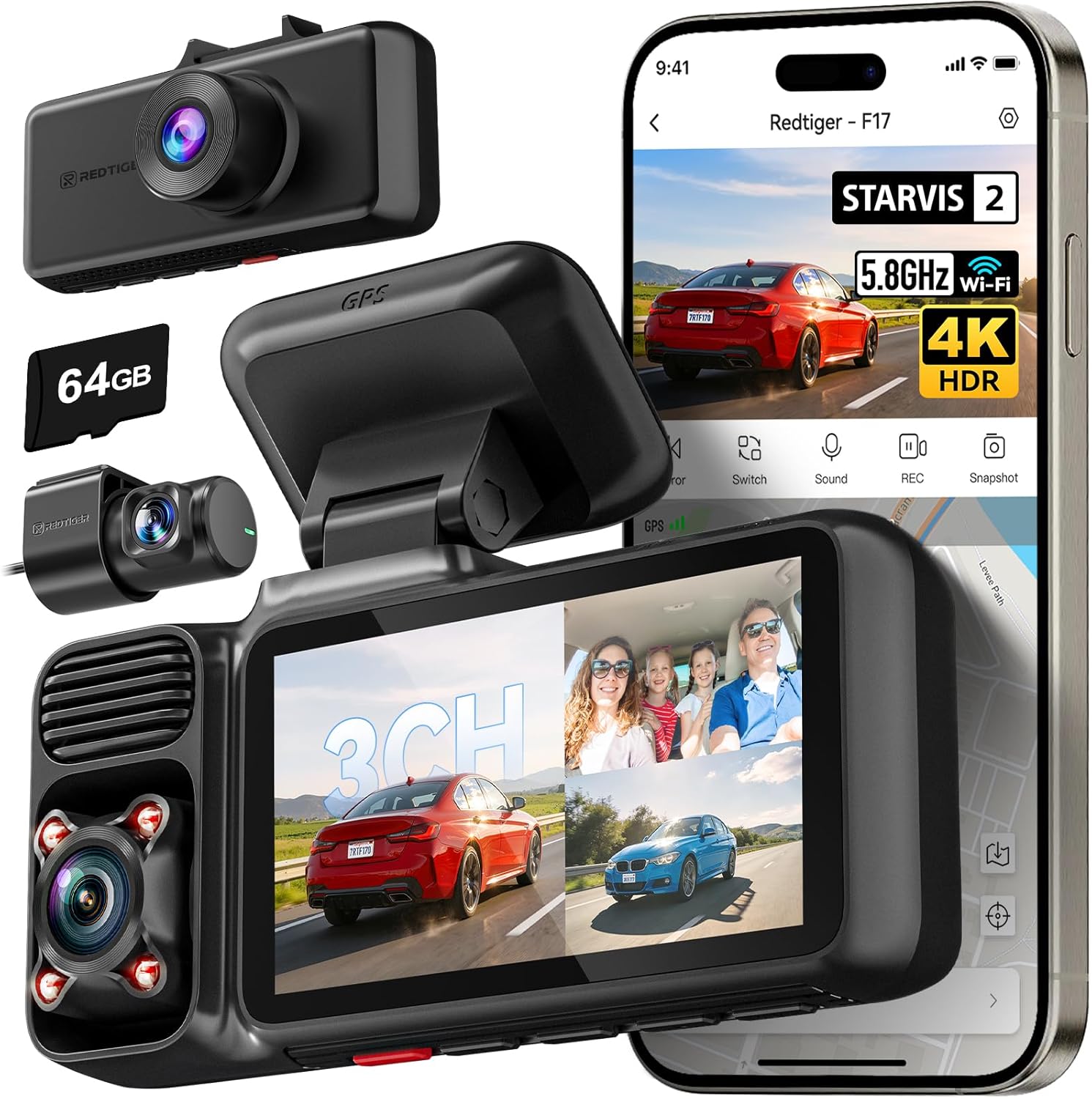
The REDTIGER F17 is a three‑camera dash cam package that records the front in 4K using a STARVIS 2 IMX675 sensor while simultaneously capturing the cabin and rear in 1080p. It mounts to the windshield and includes long cables and an adhesive mount for a tidy install; once powered the unit starts recording automatically and supports loop recording, G‑sensor event locking and a parking monitor when hardwired. Notable usability features are the built‑in GPS for speed and location stamps, a 3‑inch LCD for setup and playback, 5GHz Wi‑Fi for quicker file transfers to the app, and a supercapacitor for more reliable heat tolerance than small batteries. The interior camera is useful for rideshare monitoring or documenting in‑cab incidents, and the wide combined field of view gives good coverage around a truck like a Ram 1500. Expect occasional app pairing quirks and be aware some users report SD card compatibility or power‑plug seating issues, so use the supplied 64GB card and secure the power connection; the parking features require a separate hardwire kit to operate while the vehicle is off.
Best for: Buyers who prioritize capturing both forward and in‑cab/rear evidence — for example drivers who want continuous front and rear/cabin coverage for work, ridesharing, or incident documentation on a truck.
Less Ideal for: Drivers who only need a simple single‑channel front camera or who cannot hardwire the unit for parking surveillance should consider simpler alternatives.
- True 4K front recording with STARVIS 2 sensor for improved low‑light detail
- Three simultaneous channels (front, cabin, rear) for comprehensive incident coverage
- Built‑in GPS and 5GHz Wi‑Fi for fast file transfer and accurate location/speed stamping
- Supercapacitor design for more dependable operation in high temperatures
- Includes long rear camera cable and accessories for clean professional routing during installation
- Parking monitor requires a separately purchased hardwire harness to run when the vehicle is off
- Some reports of SD card compatibility problems and occasional random shutdowns tied to power plug seating
Verdict: A dual-lens dash cam ideal for buyers who want simultaneous front and rear (or cabin) recording to document more of an incident.
VANTRUE S1 Pro Front-and-Rear Dash Cam (1440P@60fps, STARVIS 2)
Best Hardwire-Ready Dash Cam

| Video capture resolution | 1440P@60fps or 1944P+1080P |
|---|---|
| Frame rate | 60 fps |
| Connectivity | USB, Wi‑Fi (5GHz) |
| Storage support | Up to 1TB microSD |
| Power source | Built-in supercapacitor |
The VANTRUE S1 Pro is a hardwire-ready front-and-rear dash camera aimed at drivers who want permanent installation and round-the-clock coverage. It records a 1440P@60fps front feed (or 1944P+1080P dual recording) and uses STARVIS 2 sensors plus an F1.8 aperture to keep license plates and road signs readable in low light; dual HDR helps balance bright and dark areas. Built-in GPS stamps location and speed, 5GHz Wi‑Fi and a mobile app let you preview and download clips without removing the card, and the supercapacitor improves heat tolerance compared with battery cells. For hardwired setups the camera supports 24/7 parking modes, buffered motion detection, and collision-triggered event locking, which are essential for a permanently installed unit. Expect a compact, windshield-mounted unit with a long rear cable and adjustable lens positions for neat routing on a Ram 1500. Limitations to note: parking mode requires a separate hardwire kit and high-capacity microSD cards to avoid frequent overwrites, and the menu/button layout can be less intuitive than some competitors' interfaces.
Best for: Buyers who want a permanently installed dash cam on their Ram 1500 with reliable 24/7 parking surveillance and easy mobile access to recordings, prioritizing continuous protection over plug-and-play convenience.
Less Ideal for: Drivers who prefer a simple, temporary plug-in unit or who do not want to install a hardwire kit and manage large-capacity memory cards.
- Hardwire-friendly design with parking-mode support and buffered motion detection for 24/7 monitoring.
- STARVIS 2 sensor and F1.8 aperture deliver strong low-light and night-vision performance for readable license plates.
- 60 fps front recording reduces motion blur for clearer evidence at highway speeds.
- Built-in GPS and 5GHz Wi‑Fi with app control make it easy to tag, view, and download footage without removing the card.
- Supercapacitor power design tolerates wide temperature ranges better than typical batteries.
- Parking-mode operation requires purchasing and installing a separate hardwire kit.
- High-resolution and 60 fps recording use large amounts of storage so a high-capacity microSD card is necessary.
- Menu and physical button layout can be confusing compared with simpler dash cams.
Verdict: A hardwire-ready dash cam suited to buyers who want a permanent, professional installation with parking mode and uninterrupted power for long-term vehicle monitoring.
Choosing the Right Ram 1500 Dash Cam: Key Factors to Consider
Video Resolution and Sensor Low-Light Performance
Resolution matters for capturing license plates, street signs, and facial detail. Higher resolution like 1080p provides sharper daytime footage, but sensor quality and image processing determine usable detail at night. A good sensor with noise reduction yields clearer low-light recordings that are critical for early-morning commutes, dusk driving, or poorly lit parking areas.
When evaluating for a Ram 1500, think about typical driving routes you use. If you often drive rural roads or unlit streets, prioritize models with proven night performance and wide dynamic range. For highway and daylight-focused driving, consistent 1080p daytime clarity and stable exposure handling will cover most evidence needs.
Mounting Position and Field of View
The Ram 1500's windshield shape and interior mirror placement affect where a dash cam will sit and what it will capture. A camera with a balanced field of view avoids excessive fisheye distortion while covering lanes and nearby vehicles. Too wide a lens can render plates unreadable at the edges; too narrow can miss crossing vehicles.
Consider low-profile mounts that tuck behind the rearview mirror to reduce visual obstruction and risk of accidental bumps. For models offering front-and-rear coverage, think about routing the rear camera cable through the headliner and trim so the installation looks clean and does not interfere with airbags or visibility.
Power Options and Wiring
How the dash cam is powered influences both reliability and convenience. Many Ram 1500 owners use the 12V accessory outlet for simple plug-and-play setups, while others prefer hardwiring kits to enable parking mode and continuous monitoring when the engine is off. Hardwiring provides cleaner installation and access to ignition-switched power, but it requires basic knowledge of the truck's fuse box and wiring best practices.
Ensure the selected unit supports the power method you prefer and includes voltage protection or low-voltage cutoffs to avoid draining the Ram 1500 battery. If you plan extended parking surveillance, consider models compatible with external battery packs or with energy-saving parking modes that trigger only on motion or impact.
Loop Recording and Storage Management
Loop recording is essential to continuous operation because it overwrites the oldest footage when the memory card fills. Look for dash cams that manage file segments predictably and lock incident clips automatically when an impact is detected. Good file management minimizes the chance that important footage will be lost before you can secure it.
Also consider the maximum supported microSD capacity and recommended card class. High-resolution or front-and-rear configurations use more storage, so check how long continuous recording lasts on typical card sizes. For a Ram 1500 used on long trips, larger capacity and efficient compression help reduce the need to frequently offload files.
Parking Mode and Motion/Impact Detection
Parking mode provides protection when the truck is unattended, recording impacts or motion near the vehicle. There are several approaches: time-lapse, motion-triggered recording, or impact-triggered clips using a G-sensor. Each method balances battery use and sensitivity differently.
If you park in busy lots or on-street, choose a dash cam whose parking mode can ignore minor vibrations while reliably capturing hits and close-range motion. When hardwiring is not an option, models with low-power standby modes or external battery compatibility are better suited to protracted parking surveillance in a Ram 1500.
Connectivity, Controls, and Usability
Usability covers the mobile app interface, Wi-Fi transfer speeds, on-device controls, and how easy it is to retrieve and view footage. Wi-Fi enabled dash cams let you download clips without removing the card, which is handy for quick incident checks. A clear onboard menu and easy mounting adjustments make routine use simpler.
Consider how you will access recordings: frequent file transfers argue for Wi-Fi and a responsive app, while occasional retrieval might favor better physical controls and a robust card slot. For larger cabs like the Ram 1500, ensure the camera's buttons and adjustment angles are reachable and that the included mount allows fine aiming from the driver's seat.
Front-and-Rear Setup Considerations
Many Ram 1500 owners prefer a dual-channel setup to capture both forward events and rear impacts or incidents in the bed area. The rear camera requires a route for the cable that preserves interior trim and keeps the connection watertight when passing through the tailgate area on models where the rear view is external.
When choosing a front and rear dash camera arrangement, plan the cable routing ahead of purchase. Some rear cameras are designed to mount on the rear glass and route cable along the headliner and down the pillar for a neat install. Confirm that the rear lens angle and mounting bracket will clear rearview obstructions and provide the coverage you expect.
- Check whether the rear camera is designed for interior or exterior mounting.
- Plan cable runs to avoid interfering with airbags or trim clips.
- Verify the rear camera's field of view will capture the desired zone behind the truck.
Installation Tips for a Clean Fit
A tidy, secure installation matters for both function and aesthetics. Use adhesive mounts placed behind the rearview mirror to keep the camera discreet and reduce sun glare in recordings. For hardwired setups, identify an accessory or ignition-switched fuse to prevent battery drain and ensure parking mode functions as intended.
Take time to tuck cables under headliner trim and along A-pillars to prevent them from hanging in the line of sight. If you are uncomfortable with fuse-box work, a professional installation or a plug-in hardwire adapter can achieve the same result without complex splicing.
- Test camera angle before finalizing the mount adhesive.
- Label any removed trim pieces for easier reassembly.
- Use adhesive pads and cable clips rated for automotive environments.
Optimizing Video Settings for Evidence Use
Adjusting codec and bitrate settings can balance file size with clarity. For most owners, default settings tuned by manufacturers are adequate, but if you need crisper detail for license plates, increase bitrate or ensure a 1080p setting is enabled. Turn on timestamp overlays and GPS logging when available to add context to recorded events.
Enable parking mode and adjust G-sensor sensitivity so minor vibrations do not create excessive locked clips. If the camera supports exposure compensation or WDR, enable those options to improve contrast in high dynamic range scenes like tunnels or low sun angles on the highway.
- Enable timestamp and GPS for incident corroboration.
- Use bitrate settings that match your card capacity for longer retention.
- Test night settings on a typical route to confirm readability.
Maintaining and Archiving Footage
Regular maintenance keeps a dash cam ready when you need it. Periodically check that the mount adhesive remains secure, keep lens surfaces clean, and reformat the microSD card per the manufacturer's guidance to avoid file corruption. If you capture an incident, immediately copy the locked file to external storage to prevent accidental overwrite.
For frequent long-distance drivers using a Ram 1500, an organized archive strategy is helpful. Rotate microSD cards or copy files to cloud storage when supported by Wi-Fi-enabled units. Keep a small card reader and spare card in the glovebox for quick transfers on long trips.
- Clean the lens with a microfiber cloth to avoid streaks.
- Reformat the card every few months to reduce errors.
- Back up incident clips to multiple locations for safekeeping.
Legal and Privacy Notes for Owners
Dash cam laws vary by location, especially regarding audio recording and mounting obstruction. Make sure the camera does not block your view and check local rules on in-cabin audio recording if you plan to capture conversations. In many places, recording video of public roads is permitted, but audio may be subject to consent laws.
When using Wi-Fi features that upload clips, be mindful of privacy settings and where files are stored. Secure your device and app with strong passwords and understand how long providers retain uploaded footage if using cloud backup services.
- Position the camera to avoid obstructing the windshield.
- Disable audio recording if local laws require it or if occupants object.
- Use secure Wi-Fi and strong app passwords to protect footage.
How We Chose the Best Ram 1500 Dash Cam
We prioritized concrete, truck-specific needs when selecting the seven Ram 1500 dash cams in this roundup. Key evaluation criteria included video clarity across lighting conditions, tested by comparing daytime and low-light performance; mounting and field-of-view suitability for the Ram 1500 windshield and mirror area; power and wiring options that work with common Ram 1500 accessory and 12V/USB power setups; and feature set relevance such as loop recording duration, parking mode behavior, and Wi-Fi or app-based file transfer.We also weighed unit size and mounting profile so the camera sits discreetly without obstructing view or interfering with the rearview mirror. Reliability factors included estimated thermal performance and build quality indicators for long rides and hot-cab conditions. Our selection excluded units that lack basic safety features like loop recording or that offer only extremely low-resolution footage. The result is a curated set of options that balance practical installation, continuous recording behavior, and clear evidence-grade video for Ram 1500 owners.
Our full evaluation process is outlined in our review methodology.
FAQ
Will a dash cam drain my Ram 1500 battery if left plugged in?
It depends on the power method. Plug-in units tied to the 12V outlet may draw power only when the ignition is on. Hardwired setups or those using parking mode can draw battery power when the truck is off unless they include low-voltage cutoffs or are connected to a dedicated fused circuit. Choose models with battery protection or use a hardwire kit with voltage cutoffs to avoid unexpected drain.
Can I install a rear camera myself on a Ram 1500?
Many owners can install a rear camera themselves if they are comfortable routing cables under trim and using adhesive mounts. Interior rear cameras are usually straightforward. Exterior or bed-facing installations may require additional sealing and careful routing to prevent water ingress. If you are unsure about wire routing or sealing, professional installation is a safe option.
How much storage do I need for long road trips in a Ram 1500?
Storage needs vary with resolution, bitrate, and whether you use both front and rear channels. For continuous 1080p front-only recording, a 64GB to 128GB card typically covers several hours to days of footage. Dual-channel setups and higher bitrates consume more space, so consider 128GB or larger cards and periodic offloads during long trips.
Is Wi-Fi on a dash cam useful for daily drivers?
Yes, Wi-Fi makes it convenient to retrieve clips without removing the microSD card. For daily checks or quick evidence gathering, an app connection speeds up transfers and sharing. Keep in mind Wi-Fi transfers can be slower than card reads, so for large files or many clips you may still prefer a card reader.
Do dash cams work well in extreme heat inside the cab of a Ram 1500?
Dash cams can be affected by high interior temperatures. Many units are rated for typical automotive heat ranges, but prolonged exposure to extreme heat can shorten device life or cause shutdowns. Parking in shaded areas, using sunshades, or choosing units with higher thermal ratings helps maintain reliable operation.
Should I enable audio recording in my Ram 1500 dash cam?
Audio recording is useful for capturing context but may be restricted by local laws and occupant privacy concerns. If unsure, disable onboard audio or inform passengers. Many users enable audio only when needed for a particular event and keep it off for routine driving.
Final Verdict
For Ram 1500 owners, prioritize a dash cam that balances clear video with a mount and wiring approach that fits your truck and driving habits. Pay particular attention to night performance, power options for parking mode, and reliable loop recording behavior to ensure critical events are captured and retained.Weigh tradeoffs between convenience features like Wi-Fi and the extra storage demands of dual-channel setups. Focus on the factors above to pick a solution that provides dependable evidence and minimal day-to-day hassle for your Ram 1500.
Explore More:
- Check out all Ram 1500 parts & accessories
- Explore Electronics
- Browse all Accessories
