

Note: This article contains affiliate links. If you click on these links and make a purchase, I may earn a small commission at no extra cost to you. This helps support my research and content. Read my full affiliate disclosure here.
A dash cam can be one of the most practical upgrades for your Chevrolet S-10. Beyond recording accidents, a properly chosen dash cam captures everyday incidents, documents road trips, and provides peace of mind when the truck is parked. For S-10 owners the right unit balances unobtrusive mounting on a compact dashboard, clear daytime and low-light video, and straightforward wiring that works with the vehicle's interior.
Top Picks at a Glance
| Best Overall Dash Cam A well-rounded dash cam that balances video quality and features | ROVE R2-4K DUAL Dash Cam — Front 4K + Rear 1080P, STARVIS 2, 3" IPS, 128GB Included |  |
| Best Budget Dash Cam A low-cost option that still records clear footage for essentials | galphi Q2 4K Front Dash Cam with 5G Wi‑Fi and 64GB Card |  |
| Best Premium Dash Cam A higher-end unit with top video, build, and added features | VANTRUE N4S 3-Channel Dash Cam with STARVIS 2 and PlatePix |  |
| Best Compact Dash Cam A small, low-profile camera ideal for discreet mounting and tight spaces | VANTRUE E1 Lite 1080p Compact Dash Cam with GPS and Wi‑Fi |  |
| Best Dual-Lens Dash Cam Front-and-rear recording for comprehensive coverage of incidents and surroundings | REDTIGER F9 4K Dual Dash Cam (Front 4K + Rear 1080P) |  |
| Best 4K Dash Cam Ultra-high-resolution recording for the clearest license-plate and detail capture | REDTIGER ViewClear 70 4K Front + 2.5K Rear Dual Dash Cam with STARVIS 2 |  |
| Best Parking Mode Dash Cam Reliable parked-vehicle surveillance with motion and impact detection features | 70mai T800E 4K 3-Channel Dash Cam (Front, Rear, Inside) with GPS and Wi‑Fi 6 |  |
1. ROVE R2-4K DUAL Dash Cam — Front 4K + Rear 1080P, STARVIS 2, 3" IPS, 128GB Included
Best Overall Dash Cam

| Front resolution | 3840x2160P @30fps |
|---|---|
| Rear resolution | 1920x1080P @30fps |
| Sensor | Sony STARVIS 2 (IMX675) |
| Storage support | Includes 128GB, up to 1TB microSD |
The ROVE R2-4K DUAL is a straightforward front-and-rear dash camera designed to capture clear daytime and night footage for routine driving and incident evidence. The front camera records true 4K at 30 fps using a Sony STARVIS 2 sensor and an f/1.5 aperture, while the rear records 1080p at 30 fps with a 140 degree field of view. It mounts to the windshield and connects the rear camera with a supplied 6.5m extension cable for full coverage. The unit includes a 3" IPS screen for configuration and playback and logs GPS speed and location to the video for added context. Wireless 5 GHz WiFi and the ROVE app make it easy to download clips quickly to your phone, and the included 128GB microSD card plus 1TB max support reduce the need to manage storage frequently. Built-in supercapacitor design improves thermal resilience versus battery cells and the camera supports a 24-hour parking mode when hardwired. Trade-offs are its reliance on a separate hardwire kit for full 24/7 monitoring and that 30 fps at 4K limits very high-speed frame capture, but for everyday use and documenting incidents it balances image quality and practical features well for a vehicle like the Chevrolet S-10.
Best for: Drivers who want a reliable, easy-to-use dual-channel dash cam that balances high-resolution daytime footage, strong low-light capture, and convenient wireless file access for everyday driving and incident recording in their Chevrolet S-10.
Less Ideal for: Drivers who need professional-grade forensic frame rates or a built-in battery-powered parking solution without installing a hardwire kit should consider other models.
- True 4K front recording with Sony STARVIS 2 sensor for strong detail and low-light performance
- Dual-channel front and rear recording with wide 150°/140° fields of view for comprehensive coverage
- Built-in GPS that stamps speed and route onto video for clear incident context
- Fast 5 GHz WiFi and ROVE app allow quick downloads and easy firmware updates
- Includes 128GB microSD card and supports up to 1TB external storage for longer retention
- 24-hour parking mode requires a separately sold hardwire kit to run continuously
- 4K front video is limited to 30 fps which may miss ultra-fast motion details
Verdict: The best all-around dash cam for most buyers, offering reliable video quality, easy installation, sensible features, and good value for everyday driving and incident documentation.
2. galphi Q2 4K Front Dash Cam with 5G Wi‑Fi and 64GB Card
Best Budget Dash Cam

| Video Capture Resolution | 2160p |
|---|---|
| Field Of View | 160 Degrees |
| Connectivity Technology | Wi-Fi |
| Included Memory Card Size | 64 GB |
| Flash Memory Supported Size Maximum | 256 GB |
The galphi Q2 is a compact, screenless front dash cam designed to capture crisp 4K footage with a 160 degree lens and straightforward app control. It mounts with an adhesive pad and begins recording automatically when powered, using loop recording and a G-sensor to lock collision clips. Built-in 5GHz Wi‑Fi lets you transfer files to a phone faster than older 2.4GHz units, and the F1.6 aperture plus WDR helps produce usable night footage. The camera supports timed parking monitoring when hardwired and accepts microSD cards up to 256GB; a 64GB card is included so it is ready to use out of the box. The unit has no display, so all setup and playback are done through the smartphone app which keeps the dash unobstructed but requires occasional app interaction. If you need basic, reliable incident recording and quick file transfer without extra bells, this model fills that role well for drivers who prefer a discreet, easy-to-install front camera for everyday use in a compact truck like the Chevrolet S-10.
Best for: Buyers who want a low-cost, easy-to-install front camera that reliably records incidents and lets them quickly pull video to a phone without complicated setup or advanced features.
Less Ideal for: Drivers who need a multi-camera system, cloud streaming, or built-in screen controls should look at higher-end models with those capabilities.
- True 4K 2160p recording with a 160° wide-angle for clear incident detail
- Built-in 5GHz Wi‑Fi and app control for faster downloads and convenient playback
- Includes a 64GB microSD card so the camera is ready to use immediately
- G-sensor and loop recording that automatically lock and preserve collision clips
- Compact, screenless design reduces driver distraction and mounts discreetly on the windshield
- No onboard display so all settings and review must be done through the smartphone app
- 24-hour parking monitoring requires a separate hardwire kit to enable continuous power
Verdict: The best inexpensive dash cam for buyers who need dependable incident recording and basic features without spending much, prioritizing simple setup and acceptable video quality.
3. VANTRUE N4S 3-Channel Dash Cam with STARVIS 2 and PlatePix
Best Premium Dash Cam

| Video resolution | 2.7K + 1440P + 1440P/30FPS |
|---|---|
| Sensors | STARVIS 2 |
| Connectivity | USB, Wi-Fi (5GHz) |
| Max microSD | 1 TB |
| Power design | Supercapacitor |
The VANTRUE N4S is a top-tier three-channel dash camera designed to give full coverage of a vehicle with a front, interior, and rear camera. It records at 2.7K front and 1440p for interior and rear channels while using STARVIS 2 sensors, Triple HDR, and PlatePix processing to improve low-light clarity and make license plates readable in challenging conditions. Setup is straightforward using the magnetic GPS mount and included wiring accessories, and the 360° rotatable rear camera lets you aim coverage at traffic or cargo. Built-in 5GHz Wi‑Fi and app control let you pull clips quickly without removing the card, and quad-mode GPS logs speed and location. For parked vehicles the N4S offers buffered parking, motion and collision detection, and low-bitrate modes to stretch storage. The unit uses a supercapacitor design for better high-temperature resilience instead of a battery. The main compromises are the relatively small 2-inch screen for on-device playback and the need to buy a large-capacity microSD separately for continuous high-res recording, but for someone prioritizing resolution, night performance, and robust parking protection this is a compelling premium option for a Chevrolet S-10.
Best for: Buyers who want a durable, high-resolution, full-coverage dash cam for a Chevrolet S-10 and prioritize best-in-class night and license-plate capture plus advanced parking protection.
Less Ideal for: Drivers who need a simple single-channel dash cam or who prefer on-device large-screen playback and built-in cloud storage without managing local large-capacity cards.
- Triple-channel recording with 2.7K front and 1440p interior and rear for comprehensive coverage
- STARVIS 2 sensors plus Triple HDR and PlatePix processing for strong low-light and license plate capture
- 5GHz Wi‑Fi and app control for fast file access and OTA firmware updates
- Buffered 24/7 parking modes with motion and collision detection for parked-vehicle protection
- Supercapacitor design improves high-temperature reliability compared with battery-powered units
- 2-inch on-device screen is small for reviewing footage directly on the unit
- High-resolution recording requires purchasing a high-capacity microSD card to avoid frequent overwrites
Verdict: The best premium dash cam for users who want the highest video resolution, advanced processing, durable construction, and extra features like Wi‑Fi and cloud connectivity regardless of cost.
4. VANTRUE E1 Lite 1080p Compact Dash Cam with GPS and Wi‑Fi
Best Compact Dash Cam
| Video Capture Resolution | 1080p |
|---|---|
| Field Of View | 160 Degrees |
| Connectivity Technology | Wi‑Fi |
| Frame Rate | 30 FPS |
| Flash Memory Type | microSD |
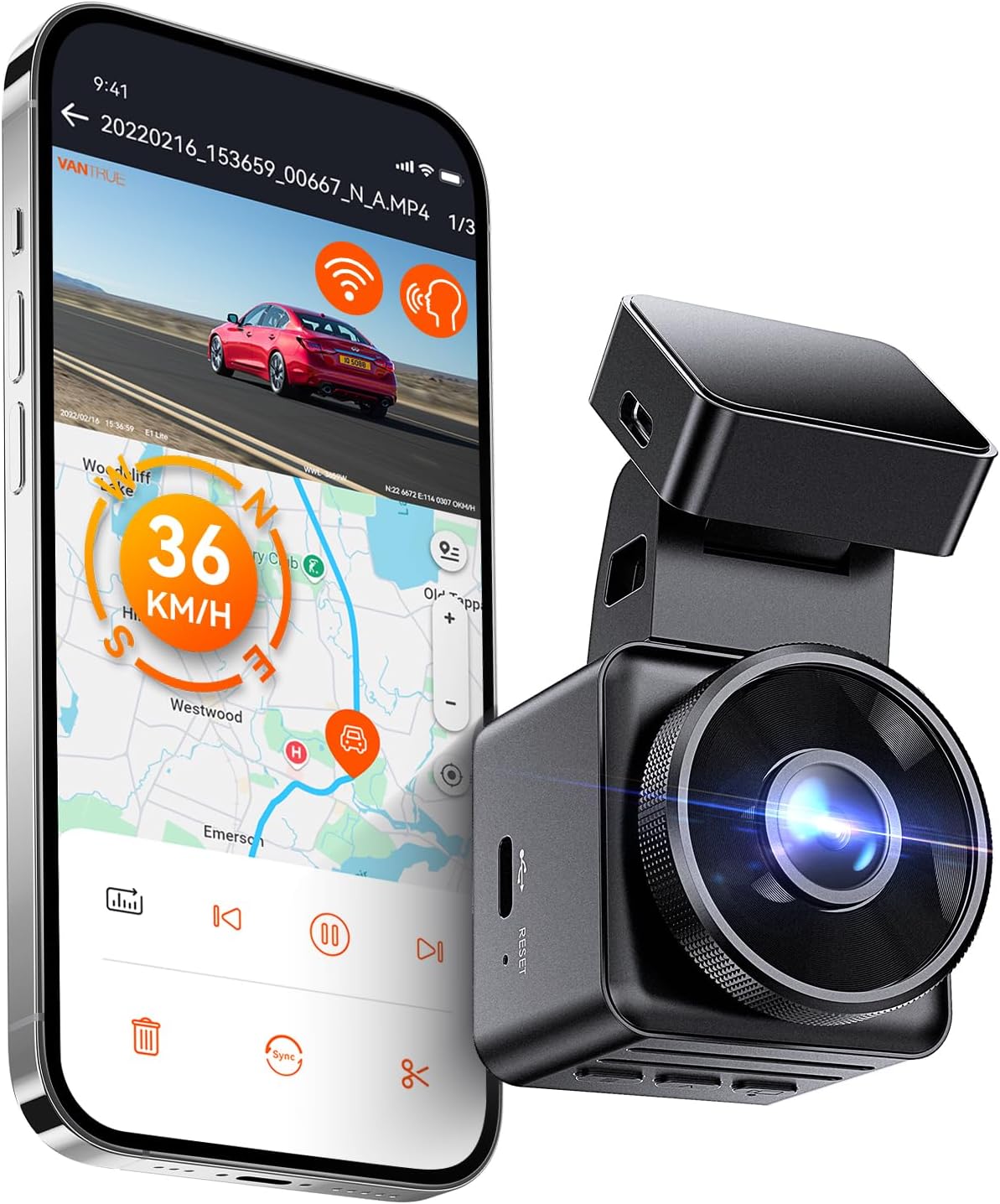
The VANTRUE E1 Lite is a compact front dash camera designed to sit unobtrusively behind the rearview mirror while capturing 1080p footage. It records at 30 fps with HDR and an f/1.8 aperture plus a wide field of view to improve night and high‑contrast scenes, making license plates and road detail easier to read. Built‑in GPS logs speed, location, and route so clips show time and place, and Wi‑Fi plus the Vantrue app lets you stream, download, and configure settings without removing the unit. Motion and collision detection with 24/7 parking guard give basic parked‑car surveillance when wired to a hardwire kit. Voice control and a small 1.54‑inch display add convenience for hands‑free commands and quick checks. Limitations: it records at 1080p/30 fps rather than higher frame rates or resolutions, and PD fast charging is not supported so you must use the supplied charger or a hardwire kit for parking mode operation.
Best for: Drivers who want a discreet, space‑saving dash cam that stays out of sight behind the mirror while still providing clear daytime and improved night recordings and GPS logging.
Less Ideal for: People who need 4K or high frame rate video for professional‑level evidence or those who want a built‑in fast charge option for power delivery without adding a hardwire kit.
- Compact, low‑profile housing suitable for mounting behind the mirror
- HDR and f/1.8 aperture improve low‑light and high‑contrast captures
- Built‑in GPS records speed and route for incident context
- Wi‑Fi and companion app allow live view, downloads, and configuration without PC
- 24/7 parking monitoring with motion and impact activation when hardwired
- Records at 1080p/30 fps so lacks higher resolution or frame rate capture options
Verdict: The best compact dash cam for drivers who prefer a discreet, space-saving unit that still delivers solid video and unobtrusive installation behind the rearview mirror.
5. REDTIGER F9 4K Dual Dash Cam (Front 4K + Rear 1080P)
Best Dual-Lens Dash Cam

| Video Capture Resolution | 2160p front, 1080p rear |
|---|---|
| Connectivity Technology | 5.8GHz Wi-Fi (app control) |
| Field Of View | 170 degrees |
| Parking Monitor | 24H (hardwire kit required) |
| Max Memory | Supports up to 256GB (microSD not included) |
The REDTIGER F9 is a dual-lens dash cam designed to capture high-resolution forward footage and a rear-facing view simultaneously. It records the front view in 4K and the rear in 1080p, using a 170 degree wide-angle lens and an F1.5 aperture to preserve detail in low light. The unit pairs with the REDTIGER app over 5.8GHz WiFi for faster transfers, live view, and on-phone playback, while built-in GPS tags speed and route data for use in incident review. Practical features include loop and lock recording, a G-sensor that secures collision clips, WDR for challenging lighting, and a parking mode that can monitor while parked when hardwired. The camera is compact enough to sit behind the mirror and ships with a long rear camera cable and Type-C charger, but a microSD card and an optional hardwire kit for full parking-mode operation are not included. Installation requires routing the rear cable and optionally hardwiring for 24H monitoring, so expect a moderate install effort for full functionality.
Best for: Drivers who need continuous front-and-rear coverage for evidence or monitoring and who want fast app-based access to high-resolution footage and route data.
Less Ideal for: Buyers looking for a plug-and-play parking solution without additional wiring or those who prefer a touchscreen interface on the main unit.
- True 4K front recording plus 1080p rear for clear forward and rear evidence
- 5.8GHz WiFi and app control for fast wireless transfer and easy playback
- Built-in GPS for speed and route logging to support incident review
- G-sensor and loop/lock recording automatically protect collision clips
- Compact, low-profile design that mounts behind the mirror and includes a long rear cable
- Parking mode requires a separate hardwire kit to run continuously while the vehicle is off
Verdict: The best dual-lens dash cam for buyers who want simultaneous front and rear (or cabin) recording to capture both forward events and what’s happening behind or inside the vehicle.
6. REDTIGER ViewClear 70 4K Front + 2.5K Rear Dual Dash Cam with STARVIS 2
Best 4K Dash Cam

| Video Capture Resolution | 2160p |
|---|---|
| Other Special Features of the Product | STARVIS 2 Sensor, Dual HDR, 24H Parking Monitor, Built-in GPS, 5.8GHz Wi‑Fi |
| Frame Rate | 30 FPS |
| Real Angle of View | 135 degrees |
| Included Memory Card Size | 128 GB |
The REDTIGER ViewClear 70 is a dual-channel dash cam built to capture high-detail evidence with a 4K front sensor and 2.5K rear sensor. It records continuously with loop recording and dual HDR to preserve license-plate and traffic-sign detail in mixed light, and the STARVIS 2 sensor plus Hyper Night processing helps retain color and clarity at night. Built-in 5.8 GHz Wi‑Fi 6 and a companion app let you download clips quickly, and onboard GPS logs speed and route data for incident verification. The 3-inch touchscreen and voice control make on-vehicle operation straightforward, and the package includes a 128 GB card plus long rear and power cables for tidy installation. For always-on parking surveillance the unit supports low-light parking guard and collision lock, though true 24-hour battery-free monitoring requires a hardwire kit. The removable bracket and rotatable lens simplify mounting and aiming on a Chevrolet S-10 windshield, but buyers should plan for a hardwire install if they want uninterrupted parking power and longer-term unattended recording.
Best for: Drivers who want the clearest possible dash-cam footage for incident evidence and plate reading on their Chevrolet S-10 and prioritize high-resolution, low-light performance.
Less Ideal for: Users who need a plug-and-play parking power solution out of the box or who prefer a simpler single-camera setup with minimal installation.
- True 4K front and 2.5K rear recording for excellent detail at distance
- STARVIS 2 sensor and dual HDR improve night and high-contrast footage
- Built-in 5.8 GHz Wi‑Fi 6 enables faster in-car downloads via app
- Includes 128 GB memory card and long rear cable for complete front/rear setup
- Touchscreen plus voice control simplifies on-device operation
- Parking mode requires a separate hardwire kit for uninterrupted 24-hour operation
Verdict: The best 4K dash cam for drivers who prioritize maximum clarity and detail in footage to improve evidence quality for incidents, plate reading, and long-distance capture.
7. 70mai T800E 4K 3-Channel Dash Cam (Front, Rear, Inside) with GPS and Wi‑Fi 6
Best Parking Mode Dash Cam

| Video Capture Resolution | 4K Front +1080P Rear+1080P Inside |
|---|---|
| Included Memory Card Size | 64 GB |
| Flash Memory Supported Size Maximum | 512 GB |
| Connectivity Technology | Wi-Fi 6 |
| Other Special Features of the Product | 24/7 Parking Monitoring with G-Sensor |
The 70mai T800E is a three-channel dash cam package that gives full coverage for a Chevrolet S-10 by recording the road ahead in 4K plus 1080p front-facing interior and rear streams. It mounts to the windshield and runs continuous loop recording to the included 64GB microSD card, while supporting up to 512GB for longer parking logs. The unit uses a supercapacitor for temperature resilience and a G-sensor to lock files on impact, and the interior camera can toggle infrared for clearer night cabin footage. Built-in five-mode GPS stamps speed and location data and Wi‑Fi 6 with the 70mai app speeds file transfers for downloading incidents. For parked protection it supports hardwire kits for true 24/7 monitoring and will record events triggered by motion or collision. Expect straightforward installation and voice or app control, though advanced parking monitoring requires wiring the optional hardwire accessory for low-power standby rather than relying on the cigarette lighter alone.
Best for: Chevrolet S-10 owners who prioritize continuous parked-vehicle protection and want a single system that records incidents around the truck while providing easy app access and GPS-verified evidence.
Less Ideal for: Drivers who need a simple plug-and-play dash cam without hardwiring or who will not install a hardwire kit for extended parked surveillance.
- Three-channel coverage capturing front (4K), rear (1080p) and interior (1080p) for complete incident documentation.
- Supercapacitor power design improves reliability in hot or cold climates and reduces battery-related failures.
- G-sensor emergency lock and parking monitoring mode protect and preserve footage from collisions or tampering.
- Built-in 5-mode GPS records precise location and speed for accurate incident context.
- Wi‑Fi 6 and app control enable faster file transfers and convenient remote access to footage.
- True continuous low-power parking mode needs an optional hardwire kit to avoid draining the vehicle battery.
Verdict: The best dash cam with parking mode for owners who want continuous or event-triggered recording while parked, using motion, impact detection, and low-power standby to protect their vehicle.
Choosing the Right Chevrolet S-10 Dash Cam: Key Factors to Consider
Video Resolution and Low-Light Performance
Clear daytime footage is essential for capturing license plates and incident details, but low-light performance matters for early morning, dusk, and nighttime driving. Look for a sensor that balances resolution and dynamic range so highlights and shadows remain readable across varied lighting conditions.
Higher resolutions like 1080p are often sufficient for identifying vehicles and signage at typical distances from the S-10, and a capable low-light sensor or aperture helps when street lighting is poor. Consider how compression and frame rate affect file size and clarity; a slightly lower resolution with better exposure handling can be more useful than a higher-resolution image that blows out highlights.
Mounting, Field of View, and Placement
The S-10 has a compact dashboard and steep windshield rake on some model years, so an unobtrusive mount that keeps the camera out of your sightline is important. A compact dashboard camera or low-profile suction mount helps maintain visibility and prevents glare from being recorded into the lens.
Field of view affects how much of the road and nearby lanes the cam records. A wider angle captures more context but can distort plates at the edges; a moderate FOV reduces distortion while still covering adjacent lanes and intersections. Check mounting height and cable routing options so the lens does not get blocked by the rearview mirror or factory trim.
Power Options and Wiring
Decide whether you want a plug-and-play solution using the vehicle power outlet or a hardwired setup for parking and 24/7 protection. Hardwiring offers continuous parking surveillance but requires a clean fuse-tap installation and space behind interior panels. For S-10 owners who prefer minimal interior modification, a discreet cigarette-plug setup with optional hardwire kit compatibility is often best.
Also consider voltage spike protection and automatic ignition sensing so the camera turns on and off with the truck. Proper wiring reduces battery drain risks and ensures the unit functions reliably across short trips and long drives.
Storage Management and Loop Recording
Loop recording is the standard way dash cams manage storage by overwriting old footage once the card is full. Ensure the camera supports reliable loop recording with configurable segment length and protected-file locking for incidents. Compatibility with common microSD card sizes and easily accessible card slots makes file retrieval simpler.
Consider how the device handles corrupted files and sudden power loss. A camera with robust file integrity features and a clear method to mark and protect important clips reduces the risk of losing evidence after an accident.
Parking Mode and Motion Detection
Parking mode allows the camera to monitor the vehicle while parked and trigger recording on motion or impact. For S-10 owners who park on the street or in public lots, a unit with buffered parking recording or time-lapse modes can conserve battery while capturing key events.
Some systems use built-in G-sensors to capture collisions, while more advanced units pair motion detection with low-power draw modes. Evaluate whether the camera requires a hardwire kit for parking mode and how it mitigates battery drain.
Connectivity and Usability
Wi-Fi enabled dash cams permit quick file transfer to a phone for reviewing or sharing clips, which is convenient after an incident. However, built-in Wi-Fi adds settings complexity, so check for intuitive apps and firmware update paths. A simple local playback and clear menu system on the camera itself can be more reliable than an app-dependent workflow.
Consider physical controls, screen size for reviewing footage on the unit, and the availability of firmware updates. Good documentation and accessible customer support improve long-term ownership experience.
Installation Tips for the S-10 Windshield and Dash
Position the dash cam behind or just adjacent to the rearview mirror to keep it out of sight and avoid obstructing the driver view. Test the angle to ensure the horizon is roughly centered in the frame so the road ahead is properly captured without excessive sky or dash reflection.
Use the shortest tidy cable route along the headliner and A-pillar trim, tucking the wire into the panel gap where possible. If hardwiring, locate a fused ignition source that powers off with the truck to prevent battery drain, and use a multimeter to verify the correct fuse before tapping.
- Clean the windshield with alcohol before mounting for secure adhesive hold.
- Run the cable down the passenger side A-pillar if the mirror blocks the driver side.
- Test different heights to avoid dashboard glare and reflection into the lens.
Balancing Field of View With Plate Legibility
A wide field of view captures more of the road and adjacent lanes, useful for multi-lane incidents, but can reduce the readable detail at longer distances. For the S-10, which is often used in mixed urban and highway driving, choose a lens angle that keeps license plates legible within 30 to 50 feet.
If you frequently encounter highway speeds, prioritize a camera that maintains clarity at 60 mph. Adjust mounting height and tilt to optimize plate capture directly ahead rather than at the extreme edges of a fisheye view.
- Moderate FOV reduces distortion while keeping useful context.
- Higher frame rates may help with fast-moving scenes but increase storage use.
- Consider test recordings at your typical routes to confirm legibility.
Using Dual Camera Setups in a Compact Truck Cabin
Front and rear dash camera setups provide continuous coverage and are especially useful if you want parking surveillance or a record of rear-impact events. In the S-10, rear camera routing is simplified because of the short cab and rear window placement, but you must ensure the rear camera does not obstruct rearview sightlines.
A compact rear camera module or an integrated dual-lens unit is often easier to install without extensive cable runs. Confirm the placement gives a clear, centered view of the rear window and that cab trim does not create blind spots or reflections in the recorded image.
- Use thin, flexible cables for neat routing across the cab.
- Secure the rear module with adhesive pads or a small bracket to prevent vibration.
- Test both front and rear synchronization to ensure timestamps align for incident reconstruction.
Maintaining and Managing Recordings
Regularly back up important clips to a computer or cloud storage to prevent accidental deletion during loop overwrite. Create a simple folder structure and label incident files by date and location to speed retrieval when needed.
Format the microSD card in the camera monthly or as recommended to reduce the risk of corrupted segments. Keep a spare, pre-formatted card on hand to swap immediately after an incident to avoid overwriting crucial footage.
- Mark critical clips as protected to prevent loop deletion.
- Rotate and reformat cards periodically for reliability.
- Use the camera app or a card reader to make backups after long trips.
Common Installation Pitfalls to Avoid
Avoid mounting too low on the windshield where dashboards and vents reflect into the lens, creating glare. Extremely high placements can capture too much sky and lose detail on the road. A midline placement near the mirror is typically best for the S-10.
Do not rely solely on adhesive pads without verifying long-term hold, especially in hot climates. Check the adhesive after the first few days and resecure if necessary. Also, avoid routing power cables where they can interfere with airbags or door mechanisms.
- Test recordings at night to ensure headlights are not causing bloom.
- Confirm that rearview mirror adjustments do not block the camera.
- Label hardwire connections to simplify future maintenance.
How We Chose the Best Chevrolet S-10 Dash Cam
We focused on features and installation characteristics that matter specifically for Chevrolet S-10 owners and trucks with similar dashboard layouts. Our selection criteria prioritized consistent video clarity at typical driving speeds, reliable loop recording and file management, mounting options suited to a compact dashboard and windshield angle, and straightforward power options for both continuous and ignition-triggered recording.Concretely we evaluated sensor resolution and low-light performance, field of view and lens placement to avoid blind spots on a truck cab, build quality and heat tolerance for cabin temperatures, and connectivity features like Wi-Fi for quick file transfer. We also considered ease of installation, including whether the unit supports hardwiring or uses a low-profile cigarette-plug run compatible with common S-10 interiors.We excluded products that required extensive custom modifications, units lacking configurable loop or parking modes, and cameras with consistently poor user reviews for reliability. Final picks weigh practical owner experience, real-world feature sets, and installation practicality over marketing claims.
Our full evaluation process is outlined in our review methodology.
FAQ
Will a dash cam void any factory warranty on my S-10?
Installing a dash cam typically does not void a vehicle warranty, but modifications that damage vehicle wiring or components could create issues. Use proper fuse-tap methods or professional installation for hardwiring to avoid disputes.
Can I install a dash cam myself in the S-10?
Yes, many owners complete a plug-and-play installation using the vehicle power outlet and a clean adhesive mount. Hardwiring requires more skill and panel work, so consider a professional if you are uncomfortable with fuse tapping or interior trim removal.
How much storage do I need for daily driving in an S-10?
Storage needs depend on resolution and recording settings. For 1080p continuous recording with standard loop segments, a 32 to 64 GB microSD card is usually sufficient for regular use, while longer highway trips or higher frame rates may benefit from larger cards.
Is parking mode reliable without hardwiring?
Most plug-in setups cannot provide true 24/7 parking surveillance without a hardwire kit or external battery. Some cameras support time-lapse parking or low-power motion detection when hardwired, which reduces battery drain while offering coverage.
How do I preserve footage after an accident?
Immediately mark the clip as protected if the camera provides that function, or stop the camera and remove the microSD card to prevent loop overwrite. Back up the file to a separate device to ensure it is preserved for insurance or law enforcement.
Do dash cams work well in extreme heat inside the S-10 cabin?
Many dash cams are designed to tolerate elevated cabin temperatures, but extreme heat can shorten electronic lifespan and cause adhesive failure. Choose a unit rated for higher operating temperatures and park in shaded areas when possible.
Final Verdict
For Chevrolet S-10 owners, prioritize clear daytime and low-light video, a mounting approach that keeps the camera out of your line of sight, and reliable power options that match how you use the truck. Decide whether you need parking surveillance or simply front-only protection, and weigh the convenience of plug-and-play setups against the fuller coverage of a hardwired install.Focus on practicality: pick a camera with good file management, straightforward installation for the S-10 cabin, and the video quality to capture important details at typical driving speeds. That approach will give you dependable recording without unnecessary complexity, helping you choose confidently based on how you use your S-10.
