

Note: This article contains affiliate links. If you click on these links and make a purchase, I may earn a small commission at no extra cost to you. This helps support my research and content. Read my full affiliate disclosure here.
If you drive a 2018–2024 Toyota Camry, a dedicated dash cam can protect you from unfair claims, capture incidents, and document memorable road trips. Choosing the right 2018-2024 Toyota Camry dash cam matters because windshield angle, cabin layout, and mounting clearances affect footage framing and installation ease. This guide shortlists seven top options that fit the Camry's windshield and interior, focusing on what matters most to owners: daytime and nighttime video quality, mounting footprint, power and parking modes, and simple setup. Below you will find practical guidance to help you pick the right unit and understand the tradeoffs before the product details.
Looking for other parts? See all Toyota Camry parts & accessories.
Top Picks at a Glance
| Best Overall Dash Cam Reliable, all-around dash cam balancing quality, features, and value | UTRDYSRH 3-Channel Dash Cam for Toyota Camry (Front, Rear, Interior) with 2" Screen and 64GB Card |  |
| Best Budget Dash Cam Affordable basic dash cam focusing on simplicity and essential recording | 70mai A500S 2.7K Front Dash Cam with Sony IMX335 and Built-in GPS |  |
| Best Compact Dash Cam Low-profile, discreet dash cam designed for minimal visibility | COOAU D30S Dual 4K Dash Cam with Built‑in GPS and Wi‑Fi |  |
| Best Dual-Channel Dash Cam Two-channel system capturing synchronized front and rear footage | FITCAMX Dual HD Dash Cam (Front 1440P / Rear 1080P) for Toyota Camry 2021–2024 |  |
| Best 4K Dash Cam Ultra-high-resolution front camera for maximum detail and clarity | mangoal 4K Dash Cam (Model A) — Custom Fit for Toyota Camry/Hybrid 2021–2024 |  |
| Best Parking-Mode Dash Cam Advanced parking-mode recording with motion and impact-triggered events | REDTIGER F17 3-Channel 4K Dash Cam (Front/Inside/Rear) with GPS and Wi‑Fi |  |
| Best Premium Dash Cam Top-tier dash cam with advanced features, build quality, and connectivity | mangoal 4K STARVIS 2 Dash Cam — Custom Fit for Toyota Camry (2018–2020) |  |
UTRDYSRH 3-Channel Dash Cam for Toyota Camry (Front, Rear, Interior) with 2" Screen and 64GB Card
Best Overall Dash Cam

| Display Size | 2-inch |
|---|---|
| Camera Count | 3 |
| Front Viewing Angle | 170° |
| Power Input | 5V 1.5–2A |
| Storage Included | 64GB TF card |
This 3-channel dash cam records the road ahead, the rear, and the cabin simultaneously to give balanced coverage for everyday driving in a Toyota Camry (2018–2024). It mounts to the windshield and powers from the car, starting automatic loop recording and saving footage to the included 64GB TF card. The 170 degree front lens plus 120 degree interior and rear lenses reduce blind spots around intersections and while changing lanes, and a night-vision mode improves low-light visibility for commutes and evening trips. Practical features include continuous overwrite loop recording so you do not need to manage files constantly and a compact footprint that keeps the unit from blocking the view. Limitations to note are the small 2-inch screen for playback and reliance on the included TF card and wiring for rear camera setup, which may require careful routing during installation. For routine recording and incident documentation in a Camry, it offers a straightforward multi-angle solution.
Best for: Camry drivers who want a reliable, easy-to-install all‑around dash cam that records front, rear, and interior views for daily commuting, road trips, and incident documentation without fuss.
Less Ideal for: Users who need large on-device screens for reviewing footage or those unwilling to run wiring for a rear camera should consider simpler single-camera units or professional installation options.
- Three simultaneous channels capture front, rear, and interior views for comprehensive coverage
- Wide 170° front and 120° side/rear angles reduce blind spots and capture more surrounding traffic
- Includes 64GB TF card and supports loop recording for continuous unattended operation
- Night vision optimization helps maintain usable footage in low-light driving conditions
- Small 2-inch display limits on-device playback clarity and menu navigation
- Rear camera requires cable routing and connection during installation which may need time
Verdict: The best all-around dash cam choice for most owners that balances video quality, reliability, parking protection, ease of installation, and value for typical daily driving and incident capture.
70mai A500S 2.7K Front Dash Cam with Sony IMX335 and Built-in GPS
Best Budget Dash Cam

| Video Capture Resolution | 1944p |
|---|---|
| Field Of View | 140 Degrees |
| Frame Rate | 30FPS |
| Flash Memory Type | microSD |
| Screen Size | 2 Inches |
The 70mai A500S is a compact front dash cam aimed at everyday drivers who want clearer-than-1080p footage plus basic smart features. It records 2592×1944 (2.7K) at 30 FPS with a Sony IMX335 sensor, a large f/1.8 aperture and multi-layer optics, which improves low-light detail and helps capture license plates and signage at night. The unit mounts with an adhesive plate, has a 2-inch IPS screen for on-device playback and pairs with the 70mai app over Wi‑Fi so you can preview and download clips and update firmware OTA. Built-in GPS logs route and speed while ADAS provides lane departure and forward collision warnings for extra situational awareness. Loop recording, emergency lock and optional hardwire support allow 24-hour parking detection when wired to constant power. Downsides are periodic app transfer slowness for long clips and sensitivity to microSD card compatibility and formatting — using a recommended U1 or better card and occasional formatting helps. The camera is straightforward to install and delivers strong night and daytime video for typical commuting and evidence capture needs.
Best for: Camry drivers looking for an affordable, easy-to-install dash cam that delivers clear daytime and improved night footage, straightforward app control, and basic safety features like GPS and ADAS for reliable incident recording without complexity.
Less Ideal for: Users who need a dual-channel packaged system out of the box or who want instant, fast wireless exports of long clips without using a card reader; professional fleet buyers may need higher-end solutions.
- High-resolution 2.7K front recording with Sony IMX335 sensor for clearer daytime and improved night footage
- Built-in GPS and route logging for speed and location overlay
- ADAS warnings add an active safety layer while driving
- Wi‑Fi app control with OTA updates makes previewing and sharing clips convenient
- Supports 24-hour parking monitoring when hardwired and has emergency lock to protect incidents
- App export of longer video clips can be slow
- Can be picky about microSD card compatibility and may require reformatting occasionally
- Parking mode requires an additional hardwire kit to enable continuous monitoring
Verdict: The best low-cost dash cam for Camry owners who want reliable incident recording and simple features without spending much, prioritizing ease of use and basic video clarity.
COOAU D30S Dual 4K Dash Cam with Built‑in GPS and Wi‑Fi
Best Compact Dash Cam

| Video Capture Resolution | 4K front or 2.5K+1080p dual @30fps |
|---|---|
| Field Of View | 170° front / 150° cabin |
| Connectivity Technology | Wi‑Fi, App control |
| Flash Memory Type | microSD up to 256 GB |
| Power | Supercapacitor (no battery) |
The COOAU D30S is a compact dual dash camera designed to record the road ahead and the vehicle interior simultaneously. It mounts to the windshield behind the rearview mirror and records either single-front 4K or dual-channel 2.5K front plus 1080p cabin footage at 30 fps, with wide 170° and 150° fields of view. Key real-world features include built-in GPS to stamp speed and location, Wi‑Fi and an app for downloading clips without removing the card, loop recording with G‑sensor locking for accident evidence, and infrared cabin LEDs for usable night interior footage. The unit uses a supercapacitor for temperature resilience and supports microSD cards up to 256 GB. Practical limits: the camera uses a micro‑USB power connector, the parking monitoring function requires an additional hardwire kit to run with the engine off, and some users report intermittent app reliability, so retrieving footage via the SD card or USB is a useful fallback. The small 1.5-inch screen and compact profile make it easy to tuck out of sight on a Camry windshield while still capturing broad coverage.
Best for: Drivers who prioritize a low‑profile, windshield‑mounted dash cam that tucks behind the rearview mirror for minimal distraction and clean interior appearance, especially Camry owners wanting discreet front-and-cabin coverage for rideshare, family trips, or daily commuting.
Less Ideal for: Buyers who need a plug‑and‑play parking recorder without extra wiring or who require flawless phone app connectivity for everyday footage access.
- Dual-channel recording captures both front and cabin views for rideshare or family trips
- High-resolution front recording (4K single or 2.5K dual) improves plate and sign legibility
- Built-in GPS logs speed and location for stronger incident records
- Parking monitoring and G‑sensor auto-lock protect evidence when parked with hardwire kit
- Supercapacitor design improves heat tolerance and long-term reliability
- Parking mode requires separate hardwire kit to function with engine off
- Micro‑USB power connector instead of newer USB‑C standard
- Some users report inconsistent behavior with the companion app, so wireless features may be unreliable
Verdict: The best small, low-profile dash cam for drivers who want unobtrusive mounting and a discreet footprint that won't block sightlines or clash with interior styling.
FITCAMX Dual HD Dash Cam (Front 1440P / Rear 1080P) for Toyota Camry 2021–2024
Best Dual-Channel Dash Cam

| Compatible Vehicle Style | Toyota Camry 2021-2024 |
|---|---|
| Front Video Resolution | 1440P |
| Rear Video Resolution | 1080P |
| Connectivity Technology | Wi-Fi (2.4GHz) |
This FITCAMX dash cam is a factory-style dual recorder made to integrate cleanly into Toyota Camry models from 2021 through 2024. It mounts in the rearview mirror area to preserve a low-profile look and records front footage at 1440P and rear at 1080P, both at 30fps, with an f/1.6 aperture and WDR to help in low-light situations. Built-in WiFi and a companion app let you view live video and download clips to your phone without removing the card, while loop recording and a G-sensor capture and protect incident files automatically. The unit ships with a 64GB card, installation tool, and cable for a mostly complete installation. Because it is tailored for specific Camry roof and mirror housings, expect a near-OEM fit and concealed wiring when installed, but it will not fit Camry models outside the 2021–2024 range. Buyers should also plan for a professional or careful DIY install to get the integrated look and reliable power connections.
Best for: Camry drivers who want full front-and-rear coverage for clear, usable evidence in collisions or incidents and prefer a factory-style, discreet installation that integrates with a phone app for quick footage access.
Less Ideal for: Drivers who need a universal dash cam for multiple vehicles or owners of Camry models outside the 2021–2024 range should look elsewhere.
- Vehicle-specific design that integrates into the mirror area for a low-profile, factory-like appearance
- Dual-channel recording with front 1440P and rear 1080P plus WDR for improved night clarity
- Built-in 2.4GHz WiFi and companion app for live view and easy footage download
- Includes 64GB memory card and installation tool for a near-complete out-of-box setup
- Compatibility limited to Toyota Camry 2021–2024 and not compatible with 2025–2026 models
Verdict: The best front-and-rear dash cam system for buyers who need simultaneous high-quality recording of both the road ahead and rear traffic for comprehensive evidence in accidents.
mangoal 4K Dash Cam (Model A) — Custom Fit for Toyota Camry/Hybrid 2021–2024
Best 4K Dash Cam

| Compatible with Vehicle Type | Toyota Camry & Camry Hybrid 2021–2024 (Model A) |
|---|---|
| Video Capture Resolution | Front 4K 2160P |
| Connectivity Technology | Wi-Fi |
| Included Memory Card Size | 128 GB |
| Control Method | App |
This mangoal Model A dash cam is a custom-fit front recorder built to sit behind the rearview mirror and blend with the factory trim on 2021–2024 Camry and Camry Hybrid (Gen8) models. It captures UHD 2160P/30fps video with a STARVIS IMX335 CMOS sensor and an f/1.8 aperture for improved low-light performance, and it offers loop recording, G-sensor event locking, parking monitoring, and built-in microphone and speaker. Installation is aimed at a clean OEM look using the car's lane-assist plug power adapter so wiring is concealed, but placement is model-specific and the cover clips can be fiddly during install. Built-in WiFi and a free app let you preview and download footage directly to a smartphone, though the app preview is compressed and full-quality clips must be accessed from the camera file area or by removing the microSD card. The unit ships with a microSD card and supports cards up to the specified maximum, but buyers should confirm the exact Camry submodel before ordering since the wrong variant will not fit or install correctly.
Best for: Drivers of 2018–2024 Toyota Camry and Camry Hybrid (Gen8, Model A) who need the highest-resolution front footage to capture license plates, road signs, and fine detail for evidence or insurance, and who prefer a factory-integrated look with app control and parking monitoring.
Less Ideal for: Drivers who need a universal plug-and-play recorder for multiple car models or who want remote WiFi access to the camera from outside the vehicle.
- Custom-fit design integrates behind the mirror for a factory-installed appearance
- 4K 2160P front recording with STARVIS IMX335 sensor and f/1.8 aperture for better low-light capture
- Built-in WiFi and app control for easy file preview and downloads on a smartphone
- Parking monitor, G-sensor event locking, and loop recording provide continuous protection
- Model-specific wiring and internal clip positions mean incorrect variant will not install
- App preview is compressed so full-resolution playback requires downloading files or using the SD card
- Installation can be fiddly and the mounting clips may be delicate if repeatedly removed
Verdict: The best dash cam offering 4K front recording for drivers who prioritize maximum detail in license plates, signs, and fine image clarity in varied lighting conditions.
REDTIGER F17 3-Channel 4K Dash Cam (Front/Inside/Rear) with GPS and Wi‑Fi
Best Parking-Mode Dash Cam
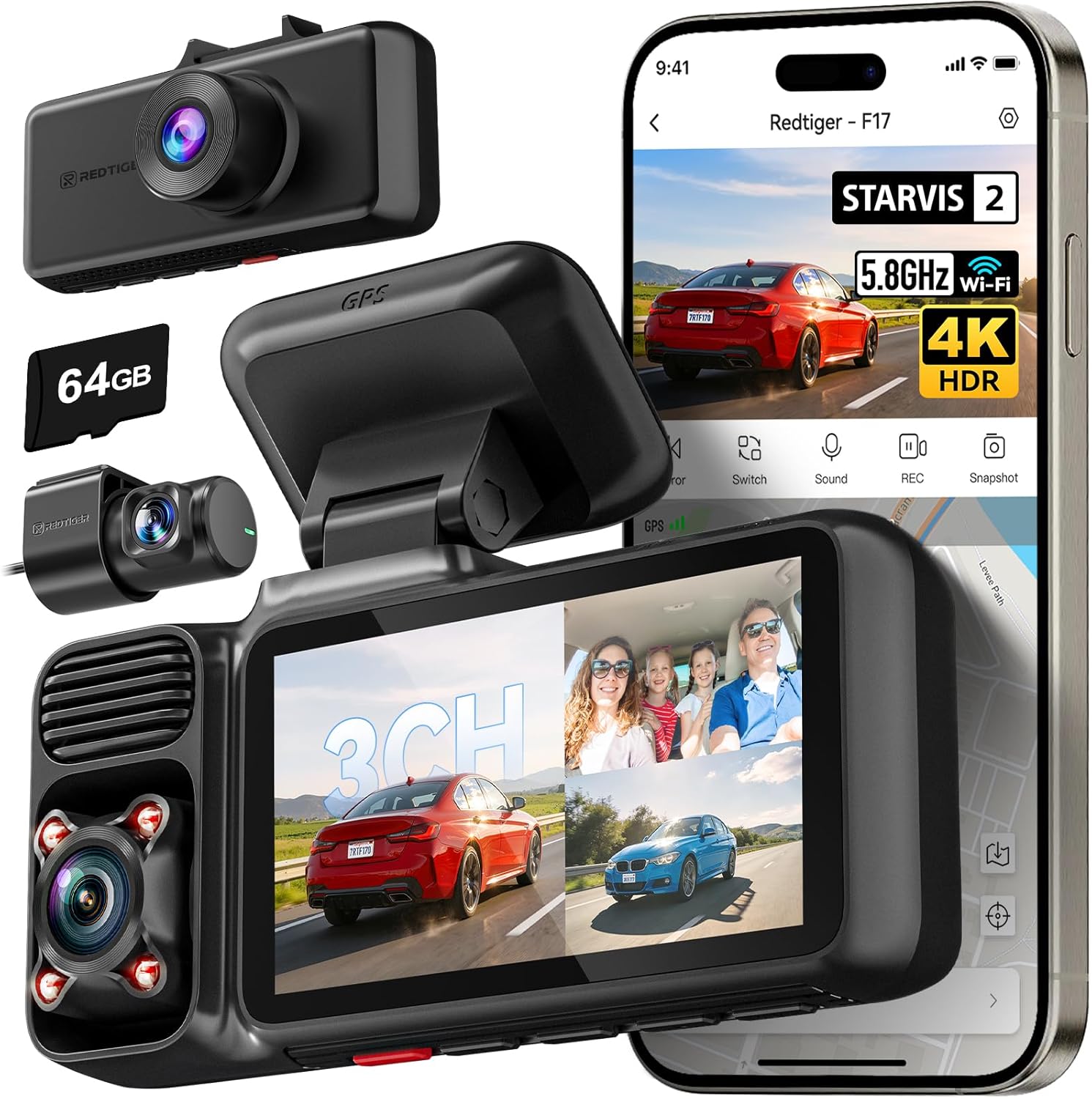
| Video Capture Resolution | 2160p (front) + 1080p (inside/rear) |
|---|---|
| Field Of View | Front 150° / Cabin 160° / Rear 155° |
| Wi‑Fi | 2.4GHz and 5GHz (app control) |
| Included Memory Card Size | 64 GB |
| Power Backup | Supercapacitor |
The REDTIGER F17 is a three-camera dash cam system built to record front, cabin, and rear views simultaneously, using a STARVIS 2 IMX675 4K front sensor and 1080p interior and rear sensors. It mounts to the windshield and is typically powered from the vehicle so it starts and stops with the ignition; the included long cables make clean routing to the rear straightforward in sedans like the Camry. Notable features are a 3-inch built-in display for setup and playback, dual-band 5GHz Wi‑Fi for faster transfers to the REDTIGER app, integrated GPS for speed and route stamping, WDR/HDR for improved dynamic range, and a supercapacitor for better heat tolerance than battery-backed units. The F17 supports parking monitoring via a hardwire kit, loop recording, and G-sensor event locking for collision saves. Practical limitations include occasional user reports of SD-card compatibility issues and some power-connection sensitivity that may require a firm harness or hardwiring for full reliability; advanced features like touchscreen or voice control are not present. For a three-channel system this package balances image quality and convenience for everyday and fleet use in mid-size sedans.
Best for: Camry owners who prioritize unattended protection and want a triple-channel system that records collisions and motion while parked, with reliable hardwire-compatible parking modes and a supercapacitor for safe operation in hot or cold conditions.
Less Ideal for: Users who need a touchscreen interface, voice control, or a simple single-camera plug-and-play unit should consider simpler models instead.
- True 3-channel recording (front 4K plus interior and rear 1080p) for full coverage
- STARVIS 2 IMX675 front sensor with WDR/HDR improves low-light and high-contrast footage
- Built-in GPS and 5GHz Wi‑Fi let you tag routes and quickly transfer recordings to the app
- Supercapacitor power design withstands hot cabin temperatures better than battery-backed units
- Included long cabling and adhesive mount make installation and clean routing easier in sedans
- Some users report SD card recognition or formatting problems with higher-capacity cards
- Power plug/cable can be sensitive to vibration unless hardwired for a stable connection
Verdict: The best dash cam with reliable parking-mode features and impact/motion detection for Camry owners who want unattended collision and vandalism recording while the vehicle is parked.
mangoal 4K STARVIS 2 Dash Cam — Custom Fit for Toyota Camry (2018–2020)
Best Premium Dash Cam

| Compatible Vehicle Type | Toyota Camry & Camry Hybrid 2018 2019 2020 (Model B) |
|---|---|
| Video Capture Resolution | Front 4K |
| Connectivity Technology | Wi-Fi |
| Field Of View | 150 Degrees |
| Frame Rate | 30 |
This mangoal dash cam is built to replace a factory-style unit behind the rearview mirror on Toyota Camry 2018–2020 models, delivering 4K front video using STARVIS 2 sensors for clearer daytime and low-light footage. It connects to your phone over faster 5GHz Wi-Fi and is controlled via the mangoal app for live preview and quick downloads. The unit supports an external GPS module for speed and route logging, has built-in microphone and speaker, loop recording, G-sensor triggered event files, and a parking monitor for surveillance while parked. Installation is simplified by the vehicle-specific fit and the included lane-assist plug power adapter, which hides wiring for a clean look. Limitations to note are that GPS requires the separate external module to record location data and the camera records front-only by default unless you add a compatible rear unit. For Camry owners wanting an integrated appearance and high-resolution front footage, this balances image quality and in-car convenience, but plan for the optional GPS or rear camera if you need full trip logging or dual-channel recording.
Best for: Buyers of 2018–2020 Toyota Camry or Camry Hybrid seeking a top-tier, factory-style dash cam with best-in-class 4K daytime and low-light recording, advanced GPS and app connectivity, and a clean OEM fit behind the mirror for a seamless installation and daily driving security.
Less Ideal for: Drivers who need built-in GPS tracking or out-of-the-box dual-channel recording should consider a different model or plan to buy the optional modules and a rear camera.
- True 4K front recording with STARVIS 2 sensor for improved daytime and night detail
- Custom-fit design that mounts behind the mirror for a factory-like, hidden installation
- 5GHz Wi-Fi and app control for faster live preview and file transfer to a smartphone
- Built-in parking monitor, G-sensor, loop recording, and mute function for practical daily use
- GPS is not built-in and requires the included external module to log speed and route
Verdict: The best higher-end dash cam for buyers willing to pay more for top-tier video quality, advanced driver-assist features, superior build quality, and extensive connectivity options.
Choosing the Right 2018-2024 Toyota Camry Dash Cam: Key Factors to Consider
Video Resolution and Sensor Performance
Resolution determines how much detail the camera captures, but sensor quality and lens calibration matter more for real-world footage. A 1080p dash cam often provides adequate detail for license plates at medium distances when paired with a high-quality sensor. For the Camry, prioritize consistent motion handling and clarity in both daytime and nighttime driving conditions.
Good low-light sensor performance reduces bloom around headlights and improves detail at dusk or under street lighting. Consider cameras with wide dynamic range or HDR processing to handle bright headlights and shaded areas at the same time. If you frequently drive at night or in poorly lit areas, sensor sensitivity and noise control can be more consequential than headline megapixel counts.
Mounting Size and Windshield Fit
The Camry's windshield curvature and driver sightlines mean a compact dashboard camera and a low-profile mount will offer cleaner installation and less visual obstruction. Bulky units can interfere with lane sensor fields or obstruct the rearview mirror area.
Look for slim designs that sit close to the glass and mounts that allow the camera to tuck behind the mirror housing. Adhesive and suction mounts vary in stability; adhesive mounts usually provide a neater, permanent installation while suction mounts let you move the camera between vehicles. Consider how the mount and cable routing will work with the Camry's A-pillar and headliner to keep the install tidy and discreet.
Power Options and Parking Mode
Power strategy affects continuous protection and battery health. Hardwiring to the Camry's fuse box with a dedicated low-voltage cutoff adapter enables true 24/7 parking surveillance without draining the car battery. Alternatively, a hardwire kit with timer or motion trigger conserves battery but still captures impacts.
Some owners use a separate battery pack to isolate the dash cam from the vehicle battery. If you regularly park for extended periods, confirm the camera's parked-mode current draw and whether the unit supports motion-triggered recordings or time-lapse parking. Reliable auto start/stop behavior when the vehicle powers on or off is crucial for consistent coverage.
Storage, Loop Recording and File Management
Loop recording keeps the camera recording continuously by overwriting the oldest files, but you want a dash cam that segregates event clips so crucial footage is not lost. Ensure the unit supports sufficient microSD card sizes and uses file systems compatible with the camera to prevent file corruption.
Look for clear file structure or an easily accessible event-lock button that protects important clips from being overwritten. Some cameras also support automatic cloud backup via Wi-Fi, which can be useful if you need off-site copies. Consider how easy it is to remove and read the memory card or transfer files via an app, since convenient access matters after an incident.
Field of View and Camera Placement
Field of view affects what the camera captures at the sides and how much of the road ahead is visible. A wider angle records more context but can distort license plates at the edges and reduce detail per pixel. For the Camry, choose a field of view that captures a balanced carriageway width without excessive fisheye distortion.
Placement on the windshield will change the perspective. Mounting slightly behind the rearview mirror gives a centered view while minimizing dashboard reflections. If you plan to use a front and rear dash camera setup, ensure the front camera's placement does not block the rear camera's sightlines or complicate cable routing to the rear hatch or trunk area.
Connectivity and Ease of Use
Wi-Fi and smartphone apps speed up clip review and configuration, but they must be stable and intuitive. For quick evidence retrieval after an incident, an app that previews, downloads, and shares clips without fuss is valuable.
Menu navigation and physical buttons also matter when you need to lock a clip on the fly. Consider whether the camera's setup process fits your comfort level: some units have straightforward on-screen menus while others rely heavily on an app. Look for clear status indicators for recording, GPS lock, and parking mode so you know the unit is functioning as expected.
Why a Dash Cam Suits the Camry's Interior
The 2018–2024 Toyota Camry has a fairly flat dashboard and a windshield angle that lends itself to compact, low-profile dash cams. This makes it easy to install a front-facing unit behind the rearview mirror without blocking sightlines or driver-assist sensors.
A properly positioned dash cam minimizes reflections from the dashboard and keeps the camera out of the driver's peripheral view. Neat cable routing along the A-pillar and headliner preserves cabin aesthetics and reduces the risk of snagging the cable when entering or exiting the vehicle.
- Mount behind the rearview mirror to keep the camera centered and discreet.
- Tuck cables into the headliner and A-pillar covers for a factory look.
- Choose a compact dashboard camera to avoid interference with view or sensors.
Front and Rear Camera Setup: What to Expect
If you want coverage of both forward and rear incidents, a front and rear dash camera configuration provides a useful record of what happens behind and ahead. Rear camera routing typically runs along interior trim or under floor mats depending on the Camry's configuration.
When planning a dual-camera install, check that the rear camera's cable length and connectors are compatible with the route you intend to use. Also consider whether the rear camera is intended for the rear window or the cabin; rear-window mounts reduce interior obstructions and provide a clear external view.
- Verify cable length for a clean run to the rear window without stretching connectors.
- Test rear camera placement to avoid rear defroster lines or heavy tint obstructing the view.
- Ensure both cameras have synchronized timestamps for accurate event reconstruction.
Installation Tips for a Clean, Reliable Mount
Start by positioning the camera so it does not obscure the driver's view or the lane-assist sensors. Clean the windshield with an alcohol wipe where the adhesive will sit and allow the adhesive to set per the manufacturer's guidelines. If using a suction mount, pick a stable spot and check it periodically for shifting.
For a neat professional look, route the power cable up the A-pillar and under the headliner, down toward the fuse box or 12V outlet. Use trim tools to avoid damaging clips when tucking the wire. Label which fuse you use if you hardwire, and follow the vehicle's electrical guidelines to preserve warranty and avoid unnecessary drains.
- Use adhesive mounts for permanent, vibration-free mounting.
- If you hardwire, include a low-voltage cutoff to protect the Camry battery.
- Test the camera angle before finalizing the adhesive to ensure clear plate-level framing.
How to Evaluate Nighttime Footage
Nighttime performance is often the deciding factor between similar dash cams. Evaluate footage for noise levels, contrast around headlights, and the ability to record readable license plates under street lighting. Look for sample clips recorded in suburban streets and highways to see how the camera handles different lighting.
Also pay attention to headlight flare and overexposure from oncoming traffic. Cameras with dynamic range processing or HDR tend to retain more detail in bright and dark areas simultaneously. For Camry owners who drive late or on poorly lit roads, prioritize consistent nighttime clarity over slightly higher daytime resolution.
- Review sample night clips to check license plate legibility at various distances.
- Look for footage that balances highlight control and shadow detail.
- Consider cameras with adjustable exposure or WDR settings to tune performance.
Maintenance and Long-Term Reliability
Periodic maintenance keeps your dash cam dependable. Clean the lens area to avoid smearing and check that the mount adhesive remains secure over temperature changes. If your device uses microSD cards, replace them after extended use as cards have finite write cycles.
Keep firmware updated from the manufacturer to address bugs and add features. Verify backup procedures and test the event-lock function occasionally to ensure critical clips are protected. Proper maintenance reduces the chance of false negatives when you need footage most.
- Inspect and clean lens and windshield mounting area every few months.
- Reformat the microSD card periodically according to the camera's guidelines.
- Install firmware updates to maintain recording stability and features.
Still looking for the perfect fit?
Select your Toyota Camry configuration to see the most relevant Dash Cams recommendations
How We Chose the Best 2018-2024 Toyota Camry Dash Cam
We prioritized practical, vehicle-focused criteria to identify dash cams suited to the 2018–2024 Toyota Camry. First, video performance: we looked for consistently sharp daytime footage and usable low-light recording at intersections and highways. Second, mounting and fit: compact units and low-profile mounts that do not obstruct the Camry's windshield view or interfere with driver-assist sensors were favored. Third, power and parking features: reliable parking/impact detection and low-current draw options were important for owners who park on the street or use battery-saving adapters. Fourth, recording reliability: loop recording behavior, automatic file integrity on power loss, and robust file management were considered. Fifth, connectivity and convenience: Wi-Fi or easy file transfer for reviewing clips, plus straightforward menu systems and mobile app stability. We excluded devices that require complex dash disassembly to install, camera units with inconsistent firmware support, or those lacking parking-mode capability for at least basic event recording. The selection emphasizes real-world usability for Camry owners rather than headline specifications alone, and it favors units with clear instructions for clean mounting and power routing compatible with the Camry's interior.
Our full evaluation process is outlined in our review methodology.
FAQ
Will a dash cam affect my Camry's driver-assist sensors?
Usually not if the camera is mounted behind the rearview mirror and kept compact. Avoid placing the unit over sensor housing or in the direct line of sight of cameras and sensors. Proper positioning and a low-profile mount prevent interference.
What microSD card size and class should I use?
Use a high-endurance microSD card rated for continuous video recording and follow the camera's recommendations for maximum capacity. Cards in the 64–256 GB range are common; higher capacities give longer continuous recording before overwriting.
Can I hardwire a dash cam into the Camry without voiding warranty?
Hardwiring itself does not automatically void warranty, but improper installation that alters vehicle wiring or causes electrical faults could. Use a reliable hardwire kit, follow Toyota's electrical guidelines, and consider having the work done by a professional if unsure.
How do parking modes impact battery life?
Parking modes that use motion-triggered recording or low-current monitoring consume less power than full-time recording. Using a hardwire kit with a low-voltage cutoff prevents battery drain by shutting the camera off before the vehicle battery drops below a safe level.
Is Wi-Fi on the dash cam necessary?
Wi-Fi is convenient for quickly downloading clips and adjusting settings from your phone, but it is not essential for core recording functions. If you regularly need to share footage, Wi-Fi simplifies the process, though direct microSD access is a reliable alternative.
Where is the best place to mount a rear camera in the Camry?
Mount the rear camera high on the rear windshield to maximize the external view and minimize obstructions from headrests. Keep it away from the defroster lines and ensure the mount does not interfere with the rear parcel shelf or interior trim.
Final Verdict
For the 2018–2024 Toyota Camry, prioritize a compact dash cam that delivers clear daytime footage, reliable nighttime performance, and a low-profile mount that tucks behind the rearview mirror. Balance your need for front and rear coverage with practical installation concerns like cable routing and power options. Decide whether parking mode, hardwiring, or a separate battery best matches your parking habits, and choose a unit whose file management and connectivity make evidence retrieval straightforward. Focusing on these tradeoffs will help you select a dash cam that protects you on the road without compromising the Camry's interior aesthetics.
Explore More:
- Check out all Toyota Camry parts & accessories
- Explore Electronics
- Browse all Accessories
