

Note: This article contains affiliate links. If you click on these links and make a purchase, I may earn a small commission at no extra cost to you. This helps support my research and content. Read my full affiliate disclosure here.
If you want clearer sound, easier controls, or modern smartphone integration in your Toyota Avalon, choosing the right car stereo matters. The wrong unit can leave you with poor audio performance, limited features, or a difficult install. This guide highlights seven shortlisted car stereos that cover a range of use cases, from simple audio upgrades to full-feature head units with touchscreen interfaces.We evaluated options based on audio quality, compatibility with Toyota Avalon dash fitment, installation complexity, connectivity features, and control ergonomics. Read on to find the type of unit that matches your priorities and driving habits.
Looking for other parts? See all Toyota Avalon parts & accessories.
Top Picks at a Glance


1. VECHTEL Android 15 9" Car Stereo for Toyota Avalon (2006–2010) with Wireless CarPlay and Backup Camera

| Display Size | 9 Inches |
|---|---|
| Operating System | Android 15 |
| Memory | 4GB RAM + 64GB ROM |
| Camera | AHD backup camera, 170-degree |
| Bluetooth | Bluetooth 5.0 |
This VECHTEL unit replaces the factory radio in Toyota Avalon models from 2006 to 2010 and brings a modern 9-inch 1280×720 touch display running Android 15. It provides wireless CarPlay and Android Auto for hands-free navigation and calls, Bluetooth 5.0 for media streaming, built-in GPS with WiFi for online or offline maps, and a 32-band EQ for sound tuning. The package includes an AHD backup camera with 170-degree view and night vision and retains steering wheel control compatibility so common driving tasks stay convenient. Installation requires matching the center console shape but once fitted the system behaves like a full infotainment upgrade with split-screen and app support for everyday use. Limitations to consider are the need to confirm exact dash fit before ordering and that advanced features depend on proper wiring and occasional software updates from the maker rather than factory support.
Best for: A reliability-focused buyer who wants a durable, modern infotainment upgrade for a Toyota Avalon 2006–2010 that emphasizes dependable connectivity and navigation over trend-driven extras.
Less Ideal for: Drivers who prefer factory-supported OEM updates or need plug-and-play compatibility without any dash modifications should consider alternatives.
- Wireless CarPlay and Android Auto for hands-free navigation and messaging
- Includes AHD backup camera with wide 170-degree angle and night vision
- Android 15 system with 4GB RAM and 64GB storage supports apps and offline maps
- Supports steering wheel controls and Bluetooth 5.0 for seamless in-car use
- Fitment depends on center console shape and may require modification or professional install
- Feature reliability and future updates depend on vendor support rather than factory channels
Verdict A practical infotainment replacement that modernizes a 2006–2010 Toyota Avalon with wireless CarPlay/Android Auto and a backed-up camera while prioritizing dependable connectivity and navigation.
2. Kenwood KDC-BT23 Single-DIN Bluetooth Car Stereo Receiver

| Chassis Size | single-din |
|---|---|
| Display Type | LED |
| Wireless Remote | No |
| Warranty | 1 year |
The Kenwood KDC-BT23 is a compact single-DIN receiver that brings Bluetooth hands-free calling and audio streaming, a CD player, front USB and 3.5mm auxiliary inputs, and basic preamp outputs to a factory dash. In a Toyota Avalon it is typically installed to replace an aging factory radio and restore smartphone connectivity, Pandora/Spotify control over Bluetooth, and a simple, easy-to-read LED display that blends with the dash. The unit offers 4-channel amplification with modest RMS power and adjustable EQ controls so you can tune the cabin sound without adding an amplifier. Notable conveniences include detachable faceplate for theft deterrence, CD text and MP3 ID3 tag display, and dual phone connection for switching between drivers. Limitations are its single-DIN size so a pocket or mounting kit may be needed for full dash fit, the dated LED interface lacks touchscreen features, and connectivity options are limited compared with modern multimedia receivers that offer CarPlay/Android Auto and larger displays.
Best for: Practical, convenience-driven buyers who want to restore smartphone audio, Bluetooth calling, and basic media playback in their Toyota Avalon without replacing the whole dash or adding complex features.
Less Ideal for: Drivers who want a factory-style touchscreen interface, seamless CarPlay/Android Auto integration, or a visually modern multimedia center should consider a double-DIN upgrade instead.
- Built-in Bluetooth for hands-free calling and wireless audio streaming.
- Front USB and 3.5mm auxiliary inputs for easy phone or media playback.
- Detachable faceplate for theft deterrence and simple controls that match factory aesthetics.
- Adjustable EQ and preamp outputs let you tune sound or add amplifiers/subwoofers later.
- Single-DIN form factor may require a mounting kit or leave unused dash space in some Avalon trims.
- No modern touchscreen, CarPlay, or Android Auto support compared with newer head units.
Verdict A straightforward, convenience-focused single-DIN upgrade that adds Bluetooth and basic media inputs to a Toyota Avalon but lacks modern touchscreen features.
3. ikasus 9" Android 13 Double-Din Car Stereo with CarPlay/Android Auto for Toyota Avalon (2013–2018)

| System | Android 13 |
|---|---|
| Display Size | 9 Inches |
| RAM | 2GB |
| ROM | 32GB |
| Screen resolution | 1280×720 |
This ikasus 9-inch double-din unit replaces the factory head unit in a Toyota Avalon (2013–2018) and brings Android 13 functionality plus wired CarPlay/Android Auto support to the dash. It is typically used as a daily-driver infotainment upgrade for navigation, media playback, hands-free calling, and backup camera input. Notable features include a 1280×720 capacitive touchscreen, built-in WiFi and Bluetooth 5.0, GPS navigation with 2D/3D maps, dual-zone audio so navigation and media can run separately, and AHD/CVBS camera input for high-definition rear view. Practical benefits include faster app responsiveness from the quad-core CPU and 2GB RAM, local media playback from USB or external drives, and steering-wheel control compatibility for safer operation while driving. Limitations to consider are modest RAM which can constrain heavy multitasking, and the need to verify harness fitment and possibly buy adapters for a perfect plug-and-play install; the backup camera is not included. Expect a significant infotainment upgrade for everyday driving but plan for a careful install and occasional software quirks common to third-party Android head units.
Best for: Performance-oriented owners who prioritize a responsive, feature-rich infotainment experience and want modern smartphone integration and navigation for their Avalon.
Less Ideal for: Buyers seeking a fully plug-and-play swap without any wiring checks or those who want the highest-end processing head unit for intensive app multitasking should consider higher-spec alternatives or professional installation services.
- Designed specifically for Toyota Avalon 2013–2018 ensuring dash integration and steering-wheel control support
- Built-in WiFi, Bluetooth 5.0, and GPS for online navigation, streaming, and hands-free calling
- Supports wired CarPlay and Android Auto to mirror phone apps and provide navigation/voice control
- Dual-zone audio allows music playback while using navigation without interrupting sound
- AHD camera input and 1080p video support for sharper backup camera imaging
- Only 2GB of RAM can limit heavy multitasking and future-proofing
- Backup camera is not included so buyers must purchase a compatible camera separately
Verdict A practical, performance-minded infotainment upgrade for Toyota Avalon owners who want modern smartphone integration and navigation without replacing the whole dash.
4. Oskkude 9" Android 13 Double Din Car Stereo for Toyota Avalon (2005–2010)
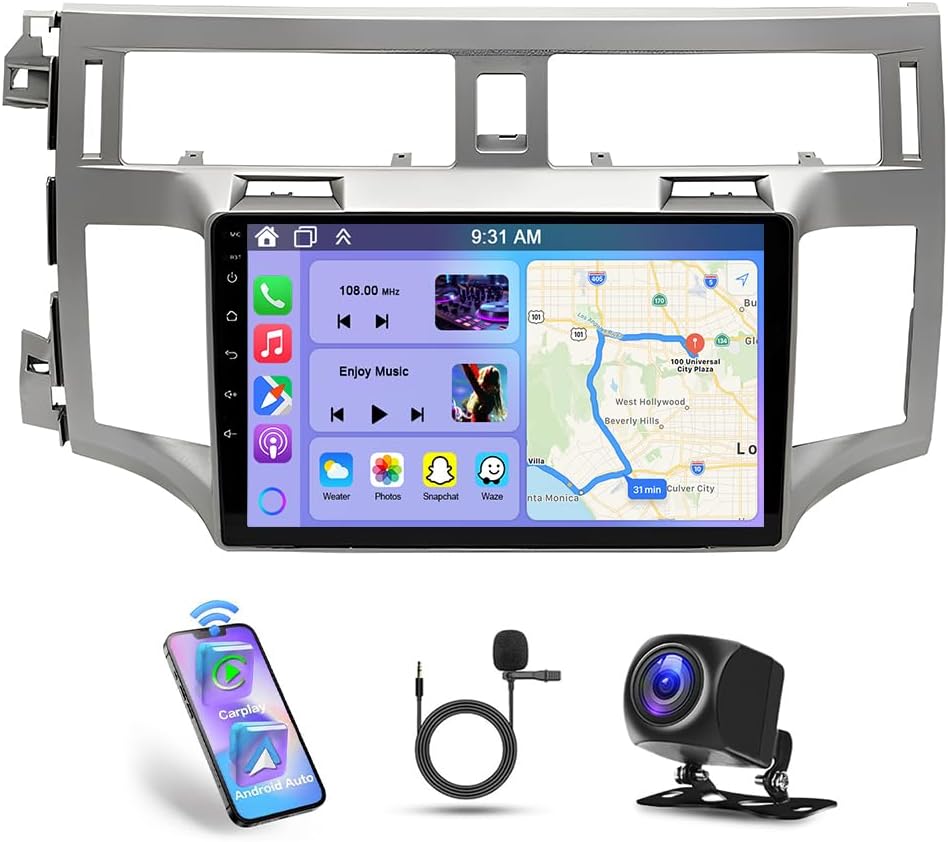
| Operating System | Android 13 |
|---|---|
| Display Size | 9 Inches |
| Memory | 2GB RAM + 32GB ROM |
| Compatibility | Toyota Avalon 2005-2010 |
| Backup Camera | AHD with 170° wide view |
This Oskkude double-din replaces the factory stereo in Toyota Avalon models from 2005 through 2010 and turns the dash into an Android-based infotainment hub. It runs Android 13 on a 9-inch IPS touchscreen with 2GB RAM and 32GB storage, supports wireless CarPlay and wired Android Auto, and includes WiFi, built-in GPS with offline North America maps, Bluetooth and USB/SD/AUX inputs. Typical use is daily driving navigation, hands-free calling, and media playback with an optional AHD backup camera feeding a 170 degree night-vision view when reversing. The unit also integrates with steering wheel controls so basic functions are accessible without taking hands off the wheel. Limitations to expect are modest onboard memory and RAM compared with modern flagship players, and installation may require trimming or harness adapters to match Avalon's dash and steering wheel wiring. The included camera and features make this a strong value for owners who want smartphone integration and navigation without spending much on a premium head unit.
Best for: Budget-conscious owners who want modern smartphone integration, navigation and a backup camera in a Toyota Avalon 2005–2010 without paying for a premium brand-name head unit.
Less Ideal for: Drivers who demand high-performance audio processing, extensive app storage, or the fastest Android responsiveness should consider higher-spec models instead.
- Designed specifically to fit Toyota Avalon 2005–2010 dash for a near-seamless install
- Wireless CarPlay plus wired Android Auto for simple phone integration and voice control
- Built-in GPS with offline North America maps and WiFi for online navigation and app downloads
- Includes AHD backup camera with night vision and wide 170° view for safer reversing
- Only 2GB RAM and 32GB storage, which can limit multitasking and app storage compared with higher-end units
- May require vehicle-specific wiring harness, dash trim, or additional adapters for a clean factory-like installation
Verdict A cost-conscious way to add wireless CarPlay, Android Auto, GPS and a backup camera to a Toyota Avalon 2005–2010, with reasonable features for the price but limited RAM and storage.
5. IIWEY iK7 10" Portable Wireless CarPlay Screen with 4K Dash Cam and 1080P Backup Camera

| Screen size | 10 inches |
|---|---|
| Screen resolution | 1600 x 600 |
| Dash cam | 4K front |
| Rear camera | 1080P rear camera |
| Included storage | 64GB SD card |
The IIWEY iK7 adds Apple CarPlay and Android Auto to a Toyota Avalon without removing the factory head unit by offering a detachable 10-inch touchscreen that mounts with a suction cup or 3M pad. It pairs wirelessly with phones for navigation and media and includes AirPlay and Miracast mirroring so maps and apps display full-size on a 1600×600 panel. The unit also records a 4K forward dash cam and a 1080P backup camera that activates on reverse, which is useful for parking and incident recording. Setup is largely plug-and-play and the package includes a 64GB SD card and mounting hardware so you can get it running in most Avalon cabins quickly. Expect clear audio from Bluetooth or AUX and simple voice control via Siri or Google Assistant. Limitations to note are the portable design instead of full dash integration, which can look less seamless than a factory replacement, and occasional reports of minor firmware or calibration quirks that may need vendor support or updates.
Best for: Risk-averse mainstream Toyota Avalon owners who want a low-risk, noninvasive upgrade that adds wireless CarPlay, dashcam recording, and a bigger screen without changing the factory stereo.
Less Ideal for: Drivers seeking a factory-quality in-dash replacement or a fully integrated OEM look should consider a professional dash swap instead.
- Wireless Apple CarPlay and Android Auto for hands-free navigation and media control
- Integrated 4K front dash cam plus 1080P rear camera for continuous recording and reverse assist
- Large 10-inch touchscreen with high resolution improves map legibility and mirror-screen viewing
- Comes with mounts and a 64GB SD card for immediate installation and recording
- Multiple connection options including Bluetooth, USB and Wi-Fi for audio and file transfer
- Portable mount style is not a built-in dash replacement and may obstruct some sightlines or look non-factory
- Some users report occasional firmware or time-reset issues that can require updates or support
Verdict An easy, low-risk way for a Toyota Avalon to gain wireless CarPlay, a large touchscreen, and built-in dashcam/backup camera without replacing the factory head unit.
6. ZERTRAN 9" Android Car Stereo with CarPlay/Android Auto and Backup Camera for Toyota Corolla Matrix 2003–2008

| Display Resolution | 1280×720 |
|---|---|
| RAM | 4G |
| ROM | 64G |
| Display Type | 2.5D QLED capacitive |
This ZERTRAN 9-inch Android head unit swaps into Toyota dashboards to add a large touchscreen, wired backup camera, and smartphone integration via CarPlay and Android Auto. It runs a quad-core Android system with 4GB RAM and 64GB storage, supports WiFi and Bluetooth, and uses a 1280×720 QLED capacitive display for clearer maps and media. Typical use is daily driving in a Toyota where you want modern navigation, hands-free calling, streaming audio, and steering-wheel control retention. The bundle includes a GPS antenna, external mic, USB harnesses, RCA camera lead, and a 720p AHD reverse camera, which simplifies installation and gives immediate rearview video. Practical benefits are the roomy screen, built-in mirror-link and dual-screen options, and the ability to keep steering wheel buttons working for safer control. Important limitations are that original factory cameras or amplifiers may need extra adapters or CANBUS confirmation, the radio metadata display is limited on some stations, and some steering control buttons or rare factory features might not be fully compatible without additional modules.
Best for: Practical optimizers who want a cost-effective way to modernize a Toyota's infotainment with touchscreen navigation, smartphone integration, and an included backup camera without buying a dealer-level unit.
Less Ideal for: Drivers seeking a plug-and-play factory-identical replacement for every OEM feature or those who need guaranteed compatibility with original amplifiers and proprietary camera setups.
- Built-in wired CarPlay and Android Auto for native navigation and media integration
- Includes GPS antenna, external mic, USB cables, install kit, and a 720p AHD reverse camera
- 4GB RAM and 64GB storage for responsive operation and app storage
- Large 9-inch 1280×720 QLED capacitive screen improves visibility for maps and media
- Supports steering wheel control and mirror-link for safer in-drive operation
- May require extra CANBUS adapter or camera replacement to work with factory amplifiers or original cameras
- Some radio stations do not display metadata like song titles
- Certain special steering wheel buttons or OEM functions might not be fully supported
Verdict A budget-friendly way to give a Toyota a modern 9-inch touchscreen, CarPlay/Android Auto, and backup camera, but confirm amplifier and original-camera compatibility before buying.
7. BOSS Audio Systems BCP62-RC 6.2" Car Stereo with Apple CarPlay and Backup Camera

| Display resolution | 800 x 480 |
|---|---|
| Display size | 6.2 inch |
| Connectivity technologies | Auxiliary, Bluetooth, USB |
| Special features | Apple CarPlay, Backup Camera Included, Touchscreen |
The BOSS BCP62-RC is a double-din replacement head unit that brings wired Apple CarPlay, Bluetooth hands-free calling, USB and auxiliary inputs, and a bundled rear camera to a Toyota Avalon dash. Installation is typical for a double-din unit and is best handled by a shop familiar with Avalon dash trim and wiring; once installed the touchscreen is responsive and the physical volume knob makes everyday use simple. CarPlay connects over the rear USB port for phone mirroring and Siri control, letting you run navigation, media, and messages through the factory speakers with steering-wheel control support when an interface module is added. The included backup camera can display automatically in reverse and there are front and subwoofer preamp outputs for adding amps or an auxiliary camera. Downsides to expect are occasional fitments quirks during wiring, limited camera cable length in some truck-style runs, and reports of intermittent camera or CarPlay failures over long-term use, so plan for professional installation and routing to avoid heat or wiring issues.
Best for: A balanced all-round Toyota Avalon buyer who wants a cost-effective factory-style upgrade that adds Apple CarPlay, a touchscreen, and a backup camera without chasing premium audiophile features.
Less Ideal for: Drivers seeking factory-quality longevity or advanced Android Auto support should consider higher-end units or products explicitly verified for long-term reliability in their Avalon.
- Wired Apple CarPlay integration for native iPhone apps and Siri control.
- Capacitive 6.2-inch touchscreen with a physical volume knob for intuitive operation.
- Includes a rear backup camera and external microphone in the box.
- Multiple inputs and outputs including USB, aux, front/rear/subwoofer preamp outputs for upgrades.
- Support for steering-wheel controls via a separate interface module.
- Reported occasional long-term reliability issues such as CarPlay or camera dropouts.
- Rear USB requirement for CarPlay may require dash modifications or a USB extension for convenient routing.
- Backup camera cable length can be short for some vehicle routing runs, requiring an extension.
Verdict A budget-friendly double-din replacement that adds Apple CarPlay and a backup camera to a Toyota Avalon, but plan for professional installation and occasional troubleshooting.
Choosing the Right Toyota Avalon Car Stereo: Key Factors to Consider
Physical Fit and Dash Compatibility
Fit matters because a clean, secure installation depends on matching the unit size and mounting style to the Avalon dash. Double DIN head units will occupy more vertical space and may require a different trim kit than single DIN units. Some models need additional mounting brackets or fascia adapters to achieve a factory look.
Considering fit up front reduces the risk of gaps, loose panels, or dashboard modifications. It also affects the ease of accessing wiring harnesses and the availability of factory steering-wheel control adapters, which can preserve convenient in-car controls.
Audio Performance and Sound Tuning
Core audio quality influences how much of an upgrade you feel after installation. Look at preamp output levels, equalization options, built-in crossovers, and signal-to-noise ratio to gauge clarity and headroom. Units with flexible tone controls or parametric EQ let you tailor sound to your speakers and cabin acoustics.
If you plan to add an external amplifier or subwoofer, check for preamp outputs and gain controls. Better onboard DSP features can reduce the need for external processors while enabling better balance between bass, mids, and highs.
Smartphone Integration and Connectivity
Modern in-car connectivity affects safety and convenience. Apple CarPlay or Android Auto support lets you access navigation, calls, and media with familiar interfaces. Bluetooth audio streaming, hands-free calling, and multiple USB inputs matter for daily use and passenger flexibility.
Also consider whether the unit supports wireless connections or requires a wired link, and whether it offers multiple device profiles. The ease of pairing and call quality can vary, so choose a unit whose connectivity style matches how you use your phone while driving.
User Interface and Controls
Controls determine how easily you interact with the stereo while driving. Touchscreen displays can simplify navigation but should be responsive and readable in sunlight. Physical buttons and knobs offer tactile feedback for common functions like volume and track skipping.
Evaluate screen size, touch sensitivity, and menu layout. If you rely on steering-wheel controls, confirm compatibility or the availability of adapter modules to retain those functions after installation.
Installation Complexity and Wiring
Installation effort influences total project time and whether you can DIY or need professional help. Consider whether the stereo uses standard wiring harnesses, requires a dash removal, or needs additional adapters for antenna, amplifiers, or OEM camera inputs. Some units offer plug-and-play harnesses that simplify installation, while others demand splicing and custom mounting.
Factor in the time to route wiring, mount the unit securely, and test all functions. If you want to preserve factory features like backup cameras or parking sensors, check for dedicated inputs and retainers.
Expandability and Future-Proofing
Think about how the stereo will fit into future upgrades. Units with preamp outputs, camera inputs, and auxiliary outputs make adding amplifiers, subwoofers, or cameras easier. Software update support and modular accessory ecosystems extend longevity.
Choosing a unit with adaptable connections and firmware update capability reduces the need to replace the head unit as your needs evolve. Also consider whether the unit supports common streaming codecs and media formats to ensure compatibility with future devices.
FAQ
Will a double DIN head unit fit my Toyota Avalon?
Many Toyota Avalon models can accept a double DIN head unit, but fit depends on the dashboard layout and trim. You may need a dash fascia adapter and possibly relocation brackets. Check the specific dash opening dimensions and whether adapter kits exist for your model year before purchasing.
Can I keep my steering-wheel audio controls after installing a new stereo?
Often you can retain steering-wheel controls using a compatible adapter module that translates the vehicle signals to the new unit. Compatibility varies by model and year, so verify adapter availability and confirm programming steps to ensure the controls operate correctly after installation.
Is professional installation necessary for a car stereo upgrade?
Professional installation is not always necessary, but it can simplify integration and preserve factory features. DIY installation is feasible if you are comfortable with dashboard disassembly and wiring harnesses. Choose professional help if you want guaranteed fit, camera retention, or complex audio system wiring.
How do I ensure good sound quality after upgrading the head unit?
Start by matching the head unit outputs to your speaker and amplifier capabilities. Use the unit's EQ and time-alignment features to tune sound for the cabin. Also confirm proper grounding and secure connections to avoid noise issues. If needed, add a small amplifier or DSP for clearer control over frequency response.
Will aftermarket head units support my backup camera?
Many aftermarket head units include dedicated camera inputs and trigger wires to support factory or aftermarket backup cameras. Confirm the unit has the correct input type and resolution compatibility. You may need an adapter or retention harness to connect the factory camera without cutting factory wiring.
What connectivity features should I prioritize for daily driving?
For everyday use prioritize reliable Bluetooth for hands-free calls and streaming, plus a straightforward smartphone integration method such as wired or wireless projection. Multiple USB ports and persistent device pairing improve convenience. If you frequently use navigation, CarPlay or Android Auto compatibility is especially useful.
How We Chose the Best Toyota Avalon Car Stereo
We focused on units that are compatible with the Toyota Avalon dashboard and that deliver clear real-world benefits for drivers. Our selection criteria emphasized audio performance, including signal-to-noise ratio and tonal balance; physical fit and mounting options specific to the vehicle dash; connectivity features such as Bluetooth streaming, wired and wireless smartphone integration, and auxiliary inputs; and installation complexity including harness compatibility and required trim or dash modifications.We also considered user-facing controls and screen usability for touchscreen models, plus expandability for external amplifiers or cameras. Units that required excessive fabrication, lacked basic modern connectivity, or were known to have persistent reliability issues were excluded. The final shortlist balances sound quality, feature set, and practical installability for typical DIY installers and professional installers alike.
Our full evaluation process is outlined in our review methodology.
Conclusion
An effective Toyota Avalon car stereo upgrade balances physical fit, audio performance, and the connectivity features you use most. Prioritize units that match your dash opening and offer the audio outputs or DSP tools needed to get the sound you want.Weigh installation complexity against feature gains, and plan for expandability if you think you will add amplifiers, subwoofers, or cameras later. Focusing on fit, sound tuning, and reliable connectivity will lead to a satisfying long-term upgrade.
Explore More:
- Check out all Toyota Avalon parts & accessories
- Explore Electronics
- Browse all Accessories
