

Note: This article contains affiliate links. If you click on these links and make a purchase, I may earn a small commission at no extra cost to you. This helps support my research and content. Read my full affiliate disclosure here.
If you want clearer audio, better phone integration, and a dash that looks modern, upgrading the Scion tC car stereo can make a noticeable difference. Choosing the right unit affects how music, navigation, and calls perform while driving and how the dash fits and finishes after installation.This guide highlights seven shortlisted options that fit Scion tC dashboards and focuses on compatibility, audio quality, installation considerations, and connectivity features. Read on to see which types of units match your needs and which factors we evaluated for these top picks.
Looking for other parts? See all Scion tC parts & accessories.
Top Picks at a Glance


1. Orlog 7" Car Stereo with Wireless CarPlay & Android Auto for Scion tC

| Screen Size | 7 Inches |
|---|---|
| Connectivity | Apple CarPlay, Android Auto, Bluetooth, USB, AUX |
| Bluetooth Version | 5.2 |
| Audio Output | 4 x 50W |
| Touch Screen Type | Capacitive |
This Orlog 7-inch in-dash stereo is a direct-fit replacement designed to upgrade Scion tC infotainment with modern smartphone integration and improved sound control. It installs using the supplied plug-and-play wiring harness and keeps steering wheel functions, making it suitable for a straightforward factory-style swap. The unit offers wireless and wired Apple CarPlay and Android Auto, Bluetooth 5.2 for hands-free calling and streaming, USB/TF/AUX inputs, and a backup camera input for safer reversing. Audio is handled by a 4x50W output with a built-in DSP and 32-band EQ, which lets you tailor the sound to factory speakers without adding external processors. The 7" QLED capacitive touchscreen (1280×720) supports 1080p video playback and dims with the vehicle lights for night driving. Trade-offs to consider are that vehicles with a factory J-BL system require an additional harness and protocol box to retain full speaker decoding, and advanced installers may want separate amplifiers for louder systems. For reliability-first buyers the emphasis is on the solid integration and hardware features rather than high-end audiophile output.
Best for: Practical, reliability-focused owners who want a factory-style infotainment upgrade with modern smartphone integration and simple installation.
Less Ideal for: Buyers seeking a high-power aftermarket audio system or those who prefer a fully custom install with external amplifiers and components.
- Plug-and-play wiring harness keeps installation simple and preserves steering wheel controls
- Wireless and wired Apple CarPlay and Android Auto for seamless phone-based navigation and media
- Built-in DSP with 32-band EQ and 4×50W output improves sound without extra gear
- Backup camera input and bright 7" QLED capacitive touchscreen with 1280×720 resolution
- Not directly compatible with vehicles that have the factory J-BL audio system without buying an extra harness and protocol box
Verdict A reliable, vehicle-specific touchscreen upgrade that brings wireless CarPlay/Android Auto and solid sound control to the Scion tC while keeping installation simple.
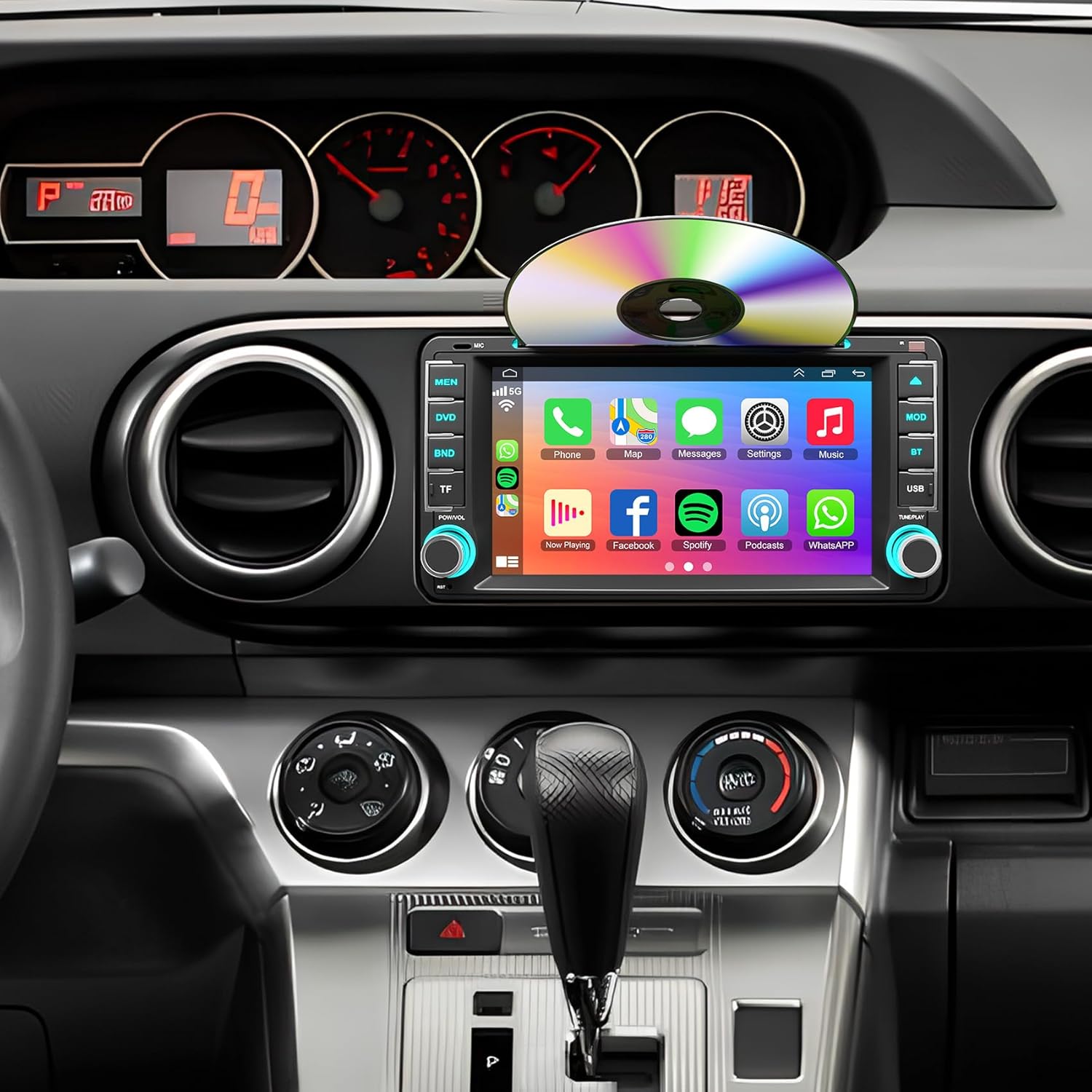
2. B4U 7-Inch Car Stereo for Scion tC (2005–2016) with CD/DVD, CarPlay & Android Auto
| Compatible Models | Scion tC 2005-2016 |
|---|---|
| Display Resolution | 1280×720 |
| Connectivity Technology | Bluetooth |
| Built-In Media | CD/DVD player & backup camera included |
This B4U 7-inch head unit replaces the factory radio in Scion tC (2005–2016) to add smartphone integration, hands-free calling, media playback and a backup camera. It is typically installed in-dash and connects to your phone via wired or wireless CarPlay/Android Auto or Bluetooth, while still offering a CD/DVD player for those who want discs. Notable features include a high-resolution 1280×720 QLED touchscreen, mirror link for iOS and Android, steering wheel control support and an included HD night-vision backup camera with microphone and wiring harness. In practice it modernizes older interiors, provides easy access to navigation and streaming apps, and adds reversing visibility. Expect mixed fitment: several owners report trim or mounting hole adjustments may be needed for a flush install, and some units show intermittent software glitches such as touch offset, occasional freezes, or inconsistent wired CarPlay performance. The unit includes many cables and mounting hardware so you can complete a one-stop install, but buyers who want flawless factory-fit and rock-solid software should be prepared to spend time troubleshooting or consider professional installation.
Best for: Convenience-driven buyers who want to modernize a Scion tC without replacing factory dash trim and prioritize smartphone access, simple media playback, and an all-in-one install solution.
Less Ideal for: Buyers seeking a perfect factory-quality fit or rock-solid, guaranteed software performance should consider higher-end, vehicle-specific replacements or professional installation options.
- Adds wired and wireless CarPlay/Android Auto for easy phone apps and navigation
- Built-in CD/DVD player preserves disc playback not found on many modern units
- Includes HD rear view camera, microphone and necessary wiring for a single-bundle install
- High-resolution 1280×720 touchscreen and steering wheel control support for convenient operation
- Fitment may require trimming or bracket modification to sit flush in some dashboards
- Some users report intermittent touchscreen calibration, software freezes, or unreliable wired CarPlay connections
Verdict A budget-friendly way to add CarPlay/Android Auto, CD/DVD playback and a backup camera to a Scion tC, but expect possible fitment tweaks and occasional software quirks.
3. RONGJI 9" Android Touchscreen Head Unit for Toyota Scion tC (2005–2010)

| Screen Size | 9 Inches |
|---|---|
| Operating System | Android |
| Memory Storage Capacity | 64 GB |
| Touch Screen Type | Capacitive |
| Connectivity Technology | Wireless |
This RONGJI 9-inch head unit replaces the factory radio in the Scion tC and brings a modern Android infotainment experience with navigation and plenty of connectivity. It runs Android with 2GB RAM and 64GB storage, a 1280×720 capacitive IPS screen, and supports wireless and wired CarPlay and Android Auto for phone mirroring and hands‑free controls. Practical features include built-in GPS with external antenna for offline maps, Bluetooth calling and music streaming with a built‑in microphone, FM/RDS radio, steering wheel control support, split‑screen operation, and 5G Wi‑Fi for app downloads. Installation is described as plug‑and‑play for compatible dashboards, making it suitable for DIY upgrades. Limitations are modest RAM compared with high‑end units and potential variability in install fit and integration with factory sensors or climate controls on some Scion tC trims, so planning and dash photos are advised before purchase.
Best for: Performance-oriented buyers who want a responsive, feature‑rich infotainment upgrade that modernizes their Scion tC with navigation, wireless smartphone integration, and app capability while prioritizing real-world usability and connectivity.
Less Ideal for: Buyers seeking top-tier processing power or guaranteed seamless integration with every factory control should consider premium OEM‑grade units or professional installation services instead.
- Large 9-inch IPS capacitive touchscreen with 1280×720 resolution for clear maps and media
- Built‑in wireless and wired CarPlay and Android Auto for seamless phone integration
- 64 GB internal storage plus Wi‑Fi lets you install apps and store maps locally
- Integrated GPS with external antenna enables offline navigation in areas without mobile data
- Supports steering wheel controls and rear camera input for safer, easier driving
- 2GB of RAM is adequate for basic multitasking but lags behind premium head units for heavy app use
- Fit and integration may require dashboard photo verification and possible additional adapters for full compatibility
Verdict A feature-packed Scion tC replacement head unit that brings modern navigation and wireless phone integration at a strong value, best for drivers who prioritize connectivity over flagship processing power.
4. Oskkude 7" Android 14 Double Din Car Stereo for Scion tC (2005–2010) with Wireless CarPlay and Android Auto

| Operating System | Android 14.0 |
|---|---|
| Memory/Storage | 2GB RAM + 32GB ROM |
| Screen | 7 inch IPS touchscreen |
| Output Power | 180 Watts (45W x 4) |
| Connectivity | Bluetooth, USB, Wi‑Fi |
This Oskkude 7" Android 14 double-din replaces the factory radio in a Scion tC (2005–2010) with a modern touchscreen and smartphone integration. It runs Android 14 on a quad-core platform with 2GB RAM and 32GB storage, so you can run navigation apps over the built-in WiFi, use wireless CarPlay or Android Auto, and play local media via USB, SD or AUX. The IPS display supports split-screen multitasking and an onboard equalizer for basic sound tuning. Installation is designed for a standard fit and the package includes a waterproof backup camera that switches on in reverse. Practical limits are modest processing and memory compared with higher-end units, so very heavy multitasking or advanced DSP features may be slower, and the camera compatibility is limited to OEM CVBS 720P. For a budget buyer who wants CarPlay/Android Auto, navigation and a plug-and-play fit for the Scion tC, this unit provides a complete and cost-effective upgrade.
Best for: Budget-conscious Scion tC owners who want to modernize their dash with smartphone integration, navigation and a backup camera while keeping installation simple and affordable.
Less Ideal for: Drivers seeking top-tier audio processing, heavy multitasking performance, or advanced camera systems should consider higher-end head units with more memory and processing power.
- Wireless CarPlay and Android Auto for hands-free navigation and media control
- Built-in WiFi and GPS that support online and offline navigation apps
- Includes waterproof reversing camera that auto-switches when in reverse
- 7" IPS touchscreen with split-screen multitasking and basic HiFi EQ
- Designed for direct fit in Scion tC 2005–2010 with necessary installation harnesses included
- Modest 2GB RAM may limit performance with many apps open at once
- Camera support restricted to OEM CVBS 720P and no 360 degree camera support
Verdict A cost-effective, vehicle-specific upgrade that brings wireless CarPlay/Android Auto and navigation to Scion tC owners who prioritize features and fit over high-end performance.
5. KENWOOD KMM-BT270U Bluetooth Digital Media Car Stereo Receiver

| Form factor | Single DIN |
|---|---|
| Bluetooth | Yes, dual phone pairing |
| USB input | Yes |
| AUX input | Yes |
| Equalizer | 13-band EQ |
The KENWOOD KMM-BT270U is a single-DIN digital media receiver that brings Bluetooth streaming, hands-free calling, and USB playback to vehicles like the Scion tC. It pairs two phones simultaneously, accepts USB and AUX sources, and includes a built-in MOSFET amplifier rated up to 200 watts max for louder output without adding an external amp. The high-contrast LCD and detachable faceplate make daily use and theft deterrence straightforward, while the 13-band equalizer gives detailed tone control for tuning factory speakers. Installation follows standard single-DIN wiring and users typically splice a harness adapter for a Scion tC dash to preserve factory connections. Limitations to expect are the head unit’s limited built-in power when driving low-impedance or multiple aftermarket speakers at high volume and the absence of a CD slot or touchscreen. For risk-averse buyers wanting a straightforward, reliable upgrade, this unit provides familiar controls and proven connectivity, but those planning heavy speaker or subwoofer loads should plan for an external amplifier.
Best for: A mainstream, risk-averse buyer looking for a dependable, straightforward head unit upgrade for a Scion tC that restores reliable Bluetooth streaming and clearer sound without complicated installation or advanced features.
Less Ideal for: Audiophiles planning to run high-power speakers or multiple subs without an external amplifier, and buyers who require touchscreen navigation or integrated video features.
- Bluetooth with hands-free calling and support for two phones simultaneously
- Multiple input options including USB and AUX for versatile media playback
- 13-band equalizer for fine audio tuning without external DSP
- Detachable faceplate and high-contrast display for everyday usability and theft deterrence
- Built-in MOSFET amplification for stronger output than basic head units
- Built-in amplifier can overheat or clip with demanding speaker loads at very high volume
- No CD player or touchscreen interface for modern infotainment expectations
Verdict A dependable, feature-focused single-DIN receiver that modernizes a Scion tC with Bluetooth and tuneable sound but needs an external amp for heavy-duty speaker setups.
6. ikasus 7" Android Car Stereo with Wireless CarPlay and Android Auto for Toyota Scion xA (2004–2006)

| Compatible Vehicles | Toyota Scion xA 2004 2005 2006 |
|---|---|
| Operating System | Android (listed Android 13/14 variants) |
| Screen Resolution | 1024×600 |
| Audio Output | 4×50W |
| Connectivity | Bluetooth, USB, Wi Fi, Wireless CarPlay, Wireless Android Auto |
This ikasus 7-inch head unit replaces the factory radio in a Toyota Scion xA (2004–2006) and adds a modern Android interface with wireless CarPlay and Android Auto. It runs an Android OS and includes built-in Wi Fi and Bluetooth for streaming, hands-free calls and app downloads. The unit supports GPS navigation, FM/RDS radio, split-screen multitasking and rear camera input so you can keep factory parking visuals while using navigation or media. Installation is intended to be plug-and-play with a wiring harness that retains steering wheel control. Practical features include dual USB ports, multiple media playback formats and a DSP equalizer for better sound tuning. Limitations to note are that Android-based head units can vary in software polish and app compatibility, and touchscreen responsiveness and map app behavior depend on the installed firmware and updates. Expect to spend time on initial setup, tuning and any firmware updates to get everything running smoothly with Scion xA systems.
Best for: Buyers who prioritize practical upgrades and modern smartphone integration for an older Scion, seeking a cost effective way to add navigation, hands-free calling and media streaming without extensive customization.
Less Ideal for: Drivers who want a plug-and-play experience identical to a factory head unit with guaranteed long term software support or those who prefer dealer-level integrated infotainment systems.
- Designed specifically to fit Toyota Scion xA 2004–2006 for direct replacement installation
- Wireless CarPlay and Android Auto plus wired options for phone integration
- Built-in GPS navigation and Wi Fi allow online and offline mapping and app downloads
- Supports rear view camera input and retains steering wheel control for safer reversing and hands-free operation
- Android firmware and app behavior may require updates and occasional troubleshooting
- Software polish and touchscreen responsiveness can vary compared with factory systems
Verdict A budget-friendly way to modernize a Scion xA with wireless CarPlay/Android Auto, GPS and camera support, but expect to manage software setup and occasional firmware quirks.
7. Corehan 10" Double-DIN Touchscreen Car Stereo with Wireless CarPlay & Android Auto

| Screen size | 10 inches |
|---|---|
| Connectivity | Wireless CarPlay, Wireless Android Auto, Bluetooth, USB |
| Special features | Mirror Link, Backup Camera Input, FM Tuner |
| Wattage | 45 watts |
This Corehan 10-inch double-DIN touchscreen replaces a factory radio with a modern infotainment suite that supports wireless Apple CarPlay and wireless Android Auto, built-in Bluetooth, USB media playback, FM radio, and backup camera input. Typical use is daily driving in a Scion tC where the unit becomes the hub for navigation, music, hands-free calls, and reversing assistance. The large 10-inch display and mirror-link capability make maps and media easy to see, and the bundled wide-angle backup camera simplifies parking. The unit is designed to mount with common aftermarket dash kits, which helps installation into the Scion tC with a compatible Metra or Scosche kit. Practical benefits include cordless phone integration for cleaner installs and a responsive touchscreen interface that boots quickly. Limitations to expect are variable radio reception and mixed reports on the included camera image quality, plus some vehicles may require a BUS adapter or extra wiring work for steering wheel control and vehicle-specific interfaces. If you want a big-screen, budget-friendly upgrade for a Scion tC, this unit covers the core features well but may need minor wiring or adapter work for full integration.
Best for: Balanced buyers who want a big-screen, modern infotainment upgrade for their Scion tC without spending on high-end brands and who value wireless phone integration and straightforward daily use.
Less Ideal for: Owners seeking a plug-and-play factory-equivalent swap with guaranteed steering wheel control and vehicle-specific features out of the box should consider a vehicle-specific factory-quality replacement instead.
- Wireless Apple CarPlay and Android Auto for cable-free phone integration
- Large 10-inch touchscreen improves visibility for navigation and media
- Includes wide-angle backup camera and backup camera input for easier parking
- Compatible with common aftermarket double-DIN dash kits for Scion tC installations
- Built-in Bluetooth and USB media playback for multiple audio sources
- Included backup camera image quality can be mediocre in low light
- Radio reception and Bluetooth stability are inconsistent across vehicles
- May require a BUS adapter or extra wiring for steering wheel controls and full vehicle integration
Verdict A cost-effective way to give a Scion tC a large, wireless CarPlay/Android Auto touchscreen and backup camera, but expect some installation wiring and mixed camera or radio performance.
Choosing the Right Scion tC Car Stereo: Key Factors to Consider
Dash Fit and Mounting
Correct dash fit is essential because the unit must integrate with the Scion tC dash opening and trim. A poor fit can leave gaps, interfere with HVAC controls, or require time-consuming modifications.
Consider whether you need a single DIN or double DIN head unit and check mounting sleeve and trim compatibility. Look for units with optional mounting kits or trim bezels to simplify installation and achieve a factory-like appearance.
Wiring and Harness Compatibility
Wiring compatibility affects installation time and whether you can retain steering wheel controls or factory amplifiers. Using a vehicle-specific harness adapter preserves factory wiring and reduces the chance of errors during installation.
Confirm whether the chosen head unit supports standard wiring for the Scion tC or if additional adapters are required for features such as retained power, illumination, and speaker outputs. Accessory power and antenna connections should also match the vehicle harness to avoid aftermarket splices.
Audio Output and Tuning Options
The head unit is often the primary signal source for your car audio system, so its preamp output level, equalization, and crossover features influence final sound quality. Units with higher-quality digital-to-analog converters and configurable EQ let you better tailor sound to speaker capabilities and cabin acoustics.
Look for adjustable preouts, time alignment, and multi-band equalization if you plan to upgrade speakers or add external amplification. These tools help deliver clearer detail and balanced staging in the Scion tC cabin.
Phone Connectivity and Hands-Free Use
Modern connectivity affects usability and safety. Support for Apple CarPlay or Android Auto enables safer access to navigation, messaging, and music through a familiar interface, while Bluetooth alone still handles calls and streaming.
Evaluate whether you prefer wired or wireless phone integration, and check the head unit's support for hands-free calling, multiple device pairing, and stable audio streaming. Consider ease of voice control activation and how the unit manages incoming notifications while driving.
Display and Controls
Display size, touch responsiveness, and physical control layout affect how easily you interact with the system while driving. A clear, glare-resistant screen with intuitive menus reduces distraction and improves day-to-day operation.
If you choose a touchscreen car stereo, verify the screen resolution and responsiveness. For smaller or single DIN installs, look at detachable faceplates and logical button layouts that allow simple access to common functions without extensive menu diving.
Expandability and Future Upgrades
Think about whether you will add amplifiers, subwoofers, rear cameras, or additional inputs later. A head unit with multiple preouts, camera inputs, and USB/aux support gives you flexibility to expand the system without replacing the radio.
Choose units that offer firmware updates, accessory ports, and documented support for aftermarket integration. This helps protect your investment and makes incremental upgrades easier as your needs evolve.
FAQ
Can I install a double DIN head unit in a Scion tC?
Many Scion tC dashboards can accept a double DIN head unit with the correct mounting kit and trim bezel. Installation often requires a dash bezel replacement or adapter to achieve a clean fit. It usually depends on the model year and the specific head unit depth and connector layout.
Will a new head unit retain steering wheel audio controls?
Retaining steering wheel controls often depends on using a compatible steering wheel interface or adapter that translates factory button signals to the aftermarket head unit. Without an adapter, some functions may not work, so check compatibility before purchase and plan for the additional interface if needed.
Is it better to choose wired or wireless phone integration?
Wired connections typically offer more reliable audio and full feature access, while wireless integration adds convenience by removing cables. If you frequently rely on navigation and want uninterrupted connectivity, wired CarPlay or Android Auto usually provides the most stable experience. Wireless is useful for casual use and quick device switching.
Do I need a new antenna or adapter for a different head unit?
In many cases you can use the factory antenna with an adapter that matches the aftermarket head unit connector. Some installations may benefit from a different antenna adapter for improved reception or for integration with antenna amplifiers. Verify the connector types before installation.
How can I improve sound quality without replacing speakers?
Improving the head unit's tuning can yield noticeable gains. Use the unit's equalizer, time alignment, and high-quality preouts to optimize signal to the existing speakers. Adding a small external amplifier can also increase headroom and clarity without replacing factory speakers.
Are touchscreens harder to use while driving?
Touchscreens can be easy to use if they have responsive controls and large, well-designed icons. However, physical buttons offer tactile feedback that can be safer for some drivers. Choose an interface that balances quick, glanceable information with controls you can operate confidently while driving.
How We Chose the Best Scion tC Car Stereo
We shortlisted units that specifically suit the Scion tC dash profile and installation limits, prioritizing fitment and wiring compatibility to reduce modification during install. We evaluated audio output and tuning potential to ensure the unit could drive factory or aftermarket speakers effectively. Connectivity features were assessed, including wired and wireless phone integration, hands-free calling, and streaming options that matter for everyday use. Usability and display clarity were considered for safe, glanceable operation while driving. Build quality and access to replacement parts or installation accessories were weighed to ensure long-term reliability.We excluded units that require extensive dash cutting, complex HVAC relocation, or nonstandard mounting brackets. We also filtered out models with unclear support for common phone integration standards or poor documented reliability. The final list focuses on practical fit, sound and feature balance, and straightforward installation for Scion tC owners.
Our full evaluation process is outlined in our review methodology.
Conclusion
Choosing the right Scion tC car stereo comes down to fitment, connectivity, and the audio features you need. Prioritize dash compatibility and wiring adapters to preserve a clean install, then focus on the audio output and tuning options that match your speakers or amplifier plans.Consider how you use phone features and whether wired or wireless integration matters most. If expandability matters, select a unit with multiple preouts and accessory inputs so you can build the system over time without swapping the head unit again.
Explore More:
- Check out all Scion tC parts & accessories
- Explore Electronics
- Browse all Accessories
