

Note: This article contains affiliate links. If you click on these links and make a purchase, I may earn a small commission at no extra cost to you. This helps support my research and content. Read my full affiliate disclosure here.
Upgrading the Kia Optima car stereo can transform daily drives with clearer audio, easier access to navigation, and hands-free calling. Choosing the right unit matters because fitment, wiring compatibility, and in-dash controls affect installation time and long-term usability.This guide highlights seven shortlisted options that represent strong choices in the category. We evaluated each pick against practical criteria such as connectivity features and installation requirements to help you find a reliable upgrade. Read on for factors to weigh before picking the best fit for your vehicle.
Looking for other parts? See all Kia Optima parts & accessories.
Top Picks at a Glance


1. Hikity 9" Android Car Stereo with Wireless CarPlay for Kia Optima / Magentis (2008–2010)

| Screen Size | 9 Inches |
|---|---|
| Memory Storage Capacity | 64 GB |
| Resolution | 1024 x 600 |
| Operating System | Android |
| Connectivity Technology | Bluetooth/USB/WiFi |
This Hikity 9-inch aftermarket head unit replaces the factory radio in Kia Optima/Magentis (2008–2010) and brings modern infotainment features into an older dash. It runs Android with 64 GB storage and supports wireless CarPlay and Android Auto for hands-free navigation and media; it also includes WiFi, Bluetooth, dual USB inputs and a supplied AHD backup camera for safer reversing. Installation is plug-and-play for the listed models and the package includes the wiring harness, GPS antenna, microphone and necessary cables so you usually do not need extra parts. The capacitive 1024 x 600 touchscreen and split-screen support make multitasking practical while driving. Expect solid everyday functionality for navigation, music streaming and phone calls, but be prepared for occasional setup or pairing quirks with specific phone brands and for steering-wheel control configuration steps. Technical support from the seller is available for installation help. If you want a reliable modern infotainment upgrade that integrates navigation and camera capability on a budget, this unit delivers pragmatic value for older Kia Optima/Magentis vehicles.
Best for: Reliability-focused buyers who want a durable, factory-style infotainment upgrade that restores modern navigation, hands-free calling and a backup camera to older Kia Optima/Magentis models while minimizing extra parts or complicated installs.
Less Ideal for: Buyers seeking plug-and-play perfection without any setup or phone compatibility checks should consider dealer or vehicle-specific factory-quality replacements instead.
- Wireless CarPlay and Android Auto for hands-free navigation and apps
- Includes AHD backup camera and all main harnesses for plug-and-play installation
- 64 GB internal storage and Android OS allow apps, offline maps and media storage
- Split-screen and 1024 x 600 capacitive touchscreen for usable multitasking
- May require steering wheel control learning and manual adjustments to fully integrate
- Some phones, particularly certain Samsung and Huawei models, may have connection issues
Verdict A practical, reliability-minded infotainment upgrade for 2008–2010 Kia Optima/Magentis that adds wireless CarPlay/Android Auto, navigation and a backup camera with most installation needs included.
2. GOHHDL 9" Android 15 Car Stereo for Kia Optima K5 (2010–2013) with Wireless CarPlay and Android Auto

| Screen Size | 9 Inches |
|---|---|
| Operating System | Android |
| Memory Storage Capacity | 64 GB |
| Display Type | LCD |
| Supported Satellite Navigation System | GPS |
This GOHHDL 9-inch Android 15 head unit replaces the factory radio in Kia Optima K5 model years 2010–2013 to add modern infotainment features. It installs using the supplied wiring harness and bezel and provides a large 1080P touchscreen for navigation, streaming, and split-screen apps. Key functions include wireless CarPlay and Android Auto, Bluetooth hands-free calling and audio streaming, built-in WiFi for online maps and apps, mirror link for screen mirroring, FM/RDS radio, and support for a backup camera and steering wheel controls. In daily use the interface gives quick access to maps, music, and voice assistants while split-screen mode helps keep navigation visible during media playback. Buyers should expect a more feature-rich cabin experience and improved connectivity, though some users report limited installation instructions, occasional issues with camera wiring, and nonintuitive translated menus that may require setup time. Sound output and compatibility differ between standard and Infinity factory systems so verify your center bezel style and connector type before ordering. With proper installation this unit modernizes older Optimas but requires patience during setup.
Best for: Buyers who prioritize convenience and modern connectivity in an older Kia Optima K5 and want a straightforward upgrade to CarPlay, Android Auto, navigation, and Bluetooth without replacing other vehicle systems.
Less Ideal for: Drivers who expect factory-perfect integration without any wiring adjustments or those who prefer fully documented professional install kits should consider alternatives.
- Wireless CarPlay and Android Auto for phone mirroring and hands-free operation
- Built-in GPS navigation and WiFi for online maps and app downloads
- Includes backup camera and supports steering wheel control integration
- Large 9-inch 1080P touchscreen with split-screen multitasking
- Plug-and-play wiring harness and bezel designed for Kia Optima K5 fitment
- Installation instructions are sparse and menus are sometimes poorly translated
- Some users report reverse camera or audio output problems on certain factory systems
Verdict A feature-packed, convenience-focused upgrade for 2010–2013 Kia Optima K5 owners that brings modern phone integration and navigation but may need careful installation and setup.
3. BINIZE 9.7" Android Car Stereo Head Unit for Kia Optima K5 (2013–2015)

| Screen Size | 9.7 Inches |
|---|---|
| Connectivity Technology | Bluetooth, USB, Wi‑Fi |
| Additional Features | Bluetooth, Touchscreen, Wi‑Fi |
| Map Types | North America |
| Compatible Devices | Smartphone |
This BINIZE head unit replaces the factory radio in 2013–2015 Kia Optima K5 with a 9.7-inch IPS touchscreen running Android (listing notes Android 13/14). It is used as a daily multimedia hub for navigation, phone integration, music and reversing guidance. Key features include wireless and wired CarPlay and Android Auto support, Bluetooth hands-free calling with an external mic, built-in GPS with online and offline maps, Wi‑Fi and FM radio. The unit ships with a backup camera and supports steering wheel controls so common functions remain on the wheel. Performance is adequate for everyday driving: reviewers report responsive menus and stable phone connections, though multitasking beyond navigation plus media can expose the modest system memory. Installation is marketed as plug-and-play for the Optima, but models with premium audio may need an additional harness. If you prioritize a modern interface and phone integration for your Optima, this unit delivers a factory-style upgrade; buyers who expect high-end audiophile tuning or heavy Android multitasking should temper expectations.
Best for: Performance-oriented buyers who want a modern, responsive infotainment experience in a 2013–2015 Kia Optima K5 and prioritize quick phone integration, navigation, and everyday driving convenience.
Less Ideal for: Drivers seeking a high-end audiophile upgrade or those who need intensive Android multitasking and app-heavy use should consider more powerful units or an audio-specific system.
- Direct-fit design for 2013–2015 Kia Optima K5 for a clean dashboard appearance
- Supports wireless and wired CarPlay and Android Auto for seamless phone integration
- Built-in GPS with online/offline map support plus included backup camera for safer reversing
- Steering wheel control support and Bluetooth hands-free calling with external mic for convenient, safer operation
- Limited system memory may show slight slowdowns under heavy multitasking
- May require a separate wiring harness for Optimas equipped with premium factory audio
Verdict A clean, factory-style upgrade for 2013–2015 Kia Optima K5 that brings modern phone integration and navigation at a budget-friendly performance level.
4. Fuluku 9" Android Car Stereo for Kia Optima K5 2010–2013 with Wireless CarPlay & Android Auto

| Screen Size | 9 Inches |
|---|---|
| Memory Storage Capacity | 64 GB |
| Operating System | Android |
| Resolution | 1024 x 600 |
| Power Output | 4*45W |
This Fuluku 9-inch Android car stereo swaps into the Kia Optima K5 (2010–2013) dash to modernize connectivity and media without a big budget. It runs an Android OS with 2GB RAM and 64GB storage, a capacitive 1024×600 display, built-in WiFi and GPS, and supports both wired and wireless CarPlay and Android Auto for maps, calls, and music. The unit keeps factory conveniences like steering wheel controls and reversing camera input so it integrates with the car’s existing systems. Practical benefits include dual USB ports, Bluetooth hands-free phonebook support, multi-band FM RDS, configurable EQ and a supplied backup camera for safer reversing. Limitations to expect are modest processing performance with the 2GB RAM option that can cause occasional UI lag, mounting hardware that some users find less robust, and the need for careful verification of fit and harness compatibility before installation. Installation can be straightforward for someone comfortable with car audio wiring but novices may prefer professional help to retain factory features and ensure a clean fit.
Best for: Budget-conscious buyers who want to modernize a Kia Optima K5 (2010–2013) with smartphone integration and navigation without spending on a premium head unit.
Less Ideal for: Drivers seeking the fastest interface, top-tier audio processing, or factory-level fit and finish should consider higher-end replacement stereos or professional install options.
- Specifically designed to fit Kia Optima K5 2010–2013 dashboards and preserve factory steering wheel controls and reversing camera.
- Includes wireless and wired CarPlay and Android Auto plus built-in GPS and WiFi for online or offline navigation.
- Large 9-inch capacitive touchscreen with multiple UI themes and configurable EQ for better in-car media control.
- Comes with a backup camera and dual USB inputs so you get modern features and basic accessory kit out of the box.
- 2GB RAM configuration can show UI lag and slower app performance compared with higher-end head units.
- Some users report marginal mounting hardware quality, which may require reinforcement during install.
- User interface and software polish may be less refined than factory or premium aftermarket systems.
Verdict A cost-conscious way to add CarPlay/Android Auto, navigation, and a backup camera to a Kia Optima K5, but expect modest performance and basic mounting hardware.
5. SJoyBring 7" QLED Double-DIN Car Stereo with Wireless Apple CarPlay & Android Auto

| Screen | 7" QLED 1280×720 |
|---|---|
| Connectivity | Wireless CarPlay & Android Auto, Bluetooth 5.3, USB |
| Audio channels | 4.2‑channel with dual subwoofer outputs |
| Camera | Rear HD night-vision backup camera included |
| EQ | 10‑band customizable EQ |
This SJoyBring double-DIN head unit upgrades a Kia Optima's factory radio to a modern touchscreen system with wireless Apple CarPlay and Android Auto, Bluetooth 5.3, and an included HD backup camera. It is typically used as a straight replacement in vehicles that accept a standard double-DIN opening alongside dash kit and harness adapters for the Optima. The 7" QLED 1280×720 display supports 1080p video and offers a bright, high-contrast interface that makes navigation and phone controls easy to read. Audio is driven by a 4.2‑channel output with dual subwoofer outputs and a 10‑band EQ for tuning, which gives fuller sound than many stock systems. Practical benefits include steering-wheel control support, a physical volume knob for safer adjustments while driving, and a separate Bluetooth module with external antenna for more reliable phone connections. Expect installation extras: dash kit, Optima-specific harness, and antenna adapter are often required and sold separately. Limitations include the need to confirm dash opening fitment, potential microphone performance variability, and that advanced integration features may require additional adapters for full steering-wheel control compatibility.
Best for: Risk-averse mainstream buyers who want a reliable, budget-friendly way to modernize their Kia Optima with wireless smartphone integration and improved audio without chasing high-end brands.
Less Ideal for: Drivers seeking top-tier audiophile sound or factory-level seamless vehicle integration should consider higher-end, Optima-compatible OEM-quality head units or dealer options.
- Wireless Apple CarPlay and Android Auto for hands-free navigation and media
- 7" QLED 1280×720 touchscreen with 1080p playback for clearer maps and video
- 4.2‑channel output plus dual subwoofer outputs and 10‑band EQ for customizable, fuller sound
- Includes rear HD night-vision backup camera and external Bluetooth antenna for stronger signal
- Physical volume knob and steering-wheel control support for safer in-car operation
- May require vehicle-specific dash kit, wiring harness, and antenna adapter for Kia Optima installation
- Included microphone and remote control quality vary by unit and may not match premium head units
Verdict A budget-friendly way to give a Kia Optima modern wireless smartphone integration, brighter display, and stronger audio, as long as you plan for a dash kit and harness for proper installation.
6. ISUDAR 9" Android 14 Car Stereo for Kia Optima K5 (2011–2015) with Wireless CarPlay & Android Auto
| Operating System | Android 14 |
|---|---|
| Screen Size | 9 Inches |
| Memory Storage Capacity | 64 GB |
| Memory | 2GB RAM |
| Bluetooth | Bluetooth 5.4 |
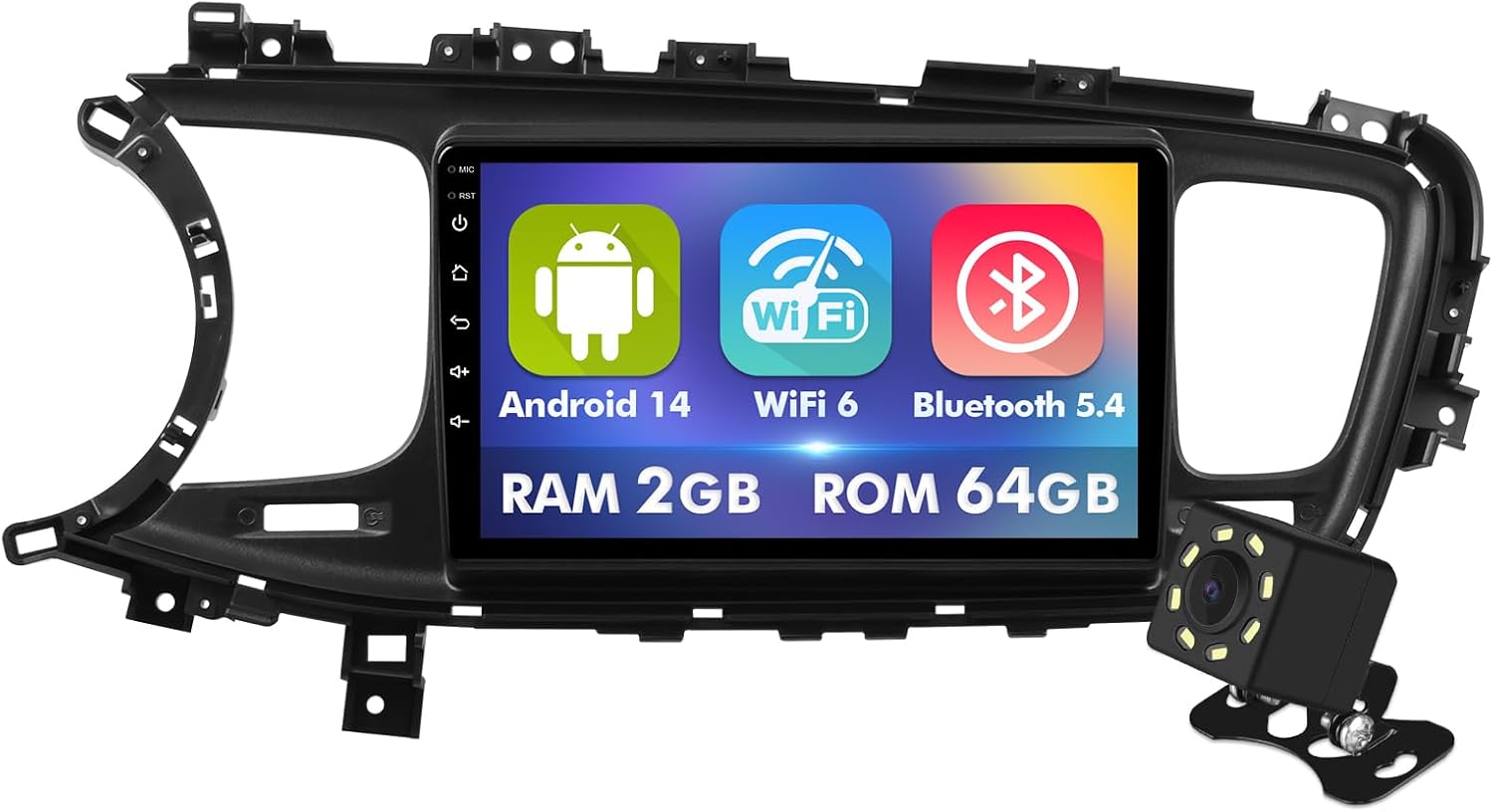
This ISUDAR 9-inch car stereo replaces the factory radio in Kia Optima K5 models from 2011 to 2015 and brings modern smartphone integration and media features into an older dash. It runs a customized Android 14 with 2GB RAM and 64GB storage, so you can install navigation and streaming apps and keep multiple media files on board. The IPS 1280×720 touchscreen is bright enough for maps and menus, and wireless CarPlay and Android Auto simplify daily driving by handling calls, navigation, and music without cables. Built-in WiFi 6 and Bluetooth 5.4 improve wireless stability and streaming quality, and the included backup camera lets the screen automatically show reverse view. Installation is straightforward when your Optima does not have the amplified factory system or a large OEM screen, and steering wheel control retention is supported. Limitations include modest processing power for heavy multitasking and that the unit is specifically designed for the Optima K5 dash layout, so fitment is not universal. Expect solid modern conveniences for routine use rather than high-end audiophile performance.
Best for: A practical optimizer who wants to modernize an older Kia Optima K5 without overspending and prefers straightforward smartphone integration and everyday convenience over premium audio tweaks.
Less Ideal for: Buyers seeking top-tier audio fidelity, advanced processing speed for many simultaneous apps, or a unit that fits nonstandard factory screens and amplified systems should look elsewhere.
- Tailored fit and styling for Kia Optima K5 (2011–2015) to preserve dash appearance
- Wireless CarPlay and Android Auto support for phone-free navigation and media
- WiFi 6 and Bluetooth 5.4 for more stable wireless connections and streaming
- Includes backup camera and GPS antenna so you get essential accessories in the kit
- Large 9-inch IPS touchscreen with 1280×720 resolution for clear maps and menus
- 2GB RAM and a 1.5GHz quad-core CPU can feel sluggish with many apps or heavy multitasking
- Not compatible with Optimas that have the large factory screen, factory amplifier, or original camera systems
Verdict A budget-conscious, dash-matched upgrade that adds modern wireless smartphone integration and useful accessories to Kia Optima K5 models while keeping costs and complexity low.
7. IIWEY iK7 10" Portable Wireless CarPlay Screen with 4K Dash Cam and Backup Camera

| Screen size | 10 inches |
|---|---|
| Screen resolution | 1600 x 600 |
| Dash cam | 4K front |
| Backup camera | 1080P rear |
| Included storage | 64 GB SD card |
The IIWEY iK7 is a self-contained portable car stereo aimed at drivers who want a fast CarPlay/Android Auto upgrade without replacing the factory head unit. It mounts to the dash or windshield and pairs wirelessly to your phone for navigation, calls, and media while also functioning as a 4K front dash cam with loop recording and a 1080p rear camera that auto-activates in reverse. The 10-inch 1600×600 touchscreen and AirPlay/Miracast mirroring make maps and apps easy to read, and the included 64GB card plus Wi-Fi transfer simplify saving footage. Installation is simple using the suction or 3M mount and the device boots with a car charger so it works with most Kia Optima dashboards without cutting into factory wiring. Expect clearer navigation and added incident recording in one compact package, though the portable design means it does not integrate with factory controls or steering-wheel buttons, and occasional firmware quirks or power-cord issues have been reported that may require updates or support.
Best for: A balanced buyer who wants a single, easy upgrade to add wireless CarPlay, navigation, and dashcam recording to their Kia Optima without a full dash install.
Less Ideal for: Drivers who need a full factory-style replacement that integrates with steering controls, HVAC displays, or OEM infotainment features should look at in-dash replacements instead.
- Wireless Apple CarPlay and Android Auto for hands-free navigation and media
- Integrated 4K front dash cam with loop recording for incident capture
- Includes 1080p rear backup camera that auto-switches when reversing
- Large 10-inch 1600×600 touchscreen with AirPlay and Miracast mirroring
- Comes with mounts, car charger, and 64GB SD card for plug-and-play setup
- Does not connect to factory steering-wheel controls or replace the factory head unit
- Portable power and mounts can look less integrated than a built-in stereo and may require occasional firmware updates
Verdict If you want a plug-and-play way to add wireless CarPlay plus high-resolution dash and backup cameras to your Kia Optima, the IIWEY iK7 delivers a big-screen, all-in-one upgrade without a full head-unit swap.
Choosing the Right Kia Optima Car Stereo: Key Factors to Consider
Fitment and Dash Size
Fitment is the first practical constraint for a head unit because dash opening size determines whether a single DIN, double DIN, or a custom fascia is required. If the unit does not match the Optima's dash profile, you will face additional trim panels or adapter kits that add cost and complexity.
Consider whether the vehicle retains factory features like climate control displays or passenger airbag indicators that may interact with the new unit. Choosing a unit that aligns with the dash size reduces installation time and preserves a factory-like appearance.
Wiring Harness and Integration
A compatible wiring harness and steering-wheel control interface make installation far simpler and preserve existing convenience features. Without proper harnesses, expect to splice wires, which increases the risk of electrical issues and complicates future troubleshooting.
Check for support of vehicle-specific harnesses, CAN bus interfaces, and whether the unit provides dedicated outputs for amplifiers and subwoofers. Good integration minimizes modification to the vehicle and maintains factory functionalities.
Connectivity Options
Connectivity determines how you will use the stereo day to day. Built-in Bluetooth is useful for hands-free calls and wireless streaming, while Apple CarPlay or Android Auto enable safe access to navigation, messaging, and music apps via a familiar interface.
Also look for multiple USB inputs, auxiliary inputs, and support for phone mirroring if you rely on third-party apps. The right connectivity mix impacts convenience, safety, and how future-proof the installation will be.
Display and Controls
The display and physical controls affect usability while driving. Touchscreen interfaces offer direct control and richer visuals for maps and media, but they must be responsive and viewable in sunlight to be practical. Physical knobs and buttons help with quick adjustments without taking eyes off the road.
Consider screen size, resolution, and whether the layout supports clear icons for frequent tasks. Intuitive controls reduce distraction and improve the overall driving experience.
Audio Features and Outputs
Audio performance relies on preamp outputs, equalization options, and support for external amplifiers. Units with higher-quality preouts and multi-band EQs make it easier to tailor sound to your speakers and any added amplifiers or subwoofers.
Look for channel-level outputs, adjustable crossovers, and time-alignment features if you plan to upgrade speakers. These options influence the final sound quality and compatibility with aftermarket audio components.
Installation Complexity and Support
The complexity of installation affects cost, time, and the potential need for professional help. Units that are designed for straightforward plug-and-play installation will save time and reduce the risk of wiring errors. Consider the availability of installation guides, community support, and whether replacement fascia or brackets are required.
Also assess firmware update procedures and the manufacturer's support channels. Good documentation and accessible updates help maintain reliable operation and add longevity to the stereo investment.
FAQ
Will a double DIN head unit fit my Kia Optima?
Many double DIN head units fit the Kia Optima if the dash opening and mounting brackets are compatible. Fitment often depends on the model year and whether the factory unit uses a single or double DIN design. Check dash dimensions and whether a compatible fascia or mounting kit is required to ensure a proper installation.
Do I need a special wiring harness to install an aftermarket car radio?
Using a vehicle-specific wiring harness is strongly recommended because it plugs into the existing factory connectors and preserves wiring color codes. A proper harness prevents cutting factory wires, simplifies installation, and helps retain steering-wheel control functions. Without one, expect to splice wires and verify connections manually.
Is wired Apple CarPlay or Android Auto better than wireless?
Wired connections typically provide more reliable audio and faster initial pairing, while wireless options add convenience by eliminating a cable. Wireless implementations depend on stable Bluetooth and Wi-Fi handshakes, which can vary by phone and unit. If you prioritize consistency, a wired connection is usually more dependable.
Can I keep steering-wheel controls after upgrading the head unit?
In most cases you can retain steering-wheel controls by using an appropriate adapter or a head unit that supports external control interfaces. The adapter translates the vehicle signals into commands the new unit understands. Verify compatibility for your Optima model to ensure buttons map correctly.
How do I choose between touchscreen and button-based units?
Choose a touchscreen if you value map visuals, app integration, and a modern interface. If you prefer minimal distraction and quick tactile feedback, a unit with physical knobs and buttons may be better. Many buyers opt for a hybrid approach that combines a touchscreen with essential physical controls for safer operation.
Will upgrading the head unit improve audio quality by itself?
A new head unit can improve source clarity, connectivity, and preamp quality, which often results in noticeably better sound. However, overall audio quality also depends on speaker condition, speaker placement, and any amplifiers in the system. For a full upgrade, consider matching the head unit with better speakers or amplification.
How We Chose the Best Kia Optima Car Stereo
We focused on options that deliver reliable fitment and straightforward installation in the Kia Optima, prioritizing units with documented vehicle-specific installation kits or standard dash dimensions. Key evaluation criteria included in-dash compatibility, wiring and harness support, and the presence of modern connectivity such as Bluetooth and phone-mirroring protocols.We also assessed user-facing controls and display clarity to ensure the unit would be easy to operate while driving. Audio performance considerations included preamp outputs and EQ flexibility for achieving balanced sound with factory or aftermarket speakers. Durability and firmware support were considered to favor units likely to receive updates and maintain functionality over time.We excluded products that require extensive custom dash fabrication or rare installation adapters that are not commonly available. Units that lacked basic safety features like hands-free calling or simple mute functions were also removed. The final list reflects a balance of compatibility, connectivity, audio capability, and realistic installation effort for Kia Optima owners.
Our full evaluation process is outlined in our review methodology.
Conclusion
Prioritize fitment, wiring integration, and the connectivity features you use most when choosing a Kia Optima car stereo. Balancing ease of installation with the audio outputs and user interface you need will yield the best long-term experience.Expect tradeoffs between feature breadth and installation complexity. Focus on units that align with your dash configuration and offer the inputs and outputs necessary for any future audio upgrades.
Explore More:
- Check out all Kia Optima parts & accessories
- Explore Electronics
- Browse all Accessories
