

Note: This article contains affiliate links. If you click on these links and make a purchase, I may earn a small commission at no extra cost to you. This helps support my research and content. Read my full affiliate disclosure here.
If you drive a GMC Sierra 1500, swapping the factory radio for a modern car stereo is one of the most noticeable upgrades you can make. The right head unit improves sound quality, adds smartphone mirroring, and often simplifies connecting multiple devices. This guide covers the five best options we shortlisted for the Sierra 1500, focusing on units that balance audio performance, dash fit and installation, and in-cab convenience.Below you will find our top picks and a clear explanation of the features and tradeoffs that matter for this truck. Read on to find the stereo that best matches how you use your vehicle and how you want it to sound.
Looking for other parts? See all GMC Sierra 1500 parts & accessories.
Top Picks at a Glance
| Best Overall Car Stereo The all-around best pick balancing features, sound, and usability | ZZH 10.2" Android 13 Car Radio Stereo for 2014-2018 Chevy Silverado/GMC Sierra (4GB+64GB) |  |
| Best Budget Car Stereo A low-cost model that covers core audio and connectivity needs | Junsun 10" Android 13 Car Radio Stereo for Chevy Silverado with Wireless CarPlay and Android Auto |  |
| Best Premium Car Stereo A higher-end unit with top audio components and advanced features | MirthWorld 11.5" 2K Android 13 Car Stereo for Chevy Silverado/GMC Sierra 2014–2018 |  |
| Best Double-DIN Car Stereo A large-size head unit with big-screen features and expanded controls | Eonon 10.1" Android 14 Car Stereo for Chevrolet/GMC Silverado Sierra (2014–2018) – GMSX7A |  |
| Best CarPlay/Android Auto Car Stereo Seamless smartphone integration for maps, music, and voice control | AINAVITO 11.5" Android 13 Car Stereo with Dual Knobs for Chevy Silverado & GMC Sierra (2014–2018) |  |
1. ZZH 10.2" Android 13 Car Radio Stereo for 2014-2018 Chevy Silverado/GMC Sierra (4GB+64GB)
Best Overall Car Stereo

| Screen Size | 10.2 Inches |
|---|---|
| Operating System | Android 13 |
| Memory Storage Capacity | 64 GB |
| Connectivity Technology | Bluetooth, USB, Wi‑Fi |
| Built-In Media | Backup Camera, Canbus, Microphone |
This ZZH 10.2" head unit replaces the factory radio in 2014–2018 Silverado and Sierra trucks with a modern Android 13 system that feels like a factory upgrade. It installs using vehicle-specific wiring and retains steering wheel controls, radar, and the original reversing camera while adding wireless and wired CarPlay/Android Auto, Bluetooth 5.0, GPS with North American maps, and WiFi hotspot support. The 1280×800 QLED display and responsive capacitive touchscreen make maps, apps, and backup camera video clear, and the 8-core CPU with 4GB RAM and 64GB storage keeps menus and apps snappy. Built-in DSP and FM/AM radio improve in-cab sound staging, though some reviewers report occasional CarPlay disconnects and that the internal amplifier is average compared with aftermarket amps. Installation is straightforward for seasoned DIYers but may require extra adapters or help for first-timers. For daily driving this unit modernizes connectivity and navigation while preserving most factory features, but buyers seeking top-tier audio power or a completely plug-and-play zero-hassle install should plan accordingly.
Best for: Drivers who want a modern, feature-rich infotainment upgrade for a 2014–2018 Silverado or Sierra that balances connectivity, touchscreen clarity, and retained factory functions without professional customization.
Less Ideal for: Audiophiles wanting a high-power aftermarket amplifier or buyers who need a fully foolproof, first-time DIY installation without any possible adapter or setup troubleshooting.
- Vehicle-specific plug-and-play wiring preserves steering wheel controls and vehicle signals
- Large 10.2" 1280×800 QLED capacitive touchscreen for clear daytime visibility and responsive touch
- Supports both wired and wireless CarPlay and Android Auto plus Bluetooth 5.0 and WiFi hotspot
- Android 13 with 4GB RAM and 64GB storage for smooth app use and expandable functionality
- Includes GPS antenna and backup camera compatibility to restore or improve reversing visibility
- Some users report intermittent wireless CarPlay disconnects and occasional need to reset the unit
- Internal amplifier performance is modest compared with higher-end aftermarket amps
Verdict: The best overall car stereo is the one that balances audio quality, connectivity, installation ease, and user-friendly features for most DIY installers and daily drivers.
2. Junsun 10" Android 13 Car Radio Stereo for Chevy Silverado with Wireless CarPlay and Android Auto
Best Budget Car Stereo

| Screen Size | 10 Inches |
|---|---|
| Operating System | Android 13 |
| Display Type | LCD capacitive touchscreen |
| Additional Features | Wireless CarPlay, Android Auto, Backup Camera |
| Connectivity Technology | Bluetooth, USB, Wi-Fi |
This Junsun 10-inch unit replaces the factory head unit to add smartphone mirroring, navigation, and a touchscreen interface to compatible Silverado and GMC dashboards. It runs Android 13, supports both wireless CarPlay and Android Auto plus Bluetooth calling and media, and accepts a wired backup camera so reversing is visible on the big 1280×720 LCD. Typical use is daily driving and long trips where phone navigation, streaming music, and hands-free calls matter. The system supports online maps when connected to Wi-Fi and can run Android apps from an app store, letting you customize media and navigation. Installation is reported straightforward for DIYers with vehicle-specific fitment and steering wheel control retention. Expect clear FM/AM reception and wide codec support including FLAC for local music. Limitations include occasional software bugs and connectivity quirks reported by some users, and touch or button responsiveness may vary over time, so buyers should be comfortable troubleshooting firmware settings or microphone placement if call quality needs improvement.
Best for: Cost-conscious DIY owners who want to upgrade a compatible Sierra-era dashboard with smartphone integration, navigation, and a large touchscreen without paying for premium brands.
Less Ideal for: Drivers seeking long-term zero-maintenance reliability or professional-grade audio tuning should consider higher-end, tested brands or dealer-installed options instead.
- Modern Android 13 OS offers app install and customization like a smartphone
- Wireless CarPlay and Android Auto for hands-free navigation and media
- Includes backup camera support and steering wheel control retention for safer driving
- 10-inch 1280×720 capacitive touchscreen provides clear, easy-to-read display
- Bluetooth and wide codec support (including FLAC) for flexible audio sources
- Some users report intermittent software bugs, connectivity issues, or rebooting after months of use
Verdict: The best budget car stereo provides reliable sound and basic connectivity at a low price, making it ideal for cost-conscious DIYers who want dependable performance without extras.
3. MirthWorld 11.5" 2K Android 13 Car Stereo for Chevy Silverado/GMC Sierra 2014–2018
Best Premium Car Stereo

| Compatible models | Chevy Silverado/GMC Sierra 2014–2018 |
|---|---|
| Operating system | Android 13 |
| CPU / memory | 8 Core / 4GB RAM + 64GB ROM |
| Screen | 11.5-inch 2K (2000×1200) IPS |
| Backup camera | 1080P AHD included |
This MirthWorld 11.5-inch head unit modernizes the Sierra dash with a large 2000×1200 IPS touchscreen running Android 13 on an eight-core processor with 4GB RAM and 64GB storage. It is used as a full replacement infotainment center that retains factory functions like steering wheel controls, reverse camera input, parking sensors, ACC and lighting signals via the supplied CANbus harness. Key features for daily use include wireless Apple CarPlay and Android Auto, built-in GPS, 5GHz Wi‑Fi for fast map updates and streaming, and an included 1080P AHD backup camera that meaningfully improves rear visibility. Sound is improved through the unit's DSP and EQ options and the AM/FM tuner performs reliably. Installation is largely plug-and-play for the specified GMC Sierra/Silverado years but requires managing multiple harnesses and fitting the replacement bezel for the oversized display. Expect tablet-like responsiveness for navigation and media, with occasional UI nuances compared with high-end factory audio stacks. This unit is a performance-focused upgrade that brings modern connectivity and a premium screen to older trucks while keeping essential factory features intact.
Best for: Buyers seeking a top-tier aftermarket upgrade for a Sierra who prioritize a large, modern display, wireless smartphone integration, and long-term responsive performance over keeping the original radio appearance.
Less Ideal for: Drivers who want an exact factory-looking, drop-in replacement or those unwilling to spend time routing harnesses and fitting the replacement bezel should consider simpler options.
- Large 11.5-inch 2K IPS touchscreen improves visibility and modernizes the dash
- Powerful hardware (8-core CPU, 4GB RAM, 64GB storage) for smooth multitasking
- Wireless Apple CarPlay and Android Auto for cable-free smartphone integration
- Includes 1080P AHD backup camera and retains factory camera and steering wheel controls via CANbus
- Built-in GPS and 5GHz Wi‑Fi for fast navigation updates and streaming
- Oversized screen requires the supplied bezel and non‑drop-in mounting compared with factory unit
Verdict: The best premium car stereo offers superior build quality, refined sound tuning, and advanced features for buyers willing to pay more for excellent in-car audio and long-term durability.
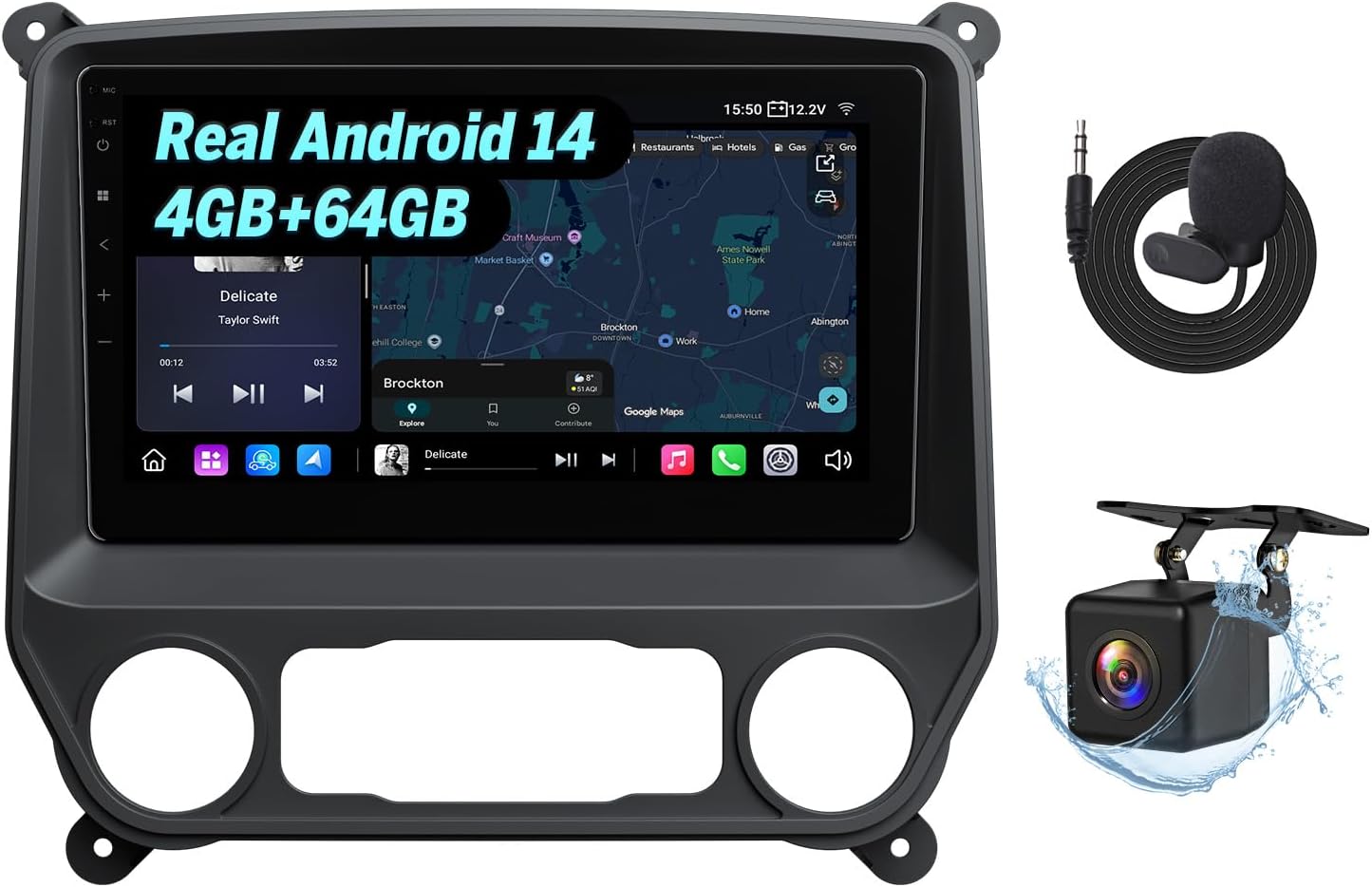
4. Eonon 10.1" Android 14 Car Stereo for Chevrolet/GMC Silverado Sierra (2014–2018) – GMSX7A
Best Double-DIN Car Stereo
| Screen | 10.1-inch IPS 1280×720 |
|---|---|
| OS | Android 14 |
| Memory | 4GB RAM, 64GB ROM |
| Wireless | Bluetooth 5.4, dual-band Wi‑Fi |
| Audio outputs | 4-channel RCA preouts + sub out |
This Eonon GMSX7A is a purpose-built double-DIN upgrade for 2014–2018 Silverado and Sierra trucks that replaces the factory radio with a large 10.1-inch Android 14 touchscreen. It provides wireless and wired CarPlay and Android Auto, screen mirroring, Bluetooth 5.4 calling, and a selectable 48-band DSP EQ for detailed sound tuning. The unit is aimed at drivers who want a modern infotainment hub: navigation and music apps run from the built-in RK3562 quad-core processor with 4GB RAM and 64GB storage, and the side USB hub plus RCA/sub outputs make adding sources or an amplifier straightforward. Practical features include CANBUS steering wheel control support, a supplied 720P backup camera, OTA software updates, and power management to reduce parasitic battery drain. Limitations to note are reported intermittent quirks like occasional lag, lower-than-expected speaker output on some installs, and some users needing extra adapters for vehicles with factory Bose systems; installation can be involved and may require additional decoder hardware for complete factory feature parity.
Best for: Buyers who want a touchscreen-first double-DIN upgrade that modernizes an older Silverado or Sierra with smartphone integration, expanded media options, and advanced audio tuning while prioritizing a big, easy-to-use interface.
Less Ideal for: Drivers who need absolute factory-exact feature parity with Bose systems without buying additional decoders or those who prefer a plug-and-play swap with minimal installation effort.
- Large 10.1-inch IPS touchscreen with 1280×720 resolution for clearer maps and media
- Wireless and wired Apple CarPlay and Android Auto plus screen mirroring for easy smartphone integration
- Built-in DSP with 48-band EQ, RCA preouts, and subwoofer terminal for improved sound customization and aftermarket amps
- Modern connectivity including Bluetooth 5.4, dual-band Wi‑Fi, three USB ports, and 64GB internal storage for apps and media
- Includes backup camera, CANBUS adapter, external mic, and OTA update support for ongoing improvements
- Some users report software glitches and occasional lag with wireless CarPlay or system responsiveness
- Lower native amplifier output in certain installs may require an external amp for higher volume headroom
Verdict: The best double-DIN car stereo fits vehicles that accept larger head units and is ideal for buyers who want a touchscreen interface, expanded functionality, and easier control while driving.
5. AINAVITO 11.5" Android 13 Car Stereo with Dual Knobs for Chevy Silverado & GMC Sierra (2014–2018)
Best CarPlay/Android Auto Car Stereo

| Compatible Vehicles | Chevy Silverado & GMC Sierra 1500/2500/3500 (2014-2018) |
|---|---|
| Operating System | Android 13.0 |
| Memory | 4GB RAM + 64GB ROM |
| Display | 11.5" QLED 1280×800 |
| Connectivity | Wireless/Wired CarPlay & Android Auto, Bluetooth 5.4, Dual-band Wi‑Fi |
This AINAVITO head unit replaces the factory radio in 2014–2018 Silverado and Sierra trucks to bring modern smartphone-first features and a tablet-style display. It runs Android 13 on 4GB RAM/64GB storage, so navigation apps, streaming services, and multitasking feel responsive, and wireless CarPlay and Android Auto connect quickly via Bluetooth 5.4 and dual-band Wi‑Fi. The 11.5" QLED touchscreen is bright and anti-glare, while the mechanical volume and tuning knobs give tactile control that is useful on rough roads or with gloves. Installation includes a full harness, GPS antenna, and a 1080p AHD wide-angle backup camera; steering wheel controls are supported through the supplied CANBUS wiring. Practical limitations: some users report extra wiring or a PAC/fiber adapter may be needed to fully integrate certain factory Bose systems and that camera or harness adjustments can require fiddling. Expect a deeper install step compared with plug-and-play single-DIN units, but you gain a clear, phone-centric interface and rich media capability tailored to these trucks.
Best for: Drivers who prioritize phone-first connectivity and want fast, wireless CarPlay/Android Auto plus a large, easy-to-read screen that modernizes their truck's dash while keeping tactile controls.
Less Ideal for: Buyers who want a strictly plug-and-play swap with no wiring changes or those who prefer a smaller single-DIN unit to retain original dash aesthetics without a trim kit.
- Fast wireless CarPlay and Android Auto via Bluetooth 5.4 and dual-band Wi‑Fi for reliable phone navigation and streaming
- Large 11.5" 1280×800 QLED touchscreen with anti-glare visibility for daytime use
- Android 13 with 4GB RAM and 64GB storage enables smooth multitasking and offline apps
- Dual mechanical knobs provide quick, tactile control while driving
- Includes 1080P AHD wide-angle backup camera and full installation kit for a complete upgrade
- Some factory Bose setups may still require an additional adapter or wiring work to drive the amplifier correctly
- Backup camera image quality can vary and may need configuration or better routing to perform optimally
Verdict: The best CarPlay/Android Auto car stereo focuses on smartphone-first connectivity, making it the top choice for drivers who prioritize navigation, hands-free calling, and streaming from their phone.
Choosing the Right GMC Sierra 1500 Car Stereo: Key Factors to Consider
Fit and Dash Compatibility
Getting the correct physical fit is the first step. The Sierra 1500's dash can accept single DIN or double DIN head units depending on trim and any existing factory bezels. Choosing a unit that fits the factory opening reduces the need for dash modification and preserves the truck's interior aesthetic.
Beyond raw dimensions, the bezel profile and control layout affect ventilation and access to HVAC controls. Some head units require additional mounting kits or pocket fillers; those add installation time and cost and can alter the dash look. When selecting a stereo, consider whether factory trim panels or steering wheel control adapters are needed to retain convenience features. Poor fit can lead to vibration, loose trim, or obstructed controls, all of which affect long-term satisfaction.
Audio Output and System Integration
Head unit output determines how well the rest of the audio system performs. Look at preamp voltage and whether the unit offers multiple preouts for adding external amplifiers. Higher-quality preamp stages provide cleaner signal and more headroom for aftermarket components.
Built-in equalizers, time alignment, and crossover options help tailor sound for the Sierra 1500's cabin acoustics. If you plan to keep factory speakers, the head unit should have strong onboard processing to compensate. For owners planning a more extensive audio upgrade, ensure the unit provides the needed connections and signal control for amplifiers, subwoofers, and active crossovers.
Smartphone Integration and Connectivity
Modern drivers expect seamless smartphone integration for maps, calls, and media. Choose a unit that supports the smartphone features you use most often, such as Apple CarPlay or Android Auto, either wired or wireless. Reliable Bluetooth streaming and hands-free calling are essential for everyday use.
Also check available USB ports and their charging output. Units that support direct playback from USB devices or have onboard storage options make playing large music libraries easier. If you rely on multiple devices, look for head units with easy pairing management and strong Bluetooth profiles to avoid frequent disconnects.
User Interface and Controls
How you interact with the stereo matters when driving. Touchscreen car stereos offer rich displays and visual feedback, which is helpful for navigation and media browsing. However, touchscreens can be distracting if controls are not logically organized. Physical knobs and buttons provide tactile feedback and quick access to common functions like volume and source change.
Consider how the interface will work with steering wheel controls and how easy it is to adjust settings on the fly. Screen legibility under direct sunlight and at night should also be evaluated, as well as whether display themes and brightness controls are available to match the Sierra 1500's interior lighting.
Installation Effort and Wiring
Installation complexity ranges from simple plug-and-play harness connections to units that require dash disassembly, HVAC relocation, or custom wiring. For many owners, minimizing time in the garage is a priority, so choose units compatible with factory harnesses and steering wheel control adapters to reduce wiring labor.
Pay attention to accessory features that complicate wiring such as backup camera inputs, multiple camera support, or factory amplifier integration. If adding amplifiers or speakers, plan for power and ground routing and confirm the vehicle's factory electrical capacity. A clean installation preserves reliability and resale value.
Durability and Long-Term Support
A car stereo is an investment in daily use, so durability matters. Consider build quality, cooling design, and the reputation for firmware updates and ongoing software support. Units with active software updates can receive interface improvements and bug fixes that extend useful life.
Also think about warranty coverage and how straightforward it is to get replacement parts or updates. A robust support ecosystem makes future issues easier to resolve and can save time if features like smartphone integration change over time.
Single DIN Versus Double DIN: Which Fits Your Sierra 1500?
The Sierra 1500 can accept both single DIN and double DIN head units in many configurations, but the choice affects features and installation. Single DIN units keep the dash look compact and are often easier to install, while double DIN touchscreen units provide larger displays for navigation, media browsing, and camera feeds.
If your priority is a simple audio upgrade and retaining a stock appearance, a high-quality single DIN head unit with a digital display and robust audio processing may be enough. If you want a modern touchscreen experience with smartphone mirroring, a double DIN head unit is the more versatile choice.
- Single DIN: easier install, smaller display, often retains more dash storage
- Double DIN: larger touchscreen options, better for Apple CarPlay/Android Auto and cameras
- Consider trim and bezel availability to ensure a seamless look after installation
Retaining Steering Wheel Controls and Factory Features
Many Sierra 1500 owners want to keep steering wheel audio and voice controls. Most modern head units support these features through simple adapters, but compatibility varies. Confirm that the unit you choose has documented support for the Sierra 1500 or that a reliable adapter exists.
Also verify how the head unit interacts with factory amplifiers, if present. Some factory systems use proprietary wiring or powered amplifiers that require special integration harnesses to preserve sound and function.
- Check compatibility with steering wheel control adapters before purchasing
- Confirm whether a harness or interface is needed for factory amplifier integration
- Ask whether HVAC controls or dash illumination are affected by the new unit
Backup Cameras and Multiple Camera Inputs
Adding or retaining a backup camera is a common reason to upgrade the stereo. Double DIN touchscreen units typically provide at least one camera input and can display guidelines for parking. If your Sierra 1500 setup includes a tow camera or additional camera views, look for a head unit that supports multiple inputs and easy camera switching.
Consider camera trigger wiring and whether the head unit supports optional overlays or distance guides. A clean camera integration improves safety and towing convenience without requiring constant device hookups.
- Ensure the head unit has the number of camera inputs you need
- Check trigger voltage compatibility with existing camera systems
- Look for units that support configurable parking guidelines
Sound Staging and Speaker Matching
The Sierra 1500's cabin has unique acoustics that affect sound staging. Good head units offer time alignment and adjustable crossovers to place imaging where you want it and to protect speakers from out-of-band frequencies. If you plan to keep factory speakers, choose a unit with strong signal processing to make the most of existing components.
When replacing speakers or adding amplifiers, plan the signal chain so that the head unit provides the correct level and type of outputs. Properly matched components and tuning can transform the listening experience in a truck's cabin.
- Use time alignment to correct distance differences between speakers
- Employ crossovers to protect mids and highs from bass-heavy signals
- Consider adding a small amplifier if the head unit's built-in power is insufficient for the desired loudness and clarity
Wiring Tips for a Clean Installation
A neat wiring job reduces rattles and electrical issues. Use proper gauge power and ground wires, and route speaker wires away from major electrical harnesses to minimize interference. Secure connections with crimped terminals and heat-shrink tubing for longevity.
Label wires during disassembly to simplify reinstallation. When adding components like amplifiers or a subwoofer, plan power distribution with an inline fuse close to the battery and a solid ground point on the chassis to avoid noise and voltage drop issues.
- Route power wire with protective conduit and fuse near battery
- Use quality connectors and insulate solder joints or crimps
- Test speaker polarity and continuity before final reassembly
Software, Updates, and Future-Proofing
Since smartphone platforms evolve, consider how the head unit handles software updates. Units that support firmware updates can gain new features or improved compatibility over time. This is particularly important for Apple CarPlay and Android Auto support and security fixes for wireless connections.
Also think about accessory ecosystems such as backup camera firmware or app-based tuning utilities. A head unit with active manufacturer support or an open update procedure will remain useful longer and reduce the chances of obsolescence.
- Verify whether firmware updates are available and easy to install
- Check if the unit's app ecosystem supports mobile customization and tuning
- Choose units with common standards to maximize future accessory compatibility
How We Chose the Best GMC Sierra 1500 Car Stereo
We prioritized characteristics that directly affect ownership and installation in the GMC Sierra 1500. Fit and dash compatibility were primary filters to ensure each stereo physically integrates with the truck's dash and climate-control layout. We evaluated audio output and processing features such as preamp voltage, built-in equalization, and crossover controls because they determine usable sound quality with the vehicle's speakers and any added amplifiers. Connectivity options were assessed, including wired and wireless smartphone integration, Bluetooth audio stability, and available USB inputs for media and charging. User interface and display type were reviewed to match common preferences for touchscreen responsiveness versus simple physical controls. Ease of installation was another key criterion: we favored units that work with minimal dash modification and that play well with factory steering wheel controls or available adapters. We excluded units that require significant dash cutting, complex HVAC relocation, or that lack essential mounting hardware for the Sierra 1500. Final selections reflect a balance of sound capability, installation practicality, feature set, and long-term reliability indicators.
Our full evaluation process is outlined in our review methodology.
FAQ
Will a double DIN touchscreen replace the Sierra 1500 climate controls?
Usually no. Most double DIN units are designed to fit without relocating HVAC controls, but some installations require a trim kit to preserve the climate control access. Verify the specific dash configuration for your Sierra 1500 trim before choosing a double DIN unit.
Can I keep my factory steering wheel audio controls after installing an aftermarket stereo?
Often yes. Many head units work with steering wheel control adapters that preserve volume and track functions. Confirm adapter availability for the Sierra 1500 and whether additional programming or wiring is required.
Do aftermarket head units support Apple CarPlay and Android Auto wirelessly?
Some units support wireless Apple CarPlay or Android Auto, while others require a wired USB connection. Wireless operation is convenient but can be more sensitive to phone and unit firmware; wired connections are generally more stable for audio and navigation.
Will upgrading the head unit improve my truck's sound without changing speakers?
Yes. A quality head unit with better preamps and EQ can significantly improve clarity and dynamic range even with factory speakers. However, for major improvements in bass and overall fidelity, upgrading speakers and adding an amplifier may be necessary.
What should I check before buying a stereo to use a backup camera?
Confirm the head unit has a camera input and that the trigger wiring and voltage are compatible with your camera. If you have a tow camera or aftermarket camera with different voltage, you may need an adapter or a unit that supports multiple camera formats.
Is professional installation recommended for complex audio upgrades in the Sierra 1500?
It depends on your experience. Basic single-unit swaps can be DIY if you are comfortable with dash removal and wiring. For amplifier installs, sound deadening, or complex camera systems, professional installation helps ensure proper grounding, routing, and tuning.
Final Verdict
When upgrading the stereo in your GMC Sierra 1500, prioritize fit and integration first, then focus on the audio and connectivity features that match how you use the truck. If you want touchscreen navigation and easy phone mirroring, a double DIN unit with solid CarPlay or Android Auto support is the right direction. If you prefer a cleaner, simpler install, a well-equipped single DIN head unit can still deliver substantial audio improvements.Balance installation complexity against long-term needs such as amplifier connections and camera inputs. Choose the option that best aligns with your desired features, installation capabilities, and plans for future audio upgrades to get the most value from the upgrade.
Explore More:
- Check out all GMC Sierra 1500 parts & accessories
- Explore Electronics
- Browse all Accessories
