

Note: This article contains affiliate links. If you click on these links and make a purchase, I may earn a small commission at no extra cost to you. This helps support my research and content. Read my full affiliate disclosure here.
If you want clearer sound, more modern connectivity, or a cleaner dash layout, choosing the right Chevrolet Suburban car stereo matters. Your vehicle’s dash space, wiring, and speaker setup affect installation complexity and the audio outcome, so selecting a compatible head unit can save time and give noticeably better sound and usability.This guide covers seven shortlisted car stereos that fit common Suburban configurations, with an emphasis on audio performance and installation compatibility. Below we explain the evaluation criteria and what to expect when upgrading your system before the product list.
Looking for other parts? See all Chevrolet Suburban parts & accessories.
Top Picks at a Glance


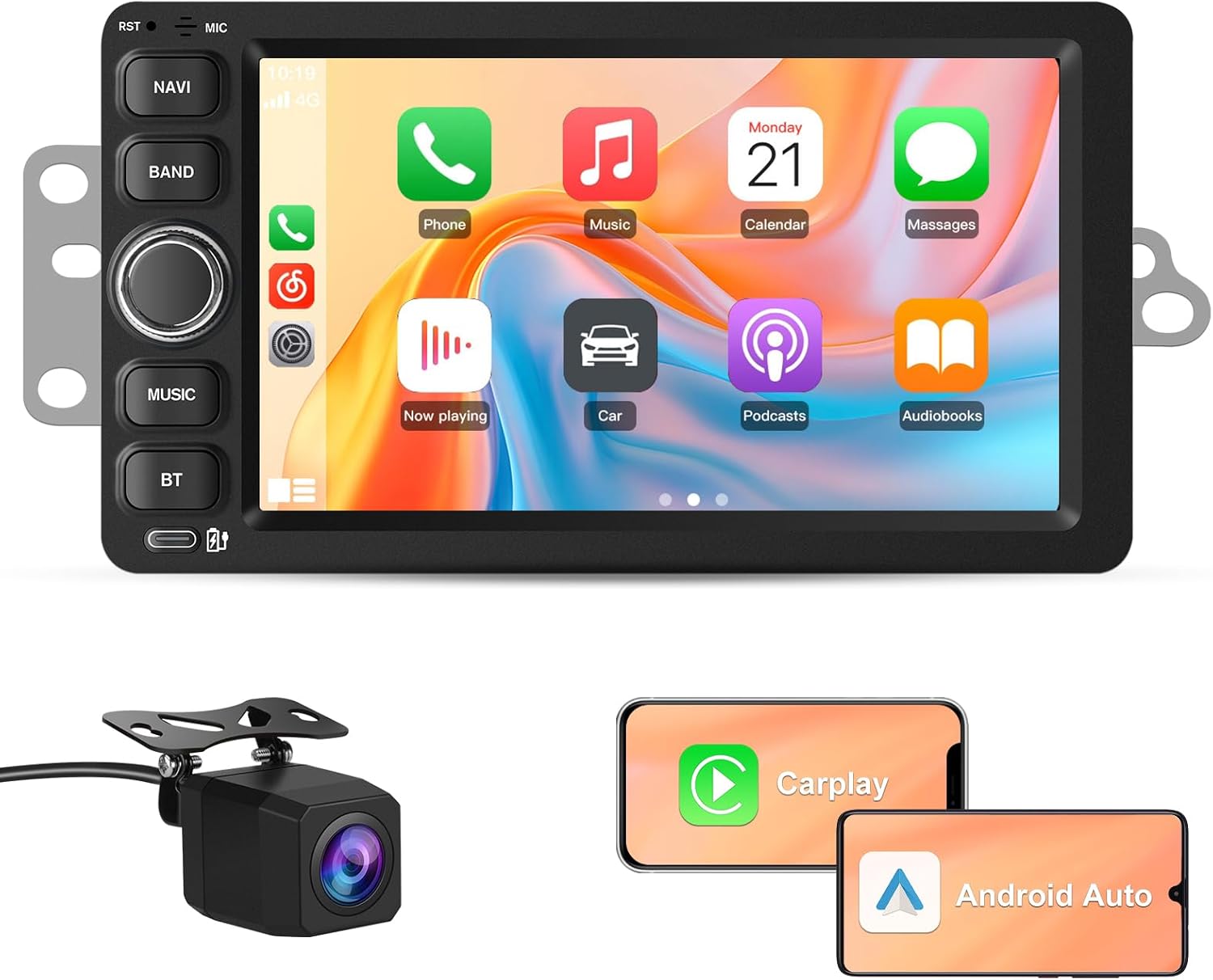
1. Vratzn Android 13 Car Stereo with Wireless CarPlay/Android Auto and Backup Camera for 2003–2006 Chevrolet/GMC
| Display Size | 7 Inches |
|---|---|
| Operating System | Android 13 |
| Storage | 64GB |
| Voice command | Microphone, Touchscreen |
This Vratzn head unit replaces the original radio in compatible 2003–2006 Chevrolet Suburban and GMC models to add a modern infotainment experience. It runs Android 13 on a 7-inch capacitive screen and is supplied with a reversing camera; wireless CarPlay and Android Auto connect over Bluetooth so your phone apps, navigation and voice assistant work without a cable. The unit supports WiFi for map updates and app downloads, and DSP audio plus EQ controls improve sound compared with older factory systems. Steering wheel control support and plug-and-play wiring keep the install close to factory integration, though minor trim or mounting adjustments are reported on some dashboards. With 2GB RAM and 64GB storage the system handles navigation and media reliably but is not aimed at heavy multitasking. The backup camera triggers automatically in reverse and GPS locks quickly when online. For a reliability-focused owner wanting a factory-like upgrade, this brings modern convenience while keeping vehicle systems intact, but expect occasional fitment tweaks during installation.
Best for: Reliability-focused buyers who prioritize a factory-quality, well-integrated infotainment upgrade that modernizes an older Suburban without adding complex maintenance or risky modifications.
Less Ideal for: Drivers who want a high-performance multimedia workstation or who plan intense multitasking, heavy app installs, or a custom dash redesign should consider higher-spec or professionally modified systems.
- Wireless CarPlay and Android Auto for phone integration without a cable
- Built-in GPS and WiFi allow map access and app downloads on the go
- Includes reversing camera that auto-activates when shifting into reverse
- DSP audio and EQ controls improve sound compared with older factory radios
- Steering wheel control compatibility and largely plug-and-play wiring preserve vehicle integration
- 2GB RAM is entry-level so heavy multitasking or many background apps may slow the system
- Some dashboards may require slight trim or mounting adjustments for a perfect fit
Verdict A practical, factory-style upgrade that modernizes 2003–2006 Chevrolet/GMC dashboards with wireless phone integration and a backup camera while keeping reliability and vehicle integration front and center.
2. Inexaccessories 7" Touchscreen Car Stereo with Wireless CarPlay/Android Auto and Backup Camera

| Applicable vehicles | Selected Chevrolet and GMC models 2005–2014 |
|---|---|
| Screen size | 7-inch IPS |
| Connectivity | Wired/Wireless CarPlay and Android Auto |
| Included accessory | Rear view backup camera |
This single-DIN replacement head unit installs into compatible Chevrolet and GMC dashboards to bring a modern infotainment interface to older Suburbans. It provides a 7-inch IPS touchscreen, supports wired and wireless Apple CarPlay and Android Auto for hands-free navigation and media, and includes a waterproof night-vision backup camera that switches on automatically when you shift into reverse. The unit also plays DVDs, offers a built-in equalizer for basic sound tuning, and accepts steering-wheel controls and an external microphone for calls. In practice it is a convenience-focused upgrade: owners report straightforward installation with factory connectors in many trim levels and reliable phone connectivity for navigation and music. Downsides to expect are occasional electrical noise or hum on some installs, imperfect documentation, and UI/menu differences from the product images. For buyers willing to do minor wiring adjustments or basic troubleshooting, it significantly modernizes an older Suburban without replacing factory speakers or dashboards.
Best for: Convenience-driven buyers who want to modernize a mid-2000s Chevrolet Suburban with smartphone integration and a backup camera without extensive dash modification.
Less Ideal for: Drivers seeking a perfect factory-exact replacement or plug-and-play flawless fit across every trim should consider higher-end aftermarket units or professional installation services.
- Wireless and wired Apple CarPlay and Android Auto for hands-free navigation and apps
- Included HD night-vision backup camera that displays automatically in reverse
- 7-inch IPS touchscreen with DVD/CD playback for multiple media options
- Supports steering-wheel controls and external microphone for safer operation
- Some users report a persistent humming noise that can require troubleshooting to eliminate
- Manuals and on-screen menus may differ from listing images and are sometimes poorly translated
Verdict A practical, convenience-focused infotainment upgrade for compatible Chevrolet Suburbans that adds wireless CarPlay/Android Auto and a backup camera but may need minor troubleshooting to address noise or fitment quirks.
3. CGOGC 10" Android 12 Touchscreen Car Stereo with Wireless CarPlay & Android Auto for Chevy Silverado Tahoe GMC Yukon (2007–2013)

| System | Android 12 |
|---|---|
| CPU | Octa-core |
| RAM | 2GB |
| Storage | 32GB ROM |
| Display resolution | 1280×720 |
This head unit replaces the factory radio with a 10-inch IPS touchscreen running Android 12 on an octa-core processor, giving noticeably faster menus and smoother app performance than older single- or quad-core units. It is built for in-dash replacement on compatible Chevy and GMC models and is typically used to add wireless CarPlay/Android Auto, navigation, Bluetooth calling, and modern media playback to older vehicles. The unit includes 2GB RAM and 32GB storage, supports 1080p video, 5G WiFi, and a DSP plus TDA7388 amplifier for fuller sound without aftermarket amps. Practical benefits include wireless phone integration for safer hands-free use, fast GPS lock and app downloads over WiFi, and steering wheel control support. Limitations to expect are modest RAM and storage by modern phone standards and occasional reports of errant touch behavior on some units, so buyers should be prepared to test functionality on arrival and update firmware if available.
Best for: Performance-oriented drivers who want a substantial tech and audio upgrade to their older Chevy or GMC without replacing speakers or adding external processors, prioritizing responsive navigation, wireless phone integration, and improved in-car media performance.
Less Ideal for: Buyers seeking the highest-end audio hardware or large onboard storage for apps and media should consider premium units with more RAM, larger storage, or external amplifiers instead.
- Wireless Apple CarPlay and Android Auto for hands-free navigation and media
- Octa-core Android 12 platform with 2GB RAM and 32GB storage for responsive operation
- 10-inch IPS 1280×720 display that supports 1080p video playback
- Built-in DSP and TDA7388 amplifier chip for improved onboard audio tuning
- Supports WiFi, Bluetooth 5.0, GPS navigation, backup camera input, and steering wheel controls
- 2GB RAM and 32GB storage are modest compared with recent flagship head units
- Some user reports of touch-input glitches or random behavior on individual units
Verdict A performance-minded, direct-fit upgrade that brings wireless CarPlay/Android Auto and noticeably faster operation to older Chevy and GMC dashboards, with solid built-in audio but modest memory limits.
4. OHREX 7" Car Stereo Replacement with Wireless CarPlay & Android Auto for Chevrolet Suburban (2007–2012)

| Display Size | 7 Inches |
|---|---|
| Operating System | Android 13 |
| Memory | 2GB RAM |
| Storage | 64GB ROM |
This OHREX head unit swaps into a 2007–2012 Chevrolet Suburban to modernize the dashboard with a 7-inch capacitive touchscreen running Android 13. It provides wireless CarPlay and Android Auto plus built-in Bluetooth and WiFi for hands-free calling, music streaming and navigation apps. The package includes a backup camera input so the display will automatically show the rear view when you shift into reverse. Typical use is daily driving where you want smartphone integration, voice navigation and improved media playback compared with the stock radio. Notable features are the Android 13 OS with 2GB RAM and 64GB storage, factory steering wheel control compatibility and automatic reverse-camera trigger. Expect a largely plug-and-play install on Suburbans that share the same 2007–2012 dash harness, though some users report needing to select CAN/non-CAN settings or reboot to get steering controls and camera to function correctly. Documentation is sparse and advanced setup or troubleshooting may require patience or basic car-audio know-how.
Best for: Budget-conscious Suburban owners who want a low-cost way to add modern smartphone integration and a backup camera while keeping a factory-like dashboard appearance.
Less Ideal for: Drivers who want dealer-level plug-and-play certainty or need premium audio processing and factory-matched sound tuning should consider higher-end, vehicle-specific units or professional installation.
- Wireless CarPlay and Android Auto for phone mirroring without a cable
- Built-in Bluetooth and WiFi for streaming and hands-free calling
- Backup camera input with automatic reverse display
- Designed to retain factory steering wheel controls for convenient operation
- Large 64GB internal storage for apps and media
- Sparse printed documentation can make initial setup or troubleshooting harder
- Some units require CAN bus setting changes or a reboot to enable camera or steering controls fully
Verdict A cost-effective way to bring wireless CarPlay/Android Auto and a backup camera to a 2007–2012 Chevrolet Suburban, with solid features for the price but some setup patience required.
5. AINAVI 10" Touchscreen Car Stereo with Wireless CarPlay and Android Auto for Chevrolet Suburban (2007–2014)

| Display Size | 10 Inches |
|---|---|
| Memory | 2G RAM + 64G ROM |
| Operating System | Android 13 |
| Included Accessories | Backup camera, GPS module, external mic |
This 10-inch touchscreen head unit replaces the factory radio in Chevrolet Suburban (2007–2014) and brings modern smartphone integration and navigation to older trucks. It runs an Android system with 2 GB RAM and 64 GB storage, supports wireless CarPlay and Android Auto, and can mirror phones either wired or wirelessly. The unit includes a backup camera, external microphone, GPS module and prewired connectors to simplify installation in compatible Suburbans. Practical benefits include hands-free calls via Bluetooth, split-screen app multitasking, steering wheel control retention and a built-in FM tuner. Limitations to consider are intermittent software quirks reported by some users such as reconnect issues with CarPlay after WiFi use and occasional slow response compared with higher-end head units, plus dependency on an internet connection for some GPS features. Installation is mostly plug-and-play for matching dash layouts but may require careful fitment checks and some wiring familiarity for trouble-free operation.
Best for: Risk-averse mainstream buyers who want a straightforward, factory-quality upgrade to add modern phone mirroring, hands-free features and navigation to their older Chevrolet Suburban without chasing the most expensive audio gear.
Less Ideal for: Drivers seeking top-tier audio performance, the fastest UI responsiveness, or guaranteed support for every factory accessory should consider higher-end branded head units or professional installers.
- Wireless CarPlay and Android Auto for hands-free navigation and media
- Includes backup camera and external mic for clearer reversing and calls
- Prewired kit and GPS module simplify installation in compatible Suburban dashboards
- Split-screen multitasking and 64 GB internal storage let you run apps and save media locally
- Some users report occasional connectivity and responsiveness issues compared with premium head units
- Certain factory systems like original satellite radio may not be supported
Verdict A practical, dash-matched touchscreen upgrade that adds wireless CarPlay/Android Auto and a backup camera to Chevrolet Suburban (2007–2014), best for buyers who want modern features without premium pricing.
6. Connorddo 7" Android 15 Car Stereo with Wireless CarPlay/Android Auto and Backup Camera

| Display Size | 7 Inches |
|---|---|
| System | Android 15 |
| Memory | 4GB RAM + 64GB ROM |
| Resolution | 1024×600 |
This Connorddo 7-inch Android 15 head unit modernizes older Chevrolet Suburban dashboards by adding wireless CarPlay and Android Auto, onboard GPS with offline maps, Bluetooth hands-free calling, and a backup camera. It installs as a direct replacement for compatible 2003–2006 GM double-din openings and is typically used to restore smartphone navigation, streaming, and hands-free features to an older truck. The unit ships with a bright 1024×600 IPS touchscreen, 4GB RAM and 64GB storage for smooth multitasking, split-screen functionality, and DSP EQ for better sound tuning. Practical benefits include easy pairing, integrated steering wheel control support, and RCA outputs for connecting amplifiers or rear headrest displays. Important limitations are the small 7-inch display compared with modern large-head units and the likely need to splice two thin wires only when wiring the included backup camera trigger, which some buyers may find fiddly. For a Suburban needing a cost-effective tech refresh, this unit delivers a lot of connectivity and navigation features for the price.
Best for: Practical optimizers who want to modernize a 2003–2006 Chevrolet Suburban with smartphone integration and navigation while keeping costs and installation complexity low.
Less Ideal for: Buyers seeking the largest possible display, premium audio hardware, or factory-level integration with newer vehicle features should consider higher-end or dealer-grade replacements instead.
- Wireless CarPlay and Android Auto for phone apps and navigation without a cable
- Built-in GPS with offline maps plus Wi-Fi for online navigation and app downloads
- 4GB RAM and 64GB storage provide responsive performance and capacity for apps
- Includes backup camera and supports steering wheel controls for safer operation
- Split-screen and RCA outputs allow multitasking and connection to rear displays or amps
- 7-inch screen is smaller than many modern head units, limiting UI space
- Backup camera trigger requires minor splicing during installation
Verdict A budget-friendly, plug-in upgrade that brings wireless smartphone integration, navigation, and a backup camera to a 2003–2006 Chevrolet Suburban.
7. PLZ 10.1" Touchscreen Car Stereo Head Unit with Wireless Apple CarPlay and Android Auto

| Screen size | 10.1 inches |
|---|---|
| Connectivity | Wireless CarPlay & Android Auto, Bluetooth 5.3 |
| Audio outputs | 4.2 channel preamp with 2 subwoofer outputs |
| Touchscreen resolution | 1280 x 720 |
This PLZ 10.1" head unit converts a Chevrolet Suburban dash into a modern infotainment center by adding wireless Apple CarPlay and Android Auto, a large IPS touchscreen, Bluetooth 5.3 and built-in DSP with a 10-band EQ and dual subwoofer outputs. Typical use is daily driving and road trips where you want phone navigation, hands-free calls and improved audio control; the unit supports steering wheel controls and includes a backup camera for parking convenience. Notable features are the independent Bluetooth module with an extra antenna for stable connection, 4.2-channel preamp outputs for aftermarket amps and a heat-sink design aimed at longer runtimes. Installation may require a dash kit or wiring harness adapter for Suburban-specific connections and a professional install is recommended to preserve retained accessory power and factory amp integration. The unit offers a lot of features for the price, but video playback and some advanced integrations may be limited by platform restrictions, and occasional firmware or compatibility quirks mean patient setup and occasional troubleshooting could be needed.
Best for: Balanced buyers who want a full modern infotainment feature set for their Chevrolet Suburban without stepping up to dealer retrofit systems, prioritizing functionality and value.
Less Ideal for: Drivers who need a perfect factory-style, plug-and-play swap without any dash modification or those who require guaranteed dealer-level integration with OEM amplifiers and vehicle systems.
- Wireless Apple CarPlay and Android Auto for hands-free navigation and voice control
- Large 10.1" IPS touchscreen with adjustable viewing angle for clear daytime visibility
- Built-in DSP and 10-band EQ plus 4.2-channel preamp outputs for better sound tuning and adding amplifiers
- Independent Bluetooth 5.3 module with extra antenna for more stable wireless connections
- Includes backup camera support and steering wheel control compatibility
- May require a Suburban-specific dash kit, harness adapter or antenna adapter for a clean fit and retained accessory power
- Some streaming/video playback is restricted during driving and certain integrations can require firmware updates or adjustments
Verdict A value-packed upgrade that brings wireless CarPlay/Android Auto and serious audio tuning to a Chevrolet Suburban if you are willing to handle installation details.
Choosing the Right Chevrolet Suburban Car Stereo: Key Factors to Consider
Physical Fit and Mounting
Confirming the radio’s physical size and mounting style is essential because dash openings and trim vary across model years.
A unit that matches single-din or double-din spaces will reduce the need for custom bezels or modification. Proper fit also helps maintain factory aesthetics and ensures dash controls remain accessible. Consider whether trim kits or pocket spacers are required and if the mounting depth allows for connectors and harnesses behind the unit.
Wiring and Vehicle Integration
Compatibility with the vehicle’s wiring harness and steering-wheel control interfaces affects how seamless the install will be.
Look for units that work with plug-and-play harnesses or have adapters available for Suburban-specific wiring. Integration with factory amplifiers and retained features such as chimes, backup camera triggers, and HVAC information should be verified. Poor wiring compatibility can lead to extra adapters, spliced connections, or loss of features.
Audio Outputs and Upgrade Path
Assessing the stereo’s preamp outputs and built-in equalization matters if you plan to add amplifiers or subwoofers later.
Multiple, high-voltage RCA outputs make it easier to drive external amps without noise issues. Built-in crossovers, parametric EQs, and time-alignment features provide more tuning flexibility and can improve system coherence. If you intend to upgrade speakers or add amplification, choose a head unit with a clear upgrade path.
Smartphone Connectivity
Modern connectivity options determine how you will access navigation, streaming, and hands-free calling while driving.
Support for Apple CarPlay or Android Auto, wired or wireless, offers a familiar smartphone interface. Bluetooth audio and hands-free profiles are important for everyday use when smartphone projection is not available. Consider whether the unit supports USB charging and media playback from flash drives or external storage.
User Interface and Controls
The control layout and display clarity affect usability while on the road and should match your comfort with touchscreens or physical buttons.
Touchscreen units provide a large interface for maps and media but may be harder to operate without looking. Physical knobs and buttons allow safer, tactile control for volume and source switching. Check display size, brightness, and responsiveness to ensure it meets daytime visibility needs.
Video and Camera Support
If you plan to use a backup camera or rear-seat entertainment, confirm the head unit’s video inputs and monitor capabilities.
A unit with a dedicated reverse trigger input and composite or camera-specific input will simplify camera integration. Video playback options and multiple camera inputs add flexibility for added safety features. Verify supported resolutions and whether the head unit supplies power or requires an external camera power source.
FAQ
Will a modern double din head unit fit in my Chevrolet Suburban?
Many Suburban dashboards accept double-din units, but fit depends on the model year and trim. You often need a dash kit or spacer to ensure a factory look. Check mounting depth and connector clearance before purchasing to avoid fitment issues.
Do I need special adapters to keep steering-wheel controls?
Usually an adapter is required to retain steering-wheel control functions. These adapters translate button inputs into the head unit’s command set. Confirm compatibility with your Suburban’s wiring and the chosen head unit before buying an adapter.
Can I add an amplifier with a stock radio harness?
You can add an amplifier, but the stock harness may not offer high-voltage preouts. Look for a head unit with multiple RCA outputs and adequate preamp voltage for cleaner signal to external amplifiers. If the stock radio lacks outputs, add a line-output converter or choose a unit designed for upgrades.
Is wireless Apple CarPlay or Android Auto reliable in a vehicle?
Wireless smartphone projection often works well but can depend on phone model, head unit firmware, and vehicle environment. Wired connections are usually more stable for long drives, while wireless options add convenience for quick pairings. Check for firmware updates if connection hiccups occur.
How difficult is installation for a typical DIYer?
Installation difficulty ranges from straightforward plug-and-play to moderately complex depending on wiring and whether you need dash trim kits. If you are comfortable with basic tools and wiring harnesses, you can handle most installs. Professional installation is advisable if dash modification or integration with factory systems is required.
How We Chose the Best Chevrolet Suburban Car Stereo
We selected seven car stereos based on criteria that reflect real-world installation and listening needs for Chevrolet Suburban owners. Primary factors included physical fit and mounting type to match Suburban dash openings, compatibility with vehicle wiring and steering-wheel controls, and availability of required installation accessories. We also evaluated audio performance potential through preamp outputs, equalization and tuning features, and support for external amplifiers and subwoofers. Connectivity options were assessed, including hands-free Bluetooth, wired and wireless smartphone integration, and auxiliary or USB inputs. Ease of installation and documentation were considered, along with software update paths and manufacturer support for firmware.We excluded units that require extensive dash modification or professional fabrication beyond common installation practices, and we did not include niche specialty radios that lack modern connectivity. The result is a focused list of head units that balance ease of fit, upgrade potential, and in-vehicle listening experience.
Our full evaluation process is outlined in our review methodology.
Conclusion
When upgrading a Chevrolet Suburban car stereo, prioritize fitment and vehicle integration first, then focus on the audio outputs and connectivity features you will actually use. Consider whether you need a basic unit with Bluetooth or a feature-rich head unit that supports smartphone projection and future amplification.Balancing ease of installation with upgrade potential will help you choose a unit that improves sound and usability without unnecessary complexity. Keep the factors above in mind to find a solution that meets your driving and listening priorities.
Explore More:
- Check out all Chevrolet Suburban parts & accessories
- Explore Electronics
- Browse all Accessories
