

Note: This article contains affiliate links. If you click on these links and make a purchase, I may earn a small commission at no extra cost to you. This helps support my research and content. Read my full affiliate disclosure here.
If you spend time driving your Chevrolet Malibu, the right car stereo can make daily commutes and road trips much more enjoyable. Picking the correct unit affects sound quality, smartphone integration, and how neatly the dash looks after installation. This guide highlights the top shortlisted car stereos selected for the Chevy Malibu, and explains the practical tradeoffs between sound, connectivity, and installation.Below you will find our top picks and a brief explanation of the criteria we used to evaluate each option, so you can quickly find the right balance of features and fitment for your vehicle.
Looking for other parts? See all Chevrolet Malibu parts & accessories.
Top Picks at a Glance


1. SIXWIN 9" Android Car Stereo with CarPlay/Android Auto for Chevrolet Malibu 2009–2014

| Display Size | 9 Inches |
|---|---|
| Voice command | Touchscreen |
| Warranty | 1 year |
This SIXWIN 9-inch Android car stereo replaces the factory head unit in a Chevrolet Malibu 2009–2014 to provide wireless CarPlay and Android Auto, on-board GPS navigation, Bluetooth and WiFi streaming, Mirror Link, and support for a backup camera. Typical installation involves swapping the dash unit and connecting the vehicle harness and camera input so the system handles hands-free calling, turn-by-turn directions, and media playback from your phone. The touchscreen is described as responsive and the unit includes steering wheel control setup so most factory controls can remain functional. Practical benefits include modern smartphone integration in an older vehicle, integrated navigation without relying solely on a phone, and improved reverse visibility when paired with a camera. Limitations to expect are the need for occasional software updates for compatibility with the latest phones and some phone models may require vendor software for full Android Auto support, so you may need help from the seller for updates and setup guidance.
Best for: Reliability-focused buyers who want to modernize a Chevrolet Malibu 2009–2014 with dependable smartphone integration and navigation while keeping daily driving simple and predictable.
Less Ideal for: Buyers who prefer a fully dealer-installed factory replacement or those unwilling to manage occasional software updates and configuration steps should consider other options.
- Adds wireless CarPlay and Android Auto for hands-free navigation and media control
- Built-in GPS navigation reduces dependence on a phone for directions
- 9-inch touchscreen offers a larger, responsive interface for menus and media
- Supports backup camera input to improve rear visibility during parking
- May require vendor-provided software updates for compatibility with the latest phones
- Android Auto reportedly has limited support on some phone brands without additional steps
Verdict A practical, reliability-minded upgrade that brings modern CarPlay/Android Auto and navigation to a 2009–2014 Chevy Malibu with some expected setup and update duties.
2. AUMUME 9" Android 14 Double Din Car Stereo with Wireless CarPlay/Android Auto for Chevrolet Malibu 2009-2014

| OS | Android 14 |
|---|---|
| Screen Resolution | 1280×720P |
| Memory | 2GB RAM + 64GB ROM |
| Bluetooth | Bluetooth 5.4 |
| Power output | 4×45W |
This AUMUME 9-inch Android 14 head unit upgrades a Chevy Malibu’s factory radio to a modern infotainment system with wireless CarPlay and Android Auto, built-in GPS, WiFi 6, Bluetooth 5.4 and support for a backup camera. It installs with a plug-and-play connector intended to avoid cutting wires and keeps steering wheel controls functional, so daily drivers can add navigation, music streaming and phone integration without major shop work. The 1280×720 IPS screen is bright and easy to read, and the unit includes 2GB RAM and 64GB storage for apps and media. Practical features include dual USB inputs, FM radio, and support for common audio and video formats. Performance is aimed at convenience more than speed: the 4-core 1.5GHz CPU handles navigation and CarPlay smoothly but can show occasional lag with heavier apps or multitasking. Built-in audio power is modest, so those wanting strong factory-level volume may prefer adding an external amplifier. In short, it brings modern connectivity and a large, clear screen to Malibu models affordably while sacrificing top-tier processing and high-output audio.
Best for: Drivers who prioritize convenience and modern smartphone integration and want an easy, relatively low-effort upgrade to add wireless CarPlay/Android Auto and navigation to a 2009–2014 Chevy Malibu.
Less Ideal for: Audiophiles seeking high-power factory-quality sound or users who need the fastest possible processor performance for heavy app use should consider higher-end units or additional amplifiers.
- Wireless and wired CarPlay/Android Auto for phone-based navigation and hands-free control
- 9-inch 1280×720 IPS touchscreen improves visibility and usability over the factory unit
- Plug-and-play installation with steering wheel control compatibility to simplify fitting
- Built-in GPS, WiFi 6 and Bluetooth 5.4 enable streaming, online/offline maps, and stable device connections
- Only 2GB RAM can cause occasional lag with heavier apps or multitasking
- Built-in amplifier output is limited, so aftermarket amp recommended for stronger audio
Verdict A convenient, feature-rich modern infotainment replacement for Chevy Malibu 2009–2014 that adds wireless phone integration and navigation at the cost of modest processing power and audio output.
3. Aitrenlu 6.86" Android 13 Touchscreen Car Stereo with Wireless CarPlay/Android Auto
| Display Size | 6.86 Inches |
|---|---|
| Operating System | Android 13.0 |
| Memory | 2GB RAM + 32GB ROM |
| Connectivity | Wireless/Wired CarPlay, Android Auto, WiFi, Bluetooth |
| Radio | FM/AM with RDS |
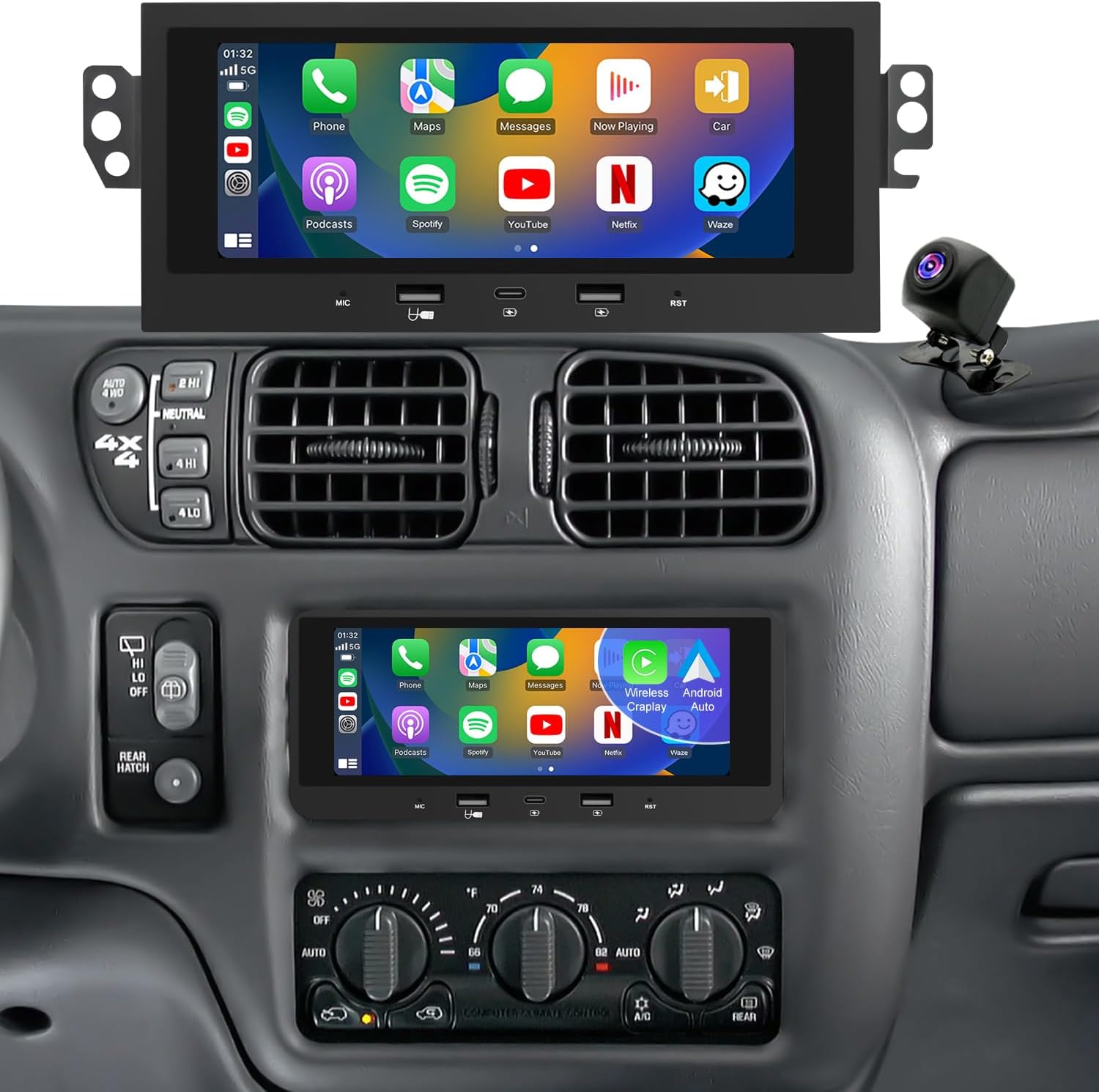
This Aitrenlu 6.86-inch Android 13 stereo swaps into late-1990s and early-2000s Chevrolet dashboards to bring modern connectivity to older Malibus. It installs plug-and-play with the included harnesses and preserves steering-wheel controls while adding wireless and wired CarPlay/Android Auto, Bluetooth 5.0, built-in GPS with offline map support, and 5G-capable WiFi for app downloads and map updates. The IPS screen (1024×600) supports split-screen multitasking and a rearview camera input that auto-switches when reversing. Sound tuning uses a built-in DSP EQ and dual rear USBs handle media or charging. Real-world trade-offs are a modest internal amp that may benefit from an external amplifier for fuller sound, occasional wireless dropouts in high-interference areas, and a slower boot time compared with factory radios. Touch calibration or minor CANbus tweaks are sometimes needed to get steering controls and camera feeds working perfectly. For a performance-oriented upgrade that modernizes a Malibu without cutting the dash, it delivers most of the features drivers want at this price point.
Best for: Drivers focused on performance upgrades who want modern navigation, phone integration, and multitasking in a period-correct Malibu interior while keeping install reversible and controls familiar.
Less Ideal for: Users seeking studio-grade audio power or the smoothest, fastest boot and interface experience should consider higher-end head units with stronger built-in amplifiers and more polished software.
- Wireless and wired Apple CarPlay and Android Auto for phone apps and navigation without a wired-only constraint
- Built-in GPS with offline map support plus 5G WiFi for faster map updates and downloads
- Plug-and-play installation and retained steering-wheel control compatibility preserve the factory dash and ergonomics
- IPS 1024×600 display with split-screen makes multitasking and navigation readable on a compact screen
- Bluetooth 5.0 and DSP EQ provide stable streaming and basic sound tuning without external processors
- Internal amplifier has limited power so larger cabins may need an external amp for better dynamics
- Wireless connections can drop in high-interference environments; wired connections are more reliable
- Boot time and interface polish are not as fast or refined as newer factory-grade head units
Verdict Aitrenlu’s unit brings modern CarPlay, Android Auto, GPS, and WiFi to a Malibu dash with simple installation and performance-focused features but leaves room for audio upgrades and occasional wireless reliability compromises.
4. PODOFO 9" Android Car Stereo for Chevy Malibu (2009–2014) with CarPlay & Android Auto

| Applicable Models | Chevy Malibu 2009-2014 |
|---|---|
| Display Size | 9 Inches |
| Memory | 2G RAM + 64G ROM |
| Rear Camera | AHD 1080P, 170° viewing angle |
| Connectivity | Wired/Wireless CarPlay, Android Auto, WiFi, Bluetooth |
This PODOFO 9-inch Android head unit is a budget-focused replacement for the Chevy Malibu 2009–2014 factory radio that brings touchscreen navigation, wired or wireless CarPlay/Android Auto, Bluetooth, WiFi and an included 1080P AHD rear camera. Installation replaces the in-dash stereo and is intended to restore steering wheel control and reverse-camera auto-switching while adding app support from the Android app store. The unit ships with 2GB RAM and 64GB storage which keeps the interface responsive for navigation and media apps, and the IPS display offers wide viewing angles for maps and video. Practical benefits are easy smartphone integration for hands-free calls and navigation, expandable app options, and a dedicated backup camera feed for safer parking. Limitations include fitment variability across model years and trim levels so confirming console shape is essential, and a few user reports mention missing features or fit problems out of the box, which may require returns or seller support. Expect an economical upgrade that adds modern connectivity but may need patience during installation and setup.
Best for: Budget-conscious buyers who want modern smartphone integration and a camera-equipped upgrade for a Chevy Malibu without spending on premium aftermarket units.
Less Ideal for: Drivers who prioritize perfect factory fitment, professional-grade performance, or warranties from major aftermarket brands should consider higher-end, vehicle-specific options instead.
- Wired and wireless Apple CarPlay and Android Auto support for easy smartphone integration
- Includes 1080P AHD waterproof rear camera with automatic reverse-screen switching
- 9-inch IPS touchscreen for clearer maps and media with multitouch control
- 2GB RAM and 64GB storage to install apps and keep the system responsive
- Reported fitment issues for some Malibu center consoles so physical compatibility is not guaranteed
- Lower RAM compared with higher-end units may limit multi-tasking with many apps open
Verdict A cost-effective way to add touchscreen CarPlay/Android Auto and a backup camera to Malibu (2009–2014) models, but check physical fit carefully before buying.
5. Driauto 9" Android 15 Car Stereo for Chevrolet Malibu (2009–2014) — 8‑Core, 6GB RAM, 128GB

| Operating system | Android 15 |
|---|---|
| Memory | 6GB RAM + 128GB storage |
| Display | 9 inch IPS, 1280×720 |
| Bluetooth | Version 5.0 |
| Power output | 4×45W |
This Driauto 9-inch Android 15 head unit replaces the factory radio in compatible Chevrolet Malibu 2009–2014 dashboards and turns the dash into a modern infotainment center. It runs on an 8-core chipset with 6GB RAM and 128GB storage, which keeps navigation, media playback, and apps responsive; built-in WiFi and offline map support let you download maps or use online navigation when a hotspot is available. Connectivity includes wireless CarPlay and Android Auto, Bluetooth 5.0 hands-free and streaming, mirror-link, and dual USB ports. Audio is boosted by a 4x45W output and a 32-band DSP for tuning. The unit supports reversing camera input, steering-wheel controls, and optional accessories like OBD and DAB+. Installation requires verifying your factory radio harness: the wiring harness will not work with premium amplified or Bose systems and fitment varies by production option, so measure the factory unit first or consult support. The interface is highly customizable but some advanced features need optional modules. For buyers who want a near-stock integration and modern smartphone features, this unit delivers strong performance with the usual installer checks for vehicle compatibility.
Best for: Risk-averse mainstream buyers who prioritize modern connectivity and a factory-like replacement experience while wanting clear install guidance and support.
Less Ideal for: Those who have premium amplified factory sound systems, want a plug-and-play swap for every Malibu trim, or prefer dealer-installed factory upgrades.
- Modern Android 15 platform with 6GB RAM and 128GB storage for smooth multitasking and app installs
- Wireless CarPlay and Android Auto plus Bluetooth 5.0 for hands-free calling and phone integration
- Built-in GPS with offline map capability and WiFi/hotspot support for updates and streaming
- DSP and 4x45W power output for noticeably improved sound tuning and volume over stock
- Supports reversing camera, steering-wheel controls, and multiple optional accessories for expanded functionality
- Not compatible with vehicles equipped with premium amplified or Bose factory sound systems without additional adapters or modifications
- Fitment varies by factory radio type so some Malibu units will require removal and inspection of the stock head unit before purchase
Verdict A feature-rich Android replacement head unit that modernizes a 2009–2014 Chevrolet Malibu but requires careful fitment checks for nonstandard factory audio systems.
6. ISUDAR 9" IPS Touchscreen Android 14 Car Stereo for Chevrolet Malibu (2009–2014)

| OS | Android 14 |
|---|---|
| Memory | 2GB RAM + 64GB ROM |
| Display resolution | 1280×720 |
| Connectivity | Wireless CarPlay, Android Auto, WiFi 6, Bluetooth 5.4 |
| Power output | 4×45W |
This ISUDAR 9-inch Android 14 stereo replaces the stock head unit in Chevrolet Malibu model years 2009–2014 and brings a modern infotainment experience. It runs Android 14 on a quad-core processor with 2GB RAM and 64GB storage, so you can install navigation and media apps, stream over built-in WiFi 6, and pair phones via Bluetooth 5.4. Wireless and wired CarPlay and Android Auto integration make hands-free calling and navigation convenient, while backup camera and steering wheel control support keep existing vehicle functions working. The 1280×720 IPS display is bright and responsive, and the unit delivers up to 4x45W audio output for improved in-car sound. Expect straightforward garage or DIY installation if you verify dash fitment first. Limitations include modest RAM compared with high-end stereos and occasional startup delay reported by some users, so multitasking heavy apps may be slower than on premium units.
Best for: Practical owners who want a big modern infotainment upgrade for an older Malibu without overspending and who prioritize value and usable features over top-tier performance.
Less Ideal for: Drivers who need the fastest possible app performance, extensive multitasking, or a high-end audiophile head unit should consider premium alternatives.
- Direct fit replacement for Chevrolet Malibu 2009–2014 with steering wheel control and backup camera integration
- Android 14 platform with 64GB storage lets you run navigation and music apps locally
- Wireless CarPlay and Android Auto plus WiFi 6 and Bluetooth 5.4 for fast, stable phone connectivity
- 1280×720 IPS touchscreen provides clear visuals and tactile responsiveness
- 4×45W power output improves driving audio compared with many factory radios
- Only 2GB of RAM may limit heavy multitasking and advanced app performance
- Unit can show a short startup delay on power-up according to some user reports
Verdict A cost-effective, feature-rich upgrade that modernizes a 2009–2014 Chevy Malibu with wireless CarPlay/Android Auto and solid connectivity, but with modest multitasking performance.
7. PLZ 10.1" Wireless Car Stereo with Apple CarPlay and Android Auto (MP-108)

| Screen size | 10.1 inches |
|---|---|
| Bluetooth | 5.3 |
| Preamp output | 4.2 channel |
| EQ | 10-band |
| Backup camera | Included |
This PLZ 10.1" single-din/expandable double-din head unit turns a Malibu dash into a modern infotainment center by adding wireless CarPlay/Android Auto, a large IPS touchscreen, Bluetooth 5.3, and built-in DSP with a 10-band EQ. Typical use is replacing the factory stereo to get phone-based navigation, hands-free calling, music streaming, and a visual reverse camera input. Notable features include an independent Bluetooth module with extra antenna for steadier connections, wired or wireless CarPlay/Android Auto with voice control, dual subwoofer outputs and a 4.2-channel preamp for expanded audio systems, and an included backup camera. Practical benefits are much improved smartphone integration, flexible audio tuning, and a bright display that supports multi-angle viewing. Important limitations are that installation may require a dash kit, vehicle-specific harness adapter, or professional installation to retain retained accessory power and fit Chevrolet Malibu dash openings, and some users report occasional freezes and limited playback of streaming video through CarPlay for safety reasons.
Best for: Balanced buyers who want to modernize a Chevrolet Malibu with smartphone integration, better audio tuning, and a large touchscreen without chasing premium dealer options.
Less Ideal for: Drivers who prefer a completely plug-and-play OEM-style replacement with guaranteed dash fitment and factory feature retention should consider vehicle-specific factory-quality units or pro-installed alternatives.
- Wireless Apple CarPlay and Android Auto for phone navigation and voice control without a cable
- Large 10.1-inch IPS touchscreen that improves visibility and touch control
- Independent Bluetooth 5.3 module with extra antenna for more reliable hands-free and streaming connections
- Built-in DSP and 10-band EQ plus 4.2-channel preamp and dual subwoofer outputs for flexible sound tuning
- Includes backup camera and supports steering wheel controls for safer operation while driving
- May require a Malibu-specific dash kit and wiring harness adapter to fit and retain vehicle features
- Some users report occasional software freezes and the need to reboot the vehicle to recover
Verdict A cost-effective way to bring wireless CarPlay/Android Auto, a big touchscreen, and advanced audio tuning to a Chevrolet Malibu, provided you handle dash fitment and installation needs.
Choosing the Right Chevrolet Malibu Car Stereo: Key Factors to Consider
Fitment And Dash Compatibility
Correct physical fitment determines whether the unit can be installed cleanly without major dash cutting or modification. Measure available space and verify single DIN or double DIN compatibility with your Malibu trim and year. Consider the bezel and mounting depth, because some head units are deeper and may interfere with HVAC or structural components.
Also factor in harness compatibility and whether a vehicle-specific mounting kit or adapter is required. A unit that matches factory mounting points and uses a plug-and-play harness will save time and reduce the risk of wiring mistakes during installation.
Audio Performance And Output Options
Audio performance affects clarity, dynamic range, and the ability to drive aftermarket speakers or amplifiers. Look for units with good internal DACs, adjustable EQ, time alignment, and sufficient preamp output voltage for external amplifiers. More robust preamp outputs help maintain signal quality when adding amplifiers and crossovers.
Also check the number of RCA outputs and whether the unit supports multiple zones or subwoofer-level control. These options matter if you plan to upgrade speakers or add a dedicated subwoofer later.
Smartphone Integration And Connectivity
Modern connectivity features influence how you use navigation, media, and calls while driving. Support for Apple CarPlay and Android Auto provides seamless access to preferred apps, directions, and messaging with minimal distraction. Native Bluetooth is still important for streaming and hands-free calling when a smartphone interface is not available.
Evaluate wired versus wireless implementations, the quality of Bluetooth audio codecs supported, and whether the unit includes a built-in microphone or a provision for an external mic to improve call clarity.
User Interface And Controls
How you interact with the head unit affects usability and safety when driving. Large, responsive touchscreens reduce the need to hunt for small buttons, while tactile buttons and knobs are useful for quick adjustments without looking. Consider screen size and resolution, menu layout, and whether the interface supports customizing presets and shortcuts.
If you frequently adjust settings while on the move, a combination of touchscreen and physical controls tends to offer the best balance of convenience and safety.
Installation Complexity And Wiring
Installation complexity impacts time, cost, and the potential need for professional help. Assess whether the unit requires a CAN-bus adapter, steering-wheel control interface, or retained factory features like backup camera and onboard vehicle information. Units that support retained factory features via harness adapters reduce the chance of losing important functions.
Also consider the wiring skill required for speaker-level to RCA conversions and for integrating amplifiers and subs. Simpler plug-and-play solutions are preferable for DIY installers, while advanced installs may require soldering, crimping, or a professional installer.
Expandability And Future-Proofing
Think about how the head unit will accommodate future upgrades such as external amplifiers, additional cameras, or enhanced connectivity modules. Units with multiple preamp outputs, USB ports, and auxiliary inputs provide more flexibility for adding components later. Firmware update capability is useful for receiving feature improvements and bug fixes over time.
Choosing a unit with common connection standards and modular accessories makes it easier to expand the system without replacing the entire head unit.
FAQ
Will a double DIN head unit fit in all Chevrolet Malibu model years?
Fitment depends on the model year and trim level. Some Malibu variants are designed for a double DIN opening while others use a single DIN or require a specific mounting kit. Verify the dash opening and mounting depth for your exact year before purchasing.
Do I need professional installation for a car stereo upgrade in a Malibu?
It often depends on your experience and the complexity of the upgrade. Simple replacements with plug-and-play harnesses can be DIY-friendly, but installs involving amplifiers, custom wiring, or steering-wheel control retention may benefit from professional installation to ensure proper function and safety.
How important is it that the stereo supports Apple CarPlay or Android Auto?
Support for Apple CarPlay or Android Auto provides a safer and more integrated smartphone experience, especially for navigation and messaging. It is particularly valuable if you rely on smartphone apps while driving, but basic Bluetooth streaming still provides core media and call functionality.
Can I keep the Malibu factory backup camera when upgrading the head unit?
Many aftermarket head units offer camera input compatibility, but retaining the factory camera typically requires the correct wiring adapter or vehicle-specific interface. Confirm that the chosen unit supports a camera input and that you have the necessary adapter for the Malibu model year.
Will upgrading the head unit noticeably improve audio quality by itself?
Upgrading the head unit can improve source quality, connectivity, and preamp signal strength, which often results in clearer sound. However, the greatest improvements usually come from replacing speakers and adding amplification, so consider the head unit as one part of the overall audio chain.
How We Chose the Best Chevrolet Malibu Car Stereo
We focused on options that fit the Chevrolet Malibu dash and wiring without extensive custom fabrication. Key evaluation criteria included audio performance measured by clarity and supported formats, physical fitment and installation complexity for Malibu dashboards, connectivity features such as Bluetooth, Apple CarPlay, and Android Auto compatibility, and user interface quality including touchscreen responsiveness and button layout. We also assessed input and output options like preamp outputs and microphone integration for hands-free calling, and the durability and build quality of the head unit for long-term reliability.Products were excluded if they required major dashboard modification, lacked clear wiring harness compatibility, or failed to provide documented support for common Malibu model years. We prioritized units that balance sound improvement, straightforward installation, and modern connectivity features relevant to everyday driving.
Our full evaluation process is outlined in our review methodology.
Conclusion
Choosing the right Chevrolet Malibu car stereo means balancing fitment, connectivity, and audio capability. Prioritize units that match your dash opening and wiring harness, offer the smartphone features you use most, and provide the preamp and output options needed for any future speaker or amplifier upgrades.Accept that tradeoffs exist between feature sets and installation complexity. Decide whether ease of installation or expandability matters more to you, and use the factors above to narrow choices to the head unit that best fits your driving habits and upgrade plans.
Explore More:
- Check out all Chevrolet Malibu parts & accessories
- Explore Electronics
- Browse all Accessories
