

Note: This article contains affiliate links. If you click on these links and make a purchase, I may earn a small commission at no extra cost to you. This helps support my research and content. Read my full affiliate disclosure here.
If you drive a Ram Dakota, fitting a proper backup camera can dramatically reduce blind spots and make low-speed maneuvers easier and safer. The right Ram Dakota backup camera improves rear visibility in tight parking situations, when towing, and at night, while matching your truck's mounting points and electrical system.This guide covers the five shortlisted backup camera options we vetted for the Dakota. Each pick was evaluated for image clarity, mounting compatibility, wiring options, and ease of installation so you can pick the solution that fits your driving habits and vehicle setup.
Top Picks at a Glance
| Best Overall Backup Camera A reliable, well-rounded camera that balances image, fit, and durability | PHEZEN 6.86" Android Car Radio with Wireless CarPlay/Android Auto and Backup Camera for Dodge Dakota (2001–2004) |  |
| Best Budget Backup Camera An affordable direct-fit or universal camera for basic reverse visibility | KoiLuvGo License Plate Backup Camera with 170° Wide-Angle and Night Vision |  |
| Best Wireless Magnetic/Solar Camera Portable wireless cameras with magnetic mounts, solar charging, and battery power | Rohent Solar Magnetic Wireless Backup Camera with 7" 1080p Monitor |  |
| Best Complete Monitor Kit All-in-one kits that include a camera plus a monitor and cabling for plug-and-play use | pemacom P15 1080p Wireless Magnetic Backup Camera Kit with 7" Monitor |  |
| Best 1080P AHD / Metal-Housing Camera High-resolution AHD cameras with metal housings and high waterproof ratings | PixelMan PMD2A-S 1080P AHD Metal Backup Camera |  |
1. PHEZEN 6.86" Android Car Radio with Wireless CarPlay/Android Auto and Backup Camera for Dodge Dakota (2001–2004)
Best Overall Backup Camera
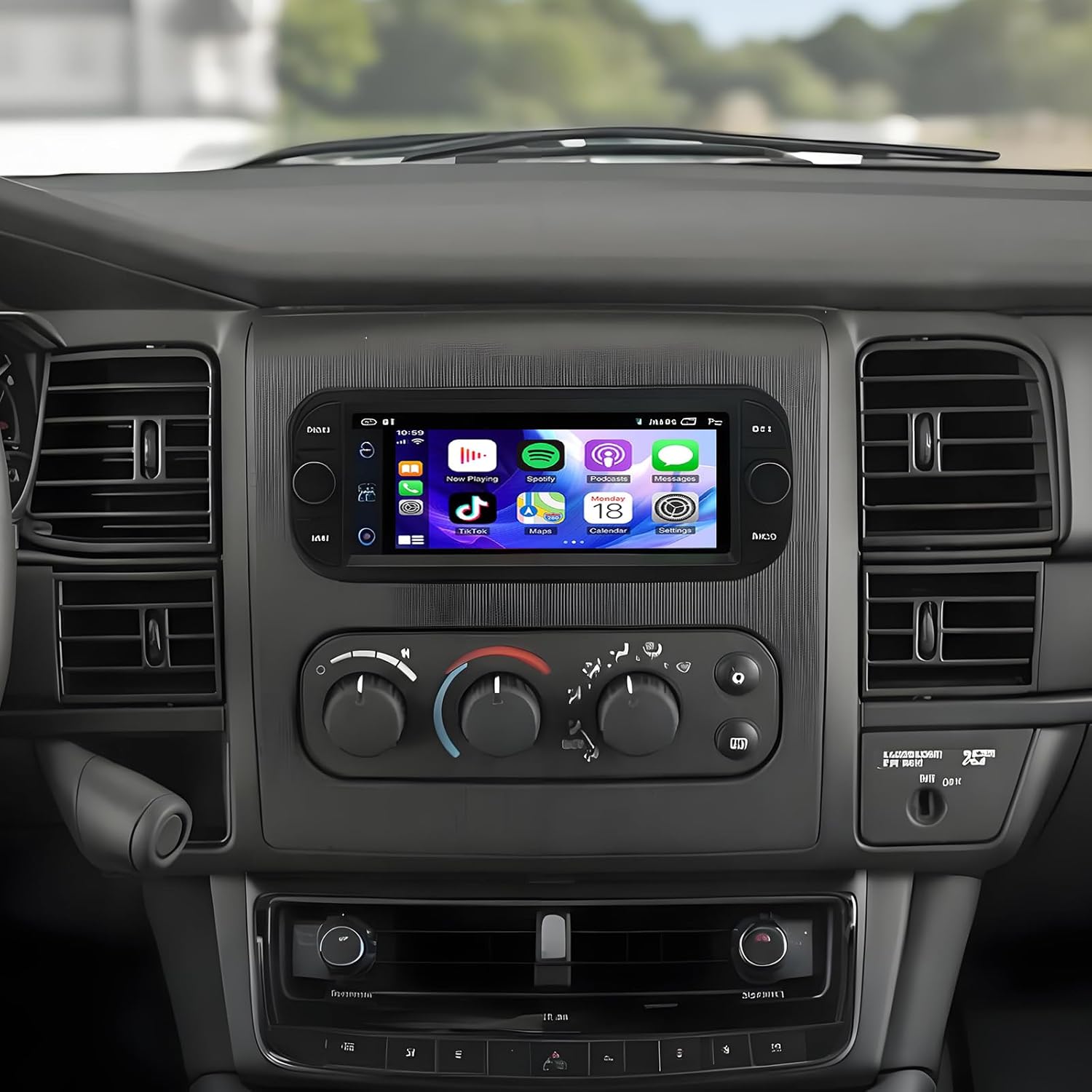
| Operating system | Android 13/15 |
|---|---|
| Screen size | 6.86 inch IPS |
| Memory | 2GB RAM + 32GB ROM |
| Camera rating | IP68 waterproof, 170° lens |
| Connectivity | Wireless CarPlay, Android Auto, Wi‑Fi, Bluetooth |
This PHEZEN head unit replaces the factory radio in Dodge Dakota 2001–2004 and combines modern infotainment with a dedicated reversing camera. It runs Android 13 on a 6.86-inch IPS touchscreen and supports wireless CarPlay and Android Auto so you can use navigation, calls, and music without plugging in. The unit includes built-in Wi‑Fi, Bluetooth hands‑free calling, FM radio, and steering wheel control support for convenient everyday use. The supplied backup camera is described as 170 degree, IP68 waterproof, and night‑vision capable, which makes it suitable for clear rear imaging in wet conditions and low light. Installation requires verifying fit and matching the truck's dash and harness, and the 2GB/32GB configuration is basic for heavy multitasking or advanced apps. Expect straightforward reversing performance and modern connectivity, but power users who want high-end processing, maps preloaded, or larger displays may prefer a higher‑spec unit.
Best for: Buyers who want a single, dependable upgrade that brings modern touch controls, wireless phone integration, and a weatherproof backup camera to a Dodge Dakota without replacing other vehicle systems.
Less Ideal for: Drivers who need a high‑performance multimedia center with large storage, advanced processors, or a bigger screen should consider higher‑spec units instead.
- Wireless CarPlay and Android Auto for cable-free access to navigation and phone functions
- IP68-rated backup camera with 170° lens and night vision for reliable rear visibility in rain and low light
- Built-in Wi‑Fi and Bluetooth for streaming, hands‑free calling, and app downloads
- Steering wheel control compatibility preserves in‑car ergonomics after upgrade
- Modest 2GB RAM / 32GB storage configuration limits heavy multitasking and large map/cache storage
Verdict: Choose this when you want a single dependable backup camera that delivers clear day/night imaging, easy installation, and solid weather resistance for everyday reversing and towing.
2. KoiLuvGo License Plate Backup Camera with 170° Wide-Angle and Night Vision
Best Budget Backup Camera

| Real Angle of View | 170 Degrees |
|---|---|
| Connector Type | RCA |
| Optical Sensor Technology | CMOS |
| Installation Type | Surface Mount |
This KoiLuvGo license plate backup camera is a straightforward, budget-focused rear-view camera that restores basic reversing visibility and parking guidance for a Ram Dakota. It mounts around the license plate or other discreet rear locations and outputs analog video over the included RCA cable to any compatible monitor or aftermarket head unit. The 170° wide-angle lens gives a broad field of view for close obstacles while the 7 infrared LEDs plus one sensor-assisted light improve low-light visibility and support mixed color/night imaging. The unit is described as P67-rated with anti-fog construction, so it stands up to rain and car washes better than bare electronics. Installation is simple for anyone comfortable with wiring a reverse lamp trigger and routing a 6-meter RCA cable under the vehicle. Limitations are typical for low-cost cameras: video is analog resolution rather than high-definition, and image quality and low-light color rendering will not match premium cameras, but it performs well as a no-frills replacement to regain rear visibility on a Ram Dakota.
Best for: A Ram Dakota owner who wants an inexpensive, easy-to-install replacement camera to restore rear visibility and basic parking guidance without adding complex features.
Less Ideal for: Drivers who want high-definition video, advanced parking overlays, or professional-grade image quality should consider higher-end camera systems.
- Wide 170° lens provides broad rear coverage for parking and obstacle detection
- Infrared LED night vision with a sensor light improves visibility in low light
- P67-rated waterproof and anti-fog construction for reliable outdoor use
- Includes 6-meter RCA video cable and simple surface-mount design for straightforward installation
- Analog video with modest resolution rather than modern HD image quality
- Short manufacturer warranty period of 30 days
Verdict: Pick this if you need a low-cost replacement that restores rear visibility and parking guidance without extra features or complex installation.
3. Rohent Solar Magnetic Wireless Backup Camera with 7" 1080p Monitor
Best Wireless Magnetic/Solar Camera

| Screen Size | 7 inches |
|---|---|
| Video Capture Resolution | 1080p |
| Field Of View | 170 degrees |
| Battery Capacity | 15000mAh |
| Waterproof Rating | IP69K |
This Rohent kit pairs a solar-charged magnetic camera with a 7" 1080p monitor to give a truly cable-free reversing setup for a Ram Dakota. The camera mounts in seconds using strong magnets and keeps itself topped up with a 5W solar panel and a 15,000mAh internal battery, so you can move it between a truck bed, trailer or camper without rewiring. The system streams a 170 degree wide-angle view to the monitor over a dual-antenna 2.4GHz link; that helps maintain a steady feed up to the indicated vehicle range and supports adding a second camera to cover hitching or blind spots. Night vision, parking guidelines, IP69K weather protection and a cigarette-lighter or USB power option for the monitor make real-world use straightforward. Expect easy seasonal or temporary installs and reliable daytime charging, but understand solar gain limits battery top-up in low-light environments and magnetic mounting is not a permanent, theft-proof solution for long-term fixed installations.
Best for: Buyers who need a quick, no-wires backup solution for temporary or movable installs on a Ram Dakota, such as trailer hookups, seasonal gear, or shared vehicles where mobility and fast mounting matter most.
Less Ideal for: Drivers seeking a permanent, theft-resistant factory-style backup camera or those who require guaranteed 24/7 continuous operation in low-sunlight locations should consider hardwired alternatives.
- Truly wire-free setup with magnetic mount for fast, no-drill installs and easy repositioning.
- Solar panel plus 15,000mAh battery provides long runtime and reduced need for frequent charging.
- Dual-antenna wireless link reduces lag and maintains a stable 1080p feed within practical vehicle range.
- 170° wide-angle lens and adjustable parking guidelines improve visibility for reversing and hitching.
- IP69K rating and wide operating temperatures make it durable in harsh weather.
- Solar charging depends on sunlight so performance and continuous operation can drop in low-light or shaded conditions.
Verdict: Opt for this when you want a no-wires, quick-mount camera—ideal for trailers or temporary installs where magnetic or solar-powered mobility matters most.
4. pemacom P15 1080p Wireless Magnetic Backup Camera Kit with 7" Monitor
Best Complete Monitor Kit

| Screen Size | 7 Inches |
|---|---|
| Video Capture Resolution | 1080p |
| Field Of View | 170 Degrees |
| Connector Type | USB |
| Voltage | 12 Volts |
The pemacom P15 ships as a complete monitor kit intended for drivers who want a fast, low‑hassle reversing solution. The package includes a 7-inch anti-glare LCD monitor with suction-cup mounting and a magnetic rear camera that mounts without drilling. The camera streams a 1080p image over a 2.4 GHz digital link with frequency-hopping to reduce interference, and it supports a second camera for split or dual-channel views to cut blind spots. Built-in night vision, a 170-degree wide angle lens, and adjustable display settings help produce a clear picture in low light and crowded rear scenes. Power options are flexible: the monitor runs from a cigarette-lighter adapter or USB and the camera uses a 15,000 mAh battery plus a 5W solar panel and Type-C charging for extended field use. The unit is weatherproof and rated for harsh environments, but magnetic mounting may not suit every installation surface and fully wireless setups can still require occasional recharging depending on solar conditions. For drivers wanting a plug-and-play reversing setup with optional trailer or second-camera coverage, this kit delivers a practical all-in-one package.
Best for: Buyers who want a full, plug-and-play reversing system that installs quickly without wiring and provides clear 1080p visibility for towing or trailer setups.
Less Ideal for: Drivers who require a permanently hardwired, factory-style camera integration or a professional flush mount should consider wired replacement options instead.
- Complete out-of-the-box system including monitor, camera, power cables, and antennas
- True 1080p camera with 170-degree wide-angle lens and night vision for clearer reversing views
- Magnetic mount and solar charging plus a large internal battery enable quick install and extended off-grid use
- Digital 2.4 GHz signal with frequency hopping reduces interference and supports up to two camera channels
- Magnetic mount may not adhere well to all vehicle surfaces or preferred locations
Verdict: Select this when you want a full system (camera + display) that’s ready to install for drivers who need an out-of-the-box reversing solution.
5. PixelMan PMD2A-S 1080P AHD Metal Backup Camera
Best 1080P AHD / Metal-Housing Camera

| Video Capture Resolution | 1080p |
|---|---|
| Field Of View | 170 Degrees |
| Optical Sensor Technology | CMOS |
| Connector Type | RCA |
| Voltage | 12.0 |
The PixelMan PMD2A-S is a compact metal backup camera designed to give a sharper, more durable rearview picture for daily reversing on a Ram Dakota. It outputs HD by default and can be switched to AHD (1080P) when paired with an AHD-capable monitor, delivering clearer daytime detail and improved night visibility thanks to a larger 1/2.7in imaging chip and an F1.4 wide-angle glass lens. The alloy housing and nano waterproof sealing aim to resist seasonal expansion and moisture, and the kit includes two mounting brackets so you can hide the camera on the license plate or surface-mount it to the Dakota without drilling. Installation uses an RCA connector and a 26 ft double-shielded cable that reaches typical truck rear runs. Expect a noticeable step up in color saturation and low-light performance versus basic cameras, but you will need an AHD-capable screen to get true 1080P, and wiring a separate power and RCA run is required for integration with some factory screens on the Dakota.
Best for: Ram Dakota owners who want a weatherproof, upgrade-grade reverse camera that prioritizes image clarity and lasting hardware for regular use and safer backing maneuvers.
Less Ideal for: Buyers who need an integrated wireless solution or who cannot run an RCA/power cable from the tail to the cab should consider alternative systems that match those installation constraints.
- Supports AHD 1080P output when paired with an AHD monitor for higher-resolution reversing images
- Large 1/2.7in imaging chip and F1.4 glass lens for improved brightness, color saturation, and night clarity
- Alloy metal housing with nano waterproof sealing designed to resist moisture and temperature changes
- Includes two mounting brackets (license plate and surface) and a 26 ft double-shielded RCA cable for flexible installation
- Requires an AHD-capable monitor to achieve 1080P; otherwise it defaults to lower HD resolution
Verdict: Buy this if you prioritize image clarity and long-term durability—metal-bodied, 1080P/AHD cameras that hold up in harsh weather and deliver crisp night/day footage.
Choosing the Right Ram Dakota Backup Camera: Key Factors to Consider
Mounting and Fitment
Compatibility with the Ram Dakota's rear geometry determines how clean and secure the installation will be. Some backup cameras are designed to mount in or around the license plate recess while others use bumper or tailgate locations; choosing the correct mounting style avoids unnecessary drilling or custom brackets.
Fitment affects cable routing too. A camera that aligns with existing screw points and trim panels simplifies wiring paths and reduces the risk of water ingress. When planning installation, consider how the camera housing sits relative to the bumper and whether it will be exposed to road debris or be tucked under trim for additional protection.
Image Quality and Low-Light Performance
Resolution and sensor sensitivity directly affect how much detail you can see on the monitor, especially at night. A higher-resolution sensor provides a clearer picture for identifying obstacles and reading small objects behind the truck, while a sensor with good low-light performance or integrated infrared LEDs enhances visibility in dim conditions.
Also consider dynamic range and color reproduction. A camera that handles bright highlights and deep shadows preserves detail when the sun is low or when headlights illuminate the scene. For routine backing and hitching tasks, prioritize cameras with consistent exposure and usable night images.
Field of View and Image Distortion
A wide field of view reduces blind spots but can introduce fisheye distortion that makes distances harder to judge. For a Ram Dakota, a field of view between roughly 120 and 170 degrees often offers a practical balance: wide enough to see approaching obstacles and pedestrians, but not so wide that objects appear unnaturally warped.
Some systems include on-screen guidelines or adjustable viewing modes to help with depth perception. Consider whether you need fixed guidelines for hitching or selectable overlays that you can disable if they interfere with assessment of real distances.
Wiring, Power, and Signal Type
Decide between wired and wireless architectures based on your Dakota's usage and wiring access. Hardwired cameras typically provide more reliable, lag-free video and a consistent power source tied to the reverse light circuit. Wireless systems avoid running long video cables and can be simpler for temporary installs, but they may introduce interference or require a stable power feed.
Also check power draw and whether the camera needs a fused connection or can be tapped into the reverse lamp circuit. For trucks used for towing, confirm whether the selected power and signal approach will remain stable when trailers are connected.
Durability and Weather Resistance
The rear of a truck is exposed to water, road grime, and mechanical impact. A camera with a solid ingress protection rating, corrosion-resistant materials, and a robust mounting bracket will last longer under typical Dakotas use. Look for sealed housings, protective lens covers, and metal or reinforced polymer housings rather than thin plastics.
Consider temperature operating ranges as well. If you drive in very hot summers or freezing winters, ensure the camera specifications include operating limits that exceed local extremes to avoid intermittent failures.
Compatibility With Displays And Features
Think about how the camera will connect to your in-cab monitor or stereo screen. Some systems are plug-and-play with dedicated video inputs, while others use proprietary wireless monitors or require an adapter. Confirm signal format and connector types so you do not need extra converters.
Also check for features you might want, like on-screen parking guidelines, mirror-image flip for tailgate mounting, or trigger wires that switch a monitor to camera feed when the truck is shifted into reverse. Ensuring the camera and monitor speak the same 'language' reduces headaches during setup.
Mounting Options for the Ram Dakota
Ram Dakota owners can typically choose from license-plate recess mounts, tailgate-lip mounts, or bumper-mounted cameras. Each location affects visibility, exposure to debris, and installation complexity. License plate mounts are often the cleanest because they use existing fasteners and keep the camera centered at the vehicle's rear height.
- License plate mount: centers the image and simplifies wiring behind trim.
- Tailgate-lip mount: can offer a higher vantage point but may require drilling or bracket work.
- Bumper mount: protects the camera under the bumper but can be obstructed by towing hardware.
Wired Vs Wireless Systems: Tradeoffs to Consider
Wired systems generally deliver the most consistent video quality and are less prone to interference, which is important when precise, lag-free feedback is needed for hitching or tight maneuvers. They do require running a video cable from the rear to the cab and a reliable power tap from the reverse lamp circuit.Wireless backup camera systems remove the need to route long video cables and can be faster to install, especially on older interiors. However, signal dropouts or interference from other electronics can occur. If you opt for wireless, prioritize models with robust signal encryption and dedicated transmitter/receiver pairs to reduce interference risks.
- Wired: stable video, no latency, needs cable routing.
- Wireless: easier install, potential interference, good for temporary setups.
Night Vision and Low-Light Techniques
Not all night-vision approaches are equal. Infrared LED arrays produce monochrome images that are useful in total darkness, while low-light, color-capable sensors rely on passive sensitivity to preserve useful color information under streetlights. For typical Dakota use, a color image with decent low-light sensitivity helps distinguish painted curbs, brake lights, and other vehicles more easily.Also inspect lens coatings and hooding that reduce glare from headlights. Adjustable exposure or multiple gain levels can improve visibility under rapidly changing conditions such as passing vehicles or reflections.
- IR LEDs: reliable in no-light conditions but produce black-and-white images.
- High-sensitivity color sensors: retain color in low light but vary by implementation.
Installation Tips and Common Pitfalls
Plan cable routing before drilling. Remove trim panels if possible to follow factory harness paths and to avoid pinching wires. Use grommets where cables pass through metal panels and seal any openings to prevent water intrusion.Test the camera and monitor connection before finalizing mounting. Verify trigger wiring to ensure the monitor switches to the camera feed when reverse gear is engaged. If you are uncertain about the vehicle's electrical layout, consult a wiring diagram or a professional installer to avoid damage to the reverse light circuit.
- Protect cables with conduit or split loom for durability.
- Label wiring during tear-down to simplify reassembly.
- Confirm ground points for stable electrical connections.
Features That Improve Daily Use
On-screen guidelines that match the Dakota's geometry can speed up parking and hitching, but they must be correctly placed to be useful. Look for systems that allow you to calibrate or disable overlays if they do not match your truck's actual rear profile.Other convenience features include automatic dimming or brightness adjustment for daytime glare, adjustable mounting angles for improved vertical aim, and lens materials that resist scratching. These small details influence satisfaction over time as you use the camera daily.
- Adjustable guidelines or calibration options.
- Brightness or exposure auto-adjust for varying light conditions.
How We Chose the Best Ram Dakota Backup Camera
We prioritized criteria that matter specifically for Ram Dakota owners and for the backup camera category. Primary evaluation factors included mounting compatibility with Ram Dakota rear aperture and license plate areas, image resolution and low-light performance to ensure usable video at night, and field of view to balance wide coverage with minimal distortion.We also assessed wiring and power options, including hardwired and wireless signal links, to reflect common Dakota wiring access and towing configurations. Durability factors such as waterproof rating and materials were considered because the Dakota is often used in variable weather and work environments. Ease of installation and fitment instructions were reviewed to favor solutions that minimize drilling or modification.Excluded items included cameras designed only for other vehicle platforms or those requiring major bodywork to install. We also set aside devices that lacked clear electrical specifications or insufficient night-vision capability. The final list reflects products that meet fitment expectations, offer clear imaging, and provide practical installation pathways for a Ram Dakota.
Our full evaluation process is outlined in our review methodology.
FAQ
Do I need to tap power from the reverse light to run a backup camera?
Most wired systems are powered from the reverse lamp circuit so the camera turns on automatically when you shift into reverse. Some wireless or dedicated camera monitors require a separate fused power connection to the ignition or accessory circuit for continuous operation.
Can I install a camera without drilling into the tailgate or bumper?
Yes. Many cameras are designed to mount using existing license plate holes or to clip into the tailgate lip. Choosing a model that matches the Dakota's factory fastener locations avoids new holes and preserves resale value.
Will a wireless backup camera work reliably when towing a trailer?
Wireless systems can work while towing, but performance depends on transmitter placement and potential interference from trailer wiring or metal structures. For consistent, lag-free video during towing, a hardwired camera is usually more reliable.
How do I ensure the camera is waterproof and durable enough?
Check the IP rating and housing materials. An IP67 or higher rating is desirable for a truck application because it indicates protection against heavy splashing and temporary immersion. Metal housings and sealed cable entries offer additional durability.
Can I add parking guidelines or adjust the camera image after installation?
Some cameras offer adjustable or software-configurable guidelines, while others have fixed overlays. If alignment matters, choose a system with calibration features or an adjustable mount so you can tweak the viewing angle after installation.
Will the camera interfere with the Dakota's factory wiring or electronics?
Properly installed cameras should not interfere if you use correct fusing and solid ground connections. Avoid splicing into unrelated circuits and follow the vehicle's wiring best practices to prevent electrical issues.
Final Verdict
Choose a backup camera for your Ram Dakota by prioritizing mounting compatibility and image quality first, then weigh wiring approach and durability based on how you use the truck. If you regularly tow or need lag-free video, favor a hardwired solution with robust low-light performance. For easier installs or temporary setups, a quality wireless system can be acceptable but expect potential signal tradeoffs.Balance field of view and distortion so you can judge distances accurately, and pick a housing and IP rating suited to truck use. With those tradeoffs in mind, you can select a camera that meaningfully improves safety and confidence when reversing your Dakota.
