

Note: This article contains affiliate links. If you click on these links and make a purchase, I may earn a small commission at no extra cost to you. This helps support my research and content. Read my full affiliate disclosure here.
Upgrading the rear-view setup on a 2012-2017 Toyota Camry can make parking, reversing, and maneuvering in tight spaces noticeably easier and safer. You want a backup camera that gives a clear image, mounts cleanly to the vehicle, and integrates with your existing monitor or head unit without fuss. This guide covers seven top options narrowed for the Camry's dimensions and wiring layout, with attention to image quality, installation complexity, and mounting style. Read on to understand which camera types suit your use case and what to expect during fitment before you start the install.
Looking for other parts? See all Toyota Camry parts & accessories.
Top Picks at a Glance
| Best Overall Backup Camera for 2012-2017 Toyota Camry DIY Mechanics Reliable all-around camera balancing clarity, fit, wiring, and durability | Car Integrations Plug-and-Play Backup Camera Kit for Select 2012–2015 Vehicles with 6.1" Factory Display |  |
| Best Budget Backup Camera for 2012-2017 Toyota Camry DIY Mechanics Affordable option with acceptable image quality and simple mounting | UHANBUT Car Backup Camera with 12 LED Night Vision, 170° Wide Angle |  |
| Best Premium Backup Camera Top-tier sensor and build quality for long-lasting, high-resolution performance | Master Tailgaters Replacement Backup Camera for Toyota Camry (2015–2017, 2021–2023) |  |
| Best Wireless Backup Camera Minimal wiring solution with stable video feed and easy setup | Purthog Plug-and-Play 4.6" Backup Camera with 150° Wide-Angle Monitor |  |
| Best Night-Vision Backup Camera Enhanced low-light imaging using IR or sensitive sensors for clarity | PixelMan PMD2A-S AHD 1080P Metal Wide-Angle Backup Camera |  |
| Best Wide-Angle Backup Camera Extra-wide field of view to reduce blind spots and improve awareness | GreenYi AHD 1080P Backup Camera with Dynamic Trajectory Guide Line |  |
| Best Complete Backup Camera Kit Includes camera, monitor or adapter, mounts, and all necessary accessories | PYvideo Rear Backup Camera Kit for Toyota (2012–2014) |  |
Car Integrations Plug-and-Play Backup Camera Kit for Select 2012–2015 Vehicles with 6.1" Factory Display
Best Overall Backup Camera for 2012-2017 Toyota Camry DIY Mechanics

| Screen Size | 6.1 Inches |
|---|---|
| Voltage | 12 Volts |
| Field Of View | 155 Degrees |
| Video Capture Resolution | 580p |
This Car Integrations kit installs as a factory-style backup camera for compatible vehicles with the 6.1" factory display and is designed to show the rear view automatically when you shift into reverse. The package includes a flush-mount HD camera, a 16-pin factory-connect harness, a 30-foot extension cable with integrated power, a hole saw, and a sealer pad so you can complete the job without replacing the head unit. The camera delivers a 150–155 degree wide view and improved low-light sensitivity for clearer night reversing, and the IP69K housing and weatherproof sealer support year-round exposure. Installation is aimed at DIYers or installers and typically takes 30–60 minutes, but some users report that vehicle wiring and reverse-trigger locations vary by trim which can require tracing or a manual trigger connection on some systems. While the kit preserves the factory look and eliminates aftermarket screens, expect to spend a bit of time confirming your head unit variant and following the manufacturer video or support if your vehicle wiring differs.
Best for: DIY-minded Camry owners who want a factory-integrated reverse camera that balances clear daytime and night visibility with straightforward plug-and-play wiring and a neat flush-mount finish for everyday parking and backing tasks.
Less Ideal for: Drivers who prefer a universal camera that works with any aftermarket head unit without checking compatibility or those who want a completely hands-off dealer installation service.
- Factory-style 16-pin harness integrates with the factory 6.1" display to show the camera automatically when in reverse
- HD camera with a 150–155° wide-angle field of view improves rear visibility and parking awareness
- IP69K-rated, weatherproof flush-mount housing with sealer pad for durable, factory-like exterior fitment
- Complete kit includes camera, harness, 30-foot extension cable, hole saw, and installation guide with video support
- Compatibility depends on the exact factory 6.1" head unit variant and some vehicles require a manual reverse-trigger connection
- Some users report incomplete or unclear wiring instructions and variable customer support response
Verdict: The best all-around backup camera choice for most owners doing their own installs, balancing image clarity, fitment, ease of wiring, and reliability for everyday driving and parking.
UHANBUT Car Backup Camera with 12 LED Night Vision, 170° Wide Angle
Best Budget Backup Camera for 2012-2017 Toyota Camry DIY Mechanics

| Voltage | 12 Volts |
|---|---|
| Connector Type | RCA |
| Field Of View | 170 Degrees |
| Installation Type | Surface Mount |
This UHANBUT backup camera is a low-cost reversing camera intended to provide a wider field of view and improved low-light visibility. It connects via an RCA video lead and runs from a 12V supply, so it is normally paired with an aftermarket monitor or a Camry factory-style screen that accepts RCA input. The 170 degree viewing angle and built-in 12 LEDs help reduce blind spots and improve night-time parking visibility, and the camera is IP68-rated, so it tolerates rain and car washes. Installation is flexible: surface-mount to the bumper or fit into a license-plate frame, depending on how you want the image framing to sit. Practical limitations are the simple video interface and basic plastic/iron housing, which mean you should expect a functional but not ultra-sharp image compared with higher-end CCD units, and you may need an adapter or professional install if your Camry lacks an RCA input. For drivers who want an inexpensive, weatherproof way to add rearview assistance, it delivers useful coverage and illumination at a budget price.
Best for: Budget-minded DIY mechanics updating a 2012–2017 Toyota Camry who need an inexpensive wired backup camera that delivers usable night and daytime visibility and mounts simply to a license-plate or surface bracket.
Less Ideal for: Users looking for a factory-quality, ultra-sharp CCD camera or a plug-and-play camera that integrates seamlessly with a Camry head unit without any adapters or professional installation.
- 170° wide-angle lens reduces rear blind spots for easier parking
- 12 LED lights automatically improve night and low-light visibility
- IP68 waterproof rating designed to withstand rain and car washes
- Simple RCA video output compatible with many aftermarket monitors
- Flexible mounting—license-plate frame or surface mount options
- Basic plastic and iron construction and budget optics can produce grainy or less detailed images compared with higher-end cameras
- Requires an RCA-capable monitor or adapter for integration with some Camry infotainment systems
Verdict: The best low-cost backup camera that still provides acceptable resolution, a reliable signal or wired connection, and straightforward Mounting for DIY mechanics working within a tight budget.
Master Tailgaters Replacement Backup Camera for Toyota Camry (2015–2017, 2021–2023)
Best Premium Backup Camera

| Real Angle of View | 170 Degrees |
|---|---|
| Connector Type | RCA |
| Optical Sensor Technology | CMOS |
| Installation Type | Plug In |
| Lux rating | 1 Lux |
This Master Tailgaters backup camera is a direct-fit replacement intended to plug into the factory video harness on specified Toyota Camry model years so you can restore or upgrade a damaged rear camera without wiring changes. Installation is plug-and-play and the camera uses a wide-angle lens and CMOS sensor to provide a broad field of view for reversing. It is rated for low-light use and claims a high video capture resolution with a waterproof IP69K rating and an operating temperature range that supports harsh conditions. The camera outputs via an RCA connector to compatible monitors and is positioned as a factory-style replacement using standard mounting and connector locations. Practical benefits include easy installation, a wide viewing angle for better rear coverage, and weather resistance for reliability. Limitations are that compatibility is limited to specific Camry part numbers so you must confirm a part-number match before buying, and the unit requires a compatible display or factory harness with the expected connector type for video to appear on the in-cabin screen.
Best for: Buyers who want a top-tier, long-lasting backup camera for a 2012–2017 Toyota Camry and prioritize superior low-light performance, wide-angle coverage, and rugged, weatherproof construction over lower upfront cost.
Less Ideal for: Drivers looking for a wireless camera, multi-camera systems, or a unit that adapts to nonstandard displays should consider other options.
- Plug-and-play installation into the existing factory video harness for straightforward fitment
- Wide-angle lens with up to 170 degree field of view for improved rear coverage
- Rated waterproof to IP69K for strong protection against water and debris
- Designed for low-light performance to aid reversing in dim conditions
- Compatibility depends on exact OEM part numbers so it will not fit all Camry configurations
- Provides RCA video output which may not directly interface with some factory screens without the correct harness or adapter
Verdict: A higher-end backup camera with superior image quality, advanced sensor tech, and durable construction for buyers willing to pay more for top-tier performance and longevity.
Purthog Plug-and-Play 4.6" Backup Camera with 150° Wide-Angle Monitor
Best Wireless Backup Camera

| Screen Size | 4.62 Inches |
|---|---|
| Voltage | 12 Volts |
| Field Of View | 150 Degrees |
| Connector Type | RCA |
| Installation Type | Surface Mount |
This Purthog kit combines a compact 4.6-inch monitor with a wired rear camera to give a straightforward reversing aid for 2012–2017 Toyota Camry owners who lack a factory screen. The camera mounts to the rear and runs to the dash-mounted monitor via a long RCA cable, drawing power from the vehicle 12V system or the cigar lighter for true plug-and-play operation. Notable features include a 150° wide-angle lens for broad rear coverage, 12 built-in LEDs for low-light/night vision, fixed distance guide lines, and brightness and contrast adjustment on the monitor. In practice the system is best for parking and low-speed maneuvers: the wide view and night illumination improve visibility over mirrors alone, and the sealed camera housing resists rain and road spray. Limitations to expect are the small screen size and basic image processing compared with integrated factory systems, fixed guide lines that cannot be calibrated to the Camry's bumper, and a wired installation that requires routing the long video cable through the cabin. For Camry owners who want an inexpensive, reversible upgrade without dash replacement or complex integration, this kit is a practical option.
Best for: Drivers of 2012–2017 Toyota Camry who want a simple, low-effort install and prefer a plug-and-play backup camera solution that minimizes wiring and can be set up by a DIYer without professional help.
Less Ideal for: Drivers seeking a fully integrated OEM-style system with calibrated parking lines, high-resolution color display, or wireless installation should consider other options.
- True plug-and-play wiring with cigarette-lighter power option for an easy install.
- 150° wide-angle lens provides broad rear coverage to reduce blind spots.
- 12 LED night-vision illumination improves low-light reverse visibility.
- Sealed, water-resistant camera housing for reliable outdoor use.
- Monitor offers brightness and contrast adjustment to suit different lighting conditions.
- Small 4.6-inch monitor offers limited detail compared with larger or factory screens.
- Distance guide lines are fixed and cannot be calibrated to the vehicle bumper.
Verdict: The best wireless backup camera that minimizes wiring complexity while delivering a stable, low-latency video feed and easy pairing for quick DIY installation.
PixelMan PMD2A-S AHD 1080P Metal Wide-Angle Backup Camera
Best Night-Vision Backup Camera

| Video Capture Resolution | 1080p (AHD switchable) |
|---|---|
| Field Of View | 170 Degrees |
| Optical Sensor Technology | CMOS |
| Connector Type | RCA |
| Voltage | 12.0 |
The PixelMan PMD2A-S is a license-plate style backup camera designed to replace or upgrade a factory rearview feed on vehicles like the 2012–2017 Toyota Camry that accept an RCA video input. It provides a wide 170 degree field of view and uses a 1/2.7in CMOS sensor with a large chip and glass lens to deliver brighter, more color-accurate images and improved low-light performance compared with many small cameras. The unit ships with two mounting brackets (license-plate and small adjustable bracket), a 26-foot double-shielded RCA cable and power lead for a tidy run to a dash screen, and a metal alloy housing with nano-sealant for strong weather resistance. It supports switching between HD and AHD output so you can enable 1080p on compatible factory or aftermarket monitors. Expect straightforward surface-mount installation, good nighttime visibility without extra lights, and a stable adjustable bracket that resists vibration. Limitations: it requires a monitor with an RCA input and may need AHD-compatible wiring or a switcher to reach full 1080p output, and the fisheye-style wide lens can introduce distortion at the edges.
Best for: Drivers of 2012–2017 Toyota Camry who prioritize clear, reliable low-light reversing vision and want a compact, license-plate–mount backup camera that improves night-time safety without major vehicle modification.
Less Ideal for: If you need a plug-and-play connector that mates directly to a factory digital camera interface or want a distortion-free narrow field of view, consider alternatives made specifically for that factory system or a camera with minimal fisheye effect.
- 170 degree wide-angle glass lens gives a very broad rear view for parking and hitch checks.
- Large 1/2.7in sensor and AHD-capable output improve brightness and color versus typical 1/4in cameras.
- Metal alloy housing with nano waterproofing and sturdy bracketing improves durability in wet conditions.
- Includes long double-shielded RCA cable and two mounting options for hidden or visible installs.
- Requires a display or head unit with RCA input and may need AHD-compatible monitor or signal switching to achieve 1080p.
- Wide fisheye lens produces some edge distortion that can affect precise distance judgment.
Verdict: The backup camera that offers the clearest low-light performance and reliable infrared or low-light sensor capability for safer reversing in dim conditions.
GreenYi AHD 1080P Backup Camera with Dynamic Trajectory Guide Line
Best Wide-Angle Backup Camera

| Video Capture Resolution | 1080p |
|---|---|
| Field Of View | 170 Degrees |
| Connector Type | 4-Pin Mini DIN, RCA |
| Optical Sensor Technology | CMOS |
| Compatible Devices | Monitors with RCA Connector |
The GreenYi AHD 1080P backup camera is a surface-mount reverse camera designed to give a wider, clearer view when backing up. It produces 1080p (or switchable 720p/CVBS) video and uses a 170 degree fisheye lens to cover blind spots. The camera includes a rotating metal body for aiming during installation, a long double-shielded video cable and a 4-pin to RCA power lead, and IP68 sealing for rain and wash-down durability. The built-in dynamic trajectory guide line visibly shifts with the vehicle movement to help judge turning paths without extra electronics. Practical benefits are easy aiming via the supplied wrench, a long cable that simplifies routing to the cabin, and compatibility with displays that accept RCA input. Important limitations are that it outputs RCA/CVBS by default and requires either cutting switch wires or using its harness to change video modes, and some head units or factory radios may not support AHD signals so you may be limited to lower-resolution CVBS on older stereos.
Best for: Camry owners who prioritize maximum rear visibility for everyday parking and tight-space reversing and want a wide-angle, adjustable backup camera that reduces blind spots and integrates with a factory or aftermarket monitor that accepts RCA input.
Less Ideal for: Those seeking a plug-and-play camera that ties into a factory camera input without any wiring changes or vehicles whose radios do not accept RCA video inputs should look for a purpose-built Camry-specific harnessed option.
- True 1080p AHD capture with switchable CVBS/720p modes for flexible compatibility
- 170 degree fisheye lens covers wide blind-spot area useful when reversing
- IP68-rated sealing and filled body for reliable wet-weather performance
- Adjustable rotating metal body and supplied wrench make aiming straightforward
- Includes long double-shielded video cable and 4-pin to RCA power cable for easier installation
- Requires RCA-compatible monitor or radio and may need wire cutting or the supplied harness to select AHD/CVBS modes
- Some vehicles head units will not display AHD signals and default to lower-quality CVBS
- 4-pin connector pin layout may not match existing factory harnesses, requiring use of supplied wiring
Verdict: The camera with the widest useful field of view that reduces blind spots and makes judging distances and obstacles behind the vehicle easier for everyday reversing tasks.
PYvideo Rear Backup Camera Kit for Toyota (2012–2014)
Best Complete Backup Camera Kit
| Voltage | 12 Volts |
|---|---|
| Optical Sensor Technology | CMOS |
| Field Of View | 170 Degrees |
| Lux rating | 0.01 Lux |
| Installation Type | Surface Mount |
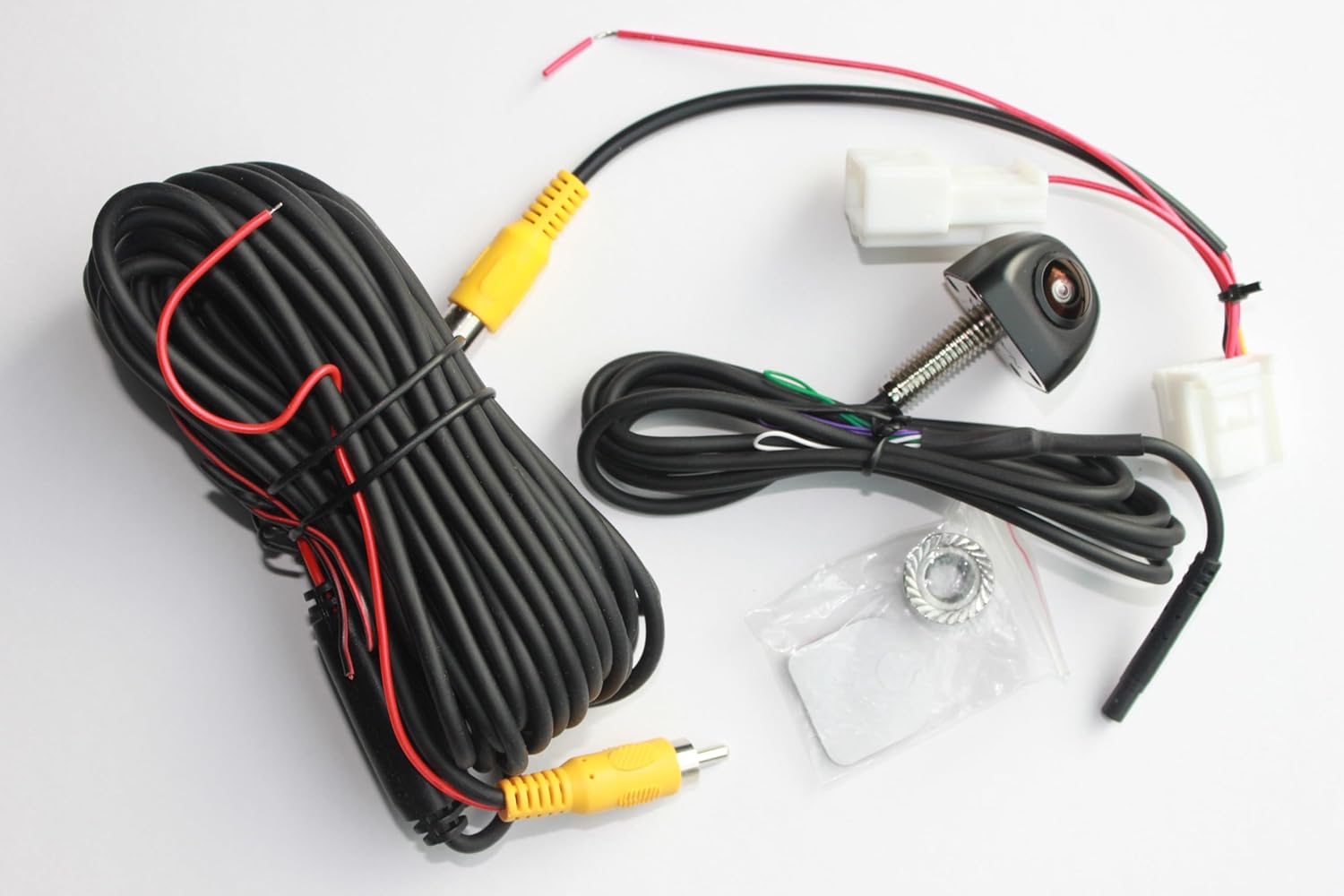
This PYvideo kit adds a wide-angle backup camera to Toyota vehicles and is built for direct integration with factory infotainment screens used on 2012–2014 Toyota models. The kit includes the camera, a vehicle-specific harness, video and power cabling, zip ties, and installation instructions so you can test the feed before finalizing trim work. The camera uses a 170-degree wide-angle lens, low-light sensitivity (0.01 lux), and a roughly 600 TV-line analog image that produces a clear daytime and acceptable low-light picture for parking and obstacle awareness. Installation typically involves removing trunk trim, routing the cable into the cabin, and connecting the harness behind the radio; many owners report the harness plugs into the stock connector without cutting factory wiring. Practical benefits are improved rear visibility and parking confidence while preserving the factory radio and screen. Important limitations: the system is analog and not as sharp as modern digital cameras, routing and dash removal can be time consuming for inexperienced installers, and a small number of users reported connector or camera failures after long-term use.
Best for: DIY owners of 2012–2014 Toyota Camry, Prius, Corolla, RAV4, Avalon and similar models who want a complete, plug‑and‑play backup camera kit that includes the camera, harness, cables, and mounting hardware for a straightforward factory‑style installation without cutting vehicle wiring.
Less Ideal for: Drivers looking for the highest-resolution digital camera or a fully plug-and-play aftermarket system that requires no panel removal should consider newer digital camera kits or professional installation options.
- Vehicle-specific harness for plug-and-play integration with compatible 2012–2014 Toyota radios
- 170-degree wide-angle lens for broad rear coverage and better visibility in tight parking situations
- Low-light performance rated to 0.01 lux for usable night-time images
- Includes wiring, video/power cables and mounting hardware so no extra parts are required for a standard install
- Analog video and ~600 TV-line resolution are lower fidelity than modern digital camera systems
Verdict: A full kit that includes camera, monitor or adapter, mounting hardware, and all necessary cables or wireless transmitters so DIY installers get everything needed in one purchase.
Choosing the Right 2012-2017 Toyota Camry Backup Camera: Key Factors to Consider
Image Quality and Low-Light Performance
Image clarity affects how well you can judge distances and spot small obstacles behind the Camry. Look for cameras with higher effective resolution and wide dynamic range so bright highlights and shadowed areas both retain detail. Low-light sensitivity matters because many parking situations occur at dusk, in dim garages, or under street lighting; sensors with good low-light performance reduce grain and improve color rendering.
Also consider whether the camera uses infrared or enhanced low-light processing. Infrared can help in near-total darkness but may wash out close objects or reflect off shiny surfaces. A balanced sensor with optimized exposure and noise reduction typically delivers the most useful image for everyday reversing and parking.
Field of View and Parking Guidelines
The camera's field of view determines how much of the rear area you see and how perspective is rendered. A wider field of view helps capture cross-traffic and curb edges, but extreme wide angles create fish-eye distortion that can make judging exact distances harder. For a mid-size sedan like the Camry, a horizontal field of view around 120 to 160 degrees is often a good compromise between coverage and usable perspective.
If parking guidelines are important, check whether the camera offers adjustable or switchable lines, and whether those lines are static or dynamic. Static guidelines provide a reference, while dynamic lines that change with steering angle require integration with steering sensors and are less commonly available for aftermarket installs on this vehicle without additional harnesses.
Mounting Type and Fitment for Camry
Mounting style affects both aesthetics and installation complexity. Common options include license-plate mounts that replace or clip over the plate, surface-mount housings that attach to the bumper or trunk lid, and recessed or flush-mount units designed for discrete installs. For the 2012-2017 Toyota Camry, license-plate and trunk-lip mounts typically require minimal modification and align with factory sheetmetal geometry.
Consider whether the chosen mount will obstruct sensors or trim, how secure the fasteners are against vibration, and whether weather sealing remains effective where the camera meets painted surfaces. If you prefer a near-OEM look, choose a low-profile or recessed option and plan for paint- or trim-friendly attachment methods.
Wiring and Power Integration
How the camera draws power and sends its video signal determines installation time and compatibility. Most aftermarket units power from the reverse light feed so the camera activates when the Camry is shifted into reverse. Confirm the camera's power input range and whether the kit includes a pig-tail or OEM-style harness to tap the reverse circuit without cutting factory wires.
Video signal options include analog composite, which is widely compatible with aftermarket monitors and many factory screens via adapters, and wireless transmission that can avoid running a long video cable but may introduce latency or interference. If your Camry has a factory display, plan for an adapter harness or professional interface to route composite video into the head unit if you do not want a standalone monitor.
Durability and Weather Resistance
Cameras mounted externally on the Camry are exposed to rain, road salt, dust, and temperature swings. Choose units with solid ingress protection ratings and corrosion-resistant housings. IP67 or higher is a practical baseline for long-term reliability, and stainless or plated mounting hardware will resist rust.
Also think about lens coatings that resist fogging and scratching, and whether the camera body dissipates heat effectively to prevent failure in hot climates. A rugged build increases the chance the camera will keep providing a clear image through multiple seasons without frequent service.
Compatibility With Monitors and Head Units
Decide whether you will use an aftermarket monitor, a dash-mounted display, or integrate with the Camry's factory screen. Compatibility hinges on the camera output type and the monitor input. Composite video is the most common standard and works with most aftermarket displays and many factory interfaces with the right adapter.
If you want a wireless camera, confirm the receiving monitor supports the camera's transmission standard to avoid pairing issues. Also verify trigger wire requirements so the monitor switches automatically when the transmission is placed in reverse, otherwise you may need manual switching or additional wiring for an automatic display.
Choosing Between Wired and Wireless Options
Wired cameras use a physical video cable to connect the camera to a monitor or interface. For the 2012-2017 Camry, a wired composite connection tends to provide the most consistent image with minimal latency and fewer interference issues. Running the cable requires routing through the trunk and interior panels, which takes more time but yields a stable connection.
Wireless units simplify installation by eliminating a long video cable. They can be ideal if you prefer a less invasive install or want a temporary setup. However, wireless systems may suffer from signal dropouts or increased latency, especially in areas with heavy radio interference. If you choose wireless, pick a kit noted for reliable transmission and test it around your typical parking locations.
- Wired: lower latency, stable signal, requires cable routing.
- Wireless: easier install, potential interference and latency tradeoffs.
Mounting Locations That Work Best on the Camry
License-plate mounts are the most common for the Camry because they are easy to fit, keep the camera centered, and need minimal modification. Trunk-lip or bumper edge mounts can offer a slightly different viewing angle that reduces the chance of the license plate blocking the lens.
Flush or recessed mounts deliver a clean look but may require drilling or trim removal. When choosing a location, account for trunk opening angles so the camera does not get blocked by the trunk lid or get splashed excessively by rear tire spray in wet conditions.
- License-plate mount: easiest, centered view.
- Trunk-lip mount: improved angle, may need minor trim work.
- Flush/recessed mount: discrete look, requires more fitment work.
Adapting the Camera to the Camry's Electrical System
Most installs tap the camera power to the reverse light circuit so the camera only powers up when you shift into reverse. Use proper connectors or an add-a-fuse harness for a clean, serviceable connection and to avoid damaging the factory wiring.
If integrating with a factory head unit, you may need an interface that accepts composite video and provides a trigger input so the screen switches when reversing. Some monitors include a trigger lead that can be wired to the reverse lamp feed for automatic activation.
- Tap reverse light for power with a fuse-protected connection.
- Use a video interface when connecting to a factory display to maintain steering wheel controls and other head unit functionality.
Legal and Practical Considerations
While backup cameras enhance visibility, they are not a substitute for checking mirrors and physically looking when reversing. Follow local road rules for aftermarket electrical modifications and ensure any installation does not obscure the license plate in jurisdictions where plate visibility is regulated.
Choose mounting and wiring methods that allow easy removal or replacement without permanently altering the vehicle if you prefer a reversible installation. Keep manufacturer instructions and wiring diagrams so future service or troubleshooting can proceed smoothly.
- Do not rely solely on the camera; use mirrors and shoulder checks.
- Ensure the license plate remains fully visible per local requirements.
- Prefer reversible mounts and documented wiring for serviceability.
Preparing for a Successful Installation
Gather tools such as trim removal tools, a multimeter, panel clips, and tape before starting. Clean the mounting area and test-fit the camera to verify sightlines and clearance. Planning cable runs before routing prevents unnecessary panel removal and reduces install time.
Test the camera on a bench with a monitor before final mounting to confirm power and video output. Label any wires you disconnect and protect exposed connections with heat-shrink tubing or marine-grade electrical tape for a durable finish.
- Test camera and monitor before final mounting.
- Use proper tools and protective materials for wiring connections.
- Plan cable routes and trim removal to minimize vehicle disassembly.
Still looking for the perfect fit?
Select your Toyota Camry configuration to see the most relevant Backup Cameras recommendations
How We Chose the Best 2012-2017 Toyota Camry Backup Camera
We shortlisted backup cameras that match the electrical and mounting constraints typical of the 2012-2017 Toyota Camry. Our editorial filters prioritized image clarity under varied lighting, camera lens field of view suitable for a mid-size sedan, and mounting options that align with common Camry trunk and license plate configurations. We also weighted build durability for daily road use, waterproofing to at least IP67 standards, and compatibility with common aftermarket monitors and factory display connections found in these Camry model years.Evaluation criteria included video resolution and low-light performance, connector type and wiring harness availability for the Camry, mounting versatility (license-plate, bumper, or OEM replacement placements), and ease of installation including whether a camera can use the vehicle's reverse light circuit for power. We excluded cameras that require extensive bumper modification beyond standard drill-and-mount or that have unverified electrical compatibility with the Camry reverse circuit. Units lacking adequate ingress protection or with persistently poor real-world image samples were also removed from consideration.
Our full evaluation process is outlined in our review methodology.
FAQ
Will a universal backup camera fit the 2012-2017 Camry without modification?
Many universal cameras fit the Camry using license-plate or trunk-lip mounts with minimal modification. Some flush or recessed mounts may require drilling or trim changes. Check the camera's mounting dimensions against the Camry's mounting surfaces before purchase.
Can I power the camera from the Camry's reverse light circuit?
Yes. Most aftermarket cameras are designed to draw power from the reverse lamp feed so they activate when the car is in reverse. Use appropriate connectors or an add-a-fuse adapter and verify voltage compatibility to avoid stressing the vehicle wiring.
Is a wireless camera reliable for daily use on this Camry?
Wireless cameras can be reliable but are more susceptible to interference and signal dropouts than wired systems. For consistent daily use, a wired connection typically provides fewer interruptions and lower latency.
Do I need a special adapter to connect a camera to the factory display?
Often an interface or adapter is required to feed composite video into the factory head unit and to provide a reverse trigger. The exact adapter depends on the Camry's factory head unit wiring and whether the display accepts external video input.
How do I protect the camera from road salt and moisture?
Choose a camera with an adequate IP rating and corrosion-resistant hardware. Seal cable entry points with grommets and use dielectric grease on connectors to limit moisture ingress and prevent salt-induced corrosion.
Will aftermarket parking guidelines match my Camry's real distances?
Aftermarket guideline overlays are approximations and can vary between units. They are useful for reference but you should calibrate your stopping distances by practice and not rely solely on the lines for exact measurements.
Final Verdict
Prioritize a backup camera that balances reliable image quality with an installation approach you are comfortable performing on the 2012-2017 Toyota Camry. If you want consistently clear video and minimal troubleshooting, favor wired composite solutions with a power tap at the reverse light and a mount that avoids obstruction by the license plate or trunk. If quick, less-invasive installation is your goal, a quality wireless kit can work but expect occasional interference tradeoffs.Ultimately, focus on fitment, weather protection, and compatibility with your monitor or head unit. These factors will determine how well the camera performs in real-world parking and reversing scenarios and how long it stays serviceable on your Camry.
Explore More:
- Check out all Toyota Camry parts & accessories
- Explore Electronics
- Browse all Accessories
