

Note: This article contains affiliate links. If you click on these links and make a purchase, I may earn a small commission at no extra cost to you. This helps support my research and content. Read my full affiliate disclosure here.
Upgrading your Chevrolet S-10 with a dedicated backup camera can make reversing, parking, and hitching a trailer much easier and safer. The right camera reduces blind spots, improves visibility in low light, and helps you judge distances behind the truck.This guide covers the top shortlisted backup camera solutions for the S-10 and walks through the practical tradeoffs of image clarity, mounting style, wiring, and monitor options. Use the evaluation criteria below to match a solution to how you drive and how you plan to install it.
Top Picks at a Glance
| Best Overall Backup Camera A reliable all‑around kit that balances image, fit, and durability | AUTO-VOX Solar Wireless Backup Camera with 5" 1080P Monitor |  |
| Best Budget Backup Camera An inexpensive, no‑frills camera that covers basic reversing needs | eRapta ERT01 HD License Plate Backup Camera (Wired) |  |
| Best Wireless Solar Backup Camera License‑plate wireless kits with solar or built‑in battery for no hardwiring | TYPE S Solar-Powered Wireless Backup Camera with 6.8" Touchscreen Monitor |  |
| Best Stainless License‑Plate Backup Camera Metal‑body license‑plate cameras with stainless or aluminum mounts for longevity | PixelMan PMD3A Stainless Steel License Plate Backup Camera (AHD 1080P, 170°) |  |
| Best AHD / 1080P Heavy‑Duty Backup Camera High‑resolution AHD/1080P cameras with rugged IP68/IP69K weather protection | PixelMan PMD2A-S 1080P AHD Wide‑Angle Backup Camera |  |
1. AUTO-VOX Solar Wireless Backup Camera with 5" 1080P Monitor
Best Overall Backup Camera

| Screen Size | 5 Inches |
|---|---|
| Video Capture Resolution | 1080p |
| Power | Solar and battery (5000mAh) |
| Waterproof Rating | IP69K |
| Installation Type | Surface Mount |
This AUTO-VOX kit pairs a compact, surface-mount camera with a 5" 1080p LCD monitor to give clear rear visibility on a truck like the Chevrolet S-10. The camera mounts above or below the license plate and uses a built-in solar panel plus a 5000mAh battery so you can avoid running wires to vehicle lighting; the manufacturer says the unit can run months between charges and the monitor sleeps after a set time to save power. Wireless frequency-hopping tech and a digital receiver aim to keep a stable signal up to about 52 feet, while the wide-angle lens and upgraded night-vision deliver usable images in low light. IP69K waterproofing and an operating range rated for extreme temperatures make this practical for year-round use. Installation is genuinely DIY-friendly with adhesive or screws and no drilling required for many setups, though users who need a longer wireless range or fully hardwired power integration may find limitations. Overall it is a well-rounded, easy-to-install option for improving rear visibility on an S-10.
Best for: Drivers who want a reliable, easy DIY backup camera for a Chevrolet S-10 that delivers clear day and night views and minimal wiring work.
Less Ideal for: People needing long-range wireless coverage for large trailers or those who prefer a permanently hardwired, always-on factory-style camera.
- Solar-assisted 5000mAh battery reduces need for frequent recharging or wiring to vehicle power
- 5" 1080p monitor and wide-angle lens provide clear daytime and improved night images
- IP69K rating and wide operating temperature range suit wet and extreme conditions
- Quick surface-mount DIY installation with adhesive or screws and included anti-theft hardware
- Wireless range is limited to about 52 feet which may not suit larger trailers or long-range mounting
- Not designed for continuous hardwired power integration without additional wiring modifications
Verdict: Our top pick is the well‑rounded backup camera that combines clear day/night imaging, solid weather resistance, and straightforward installation for most DIY installs.
2. eRapta ERT01 HD License Plate Backup Camera (Wired)
Best Budget Backup Camera

| Field Of View | 148 Degrees |
|---|---|
| Video Capture Resolution | 720p |
| Connector Type | RCA |
| Voltage | 12-24 Volts |
| Ingress Protection | IP69K |
The eRapta ERT01 is a budget wired backup camera that mounts behind the license plate or on a trunk and connects to any display with an RCA video input. It delivers a wide roughly 148 to 149 degree field of view and 720p video capture from a 1/3" CMOS sensor, plus 10 built-in LEDs that act as supplemental lighting for low-light reversing. Installation is straightforward for a DIYer: power the camera from the reverse lamp (12–24V DC) and run the included 26 ft RCA cable to your monitor or radio. The metal housing and IP69K rating give confidence against water and dust, and the package includes two mounting brackets for license-plate or trunk installs. Limitations to expect are that it only outputs analog CVBS via RCA so it will not work with displays that require AHD without an adapter, and image detail is limited by 720p resolution. For someone who wants a simple, reliable backup view and good night visibility on a budget, this camera covers the essentials without extras like wireless pairing or higher-resolution recording.
Best for: A practical S-10 owner who wants an inexpensive, straightforward wired backup camera that is easy to install and gives reliable night-time visibility for daily reversing and parking.
Less Ideal for: Drivers who need wireless integration, dash recording, or higher-resolution video for license-plate legibility should consider more advanced systems.
- Wide 148–149° field of view reduces blind spots when reversing.
- Built-in LED night illumination and a low lux rating for usable low-light performance.
- IP69K metal housing for strong water and dust protection suitable for exterior mount.
- Long 26 ft RCA cable and simple power-from-reverse-light wiring make DIY installation easy.
- Includes multiple mounting brackets to fit behind license plate or on trunk.
- Outputs CVBS analog signal only, incompatible with monitors that require AHD without a converter.
- 720p resolution limits fine detail compared with higher-resolution cameras.
Verdict: Choose this affordable camera if you need a simple, functional reverse camera with decent night vision and an easy DIY install without extra features.
3. TYPE S Solar-Powered Wireless Backup Camera with 6.8" Touchscreen Monitor
Best Wireless Solar Backup Camera

| Screen Size | 6.8 inches |
|---|---|
| Video Capture Resolution | 720p |
| Field Of View | 160 degrees |
| Voltage | 12 volts |
| Lux rating | 0.1 lux |
This TYPE S kit combines a solar-charging license-plate backup camera with a 6.8" touchscreen dashboard monitor to provide a nearly cable-free backup solution. The camera mounts in a license-plate frame, transmits video wirelessly to the monitor, and charges itself from built-in solar panels while offering a micro-USB port for occasional topping up. It records 720p video, uses a 160 degree wide-angle CMOS lens and has 0.1 lux sensitivity and night-vision capability so the image remains usable in low light. The monitor installs with a suction-cup windshield mount and shows parking gridlines; the camera angle is adjustable for better sight lines. Practical benefits for a Chevrolet S-10 include easy installation without tapping vehicle wiring and reliable daytime autonomy from the solar cell. Expect limitations in absolute image detail compared with higher-resolution 1080p systems and potential wireless interference in very congested RF environments; also the suction mount is less permanent than a dash- or mirror-mounted hard install.
Best for: A Chevrolet S-10 owner who wants a nearly cable-free backup camera install and easy setup without modifying vehicle wiring, prioritizing daytime autonomy and quick mounting.
Less Ideal for: Drivers seeking the highest possible image resolution or a permanently mounted factory-style display should consider wired 1080p or OEM-style systems instead.
- Solar-powered camera reduces or eliminates the need to hardwire or recharge manually
- Wireless transmission avoids long cable runs and simplifies installation
- 160° wide-angle lens and adjustable angle provide good rear coverage and flexible mounting
- Night-vision capable with 0.1 lux sensitivity for usable low-light performance
- Includes 6.8" touchscreen monitor with parking gridlines for easier reversing
- 720p resolution is modest compared with many modern 1080p backup cameras
Verdict: Select a solar/wireless system when you prefer a nearly cable‑free install and long monitor runtime without tapping vehicle wiring.
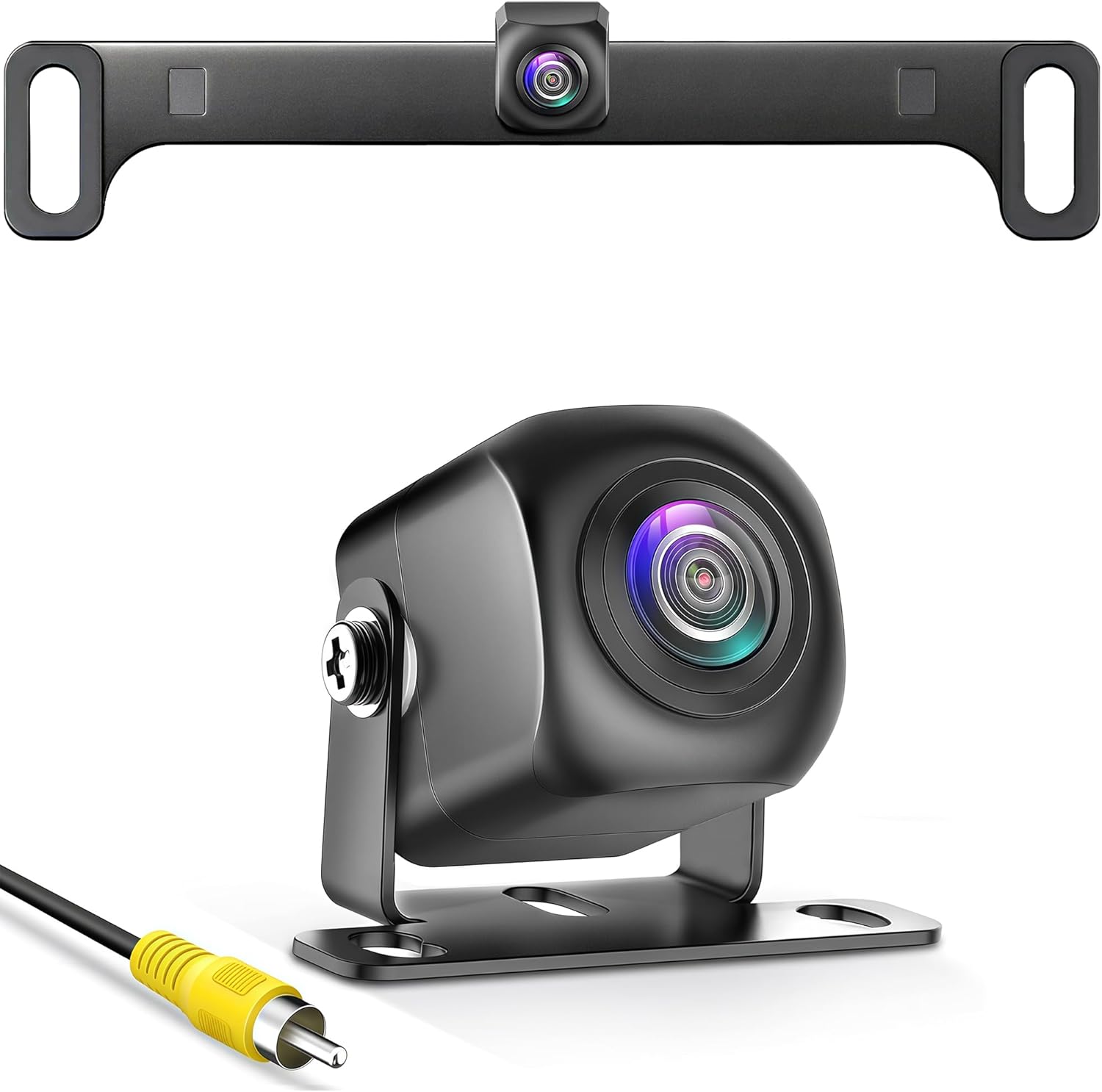
4. PixelMan PMD3A Stainless Steel License Plate Backup Camera (AHD 1080P, 170°)
Best Stainless License‑Plate Backup Camera
| Video capture resolution | 1080p |
|---|---|
| Field of view | 170 degrees |
| Connector type | RCA |
| Optical sensor size | 1/2.7 inch |
| IP rating | IP69 |
The PixelMan PMD3A is a compact, stainless license‑plate backup camera designed for long life on trucks and exposed vehicles. It provides three selectable video modes (CVBS, AHD 720P, AHD 1080P) via a built‑in toggle so you can match most RCA monitors and avoid no‑signal problems. The 1/2.7" sensor with an F1.4 lens and 170° field of view delivers clear daytime detail and usable low‑light images using available reverse lights rather than bright LEDs. Its aluminum‑magnesium alloy housing, nano sealing, and IP69 rating make it highly resistant to water jets, road grime, and temperature extremes, and the dual‑secure stainless bracket (screws plus adhesive) reduces vibration on rough roads. Installation is surface mount and the small footprint keeps a near‑OEM, low‑profile look. Limitations: it requires a monitor with RCA input and wired power from reverse lights, and it is not compatible with mirror monitors, dash cams, or GPS units, so plan wiring and compatibility before buying.
Best for: Buyers who need a durable, low‑profile license‑plate camera that withstands corrosion and vibration on trucks or frequently exposed vehicles and who prioritize long‑term reliability over plug‑and‑play wireless convenience.
Less Ideal for: Anyone relying on wireless systems, mirror‑style monitors, or cameras that plug directly into dash cams should look for a different solution that matches those setups.
- Selectable output modes (CVBS, AHD 720P, AHD 1080P) for broad monitor compatibility
- Stainless metal housing with IP69 nano sealing for high resistance to water, heat, and corrosion
- Compact, low‑profile design that preserves a factory look and reduces exposure to damage
- 170° wide‑angle lens and 1/2.7" sensor for clear daytime and usable night reversal images
- Dual‑secure mounting (screws plus adhesive) and rubber washers to minimize vibration and protect paint
- Requires a monitor with RCA input and wired connection to reverse lights
- Not compatible with mirror monitors, dash cams, or GPS units
Verdict: This category highlights compact metal‑housed license‑plate cameras that resist corrosion and vibration for longer life on trucks and exposed vehicles.
5. PixelMan PMD2A-S 1080P AHD Wide‑Angle Backup Camera
Best AHD / 1080P Heavy‑Duty Backup Camera

| Video Capture Resolution | 1080p (AHD) / 720p HD |
|---|---|
| Field Of View | 170 Degrees |
| Optical Sensor Technology | CMOS |
| Connector Type | RCA |
| Voltage | 12.0 |
The PixelMan PMD2A-S is a compact license‑plate style backup camera designed to deliver sharper AHD 1080p images when paired with a monitor that supports AHD input. It uses a 1/2.7in CMOS sensor and a wide 170° glass lens to provide a broad field of view and improved brightness and color compared with smaller chips. The camera ships with two mounting brackets (including a license‑plate mount), a 26 ft double‑shielded RCA cable, and a power lead for straightforward surface or plate installation on a Chevrolet S‑10 rear area. IP69 alloy housing and nano waterproof sealing reduce failure from water and pressure washing, which is useful for trucks driven in wet or muddy conditions. Expect clear daytime detail and stronger low‑light performance than entry‑level cams, but you must run the RCA video and 12V power and confirm your S‑10 monitor supports AHD to get full 1080p; otherwise the camera will default to 720p HD. Installation requires basic wiring and a compatible display; no wireless or direct dashcam plug‑and‑play is provided.
Best for: Buyers who want higher‑resolution reversing video and a robust, water‑resistant camera for an S‑10 that will see frequent wet, muddy, or heavy‑use conditions and who can run RCA wiring to an AHD‑capable display.
Less Ideal for: Drivers who need a wireless or dashcam‑plug backup solution or who cannot install wired RCA and 12V connections on their S‑10 should consider simpler plug‑and‑play options.
- Supports AHD 1080p output for sharper image when paired with an AHD‑capable monitor
- Large 1/2.7in sensor and F1.4 glass lens improve brightness, color and low‑light clarity
- IP69 alloy housing with nano waterproof seal for strong resistance to water and pressure washing
- Includes two mounting brackets and a 26 ft double‑shielded RCA cable for license‑plate or surface installation
- Requires a monitor that accepts AHD over RCA to reach 1080p; otherwise it outputs 720p HD
Verdict: Choose this heavy‑duty AHD/1080P camera if you need sharper resolution and an industrial waterproof rating for demanding conditions or frequent car washes.
Choosing the Right Chevrolet S-10 Backup Camera: Key Factors to Consider
Image Quality and Night Performance
A camera that delivers a sharp, wide-angle picture during the day but also maintains usable detail at night is crucial. Good low-light sensitivity and infrared or low-glow LEDs help you see obstacles and curbs after dark. Pay attention to resolution and sensor type because higher resolution often makes distance judging easier when backing up.
Wide dynamic range helps when bright sunlight and shadowed areas coexist behind the truck, such as when reversing out of a shaded driveway. Blooming and glare control also matter if you frequently back toward reflective surfaces or operate in urban settings with many lights.
Mounting Style and Fitment
How the camera mounts affects both visibility and installation complexity. License-plate-frame style cameras mount in the plate area and typically require minimal trimming, while flush-mount or bumper-integrated units may need drilling or larger cutouts. Consider the S-10's rear bumper shape and tailgate when choosing a mounting style to ensure an unobstructed field of view.
Also consider camera placement height: higher mounts give a broader field but can exaggerate depth perception, while lower mounts provide better curb-level detail. Select a mounting method that matches how you use the rear of the S-10, whether for daily parking or trailer hookup.
Wired Vs Wireless Connectivity
Wired systems provide a stable video feed and are less prone to interference, which matters if you tow or park in areas with radio noise. They typically require running a video cable through the cabin or under trim, increasing installation time but improving reliability.
Wireless systems avoid long cable runs and can be faster to install, but they can suffer from occasional dropouts or latency, especially near other wireless devices. Evaluate the tradeoff between a cleaner install and a consistently reliable image for your driving environment.
Power, Triggering, and Electrical Compatibility
Backup cameras normally tie into the reverse light circuit so the image activates when you shift into reverse. Confirm that the camera's power and trigger wiring align with the S-10's 12V reverse circuit and that connectors or splicing needs are manageable for your skill level.
Some kits include voltage regulation or fused connections to protect the camera from surges. If your S-10 has a rear accessory socket or aftermarket wiring harness, plan how the camera will draw power and whether additional relays or inline fuses are needed for safe, long-term operation.
Monitor Options and Placement
Decide where you want to view the camera feed. Options include dash-mounted displays, mirror-integrated monitors, or systems that interface with an existing infotainment screen. Monitor size and resolution influence how easily you can interpret obstacles and judge distance behind the truck.
Think about sightlines and driver ergonomics: a monitor mounted too low or far to the right can be distracting, while a mirror-mounted display keeps the view within your normal line of sight. Make sure mounting hardware and power for the monitor are compatible with the S-10 interior.
Durability and Weather Resistance
Pickup trucks see a lot of exposure to water, salt, and road debris. Look for cameras with IP-rated water and dust protection and corrosion-resistant housings. Robust housings and sealed connectors reduce the chance of failure over time due to moisture intrusion.
Also consider operating temperature ranges and cable jacket quality. A durable camera and cabling reduce maintenance and keep the system reliable through seasonal temperature swings and off-road use.
Choosing the Right Field of View
Field of view determines how much of the area behind the S-10 the camera captures and affects depth perception. Narrower lenses provide better depth judgment directly behind the vehicle but show less peripheral area. Wider lenses capture more of the surroundings but can distort distances near the edges.
For routine parking and trailer alignment choose a moderate wide-angle lens that balances peripheral coverage with useful depth cues. If you park in tight urban spaces where curb detection is critical, a slightly narrower field may help.
- Wide-angle (140 to 170 degrees): best for broad situational awareness
- Medium-angle (100 to 140 degrees): better for distance judgment
- Consider multi-lens or adjustable-angle housings for flexible coverage
Mounting Tips for the Chevrolet S-10
Plan the mounting location around available clearance and wiring access. Many S-10 owners prefer license-plate-area mounts or under-bumper placements to minimize visibility of the camera and simplify wiring routing.
When drilling or cutting is required, mask the area and test-fit the camera to prevent cosmetic damage. Use rubber grommets or sealant at cable entry points to keep moisture out and protect paint finishes.
- Test camera angle before final fasteners are torqued
- Route wires away from moving tailgate components and heat sources
- Use corrosion-resistant fasteners and dielectric grease on exposed connectors
Integrating with Existing Displays
If your S-10 already has an aftermarket head unit or a compatible display, check whether the camera feed can be routed into that system. Many modern head units accept a composite camera input, while some require an adapter or a reverse trigger connection.
Mirror-mounted and standalone dash monitors are easy alternatives if integration is not possible. Ensure the monitor's mounting location does not block sightlines and that the driver can glance at the image without distraction.
- Confirm input type: composite video, RCA, or proprietary connectors
- Plan power routing for the monitor separate from camera power if needed
- Use a short test run to verify video compatibility before final installation
Common Installation Challenges and Solutions
Older trucks like the S-10 can have tight panel clearances and brittle plastic trim. Work slowly and use trim tools to avoid breakage when running cables. Label wires during installation to simplify troubleshooting and future maintenance.
If you encounter interference or snowballing video noise, check grounding and use shielded video cables. For wireless setups that experience dropouts, reposition the transmitter or use ferrite beads on power leads to reduce noise coupling.
- Pre-run cables under trim panels before final mounting
- Test camera functionality before sealing or tightening seals
- Keep spare connectors and crimping tools on hand for field fixes
Legal and Safety Considerations
Ensure aftermarket camera installation does not obscure license plate illumination or legally required lights. Position the camera so it does not interfere with visibility requirements for tail lights or the plate itself.
Use the camera as an aid, not a substitute for mirrors and visual checks. Practice backing maneuvers after installation to understand any changes in depth perception the camera introduces.
- Verify plate illumination remains within legal limits
- Professional wiring may be required if modifications affect lighting circuits
- Keep mirrors properly adjusted after installing a camera system
How We Chose the Best Chevrolet S-10 Backup Camera
We focused on real-world fit and usefulness for Chevrolet S-10 owners, selecting products that meet core needs for reversing and parking rather than niche features. Primary evaluation criteria included image quality under varying light, mounting and fitment options compatible with S-10 rear geometry, and the range of wiring choices for S-10 electrical systems. We also weighed installation complexity for typical owner DIY ability, the reliability of wireless links where applicable, and the availability of monitor or display options that integrate cleanly with the S-10 dash or mirror.Excluded items were cameras designed exclusively for commercial fleet vehicles or those requiring substantial body modification beyond common S-10 trunk or bumper openings. We avoided solutions that lack clear documentation for power and trigger wiring on older pickup trucks. The short list favors durable housings, dependable nighttime performance, and options that balance ease of parking with straightforward installation on the S-10.
Our full evaluation process is outlined in our review methodology.
FAQ
Will a wireless backup camera work reliably on my Chevrolet S-10?
Wireless cameras can work well but may experience interference in areas with many radio signals. They are convenient for avoiding long cable runs, but wired systems generally offer more consistent video with less latency.
Can I power the camera from the S-10 reverse light circuit?
Yes. Most backup cameras are designed to tap into the reverse light circuit so the feed activates in reverse. Ensure proper fusing and secure splices to avoid overloading the circuit and check that the trigger wire connects cleanly to the reverse lamp wiring.
Do I need a special monitor for the S-10 or will any display work?
Many aftermarket monitors accept a standard composite video input and will work with most camera kits. Confirm the monitor input type and power requirements before purchase, and verify that it can be mounted without obstructing driver sightlines.
How can I improve night visibility with a backup camera on the S-10?
Choose a camera with good low-light sensitivity or infrared illumination and ensure the lens remains clean. Position the camera to minimize direct exposure to bright lights that can cause glare, and consider an auxiliary light if your reverse lights provide insufficient illumination.
Will installing a backup camera void any S-10 warranties?
On older vehicles a camera installation is unlikely to affect factory warranties, but warranty impacts depend on what is modified. Avoid altering essential wiring or lighting circuits in a way that could be considered noncompliant with manufacturer requirements.
Final Verdict
Prioritize image clarity, a mounting style that suits the S-10 rear, and an installation method that matches your DIY comfort level. Wired systems deliver reliable, low-latency video for towing and regular reversing, while wireless kits offer simpler installs for casual use. Balance durability and ease of service so the system remains dependable through weather and daily use.Choose the configuration that best aligns with how you use your Chevrolet S-10: favor stable wired connections if consistency matters most, or select a well-built wireless kit for minimal intrusion and quicker installation.
