

Note: This article contains affiliate links. If you click on these links and make a purchase, I may earn a small commission at no extra cost to you. This helps support my research and content. Read my full affiliate disclosure here.
If you drive a Chevrolet Colorado, installing a dash cam can protect you from disputed incidents and capture memorable road-trip footage. The right Chevrolet Colorado dash cam balances clear daytime and nighttime video, dependable incident detection, and an installation that fits the truck's interior without obstructing your view.This guide covers seven shortlisted dash cams that fit the Colorado, with an emphasis on video quality, power options, mounting and wiring simplicity, and the features that matter for daily driving and long trips. Read on for what to expect from each category and how to choose the best unit for your needs.
Looking for other parts? See all Chevrolet Colorado parts & accessories.
Top Picks at a Glance
| Best Overall Dash Cam The best all-around dash cam balancing features, reliability, and value | VIOFO A119M Pro 4K HDR Mini Dash Cam with STARVIS 2 |  |
| Best Budget Dash Cam A low-cost unit that still records reliably and clearly | galphi Q2 4K Front Dash Cam with 5G WiFi and 64GB Card |  |
| Best Compact Dash Cam A small, unobtrusive unit for minimal windshield presence | ROVE R2-4K Dash Cam with Built-in WiFi and GPS |  |
| Best Dual-Channel Dash Cam Front-and-rear recording for comprehensive footage of incidents | FITCAMX Dual 4K Front + 1080P Rear Dash Cam for Chevy Colorado (2023–2026) |  |
| Best 4K Dash Cam Ultra-high-resolution recording for maximum detail and clarity | VIOFO A329S 3‑Channel Dash Cam (4K Front, 2K Cabin & Rear) |  |
| Best Hardwire-Ready Dash Cam Designed for permanent installation with hardwire kit compatibility | AVAPOW X1 4K Front Dash Cam with Hardwire Kit and 64GB Card |  |
| Best Night-Vision Dash Cam Optimized low-light performance for clear nighttime footage | VANTRUE N4S 3-Channel Dash Cam with STARVIS 2 and PlatePix |  |
1. VIOFO A119M Pro 4K HDR Mini Dash Cam with STARVIS 2
Best Overall Dash Cam

| Video Capture Resolution | 4K 3840x2160P |
|---|---|
| Sensor | STARVIS 2 IMX678 |
| Frame Rate | 30 FPS |
| Field Of View | 130 Degrees |
| Flash Memory Supported Size Maximum | 512 GB |
The VIOFO A119M Pro is a small, front-facing dash cam built to capture high-detail evidence for everyday driving and parking security. It records true 4K 30 fps using a Sony STARVIS 2 IMX678 sensor and HDR/Night Vision 2.0 to keep license plates and road signs readable in daylight, tunnels, and low light. The mini form factor mounts behind the rearview mirror for a discreet fit in the Colorado without blocking sightlines and the included CPL filter reduces windshield glare. Practical features include loop recording, G‑sensor event locking, buffered 24/7 parking modes, and a supercapacitor for stable heat-resistant power. Connectivity is modern with dual‑band Wi‑Fi 6 and fast USB‑C transfer, while the quad‑mode GPS logs accurate location and speed data for incident records. Limitations: it is a single‑channel front camera so it will not capture rear footage without adding a separate rear unit, and a microSD card and hardwire kit for full parking operation are not included. Overall it balances image quality, reliable power, and convenient app control for routine use and evidence capture in a Colorado.
Best for: Drivers who want a high‑clarity, reliable front dash cam that stays discreet behind the mirror and provides dependable evidence capture for daily Colorado driving and parking security.
Less Ideal for: People who need built‑in front-and-rear recording or a bundled parking hardwire solution should consider dual‑channel kits that include rear cameras and hardwiring accessories.
- True 4K 30 fps with STARVIS 2 sensor for sharp daytime and low‑light detail
- HDR Night Vision 2.0 and included CPL filter reduce glare and improve license plate readability
- Wi‑Fi 6 and USB‑C enable fast file transfer and easy app control
- Buffered 24/7 parking modes with G‑sensor locking capture pre‑ and post‑event footage
- Supercapacitor power offers better heat tolerance and longevity than battery designs
- Single‑channel front camera only so rear coverage requires an additional camera
- MicroSD card and hardwire kit for full parking functionality are sold separately
Verdict: The best all-around dash cam that balances video quality, reliability, ease of use, and essential features for confident everyday driving and incident documentation.
2. galphi Q2 4K Front Dash Cam with 5G WiFi and 64GB Card
Best Budget Dash Cam

| Video Capture Resolution | 2160p |
|---|---|
| Field Of View | 160 Degrees |
| Connectivity Technology | Wi-Fi |
| Included Memory Card Size | 64 GB |
| Frame Rate | 30 fps |
The galphi Q2 is a compact 4K front dash cam designed to capture clear evidence of incidents for daily drivers. It mounts with an adhesive pad and begins recording automatically when powered, offering loop recording, G-sensor event lock, and voice recording for hands-free status alerts. The camera has no display which reduces driver distraction and relies on a smartphone app over its built-in 5GHz WiFi to preview and download clips quickly. Night performance benefits from an f/1.6 aperture and WDR processing, and a preinstalled 64GB microSD card gets you started right away while supporting up to 256GB. For around-town use and highway drives in a Chevrolet Colorado, the Q2 gives high-resolution footage and straightforward event protection; however, parking-mode recording requires a separate hardwire kit and there is no cloud or remote monitoring. Installation and cable hiding are simple but users who want live remote access or an integrated screen will need a different setup.
Best for: Chevrolet Colorado drivers who want an affordable, high-resolution front-facing dash cam that reliably records incidents and is controlled from a smartphone with minimal distraction.
Less Ideal for: Drivers who need built-in live remote monitoring, a display on the unit, or an out-of-the-box parking power solution without hardwiring should consider other models.
- True 4K 2160p recording for clear license-plate level detail at typical driving distances
- Built-in 5GHz WiFi and app control for faster clip transfers to your phone
- Preinstalled 64GB microSD card so the camera records out of the box
- Compact, screen-free design that minimizes distraction and fits discreetly behind the rearview mirror
- G-sensor and one-click lock protect incident clips from being overwritten during loop recording
- Parking surveillance requires purchasing and installing a separate Type-C hardwire kit
- No built-in display or cloud streaming for remote live view
Verdict: The best low-cost dash cam that provides dependable video recording and basic features for drivers who need incident coverage without spending much.
3. ROVE R2-4K Dash Cam with Built-in WiFi and GPS
Best Compact Dash Cam

| Video resolution | 2160P (4K) |
|---|---|
| Lens angle | 150° wide angle |
| Connectivity | Wi‑Fi |
| Power backup | Built-in supercapacitor |
| Max microSD support | 512GB (Class 10 U3) |
The ROVE R2-4K is a compact dash cam designed for drivers who want high-resolution footage without a bulky unit on the windshield. It records up to 2160p UHD with a 150° wide-angle lens and larger f/1.5 aperture to capture clearer detail in low light. The unit installs discreetly on the dash or low on the windshield for a low-profile look and uses a built-in supercapacitor for more reliable parking-mode recording than standard batteries. Built-in WiFi and the ROVE app let you download clips directly to your phone and the integrated GPS logs speed and route data for mapping. Practical features include loop recording, G-sensor-triggered emergency locking, and support for high-capacity microSD cards. Limitations to consider: while its compact size keeps it unobtrusive in a Chevrolet Colorado, the small 2.4" screen makes on-device menu navigation and framing less convenient than larger displays, and advanced features depend on using the smartphone app for easier control.
Best for: Drivers who want a discreet, low-profile dash camera for routine driving and parking surveillance while keeping high-resolution recording and smartphone control.
Less Ideal for: Buyers who need an intuitive large on-device display for live framing or extensive menu use should consider models with bigger screens or separate rear units.
- True 4K (2160p) recording for detailed footage
- Large f/1.5 aperture and 150° wide-angle lens for improved low-light capture
- Built-in WiFi and app support for quick clip download and sharing
- Integrated GPS records speed and route information
- Supercapacitor-backed parking mode and G-sensor emergency lock
- Small 2.4" screen limits on-device preview and menu navigation
Verdict: The best compact dash cam for buyers who prioritize a discreet, low-profile installation while retaining solid recording quality and usability.
4. FITCAMX Dual 4K Front + 1080P Rear Dash Cam for Chevy Colorado (2023–2026)
Best Dual-Channel Dash Cam

| Compatible Vehicle | Chevy Colorado 2023-2026 |
|---|---|
| Video Resolution | Front 2160P + Rear 1080P |
| Field of View | 170 degrees |
| Frame Rate | 30fps |
| Max Flash Memory | 256 GB |
This FITCAMX dual dash cam is designed to replace the factory module on Chevy Colorado (2023–2026) and records front 2160p video and rear 1080p video simultaneously at 30 fps. It installs in the ceiling/auto-dimming mirror location for a near-OEM look with no visible wiring when the vehicle has an auto-dimming mirror, and it saves footage to a supplied MicroSD card with loop recording and a G-sensor to lock incident files. You control and view clips through the FITCAMX app over built-in WiFi, and the unit supports up to 256 GB cards so you can keep many hours of footage. Notable practical benefits include WDR and an f/1.6 aperture for improved low-light recording and an integrated design that preserves windshield sightlines. Limitations to be aware of are that the rear camera requires a wired connection and installation differs if the truck lacks an auto-dimming mirror, and parking mode or 24-hour monitoring needs an extra harness or upgrade.
Best for: Drivers who want complete front-and-rear coverage with a discreet, factory-style installation for a 2023–2026 Chevy Colorado and who prioritize clear daytime and low-light incident footage.
Less Ideal for: Buyers who need a wireless rear camera solution or who want built-in 24/7 parking surveillance without purchasing additional wiring or accessories.
- Simultaneous front 2160p and rear 1080p recording for full incident context
- Designed to fit Chevy Colorado 2023–2026 with an integrated OEM-style ceiling mount
- Built-in WiFi and FITCAMX app let you preview and download clips without removing the card
- Large f/1.6 aperture and WDR improve night and high-contrast recordings
- Includes 128 GB MicroSD card and supports up to 256 GB for extended storage
- Rear camera is wired and requires additional routing during installation
- Parking mode and 24-hour monitoring require an extra harness or upgrade
Verdict: The best dual-channel dash cam for users wanting simultaneous front and rear coverage to capture complete incident context on the road.
5. VIOFO A329S 3‑Channel Dash Cam (4K Front, 2K Cabin & Rear)
Best 4K Dash Cam

| Video Capture Resolution | 4K+2K+2K |
|---|---|
| Field Of View | 210 degrees |
| Frame Rate | 30fps, 30fps, 30fps |
| Flash Memory Supported Size Maximum | 512 GB |
| Connectivity Technology | Type‑C |
The VIOFO A329S is built for drivers who prioritize the clearest possible footage. It records a 4K@30fps front view plus 2K cabin and rear channels, all using Sony STARVIS 2 sensors and HDR to reduce noise and retain license plate detail day or night. The 210° cabin lens eliminates interior blind spots, useful for monitoring passengers or cargo in a pickup cab, while the front and rear channels capture traffic and incidents. Fast Wi‑Fi 6 and a USB 3.0 Type‑C port make downloading large 4K clips quick, and built‑in GPS stamps location and speed on video. Power‑saving parking modes and optional hardwire support let you monitor the vehicle when parked without excessive battery drain, and it supports up to 4TB external SSDs or 512GB microSD for long continuous recording. Expect a more involved install on some trucks to route the cabin and rear coaxial cables discreetly and plan to buy an SSD or hardwire kit separately if you want long‑term parked surveillance.
Best for: Drivers who need the highest resolution evidence for collisions or disputes and who value detailed front and multi‑channel coverage for a Chevrolet Colorado setup.
Less Ideal for: People who want a simple plug‑and‑play single camera solution or who do not want to deal with multi‑camera installation and separate accessory purchases.
- True 4K front plus 2K cabin and rear channels for clear license plate capture
- STARVIS 2 sensors and HDR improve low‑light detail and reduce motion blur
- Wi‑Fi 6 and USB 3.0 Type‑C enable very fast file transfer of large 4K clips
- Supports up to 4TB SSD or 512GB microSD for extended recording without frequent overwrites
- Built‑in GPS and intelligent parking modes for location tagging and parked monitoring
- Hardwire kit and SSD/memory card are not included so extra purchases may be needed
- Three‑channel installation can be more complex on trucks and may require routing cables through trim
Verdict: The best 4K dash cam for drivers who need the highest video resolution to capture fine details like license plates and distant objects.
6. AVAPOW X1 4K Front Dash Cam with Hardwire Kit and 64GB Card
Best Hardwire-Ready Dash Cam
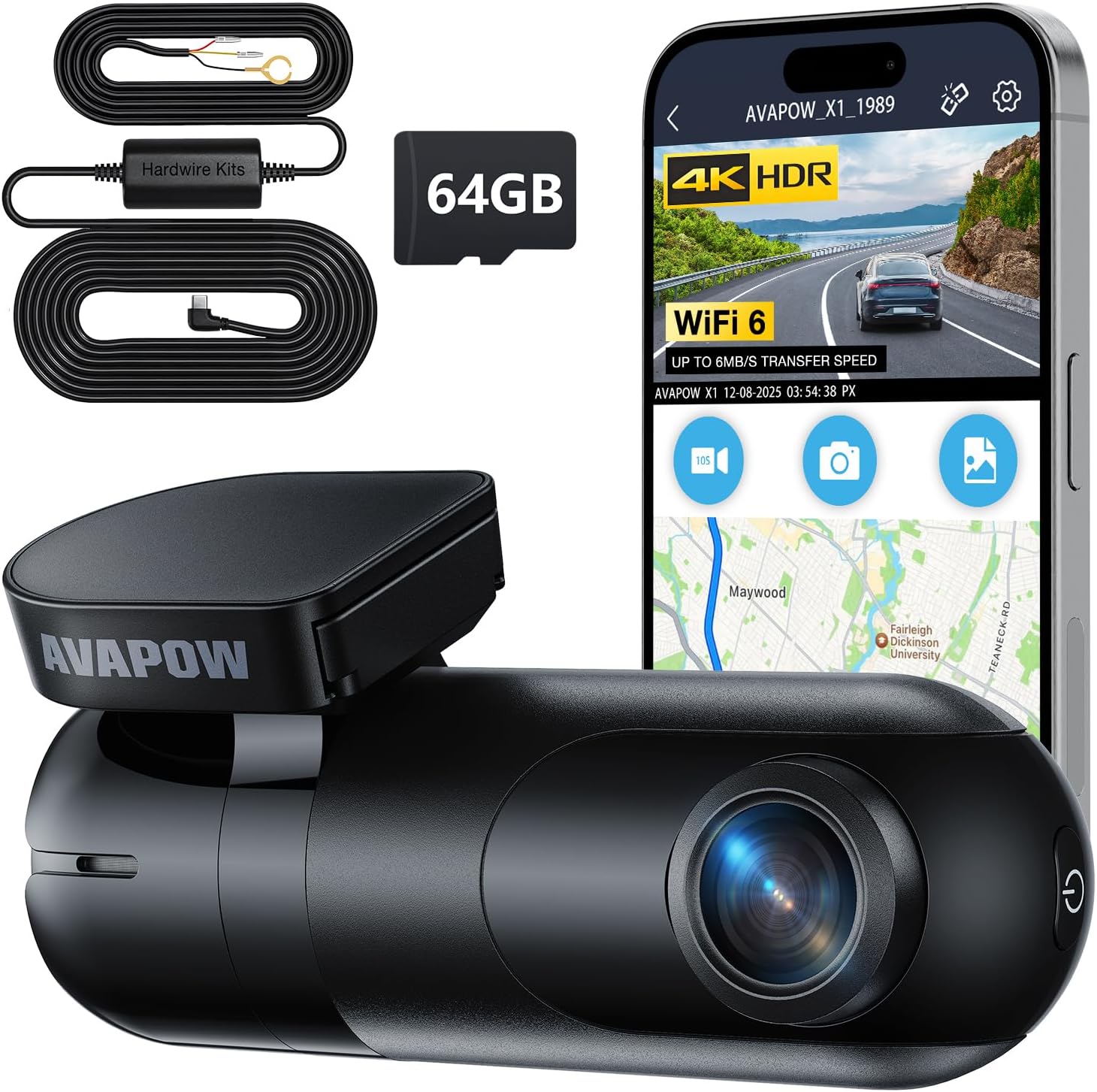
| Resolution | 3840×2160P (4K) at 30fps |
|---|---|
| Lens angle | 170° wide angle |
| Connectivity | Wi‑Fi 6 |
| Included storage | 64GB microSD card |
| Special features | G-sensor, Loop Recording, Night Vision, Parking Monitor |
The AVAPOW X1 is a compact front-facing dash cam designed for permanent installation and around-the-clock monitoring. It records true 4K (3840×2160 at 30 fps) through a 170° wide-angle lens and stores footage on the included 64GB microSD card while loop recording automatically reuses space. A hardwire kit is included so you can conceal power wiring and enable 24/7 parking modes such as time-lapse, motion detection, and collision-triggered recording. The camera also uses WDR/HDR processing and an enhanced night-vision mode to improve low-light detail, and a G-sensor locks impact events to prevent overwrite. Wi‑Fi 6 and a companion app let you transfer clips and change settings without removing the card, and OTA updates keep firmware current. Expect easy, discreet installation thanks to the ultra-compact body, but be aware that advanced parking features will draw battery power and may require a vehicle with a healthy battery or an install with a battery-discharge prevention module. The X1 is a good choice when you want hidden, always-on protection with high-resolution footage for insurance or security needs in your Chevrolet Colorado.
Best for: Buyers who plan a permanent, hidden install on their Chevrolet Colorado and prioritize continuous parking protection and high-resolution evidence capture.
Less Ideal for: Drivers who only want a simple plug-and-play camera for occasional use or who cannot accommodate any additional constant power draw from parking-mode features.
- True 4K 3840×2160 recording for clear license plate and sign detail
- Hardwire kit included for concealed, permanent installation and 24/7 parking monitoring
- Built-in G-sensor locks impact footage automatically
- Wi‑Fi 6 and phone app allow fast wireless file transfer and settings control
- Compact, low-profile design stays out of sight on the windshield
- Parking-mode monitoring can draw vehicle battery and may need a battery protection device
Verdict: The best hardwire-ready dash cam for owners planning a permanent installation that supports parking features and concealed power wiring.
7. VANTRUE N4S 3-Channel Dash Cam with STARVIS 2 and PlatePix
Best Night-Vision Dash Cam

| Video resolution | 2.7K front + 1440P interior + 1440P rear/30FPS |
|---|---|
| Field of view | 360 Degrees |
| Connectivity Technology | USB, Wi-Fi |
| Flash Memory Supported Size Maximum | 1 TB |
| Control Method | App, Voice |
The VANTRUE N4S is a three-channel dash camera that records the road, cabin, and rear with STARVIS 2 sensors designed for improved low-light performance. In practice it mounts to the windshield and delivers 2.7K front and 1440P interior and rear footage, with Triple HDR and PlatePix software that sharpen license plates and balance bright headlights against dark surroundings. It includes a rotating 360 degree rear camera, built-in quad-GPS logging, 5GHz Wi‑Fi for quick downloads, and multiple parking modes with pre-event buffering and collision locking. The supercapacitor design improves temperature tolerance for long-term use. Trade-offs are its relatively small 2 inch LCD for on-device playback and the system relies on a large microSD card for long-term storage, which you must buy separately. For Chevrolet Colorado owners seeking dependable night recordings and full vehicle coverage, the N4S focuses on clear plate and scene detail when light is poor.
Best for: Motorists who regularly drive in poorly lit areas or at night and want a dash cam that prioritizes legible, high-contrast recordings of roads and license plates while also covering cabin and rear views.
Less Ideal for: Buyers who need a large on-device screen for immediate playback or those who prefer an all-in-one unit without separate rear wiring and installation work.
- STARVIS 2 sensors and Triple HDR deliver noticeably better low-light and high-contrast footage
- PlatePix tech enhances license plate legibility day and night
- Three-channel setup covers front, cabin, and rear with a rotatable rear camera for flexible views
- 5GHz Wi‑Fi and OTA updates make grabbing clips and keeping firmware current fast
- Buffered parking modes and collision auto-lock provide round-the-clock protection
- 2 inch LCD is small for reviewing footage on the device
Verdict: The best night-vision dash cam for motorists who frequently drive in low-light conditions and need reliable, high-contrast recordings after dark.
Choosing the Right Chevrolet Colorado Dash Cam: Key Factors to Consider
Video Resolution and Night Performance
Video resolution determines how much detail the camera captures. Higher-resolution recordings, such as 1080p or greater, make it easier to read license plates, street signs, and capture facial details during daylight. However, resolution alone does not guarantee useful night footage; sensor sensitivity, aperture, and image processing affect low-light performance.
For Colorado owners who drive at dawn, dusk, or on unlit roads, prioritize units with proven night-mode processing and wide dynamic range. Look for sample clips or independent footage from similar vehicle interiors to verify performance before choosing.
Mounting Position and Field of View
Where the camera mounts on the windshield affects visibility, legality, and the angle of recorded footage. A compact dashboard camera placed behind the rearview mirror will minimize obstruction and capture a centered view of the road. Field-of-view affects how much of the lane and adjacent lanes are visible; too wide can distort details, too narrow can miss important context.
Consider how the Colorado's cabin layout and rearview mirror placement influence mounting. Ensure the camera's bracket and adhesive will fit your mirror area and that the angle can be adjusted without blocking sensors or the driver's sightline.
Power Options and Parking Mode
Power configuration determines whether the dash cam records only while driving or also when parked. Hardwiring kits or an internal battery with low-voltage cutoff allow parking mode recording to monitor hit-and-runs or vandalism when the vehicle is stationary. However, continuous parking recording can drain the battery without proper voltage protection.
If you frequently park on the street or in unattended areas, choose a dash cam with a dedicated parking mode and clear voltage-cutoff settings. Confirm whether hardwiring to the Colorado's fuse box is straightforward and whether the manufacturer provides the appropriate wiring harness or wiring guide.
Storage Management and Loop Recording
Dash cams use loop recording to overwrite old footage when the storage card fills. The implementation affects how reliably critical events are preserved. Look for stable loop recording that finalizes files immediately after an incident and minimizes file corruption.
Also consider supported card sizes and formats, plus whether the unit formats cards reliably. If you need longer retention between overwrites, select units that support larger capacity cards and have efficient compression without sacrificing critical detail.
Impact Detection and Automatic Save
Reliable G-sensor impact detection ensures footage tied to collisions or sudden movements is flagged and locked from being overwritten. Sensitivity settings help tune detection to avoid false positives from rough roads or aggressive driving in a truck.
For Colorado drivers who travel on gravel roads or carry heavy loads, adjustable sensor thresholds and clear indicators for locked files are valuable. Confirm that locked evidence files are easy to retrieve via app or by removing the memory card.
Connectivity and Ease of Use
Wi-Fi enabled dash cams and companion apps simplify file transfer, firmware updates, and configuration without removing the card. However, app quality varies and some setups are more cumbersome than others.
Prioritize units with straightforward interfaces, reliable wireless transfer, and clear status indicators. Since many Colorado owners will adjust settings after installation, intuitive menus and responsive apps reduce setup time and frustration.
Installation Tips for a Clean, Hidden Setup
Plan your cable routing before attaching the mount to keep the windshield area tidy and avoid exposed wires. Tuck the power cable into the headliner and A-pillar trim where possible, working from the camera to the fuse box or 12V outlet to achieve a factory look.
- Use trim tools to gently pry panels without damaging clips.
- Route cables along existing wiring paths and secure with adhesive clips.
- Avoid running the cable over airbags or obstructing sensor zones.
Choosing the Right Memory Card and Maintenance
Select a high-endurance microSD card rated for continuous video to reduce the chance of file errors. Format new cards in the dash cam before first use and replace them periodically according to the manufacturer's endurance recommendations.
- Keep at least one spare formatted card available for testing.
- Back up critical incident files to a computer or cloud storage promptly.
- Check recording intervals occasionally and verify loop recording works after firmware updates.
Powering Options: 12V Socket Vs Hardwiring
Using the cigarette-lighter 12V socket is the simplest installation but may not support parking mode without a separate power bank. Hardwiring provides constant power for parking recording and a cleaner installation, but it requires careful fuse selection and an understanding of the Colorado's electrical layout.
- When hardwiring, choose a fuse that is switched or constant depending on your desired behavior.
- Use an inline fuse and a low-voltage cutoff to prevent battery drain.
- If unsure, consult a qualified installer for reliable hardwiring.
Optimizing Settings for Colorado Driving Conditions
Adjust exposure and wide dynamic range settings to handle frequent transitions between sun and shade, such as driving under tree canopies or tunnels. Set G-sensor sensitivity considering the truck's load and the roughness of roads you commonly use.
- Enable parking mode features suited to your parking habits, such as motion-triggered recording or time-lapse to conserve storage.
- Set file length to a balance between manageability and recovery speed; one- to three-minute files are common.
- Turn on date, time, and GPS overlays if you want location-stamped evidence.
Using Dual-Camera Setups for Complete Coverage
Front and rear coverage provides a fuller picture of incidents involving other vehicles or collisions from behind. Rear cameras can be either a separate unit mounted at the rear window or an integrated dual-channel system sharing the front camera's recorder.
- Confirm rear camera cable length and routing before installing to ensure you can reach the rear glass.
- Choose a streamlined rear mount to avoid obstructing rear visibility.
- Verify that the dash cam locks and timestamps both front and rear footage consistently.
How We Chose the Best Chevrolet Colorado Dash Cam
To assemble the list of seven dash cams for the Chevrolet Colorado, we applied a consistent editorial framework focused on real-world use in this truck. We prioritized video performance under varied lighting, including daytime clarity and low-light/night capture, because footage quality is the primary evidence source after an incident. We evaluated mounting and wiring options for compatibility with typical Colorado cabins and windshields, including hardwiring potential and discreet hard-to-see placements.Other important criteria included impact and motion detection accuracy, power management features such as parking mode and low-voltage cutoffs, and reliability of loop recording to ensure continuous capture without manual intervention. Connectivity and usability factors like app-based Wi-Fi transfer, ease of firmware updates, and straightforward menu systems were included. We excluded any cams that required extensive dash modification or lacked documented support for continuous recording. The final selections reflect a balance of installation practicality, consistent recording behavior, and feature sets relevant to truck owners.
Our full evaluation process is outlined in our review methodology.
FAQ
Will a dash cam void my Chevrolet Colorado warranty?
Installing a dash cam typically does not void vehicle warranties because the unit is an accessory. Avoid cutting factory wiring unless properly hardwiring with a fuse tap; improper electrical work, not the camera itself, could cause issues.
Can I hardwire a dash cam into my Colorado's fuse box?
Yes, many owners hardwire dash cams to enable parking mode and a clean install. Use a proper fuse tap, pick an appropriate switched or constant fuse, and include a low-voltage cutoff to protect the battery.
How much storage do I need for continuous recording?
Storage needs depend on resolution, bitrate, and file length. For 1080p recording, a 64GB to 128GB high-endurance card typically provides several hours of footage. If you run parking mode or dual channels, choose a larger capacity and higher endurance card.
Does Wi-Fi transfer drain the camera battery faster?
Using Wi-Fi to transfer files draws additional power while the camera is on, but it does not significantly affect battery if the dash cam is connected to constant power. If relying on an internal battery, frequent Wi-Fi use can reduce standby time.
How do I ensure recorded timestamps are accurate?
Set the date and time during initial setup and enable GPS time sync if available. Periodically check after firmware updates and confirm time zone settings to ensure evidence files have correct timestamps.
Are there legal restrictions for dash cam placement on the windshield?
Regulations vary by jurisdiction; however, common guidance is to place the camera behind the rearview mirror or low on the windshield to avoid blocking the driver's view. Keep the mount small and unobtrusive to comply with local rules.
Final Verdict
When picking a dash cam for your Chevrolet Colorado, prioritize clear daytime and nighttime video, reliable impact detection, and power options that match how you park and drive. Balance storage capacity and loop recording behavior so important incidents are preserved without constant maintenance.For most Colorado owners, a compact unit with easy hardwiring options, adjustable G-sensor settings, and good night performance offers the best mix of everyday usability and evidence-quality footage. Focus on proven installation methods and verified recording quality to choose confidently.
Explore More:
- Check out all Chevrolet Colorado parts & accessories
- Explore Electronics
- Browse all Accessories
