

Note: This article contains affiliate links. If you click on these links and make a purchase, I may earn a small commission at no extra cost to you. This helps support my research and content. Read my full affiliate disclosure here.
Finding the right phone mount for your Ford Maverick makes everyday driving safer and more convenient. A good mount keeps your phone visible for navigation, secures it during bumps, and lets you access voice controls without taking your hands off the wheel. This guide highlights six top picks chosen for how well they fit the Maverick cockpit, how steady they hold devices, and how simple they are to install and use.Below you will find shortlisted mounts that suit different dash and vent layouts, plus practical notes on stability, charging access, and visibility. Read on to compare features and decide which style matches how you drive the Maverick.
Looking for other parts? See all Ford Maverick parts & accessories.
Top Picks at a Glance
| Best Overall Phone Mount A balanced, reliable choice that suits most drivers and phones | Mabett Magnetic Cubby Phone Holder for Ford Maverick (2022–2024) |  |
| Best Budget Phone Mount A low-cost option that still performs reliably for basic use | LISEN MagSafe Vent Car Mount (LS-H739) |  |
| Best Premium Phone Mount Higher-end materials and features for long-term durability and fit | Bulletpoint RubiGrid Metal Dash Mount Phone Holder for 2022-2024 Ford Maverick |  |
| Best Magnetic Phone Mount A simple, quick-attach magnetic solution for fast one-handed docking | SKYLOTEC Magnetic Phone Holder Cubby Insert for Ford Maverick (2022–2024) |  |
| Best Wireless-Charging Phone Mount An integrated charger mount that powers phones while holding them | MioBanbo Qi2.2 25W MagSafe Car Mount Charger for Ford Maverick (8-Inch Screen) |  |
| Best Suction-Cup Phone Mount A strong suction option for windshield or smooth-dash mounting needs | APPS2Car M02 Pro-S02 Magnetic Car Phone Mount with Telescopic Arm and Suction Cup |  |
1. Mabett Magnetic Cubby Phone Holder for Ford Maverick (2022–2024)
Best Overall Phone Mount
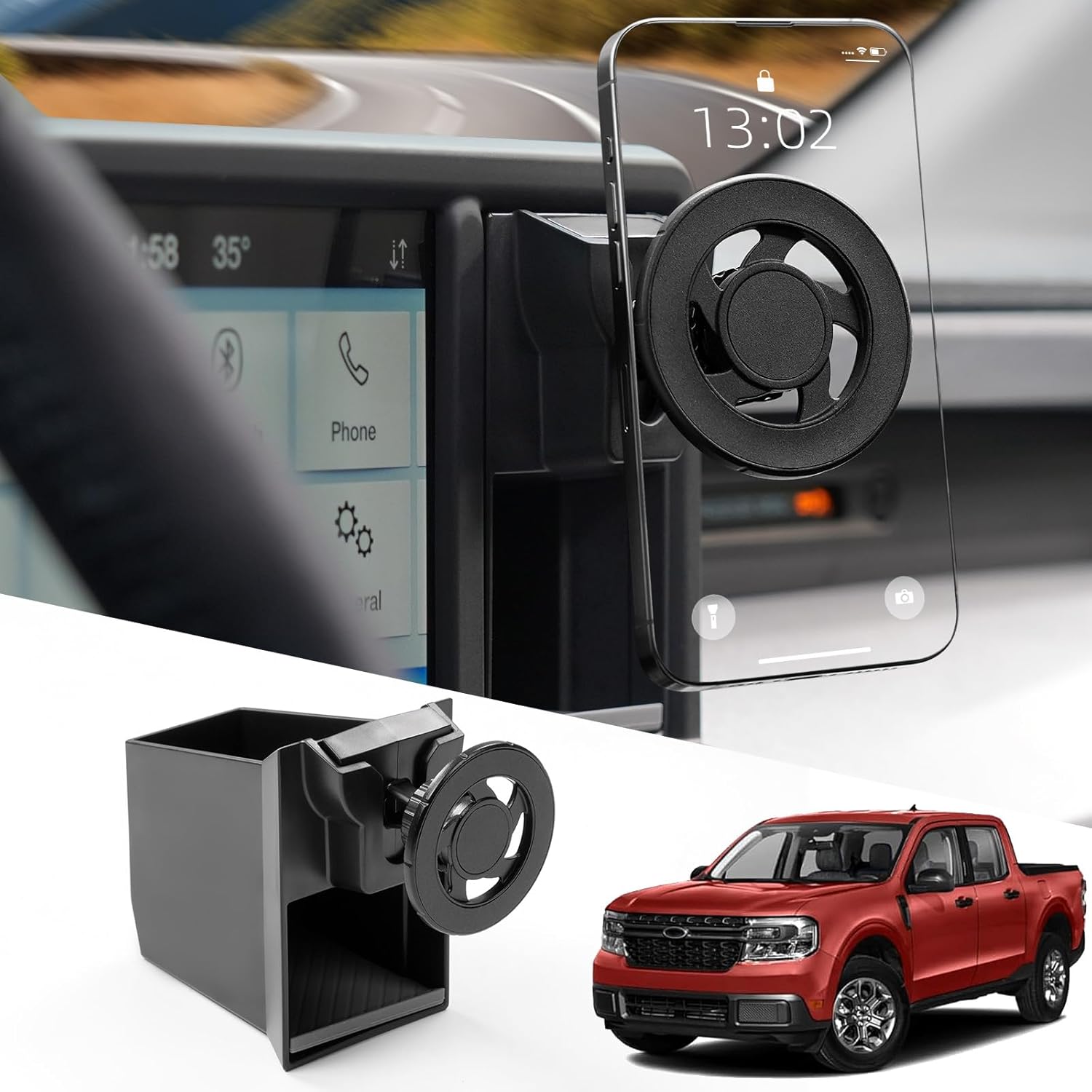
| Compatible Devices | Smartphones |
|---|---|
| Mounting Type | Cubby Mount |
| Additional Features | One-Hand Operation |
| Enclosure Material | Carbon Steel |
This Mabett cubby phone holder converts the small storage slot next to the Maverick center screen into a secure magnetic mount and storage box. It installs in the cubby after removing the factory rubber insert and uses an adjustable ball head to position your phone without blocking the screen. The strong magnet enables quick one-handed mounting and lets you switch between portrait and landscape easily, while the carbon steel and ABS construction gives the mount a solid feel that resists shaking on typical road surfaces. It is designed specifically for the Maverick cubby so it sits neatly and avoids adhesives or vent clips. Limitations are that it is not water resistant and depends on the included magnetic plate or a phone case with metal for full hold; very large or unusually shaped phones may extend beyond the cubby. Overall it is a practical, polished option for daily drivers who want a tidy, stable in-dash mount that stays out of the way of the screen.
Best for: Drivers who prioritize a tidy, vehicle-integrated mount that stays out of the way of the screen and provides fast, reliable one-handed use for daily driving.
Less Ideal for: People who frequently use very large or unusually shaped phones that extend beyond the cubby or those who need a weatherproof or vent-mounted solution.
- Custom fit for the Maverick cubby provides a clean, factory-like installation.
- Strong magnetic attachment enables fast one-handed mounting and removal.
- Adjustable ball head allows 360° rotation for portrait or landscape use.
- Made from carbon steel and ABS for solid feel and reduced vibration during normal driving.
- Not water resistant so exposed spills or heavy moisture could cause issues.
- Requires a metal plate or compatible phone case for magnetic hold, which adds a small setup step.
Verdict: The best all-around phone mount that balances stability, adjustability, ease of use, and build quality for everyday driving and frequent use.
2. LISEN MagSafe Vent Car Mount (LS-H739)
Best Budget Phone Mount

| Compatible Phone Models | iPhone 12 through iPhone 17 and MagSafe cases |
|---|---|
| Mounting Type | Vent |
| Weight Capacity Maximum | 5.6 ounces |
| Enclosure Material | Metal Hook, N55 Ultra Magnets, Plastic |
The LISEN MagSafe vent mount is a compact, budget-friendly option that holds MagSafe-ready iPhones and other smartphones using the included metal ring for non‑MagSafe cases. It clips to horizontal or vertical air vents with a reinforced steel hook and an extended arm designed to reduce direct contact with the vent. The mount’s N55/N52 high-strength magnet array gives a noticeably firm grip, so phones stay put during normal driving, sharp turns, and light bumps. It rotates for flexible viewing angles and supports one-handed docking for quick use. Practical benefits include broad MagSafe compatibility, a slim profile that keeps the phone close to the dash, and a stronger clamp than many cheap vent mounts. Limitations to expect are that it does not provide wireless charging, may not fit round or unusually shaped vents, and the metal ring is needed for non‑MagSafe phones which can add setup steps. For a low price this delivers reliable everyday holding without premium materials or extra features.
Best for: Buyers who want an inexpensive, no-frills vent mount that reliably holds MagSafe phones and prioritizes secure everyday use over added features.
Less Ideal for: People who need wireless charging in the mount or who have nonstandard circular vents should look at other mounting styles.
- Strong magnet array provides secure hold for MagSafe phones during normal driving
- Reinforced steel hook and extended arm improve vent grip and stability
- 360-degree rotation and one-handed operation make it easy to position and dock quickly
- Slim, low-profile design keeps the phone close to the dash and minimizes obstruction
- Not compatible with round or unusually shaped air vents
- Does not support wireless charging
Verdict: The best inexpensive phone mount for buyers who want secure, no-frills phone holding without paying for premium materials or advanced features.
3. Bulletpoint RubiGrid Metal Dash Mount Phone Holder for 2022-2024 Ford Maverick
Best Premium Phone Mount
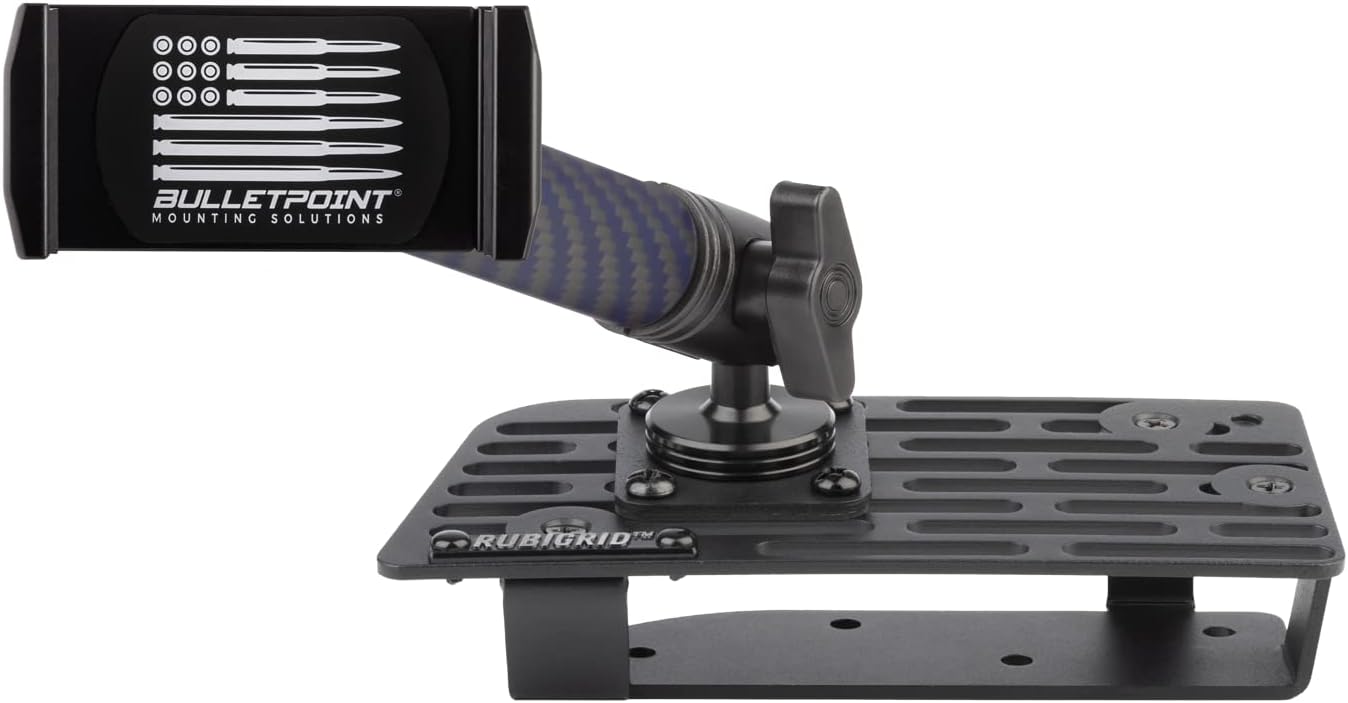
| Compatible Devices | Smartphones |
|---|---|
| Mounting Type | Dashboard |
| Additional Features | Adjustable, One-Hand Operation, Rotatable |
| Weight Capacity Maximum | 453.59 g |
| Enclosure Material | Aluminum, Carbon Fiber + Kevlar |
The Bulletpoint RubiGrid is a premium, vehicle-specific dash mount that replaces the top dash tray on 2022–2024 Ford Mavericks with a laser-cut metal platform and an AMPS-compatible mounting system. It ships with a spring-loaded universal phone holder, a 20mm AMPS ball, and a stiff 6-inch carbon fiber plus kevlar arm so you can position phones, small tablets, action cameras or radios across the grid. Installation requires removing the plastic dash tray and drilling four small holes to secure the base, but once tightened the CNC-cut metal plate and thumbscrew clamps deliver a rock-solid connection that resists vibration and rough-road movement. The spring clamp holds phones up to about 3.4 inches wide with rubber pads to protect devices. This mount prioritizes build quality and modularity over plug-and-play convenience: additional AMPS accessories are needed to expand the setup and the installation is semi-permanent. For buyers who want refined adjustability, durable materials, and a factory-like fit for the Maverick, RubiGrid is a thoughtfully engineered option.
Best for: Buyers who prioritize premium materials and a rock-solid, configurable mounting system for a Maverick and who want a refined, permanent-looking installation.
Less Ideal for: Drivers who prefer a no-drill, temporary mount or who need a quick-transfer solution between multiple vehicles.
- All-metal laser-cut platform provides a stable, low-vibration mounting foundation
- Includes AMPS-style ball and carbon fiber + kevlar arm for precise, sturdy positioning
- Spring-loaded universal phone holder with rubber pads secures devices up to 3.4 inches
- Vehicle-specific fitment for 2022–2024 Ford Maverick gives a near-factory appearance and placement
- Requires drilling the dash tray and semi-permanent installation rather than a non-invasive clamp-on setup
Verdict: The best premium phone mount for users willing to pay more for superior build quality, refined adjustability, and extra convenience features.
4. SKYLOTEC Magnetic Phone Holder Cubby Insert for Ford Maverick (2022–2024)
Best Magnetic Phone Mount

| Compatible Devices | Ford Maverick 2022 2023 2024 |
|---|---|
| Mounting Type | Vent |
| Additional Features | Screen Protector |
| Enclosure Material | Aluminum, Polyvinyl Chloride |
This SKYLOTEC cubby-insert phone holder is a MagSafe-compatible magnetic mount custom-shaped for the Ford Maverick 2022–2024. It installs without tools into the dash cubby and uses a compact aluminum alloy puck with a socket-ball arm to give 360 degree rotation while keeping the phone low and out of the windshield sightline. The mount uses 20 N55 magnets for strong holding force and the package includes two adhesive metal rings for phones or cases without built-in MagSafe. In practice it makes one-handed attachment fast and reliable for everyday driving and the turbine-style open bottom reduces possible signal interference. The low-profile design and right-angle base minimize wobble and view obstruction, and the aluminum finish adds a tidy, OEM-like look. Limitations are that it only fits left-hand drive Mavericks and non-MagSafe cases need correctly placed metal rings that may not stick well to textured or leather cases; very large or heavy phones with bulky cases could be less secure than direct MagSafe contact.
Best for: Drivers who want a slim, factory-looking mount in the Maverick that lets them snap their phone on and off with one hand while keeping the screen low and unobtrusive.
Less Ideal for: People who need a universal mount for multiple vehicle types or those who frequently use very large phones in thick cases that prevent direct magnetic contact.
- Custom fit for Ford Maverick cubby for a clean, integrated look
- Strong magnetic array (20 N55 magnets) for secure hold during normal driving
- 360° socket ball rotation for flexible, one-handed positioning
- Aluminum construction with carbon-fiber pattern for a premium appearance
- Includes two adhesive metal rings for non-MagSafe phones
- Only compatible with left-hand drive Ford Maverick models
- Adhesive metal rings may not bond well to textured or leather cases
Verdict: The best magnetic phone mount for drivers who prioritize quick, one-handed attachment and a slim footprint while maintaining reliable hold during normal driving.
5. MioBanbo Qi2.2 25W MagSafe Car Mount Charger for Ford Maverick (8-Inch Screen)
Best Wireless-Charging Phone Mount

| Compatible with Vehicle Type | 2022 2023 2024 Ford Maverick (8-Inch Touchscreen) |
|---|---|
| Charging Standard | Qi2.2 25W |
| Included Adapter | 54W Fast Adapter |
| Mounting Type | Touch Screen |
| Maximum Weight Capacity | 1.3 kg |
This MioBanbo mount combines a magnetic Qi2.2 wireless charger with a fixed touchscreen base tailored for Ford Maverick 2022–2024 models with the 8-inch display. It mounts to the factory touchscreen area without drilling and holds phones using a strong N52 magnetic array while delivering up to 25W charging to compatible iPhones and selected Pixel/Samsung models at lower rates. The unit includes an intelligent cooling fan and AI temperature regulation to keep charging speeds high without overheating, and the one-hand magnetic attachment makes placing and retrieving the phone quick and safe while driving. The included 54W adapter and cable let the mount deliver full power out of the box and keep the cabin tidy by removing the need for extra charging cables. Limitations: the highest 25W rate is restricted to specific phones and iOS combinations, and the mount is only modeled to fit Ford Maverick units with the 8-inch touchscreen, so it will not suit other dashboards or screen sizes.
Best for: Drivers who want an integrated, cable-minimizing charging solution that blends into a Ford Maverick interior and provides fast, hands-free phone mounting and charging while navigating.
Less Ideal for: People who do not have the 8-inch Ford Maverick touchscreen or who prefer a universal vent or suction-mount that moves between multiple vehicles.
- Up to 25W Qi2.2 wireless charging for rapid in-car top-ups on supported phones
- Custom touchscreen-mounted base designed to fit 2022–2024 Ford Maverick 8-inch screens without drilling
- Active cooling and AI temperature regulation to maintain charging speed and reduce heat
- Strong N52 magnets and 1.3 kg hold capacity keep phones secure on bumpy roads
- Includes 54W fast adapter and 2-in-1 cable for ready-to-use installation and a cable-free cabin
- Maximum 25W charging requires specific phone models and OS versions so many phones will charge at lower rates
- Fitment is limited to Ford Maverick models with the 8-inch touchscreen and will not work with other dash configurations
Verdict: The best wireless-charging phone mount for drivers who want seamless in-car charging and a tidy setup without separate cables while driving.
6. APPS2Car M02 Pro-S02 Magnetic Car Phone Mount with Telescopic Arm and Suction Cup
Best Suction-Cup Phone Mount

| Compatible Devices | Smartphones |
|---|---|
| Mounting Type | Windshield & Dashboard |
| Arm Length | 16 centimeters |
| Weight Capacity Maximum | 20 pounds |
| Additional Features | Premium Leather Texture Embossing |
This APPS2Car magnetic mount combines a strong suction cup base with a telescopic arm and a magnet head that requires the included metal plate for reliable attachment. It is meant to stick to windshields or smooth dashboard surfaces using either the suction cup alone or the supplied 3M pad for textured dashboards. The arm extends for adjustable viewing and uses a single-handed pull-push mechanism for quick positioning. The mount’s simulated stitching and leather-texture finish give it a premium look while the six magnets provide a firm hold when the metal plate is properly installed on or in a phone case. Practical benefits include easy one-handed use, flexible placement between windshield and dash, and a secure grip that tolerates typical road vibration. Important limitations are that it is not MagSafe compatible and it does not support wireless charging, and the metal plate is required for magnetic strength which may add an extra step to installation and affect some wireless charging setups.
Best for: Drivers who prioritize a repositionable, vibration-resistant suction-cup mount for clear sightlines and single-handed operation while using a dashboard or windshield in-cab mounting location.
Less Ideal for: People who need MagSafe compatibility or want built-in wireless charging should look at mounts designed specifically for those features.
- Strong suction cup plus 3M pad option lets you mount to windshield or smooth dashboards securely
- Telescopic arm with one-pull-push action for fast single-handed adjustment and improved sightlines
- Six high-grade magnets and included metal plates deliver a reliable hold over bumps and vibration
- Premium leather-texture finish and simulated stitching for a refined in-cabin appearance
- Requires the included metal plate for secure magnetic attachment which may interfere with some cases or wireless charging setups
Verdict: The best suction-cup phone mount for users who want a stable, repositionable mount that sticks to windshields or smooth dash surfaces and holds up to road vibration.
Choosing the Right Ford Maverick Phone Mount: Key Factors to Consider
Mounting Location and Sight Lines
Where you attach a phone mount affects visibility, safety, and compliance with local laws. A mount placed near the center of the dash or on the windshield gives a clear view of navigation but can block sight lines if positioned too low. For the Ford Maverick, consider the layout of the center stack, air vents, and instrument cluster so the phone does not obstruct critical gauges.
Think about how the mount interacts with the sun visor and reflections on the windshield during different times of day. If you rely on voice commands, mounting closer to the driver may improve microphone pickup. Also evaluate whether the mount interferes with airbags, vent airflow, or driving controls to avoid compromising safety or comfort.
Stability and Vibration Control
A mount that does not hold the phone steady will make navigation and hands-free calls difficult and can cause frequent readjustment. Stability depends on the mounting method, grip design, and materials used. For the Maverick, tire and road conditions can transmit noticeable vibration through the cabin, so select mounts with sturdy clamps or strong suction plus soft contact points that dampen vibration.
Test how the mount behaves over potholes and expansion joints; a stable mount keeps the screen readable and prevents accidental drops. Magnetic mounts should include strong magnets and a secure plate attachment to the phone or case to avoid slippage when encountering bumps.
Compatibility With Phone Size and Cases
Phone sizes and case thickness vary widely, and some mounts only support a narrow range of dimensions. Confirm the mount will accommodate the largest phone you plan to use, including with protective cases, rugged covers, or battery packs. For magnetic mounts, ensure the magnet and plate arrangement works through your case or that you are willing to place a thin plate between device and case.
Additionally, check whether the mount allows for portrait and landscape orientation and whether the adjustment mechanism is easy to operate while seated. A design that requires significant force to release or reposition can be inconvenient for drivers who change tasks frequently.
Charging Access and Cable Management
You will often need to charge the phone while using maps or media. Consider mounts that leave the charging port accessible and provide routes for cable routing so cords do not dangle into the shifter area or footwell. Some mounts include built-in wireless charging or a passthrough design that aligns the phone with a charging puck; others offer clips or hooks to secure a cable.
For the Ford Maverick, think about where your vehicle's power outlets are located and whether a longer cable will be necessary. Good cable management improves cabin tidiness and reduces the chance of accidentally yanking the cable when removing the phone.
Ease of Installation and Removal
How easily a mount installs and removes matters for shared vehicles or rental situations. Dashboard pads, suction cups, vent clips, and adhesive mounts each have tradeoffs between permanence and repositionability. For Maverick owners who switch mounts between vehicles or want to avoid sticky residue, choose solutions that secure firmly without permanent adhesives.
Consider whether the mount requires tools or fragile trim removal. Easy-to-use quick-release features make docking and undocking the phone convenient while minimizing distraction. Also verify that installation does not alter or damage air vent blades, dash finish, or trim pieces.
Adjustability and Viewing Angles
A mount with wide adjustment range helps you fine-tune viewing angle to reduce glare and ensure reachability. Ball-and-socket joints, telescoping arms, and swivel heads provide various levels of control. In the Maverick cockpit, a mount that allows both height and rotation adjustments helps compensate for different driver seating positions.
Sturdy adjustment points that lock securely prevent the phone from drooping over time. Evaluate whether the mechanism stays tight under regular use; a loose joint will require frequent readjustment and can distract from driving.
Mount Types Explained for the Maverick
Different mounting methods suit different driving habits and dash configurations. Suction cup mounts attach to the windshield or smooth dash areas and offer flexible placement, but they can be affected by temperature changes. Dash-mounted holders with adhesive pads provide a lower-profile option that keeps the screen closer to the center stack.
Vent clips are convenient and easy to move but may not fit all vent styles and can block airflow. Magnetic mounts allow fast one-handed docking but require a metal plate on the phone or case. Choose the type that best balances visibility, stability, and practicality for your Maverick's interior.
- Suction cup: flexible placement, potential temperature sensitivity
- Adhesive dash pad: low-profile, more permanent
- Vent clip: quick to install, may affect airflow
- Magnetic mount: fast docking, requires plate or compatible case
Placement Tips to Avoid Blocking Controls
Place the mount so it does not cover critical controls, airbag zones, or instrument gauges. On the Maverick, aim for a position near the center stack or along the upper dash that keeps the phone in the driver's natural field of view without obstructing the windshield or vents tied to defrosting.
If you use climate controls frequently, avoid vent-mounted options that block airflow to passengers. Trial-fit a mount with the phone before finalizing adhesive placement to ensure it does not interfere with HVAC knobs or the infotainment screen.
- Avoid positions that obstruct sight lines to the road
- Keep climate controls and infotainment touch areas accessible
- Test placement with seat fully adjusted for all drivers
Wireless Charging Considerations
If you plan to charge wirelessly, verify the mount aligns the phone's coil with the charger and that the mount supports the phone's charging standard. Some wireless mounts generate heat; ensure airflow around the mount to limit cabin temperature buildup and check for any interference with cab materials.
Also consider whether a wireless charger adds bulk that affects sight lines or whether it can be easily removed when not in use. A wired solution may provide faster charging and lighter weight, which can improve stability.
- Confirm coil alignment for reliable charging
- Monitor heat build-up during long trips
- Wired vs wireless: tradeoff between weight and convenience
One-Handed Operation and Safety
One-handed docking and release reduces distraction and helps you keep one hand on the wheel during brief interactions. Look for mounts with intuitive grips or magnetic pull-and-go designs that allow quick access without fiddling with clamps.
Ensure the release mechanism does not require excessive force or two hands. Practice docking and removing the phone while parked to confirm the motion is smooth and that the mount does not shift position under repeated use.
- Prefer quick-release or magnetic mounts for single-handed use
- Check that adjustment knobs are reachable from the driving position
- Avoid mounts requiring precise alignment that requires two hands
Protecting Your Phone and Vehicle Finish
Soft contact surfaces on a mount prevent scratches to phone cases and protect dash finishes. For adhesive mounts, choose pads with automotive-grade adhesives designed to remove cleanly. Vent clips should include rubberized grips to avoid marking vent blades or causing cracks over time.
If using a magnetic plate, place it where it will not press directly against the phone's screen or interfere with card slots. Regularly inspect mount contacts for dirt or debris that could abrade surfaces and clean them as needed.
- Look for rubberized or felt-lined contact points
- Use adhesive pads designed for automotive surfaces
- Inspect mounts periodically to prevent wear
How We Chose the Best Ford Maverick Phone Mount
We evaluated candidates using criteria that matter specifically for Ford Maverick owners and in-dash ergonomics. Primary factors included mount stability under real-world road conditions, compatibility with common Maverick dash contours and vent layouts, and sight lines for driver safety. We also prioritized mounts that provide unobstructed access to charging ports and phone buttons and that support hands-free voice control without blocking instrument clusters.Installation ease and removal were key: we favored mounts that attach securely yet can be repositioned or removed without tools. Materials and build quality were assessed for vibration damping and long-term durability in cabin temperatures. We excluded products that rely on nonstandard modification to the dash or that require vehicle-specific adapters. Final selections balanced user convenience, solid retention, and compatibility with the Ford Maverick interior and control layout.
Our full evaluation process is outlined in our review methodology.
FAQ
Will a dash-mounted phone holder obstruct my view in the Maverick?
It depends on placement. Position the holder low on the center dash or near the infotainment area to keep the windshield sight line clear. Test the final position from a normal driving posture to confirm visibility is not compromised.
Are vent clip mounts safe for the Maverick's vents?
Vent clips are generally safe if they match the vent blade design and use padded grips. Avoid heavy mounts that strain vent blades, and check that airflow is not blocked for defrosting or passenger comfort.
Can I use a magnetic phone mount with a protective case?
Yes, but effectiveness depends on case thickness and whether a metal plate is used. Thin cases usually allow magnetic attachment through the case, while thicker or metal-backed cases may need a plate placed between the phone and case for a secure hold.
How do I prevent a suction cup mount from failing in hot conditions?
Clean both the suction surface and the mount base before installation, and press firmly to create a solid seal. Some suction mounts have a locking lever that improves retention. For long-term placement, choose dash areas with minimal direct sun exposure to reduce heat-related loss of suction.
What is the best position for navigation during long drives?
Place the phone where it is easy to glance at without moving your head significantly, typically centered near the infotainment or slightly to the right of the steering column. Ensure the mount holds the phone steady and allows landscape orientation if you prefer a wider map view.
Will wireless charging mounts get hot during extended use?
Wireless charging can generate additional heat compared with wired charging, especially during navigation and media use. Choose mounts with ventilation or moderate charging rates and monitor device temperature on long trips to avoid sustained high heat.
Final Verdict
Choose a phone mount for the Ford Maverick by prioritizing stability, sight lines, and ease of use. Decide which mounting method fits your driving habits and interior layout, balancing one-handed operation with secure retention and charging access. Remember that vent clips offer portability while dash or suction mounts often provide the best sight lines and stability.Weigh the tradeoffs between wireless convenience and potential heat or weight, and pick a mount that leaves key controls and displays unobstructed. With the right mount you will improve navigation visibility and keep your focus on the road.
Explore More:
- Check out all Ford Maverick parts & accessories
- Explore Interior Accessories
- Browse all Accessories
