

Note: This article contains affiliate links. If you click on these links and make a purchase, I may earn a small commission at no extra cost to you. This helps support my research and content. Read my full affiliate disclosure here.
Finding the right phone mount for a 2008-2013 Nissan Rogue matters more than you might think. The Rogue's dashboard shape, vent placement, and cabin ergonomics affect visibility, reach, and mirror lines. A poorly chosen mount can block vents, impair sightlines, or fall loose on rough roads.This guide shortlists the top seven phone mounts suited to the 2008-2013 Nissan Rogue, focusing on stability, installation simplicity, and driver ergonomics. Below we evaluate mounting style, compatibility, and how each option performs in everyday driving so you can pick the best fit for your routine.
Looking for other parts? See all Nissan Rogue parts & accessories.
Top Picks at a Glance
| Best Overall Phone Mount A reliable all-around mount that balances grip, adjustability, and ease | VANMASS Car Phone Mount with Suction Cup and Vent Clip |  |
| Best Budget Phone Mount A low-cost mount that still holds phones securely during drives | vanva Universal Air Vent Car Mount (Thick Case Friendly) |  |
| Best Premium Phone Mount A higher-end mount with refined materials, stronger hold, and extras | iOttie Easy One Touch 4 Dashboard & Windshield Phone Mount |  |
| Best Magnetic Phone Mount A magnet-based mount for quick attach/detach and minimal fiddling | LUNQIN CD-Slot Magnetic Phone Mount for Nissan Vehicles |  |
| Best Wireless Charging Phone Mount A mount with integrated Qi charging for charging while mounted | AbeeyGeomarn Magnetic Wireless Car Phone Mount with 15W Fast Charger for 2008–2013 Nissan Rogue |  |
| Best Vent Phone Mount An air-vent mount that keeps the dash clear and installation quick | AbeeyGeomarn Magnetic Phone Mount for 2008–2013 Nissan Rogue |  |
| Best Compact Phone Mount A small, low-profile mount ideal for tight dash or windshield space | zipelo Foldable Magnetic Dashboard Phone Holder (Metal) |  |
1. VANMASS Car Phone Mount with Suction Cup and Vent Clip
Best Overall Phone Mount

| Item model number | CTVK13 |
|---|---|
| Depth of Phone Cradle | 0.7" |
| Width of Clamp Arm | 2.2"-3.8" |
| Diameter of Suction Cup | 2.8" |
This VANMASS car phone mount is designed as an all-around solution for in-car phone use, offering both a telescopic suction cup and a vent clip so you can choose the best installation for your dash or windshield. The telescopic arm and 360 degree ball joint let you position a phone for navigation or hands-free calls while the widened cradle and strong clamp hold larger phones and thick cases. The suction cup claims a very strong hold and includes a pre-install cleaning wipe and a tear-notch for removal, while the vent clip uses a steel-cored structure with silicone pads to protect vent blades. In practice the mount is convenient for daily drivers who need repeatable, stable positioning and quick one-handed phone insertion. Limitations to note: the suction cup needs a clean, flat windshield or dash area and is not suited to leather or heavily textured dashboards, and the vent clip will not fit round or diagonal vent designs. For a 2008–2013 Nissan Rogue the mount’s vent clip and suction options give flexible placement choices that work with the Rogue’s horizontal vents and typical windshield surfaces.
Best for: Drivers who want a single mount that offers secure holding and flexible placement for everyday navigation and hands-free calls, with easy repositioning between windshield and vent installs.
Less Ideal for: People who need a mount specifically for round or diagonal vent styles or who cannot access a flat, non-textured windshield or dash surface for suction mounting.
- Includes both suction-cup and vent-clip mounting options for installation flexibility
- Telescopic arm plus 360° ball joint enables wide range of viewing angles
- Widened cradle and strong clamp support large phones and thick cases
- Steel-cored vent clip with silicone pads protects vent blades and adds durability
- Suction cup requires a clean, flat surface and may not stick well to leather or heavily textured dashboards
Verdict: The best all-around phone mount that balances secure holding, flexible positioning, and easy installation for most drivers and everyday use.
2. vanva Universal Air Vent Car Mount (Thick Case Friendly)
Best Budget Phone Mount

| Mounting Type | Vent |
|---|---|
| Compatible Devices | Smartphones |
| Additional Features | Adjustable, Rotatable, Rust Resistant, Tilt Head |
| Water Resistance Level | Waterproof |
This compact vent phone mount clamps to a vehicle air vent and holds phones in a spring-loaded cradle with rubber pads and a screw-tightened vent hook for added grip. Installation is straightforward: attach the upgraded metal clip to a horizontal or vertical vent blade on the dash and tighten the screw clamp so the mount stays put. The 360 degree swivel ball and tilt head let you set landscape or portrait viewing for navigation or hands-free calls while leaving the lower charging port accessible. The rubber contact points protect the phone and the design is intended to accommodate larger phones and thick cases. Practical benefits include easy one-handed placement and a secure hold on bumpy roads when the clip is properly tightened. Limitations are that it mounts only to non-round vent blades and can block airflow depending on vent location and orientation in the 2008–2013 Nissan Rogue dash layout, and heavy phones may shift if the vent slats are fragile or flexible.
Best for: Buyers looking for the cheapest reliable mount that installs in minutes and keeps large phones usable with thick cases for everyday navigation and calls in a 2008–2013 Nissan Rogue.
Less Ideal for: Drivers who prefer a dash or windshield mount, have round vents, or need a mount that transfers weight to the dash instead of the vent should consider other mounting styles.
- Screw-tight vent clamp and metal hook increase grip for stable mounting on firm vent blades
- 360° swivel and tilt head allow easy landscape and portrait positioning
- Rubber contact pads protect device and help prevent slipping
- Designed to fit large phones and phones with thick protective cases
- Reserved lower gap for charging cable while mounted
- Not compatible with round air vents
- Performance depends on the strength and orientation of the vehicle's vent blades
Verdict: The best low-cost phone mount for buyers who want dependable performance and simple installation without spending much.
3. iOttie Easy One Touch 4 Dashboard & Windshield Phone Mount
Best Premium Phone Mount

| Compatible Devices | Smartphones |
|---|---|
| Mounting Type | Dashboard |
| Additional Features | Easy One Touch Mechanism, Adjustable, Rotatable |
| Compatible Phone Width | 2.3"–3.5" |
The iOttie Easy One Touch 4 is a dashboard and windshield phone mount designed to keep a smartphone within easy view while driving. It uses a patented one-touch clamp to lock and release phones with a single hand motion, a telescopic arm that extends and pivots for customizable placement, and a ball joint that rotates between portrait and landscape. Installation relies on a strong suction cup plus an included dashboard pad for better adhesion on flat surfaces. For a 2008–2013 Nissan Rogue, the mount lets you position navigation or media apps closer to the windshield or on a flat dash area without blocking sightlines. The plastic build is lightweight and the mechanism is simple to operate, though textured or curved dash areas in some Rogues may reduce suction reliability and heat can weaken adhesion over time. This is a practical choice if you want smooth one-handed operation and flexible positioning, but expect the main components to be plastic rather than metal-heavy premium materials.
Best for: Buyers who prioritize smooth, single-handed operation and flexible positioning and want a dependable mount that integrates cleanly with a 2008–2013 Nissan Rogue dashboard.
Less Ideal for: Drivers seeking an all-metal, heavy-duty mount or those who need a mount guaranteed to stick to highly textured or curved dash surfaces should consider different styles.
- Easy One Touch clamp for one-handed mounting and removal
- Telescopic arm and 260-degree pivot allow tailored viewing positions
- Reusable suction cup plus dashboard pad improve mounting options
- Adjustable bottom foot accommodates phones with larger cases
- Main construction is plastic rather than metal, so it feels less premium
Verdict: The best premium phone mount for buyers willing to pay more for superior build quality, smoother adjustment, and long-term durability.
4. LUNQIN CD-Slot Magnetic Phone Mount for Nissan Vehicles
Best Magnetic Phone Mount

| Compatible Devices | Smartphones |
|---|---|
| Mounting Type | Dashboard (CD slot) |
| Additional Features | Adjustable, Non-Slip, One-Hand Operation, Rotatable |
| Compatible with Vehicle Type | Nissan Altima, Rogue, Sentra, Murano, Pathfinder |
This LUNQIN CD-slot magnetic phone mount installs into the vehicle CD slot and secures with a turn-knob grip that protects the player with silicone pads for a non‑destructive fit. It uses a gravity-assisted clamp and magnetic contact to let you place or remove your phone with one hand while the triangular lock and rubberized contact points keep the device stable over bumps. The head rotates freely for portrait or landscape viewing and the arm offers dual-axis adjustment for quick angle changes when using navigation or calls. It is intended to fit specific Nissan models including Rogue 2008–2013, so installation is straightforward in compatible cars and keeps the dash clear compared with suction or vent mounts. Limitations are that compatibility is limited to the listed Nissan CD slots and very large or thick phones near the upper width/thickness limit may be tight in the clamp.
Best for: Buyers who want the fastest one-handed placement and immediate access to their phone in a 2008–2013 Nissan Rogue and prefer a tidy dash-mounted solution over vent or suction mounts.
Less Ideal for: Drivers without a compatible CD slot or those who frequently swap between multiple vehicle models should consider other universal mounts.
- Designed specifically to insert and lock into Nissan CD slots for a secure, space-saving install
- One-handed placement using gravity-sensing locking for fast, single-hand operation
- 360° rotation and dual-axis adjustment for flexible portrait or landscape viewing
- Silicone and soft rubber contact points protect the CD player and reduce rattling during drives
- Fitment limited to the specified Nissan CD slot models so it will not work in vehicles without compatible slots
Verdict: The best magnetic phone mount for users who prioritize one-handed placement and fast access while maintaining a strong magnetic hold.
5. AbeeyGeomarn Magnetic Wireless Car Phone Mount with 15W Fast Charger for 2008–2013 Nissan Rogue
Best Wireless Charging Phone Mount

| Compatible vehicles | 2008–2013 Nissan Rogue |
|---|---|
| Charging output | 15W Fast Wireless Charger |
| Mounting type | Dashboard |
| Materials | Aluminum, Plastic |
| Included accessories | Magnetic ring, USB-A and dual USB-C cables |
This mount combines a custom-fit dashboard base shaped for 2008–2013 Nissan Rogue with a MagSafe-style 15W wireless charging head and a magnetic ring for phones that lack built-in magnets. It installs without tools using an adhesive base that matches the vehicle contours, then secures a one-way adjustable ball joint and the charging puck. In daily use the strong N55 magnets and included metal ring keep phones stable during typical driving and allow one-handed placement and removal. The 15W charging and built-in smart chips deliver faster wireless charging when paired with an 18W+ QC3.0 car adapter, and the 360° ball joint provides flexible viewing angles for navigation. Practical limits include adhesive mounting rather than a vent or CD option, and the base appears single-vehicle specific so fit and placement depend on exact dash geometry. The charger also relies on a higher-power car adapter for top charging speeds and may generate some heat under heavy use.
Best for: Drivers of a 2008–2013 Nissan Rogue who prioritize a tidy, integrated-looking dashboard mount that charges wirelessly and lets you grab and go with one hand.
Less Ideal for: People who need a reusable, non-permanent mount that can be moved between cars or those who prefer vent-mounted or suction-style holders.
- Custom-fit dashboard base tailored to 2008–2013 Nissan Rogue for neat factory-style installation
- 15W MagSafe-style wireless charging with smart charging chips for faster in-car charging
- Strong N55 magnetic array and included metal ring secure phones during normal driving
- 360° ball joint allows easy one-handed adjustment and optimal viewing angles
- Aluminum and plastic enclosure offers a more robust feel than all-plastic mounts
- Adhesive dashboard installation is permanent and may not suit users who prefer removable mounts
- Maximum charging speed requires a separate 18W+ QC3.0 car adapter which is not included
Verdict: The best wireless charging phone mount for drivers who want convenient in-car charging and a tidy setup without extra cables.
6. AbeeyGeomarn Magnetic Phone Mount for 2008–2013 Nissan Rogue
Best Vent Phone Mount
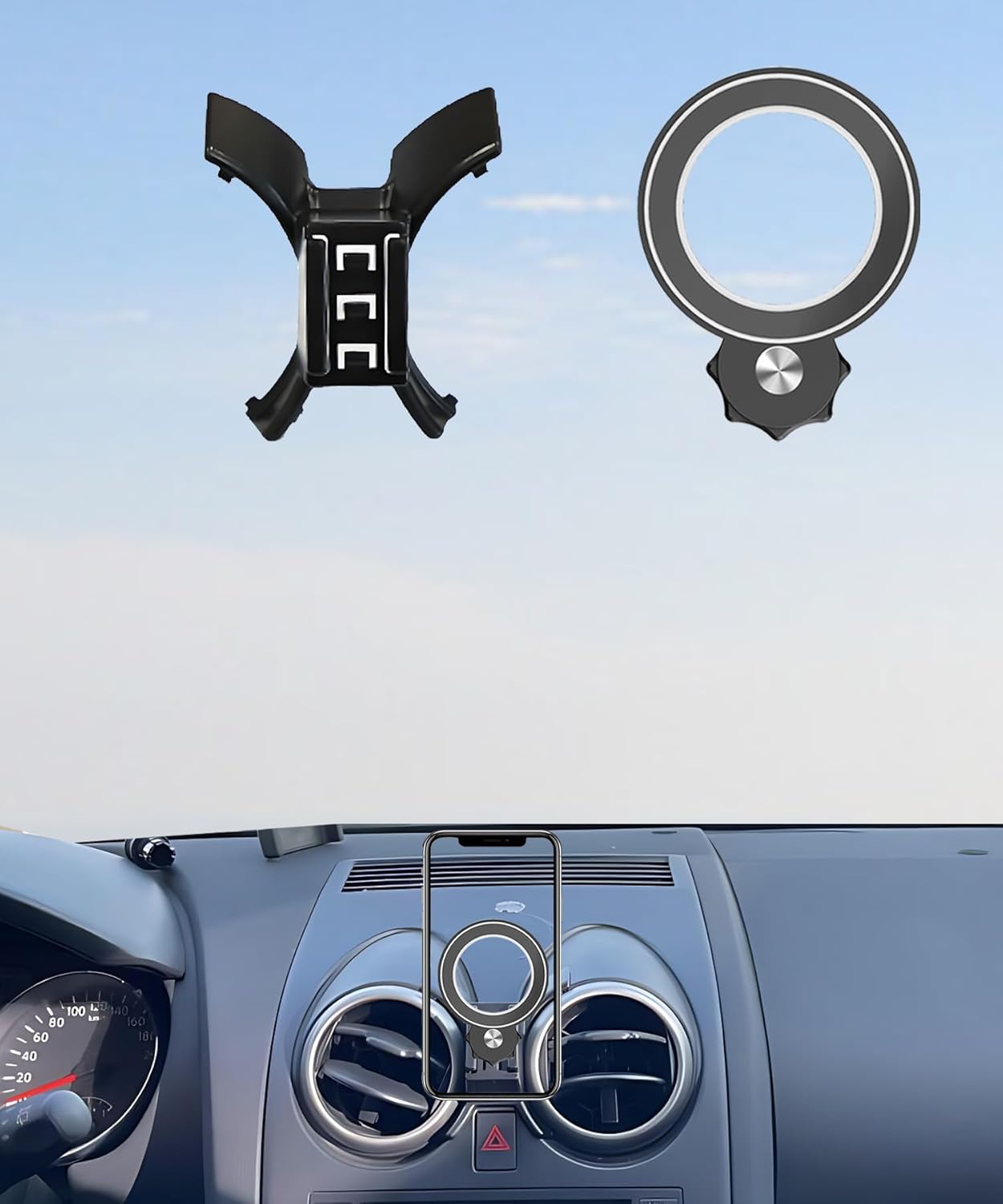
| Compatible Devices | 2008–2013 Nissan Rogue |
|---|---|
| Mounting Type | Dashboard |
| Additional Features | Adjustable, One-Hand Operation, Rotatable |
| Weight Capacity Maximum | 12 Kilograms |
| Compatible Phone Models | iPhone/Samsung/Huawei/Sony/Xperia/LG/SHARP/Xiaomi/OPPO/Motorola |
This AbeeyGeomarn mount installs on the Rogue dash and uses a strong magnetic surface for quick one-handed placement and removal of phones. It is built to fit the 2008–2013 Rogue interior and includes two adhesive metal rings for phones without MagSafe, while MagSafe-compatible phones attach directly. The mount rotates 360 degrees so you can switch between portrait and landscape viewing for navigation or calls, and the plastic housing feels sturdy for everyday driving. In practice the magnetic hold is reliable for city and highway driving, and the compact footprint keeps the phone accessible without blocking vents or the windshield. A clear limitation is that it is a dashboard-style magnetic mount rather than a vent clip, so it may not suit buyers set on vent-mounted placement; phones without rings require careful placement of the included adapters. Installation is straightforward and the design keeps the phone within easy reach for short trips and hands-free use.
Best for: Buyers who prioritize an easy-to-install, dashboard-mounted solution that keeps the phone accessible and unobtrusive while driving in a 2008–2013 Nissan Rogue.
Less Ideal for: Drivers who require a vent-mount location, need a mount for heavy rugged phones, or prefer a suction or clamp-style windshield installation.
- Custom fit for 2008–2013 Nissan Rogue for clean integration with the dashboard
- Strong magnetic attachment compatible with MagSafe and included metal rings for non-MagSafe phones
- 360-degree rotation allows easy switching between portrait and landscape
- Compact, one-hand operation keeps phone accessible without using windshield or vents
- Dashboard magnetic design rather than a vent clip may not match buyers who specifically want a vent-mounted solution
Verdict: The best vent phone mount for buyers who want an easy-to-install solution that keeps the phone accessible without using the dash or windshield.
7. zipelo Foldable Magnetic Dashboard Phone Holder (Metal)
Best Compact Phone Mount
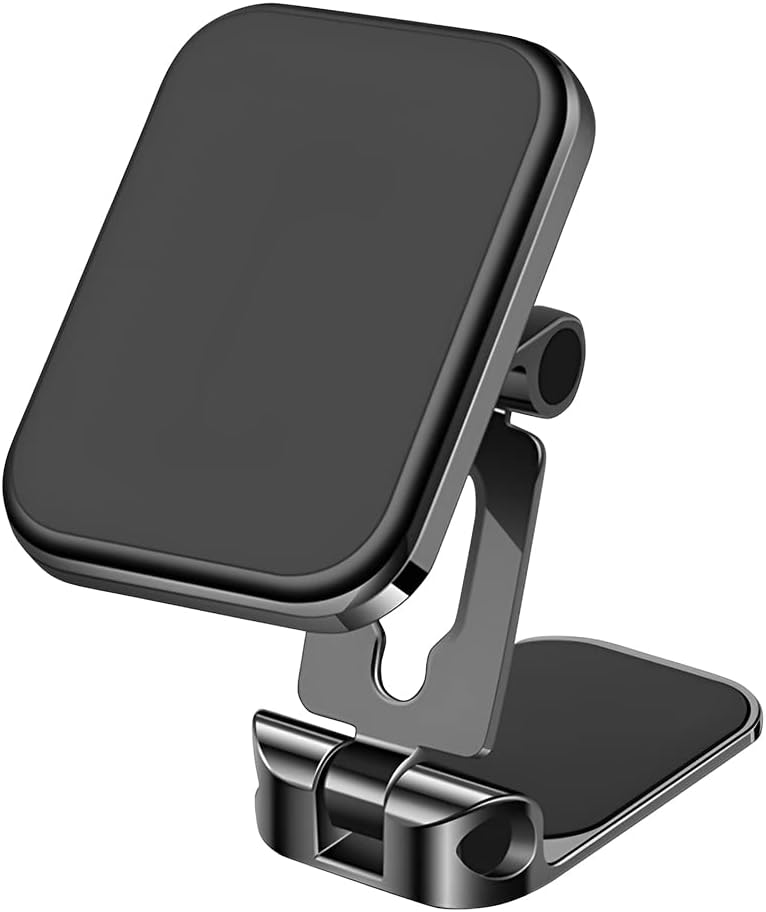
| Compatible Devices | Smartphones |
|---|---|
| Mounting Type | Dashboard |
| Additional Features | Foldable, Magnetic |
| Enclosure Material | Metal |
This compact dashboard mount uses a metal aviation-alloy body and a foldable design to stay low-profile on a Nissan Rogue dash while still providing a secure magnetic hold. It installs with a nano-strong adhesive pad that keeps the base stuck to the dash surface and includes two thin magnetic plates for attaching to a phone or case. The 360 degree rotating head and double-fold joints let you position the screen for portrait or landscape viewing without taking up much space when parked. In practice the stronger rubidium-style magnets and metal construction give a reassuring grip even with larger phones and most thin cases, though very bulky cases may reduce magnetic contact. The adhesive is designed to leave minimal residue but is effectively permanent on textured dashboards common to 2008–2013 Rogue models, so placement matters. For drivers who want a discreet, adjustable mount that keeps the windshield clear, this balances stability and compactness well.
Best for: Drivers who need a minimal, space-saving dashboard mount for a 2008–2013 Nissan Rogue and prioritize a secure magnetic hold with flexible viewing angles.
Less Ideal for: People who want a non-permanent or vent-mounted solution or who routinely use very thick protective phone cases without a metal plate.
- Compact foldable design minimizes visual clutter on the dashboard
- Strong built-in magnets provide a secure hold for most smartphones
- 360° rotating head and double-fold joints allow flexible viewing angles
- Metal alloy construction resists heat and feels durable
- Adhesive base is effectively permanent on textured dashboards and hard to reposition
Verdict: The best compact phone mount for drivers who need a discreet, space-saving mount that still provides secure holding and adjustable viewing angles.
Choosing the Right 2008-2013 Nissan Rogue Phone Mount: Key Factors to Consider
Mounting Location and Sightlines
Where you place a phone mount in a 2008-2013 Nissan Rogue changes how easily you can glance at navigation and how much it interferes with driving view. Dashboard and windshield mounts can provide higher sightlines closer to the road, reducing eye movement, but they may intrude on the windshield view or obstruct defroster vents.
Vent and cupholder mounts sit lower and keep the dash clear, but they can block airflow or sit below the driver's natural line of sight, requiring larger eye movements. Consider the Rogue's dash curve and the height of your seating position to choose a location that balances visibility and minimal obstruction.
Stability on Rough Roads
Stability is essential for GPS readability and for preventing the phone from shifting during accelerations, braking, and turns. The 2008-2013 Rogue is often driven on mixed road conditions, so choose a mount design that resists vibration and maintains a firm grip.
Look for mounts with robust clamping mechanisms, reinforced joints, and materials that dampen vibration. Suction mounts should include strong locking mechanisms and a secondary support where possible. For vent mounts, ensure the clip design fits the Rogue's vent slats securely and does not sag under weight.
Installation and Removal Ease
You will likely remove or reposition the mount for cleaning or shared vehicles, so simple installation matters. In the Rogue, avoid mounts that require tools or permanent adhesives because these can damage trim and are harder to reverse.
Quick-release clamps, twist-lock suction bases, and vent clips that snap on are preferable. Consider how easy it will be to attach a phone with one hand while parked, and whether the installation blocks access to common controls like climate knobs or the radio.
Phone Size and Case Compatibility
Phones and cases vary in width and thickness, so ensure the chosen mount can handle modern phones with protective cases. Some mounts use adjustable arms or expandable cradles, while magnetic mounts depend on a metal plate or magnetic strength that may be affected by heavy cases or wireless charging setups.
Verify the mount's maximum opening and whether the clamp or cradle can secure a phone in landscape and portrait orientations. For drivers who use navigation frequently, a secure landscape fit can make a big difference in readability.
Vent and Climate Interaction
Vent-mounted holders are convenient but can interfere with airflow and, in winter, blow warm air directly onto the phone which may affect battery performance. In the 2008-2013 Rogue, vent positions are central and side vents can differ in slat thickness, so choose a clip that distributes weight without deforming the vent fins.
Also consider whether the mount allows access to adjust vent direction and whether it will obscure climate controls. If you rely on vent airflow for comfort, a low-profile clip that keeps airflow unobstructed is preferable.
Adjustability and Reach
Adjustable arms, swivel heads, and telescoping features let you fine-tune the phone position for different drivers and seating positions. In the Rogue, slight adjustments may be necessary to avoid glare, reach the screen comfortably, or align the phone with the windshield for HUD-style viewing via reflection.
Tests of adjustability should focus on whether adjustments hold under vibration and whether the range of motion covers both portrait and landscape needs without blocking other cockpit elements.
Mount Types That Work Best in the Rogue
Different mounting styles have tradeoffs in the 2008-2013 Nissan Rogue. Dashboard and windshield mounts offer high sightlines but need careful placement to avoid obstructing the windshield or defroster vents. Vent mounts keep the dash clear and are quick to install but must match vent slat design to avoid sagging.
Magnetic mounts provide easy one-handed docking but require a secure magnetic attachment and may be less suitable if you rely on wireless charging without compatible plates. Cradle-style holders spread load across the phone and are generally more stable for larger devices.
- Dashboard mounts: higher sightline, good for GPS, check dash curvature for stable contact.
- Windshield mounts: rigid positioning, requires safe placement to not block view.
- Vent mounts: easy access, may affect airflow and need strong clips for Rogue vents.
- Magnetic mounts: fastest docking, ensure magnet strength and case compatibility.
- Cradle mounts: best for stability with bigger phones and thicker cases.
Best Places to Install in a 2008-2013 Nissan Rogue
Aim for a location that keeps the phone within a comfortable glance from your natural driving line. For many Rogue drivers, the upper center dash near the center vents offers a compromise between visibility and access while keeping the instrument cluster unobstructed.
If you frequently use voice commands and need minimal glare, a lower dash or vent mount near the center console may be better. Avoid locations that block airbags, obscure instrument readouts, or require extreme hand movements to reach.
- Upper center dash: good for navigation, maintain clear sightline.
- Center vent area: accessible, watch for airflow obstruction.
- Side vent for passenger use: keeps driver view clear but less convenient for the driver.
Installation Tips Specific to Rogue Interior
Before attaching any mount, clean the contact area of the dash or windshield with isopropyl alcohol to improve adhesion for suction bases. For vent clips, inspect the vent slats for tightness; some older Rogues may have slightly worn slats that require gentler clip designs.
When using a windshield or dashboard suction mount, allow the lock mechanism to set under no load before placing the phone. For vent mounts, attach the clip to a central slat and test with the phone mounted to ensure the vent can support the weight without tilting.
- Clean contact surface before installing suction mounts.
- Test vent clip fit without phone first to prevent slat stress.
- Position mounts to avoid covering hazard switches or airbag zones.
Maintaining Mount Performance Over Time
Regular checks can prevent sudden failures. For suction or adhesive-based mounts, re-seat and clean the surface periodically to maintain bonding. For vent clips, verify the clip teeth and rubber pads are intact to avoid damage to vent slats.
Replace worn or stretched straps and tighten swivel joints if they begin to droop. If you notice increased vibration transfer to the phone, add a thin rubber shim or choose a mount with better vibration-damping features.
- Reclean and reseat suction cups every few months.
- Inspect vent clips for wear and replace if they loosen.
- Tighten adjustable joints when you notice sagging under load.
Hands-Free Use and Legal Considerations
Many regions require hands-free operation while driving, so pick a mount that enables one-touch docking and leaves the microphone and speaker unobstructed for voice calls. Position the phone so you can use voice commands without taking your hands off the wheel.
Avoid placements that require prolonged eye-off-road time. A well-placed mount supports quick glances and seamless switching to voice navigation and calls, reducing legal and safety risks associated with handling a phone while driving.
- Prefer mounts that allow one-handed docking and removal.
- Ensure the mount does not block airbags, mirrors, or instruments.
- Use voice control and steering-wheel controls when possible to minimize interaction.
Still looking for the perfect fit?
Select your Nissan Rogue configuration to see the most relevant Phone Mounts recommendations
How We Chose the Best 2008-2013 Nissan Rogue Phone Mount
We focused on practical fit, mounting stability, and ergonomics specific to the 2008-2013 Nissan Rogue. Selection began with mounts known to work well in compact crossover cabins and narrowed by real-world fit cues relevant to this generation of Rogue.Key evaluation criteria included: stability on varied road surfaces, installation ease without modifying the dash or vents, adjustability for common Rogue sightlines, phone size compatibility including cases, and whether the mount interfered with vents, controls, or airbags. We also considered materials and clamp strength to assess long-term durability for daily use.Mounts were excluded if they required dash modification, had poor user feedback about falling off in bumpy conditions, or relied on suction alone without proven secondary support. We prioritized designs that offer quick attachment and removal, minimal obstruction of controls or vents, and clear sightlines to the windshield and instrument cluster.
Our full evaluation process is outlined in our review methodology.
FAQ
Will a vent mount damage the Rogue's vent fins?
Vent clips that distribute pressure and use soft pads typically avoid damage. Avoid heavy mounts or metal clips that focus force on a single slat. Inspect clips and choose low-profile designs if vents are already worn.
Can I use a magnetic mount with a thick phone case?
Magnetic mounts can work with thick cases but magnet strength may be reduced. Using a thin metal plate placed between the phone and case improves hold, while plates stuck to the back of the case offer better reliability.
Are suction cup mounts reliable in summer heat?
Suction mounts can lose adherence in extreme heat if the bonding surface softens. To improve reliability, clean the surface before installing and use mounts with a locking mechanism. Periodically reseat the suction cup during long hot months.
What is the easiest mount to use while driving?
Magnetic mounts and well-designed cradle mounts with one-handed release are the easiest for quick docking. Choose a mount positioned within comfortable reach and that does not require fine adjustments to engage.
Will a dashboard mount block my view of the road?
Proper placement should not block your view. Mounts installed low on the dash or near the center console keep sightlines clear. Avoid placing mounts at eye level or directly in the windshield's primary field of view.
How do I prevent my phone from vibrating loose on bumpy roads?
Select a mount with strong clamping force or a magnetic mount rated for vibration resistance. Cradle designs with rubberized grip pads and secure locking mechanisms are effective at minimizing movement on rough surfaces.
Final Verdict
For the 2008-2013 Nissan Rogue, prioritize a mount that balances stable holding power with unobstructed sightlines and easy one-handed use. Think about where the mount will sit in your cabin, how it interacts with vents and controls, and whether it can hold your phone with its case.Tradeoffs are common: vent mounts are convenient but may affect airflow, while windshield and dash mounts offer better sightlines at the cost of stricter placement. Use the decision factors above to choose the mount style that best fits your driving habits and the Rogue's interior layout.
Explore More:
- Check out all Nissan Rogue parts & accessories
- Explore Interior Accessories
- Browse all Accessories
