

Note: This article contains affiliate links. If you click on these links and make a purchase, I may earn a small commission at no extra cost to you. This helps support my research and content. Read my full affiliate disclosure here.
If you drive a Ford Fusion and want clearer audio, simpler controls, or modern smartphone integration, choosing the right car stereo matters. The right unit can transform in-car listening, make calls safer, and simplify navigation without distracting you from the road. This guide covers the top shortlisted car stereos for the Ford Fusion, selected for their fitment potential, audio performance, and connectivity features. Below you will find our picks and the criteria we used to evaluate them, so you can find the option that matches your priorities.
Looking for other parts? See all Ford Fusion parts & accessories.
Top Picks at a Glance


1. CAMECHO 10.1" Android 13 Car Radio for Ford Fusion (2010–2012) with Wireless CarPlay and Android Auto

| System | Android 13 |
|---|---|
| Memory | 2GB RAM + 64GB ROM |
| Screen size | 10.1'' |
| Radio band | FM/RDS |
| Bluetooth version | 4.1 |
This CAMECHO 10.1-inch Android 13 head unit turns the factory radio in a 2010–2012 Ford Fusion into a modern infotainment system. It installs into the dash and provides wireless and wired Apple CarPlay and Android Auto for navigation, calls and media, plus Bluetooth hands-free, FM/RDS radio and WiFi for streaming and app downloads. The unit includes a built-in GPS receiver, split-screen support, dual USB ports and an AHD rear camera for clearer reverse view. Practical benefits include seamless phone integration for safer driving, offline map support for route planning without cell service and a familiar touchscreen interface for steering wheel control compatibility. Limitations to expect are modest RAM at 2GB which affects multitasking, Bluetooth 4.1 which gives more limited wireless range compared with newer versions, and a note that the unit is not compatible with premium factory amplifier systems so additional wiring or adapter cables may be needed for some audio setups. Some feature setup, like steering wheel controls or offline maps, requires following the included configuration steps.
Best for: A reliability-focused buyer who wants a factory-style modern upgrade for a 2010–2012 Ford Fusion that prioritizes dependable phone integration, navigation and simple long-term use over cutting-edge specs.
Less Ideal for: Buyers seeking the highest-end audio performance or the latest wireless standards should consider more premium head units or systems tailored for advanced amplifiers and higher RAM.
- Wireless and wired Apple CarPlay and Android Auto for easy phone integration while driving
- Built-in GPS and WiFi that support online and offline navigation and app installation
- Includes AHD backup camera for improved reverse visibility and night vision
- Dual USB ports and split-screen support for media playback and device charging
- Designed specifically to fit 2010–2012 Ford Fusion dash with steering wheel control compatibility
- Only 2GB of RAM which can limit responsiveness when running multiple apps
- Bluetooth 4.1 offers shorter range and older wireless standards compared with newer head units
- Not compatible with premium factory amplifier systems without additional wiring or adapters
Verdict A practical, factory-style Android upgrade for 2010–2012 Ford Fusion owners who want reliable phone integration and navigation, but not cutting-edge performance.
2. Inexaccessories 7" Double-Din Car Stereo with CD/DVD, Bluetooth 5.2, CarPlay/Android Auto and Backup Camera

| Screen size | 7 inch |
|---|---|
| Bluetooth | 5.2 |
| Supports | Apple CarPlay and Android Auto |
| Media inputs | CD/DVD, USB, TF card, AUX-IN |
| Camera | Included HD rear-view camera, 170° |
This Inexaccessories double-din head unit is built to replace a factory double-din radio and brings modern connectivity plus a physical CD/DVD drive. It supports Apple CarPlay and Android Auto for navigation, phone, and music control, and offers mirror-link, Bluetooth 5.2 with an external microphone for clearer hands-free calls, FM radio, USB and TF card playback, AUX-in, and an onboard equalizer for tuning sound. An HD waterproof rear-view camera with a wide 170 degree view is included and switches the display automatically when you shift into reverse. Installation is typical for double-din replacements and the package includes mounting brackets, power cable, camera cable, and basic tools, though some dashboards require a dash kit or slight trimming because the screen can sit larger than some factory openings. Users report reliable wireless Android Auto and solid sound for stock speaker systems, but a few installations encountered fitting or noise issues. For a Fusion owner seeking an affordable full-feature upgrade, this unit covers most everyday needs with good value and extras like DVD playback and SD card support.
Best for: Convenience-driven buyers who want an easy upgrade that adds wireless smartphone integration, a backup camera, and a variety of playback options to their Ford Fusion without chasing high-end audio components.
Less Ideal for: Drivers prioritizing a perfect factory-fit or audiophiles seeking premium amplification and audiophile-grade components should consider higher-end, Fusion-specific replacement stereos or pro installation services.
- Wireless Apple CarPlay and Android Auto for hands-free navigation and media control
- Included HD waterproof rear-view camera with wide 170° viewing angle
- Multiple media inputs: CD/DVD, USB, TF card, AUX and Bluetooth for versatile playback
- External microphone and Bluetooth 5.2 improve call clarity and stable wireless connections
- Onboard equalizer and audio controls let you tailor sound to the Fusion’s speakers
- May not fit without a dash kit or modification on some dashboards due to screen framing
- Some users reported occasional buzz or sound issues after installation
- CD/DVD performance can be imperfect with mixed CDs and older discs
Verdict A budget-friendly way to add wireless CarPlay/Android Auto, a backup camera, and multiple playback options to a Ford Fusion, but measure your dash and expect possible fitment work.
3. Soundstream VRCA1-78W 7" Flip-Out Car Stereo with Wireless Apple CarPlay & Android Auto

| Screen size | 7" HD touchscreen |
|---|---|
| Connectivity | Wireless Apple CarPlay, Android Auto, Bluetooth, USB, SD |
| Audio outputs | RCA pre-outs with subwoofer control |
| Inputs | Backup camera in, AUX |
| Form factor | Single-DIN flip-out (ISO mount) |
The Soundstream VRCA1-78W turns a single-DIN dash into a modern infotainment center by deploying a motorized 7-inch touchscreen that hides away when not in use. It provides wireless Apple CarPlay and Android Auto for maps, voice control, calls, and music while Bluetooth 5.0 handles hands-free calling and streaming. The unit includes USB and SD playback, RCA pre-outs and subwoofer control for adding amplifiers, and a dedicated backup camera input with on-screen guidelines. For performance-focused buyers the 4V RCA outputs and configurable software crossovers let you integrate and tune an aftermarket amp/sub system without adding noise. Installation is standard single-DIN with ISO mounts, and users report straightforward fitting and reliable connectivity, though some have noted occasional issues with screen durability or configuration quirks. Expect a short startup delay and limited brightness/illumination adjustment options compared with higher-end factory-style units. If you want a compact, high-functioning head unit that supports modern smartphone integration and serious audio upgrades, this unit delivers a lot for its form factor.
Best for: Performance-oriented drivers who prioritize sound quality and tunability and want modern smartphone integration in a single-DIN Ford Fusion without giving up the ability to build an aftermarket audio system.
Less Ideal for: Drivers who prefer fully integrated factory-style dashboards with seamless brightness/illumination matching or those who want a guaranteed long-term dealer-backed infotainment solution should consider alternatives.
- Wireless Apple CarPlay and Android Auto for hands-free navigation and media
- Motorized 7" flip-out touchscreen that tucks into a single-DIN dash
- 4V RCA pre-outs and subwoofer control for cleaner aftermarket amplification
- Bluetooth 5.0 for stable streaming and clear hands-free calls
- Backup camera input with on-screen parking guidelines
- Some users report screen failures or reliability concerns after installation
- Limited display illumination and no fine-grain brightness control when screen is closed
- Startup takes a few seconds before the interface is ready
Verdict A tunable, performance-minded single-DIN stereo that brings wireless CarPlay/Android Auto and serious audio outputs to Ford Fusion owners who want modern features and upgradeability.
4. PHEZEN 7-inch Android 13 Touchscreen Car Stereo for Ford Fusion (2006–2009) with CarPlay & Android Auto

| Operating system | Android 13 |
|---|---|
| Display size | 7-inch capacitive IPS touchscreen |
| Memory | 2GB RAM |
| Storage | 32GB ROM |
| Phone integration | Wireless and wired CarPlay/Android Auto |
This PHEZEN 7-inch double-din stereo replaces the factory head unit in Ford Fusion models from 2006 to 2009 and brings modern features without a high price. It runs Android 13 on a quad-core processor with 2GB RAM and 32GB storage, so it handles CarPlay, Android Auto and basic multitasking like navigation and music apps. The capacitive IPS touchscreen is readable at wide viewing angles and supports split-screen use. Bluetooth hands-free calling, FM radio, steering wheel control learning, and support for a rearview camera make daily driving more convenient and safer when parking. Installation expects a dash swap for Fusion and the unit includes Wi-Fi for online maps and app access. Limitations to note are the modest 2GB RAM which can feel slow with many apps open and that this is a vehicle-specific replacement rather than a plug-and-play universal solution, so professional or experienced DIY installation is advisable. For a budget-focused Fusion upgrade it delivers broad modern features for the money.
Best for: Budget-conscious Fusion owners who want a modern infotainment upgrade that prioritizes smartphone integration and navigation without spending on a premium unit.
Less Ideal for: Drivers seeking the fastest aftermarket head unit experience, advanced audio tuning features, or a universal plug-and-play replacement should consider higher-end models or specialist units.
- Designed specifically to fit Ford Fusion 2006–2009 dash openings for a cleaner install
- Wireless and wired CarPlay and Android Auto support for phone integration
- Built-in GPS navigation with online and offline map support
- Supports steering wheel control learning and backup camera input for safer parking
- Capacitive IPS touchscreen with split-screen multitasking
- 2GB RAM is modest and may limit responsiveness with heavy multitasking or many apps
Verdict A budget-friendly, Ford Fusion–specific replacement that adds modern phone integration and navigation but with modest performance for heavy multitasking.
5. Slakerbe Android 14 9.7" Double-Din Car Stereo for Ford Fusion (2010–2012)

| Operating system | Android 14 |
|---|---|
| Screen size | 9.7 inch |
| Memory | 4GB RAM + 64GB ROM |
| Connectivity | Wireless & wired CarPlay/Android Auto, WiFi, Bluetooth |
| Compatibility | Ford Fusion 2010–2012 |
This Slakerbe Android 14 double-din unit is made to swap into a Ford Fusion 2010–2012 and upgrades the factory radio to a modern infotainment system. It runs Android 14 with 4GB RAM and 64GB storage, a 9.7 inch touchscreen, built-in GPS and WiFi for map updates and app access, and supports both wired and wireless CarPlay and Android Auto for navigation and hands-free calling. Practical features include steering-wheel control compatibility and a rear-view camera input to simplify parking. In daily use it behaves like a standard Android tablet mounted in the dash: touchscreen navigation, Bluetooth audio and phone integration, and the ability to install apps from the Play Store when connected to WiFi. Important limitations are that this is a vehicle-specific replacement so professional or careful DIY installation is recommended for correct fit and steering wheel control integration, and aftermarket units can vary in long-term reliability compared with factory-quality parts. Expect good feature value but plan for proper installation and occasional software tweaks to keep connected services working smoothly.
Best for: Risk-averse mainstream buyers who want a modern infotainment upgrade for their Ford Fusion 2010–2012 while keeping functionality familiar and straightforward.
Less Ideal for: Drivers seeking a plug-and-play swap with guaranteed factory-level longevity or fully factory-integrated systems should consider dealer options or certified replacements instead.
- Designed specifically for Ford Fusion 2010–2012 for a direct replacement fit.
- Modern Android 14 platform with 4GB RAM and 64GB storage for responsive multitasking.
- Supports wireless and wired CarPlay and Android Auto for easy phone integration.
- Built-in GPS and WiFi enable offline maps plus Play Store access and online updates.
- Rear-view camera input and steering-wheel control support improve safety and convenience.
- Installation may require dash trimming, harness adapters, or professional fitting to retain factory features.
- Aftermarket software updates and long-term support are less predictable than factory units.
Verdict A feature-rich, Ford Fusion-specific Android head unit that brings modern navigation and phone integration to 2010–2012 Fusions if you are prepared to handle vehicle-specific installation.
6. Vorally 9" Android 13 Car Stereo for Ford Fusion/Mondeo (2013–2019) with Wireless CarPlay & Android Auto

| Operating system | Android 13 |
|---|---|
| Memory | 2GB RAM / 32GB ROM |
| Screen size | 9 inches |
| Backup camera | AHD 1080P included |
| Smartphone integration | Wireless/Wired CarPlay & Android Auto |
This Vorally 9-inch Android 13 head unit replaces the factory radio in Ford Fusion/Mondeo (2013–2019) to add a modern touchscreen, smartphone integration, and navigation. It runs on a 4-core processor with 2GB RAM and 32GB storage, supports wireless and wired CarPlay and Android Auto, and can connect to Wi-Fi so you can download apps and use online map services. The unit includes Bluetooth hands-free calling, DSP-adjustable EQ, FM radio with RDS, split-screen multitasking, steering wheel control compatibility, and a waterproof AHD 1080p backup camera for reverse assist. Installation is described as plug-and-play for a damage-free swap, and the unit supports offline maps for navigation when you do not have internet. Expect noticeably more modern functionality compared with the stock radio, including access to apps and real-time traffic when online. Limitations to consider are modest memory for heavy multitasking and dependence on proper wiring and dash adapters for a clean factory-like install, and advanced audio tuning may still be constrained compared with higher-end multimedia systems.
Best for: A practical optimizer who wants to modernize a 2013–2019 Ford Fusion/Mondeo with smartphone features, navigation, and a backup camera without paying for a premium OEM multimedia system.
Less Ideal for: Buyers seeking top-tier audio processing, heavy multitasking performance, or a completely seamless factory-refit experience should consider higher-end head units or professional installations.
- Wireless and wired CarPlay and Android Auto for seamless smartphone integration
- Built-in GPS with offline map support plus Wi-Fi for online navigation and app downloads
- Includes AHD 1080p waterproof rearview camera with 170° viewing angle
- DSP EQ and split-screen support let you customize audio and run two apps at once
- Only 2GB RAM and 32GB storage may limit performance with many apps running
- May require dash adapters or professional wiring for an exact factory-style fit
Verdict A budget-friendly way to give a 2013–2019 Ford Fusion/Mondeo modern smartphone connectivity and navigation, with sensible features for the price but limited multitasking power.
7. GYVCBREU 8" Touchscreen Car Stereo with Wireless CarPlay & Android Auto for Ford Fusion
| Display Size | 8 Inches |
|---|---|
| Storage | 64GB ROM |
| Memory | 2GB RAM |
| Bluetooth | Bluetooth 5.0 |
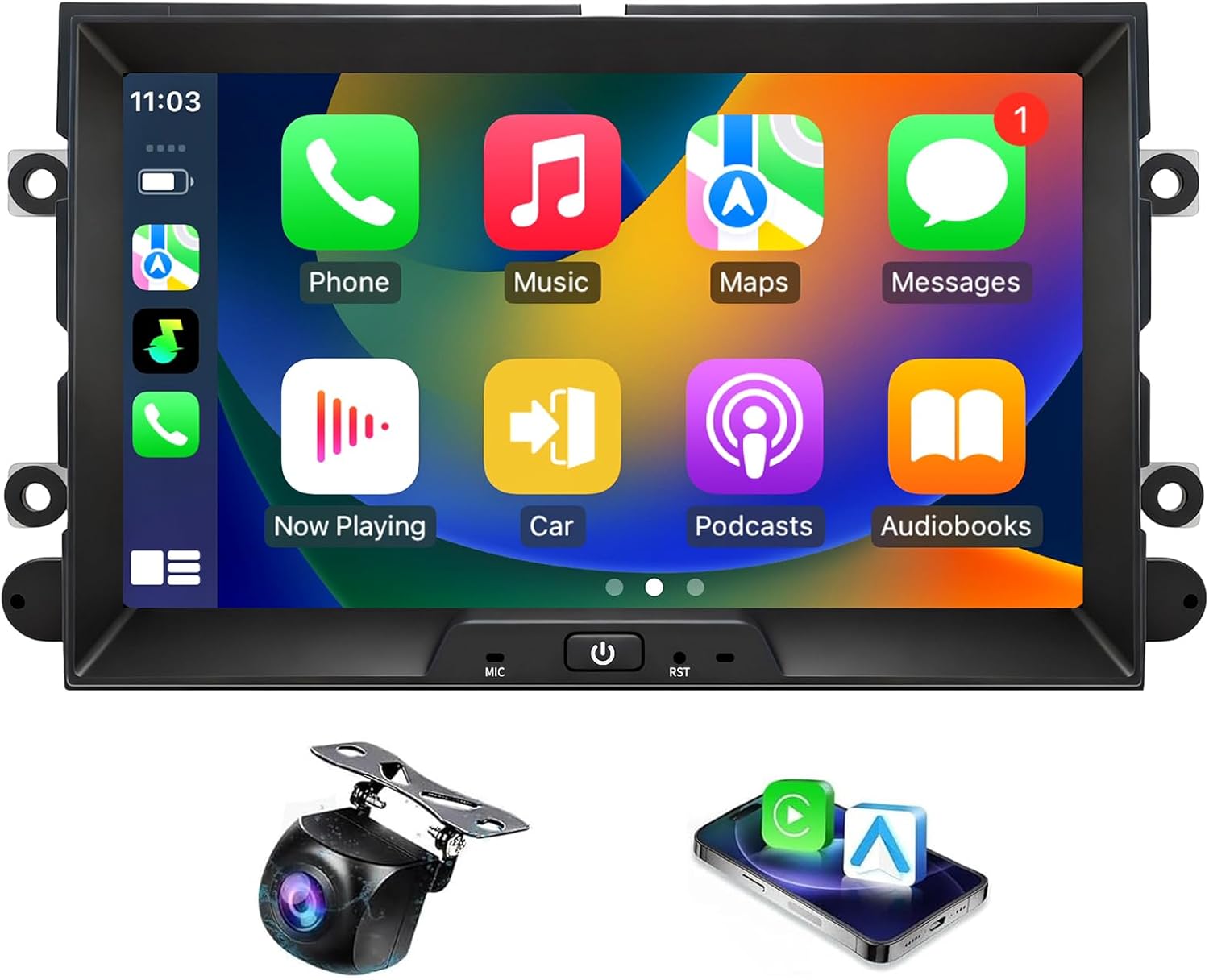
This 8-inch replacement head unit replaces the factory radio in compatible Ford vehicles and brings wireless Apple CarPlay and Android Auto, built-in GPS navigation, and a bundled 1080p backup camera. It runs an Android system with a quad-core CPU, 2GB RAM and 64GB storage, and offers WiFi, Bluetooth 5.0, DSP with a 16-band EQ, steering-wheel control support, and an HD touchscreen for everyday media, calls, and navigation. Installation requires removing the stock unit and wiring in provided harnesses and trim, so it is typically a weekend DIY or shop install; several buyers report a clean, factory-like fit when mounted correctly. Practical benefits include hands-free voice control, offline and online map support, and improved connectivity for streaming and phone integration. Limitations include mixed reports on UI responsiveness and occasional Bluetooth hiccups, a display that can wash out in direct sunlight, and sound quality that some users find less refined than higher-end factory units.
Best for: A balanced all-round buyer who wants a modern touchscreen, wireless smartphone integration, and navigation to bring an older Ford Fusion up to date without chasing premium audiophile sound.
Less Ideal for: Drivers seeking top-tier audio fidelity or the fastest, most polished Android interface should consider higher-end dedicated head units instead.
- Wireless Apple CarPlay and Android Auto for hands-free navigation and media
- Includes 1080p AHD backup camera with 170° wide view and reverse guide lines
- Android system with 64GB storage for apps plus WiFi and Bluetooth 5.0 connectivity
- DSP with 16-band EQ and steering-wheel control support for easier audio tuning and in-dash control
- UI responsiveness and screen color/contrast reported as inconsistent by some users
- Sound clarity is acceptable but not as refined as higher-end factory or premium aftermarket units
Verdict A cost-effective way to add wireless CarPlay/Android Auto, navigation, and a backup camera to a Ford Fusion, with good connectivity but middling UI and audio polish.
Choosing the Right Ford Fusion Car Stereo: Key Factors to Consider
Fit And Mounting Compatibility
Proper fit matters because an otherwise excellent stereo can be difficult or costly to install if it does not match the Fusion’s dash opening and wiring. Check the stereo’s form factor and whether it is single DIN, double DIN, or requires a dash kit to ensure a clean, secure installation.
Beyond the bezel size, consider adapter harnesses and antenna adapters. Units that offer plug-and-play harness compatibility or clear wiring diagrams reduce installation time and the risk of wiring errors that can affect functionality.
Audio Performance And Tuning
Sound quality is central to a stereo’s value, and raw power does not always equal better clarity. Look for units with preamp outputs, built-in amplifiers with sufficient RMS power, and multi-band equalizers that let you shape tone across frequencies.
Also consider support for higher-quality audio formats and crossovers for system flexibility. A unit with adjustable time alignment or parametric EQ can help compensate for speaker placement and improve imaging inside the cabin.
Smartphone Integration And Connectivity
Modern drivers expect seamless phone integration for navigation, calls, and media. Evaluate whether a head unit supports wired and wireless Android Auto or equivalent smartphone mirroring, reliable Bluetooth audio streaming, and hands-free calling.
Connectivity also includes USB inputs for media playback and charging, as well as support for external sources like dash cams or media drives. Units with robust, well-documented software tend to offer more stable day-to-day performance.
Display, Controls, And Usability
A usable interface reduces distraction while driving. Screen size and resolution affect map legibility and media browsing, while touch responsiveness and physical button placement influence ease of use.
Consider whether the display is readable in bright sunlight and if the control layout allows quick access to common functions. Voice control compatibility can also reduce the need for manual inputs during trips.
Expansion And Integration Options
Think about how the stereo will fit into your broader system. Look for multiple preouts for external amplifiers, support for rear-view cameras, and compatibility with steering-wheel control adapters. These features allow gradual upgrades without replacing the main unit again.
High-quality units also offer firmware updates or modular options that extend functionality over time, protecting your investment against obsolescence.
FAQ
Will any car stereo fit a Ford Fusion dash?
Not every stereo fits without modification. The Fusion typically accepts specific DIN or double DIN form factors. You may need a dash kit, wiring harness adapter, or antenna adapter to achieve a clean, factory-like installation. Check the stereo’s listed dash compatibility and installation notes before buying.
Do I need professional installation for a new head unit?
It depends on your comfort level. If the unit matches the Fusion’s form factor and uses plug-and-play harnesses, a DIY install is often feasible. However, professional installation can save time and ensure correct integration with steering-wheel controls, vehicle power circuits, and backup camera systems.
How important is support for Android Auto or similar systems?
Support for Android Auto or similar platforms matters if you regularly use navigation, voice commands, or streaming apps from your phone. These systems provide a familiar interface and hands-free controls, improving safety and convenience. Wireless implementations add convenience but wired connections can be more stable.
Can I keep factory features like steering-wheel audio controls?
Many aftermarket stereos support steering-wheel control retention through adapter modules. Ensure the head unit lists compatibility with such adapters and that the vendor documents the necessary wiring. Retaining factory controls helps preserve ease of use and avoids driver distraction.
What should I check for audio upgrades later?
If you plan future upgrades, prioritize units with multiple preamp outputs, high-voltage preouts, and adjustable crossovers. These features make adding external amplifiers and component speakers simpler and yield better integration with upgraded components.
How We Chose the Best Ford Fusion Car Stereo
Our shortlist focused on head units that balance reliable fitment with strong audio and modern connectivity. We prioritized models that match the Fusion's dash dimensions and mounting standards to limit installation complexity. Sound performance was judged by available audio outputs, equalizer flexibility, and supported codecs. Connectivity filters included wired and wireless smartphone integration, Bluetooth stability, and support for common protocols like Android Auto. Usability criteria covered display legibility, physical control layout, and compatibility with steering-wheel audio controls. We excluded units with unclear installation specs, poor user feedback on connectivity, or lacking key inputs such as auxiliary or rear camera support. In sum, we favored products that reduce installation headaches while delivering measurable improvements in sound and daily usability.
Our full evaluation process is outlined in our review methodology.
Conclusion
When choosing a Ford Fusion car stereo, prioritize fitment and connectivity first, since they determine how easily the unit integrates with the vehicle and your phone. Balance audio features like preouts and EQ flexibility with usability factors such as screen legibility and control layout.Accept tradeoffs between convenience and complexity: wireless smartphone integration offers simplicity but may sacrifice stability versus wired connections, while advanced audio tuning adds installation demands but improves sound. Focus on the few features that matter most to your daily driving and future upgrade plans.
Explore More:
- Check out all Ford Fusion parts & accessories
- Explore Electronics
- Browse all Accessories
